ignition LEXUS NX300 2020 Owner's Manual
[x] Cancel search | Manufacturer: LEXUS, Model Year: 2020, Model line: NX300, Model: LEXUS NX300 2020Pages: 468, PDF Size: 10.24 MB
Page 167 of 468
1674-2. Driving procedures
LEXUS NX300 Owners Manual_USA_M78389_en
4
Driving
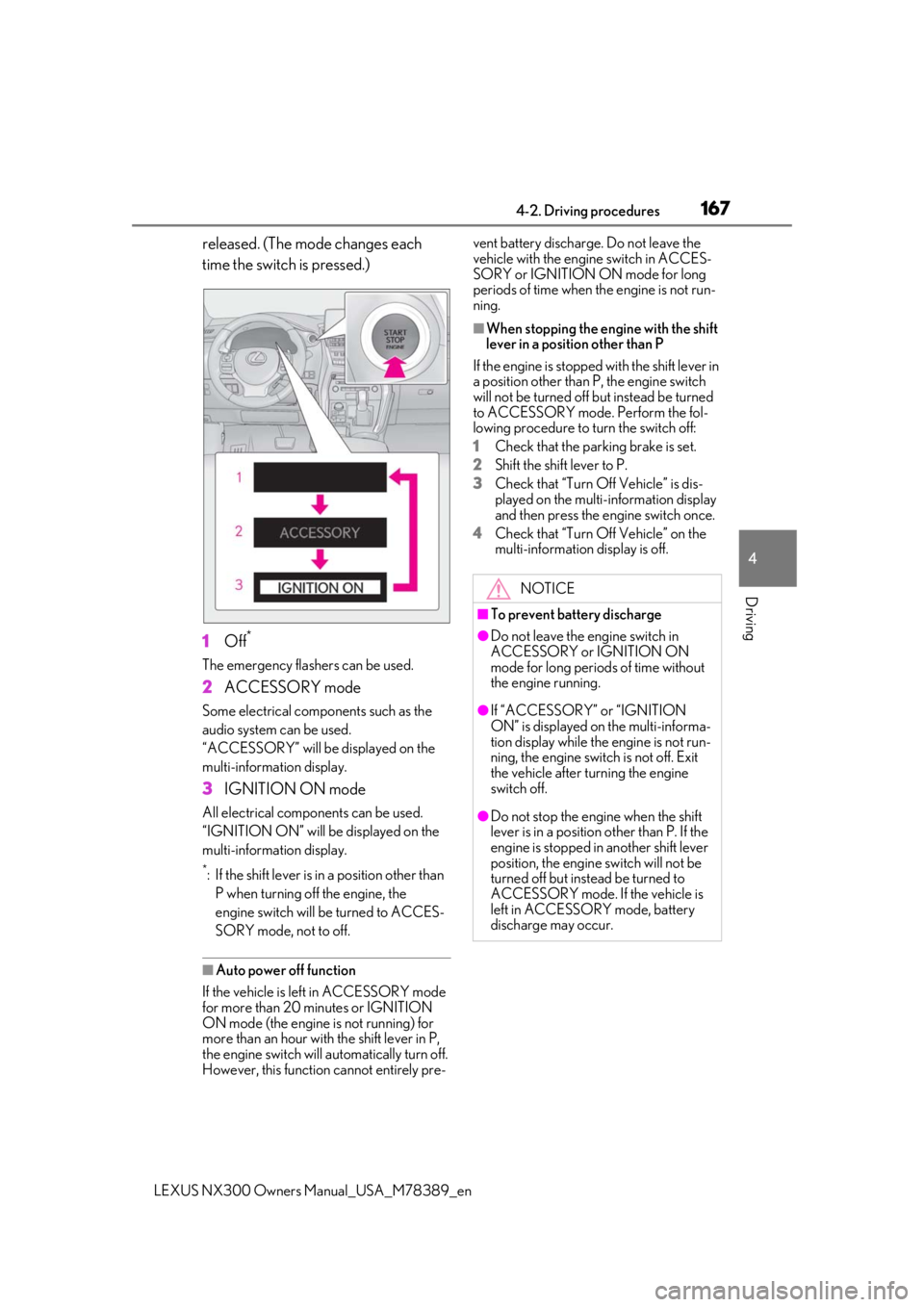
released. (The mode changes each
time the switch is pressed.)
1
Off*
The emergency flashers can be used.
2ACCESSORY mode
Some electrical components such as the
audio system can be used.
“ACCESSORY” will be displayed on the
multi-information display.
3IGNITION ON mode
All electrical components can be used.
“IGNITION ON” will be displayed on the
multi-information display.
*: If the shift lever is in a position other than
P when turning off the engine, the
engine switch will be turned to ACCES-
SORY mode, not to off.
■Auto power off function
If the vehicle is left in ACCESSORY mode
for more than 20 minutes or IGNITION
ON mode (the engine is not running) for
more than an hour with the shift lever in P,
the engine switch will automatically turn off.
However, this function cannot entirely pre- vent battery discharge. Do not leave the
vehicle with the engine switch in ACCES-
SORY or IGNITION ON mode for long
periods of time when the engine is not run-
ning.
■When stopping the engine with the shift
lever in a position other than P
If the engine is stopped with the shift lever in
a position other than P, the engine switch
will not be turned off but instead be turned
to ACCESSORY mode. Perform the fol-
lowing procedure to turn the switch off:
1
Check that the parking brake is set.
2
Shift the shift lever to P.
3
Check that “Turn Off Vehicle” is dis-
played on the multi-information display
and then press the engine switch once.
4
Check that “Turn Off Vehicle” on the
multi-information display is off.
NOTICE
■To prevent battery discharge
●Do not leave the engine switch in
ACCESSORY or IGNITION ON
mode for long periods of time without
the engine running.
●If “ACCESSORY” or “IGNITION
ON” is displayed on the multi-informa-
tion display while the engine is not run-
ning, the engine switch is not off. Exit
the vehicle after turning the engine
switch off.
●Do not stop the engine when the shift
lever is in a position other than P. If the
engine is stopped in another shift lever
position, the engine switch will not be
turned off but instead be turned to
ACCESSORY mode. If the vehicle is
left in ACCESSORY mode, battery
discharge may occur.
Page 169 of 468

1694-2. Driving procedures
LEXUS NX300 Owners Manual_USA_M78389_en
4
Driving
in the M position.)
■Shift lock system
The shift lock system is a system to prevent
accidental operation of the shift lever in
starting.
The shift lever can be shifted from P only
when the engine switch is in IGNITION
ON mode and the brake pedal is being
depressed.
■If the shift lever cannot be shifted from P
First, check whether the brake pedal is
being depressed.
If the shift lever cannot be shifted with your
foot on the brake pedal, there may be a
problem with the shift lock system. Have the
vehicle inspected by your Lexus dealer
immediately.
The following steps may be used as an
emergency measure to ensure that the shift
lever can be shifted.
Releasing the shift lock:
1
Set the parking brake.
2
Turn the engine switch off.
3
Depress the brake pedal.
4
Pry the cover up with a flathead screw-
driver or equivalent tool.
To prevent damage to the cover, cover the
tip of the screwdriver with a rag.
5
Press the shift lock override button.
The shift lever can be shifted while the but-
ton is pressed
WARNING
■When driving on slippery road sur-
faces
Be careful of downshifting and sudden
acceleration, as this could result in the
vehicle skidding to the side or spinning.
Shifting the shift lever
While the engine switch is in IGNI-
TION ON mode, move the shift lever
with the brake pedal depressed.
When shifting the shift lever between P
and D, make sure that the vehicle is
completely stopped.
Page 172 of 468

1724-2. Driving procedures
LEXUS NX300 Owners Manual_USA_M78389_en
1Right turn
2 Lane change to the right (move the
lever partway and release it)
The right hand signals will flash 3
times.
3 Lane change to the left (move the
lever partway and release it)
The left hand signals will flash 3
times.
4 Left turn
■Turn signals can be operated when
The engine switch is in IGNITION ON
mode.
■If the indicator flashes faster than usual
Check that a light bulb in the front or rear
turn signal lights has not burned out.
■Customization
P.427
■Turns automatic mode on
While the vehicle is stopped, pull and
hold the parking brake switch until the
automatic mode lamp turns on.
Parking brake indicator (U.S.A.)
Parking brake indicator (Canada)
Parking brake lamp
Automatic mode lamp
Turn signal lever
Operating instructions
Parking brake
The parking brake can be set or
released automatically or manually.
In automatic mode, the parking
brake can be set or released auto-
matically according to shift lever
operation. Also, even in automatic
mode, the parking brake can be set
or released manually.
Operating instructions
A
B
C
D
Page 174 of 468

1744-2. Driving procedures
LEXUS NX300 Owners Manual_USA_M78389_en
the switch again. (P.379)
■Parking brake operation
●When the engine switch is not in IGNI-
TION ON mode, the parking brake can-
not be released using the parking brake
switch.
●When the engine switch is not in IGNI-
TION ON mode, automatic mode (auto-
matic brake setting and releasing) is not
available.
■If “Parking Brake Overheated Parking
Brake Unavailable” is displayed on the
multi-information display
If the parking brake is operated repeatedly
over a short period of time, the system may
restrict operation to prevent overheating. If
this happens, refrain from operating the
parking brake. Normal operation will return
after about 1 minute.
■Parking brake operation sound
When the parking brake operates, a motor
sound (whirring sound) may be heard. This
does not indicate a malfunction.
■Parking brake indicator light and park-
ing brake lamp
●Depending on the engine switch mode,
the parking brake indicator light and
parking brake lamp will turn on and stay
on as described below:
IGNITION ON mode: Comes on until
the parking brake is released.
Not in IGNITION ON mode: Stays on
for approximately 15 seconds.
●When the engine switch is turned off with
the parking brake set, the parking brake
indicator light and parking brake lamp
will stay on for about 15 seconds. This
does not indicate a malfunction.
■Changing the mode
When changing the automatic mode on/off,
the message will be shown on the multi-
information display and the buzzer sounds.
■Parking the vehicle
P.146
■Parking brake engaged warning buzzer
A buzzer will sound if the vehicle is driven with the parking brake engaged. “Release
Parking Brake” is displayed on the multi-
information display.
■Warning messages and buzzers
Warning messages and buzzers are used to
indicate a system malfunction or to inform
the driver of the need for caution. If a warn-
ing message is shown on the multi-informa-
tion display, read the message and follow
the instructions.
■If the brake system warning light comes
on
P.376
■Usage in winter time
P.267
WARNING
■When parking the vehicle
Do not leave a child in the vehicle alone.
The parking brake may be released unin-
tentionally and there is the danger of the
vehicle moving that may lead to an acci-
dent resulting in death or serious injury.
■Parking brake switch
Do not set any objects near the parking
brake switch. Objects may interfere with
the switch and may lead the parking
brake to unexpectedly operate.
NOTICE
■When parking the vehicle
Before you leave the vehicle, shift the
shift lever to P, set the parking brake and
make sure that the vehicle does not
move.
■When the system malfunctions
Stop the vehicle in a safe place and
check the warning messages.
Page 178 of 468
1784-3. Operating the lights and wipers
LEXUS NX300 Owners Manual_USA_M78389_en
4-3.Operating the lights and wipers
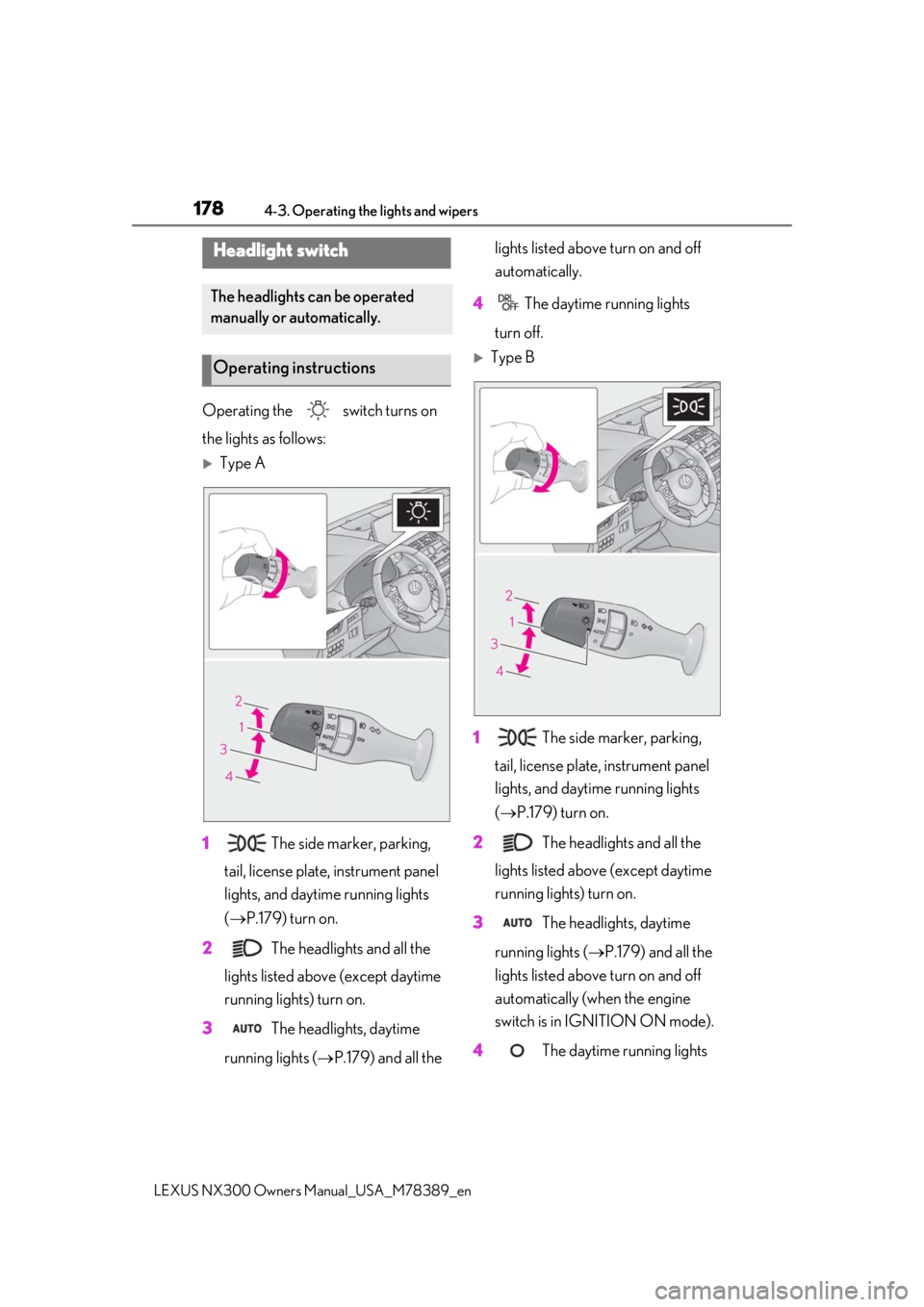
Operating the switch turns on
the lights as follows:
Type A
1 The side marker, parking,
tail, license plate, instrument panel
lights, and daytime running lights
( P.179) turn on.
2 The headlights and all the
lights listed above (except daytime
running lights) turn on.
3 The headlights, daytime
running lights ( P.179) and all the lights listed above turn on and off
automatically.
4 The daytime running lights
turn off.
Type B
1 The side marker, parking,
tail, license plate, instrument panel
lights, and daytime running lights
( P.179) turn on.
2 The headlights and all the
lights listed above (except daytime
running lights) turn on.
3 The headlights, daytime
running lights ( P.179) and all the
lights listed above turn on and off
automatically (when the engine
switch is in IGNITION ON mode).
4 The daytime running lights
Headlight switch
The headlights can be operated
manually or automatically.
Operating instructions
Page 179 of 468

1794-3. Operating the lights and wipers
LEXUS NX300 Owners Manual_USA_M78389_en
4
Driving
turn on. (P.179)
■AUTO mode can be used when
The engine switch is in IGNITION ON
mode.
■Daytime running light system
●The daytime running lights illuminate
using the same lights as the parking lights
and illuminate brighter than the parking
lights.
●To make your vehicle more visible to
other drivers during daytime driving, the
daytime running lights turn on automati-
cally when all of the following conditions
are met. (The daytime running lights are
not designed for use at night.)
• The engine is running
• The parking brake is released
• The headlight switch is in the
(type B), or
* position
*: When the surroundings are bright
The daytime running lights remain on after
they illuminate, even if the parking brake is
set again.
●For the U.S.A.: Dayt ime running lights
can be turned off by operating the switch.
●Compared to turning on the headlights,
the daytime running light system offers
greater durability and consumes less
electricity, so it can help improve fuel
●If a turn signal light is in use, the daytime
running light, on the same side, is turned
off. For emergency flashers, both are
turned off.
■Headlight control sensor
The sensor may not function properly if an
object is placed on th e sensor, or anything
that blocks the sensor is affixed to the wind-
shield.
Doing so interferes with the sensor detect-
ing the level of ambient light and may cause
the automatic headlight system to malfunc-
tion.
■Automatic light off system
●When the headlights come on: The head-
lights and tail lights turn off 30 seconds
after a door is opened and closed if the
engine switch is turned to ACCESSORY
mode or turned off. (The lights turn off
immediately if on the key is
pressed after all the doors are locked.)
●When only the tail lights come on: The tail
lights turn off automatically if the engine
switch is turned to ACCESSORY mode
or turned off and the driver’s door is
opened.
To turn the lights on again, turn the engine
switch to IGNITION ON mode, or turn the
light switch off once and then back to or .
■Light reminder buzzer
A buzzer sounds when the engine switch is
turned off or turned to ACCESSORY
mode and the driver’s door is opened while
the lights are turned on.
■Automatic headlight leveling system (if
equipped)
The level of the headlights is automatically
adjusted according to the number of pas-
sengers and the loadin g condition of the
vehicle to ensure that the headlights do not
interfere with other road users.
■Battery-saving function
In order to prevent the battery of the vehicle
from discharging, if the headlights and/or
tail lights are on when the engine switch is
turned off the battery saving function will
operate and automatically turn off all the
lights after approximately 20 minutes.
When the engine switch is turned to IGNI-
TION ON mode, the battery-saving func-
Page 181 of 468
1814-3. Operating the lights and wipers
LEXUS NX300 Owners Manual_USA_M78389_en
4
Driving
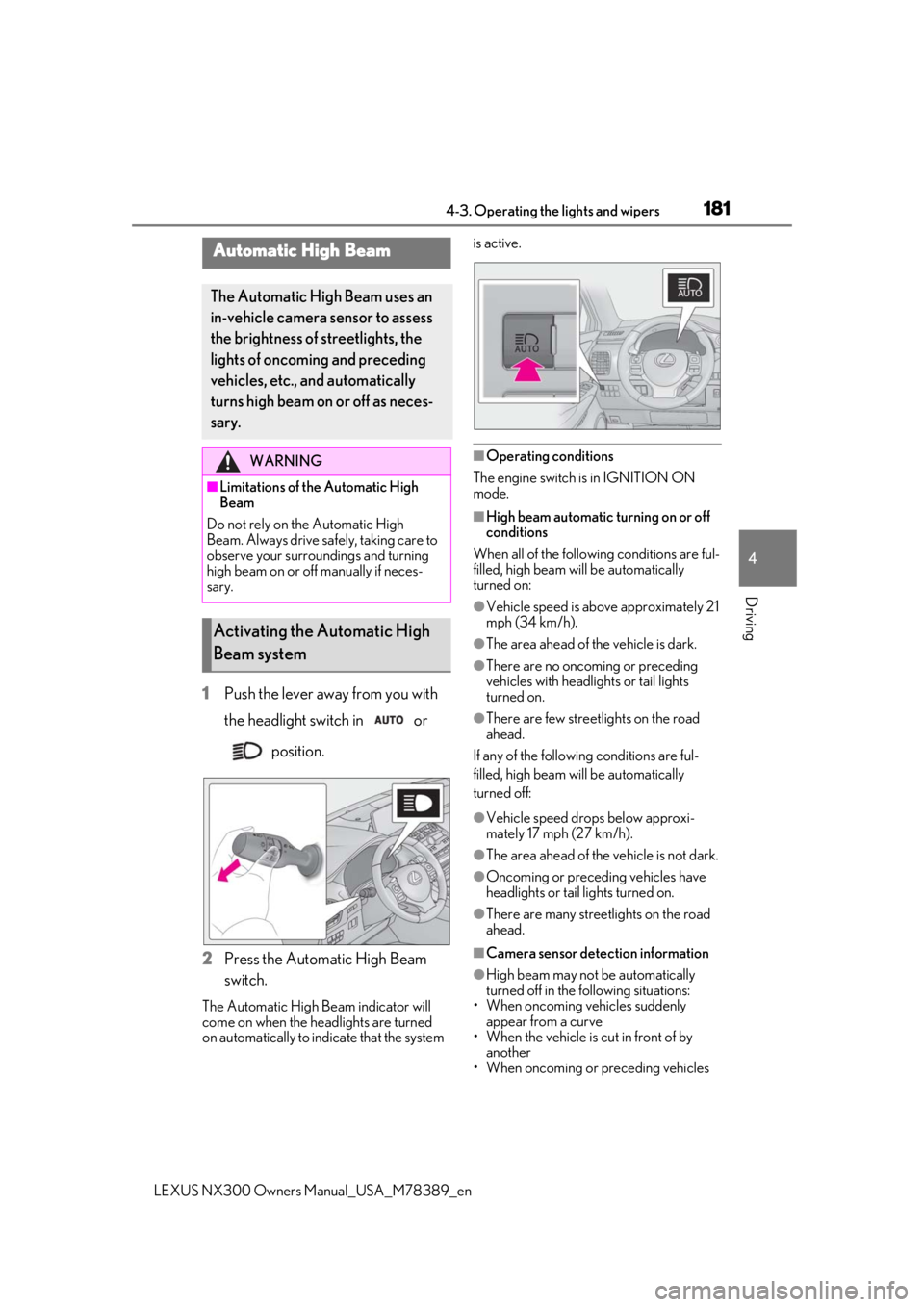
1Push the lever away from you with
the headlight switch in or
position.
2
Press the Automatic High Beam
switch.
The Automatic High Beam indicator will
come on when the headlights are turned
on automatically to indicate that the system is active.
■Operating conditions
The engine switch is in IGNITION ON
mode.
■High beam automatic turning on or off
conditions
When all of the following conditions are ful-
filled, high beam will be automatically
turned on:
●Vehicle speed is above approximately 21
mph (34 km/h).
●The area ahead of the vehicle is dark.
●There are no oncoming or preceding
vehicles with headlights or tail lights
turned on.
●There are few streetlights on the road
ahead.
If any of the following conditions are ful-
filled, high beam will be automatically
turned off:
●Vehicle speed drops below approxi-
mately 17 mph (27 km/h).
●The area ahead of the vehicle is not dark.
●Oncoming or preceding vehicles have
headlights or tail lights turned on.
●There are many streetlights on the road
ahead.
■Camera sensor detection information
●High beam may not be automatically
turned off in the following situations:
• When oncoming vehicles suddenly
appear from a curve
• When the vehicle is cut in front of by another
• When oncoming or preceding vehicles
Automatic High Beam
The Automatic High Beam uses an
in-vehicle camera sensor to assess
the brightness of streetlights, the
lights of oncoming and preceding
vehicles, etc., and automatically
turns high beam on or off as neces-
sary.
WARNING
■Limitations of the Automatic High
Beam
Do not rely on the Automatic High
Beam. Always drive sa fely, taking care to
observe your surroundings and turning
high beam on or off manually if neces-
sary.
Activating the Automatic High
Beam system
Page 188 of 468

1884-3. Operating the lights and wipers
LEXUS NX300 Owners Manual_USA_M78389_en
6Increases the sensitivity
7 Decreases the sensitivity
8 Washer/wiper dual opera-
tion
Pulling the lever operates the wipers and
washer.
The wipers will automatically operate a
couple of times afte r the washer squirts.
Vehicles with headlight cleaners:
When the headlights are on and the lever is
pulled and held, the headlight cleaners will
operate once. After this, the headlight
cleaners will operate every 5th time the
lever is pulled.
■The windshield wipers and washer can
be operated when
The engine switch is in IGNITION ON
mode.
■Dripping prevention wiper sweep (vehi-
cles with rain-sensing windshield wip-
ers)
After washing and wiping operation several
times, the wipers operate one more time after a short delay to prevent dripping.
However, this function will not operate while
driving.
■Effects of vehicle speed on wiper opera-
tion (vehicles with rain-sensing wind-
shield wipers)
Vehicle speed affects the Intermittent wiper
interval.
■Raindrop sensor (vehicles with rain-
sensing windshield wipers)
●The raindrop sensor judges the amount
of raindrops.
An optical sensor is adopted. It may not
operate properly when sunlight from the
rising or setting of the sun intermittently
strikes the windshield, or if bugs, etc. are
present on the windshield.
●If the wiper switch is turned to the
position while the engine switch is in
IGNITION ON mode, the wipers will
operate once to show that AUTO mode
is activated.
●If the temperature of the raindrop sensor
is 194°F (90°C) or higher, or 5°F (-15°C)
or lower, automatic operation may not
occur. In this case, operate the wipers in
any mode other than AUTO mode.
■If no windshield washer fluid sprays
Check that the washer nozzles are not
blocked, if there is washer fluid in the
washer fluid tank.
Page 190 of 468
1904-3. Operating the lights and wipers
LEXUS NX300 Owners Manual_USA_M78389_en
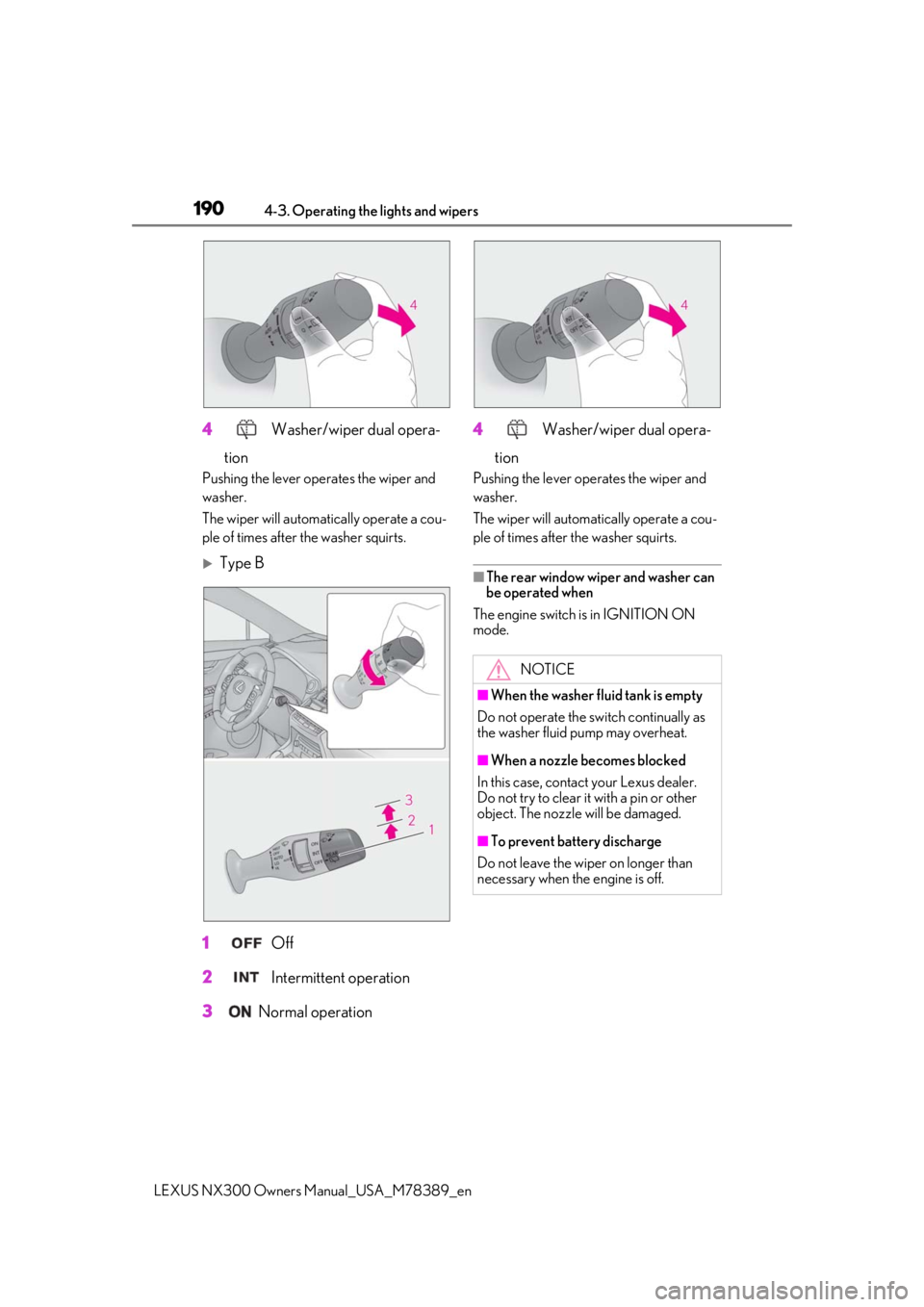
4 Washer/wiper dual opera-
tion
Pushing the lever operates the wiper and
washer.
The wiper will automatically operate a cou-
ple of times after the washer squirts.
Type B
1
Off
2
Intermittent operation
3
Normal operation 4
Washer/wiper dual opera-
tion
Pushing the lever oper ates the wiper and
washer.
The wiper will automatically operate a cou-
ple of times after the washer squirts.
■The rear window wiper and washer can
be operated when
The engine switch is in IGNITION ON
mode.
NOTICE
■When the washer fluid tank is empty
Do not operate the switch continually as
the washer fluid pump may overheat.
■When a nozzle becomes blocked
In this case, contact your Lexus dealer.
Do not try to clear it with a pin or other
object. The nozzle will be damaged.
■To prevent battery discharge
Do not leave the wiper on longer than
necessary when the engine is off.
Page 191 of 468
1914-4. Refueling
LEXUS NX300 Owners Manual_USA_M78389_en
4
Driving
4-4.Refueling
Turn the engine switch off and
ensure that all the doors and win-
dows are closed.
Confirm the type of fuel.
■Fuel types
P.416
■Fuel tank opening for unleaded gasoline
To help prevent incorrect fueling, your vehi-
cle has a fuel tank opening that only accom-
modates the special nozzle on unleaded
fuel pumps.
■If the malfunction indicator lamp illumi-
nates
The malfunction indicator lamp may illumi-
nate erroneously if refueling is performed
repeatedly when the fuel tank is nearly full.
1With all doors unlocked, press the
center of the rear edge of the fuel
filler door.
Push inward and take your hand away to
slightly open the fuel filler door. Then open
Opening the fuel tank cap
Before refueling the vehicle
WARNING
■When refueling the vehicle
Observe the following precautions while
refueling the vehicle. Failure to do so may
result in death or serious injury.
●After exiting the vehicle and before
opening the fuel door, touch an
unpainted metal surface to discharge
any static electricity. It is important to
discharge static electricity before refu-
eling because sparks resulting from
static electricity can cause fuel vapors
to ignite while refueling.
●Always hold the grips on the fuel tank
cap and turn it slowly to remove it.
A whooshing sound may be heard
when the fuel tank cap is loosened.
Wait until the sound cannot be heard
before fully removing the cap. In hot
weather, pressurized fuel may spray
out of the filler neck and cause injury.
●Do not allow anyone that has not dis-
charged static electricity from their
body to come close to an open fuel
tank.
●Do not inhale vaporized fuel.
Fuel contains substances that are
harmful if inhaled.
●Do not smoke while refueling the vehi-
cle.
Doing so may cause the fuel to ignite
and cause a fire.
●Do not return to the vehicle or touch
any person or object that is statically
charged. This may cause static elec-
tricity to build up, re sulting in a possible
ignition hazard.
■When refueling
Observe the following precautions to
prevent fuel overflowing from the fuel
tank:
●Securely insert the fuel nozzle into the
fuel filler neck.
●Stop filling the tank after the fuel noz-
zle automatically clicks off.
●Do not top off the fuel tank.
NOTICE
■Refueling
Do not spill fuel during refueling.
Doing so may damage the vehicle, such
as causing the emission control system to
operate abnormally, damaging fuel sys-
tem components or the vehicle’s painted
surface.
Opening the fuel tank cap