ignition LEXUS NX300 2020 Owner's Guide
[x] Cancel search | Manufacturer: LEXUS, Model Year: 2020, Model line: NX300, Model: LEXUS NX300 2020Pages: 468, PDF Size: 10.24 MB
Page 192 of 468
1924-4. Refueling
LEXUS NX300 Owners Manual_USA_M78389_en
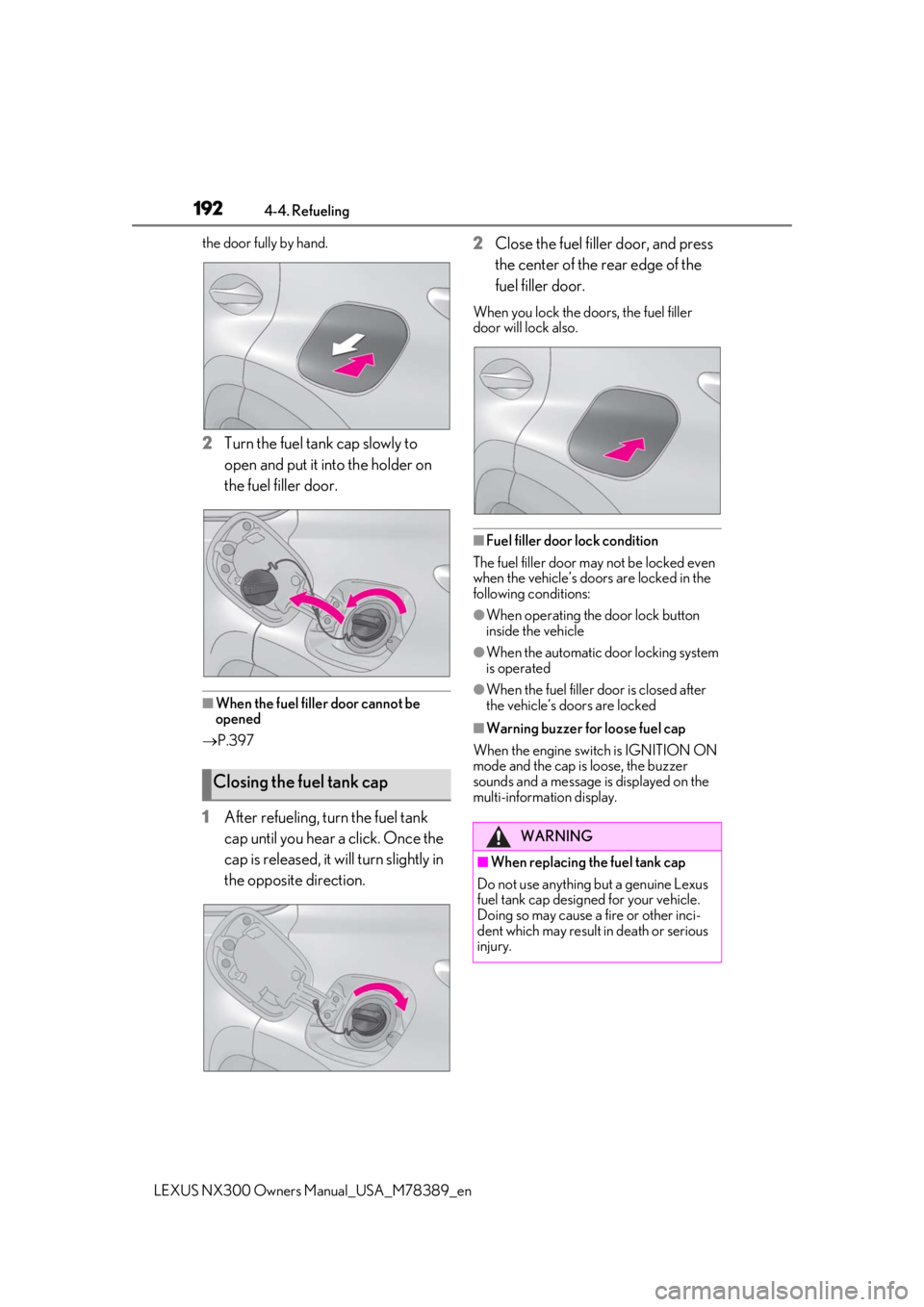
the door fully by hand.
2Turn the fuel tank cap slowly to
open and put it into the holder on
the fuel filler door.
■When the fuel filler door cannot be
opened
P.397
1After refueling, turn the fuel tank
cap until you hear a click. Once the
cap is released, it will turn slightly in
the opposite direction. 2
Close the fuel filler door, and press
the center of the rear edge of the
fuel filler door.
When you lock the doors, the fuel filler
door will lock also.
■Fuel filler door lock condition
The fuel filler door may not be locked even
when the vehicle’s doors are locked in the
following conditions:
●When operating the door lock button
inside the vehicle
●When the automatic door locking system
is operated
●When the fuel filler door is closed after
the vehicle’s doors are locked
■Warning buzzer for loose fuel cap
When the engine switch is IGNITION ON
mode and the cap is loose, the buzzer
sounds and a message is displayed on the
multi-information display.
Closing the fuel tank cap
WARNING
■When replacing the fuel tank cap
Do not use anything but a genuine Lexus
fuel tank cap designed for your vehicle.
Doing so may cause a fire or other inci-
dent which may result in death or serious
injury.
Page 225 of 468

2254-5. Using the driving support systems
LEXUS NX300 Owners Manual_USA_M78389_en
4
Driving
●The driving scene (turning, lane change,
etc.) is judged incorrectly.
●Even if it is a sign not appropriate for the
currently traveled lane, such a sign exists
directly after a freeway branches, or in an
adjacent lane just before merging.
●Stickers are attached to the rear of the
preceding vehicle.
●A sign resembling a system compatible
sign is recognized.
●Side road speed signs may be detected
and displayed (if positioned in sight of the
front camera) while the vehicle is travel-
ing on the main road.
●Roundabout exit road speed signs may
be detected and displayed (if positioned
in sight of the front camera) while travel-
ing on a roundabout.
●The front of the vehicle is raised or low-
ered due to the carried load.
●The surrounding brightness is not suffi-
cient or changes suddenly.
●When a sign intended for trucks, etc. is
recognized.
●The speed information displayed on the
meter and that displayed on the naviga-
tion system may be different due to the
navigation system using map data.
■Speed limit sign display
If the engine switch wa s last turned off while
a speed limit sign wa s displayed on the
multi-information display, the same sign dis-
plays again when the engine switch is
turned to IGNITION ON mode.
■If “RSA malfunction Visit Your Dealer” is
shown
The system may be malfunctioning. Have
the vehicle inspected by your Lexus dealer.
■Customization
Some functions can be customized. (Cus-
tomizable features: P.427)
Multi-information display
Dynamic radar cruise con-
trol with full-speed range
In vehicle-to-vehicle distance con-
trol mode, the ve hicle automati-
cally accelerates, decelerates and
stops to match the speed changes
of the preceding vehicle even if the
accelerator pedal is not depressed.
In constant speed control mode,
the vehicle runs at a fixed speed.
Use the dynamic radar cruise con-
trol with full-speed range on free-
ways and highways.
Vehicle-to-vehicle distance con-
trol mode ( P.228)
Constant speed control mode
( P.232)
System Components
A
Page 230 of 468
2304-5. Using the driving support systems
LEXUS NX300 Owners Manual_USA_M78389_en
In the vehicle-to-vehicle distance control
mode, the set speed will be increased or
decreased as follows:
For the U.S. mainland and Hawaii
Fine adjustment: By 1 mph (1.6 km/h)*1 or 1
km/h (0.6 mph)
*2 each time the lever is
operated
Large adjustment: Increases or decreases
in 1 mph (1.6 km/h)
*1 or 1 km/h (0.6 mph)*2
increments for as long as the lever is held
For Canada, Guam and Puerto Rico
Fine adjustment: By 1 mph (1.6 km/h)*1 or 1
km/h (0.6 mph)
*2 each time the lever is
operated
Large adjustment: Increases or decreases
in 5 mph (8 km/h)
*1 or 5 km/h (3.1 mph)*2
increments for as long as the lever is held
In the constant sp eed control mode
( P.232), the set speed will be increased
or decreased as follows:
Fine adjustment: By 1 mph (1.6 km/h)
*1 or 1
km/h (0.6 mph)
*2 each time the lever is
operated
Large adjustment: The speed will continue
to change while the lever is held.
*1: When the set speed is shown in “MPH”
*2: When the set speed is shown in “km/h”
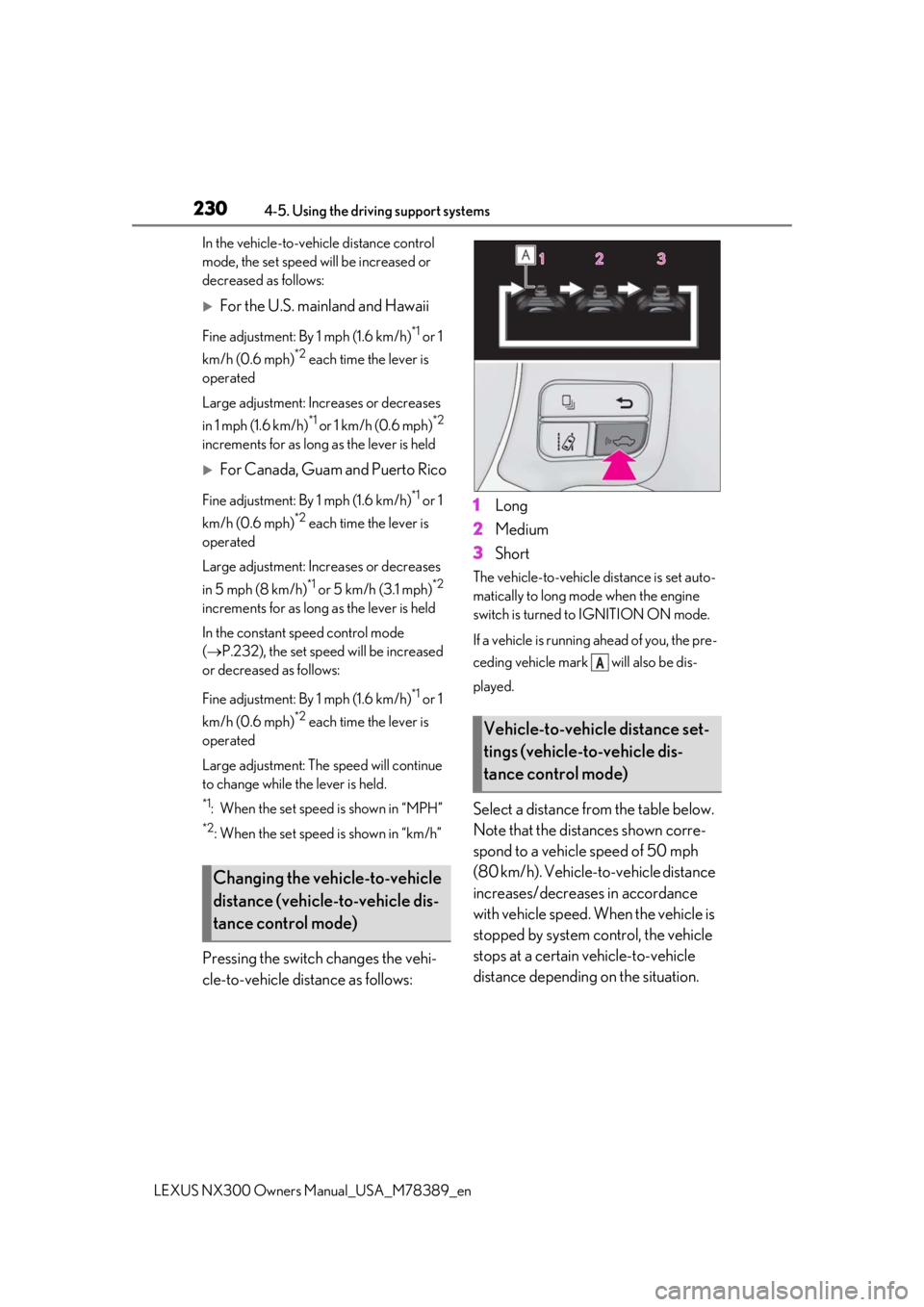
Pressing the switch changes the vehi-
cle-to-vehicle distance as follows: 1
Long
2 Medium
3 Short
The vehicle-to-vehicle distance is set auto-
matically to long mode when the engine
switch is turned to IGNITION ON mode.
If a vehicle is running ahead of you, the pre-
ceding vehicle mark will also be dis-
played.
Select a distance from the table below.
Note that the distances shown corre-
spond to a vehicle speed of 50 mph
(80 km/h). Vehicle-to-vehicle distance
increases/decreases in accordance
with vehicle speed. When the vehicle is
stopped by system control, the vehicle
stops at a certain vehicle-to-vehicle
distance depending on the situation.
Changing the vehicle-to-vehicle
distance (vehicle-to-vehicle dis-
tance control mode)
Vehicle-to-vehicle distance set-
tings (vehicle-to-vehicle dis-
tance control mode)
A
Page 237 of 468

2374-5. Using the driving support systems
LEXUS NX300 Owners Manual_USA_M78389_en
4
Driving
enabled/disabled on the multi-informa-
tion display as following:
1Press or of meter control
switches and select .
2 Press or of meter control
switches and select “PKSA”.
3 Press or of meter control
switches, select , and then press
to select the desired setting
(on/off).
When ON (enable) is selected, the
intuitive parking assist indicator comes
on.
When switched to OFF (disable) and
the intuitive parking assist is deacti-
vated, the system will not reactivate if it
is not switched to ON again from the screen of the multi-information dis-
play (Will not reactivate via engine
switch operations).
■The intuitive parking assist can be oper-
ated when
●The engine switch is in IGNITION ON
mode.
●Intuitive parking assist function is on.
●The vehicle speed is less than about 6 mph (10 km/h).
●A shift position other than P is selected.
■Setting the buzzer volume
The buzzer volume can be adjusted on the
multi-information display. ( P.235)
■Muting the buzzer sound
●To mute the buzzer sound
The buzzer can be temporarily muted by
pressing of the meter control
switches while an obstacle detection dis-
play is shown on the multi-information
display.
●To cancel the mute
Mute will be automatically canceled in
the following situations.
• When the shift position is changed
• When the vehicle speed has reached or
exceeded approximately 6 mph (10
km/h) with the shift lever in D
• When the intuitive par king assist is turned
off once and turned on again
• When the engine switch is turned off
once and turned to IGNITION ON
mode again
• When a sensor is malfunctioning
■Intuitive parking assist display
When an obstacle is detected while the
intuitive parking assist monitor is in use, the
warning indicator will appear in the upper
corner of the screen even if the display set-
ting has been set to off.
■If “Parking Assist Unavailable” or “Park-
ing Assist Unavailable Clean Parking
Assist Sensor” is displayed on the multi-
information display
A sensor may be dirty or covered with snow
or ice. In such cases, if it is removed from
the sensor, the system should return to nor-
mal.
Also, due to the sensor being frozen at low
temperatures, a malfunction display may
appear or an obstacle may not be detected.
If the sensor thaws out, the system should
return to normal.
Page 264 of 468
2644-5. Using the driving support systems
LEXUS NX300 Owners Manual_USA_M78389_en
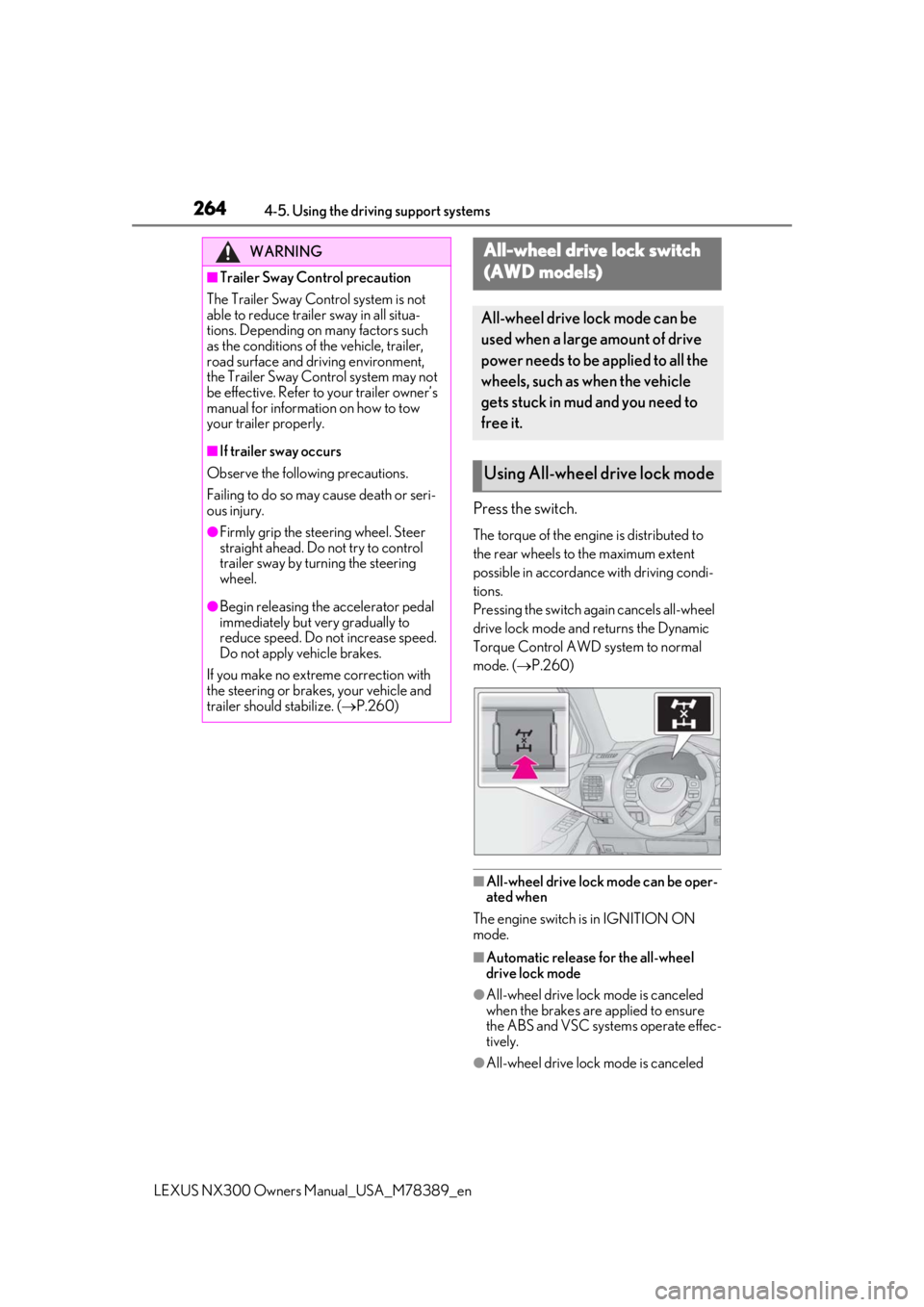
Press the switch.
The torque of the engine is distributed to
the rear wheels to the maximum extent
possible in accordance with driving condi-
tions.
Pressing the switch again cancels all-wheel
drive lock mode and returns the Dynamic
Torque Control AWD system to normal
mode. ( P.260)
■All-wheel drive lock mode can be oper-
ated when
The engine switch is in IGNITION ON
mode.
■Automatic release for the all-wheel
drive lock mode
●All-wheel drive lock mode is canceled
when the brakes are applied to ensure
the ABS and VSC systems operate effec-
tively.
●All-wheel drive lock mode is canceled
WARNING
■Trailer Sway Control precaution
The Trailer Sway Control system is not
able to reduce trailer sway in all situa-
tions. Depending on many factors such
as the conditions of the vehicle, trailer,
road surface and driving environment,
the Trailer Sway Control system may not
be effective. Refer to your trailer owner’s
manual for information on how to tow
your trailer properly.
■If trailer sway occurs
Observe the following precautions.
Failing to do so may cause death or seri-
ous injury.
●Firmly grip the steering wheel. Steer
straight ahead. Do not try to control
trailer sway by turning the steering
wheel.
●Begin releasing the accelerator pedal
immediately but very gradually to
reduce speed. Do not increase speed.
Do not apply vehicle brakes.
If you make no extreme correction with
the steering or brakes, your vehicle and
trailer should stabilize. ( P.260)
All-wheel drive lock switch
(
AWD models)
All-wheel drive lock mode can be
used when a large amount of drive
power needs to be applied to all the
wheels, such as when the vehicle
gets stuck in mud and you need to
free it.
Using All-wheel drive lock mode
Page 281 of 468
2815-2. Using the air conditioning system and defogger
LEXUS NX300 Owners Manual_USA_M78389_en
5
Interior features
Press the rear windshield and outside
rear view mirror defogger switch.
The defoggers will automatically turn off
after a period of time.
■Windshield wiper de-icer (if
equipped)
P.284
■When the outside temperature exceeds
75°F (24°C) and the air conditioning
system is on
●In order to reduce the air conditioning
power consumption, the air conditioning
system may switch to recirculated air
mode automatically.
This may also reduce fuel consumption.
●Recirculated air mode is selected as a
default mode when the engine switch is
turned to IGNITION ON mode.
●It is possible to switch to outside air mode
at any time by pressing the outside/recir-
culated air mode switch.
■Fogging up of the windows
●The windows will easily fog up when the
humidity in the vehicle is high. Pressing
“A/C” button or selecting “A/C” will
dehumidify the air from the outlets and
defog the windshield effectively.
●If you turn “A/C” off, the windows may
fog up more easily.
●The windows may fog up if the recircu-
lated air mode is used.
■When driving on dusty roads
Close all windows. If dust thrown up by the
vehicle is still drawn into the vehicle after
closing the windows, it is recommended
that the air intake mode be set to outside air
mode and the fan speed to any setting
except off.
■Outside/recirculated air mode
●Setting to the recirculated air mode tem-
porarily is recommended in preventing
dirty air from entering the vehicle interior
and helping to cool the vehicle when the
outside air temperature is high.
●Outside/recirculated air mode may auto-
matically switch depending on the tem-
perature setting or the inside
temperature.
■Registering air conditioning settings to
electronic keys (vehicles with driving
position memory)
●Unlocking the vehicle using an electronic
key and turning the engine switch to
IGNITION ON mode will recall that
key’s registered air conditioning settings.
●When the engine switch is turned off, the
current air conditioning settings will auto-
matically be registered to the electronic
key that was used to unlock the vehicle.
●The system may not operate correctly if
more than one electr onic key is in the
vicinity or if the smart access system with
push-button start is used to unlock a pas-
senger door.
●The doors that can recall the air condi-
tioning setting when unlocked using the
smart access system with push-button
start can be changed.
* For details, con-
tact your Lexus dealer.
*: The doors that can recall the driving posi-
tion memory are changed at the same
time.
■Operation of the air conditioning sys-
tem in Eco mode
●In the Eco mode, the air conditioning sys-
tem is controlled as follows to prioritize
fuel efficiency
• Engine speed and compressor operation
controlled to restrict heating/cooling
capacity
• Fan speed restricted when automatic
mode is selected
●To improve air conditioning performance,
perform the following operations
• Adjust the fan speed
• Adjust the temperature setting
• Turn off Eco mode
●Even when the driving mode is set to Eco
mode, the air conditioning eco mode can
be turned off by selecting the
.
Page 287 of 468
2875-2. Using the air conditioning system and defogger
LEXUS NX300 Owners Manual_USA_M78389_en
5
Interior features
*: If equipped
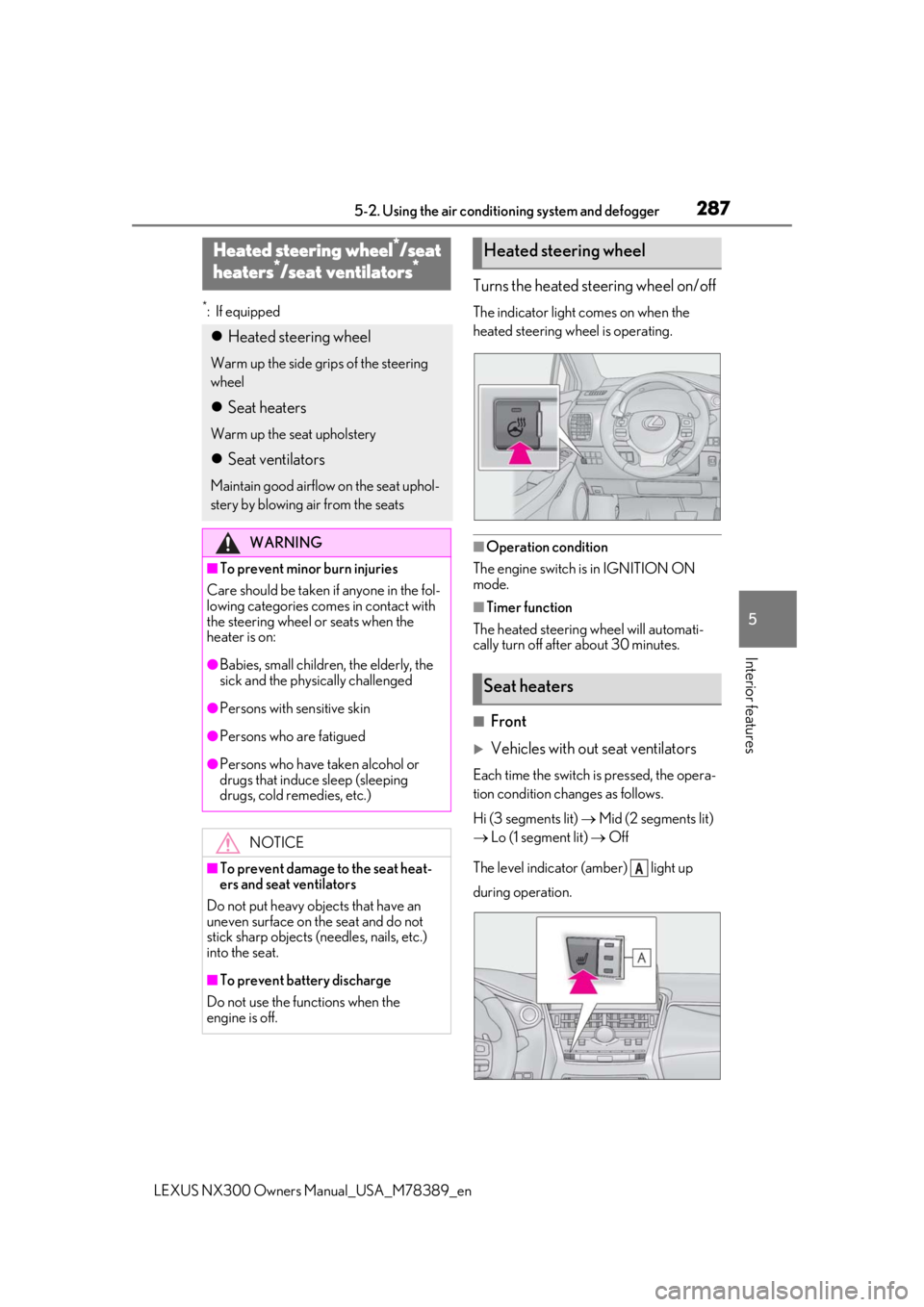
Turns the heated steering wheel on/off
The indicator light comes on when the
heated steering wheel is operating.
■Operation condition
The engine switch is in IGNITION ON
mode.
■Timer function
The heated steering wheel will automati-
cally turn off after about 30 minutes.
■Front
Vehicles with out seat ventilators
Each time the switch is pressed, the opera-
tion condition changes as follows.
Hi (3 segments lit) Mid (2 segments lit)
Lo (1 segment lit) Off
The level indicator (amber) light up
during operation.
Heated steering wheel*/seat
h
eaters*/seat ventilators*
Heated steering wheel
Warm up the side grips of the steering
wheel
Seat heaters
Warm up the seat upholstery
Seat ventilators
Maintain good airflo w on the seat uphol-
stery by blowing air from the seats
WARNING
■To prevent minor burn injuries
Care should be taken if anyone in the fol-
lowing categories comes in contact with
the steering wheel or seats when the
heater is on:
●Babies, small children, the elderly, the
sick and the phys ically challenged
●Persons with sensitive skin
●Persons who are fatigued
●Persons who have taken alcohol or
drugs that induce sleep (sleeping
drugs, cold remedies, etc.)
NOTICE
■To prevent damage to the seat heat-
ers and seat ventilators
Do not put heavy objects that have an
uneven surface on the seat and do not
stick sharp objects (needles, nails, etc.)
into the seat.
■To prevent battery discharge
Do not use the functions when the
engine is off.
Heated steering wheel
Seat heaters
A
Page 288 of 468
2885-2. Using the air conditioning system and defogger
LEXUS NX300 Owners Manual_USA_M78389_en
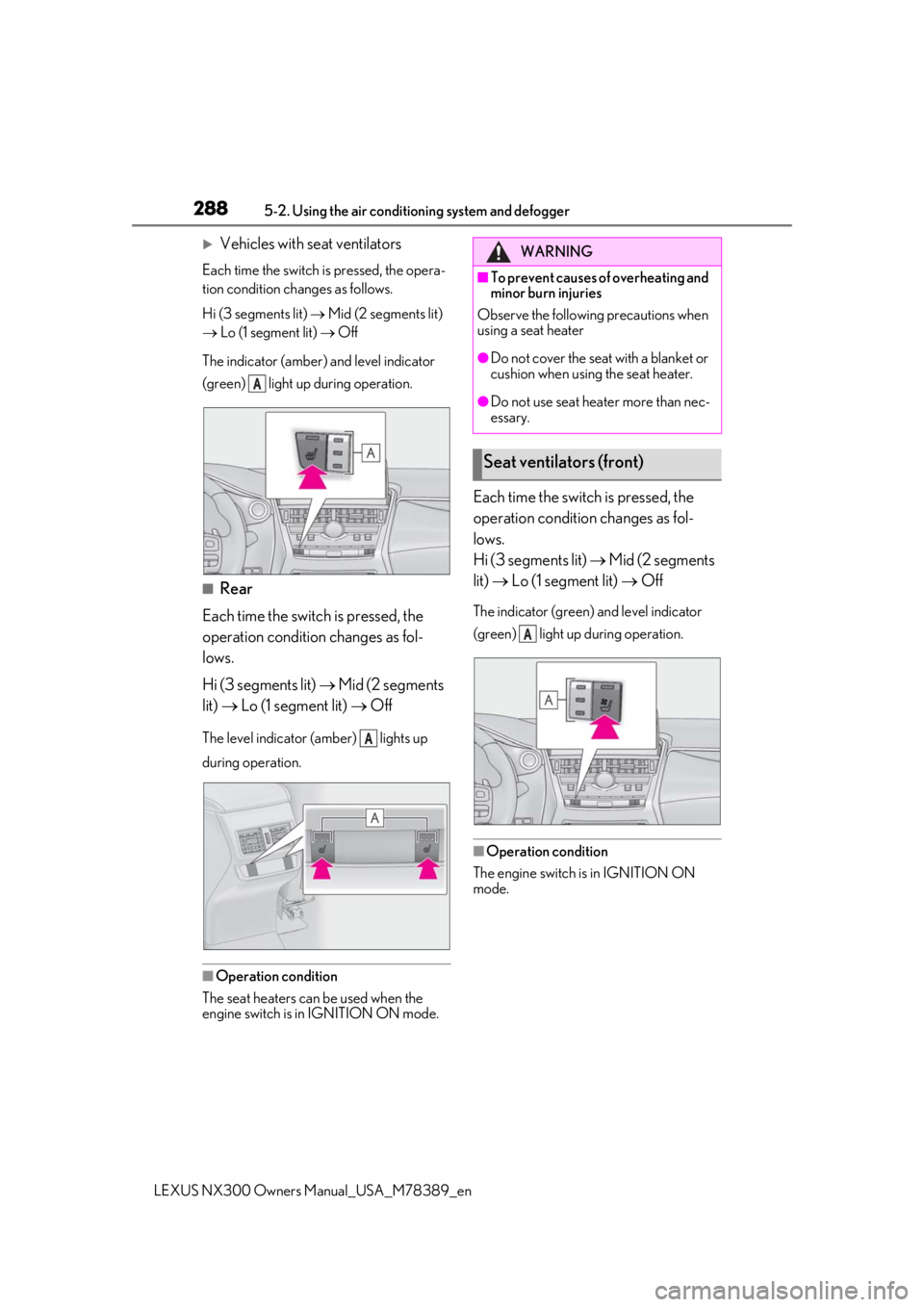
Vehicles with seat ventilators
Each time the switch is pressed, the opera-
tion condition changes as follows.
Hi (3 segments lit) Mid (2 segments lit)
Lo (1 segment lit) Off
The indicator (amber) and level indicator
(green) light up during operation.
■Rear
Each time the switch is pressed, the
operation condition changes as fol-
lows.
Hi (3 segments lit) Mid (2 segments
lit) Lo (1 segment lit) Off
The level indicator (amber) lights up
during operation.
■Operation condition
The seat heaters can be used when the
engine switch is in IGNITION ON mode.
Each time the switch is pressed, the
operation condition changes as fol-
lows.
Hi (3 segments lit) Mid (2 segments
lit) Lo (1 segment lit) Off
The indicator (green) and level indicator
(green) light up during operation.
■Operation condition
The engine switch is in IGNITION ON
mode.
A
A
WARNING
■To prevent causes of overheating and
minor burn injuries
Observe the following precautions when
using a seat heater
●Do not cover the seat with a blanket or
cushion when using the seat heater.
●Do not use seat heater more than nec-
essary.
Seat ventilators (front)
A
Page 289 of 468

2895-3. Using the interior lights
LEXUS NX300 Owners Manual_USA_M78389_en
5
Interior features
5-3.Using the interior lights
Outer foot lights
Personal lights (P.290)
Front interi or light (P.290)
Rear interior light ( P.290)
Footwell lights
• When the engine switch is in IGNITION ON mode, the footwell lights will turn on.
However, if the instrume nt panel light control switch is turned to minimum, the footwell
lights will turn off. ( P.81)
• When the shift lever is in a position other th an P, the brightness of the footwell light will
reduce intensity.
■Personal lights automatic on/off
●Illuminated entry system: The lights auto-
matically turn on/off according to engine
switch mode, the presence of the elec-
tronic key, whether the doors are locked/
unlocked, and whether the doors are
opened/closed.
●If the interior lights remain on when the engine switch is turned
off, the lights will
go off automatically after 20 minutes.
■When front interior lights and personal
lights do not respond as normal
●When water, dirt, etc., have adhered to
the lens surface
●When operated with a wet hand
●When wearing gloves, etc.
Interior lights list
Location of the interior lights
A
B
C
D
E
Page 300 of 468
3005-5. Using the other interior features
LEXUS NX300 Owners Manual_USA_M78389_en
Please use a power supply for elec-
tronic goods that use less than 12
VDC/10 A (power consumption of
120 W).
When using electronic goods, make
sure that the power consumption of all
the connected power outlets is less
than 120 W.
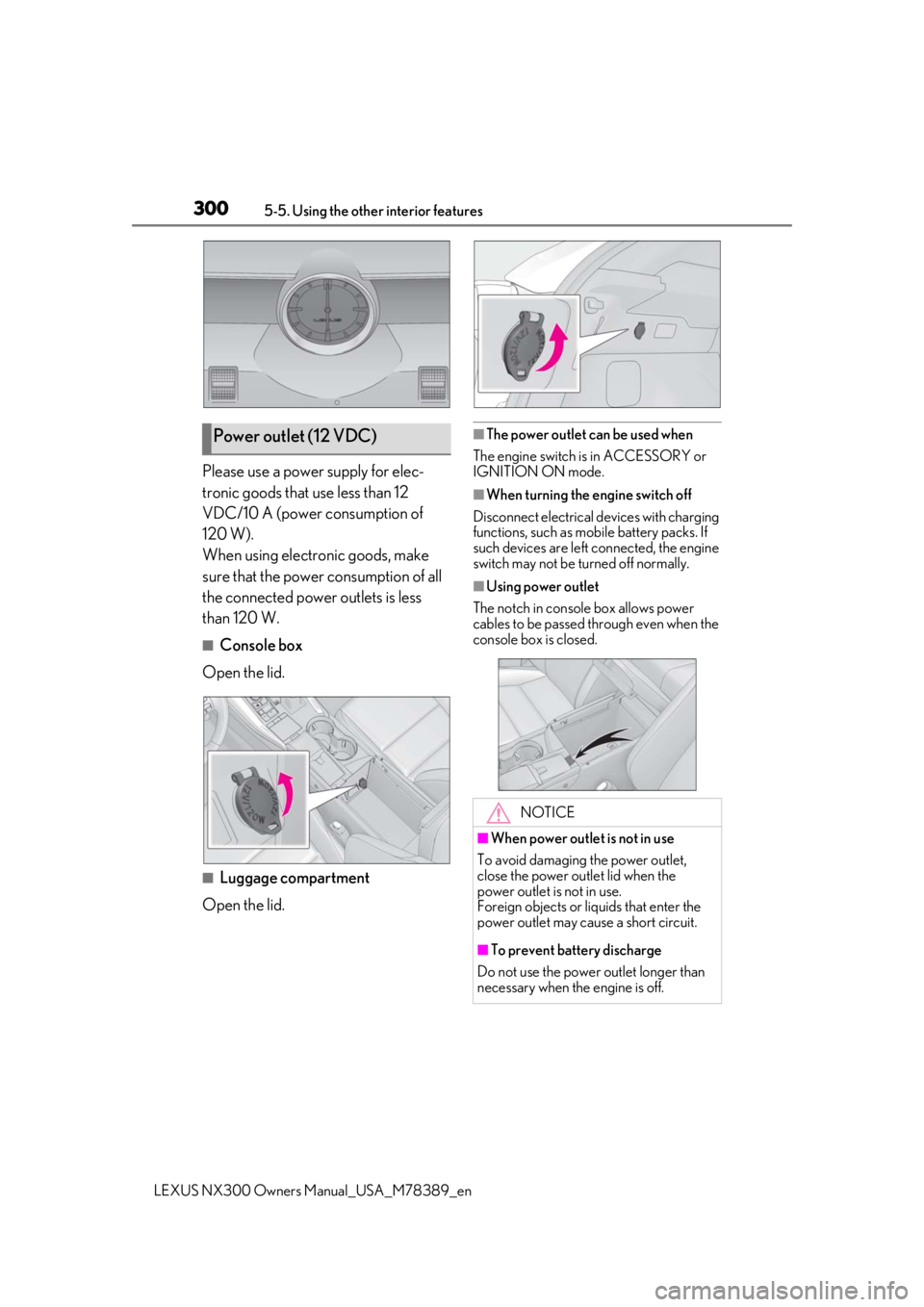
■Console box
Open the lid.
■Luggage compartment
Open the lid.
■The power outlet can be used when
The engine switch is in ACCESSORY or
IGNITION ON mode.
■When turning the engine switch off
Disconnect electrical devices with charging
functions, such as mobile battery packs. If
such devices are left connected, the engine
switch may not be turned off normally.
■Using power outlet
The notch in console box allows power
cables to be passed through even when the
console box is closed.
Power outlet (12 VDC)
NOTICE
■When power outlet is not in use
To avoid damaging the power outlet,
close the power outlet lid when the
power outlet is not in use.
Foreign objects or li quids that enter the
power outlet may cause a short circuit.
■To prevent battery discharge
Do not use the power outlet longer than
necessary when the engine is off.