ignition LEXUS NX300 2020 User Guide
[x] Cancel search | Manufacturer: LEXUS, Model Year: 2020, Model line: NX300, Model: LEXUS NX300 2020Pages: 468, PDF Size: 10.24 MB
Page 109 of 468

1093-2. Opening, closing and locking the doors
LEXUS NX300 Owners Manual_USA_M78389_en
3
Before driving
When all of the doors are locked: If the
movement is detected by the kick sensor,
all of the doors will be unlocked.
Kick sensor
Kick sensor detection area
3 When the sensor detects that your
foot is pulled back, a buzzer will
sound and the back door will auto-
matically fully open/close.
If kick operation is performed again in the
middle of back door operating, the opera-
tion will stop.
■Luggage compartment light
●The luggage compartment light turns on
when the back door is opened.
●If the luggage compartm ent light is left on
when the engine switch is turned off, the
light will go off automatically after 20
minutes.
■Power back door operating conditions
With the power back door operations set to
ON, it can automatically open and close for
the following conditions:
●When the electronic key is being carried
and the power back door switch is
pushed
*
●When the wireless re mote control is
used*
●When the engine swit ch is in IGNITION
ON mode, in addition to the above for
the opening operations, the back door
operates for any of the following condi-
tions: • Parking brake is engaged
• The brake pedal is depressed
• The shift lever is in P
*: When configured with the customization
function so that it can be operated after
being unlocked, operate the back door
after it has been unlocked.
■Kick sensor operatin g conditions (vehi-
cles with Hands Free Power Back Door)
●When the kick sensor operation setting is
turned on
●The electronic key is within the opera-
tional range. ( P.117)
■Back door closer
In the event that the back door is left slightly
open, the back door closer will automati-
cally close it to the fully closed position.
Whatever the state of the engine switch, the
back door closer operates.
■Operation of the power back door
●A buzzer sounds and the emergency
flashers flash twice to indicate that the
back door is opening/closing.
●When the power back door operations
are OFF, the power back door does not
operate but it can be opened and closed
by hand.
●When the power back door automati-
cally opens, if an abnormality due to peo-
ple or objects is de tected, operation will
stop.
■Close & lock function
When the power back door is open, this
function closes the power back door and
then locks all of the doors simultaneously.
When the following procedures are per-
formed and there are no electronic keys for
the vehicle within the vehicle, all of the
doors will lock when th e power back door is
completely closed.
1 Close all of the doors except the power
back door.
2 While carrying an electronic key, press
the switch on the lower part of
the power back door.
A different buzzer than the normal one will
A
B
Page 112 of 468

1123-2. Opening, closing and locking the doors
LEXUS NX300 Owners Manual_USA_M78389_en
WARNING
■Power back door
Observe the following precautions when
operating the power back door.
Failure to do so may cause death or seri-
ous injury.
●Check the safety of the surrounding
area to make sure there are no obsta-
cles or anything that could cause any
of your belongings to get caught.
●If anyone is in the vicinity, make sure
they are safe and let them know that
the back door is about to open or
close.
●If the power back door system is
turned off with the main switch while
the back door is operating automati-
cally, the automatic operation is
stopped. The back door then has to be
operated manually. Take extra care
when on an incline, as the back door
may open or close unexpectedly.
●If the operating conditions of the
power back door are no longer met, a
buzzer may sound and the back door
may stop opening or closing. The back
door then has to be operated manu-
ally. Take extra care when on an incline,
as the back door may open or close
abruptly.
●On an incline, the back door may sud-
denly shut after it opens. Make sure
the back door is fully open and secure.
●In the following situations, the power
back door may detect an abnormality
and automatic operation may be
stopped. In this case, the back door
has to be operated manually. Take
extra care when on an incline, as the
back door may open or close abruptly.
• When the back door contacts an obstacle
• When the battery voltage suddenly drops, such as when the engine switch
is turned to IGNITION ON mode or
the engine is started during automatic
operation
●If a bicycle carrier or similar heavy
object is attached to the back door, the
power back door may not operate,
causing itself to malfunction, or the
back door may suddenly shut again
after being opened, causing some-
one’s hands, head or neck to be caught
and injured. When installing an acces-
sory part to the back door, using a
genuine Lexus part is recommended.
■Jam protection function
Observe the following precautions.
Failure to do so may cause death or seri-
ous injury.
●Never use any part of your body to
intentionally activa te the jam protec-
tion function.
●The jam protection function may not
work if something gets caught just
before the back door fully closes. Be
careful not to catch fingers caught or
anything else.
●The jam protection function may not
work depending on the shape of the
object that is caught. Be careful not to
catch fingers or anything else.
■Kick sensor (vehicles with Hands
Free Power Back Door)
Observe the following precautions when
operating the power back door.
Failure to do so may cause death or seri-
ous injury.
●Check the safety of the surrounding
area to make sure there are no obsta-
cles or anything that could cause any
of your belongings to get caught.
●When putting your foot near the lower
center part of the rear bumper and
moving it from the rear bumper, be
careful not to touch the exhaust pipes
until they have cooled down suffi-
ciently, as touching hot exhaust pipes
can cause burns.
●Do not operate the Hands Free Power
Back Door if there is little space under
the rear bumper.
Page 126 of 468

1263-3. Adjusting the seats
LEXUS NX300 Owners Manual_USA_M78389_en
Luggage room switch
2 Check that the plate for the seat
belt is on the front side of the seat.
When using the seat be lt for the rear cen-
ter seat ( P.28)
■Operating conditions for folding down
the seatback (power seat)
When the following conditions are met,
switch operations are possible.
●When operating the rear seat switch: The
seatback position is within the range
in the illustration from the most upright
position.
●When operating the instrument panel
switch or luggage compartment switch:
The seatback position is within the range in the illustration.
●When operating the rear seat switch:
When the rear door for the seat to be
operated is open.
●When operating the luggage compart-
ment switch: When the back door is
open.
●When the other operation switches for
the seat being operated are not pressed.
When the engine swit ch is in IGNITION
ON mode, in addition to the above, the
power seat operates for any of the following
conditions:
• Parking brake is engaged
• The brake pedal is depressed
• The shift lever is in P
■Operating conditions for returning the
seatback (power seat)
When the following conditions are met,
switch operations are possible.
●When operating the rear seat switch: The
seatback position is within the range
in the illustration fr om the most upright
position.
●When operating the rear seat switch:
When the rear door for the seat to be
operated is open.
●When operating the luggage compart-
ment switch: When the back door is
open.
●When the other operation switches for
the seat being operated are not pressed.
When the engine swit ch is in IGNITION
ON mode, in addition to the above, the
power seat operates for any of the following
conditions:
• Parking brake is engaged
A
B
A
Page 130 of 468

1303-3. Adjusting the seats
LEXUS NX300 Owners Manual_USA_M78389_en
driving position cannot be recorded
properly.
1Check that the shift lever is in P.
2 Turn the engine switch to IGNI-
TION ON mode.
3 Recall the driving position that you
want to record.
4 While pressing the recalled button,
press and hold the door lock switch
(either lock or unlock) until the
buzzer sounds.
If the driving position could not be regis-
tered, the buzzer sounds continuously for
approximately 3 seconds.
■Cancelation procedure
1 Carry only the key you want to can-
cel and then close the driver’s door.
If 2 or more keys are in the vehicle, the
driving position cannot be canceled prop-
erly.
2Turn the engine switch to IGNI-
TIONON mode.
3 While pressing the “SET” button,
press and hold the door lock switch
(either lock or unlock) until the
buzzer sounds twice.
If it could not be canceled, the buzzer
sounds continuously for approximately 3
seconds.
■Recall procedure
1 Make sure that the doors are
locked before recalling the driving
position.Carry the electronic key
that has been registered to the driv-
ing position, and then unlock and
open the driver’s door using the
smart access system with push-but-
ton start or wireless remote control.
The driving position will move to the
recorded position (not including the steer-
ing wheel). However, th e seat will move to
a position slightly behind the recorded
position in order to make entering the vehi-
cle easier.
If the driving position is in a position that
has already been recorded, the seat and
outside rear view mirrors will not move.
2 Turn the engine switch to ACCES-
SORY mode or IGNITION ON
mode, or fasten a seat belt.
The seat and steering wheel will move to
the recorded position.
■Recalling the driving position using the
memory recall function
●Different driving positions can be regis-
tered for each electronic key. Therefore,
the driving position that is recalled may
be different depending on the key being
carried.
●If a door other than the driver’s door is
unlocked with the smart access system
with push-button start, the driving posi-
tion cannot be recalled. In this case, press
the driving position button which has
been set.
■Customization
The unlock door sett ings of the memory
recall function can be customized. (Cus-
tomizable features: P.427)
Page 133 of 468
1333-4. Adjusting the steering wheel and mirrors
LEXUS NX300 Owners Manual_USA_M78389_en
3
Before driving
3-4.Adjusting the steering wheel and mirrors
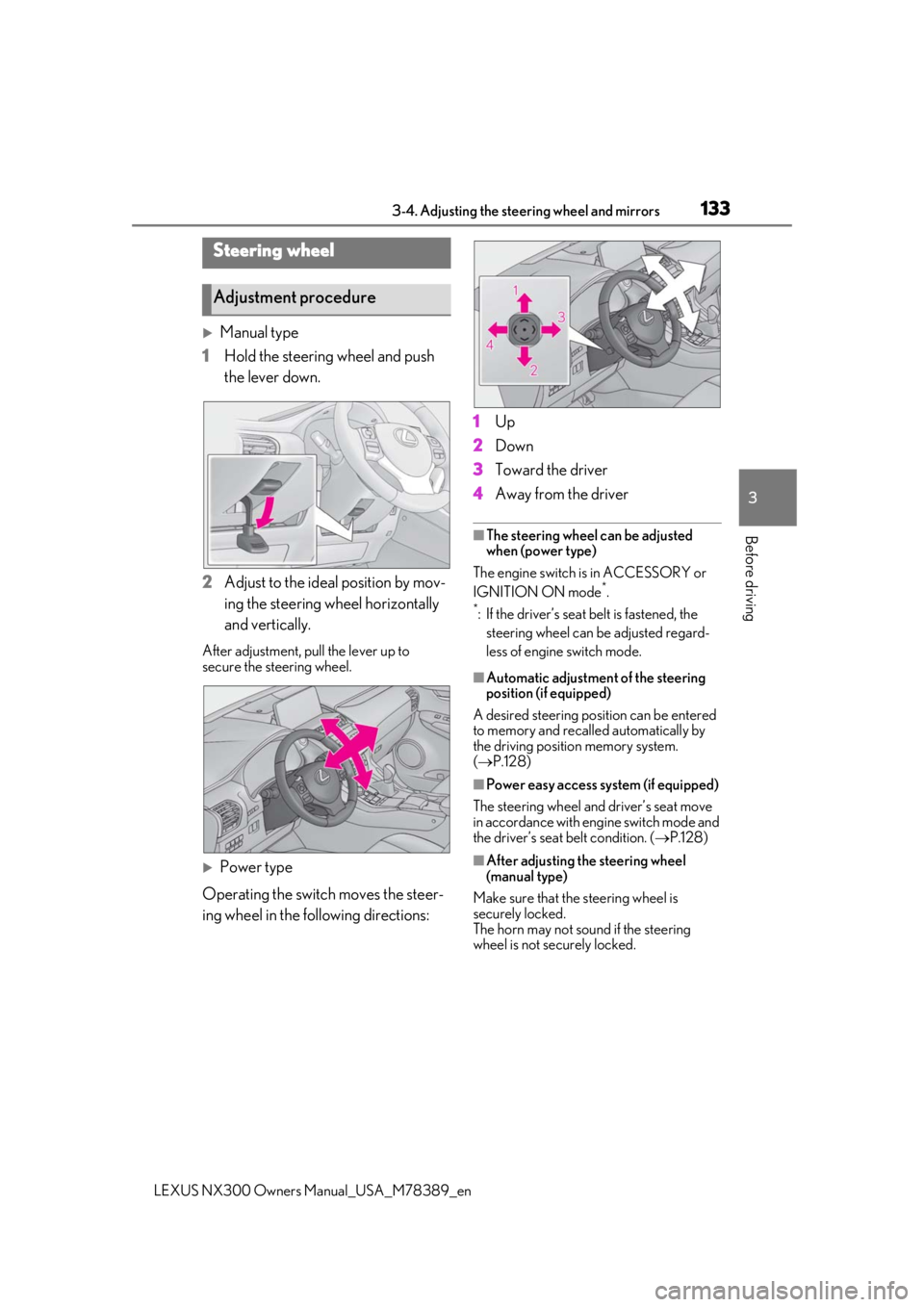
Manual type
1 Hold the steering wheel and push
the lever down.
2 Adjust to the ideal position by mov-
ing the steering wheel horizontally
and vertically.
After adjustment, pull the lever up to
secure the steering wheel.
Power type
Operating the switch moves the steer-
ing wheel in the following directions: 1
Up
2 Down
3 Toward the driver
4 Away from the driver
■The steering wheel can be adjusted
when (power type)
The engine switch is in ACCESSORY or
IGNITION ON mode
*.
*: If the driver’s seat belt is fastened, the
steering wheel can be adjusted regard-
less of engine switch mode.
■Automatic adjustment of the steering
position (if equipped)
A desired steering posi tion can be entered
to memory and recalled automatically by
the driving position memory system.
( P.128)
■Power easy access system (if equipped)
The steering wheel and driver’s seat move
in accordance with engine switch mode and
the driver’s seat belt condition. ( P.128)
■After adjusting the steering wheel
(manual type)
Make sure that the steering wheel is
securely locked.
The horn may not sound if the steering
wheel is not securely locked.
Steering wheel
Adjustment procedure
Page 136 of 468
1363-4. Adjusting the steering wheel and mirrors
LEXUS NX300 Owners Manual_USA_M78389_en
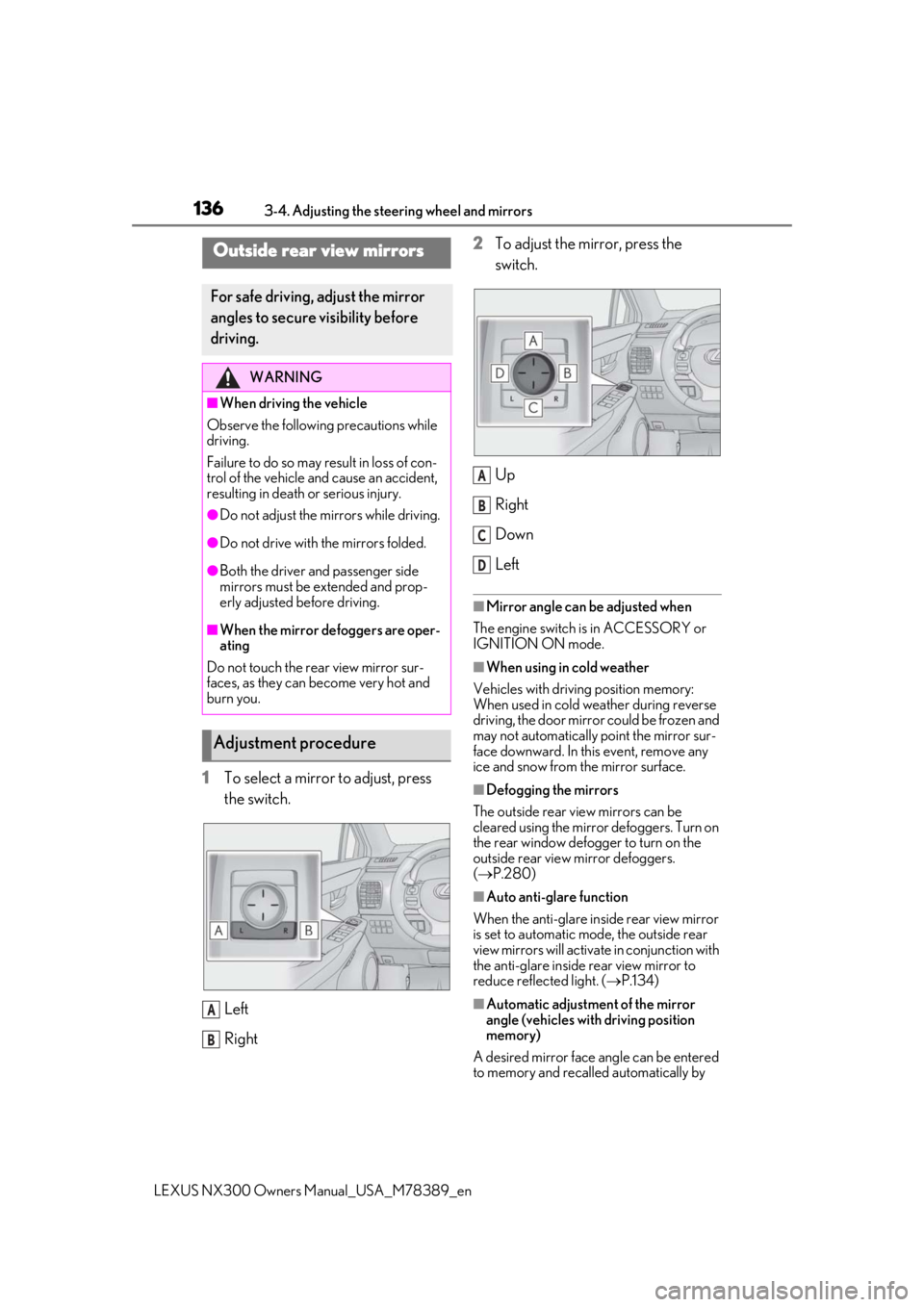
1To select a mirror to adjust, press
the switch.
Left
Right 2
To adjust the mirror, press the
switch.
Up
Right
Down
Left
■Mirror angle can be adjusted when
The engine switch is in ACCESSORY or
IGNITION ON mode.
■When using in cold weather
Vehicles with driving position memory:
When used in cold weather during reverse
driving, the door mirror could be frozen and
may not automatically point the mirror sur-
face downward. In this event, remove any
ice and snow from the mirror surface.
■Defogging the mirrors
The outside rear view mirrors can be
cleared using the mirror defoggers. Turn on
the rear window defogger to turn on the
outside rear view mirror defoggers.
( P.280)
■Auto anti-glare function
When the anti-glare inside rear view mirror
is set to automatic mode, the outside rear
view mirrors will activate in conjunction with
the anti-glare inside rear view mirror to
reduce reflec ted light. (P.134)
■Automatic adjustment of the mirror
angle (vehicles with driving position
memory)
A desired mirror face angle can be entered
to memory and recalled automatically by
Outside rear view mirrors
For safe driving, adjust the mirror
angles to secure visibility before
driving.
WARNING
■When driving the vehicle
Observe the following precautions while
driving.
Failure to do so may result in loss of con-
trol of the vehicle and cause an accident,
resulting in death or serious injury.
●Do not adjust the mirrors while driving.
●Do not drive with the mirrors folded.
●Both the driver and passenger side
mirrors must be extended and prop-
erly adjusted before driving.
■When the mirror defoggers are oper-
ating
Do not touch the rear view mirror sur-
faces, as they can become very hot and
burn you.
Adjustment procedure
A
B
A
B
C
D
Page 138 of 468
1383-5. Opening, closing the windows and moon roof
LEXUS NX300 Owners Manual_USA_M78389_en
3-5.Opening, closing the windows and moon roof
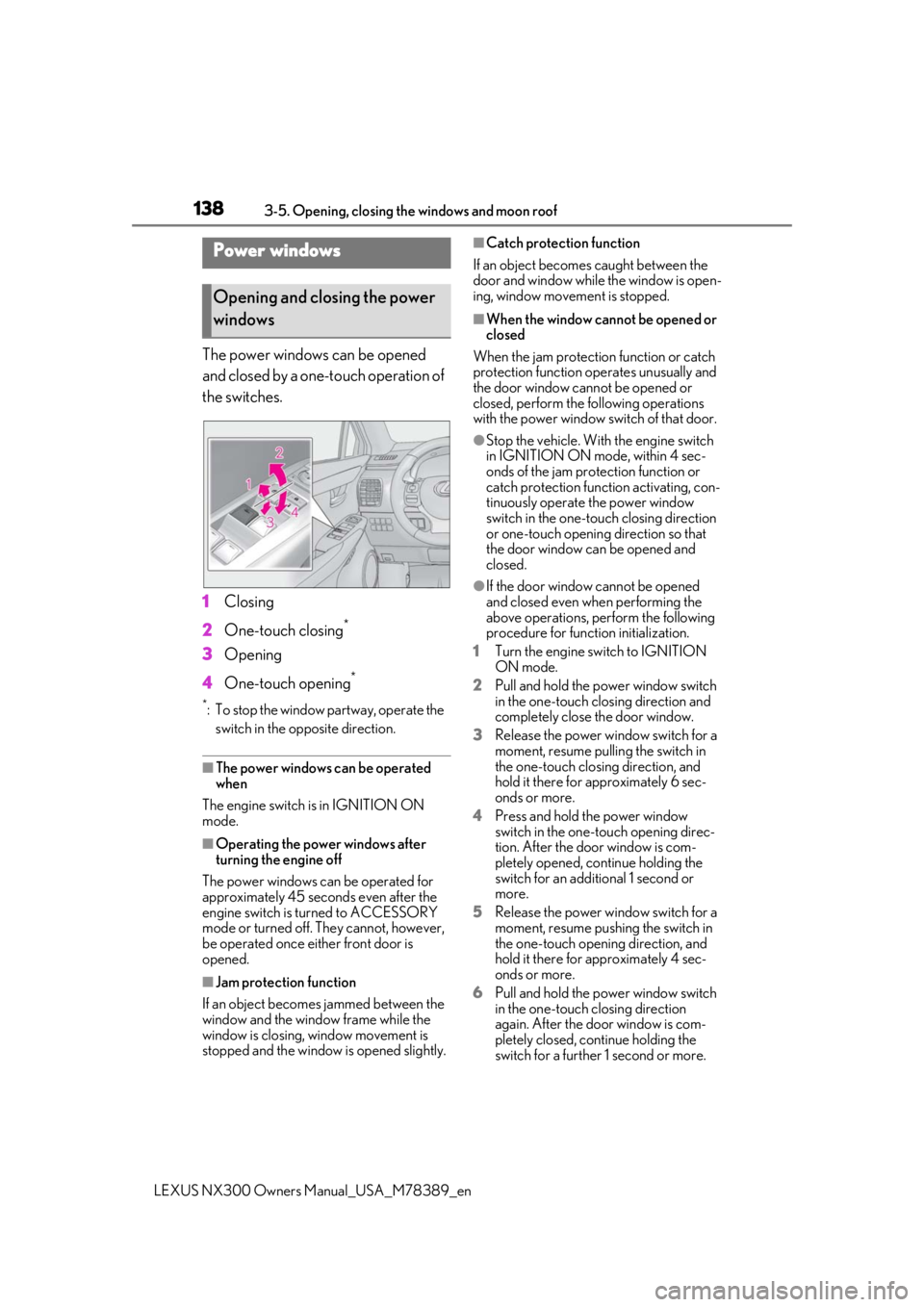
The power windows can be opened
and closed by a one-touch operation of
the switches.
1Closing
2 One-touch closing
*
3Opening
4 One-touch opening
*
*: To stop the window partway, operate the
switch in the op posite direction.
■The power windows can be operated
when
The engine switch is in IGNITION ON
mode.
■Operating the power windows after
turning the engine off
The power windows can be operated for
approximately 45 seconds even after the
engine switch is turned to ACCESSORY
mode or turned off. They cannot, however,
be operated once either front door is
opened.
■Jam protection function
If an object becomes jammed between the
window and the window frame while the
window is closing, window movement is
stopped and the window is opened slightly.
■Catch protection function
If an object becomes caught between the
door and window while the window is open-
ing, window movement is stopped.
■When the window cannot be opened or
closed
When the jam protection function or catch
protection function operates unusually and
the door window cannot be opened or
closed, perform the following operations
with the power window switch of that door.
●Stop the vehicle. With the engine switch
in IGNITION ON mode, within 4 sec-
onds of the jam protection function or
catch protection function activating, con-
tinuously operate the power window
switch in the one-touch closing direction
or one-touch opening direction so that
the door window can be opened and
closed.
●If the door window cannot be opened
and closed even when performing the
above operations, perform the following
procedure for function initialization.
1 Turn the engine switch to IGNITION
ON mode.
2 Pull and hold the power window switch
in the one-touch closing direction and
completely close the door window.
3 Release the power window switch for a
moment, resume pulling the switch in
the one-touch closing direction, and
hold it there for approximately 6 sec-
onds or more.
4 Press and hold the power window
switch in the one-touch opening direc-
tion. After the door window is com-
pletely opened, continue holding the
switch for an additional 1 second or
more.
5 Release the power window switch for a
moment, resume pushing the switch in
the one-touch opening direction, and
hold it there for approximately 4 sec-
onds or more.
6 Pull and hold the power window switch
in the one-touch closing direction
again. After the door window is com-
pletely closed, continue holding the
switch for a further 1 second or more.
Power windows
Opening and closing the power
windows
Page 141 of 468
1413-5. Opening, closing the windows and moon roof
LEXUS NX300 Owners Manual_USA_M78389_en
3
Before driving
■Tilting up and down
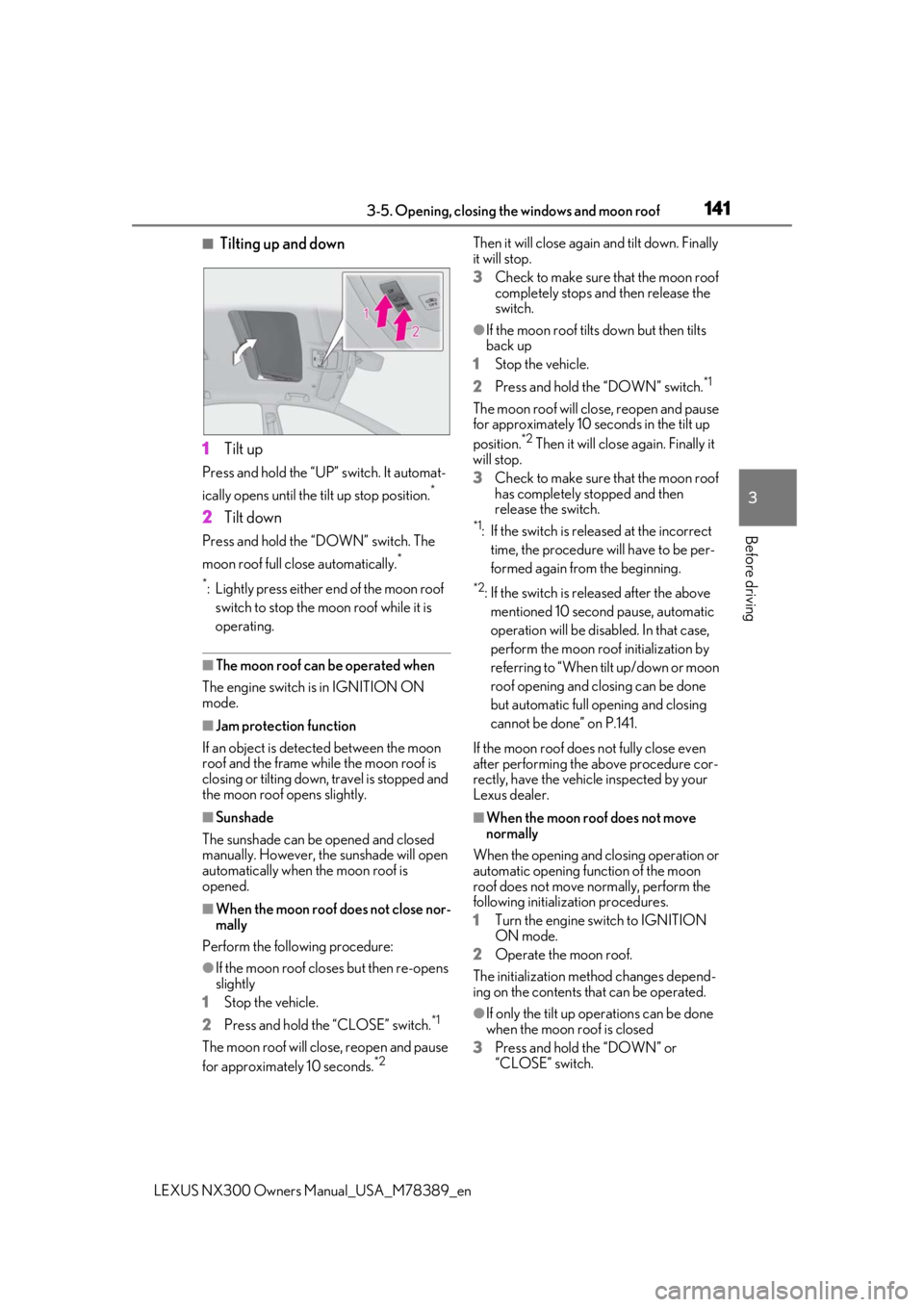
1 Tilt up
Press and hold the “UP” switch. It automat-
ically opens until the tilt up stop position.
*
2Tilt down
Press and hold the “DOWN” switch. The
moon roof full close automatically.
*
*
: Lightly press either end of the moon roof switch to stop the moon roof while it is
operating.
■The moon roof can be operated when
The engine switch is in IGNITION ON
mode.
■Jam protection function
If an object is detected between the moon
roof and the frame while the moon roof is
closing or tilting down, travel is stopped and
the moon roof opens slightly.
■Sunshade
The sunshade can be opened and closed
manually. However, the sunshade will open
automatically when the moon roof is
opened.
■When the moon roof does not close nor-
mally
Perform the following procedure:
●If the moon roof closes but then re-opens
slightly
1 Stop the vehicle.
2 Press and hold the “CLOSE” switch.
*1
The moon roof will close, reopen and pause
for approximately 10 seconds.*2 Then it will close again
and tilt down. Finally
it will stop.
3 Check to make sure that the moon roof
completely stops an d then release the
switch.
●If the moon roof tilts down but then tilts
back up
1 Stop the vehicle.
2 Press and hold the “DOWN” switch.
*1
The moon roof will close, reopen and pause
for approximately 10 seconds in the tilt up
position.
*2 Then it will close again. Finally it
will stop.
3 Check to make sure that the moon roof
has completely stopped and then
release the switch.
*1: If the switch is rele ased at the incorrect
time, the procedure will have to be per-
formed again from the beginning.
*2: If the switch is released after the above mentioned 10 second pause, automatic
operation will be disabled. In that case,
perform the moon roof initialization by
referring to “When tilt up/down or moon
roof opening and closing can be done
but automatic full opening and closing
cannot be done” on P.141.
If the moon roof does not fully close even
after performing the above procedure cor-
rectly, have the vehicle inspected by your
Lexus dealer.
■When the moon roof does not move
normally
When the opening and closing operation or
automatic opening function of the moon
roof does not move normally, perform the
following initialization procedures.
1 Turn the engine switch to IGNITION
ON mode.
2 Operate the moon roof.
The initialization meth od changes depend-
ing on the contents that can be operated.
●If only the tilt up op erations can be done
when the moon roof is closed
3 Press and hold the “DOWN” or
“CLOSE” switch.
Page 145 of 468
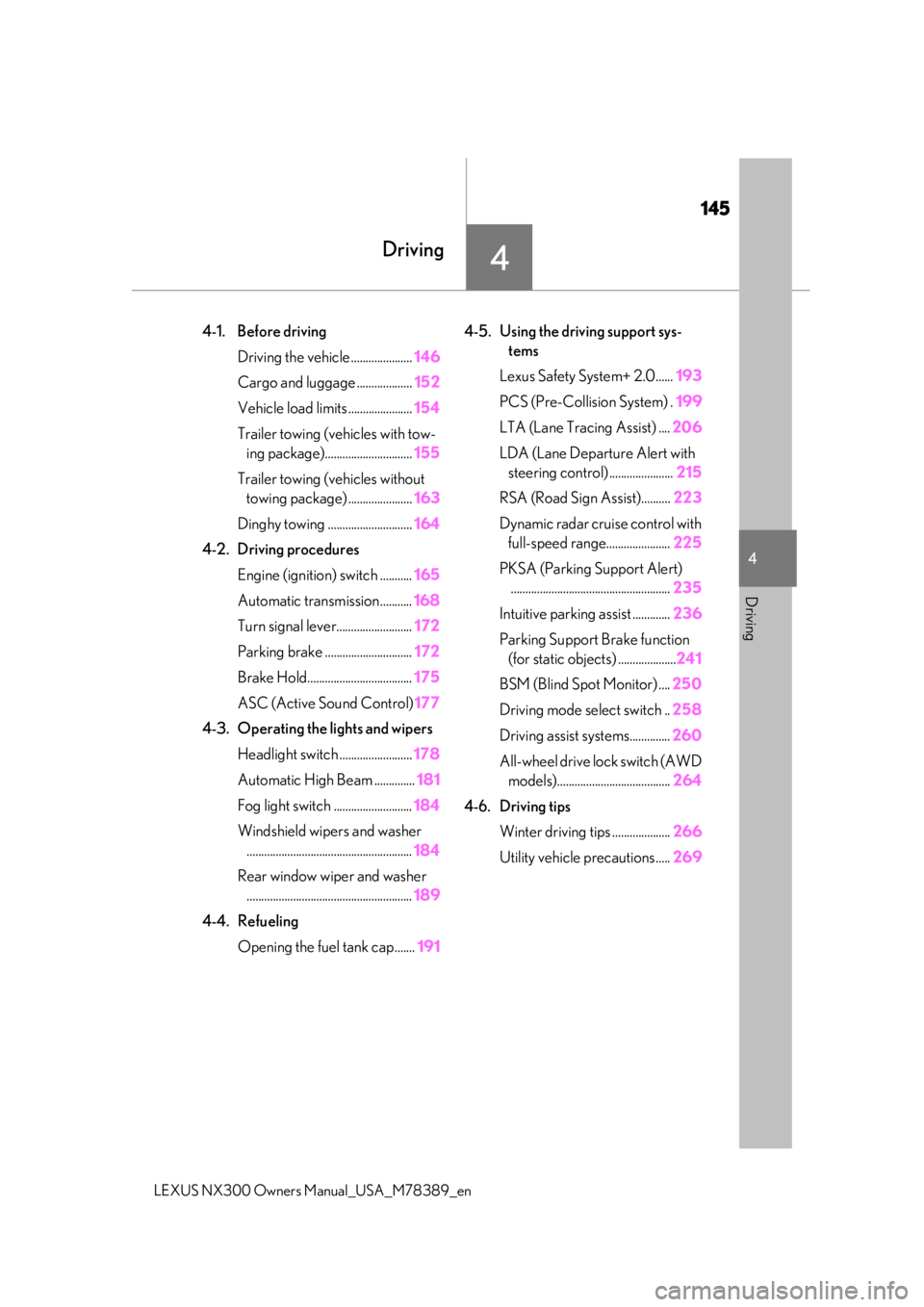
145
LEXUS NX300 Owners Manual_USA_M78389_en
4
4
Driving
Driving
4-1. Before driving
Driving the vehicle ..................... 146
Cargo and luggage ................... 152
Vehicle load limits ...................... 154
Trailer towing (vehicles with tow- ing package).............................. 155
Trailer towing (vehicles without towing package) ...................... 163
Dinghy towing ............................. 164
4-2. Driving procedures Engine (ignition) switch ........... 165
Automatic transmission........... 168
Turn signal lever.......................... 172
Parking brake .............................. 172
Brake Hold.................................... 175
ASC (Active Sound Control) 177
4-3. Operating the lights and wipers Headlight switch ......................... 178
Automatic High Beam .............. 181
Fog light switch ........................... 184
Windshield wipers and washer ......................................................... 184
Rear window wiper and washer ......................................................... 189
4-4. Refueling Opening the fuel tank cap....... 1914-5. Using the driving support sys-
tems
Lexus Safety System+ 2.0...... 193
PCS (Pre-Collision System) . 199
LTA (Lane Tracing Assist) .... 206
LDA (Lane Departure Alert with steering control) ...................... 215
RSA (Road Sign Assist).......... 223
Dynamic radar cruise control with full-speed range...................... 225
PKSA (Parking Support Alert) ....................................................... 235
Intuitive parking assist ............. 236
Parking Support Brake function (for static objects) .................... 241
BSM (Blind Spot Monitor) .... 250
Driving mode select switch .. 258
Driving assist systems.............. 260
All-wheel drive lock switch (AWD models)....................................... 264
4-6. Driving tips Winter driving tips .................... 266
Utility vehicle precautions..... 269
Page 165 of 468
1654-2. Driving procedures
LEXUS NX300 Owners Manual_USA_M78389_en
4
Driving
4-2.Driving procedures
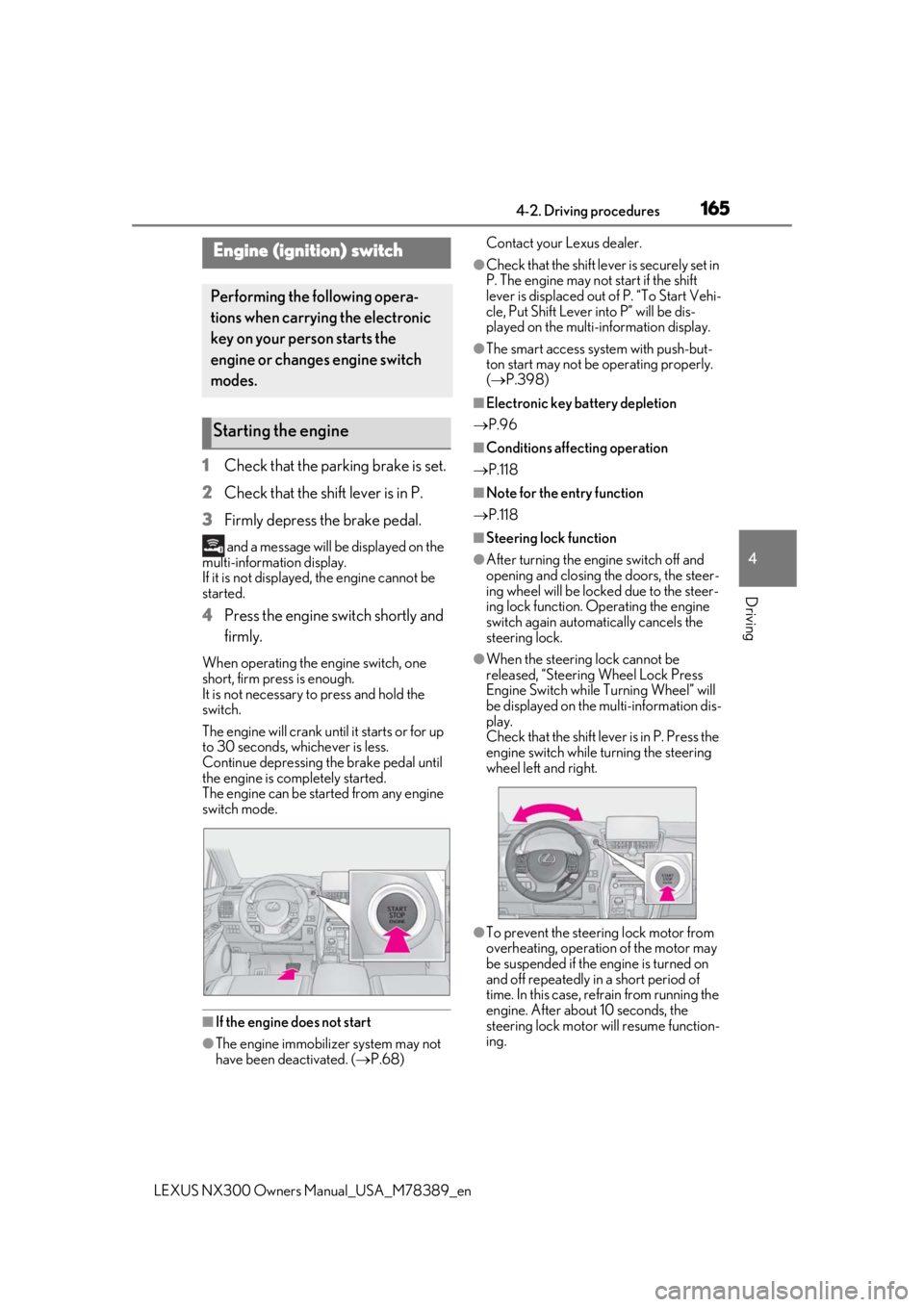
1Check that the parking brake is set.
2 Check that the shift lever is in P.
3 Firmly depress the brake pedal.
and a message will be displayed on the
multi-information display.
If it is not displayed, the engine cannot be
started.
4 Press the engine switch shortly and
firmly.
When operating the engine switch, one
short, firm press is enough.
It is not necessary to press and hold the
switch.
The engine will crank until it starts or for up
to 30 seconds, whichever is less.
Continue depressing the brake pedal until
the engine is completely started.
The engine can be started from any engine
switch mode.
■If the engine does not start
●The engine immobilizer system may not
have been deactivated. ( P.68) Contact your Lexus dealer.
●Check that the shift leve
r is securely set in
P. The engine may not start if the shift
lever is displaced out of P. “To Start Vehi-
cle, Put Shift Lever into P” will be dis-
played on the multi-information display.
●The smart access system with push-but-
ton start may not be operating properly.
( P.398)
■Electronic key battery depletion
P.96
■Conditions affecting operation
P.118
■Note for the entry function
P.118
■Steering lock function
●After turning the engine switch off and
opening and closing the doors, the steer-
ing wheel will be lock ed due to the steer-
ing lock function. Operating the engine
switch again automatically cancels the
steering lock.
●When the steering lock cannot be
released, “Steering Wheel Lock Press
Engine Switch while Turning Wheel” will
be displayed on the multi-information dis-
play.
Check that the shift lever is in P. Press the
engine switch while turning the steering
wheel left and right.
●To prevent the steering lock motor from
overheating, operation of the motor may
be suspended if the engine is turned on
and off repeatedly in a short period of
time. In this case, refrain from running the
engine. After about 10 seconds, the
steering lock motor will resume function-
ing.
Engine (ignition) switch
Performing the following opera-
tions when carryin g the electronic
key on your person starts the
engine or changes engine switch
modes.
Starting the engine