seats LEXUS NX300h 2015 Owner's Manual
[x] Cancel search | Manufacturer: LEXUS, Model Year: 2015, Model line: NX300h, Model: LEXUS NX300h 2015Pages: 681, PDF Size: 9.14 MB
Page 83 of 681
831-2. Hybrid system
1
For safety and security
NX300h_U_OM78007U ■
If a warning light comes on, a warning message is displayed, or the 12-volt battery is dis-
connected
The hybrid system may not start. In this case, try to start the system again. If the “READY”
indicator does not come on, contact your Lexus dealer. ■
Running out of fuel
When the vehicle has run out of fuel and the hybrid system cannot be started, refuel the
vehicle with at least enough gasoline to make the low fuel level warning light ( P. 5 6 7 )
go off. If there is only a small amount of fu el, the hybrid system may not be able to start.
(The standard amount of fuel is about 2.7 gal. [10.1 L, 2.2 Imp.gal.], when the vehicle is on
a level surface. This value may vary when the vehicle is on a slope. Add extra fuel when
the vehicle is inclined.) ■
Electromagnetic waves ●
High voltage parts and cables on hybrid ve hicles incorporate electromagnetic shield-
ing, and therefore emit approximately the same amount of electromagnetic waves as
conventional gasoline powered vehicl es or home electronic appliances.●
Your vehicle may cause sound interference in some third party-produced radio parts. ■
Hybrid battery (traction battery)
The hybrid battery (traction battery) has a limited service life. The lifespan of the hybrid
battery (traction battery) can change in accordance with driving style and driving condi-
tions.
WA R N I N G ■
High voltage precautions
This vehicle has high voltage DC and AC systems as well as a 12-volt system. DC and
AC high voltage is very dangerous and can cause severe burns and electric shock that
may result in death or serious injury. ●
Never touch, disassemble, remove or replace the high voltage parts, cables or their
connectors. ●
The hybrid system will become hot after star ting as the system uses high voltage. Be
careful of both the high voltage and the hi gh temperature, and always obey the warn-
ing labels attached to the vehicle. ●
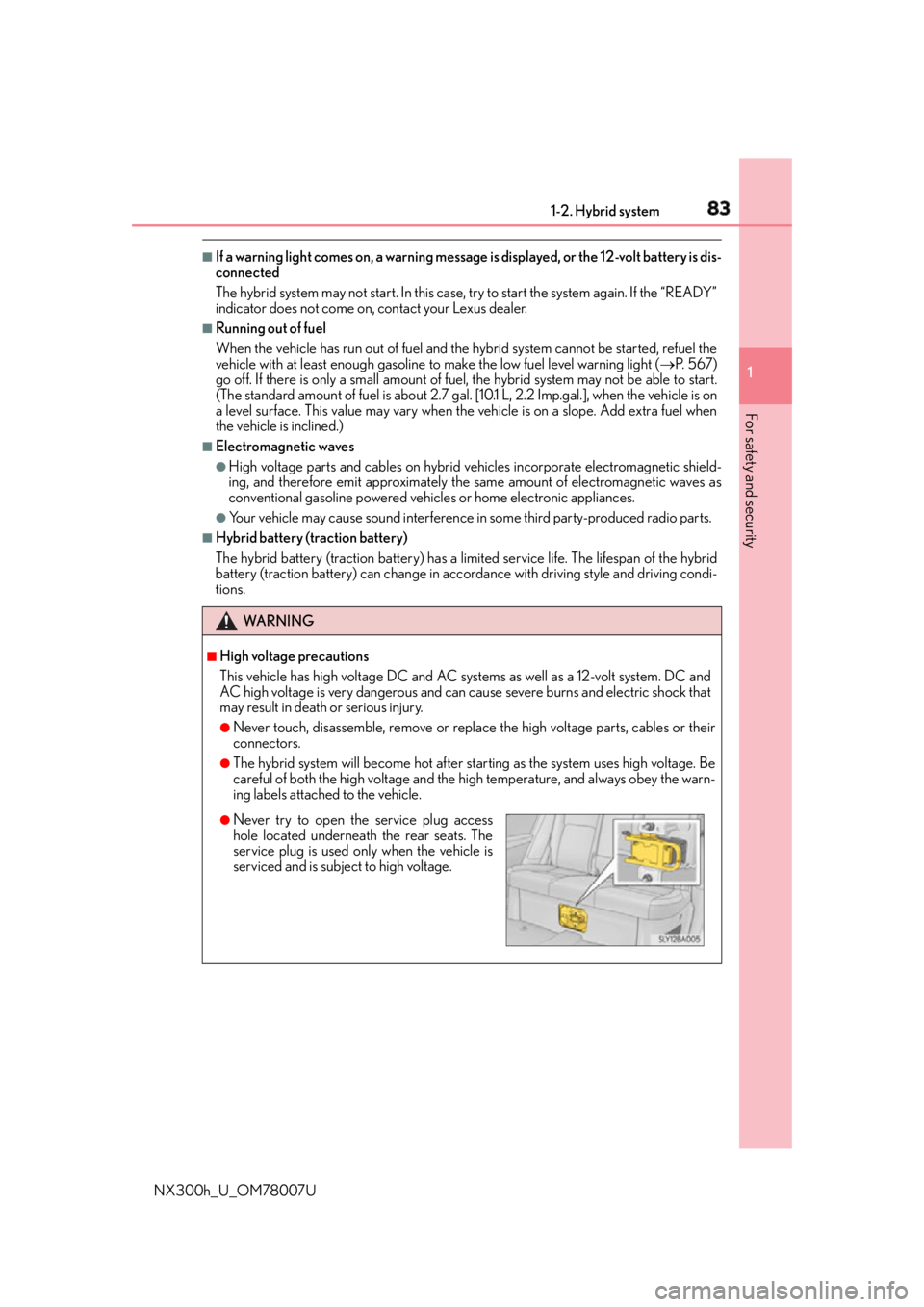
Never try to open the service plug access
hole located underneath the rear seats. The
service plug is used only when the vehicle is
serviced and is subject to high voltage.
Page 117 of 681
117
3 Operation of
each component
NX300h_U_OM78007U 3-1. Key information
Keys ....................................................118
3-2. Opening, closing and locking
the doors
Side doors ....................................... 124
Back door........................................129
Smart access system with
push-button start...................... 140
3-3. Adjusting the seats
Front seats ...................................... 146
Rear seats ........................................ 147
Driving position memory ......... 154
Head restraints ............................ 158
3-4. Adjusting the steering
wheel and mirrors
Steering wheel ............................. 160
Inside rear view mirror................ 161
Outside rear view mirrors ....... 163
3-5. Opening, closing the windows
and moon roof
Power windows ............................ 166
Moon roof .......................................169
Page 128 of 681
128 3-2. Opening, closing and locking the doors
NX300h_U_OM78007U ■
Impact detection door lock release system
In the event that the vehicle is subject to a strong impact, all the doors are unlocked.
Depending on the force of the impact or the type of accident, however, the system may
not operate. ■
Using the mechanical key
The doors can also be locked and unlocked with the mechanical key. ( P. 5 9 2 )■
Open door warning buzzer
If the vehicle speed reaches 3 mph (5 km/h), the master warning light flashes and a
buzzer sounds to indicate that door (s) or the hood in not fully closed.
The open door(s) or hood is displa yed on the multi-information display.■
Conditions affecting the operation of the sm art access system with push-button start
or wireless remote control
P. 1 4 2 ■
Customization
Settings (e.g. unlocking function using a key) can be changed.
(Customizable features: P. 6 3 3 )
WA R N I N G ■
To prevent an accident
Observe the following precautions while driving the vehicle.
Failure to do so may result in a door open ing and an occupant falling out, resulting in
death or serious injury. ●
Ensure that all doors are properly closed and locked. ●
Do not pull the inside handle of the doors while driving.
Be especially careful for the front doors, as the doors may be opened even if the
inside lock buttons ar e in locked position.●
Set the rear door child-protector locks wh en children are seated in the rear seats.■
When opening or closing a door
Check the surroundings of the vehicle such as whether the vehicle is on an incline,
whether there is enough space for a door to open and whether a strong wind is blow-
ing. When opening or closing the door, hold the door handle tightly to prepare for any
unpredictable movement.
Page 146 of 681
146 3-3. Adjusting the seats
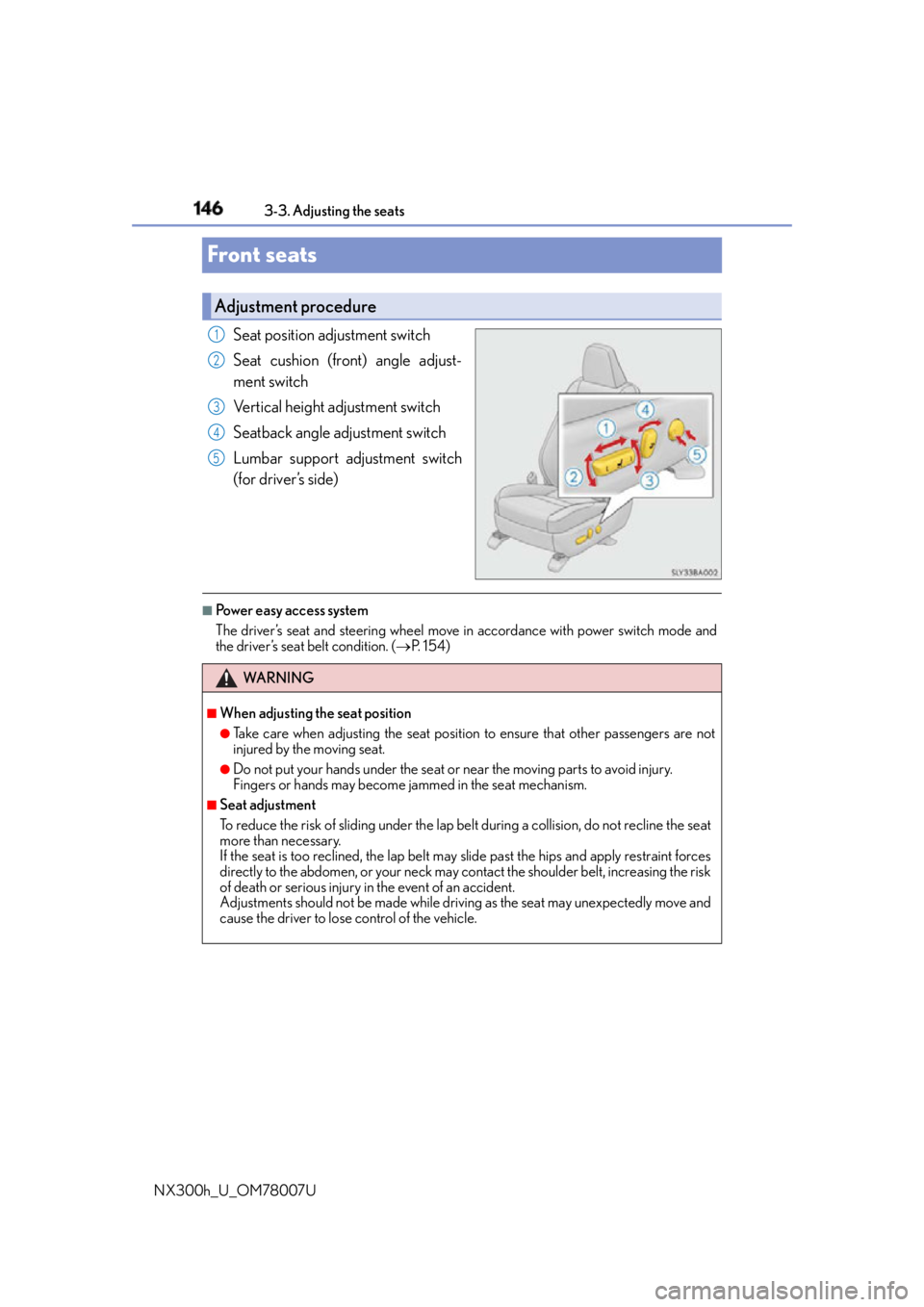
NX300h_U_OM78007UFront seats Seat position adjustment switch
Seat cushion (front) angle adjust-
ment switch
Vertical height adjustment switch
Seatback angle adjustment switch
Lumbar support adjustment switch
(for driver’s side) ■
Power easy access system
The driver’s seat and steering wheel move in accordance with power switch mode and
the driver’s seat belt condition. ( P. 1 5 4 )Adjustment procedure 1
2
3
4
5
WA R N I N G ■
When adjusting the seat position ●
Take care when adjusting the seat position to ensure that other passengers are not
injured by the moving seat. ●
Do not put your hands under the seat or near the moving parts to avoid injury.
Fingers or hands may become jammed in the se at mechanism.■
Seat adjustment
To reduce the risk of sliding under the lap belt during a co llision, do not recline the seat
more than necessary.
If the seat is too rec lined, the lap belt may slide past the hips and apply restraint forces
directly to the abdomen, or your neck may contact the shoulder belt, increasing the risk
of death or serious injury in the event of an accident.
Adjustments should not be ma de while driving as the seat may unexpectedly move and
cause the driver to lose control of the vehicle.
Page 147 of 681
1473-3. Adjusting the seats
3
Operation of each component
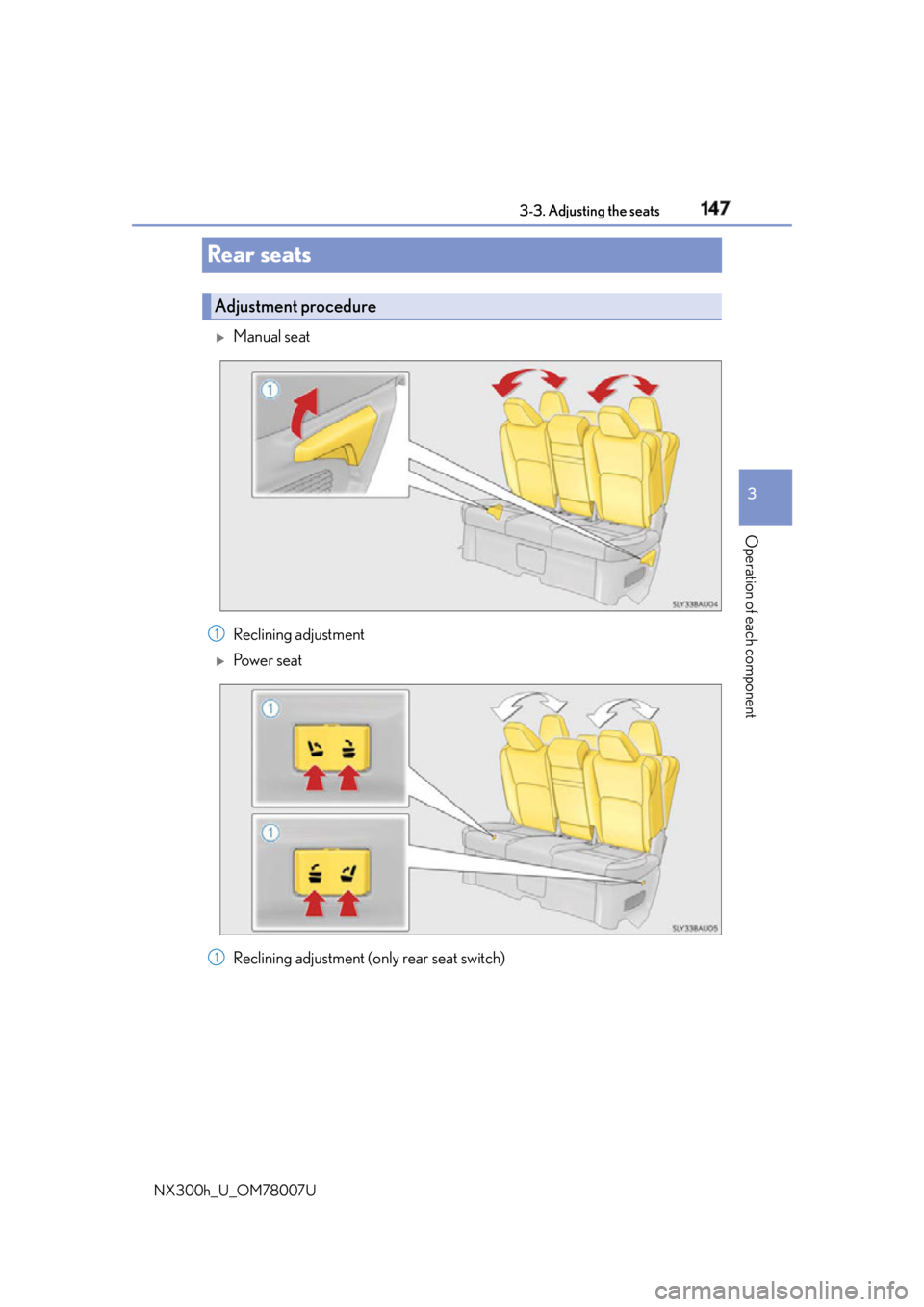
NX300h_U_OM78007URear seats
Manual seat
Reclining adjustment
Po w e r s e a t
Reclining adjustment (only rear seat switch)Adjustment procedure
1
1
Page 148 of 681
148 3-3. Adjusting the seats
NX300h_U_OM78007U ■
Before folding down the rear seatbacks
Stow the rear center seat be lt and seat belt buckles. ( P. 3 4 )
Lower the head restraint of the rear seat. ( P. 1 5 8 )■
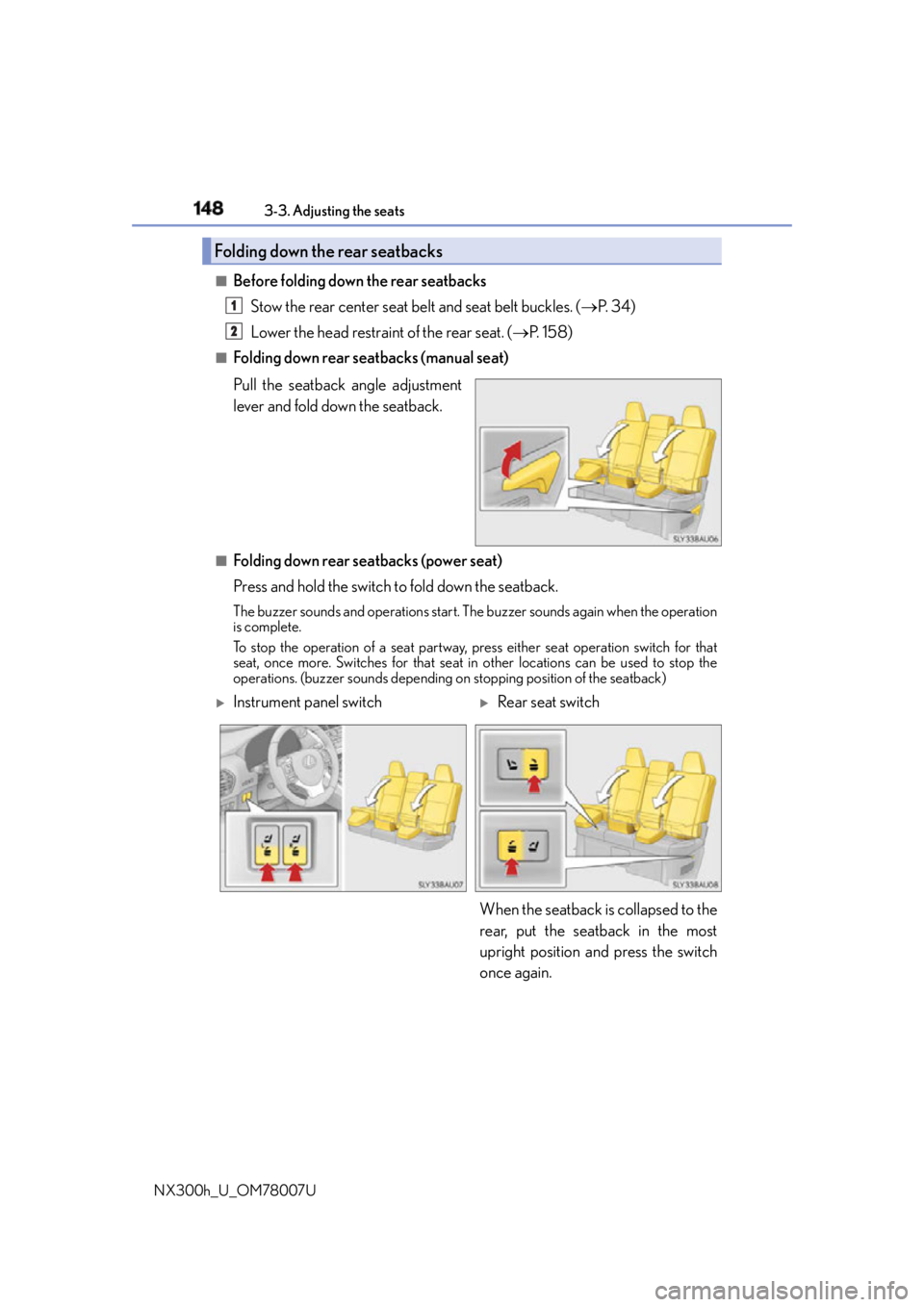
Folding down rear seatbacks (manual seat)
Pull the seatback angle adjustment
lever and fold down the seatback.
■
Folding down rear seatbacks (power seat)
Press and hold the switch to fold down the seatback.The buzzer sounds and operations start. Th e buzzer sounds again when the operation
is complete.
To stop the operation of a se at partway, press either seat operation switch for that
seat, once more. Switches for that seat in other locations can be used to stop the
operations. (buzzer sounds depending on stopping position of the seatback)Folding down the rear seatbacks 1
2
Instrument panel switch
Rear seat switch
When the seatback is collapsed to the
rear, put the seatback in the most
upright position and press the switch
once again.
Page 149 of 681
1493-3. Adjusting the seats
3
Operation of each component
NX300h_U_OM78007U ■
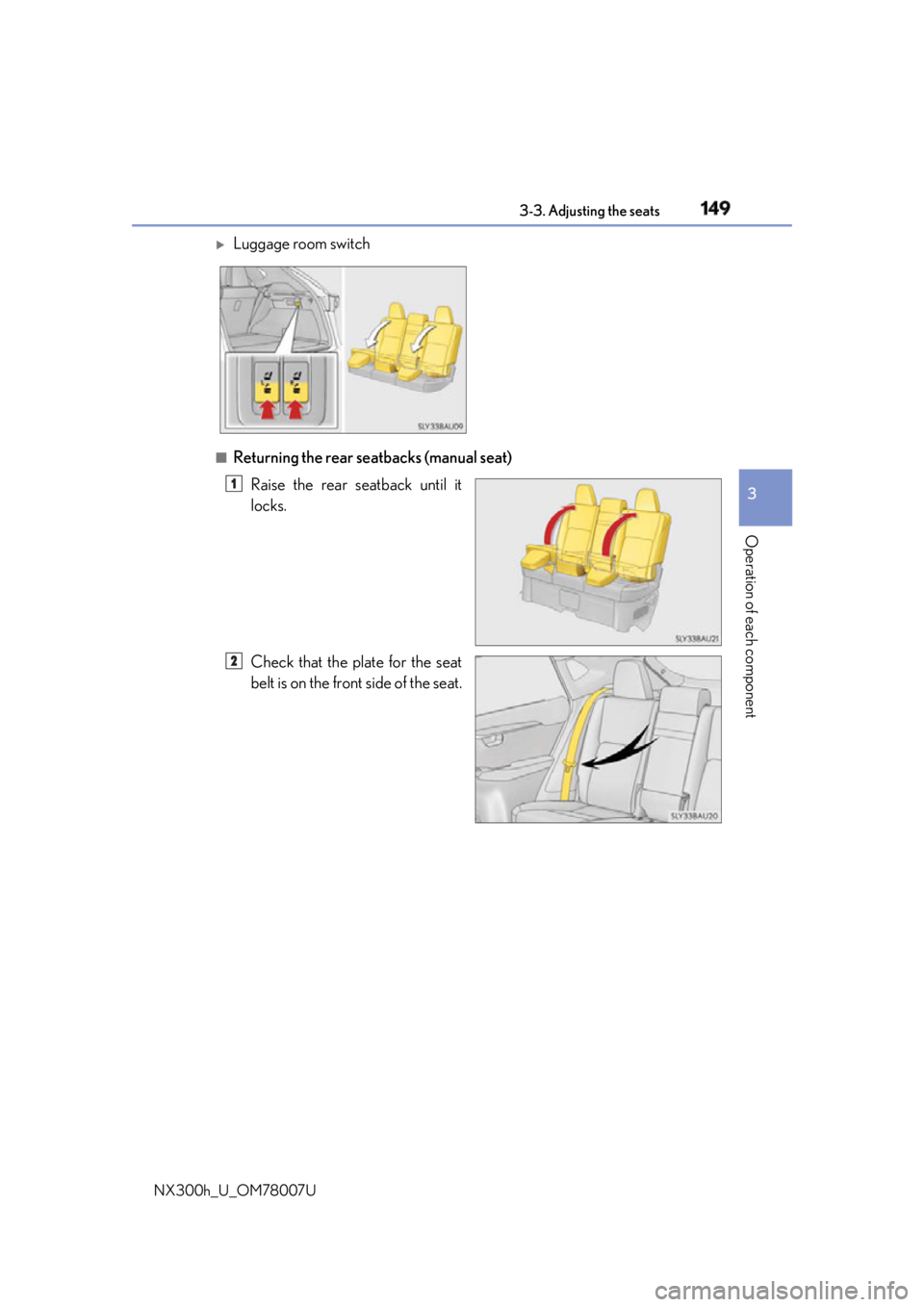
Returning the rear seatbacks (manual seat)
Raise the rear seatback until it
locks.
Check that the plate for the seat
belt is on the front side of the seat.
Luggage room switch
1
2
Page 150 of 681
150 3-3. Adjusting the seats
NX300h_U_OM78007U ■
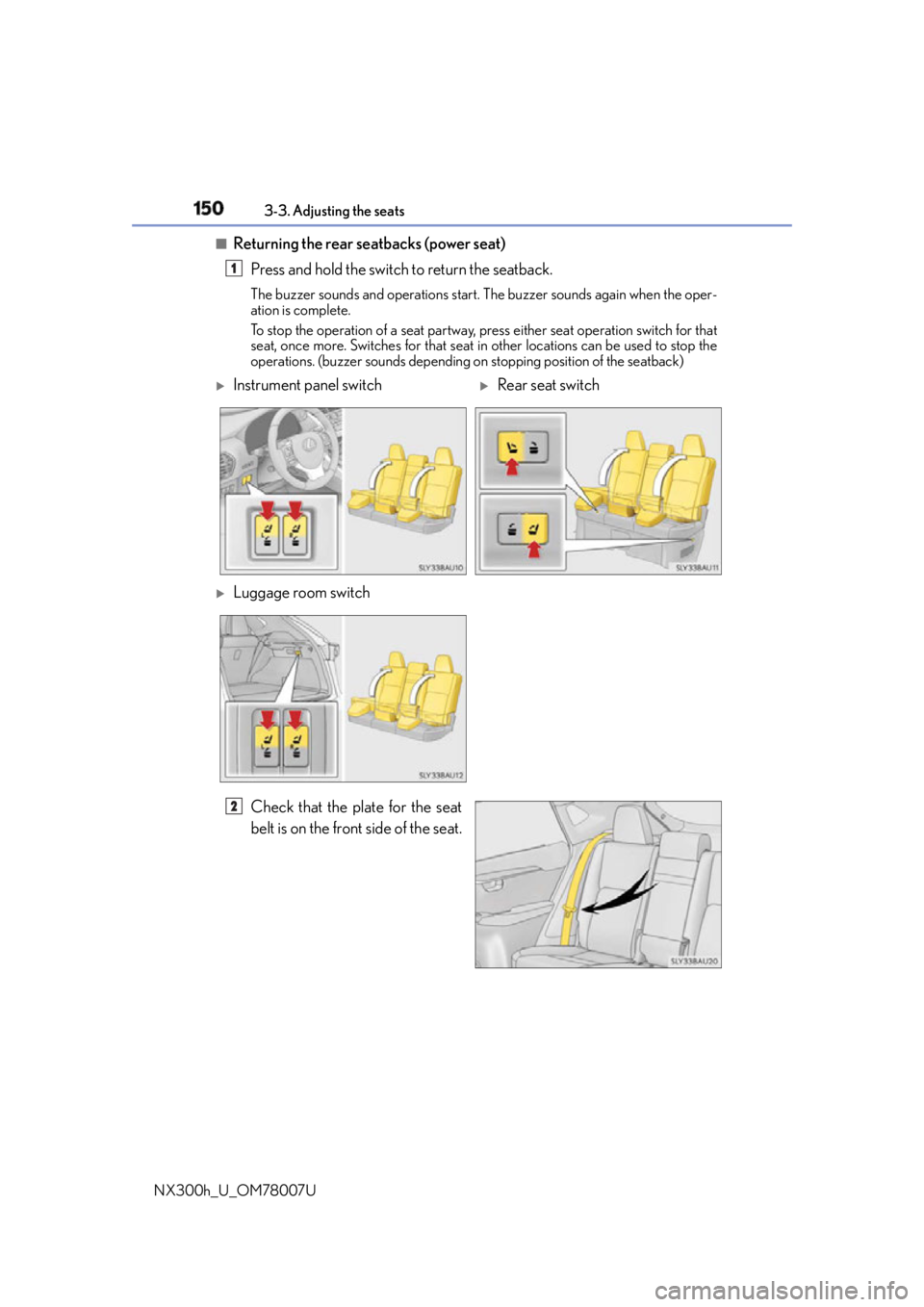
Returning the rear seatbacks (power seat)
Press and hold the switch to return the seatback. The buzzer sounds and operations start. The buzzer sounds again when the oper-
ation is complete.
To stop the operation of a seat partway, press either seat operation switch for that
seat, once more. Switches for that seat in other locations can be used to stop the
operations. (buzzer sounds depending on stopping position of the seatback)
Check that the plate for the seat
belt is on the front side of the seat. 1
Instrument panel switch
Rear seat switch
Luggage room switch
2
Page 151 of 681
1513-3. Adjusting the seats
3
Operation of each component
NX300h_U_OM78007U ■
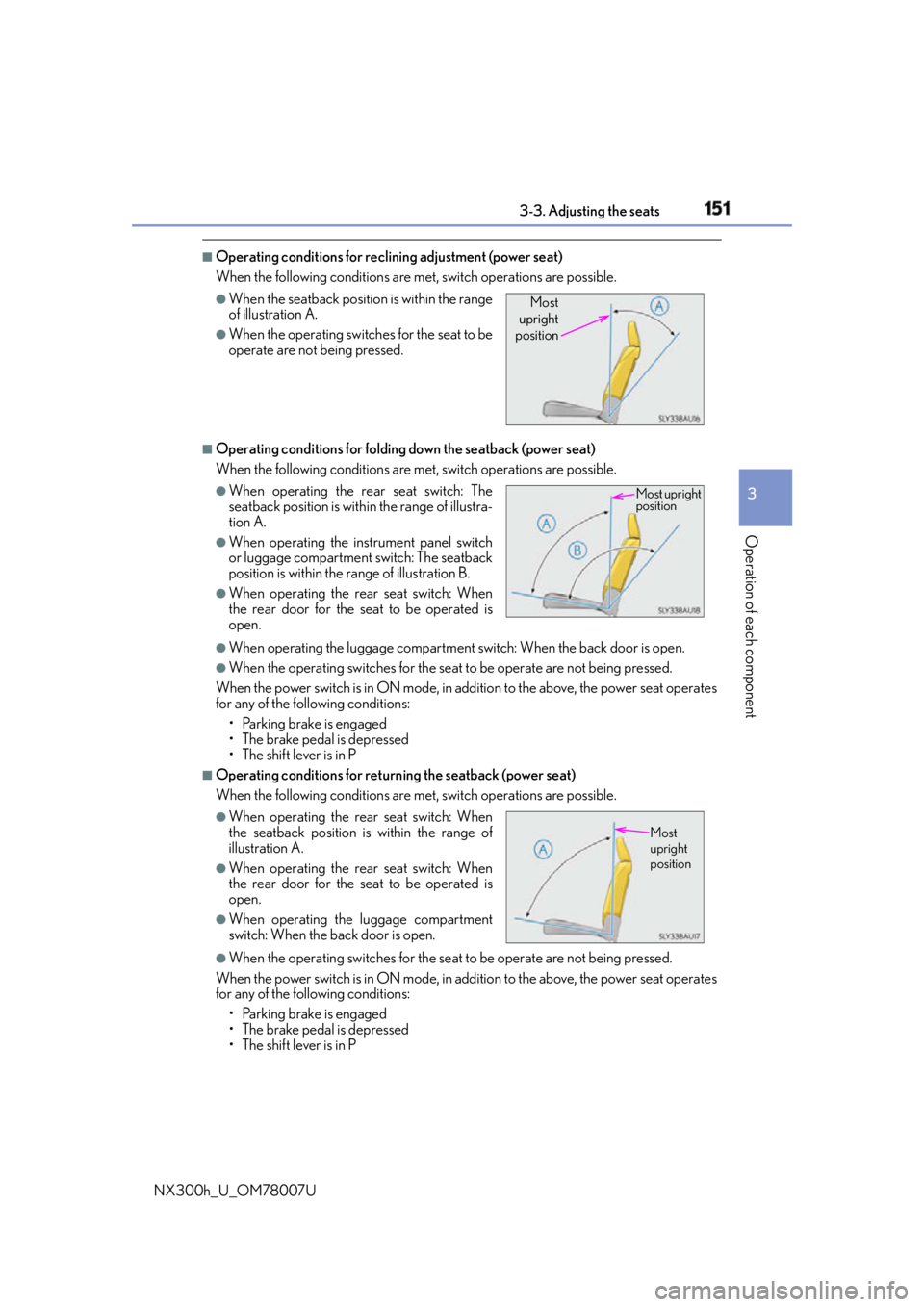
Operating conditions for reclining adjustment (power seat)
When the following conditions are me t, switch operations are possible.
■
Operating conditions for folding down the seatback (power seat)
When the following conditions are me t, switch operations are possible.
●
When operating the luggage compartment switch: When the back door is open. ●
When the operating switches for the seat to be operate are not being pressed.
When the power switch is in ON mode, in addition to the above, the power seat operates
for any of the following conditions:
• Parking brake is engaged
• The brake pedal is depressed
• The shift lever is in P ■
Operating conditions for return ing the seatback (power seat)
When the following conditions are me t, switch operations are possible.
●
When the operating switches for the seat to be operate are not being pressed.
When the power switch is in ON mode, in addition to the above, the power seat operates
for any of the following conditions:
• Parking brake is engaged
• The brake pedal is depressed
• The shift lever is in P ●
When the seatback position is within the range
of illustration A. ●
When the operating switches for the seat to be
operate are not being pressed. ●
When operating the rear seat switch: The
seatback position is with in the range of illustra-
tion A. ●
When operating the in strument panel switch
or luggage compartment switch: The seatback
position is within the range of illustration B. ●
When operating the rear seat switch: When
the rear door for the seat to be operated is
open.
●
When operating the rear seat switch: When
the seatback position is within the range of
illustration A. ●
When operating the rear seat switch: When
the rear door for the seat to be operated is
open. ●
When operating the luggage compartment
switch: When the back door is open. Most
upright
position
Most upright
position
Most
upright
position
Page 152 of 681
152 3-3. Adjusting the seats
NX300h_U_OM78007U ■
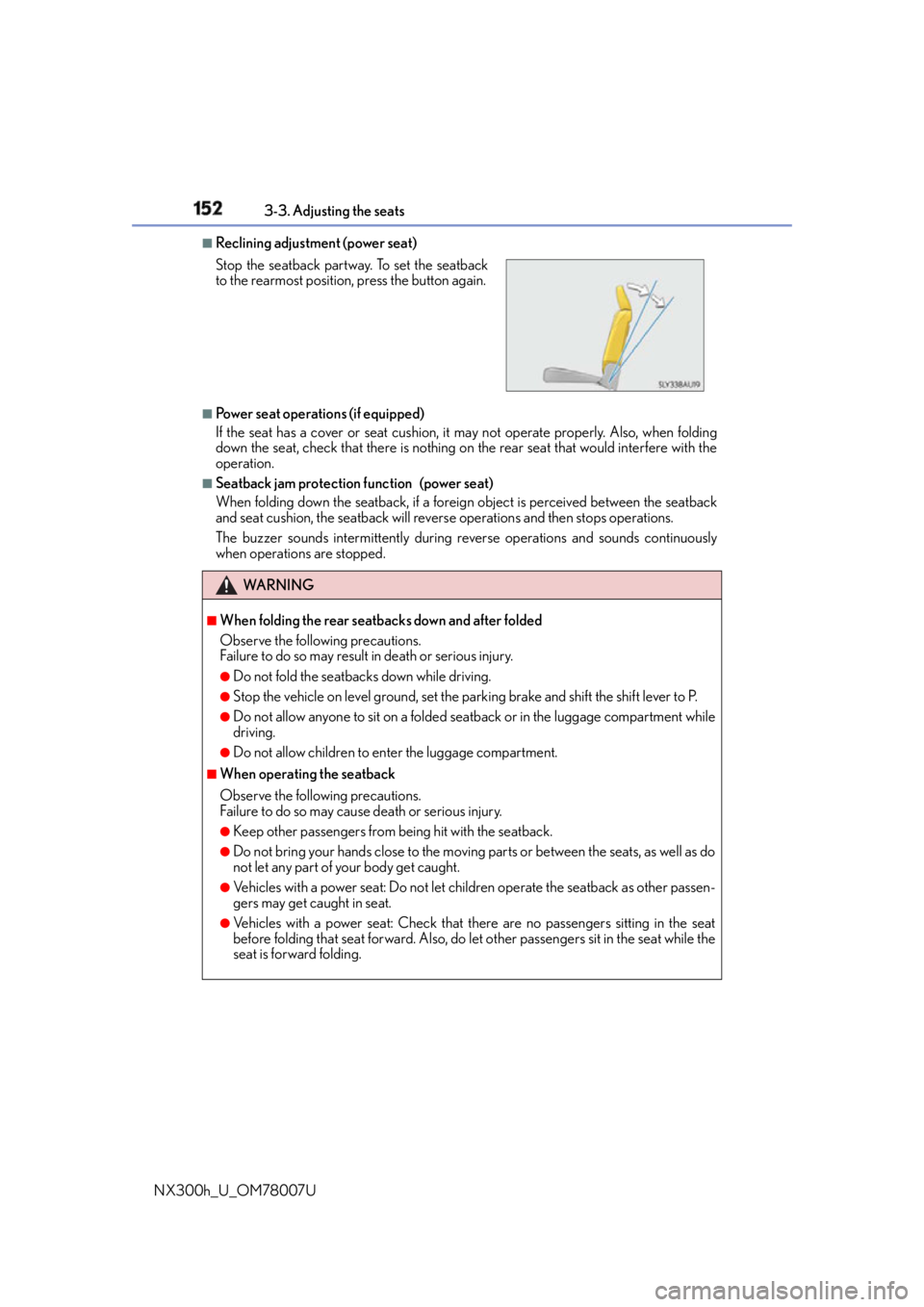
Reclining adjustment (power seat)
■
Power seat operations (if equipped)
If the seat has a cover or seat cushion, it may not operate properly. Also, when folding
down the seat, check that there is nothing on the rear seat that would interfere with the
operation. ■
Seatback jam protection function (power seat)
When folding down the seatback, if a foreig n object is perceived between the seatback
and seat cushion, the seatback will revers e operations and then stops operations.
The buzzer sounds intermitte ntly during reverse operatio ns and sounds continuously
when operations are stopped.Stop the seatback partwa y. To set the seatback
to the rearmost position, press the button again.
WA R N I N G ■
When folding the rear seatbacks down and after folded
Observe the following precautions.
Failure to do so may result in death or serious injury.●
Do not fold the seatbacks down while driving. ●
Stop the vehicle on level ground, set the parking brake and shift the shift lever to P. ●
Do not allow anyone to sit on a folded se atback or in the luggage compartment while
driving. ●
Do not allow children to enter the luggage compartment. ■
When operating the seatback
Observe the following precautions.
Failure to do so may cause death or serious injury. ●
Keep other passengers from being hit with the seatback. ●
Do not bring your hands close to the moving parts or between the seats, as well as do
not let any part of your body get caught. ●
Vehicles with a power seat: Do not let children operate the seatback as other passen-
gers may get caught in seat. ●
Vehicles with a power seat: Check that there are no passengers sitting in the seat
before folding that seat forward. Also, do le t other passengers sit in the seat while the
seat is forward folding.