ECO LEXUS NX300H 2016 Owner's Manual
[x] Cancel search | Manufacturer: LEXUS, Model Year: 2016, Model line: NX300H, Model: LEXUS NX300H 2016Pages: 680, PDF Size: 10.23 MB
Page 83 of 680
831-2. Hybrid system
1
For safety and security
NX300h_OM_USA_OM78082U
■If a warning light comes on, a warning message is displayed, or the 12-volt battery is dis-
connected
The hybrid system may not start. In this case, try to start the system again. If the “READY”
indicator does not come on, contact your Lexus dealer.
■Running out of fuel
When the vehicle has run out of fuel and the hybrid system cannot be started, refuel the
vehicle with at least enough gasoline to make the low fuel level warning light (P. 5 6 7 )
go off. If there is only a small amount of fu el, the hybrid system may not be able to start.
(The standard amount of fuel is about 2.7 gal. [10.1 L, 2.2 Imp.gal.], when the vehicle is on
a level surface. This value may vary when the vehicle is on a slope. Add extra fuel when
the vehicle is inclined.)
■Electromagnetic waves
●High voltage parts and cables on hybrid ve hicles incorporate electromagnetic shield-
ing, and therefore emit approximately the same amount of electromagnetic waves as
conventional gasoline powered vehicl es or home electronic appliances.
●Your vehicle may cause sound interference in some third party-produced radio parts.
■Hybrid battery (traction battery)
The hybrid battery (traction battery) has a limited service life. The lifespan of the hybrid
battery (traction battery) can change in accordance with driving style and driving condi-
tions.
WA R N I N G
■High voltage precautions
This vehicle has high voltage DC and AC systems as well as a 12-volt system. DC and
AC high voltage is very dangerous and can cause severe burns and electric shock that
may result in death or serious injury.
●Never touch, disassemble, remove or replace the high voltage parts, cables or their
connectors.
●The hybrid system will become hot after star ting as the system uses high voltage. Be
careful of both the high voltage and the hi gh temperature, and always obey the warn-
ing labels attached to the vehicle.
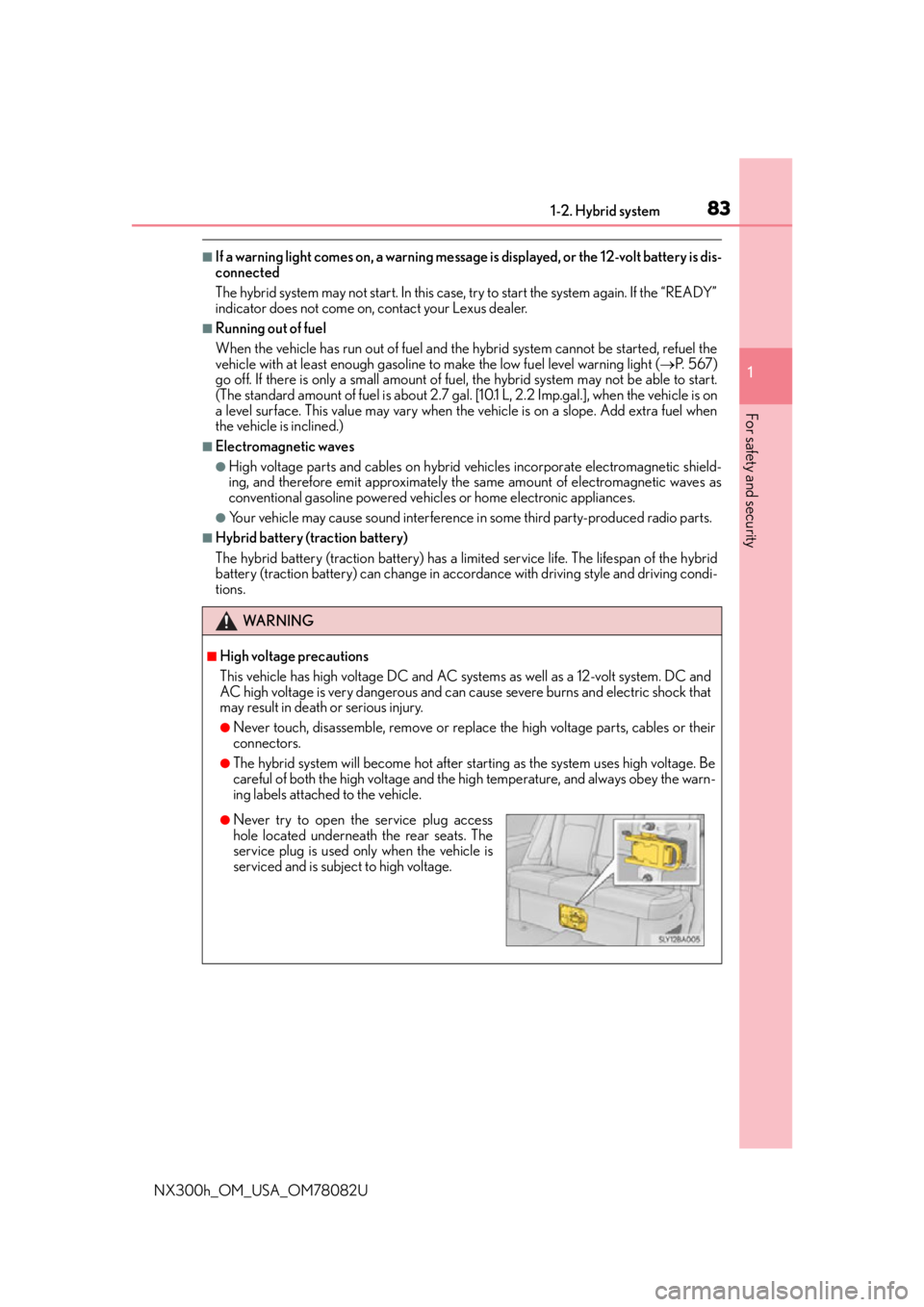
●Never try to open the service plug access
hole located underneath the rear seats. The
service plug is used only when the vehicle is
serviced and is subject to high voltage.
Page 88 of 680
881-3. Theft deterrent system
NX300h_OM_USA_OM78082U
Alarm
The alarm uses light and sound to give an alert when an intrusion is detected.
The alarm is triggered in the following situations when the alarm is set:
●A locked door is unlocked or opened in any way other than using the entry
function, wireless remote control or mech anical key. (The doors will lock again
automatically.)
●The hood is opened.
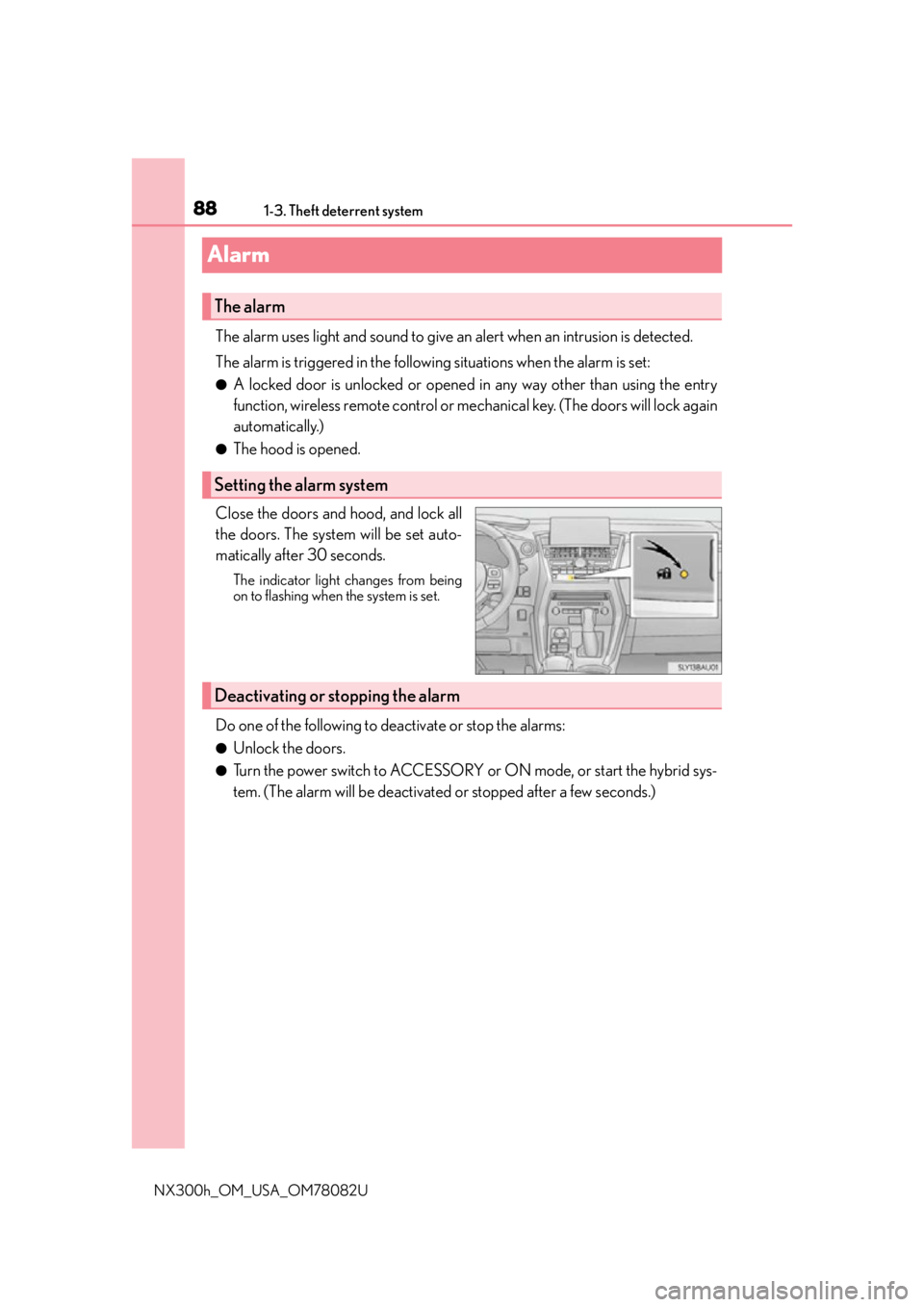
Close the doors and hood, and lock all
the doors. The system will be set auto-
matically after 30 seconds.
The indicator light changes from being
on to flashing when the system is set.
Do one of the following to de activate or stop the alarms:
●Unlock the doors.
●Turn the power switch to ACCESSORY or ON mode, or start the hybrid sys-
tem. (The alarm will be deactivated or stopped after a few seconds.)
The alarm
Setting the alarm system
Deactivating or stopping the alarm
Page 90 of 680
901-3. Theft deterrent system
NX300h_OM_USA_OM78082U
Theft prevention labels (for U.S.A.)
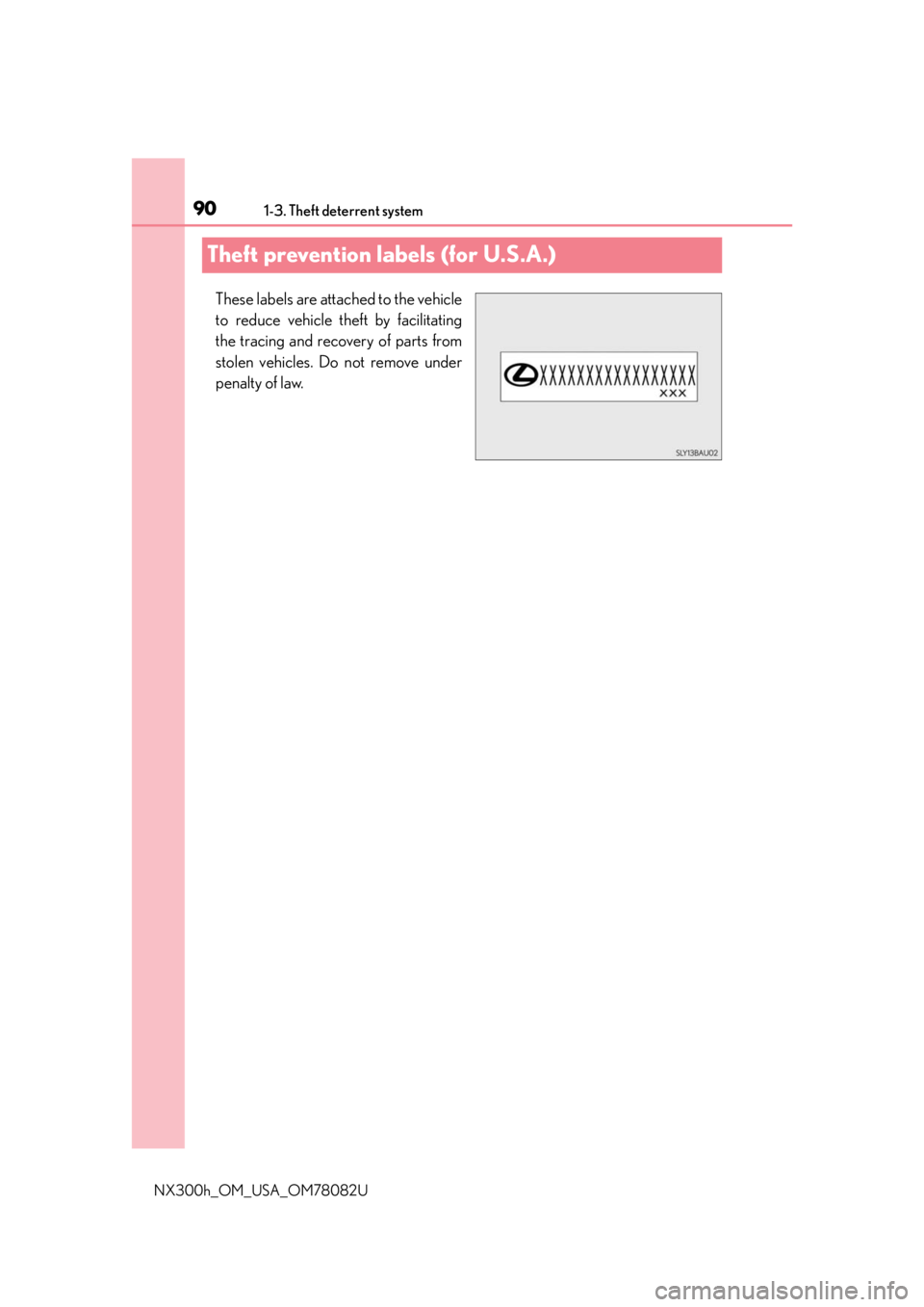
These labels are attached to the vehicle
to reduce vehicle theft by facilitating
the tracing and recovery of parts from
stolen vehicles. Do not remove under
penalty of law.
Page 94 of 680
942. Instrument cluster
NX300h_OM_USA_OM78082U
*1: These lights turn on when the power switch is turned to ON mode to indicate that a system check is being performed. They will turn off after the hybrid system is on, or
after a few seconds. There may be a malfunction in a system if the lights do not turn on,
or turn off. Have the vehicle inspected by your Lexus dealer.
*2: This light illuminates on the multi-information display.
*3: The light flashes to indicate a malfunction.
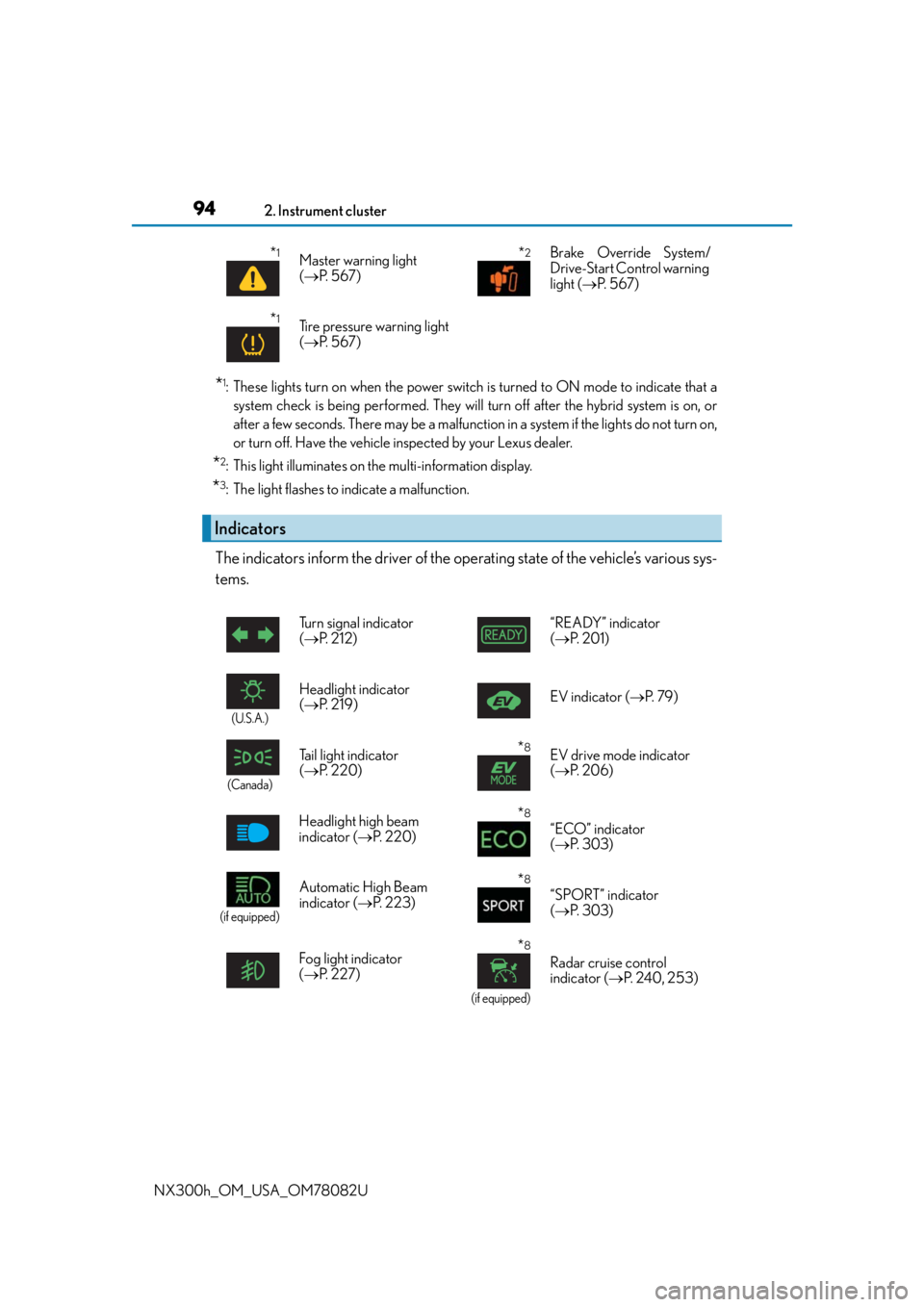
The indicators inform the driver of the operating state of the vehicle’s various sys-
tems.
*1Master warning light
( P. 5 6 7 )*2Brake Override System/
Drive-Start Control warning
light ( P. 5 6 7 )
*1Tire pressure warning light
( P. 5 6 7 )
Indicators
Turn signal indicator
( P. 212) “READY” indicator
(
P. 2 0 1 )
(U.S.A.)
Headlight indicator
( P. 2 1 9 ) EV indicator (
P. 7 9 )
(Canada)
Tail light indicator
( P. 220)*8EV drive mode indicator
( P. 2 0 6 )
Headlight high beam
indicator ( P. 220)
*8
“ECO” indicator
( P. 303)
(if equipped)
Automatic High Beam
indicator ( P. 223)*8
“SPORT” indicator
( P. 303)
Fog light indicator
( P. 2 2 7 )
*8
(if equipped)
Radar cruise control
indicator ( P. 2 4 0 , 2 5 3 )
Page 95 of 680
952. Instrument cluster
2
Instrument cluster
NX300h_OM_USA_OM78082U
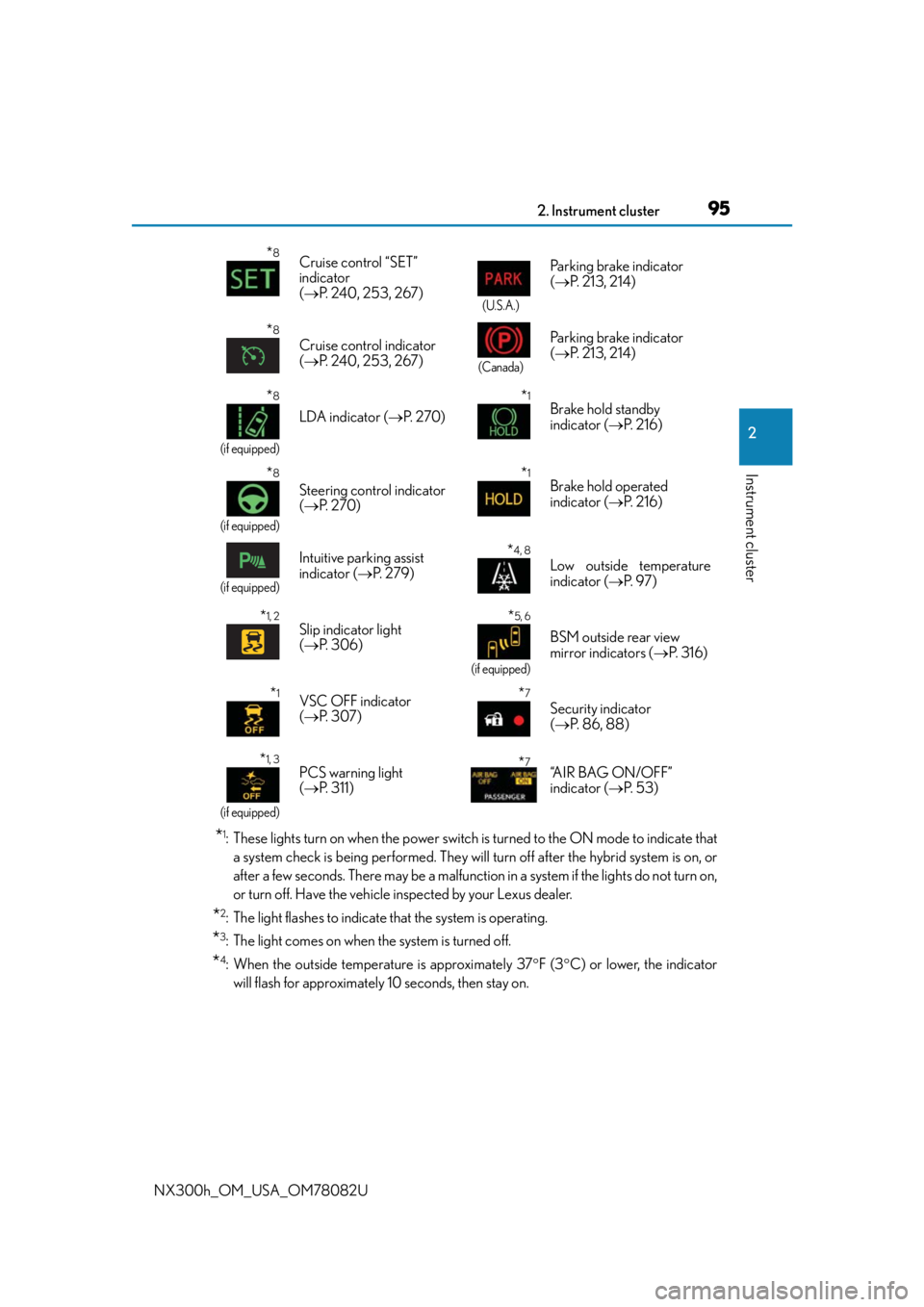
*1: These lights turn on when the power switch is turned to the ON mode to indicate thata system check is being performed. They will turn off after the hybrid system is on, or
after a few seconds. There may be a malfunction in a system if the lights do not turn on,
or turn off. Have the vehicle inspected by your Lexus dealer.
*2: The light flashes to indicate that the system is operating.
*3: The light comes on when the system is turned off.
*4: When the outside temperature is approximately 37 F (3 C) or lower, the indicator
will flash for approximately 10 seconds, then stay on.
*8Cruise control “SET”
indicator
( P. 240, 253, 267)
(U.S.A.)
Parking brake indicator
( P. 213, 214)
*8
Cruise control indicator
( P. 240, 253, 267)
(Canada)
Parking brake indicator
( P. 213, 214)
*8
(if equipped)
LDA indicator ( P. 2 7 0 )
*1Brake hold standby
indicator ( P. 2 1 6 )
*8
(if equipped)
Steering control indicator
( P. 2 7 0 )
*1Brake hold operated
indicator ( P. 2 1 6 )
(if equipped)
Intuitive parking assist
indicator ( P. 2 7 9 )*4, 8
Low outside temperature
indicator ( P. 9 7 )
*1, 2Slip indicator light
( P. 3 0 6 )*5, 6
(if equipped)
BSM outside rear view
mirror indicators ( P. 3 1 6 )
*1VSC OFF indicator
( P. 3 0 7 )*7
Security indicator
( P. 86, 88)
*1, 3
(if equipped)
PCS warning light
( P. 311) *7“A I R B A G O N / O F F ”
indicator ( P. 5 3 )
Page 96 of 680

962. Instrument cluster
NX300h_OM_USA_OM78082U
*5: In order to confirm operation, the BSM outside rear view mirror indicators illuminate in the following situations:
• When the power switch is turned to ON mode while the BSM main switch is set to
ON.
• When the BSM main switch is set to ON while the power switch is in ON mode.
If the system is functioning correctly, the BSM outside rear view mirror indicators will
turn off after a few seconds.
If the BSM outside rear view mirror indica tors do not illuminate or do not turn off,
there may be a malfunction in the system.
If this occurs, have the vehicle inspected by your Lexus dealer.
*6: This light illuminates on the outside rear view mirrors.
*7: This light illuminates on the center panel.
*8: This light illuminates on the multi-information display.
WA R N I N G
■If a safety system warning light does not come on
Should a safety system light such as the ABS and SRS airbag warning light not come on
when you start the hybrid system, this could mean that these systems are not available
to help protect you in an a ccident, which could result in death or serious injury. Have
the vehicle inspected by your Lexus dealer immediately if this occurs.
Page 98 of 680

982. Instrument cluster
NX300h_OM_USA_OM78082U
Background color of drive mode
Background color changes according to the drive mode. ( P. 303)
• Sport mode: Red
• Eco drive mode: Blue
When in Normal mode, the background color is Black.
Outside temperature
Displays the outside temperature within the range of -40 F (-40 C) to 122 F
(50 C). Low outside temperature indicator comes on when the ambient temperature
is 37 F (3 C) or lower.
Shift position and shift range
Displays the selected shift posi tion or selected shift range (P. 2 0 8 )
Speedometer
Displays the vehicle speed
Fuel gauge
Displays the quantity of fuel remaining in the tank
Multi-information display
Presents the driver with a variety of vehicle data ( P. 1 0 2 )
Displays warning messages in case of a malfunction ( P. 5 7 2 )
Odometer, trip meter and maintena nce required information display
Odometer:
Displays the total distance the vehicle has been driven
Tr i p m e t e r :
Displays the distance the vehicle has been driven since the meter was last reset.
Trip meters “A” and “B” can be used to record and display different distances indepen-
dently.
Maintenance required information:
Displays the remaining distance until the engine oil should be changed.
• Displays the maintenance required information when the power switch is ON mode.
• It can be reset from the “settings display” of the multi-information display. ( P. 1 0 2 )
Tachometer
Displays the engine speed in revolutions per minute
3
4
5
6
7
8
9
10
Page 100 of 680
1002. Instrument cluster
NX300h_OM_USA_OM78082U
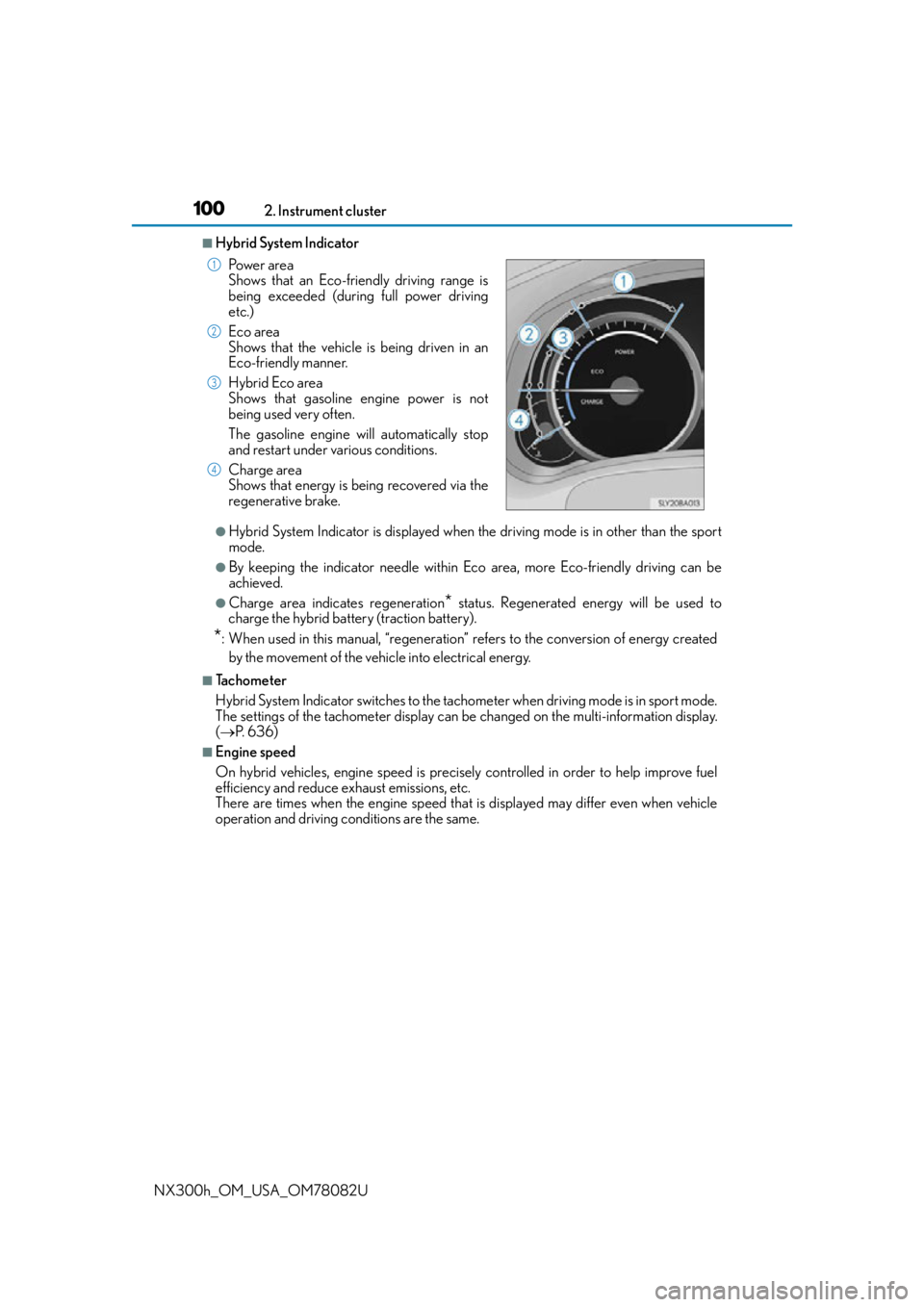
■Hybrid System Indicator
●Hybrid System Indicator is displayed when th e driving mode is in other than the sport
mode.
●By keeping the indicator needle within Ec o area, more Eco-friendly driving can be
achieved.
●Charge area indicates regeneration* status. Regenerated energy will be used to
charge the hybrid battery (traction battery).
*: When used in this manual, “regeneration” re fers to the conversion of energy created
by the movement of the vehicle into electrical energy.
■Tachometer
Hybrid System Indicator switches to the tachometer when driving mode is in sport mode.
The settings of the tachometer display can be changed on the multi-information display.
( P. 636)
■Engine speed
On hybrid vehicles, engine speed is precisely controlled in order to help improve fuel
efficiency and reduce exhaust emissions, etc.
There are times when the engine speed that is displayed may differ even when vehicle
operation and driving conditions are the same.Po w e r a r e a
Shows that an Eco-friendly driving range is
being exceeded (during full power driving
etc.)
Eco area
Shows that the vehicle is being driven in an
Eco-friendly manner.
Hybrid Eco area
Shows that gasoline engine power is not
being used very often.
The gasoline engine will automatically stop
and restart under various conditions.
Charge area
Shows that energy is being recovered via the
regenerative brake.
1
2
3
4
Page 104 of 680

1042. Instrument cluster
NX300h_OM_USA_OM78082U
■Average vehicle speed (after reset*2/a f t e r s t a r t )*1
Displays the average vehicle speed since the function was reset and the
hybrid system was started, respectively
■Elapsed time (after reset*2/after start)*1
Displays the elapsed time since the function was reset and the hybrid system
was started, respectively
■Distance (driving range/after start)*1
Displays the estimated maximum distance that can be driven with the quantity
of fuel remaining and the distance driv en after the hybrid system was started
respectively.
• This distance is computed based on your average fuel consumption. As a result,
the actual distance that can be driven may differ from that displayed.
• When only a small amount of fuel is added to the tank, the display may not be
updated.
When refueling, turn the power switch off. If the vehicle is refueled without turning
the power switch off, the display may not be updated.
■Energy monitor
P. 1 1 1
■Tire inflation pressure
Displays inflation pressure of each tire.
The inflation pressure of the spare tire will not be displayed.
■Display off
A blank screen is displayed
*1: Displayed when the item is set in “D rive Info 1” or “Drive Info 2”. (P. 636)
*2: The function can be reset by pressing th e of the meter control switches for longer
than 1 second when the item to reset is displayed.
If there is more than one item that can be reset, the item selection screen will appear.
Page 105 of 680
1052. Instrument cluster
2
Instrument cluster
NX300h_OM_USA_OM78082U
■Suspension of the settings display
In the following situations, the settings display using the meter control switches will be
suspended.
●When a warning message appears on the multi-information display
●When the vehicle begins to move
■Tire inflation pressure
●It may take a few minutes to display the tire inflation pressure after the power switch is
turned to ON mode. It may also take a few minutes to display the tire inflation pressure
after inflation pressure has been adjusted.
●“---” may be displayed if the tire information cannot be determined due to unfavorable
radio wave conditions.
●Tire inflation pressure changes with temperat ure. The displayed values may also be dif-
ferent from the values measured using a tire pressure gauge.
■When disconnecting and reconnec ting 12-volt battery terminals
The drive information will be reset.
■Liquid crystal display
P. 1 0 1
WA R N I N G
■Cautions during setting up the display
As the hybrid system needs to be operating during setting up the display, ensure that
the vehicle is parked in a place with adequate ventilation. In a closed area such as a
garage, exhaust gases includin g harmful carbon monoxide (CO) may collect and enter
the vehicle. This may lead to death or a serious health hazard.
NOTICE
■The multi-information disp lay at low temperatures
Allow the interior of the vehicle to warm up before using the liquid crystal information
display. At extremely low temperatures, th e information display monitor may respond
slowly, and display changes may be delayed.
■During setting up the display
To prevent 12-volt battery discharge, ensure that the hybrid system is operating while
setting up the display features.