ECO LEXUS NX300H 2016 Workshop Manual
[x] Cancel search | Manufacturer: LEXUS, Model Year: 2016, Model line: NX300H, Model: LEXUS NX300H 2016Pages: 680, PDF Size: 10.23 MB
Page 155 of 680
1553-3. Adjusting the seats
3
Operation of each component
NX300h_OM_USA_OM78082U
Your preferred driving position (the position of the driver’s seat, steering wheel
and outside rear view mirrors) can be recorded and recalled by pressing a but-
ton.
Three different driving positions can be recorded into memory.
■Recording procedure
Check that the shift lever is in P.
Turn the power switch to ON mode.
Adjust the driver’s seat, steering wheel and outside rear view mirrors to the
desired positions.
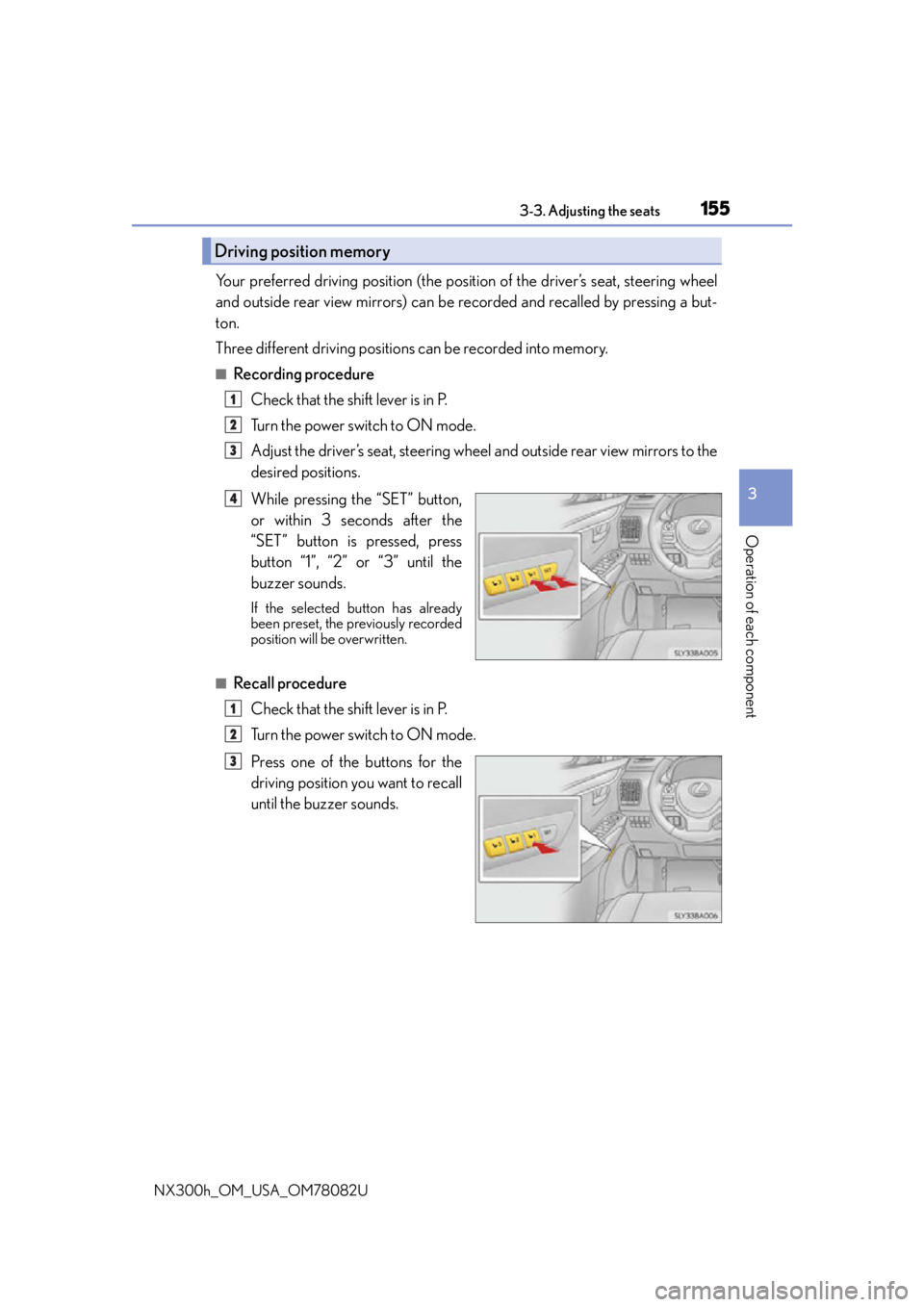
While pressing the “SET” button,
or within 3 seconds after the
“SET” button is pressed, press
button “1”, “2” or “3” until the
buzzer sounds.
If the selected button has already
been preset, the previously recorded
position will be overwritten.
■Recall procedureCheck that the shift lever is in P.
Turn the power switch to ON mode.
Press one of the buttons for the
driving position you want to recall
until the buzzer sounds.
Driving position memory
1
2
3
4
1
2
3
Page 156 of 680
1563-3. Adjusting the seats
NX300h_OM_USA_OM78082U
■To stop the position recall operation part-way through
Perform any of the following:
●Press the “SET” button.
●Press button “1”, “2” or “3”.
●Operate any of the seat adjustment switch es (only cancels seat position recall).
●Operate the tilt and telescopic steering co ntrol switch (only cancels steering wheel
position recall).
■Seat positions that can be memorized ( P. 1 4 6 )
The adjusted positions other than the position adjusted by lumbar support switch can be
recorded.
■Operating the driving position memory after turning the power switch off
Recorded seat positions can be activated up to 180 seconds after the driver’s door is
opened and another 60 seconds after it is closed again.
■In order to correctly use the dr iving position memory function
If a seat position is already in the furthest po ssible position and the seat is operated in the
same direction, the recorded position may be slightly different when it is recalled.
Each electronic key (including a card key) can be registered to recall your pre-
ferred driving position.
■Registering procedure
Record your driving position to button “1”, “2” or “3” before performing the
following:
Carry only the key you want to regist er, and then close the driver’s door.
If 2 or more keys are in the vehicle, the driving position cannot be recorded
properly.
Check that the shift lever is in P.
Turn the power switch to ON mode.
Recall the driving position that you want to record.
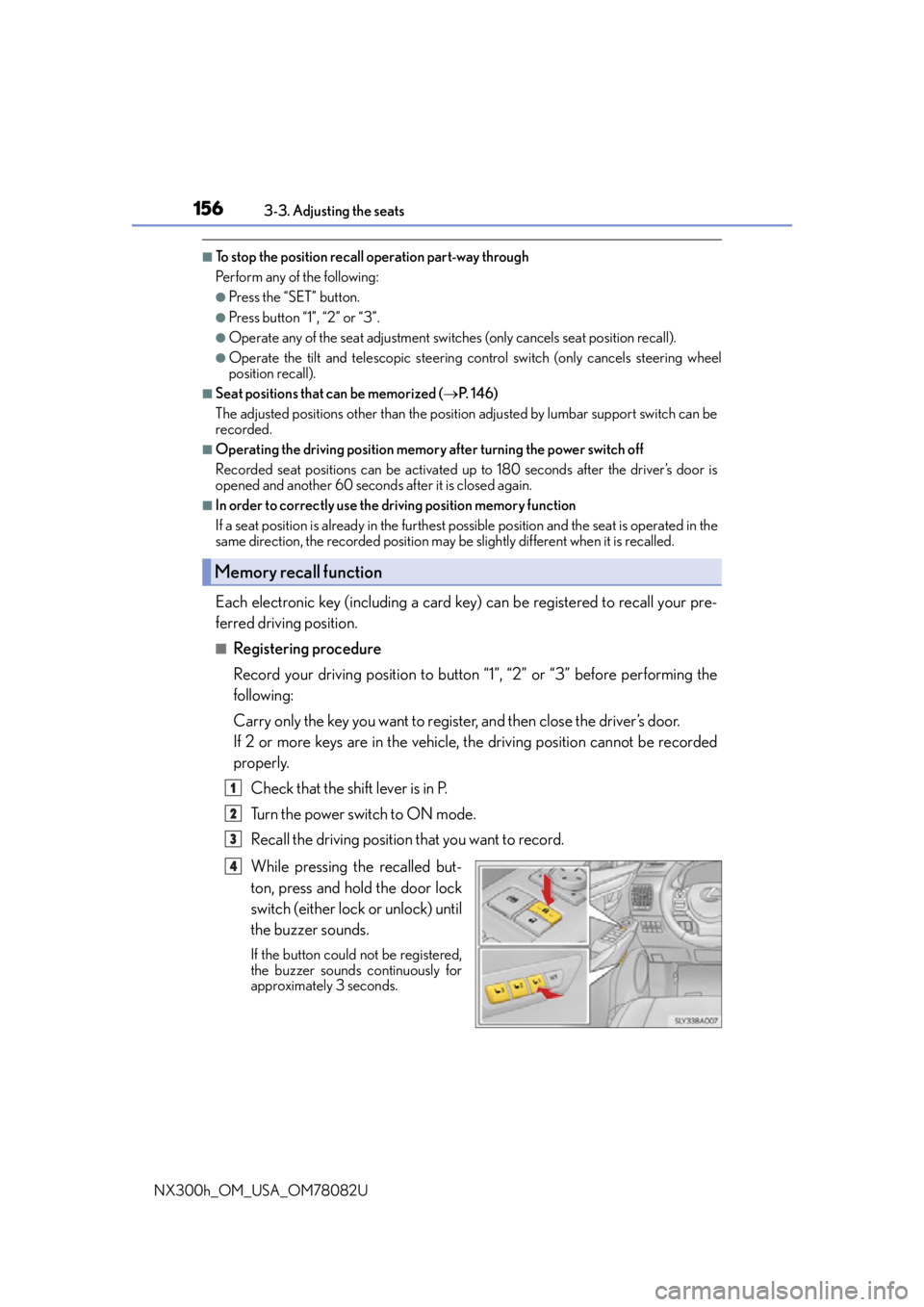
While pressing the recalled but-
ton, press and hold the door lock
switch (either lock or unlock) until
the buzzer sounds.
If the button could not be registered,
the buzzer sounds continuously for
approximately 3 seconds.
Memory recall function
1
2
3
4
Page 157 of 680
1573-3. Adjusting the seats
3
Operation of each component
NX300h_OM_USA_OM78082U
■Recall procedureCarry the electronic key that has been registered to the driving position,
and then unlock and open the driver’s door using the smart access system
with push-button start or wireless remote control.
The driving position will move to the reco rded position (not including the steering
wheel). However, the seat will move to a po sition slightly behind the recorded posi-
tion in order to make entering the vehicle easier.
If the driving position is in a position th at has already been recorded, the seat and
outside rear view mirrors will not move.
Turn the power switch to ACCESSORY mode or ON mode, or fasten a
seat belt.
The seat and steering wheel will move to the recorded position.
■Cancelation procedure
Carry only the key you want to cancel and then close the driver’s door.
If 2 or more keys are in the vehicle, the driving position cannot be canceled
properly.
Turn the power switch to ON mode.
While pressing the “SET” button, press and hold the door lock switch
(either lock or unlock) unt il the buzzer sounds twice.
If it could not be canceled, the buzzer sounds continuously for approximately 3
seconds.
■Recalling the driving position using the memory recall function
●Different driving positions can be registered for each electronic key. Therefore, the
driving position that is recalled may be different depending on the key being carried.
●If a door other than the driver’s door is unlocked with the smart access system with
push-button start, the driving position cannot be recalled. In this case, press the driving
position button which has been set.
■Customization
The unlock door settings of the memory recall function can be customized.
(Customizable features: P. 6 3 1 )
WA R N I N G
■Seat adjustment caution
Take care during seat adjustment so that th e seat does not strike the rear passenger or
squeeze your body against the steering wheel.
1
2
1
2
Page 165 of 680
1653-4. Adjusting the steering wheel and mirrors
3
Operation of each component
NX300h_OM_USA_OM78082U
WA R N I N G
■When driving the vehicle
Observe the following precautions while driving.
Failing to do so may result in loss of control of the vehicle and cause an accident, result-
ing in death or serious injury.
●Do not adjust the mirrors while driving.
●Do not drive with the mirrors folded.
●Both the driver and passenger side mirror s must be extended and properly adjusted
before driving.
■When a mirror is moving
To avoid personal injury and mirror malfunct ion, be careful not to get your hand caught
by the moving mirror.
■When the mirror defoggers are operating
Do not touch the rear view mirror surfaces, as they can become very hot and burn you.
Page 167 of 680

1673-5. Opening, closing the windows and moon roof
3
Operation of each component
NX300h_OM_USA_OM78082U
■The power windows can be operated when
The power switch is in ON mode.
■Operating the power windows after turning the hybrid system off
The power windows can be operated for approximately 45 seconds even after the
power switch is turned to ACCESSORY mode or turned off. They cannot, however, be
operated once either front door is opened.
■Up jam protection function
If an object becomes caught between the window and the window frame, window travel
is stopped and the window is opened slightly.
■Down jam protection function
When the window is opening, if a foreign obje ct malfunction within the door causes it to
be clamped, the operation stops.
■When opening and closing the window cannot be done
When the up or down jam protection function operates unusually or the door window
cannot be fully opened and cl osed, perform the following op erations with the power win-
dow switch of that door.
●Stop the vehicle, with the power switch in ON mode, continually operate the power
window switch in the one-touch closing position within 4 seconds after the up jam or
down jam protection function was activated. Otherwise, by continually operating the
power window switch in the one-touch opening position, the door window can be
opened and closed.
●If the door window cannot be opened and closed even when performing the above
operations, implement the following pr ocedure for function initialization.
Turn the power switch to ON mode.
Pull and hold the power window switch in the one-touch closing position and com-
pletely close the door window.
Release the power window switch for a moment and then resume pulling and hold-
ing the switch in the one-touch closin g position for approximately 4 seconds.
Press and hold the power window switch in the one-touch opening position and
after the door window is co mpletely opened, continue ho lding the switch for a fur-
ther 1 second or more.
Pull and hold the power window switch in the one-touch closing position, once
more, and after the door window is comple tely closed, continue holding the switch
for a further 1 second or more.
If you release the switch while the window is moving, start again from the beginning.
If the window reverses and cannot be closed or completely open, have the vehicle
inspected by your Lexus dealer.
■Door lock linked window operation
●The power windows can be opened an d closed using the mechanical key.* ( P. 5 9 2 )
●The power windows can be opened us ing the wireless remote control.* (P. 1 2 4 )
*: These settings must be customized at your Lexus dealer.
1
2
3
4
5
Page 168 of 680
1683-5. Opening, closing the windows and moon roof
NX300h_OM_USA_OM78082U
■Power windows open warning buzzer
The buzzer sounds and a message is shown on the multi-information display in the instru-
ment cluster when the power switch is turned off and the driver’s door is opened with the
power windows open.
■Customization
Setting (e.g. linked door lock operation) can be changed.
(Customizable features:
P. 6 3 1 )
WA R N I N G
Observe the following precautions.
Failing to do so may result in death or serious injury.
■Closing the windows
●The driver is responsible for all the power window operations, including the operation
for the passengers. In order to prevent acci dental operation, especially by a child, do
not let a child operate the power windows. It is possible for children and other passen-
gers to have body parts caught in the power window. Also, when riding with a child, it
is recommended to use the window lock switch. ( P. 1 6 6 )
●Check to make sure that all passengers do not have any part of their body in a posi-
tion where it could be caught when a window is being operated.
●When using the mechanical key and oper ating the power windows, operate the
power window after checking to make sure that there is no possibility of any passen-
ger having any of their body parts caught in the window. Also do not let a child oper-
ate window by the mechanical key. It is possible for children and other passengers to
get caught in the power window.
●When exiting the vehicle, turn the power swit ch off, carry the key and exit the vehicle
along with the child. There may be accidental operation, due to mischief, etc., that
may possibly lead to an accident.
■Up jam protection function
●Never use any part of your body to intent ionally activate the up jam protection func-
tion.
●The up jam protection function may not work if something gets caught just before the
window fully closes.
■Down jam protection function
●Never allow passengers to use hands, arms, cloths, etc., to intentionally activate the
down jam protection function.
●The down jam protection function may not wo rk if a foreign object gets caught just
before the window completely opens. Be careful not to get hands, arms, clothes, etc.,
caught in the window.
Page 170 of 680

1703-5. Opening, closing the windows and moon roof
NX300h_OM_USA_OM78082U
■The moon roof can be operated when
The power switch is in ON mode.
■Jam protection function
If an object is detected between the moon roof and the frame while the moon roof is clos-
ing or tilting down, travel is stoppe d and the moon roof opens slightly.
■Sunshade
The sunshade can be opened and closed manually. However, the sunshade will open
automatically when the moon roof is opened.
■Door lock linked moon roof operation
●The moon roof can be opened and closed using the mechanical key.* ( P. 5 9 2 )
●The moon roof can be opened using the wireless remote control.* ( P. 1 2 4 )
*: These settings must be cust omized at your Lexus dealer.
■When the moon roof does not close normally
Perform the following procedure:
●If the moon roof closes but then re-opens slightly
Stop the vehicle.
Press and hold the “CLOSE” switch.
*1
The moon roof will close, reopen and pause for approximately 10 seconds.*2 Then it
will close again and tilt down. Finally it will stop.
Check to make sure that the moon roof completely stops and then release the
switch.
●If the moon roof tilts down but then tilts back up
Stop the vehicle.
Press and hold the “DOWN” switch.
*1
The moon roof will close, reopen and paus e for approximately 10 seconds in the tilt
up position.
*2 Then it will close again. Finally it will stop.
Check to make sure that the moon roof has completely stopped and then release
the switch.
*1: If the switch is released at the incorrec t time, the procedure will have to be per-
formed again from the beginning.
*2: If the switch is released after the above mentioned 10 second pause, automatic operation will be disabled. In that case, perform the moon roof initialization by
referring to “When tilt up/down or moon roof opening and closing can be done but
automatic full opening and closing cannot be done” on P. 171.
If the moon roof does not fully close even after performing the above procedure cor-
rectly, have the vehicle inspected by your Lexus dealer.
1
2
3
1
2
3
Page 175 of 680
1754-1. Before driving
4
Driving
NX300h_OM_USA_OM78082U
With the brake pedal depressed, shift the shift lever to D. (P. 2 0 8 )
Pull the parking brake switch and parking brake is set manually. ( P. 2 1 4 )
Release the brake pedal and gently depress the accelerator pedal to acceler-
ate the vehicle.
Press the parking brake switch and parking brake is released manually.
( P. 2 1 4 )
■When starting off on an uphill
The hill-start assist co ntrol will activate. (P. 3 0 5 )
■For fuel-efficient driving
Keep in mind that hybrid vehicles are similar to conventional vehicles, and it is necessary
to refrain from activities such as sudden acceleration. ( P. 3 2 4 )
■Driving in the rain
●Drive carefully when it is raining, because visibility will be reduced, the windows may
become fogged-up, and th e road will be slippery.
●Drive carefully when it starts to rain, becau se the road surface will be especially slip-
pery.
●Refrain from high speeds when driving on an expressway in the rain, because there may
be a layer of water between the tires and the road surface, preventing the steering and
brakes from operating properly.
■Restraining the hybrid system output (Brake Override System)
●When the accelerator and brake pedals are de pressed at the same time, the hybrid sys-
tem output may be restrained.
●A warning message is displayed on the multi-information display while the system is
operating. If a warning message is shown on the multi-information display, read the
message and follow the instructions.
■Restraining sudden start (Drive-Start Control)
●When the following unusual op eration is performed, the hybrid system output may be
restrained.
• When the shift lever is shifted from R to D, D to R, N to R, P to D, or P to R (D includes S) with the accelerator pedal depressed, a warning message appears on
the multi-information display. If a warning message is shown on the multi-informa-
tion display, read the message and follow the instructions.
• When the accelerator pedal is depresse d too while the vehicle is in reverse.
●While Drive-Start Control is being activate d, your vehicle may have trouble escaping
from the mud or fresh snow. In such case, deactivate TRAC ( P. 307) to cancel Drive-
Start Control so that the vehicle may become able to escape from the mud or fresh
snow.
Starting off on an uphill
1
2
3
4
Page 176 of 680
1764-1. Before driving
NX300h_OM_USA_OM78082U
■Breaking in your new Lexus
To extend the life of the ve hicle, observing the followin g precautions is recommended:
●For the first 200 miles (300 km):
Avoid sudden stops.
●For the first 1000 miles (1600 km):
• Do not drive at extremely high speeds.
• Avoid sudden acceleration.
• Do not drive continuously in low gears.
• Do not drive at a constant speed for extended periods.
Vehicles with towing package
●For the first 500miles (800 km):
Do not tow a trailer.
■Operating your vehicle in a foreign country
Comply with the relevant vehi cle registration laws and confirm the availability of the cor-
rect fuel. ( P. 6 1 6 )
■Eco-friendly driving
P. 1 0 0
WA R N I N G
Observe the following precautions.
Failure to do so may result in death or serious injury.
■When starting the vehicle
Always keep your foot on the brake pedal while stopped with the “READY” indicator is
illuminated. This prevents the vehicle from creeping.
■When driving the vehicle
●Do not drive if you are unfamiliar with the location of the brake and accelerator ped-
als to avoid depressing the wrong pedal.
• Accidentally depressing th e accelerator pedal instead of the brake pedal will
result in sudden acceleration that may lead to an accident.
• When backing up, you may twist your body around, leading to difficulty in operat-
ing the pedals. Make sure to operate the pedals properly.
• Make sure to keep a correct driving posture even when moving the vehicle only slightly. This allows you to depress th e brake and accelerator pedals properly.
• Depress the brake pedal using your righ t foot. Depressing the brake pedal using
your left foot may delay response in an emergency, resulting in an accident.
●The driver should pay extra attention to pedestrians when the vehicle is powered only
by the electric motor (traction motor). As there is no engine noise, the pedestrians
may misjudge the vehicle’s movement.
●Do not drive the vehicle over or stop the vehicle near flammable materials.
The exhaust system and exhaust gases can be extremely hot. These hot parts may
cause a fire if there is any flammable material nearby.
Page 177 of 680
1774-1. Before driving
4
Driving
NX300h_OM_USA_OM78082U
WA R N I N G
Observe the following precautions.
Failure to do so may result in death or serious injury.
■When driving the vehicle
●During normal driving, do not turn off the hybrid system. Turning the hybrid system off
while driving will not cause loss of steering or braking control, however, power assist
to the steering will be lost. This will make it more difficult to steer smoothly, so you
should pull over and stop the vehicle as soon as it is safe to do so.
In the event of an emergency, such as if it becomes impossible to stop the vehicle in
the normal way: P. 5 5 7
●Use engine braking (downshift) to maintain a safe speed when driving down a steep
hill.
Using the brakes continuously may cause th e brakes to overheat and lose effective-
ness. ( P. 2 0 8 )
●Do not adjust the positions of the steering wh eel, the seat, or the inside or outside rear
view mirrors while driving.
Doing so may result in a loss of vehicle control.
●Always check that all passengers’ arms, heads or other parts of their body are not
outside the vehicle.
●AWD models: Do not drive the vehicle off-road.
This is not an AWD vehicle designed for of f-road driving. Proceed with all due cau-
tion if it becomes unavoidable to drive off-road.
●Do not drive across a river or through other bodies of water.
This may cause electric/electronic components to short circuit, damage the hybrid
system or cause other serious damage to the vehicle.
●Do not drive in excess of the speed limit. Ev en if the legal speed limit permits it, do not
drive over 85 mph (140 km/h) unless your vehicle has high-speed capability tires.
Driving over 85 mph (140 km/h) may result in tire failure, loss of control and possible
injury. Be sure to consult a tire dealer to determine whether the tires on your vehicle
are high-speed capability tires or not before driving at such speeds.