ECO LEXUS NX300H 2016 Owner's Guide
[x] Cancel search | Manufacturer: LEXUS, Model Year: 2016, Model line: NX300H, Model: LEXUS NX300H 2016Pages: 680, PDF Size: 10.23 MB
Page 106 of 680
1062. Instrument cluster
NX300h_OM_USA_OM78082U
Head-up display
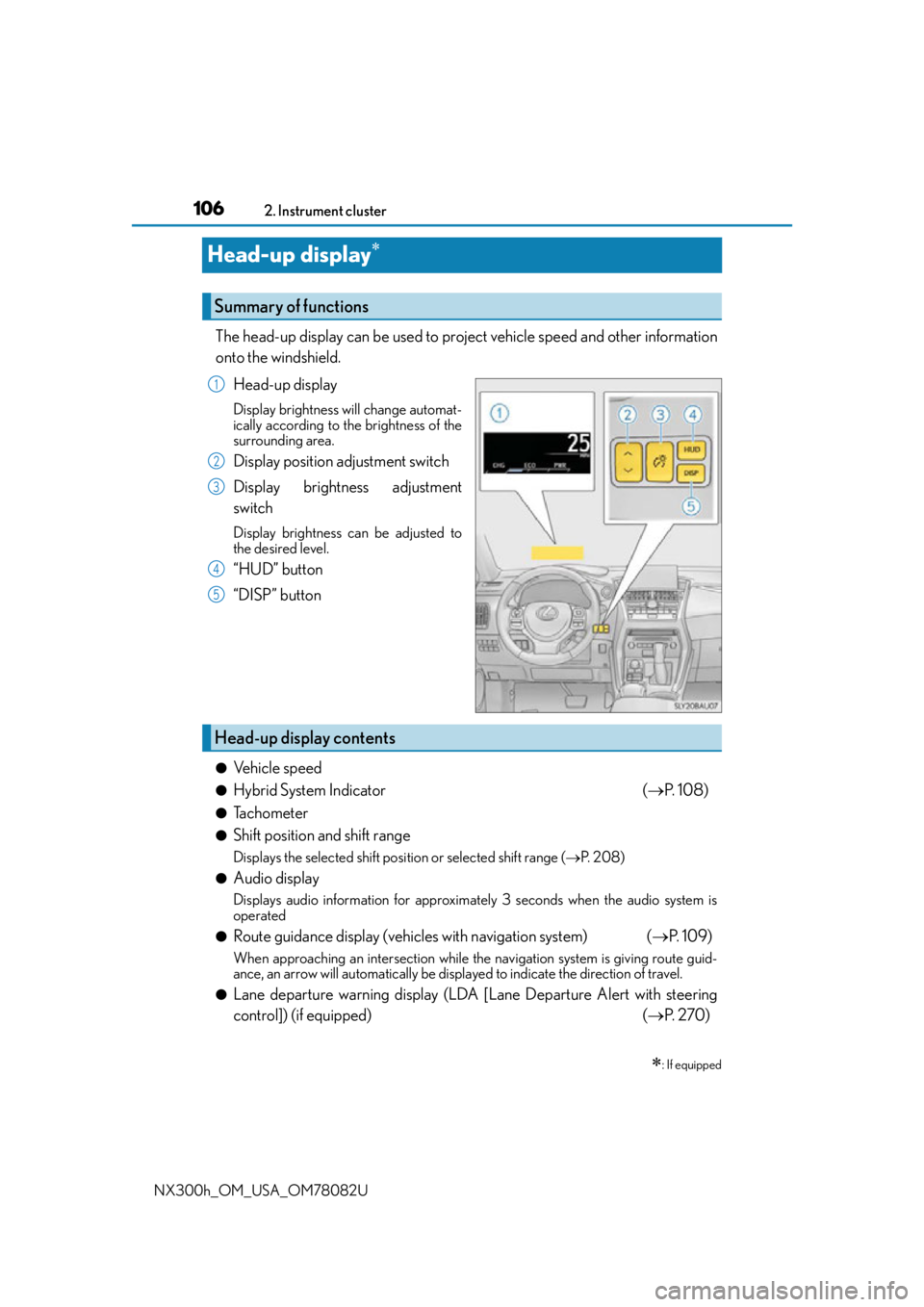
The head-up display can be used to proj ect vehicle speed and other information
onto the windshield.
Head-up display
Display brightness will change automat-
ically according to the brightness of the
surrounding area.
Display position adjustment switch
Display brightness adjustment
switch
Display brightness can be adjusted to
the desired level.
“HUD” button
“DISP” button
●Vehicle speed
●Hybrid System Indicator ( P. 1 0 8 )
●Tachometer
●Shift position and shift range
Displays the selected shift posi tion or selected shift range (P. 2 0 8 )
●Audio display
Displays audio information for approximately 3 seconds when the audio system is
operated
●Route guidance display (vehicles with navigation system) ( P. 1 0 9 )
When approaching an intersec tion while the navigation system is giving route guid-
ance, an arrow will automatically be displayed to indicate the direction of travel.
●Lane departure warning display (LDA [Lane Departure Alert with steering
control]) (if equipped) ( P. 2 7 0 )
: If equipped
Summary of functions
1
2
3
4
5
Head-up display contents
Page 108 of 680

1082. Instrument cluster
NX300h_OM_USA_OM78082U
■Adjusting the display position Higher
Lower
■Setting the brightness
The brightness of the display is automa tically adjusted in accordance with the
brightness of the surrounding environm ent. However, the brightness can also
be manually adjusted in 9 stages.
Brighter
Darker
Charge area
Shows regenerative charging.
Hybrid Eco area
Shows that gasoline engine power is not
being used very often.
The gasoline engine will automatically
stop and restart under various condi-
tions.
Eco area
Shows that the vehicle is being dr iven in an Eco-friendly manner.
Po w e r a r e a
Shows that an Eco-friendly driving range is being exceeded (during full power driving,
etc.)
Making the display easier to see
1
2
1
2
Hybrid System Indicator
1
2
3
4
Page 112 of 680
1122. Instrument cluster
NX300h_OM_USA_OM78082U
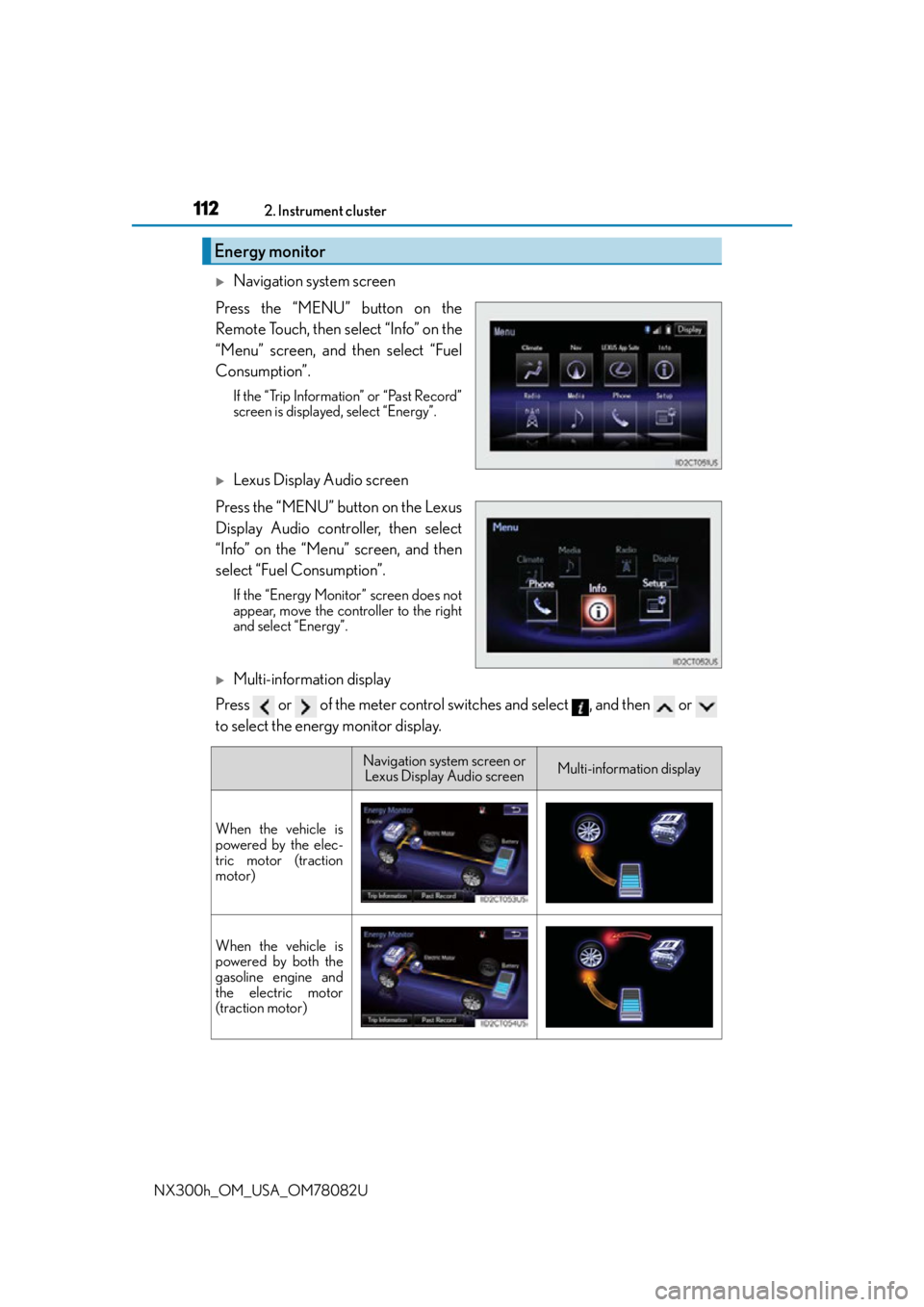
Navigation system screen
Press the “MENU” button on the
Remote Touch, then select “Info” on the
“Menu” screen, and then select “Fuel
Consumption”.
If the “Trip Information” or “Past Record”
screen is displayed, select “Energy”.
Lexus Display Audio screen
Press the “MENU” button on the Lexus
Display Audio controller, then select
“Info” on the “Menu” screen, and then
select “Fuel Consumption”.
If the “Energy Monitor” screen does not
appear, move the controller to the right
and select “Energy”.
Multi-information display
Press or of the meter control switches and select , and then or
to select the energy monitor display.
Energy monitor
Navigation system screen or Lexus Display Audio screenMulti-information display
When the vehicle is
powered by the elec-
tric motor (traction
motor)
When the vehicle is
powered by both the
gasoline engine and
the electric motor
(traction motor)
Page 114 of 680
1142. Instrument cluster
NX300h_OM_USA_OM78082U
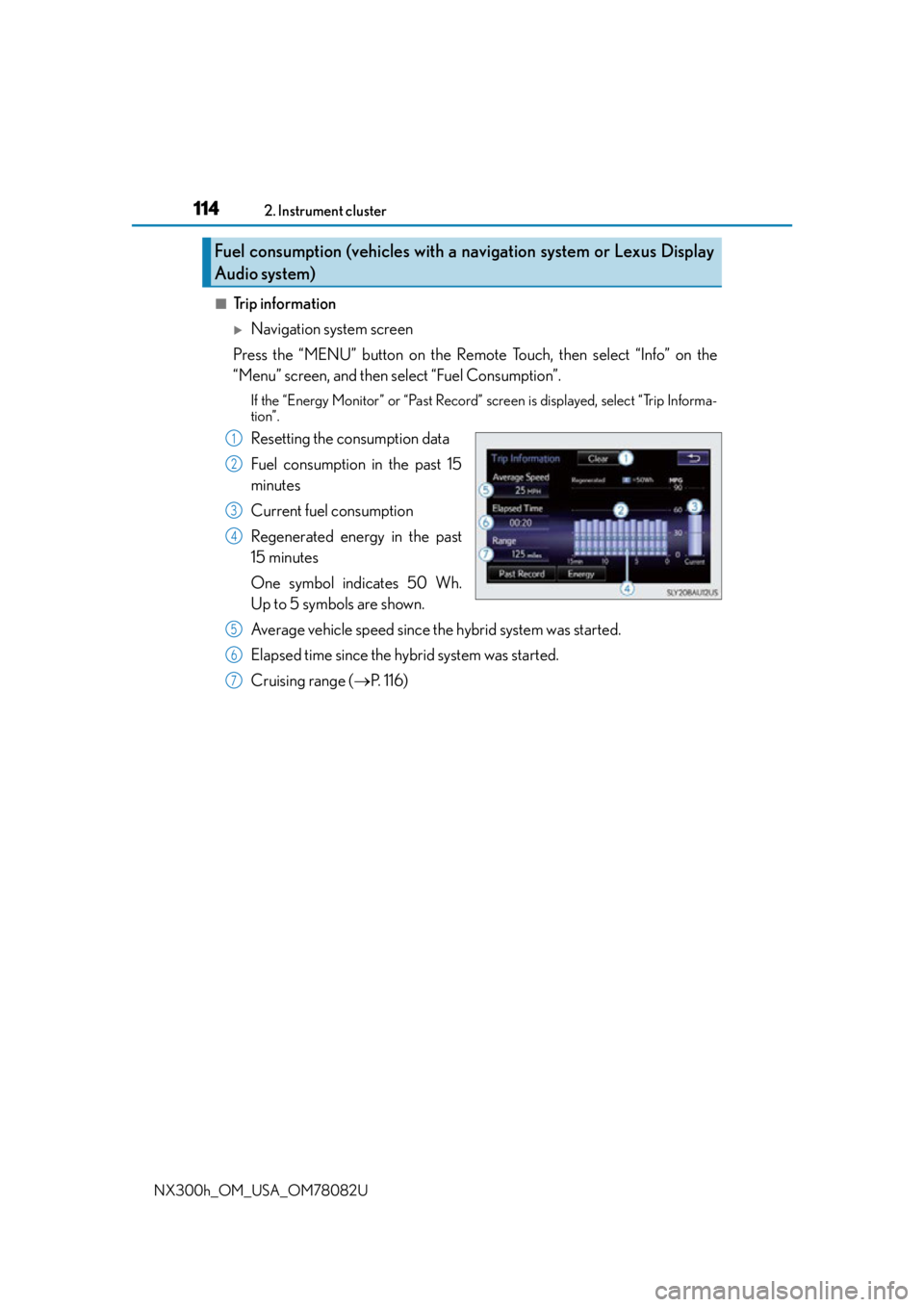
■Trip information
Navigation system screen
Press the “MENU” button on the Remote Touch, then select “Info” on the
“Menu” screen, and then select “Fuel Consumption”.
If the “Energy Monitor” or “Past Record” screen is displayed, select “Trip Informa-
tion”.
Resetting the consumption data
Fuel consumption in the past 15
minutes
Current fuel consumption
Regenerated energy in the past
15 minutes
One symbol indicates 50 Wh.
Up to 5 symbols are shown.
Average vehicle speed since the hybrid system was started.
Elapsed time since the hybrid system was started.
Cruising range ( P. 1 1 6 )
Fuel consumption (vehicles with a navigation system or Lexus Display
Audio system)
1
2
3
4
5
6
7
Page 115 of 680
1152. Instrument cluster
2
Instrument cluster
NX300h_OM_USA_OM78082U
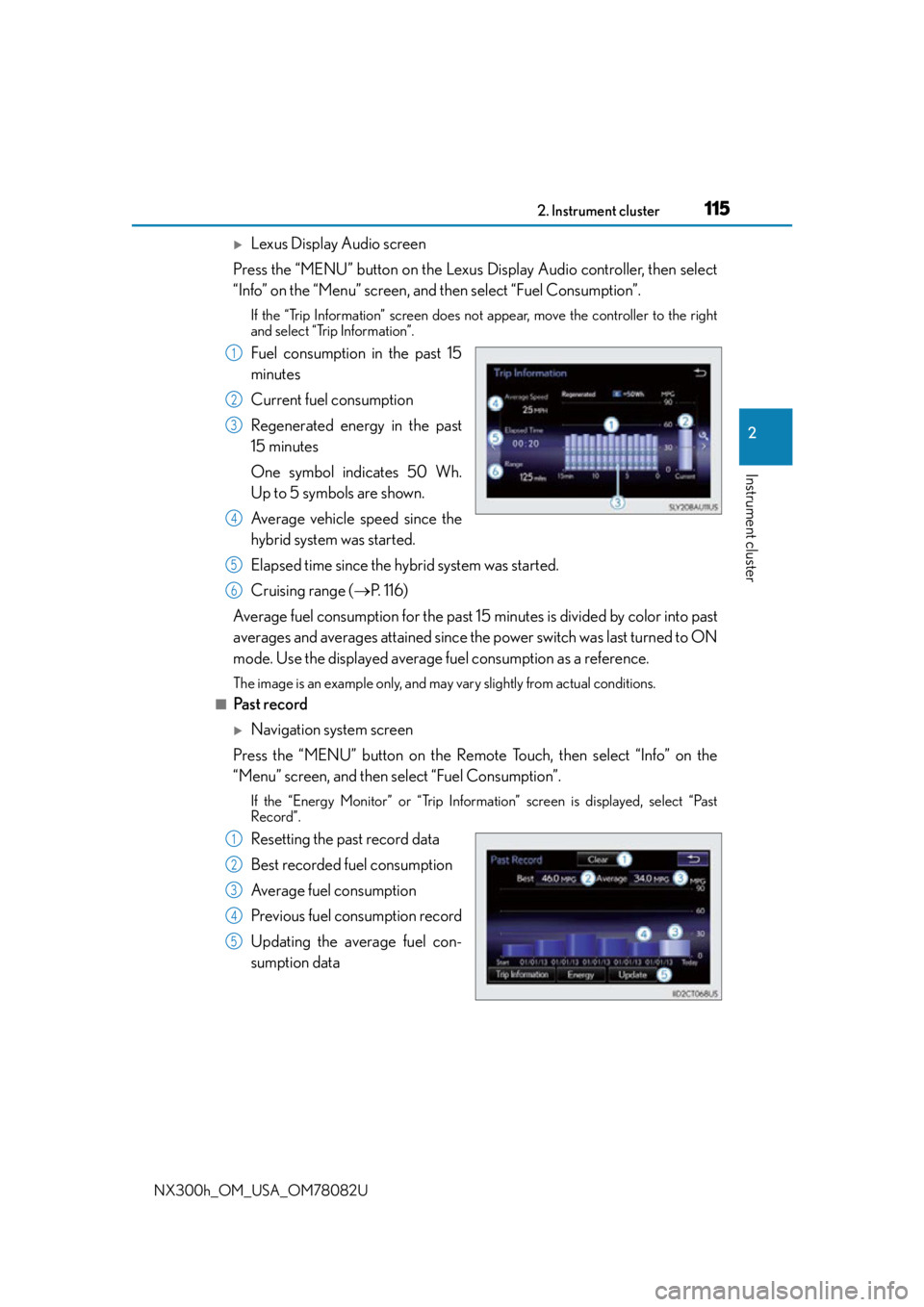
Lexus Display Audio screen
Press the “MENU” button on the Lexus Display Audio controller, then select
“Info” on the “Menu” screen, and then select “Fuel Consumption”.
If the “Trip Information” screen does not appear, move the controller to the right
and select “Trip Information”.
Fuel consumption in the past 15
minutes
Current fuel consumption
Regenerated energy in the past
15 minutes
One symbol indicates 50 Wh.
Up to 5 symbols are shown.
Average vehicle speed since the
hybrid system was started.
Elapsed time since the hybrid system was started.
Cruising range (P. 1 1 6 )
Average fuel consumption fo r the past 15 minutes is divided by color into past
averages and averages attained since th e power switch was last turned to ON
mode. Use the displayed average fuel consumption as a reference.
The image is an example only, and may vary slightly from actual conditions.
■Past record
Navigation system screen
Press the “MENU” button on the Remote Touch, then select “Info” on the
“Menu” screen, and then select “Fuel Consumption”.
If the “Energy Monitor” or “Trip Information” screen is displayed, select “Past
Record”.
Resetting the past record data
Best recorded fuel consumption
Average fuel consumption
Previous fuel consumption record
Updating the average fuel con-
sumption data
1
2
3
4
5
6
1
2
3
4
5
Page 116 of 680
1162. Instrument cluster
NX300h_OM_USA_OM78082U
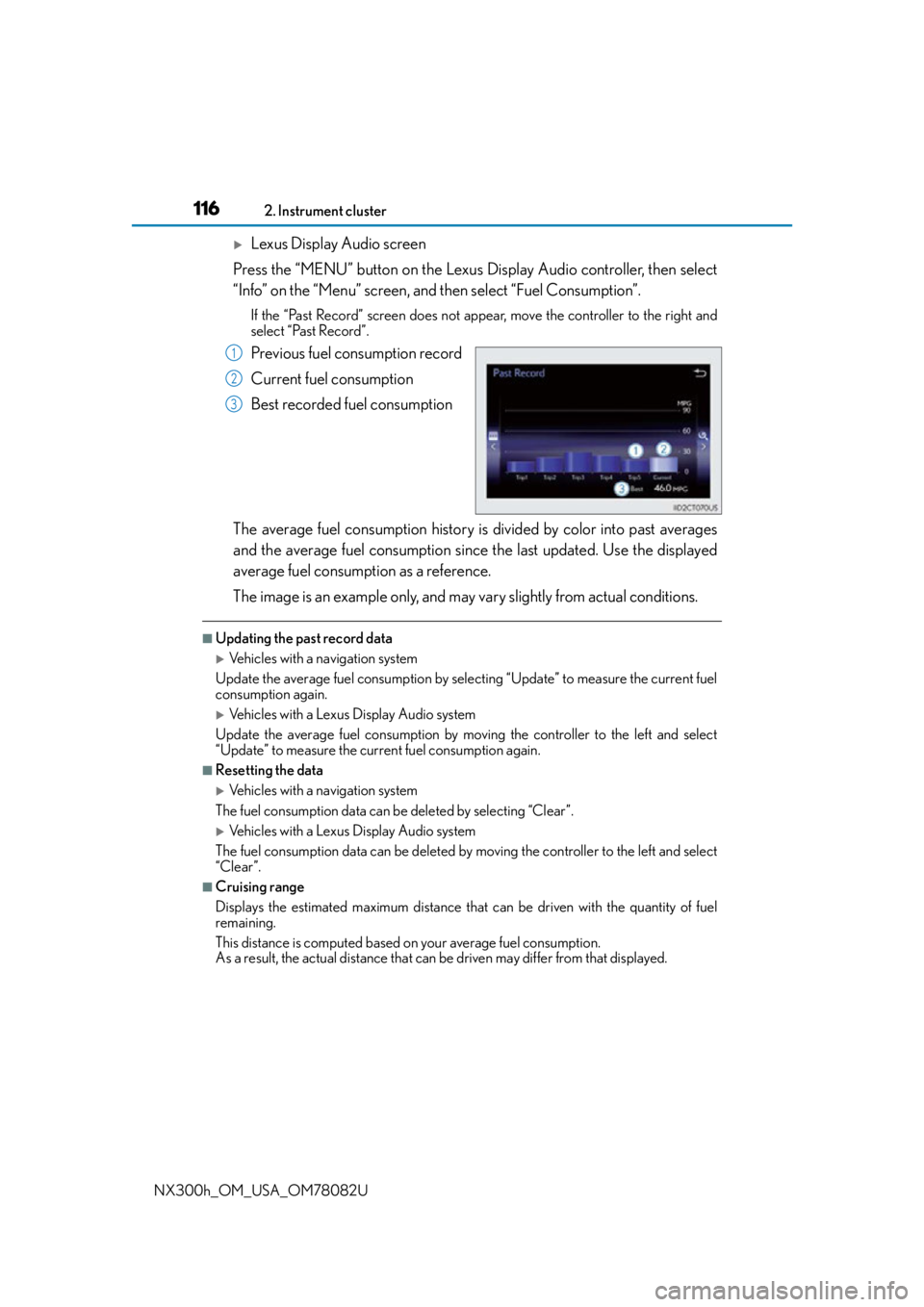
Lexus Display Audio screen
Press the “MENU” button on the Lexus Display Audio controller, then select
“Info” on the “Menu” screen, and then select “Fuel Consumption”.
If the “Past Record” screen does not appe ar, move the controller to the right and
select “Past Record”.
Previous fuel consumption record
Current fuel consumption
Best recorded fuel consumption
The average fuel consumption history is divided by color into past averages
and the average fuel consumption since the last updated. Use the displayed
average fuel consumption as a reference.
The image is an example only, and may vary slightly from actual conditions.
■Updating the past record data
Vehicles with a navigation system
Update the average fuel consumption by selecting “Update” to measure the current fuel
consumption again.
Vehicles with a Lexus Display Audio system
Update the average fuel consumption by moving the controller to the left and select
“Update” to measure the current fuel consumption again.
■Resetting the data
Vehicles with a navigation system
The fuel consumption data can be deleted by selecting “Clear”.
Vehicles with a Lexus Display Audio system
The fuel consumption data can be deleted by moving the controller to the left and select
“Clear ”.
■Cruising range
Displays the estimated maximum distance that can be driven with the quantity of fuel
remaining.
This distance is computed based on your average fuel consumption.
As a result, the actual distance that can be driven may differ from that displayed.
1
2
3
Page 119 of 680
1193-1. Key information
3
Operation of each component
NX300h_OM_USA_OM78082U
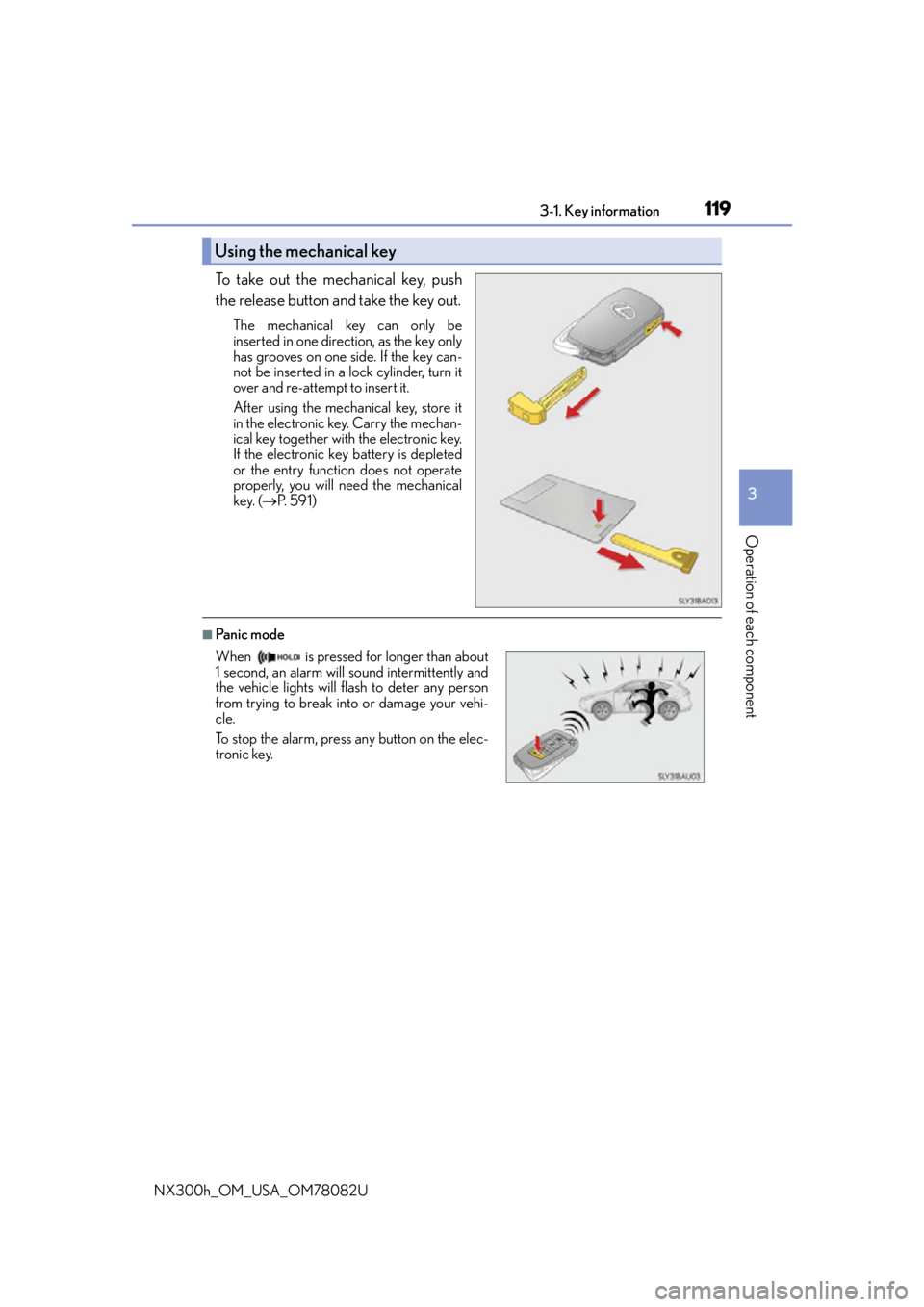
To take out the mechanical key, push
the release button and take the key out.
The mechanical key can only be
inserted in one direction, as the key only
has grooves on one side. If the key can-
not be inserted in a lock cylinder, turn it
over and re-attempt to insert it.
After using the mechanical key, store it
in the electronic key. Carry the mechan-
ical key together with the electronic key.
If the electronic key battery is depleted
or the entry function does not operate
properly, you will need the mechanical
key. (P. 5 9 1 )
■Panic mode
Using the mechanical key
When is pressed for longer than about
1 second, an alarm will sound intermittently and
the vehicle lights will flash to deter any person
from trying to break into or damage your vehi-
cle.
To stop the alarm, press any button on the elec-
tronic key.
Page 121 of 680

1213-1. Key information
3
Operation of each component
NX300h_OM_USA_OM78082U
■Electronic key battery depletion
●The standard battery life is 1 to 2 years. (The card key battery life is about a year and a
half.)
●If the battery becomes low, an alarm will sound in the cabin when the hybrid system
stops.
●As the electronic key always receives ra dio waves, the battery will become depleted
even if the electronic key is not used. The following symptoms indicate that the elec-
tronic key battery may be depleted. Replace the battery when necessary. ( P. 5 3 2 )
• The smart access system with push-button start or the wireless remote control does
not operate.
• The detection area becomes smaller.
• The LED indicator on the key surface does not turn on.
●To avoid serious deterioration, do not leave the electronic key within 3 ft. (1 m) of the
following electrical appliances that produce a magnetic field:
•TVs
• Personal computers
• Cellular phones, cordless phones and battery chargers
• Recharging cellular phones or cordless phones
• Induction cookers
• Table lamps
■Replacing the battery
P. 5 3 2
■Confirmation of the registered key number
The number of keys already registered to the vehicle can be confirmed. Ask your Lexus
dealer for details.
■If a wrong key is used
The key cylinder rotates freely to isolate inside mechanism.
Page 123 of 680
1233-1. Key information
3
Operation of each component
NX300h_OM_USA_OM78082U
NOTICE
■Handling the card key
●Do not apply excess force when inserting the mechanical key into the card key. Doing
so may damage the card key.
●If the battery or card key terminals get wet, the battery may corrode and the card key
may stop working.
If the key is dropped into water, or if drinkin g water, etc., is spilled on the key, immedi-
ately remove the battery cover and wipe the battery and terminals. (To remove the
battery cover, lightly grasp and pull it.) If the battery is corroded, have your Lexus
dealer replace the battery.
●Do not crush the battery cover or use a screwdriver to remove the battery cover.
Forcibly removing the battery cover may bend or damage the key.
●If the battery cover is frequently removed, the battery cover may become loose.
●When installing the battery, make sure to check the direction of the battery.
Installing the battery in the wrong direction may cause the battery to deplete rapidly.
●The surface of the card key may be damaged, or its coating may peel off in the follow-
ing situations:
• The card key is carried together with hard objects, such as coins and keys.
• The card key is scraped with a sharp object , such as the tip of a mechanical pencil.
• The surface of the card key is wiped with thinner or benzene.
Page 124 of 680
1243-2. Opening, closing and locking the doors
NX300h_OM_USA_OM78082U
Side doors
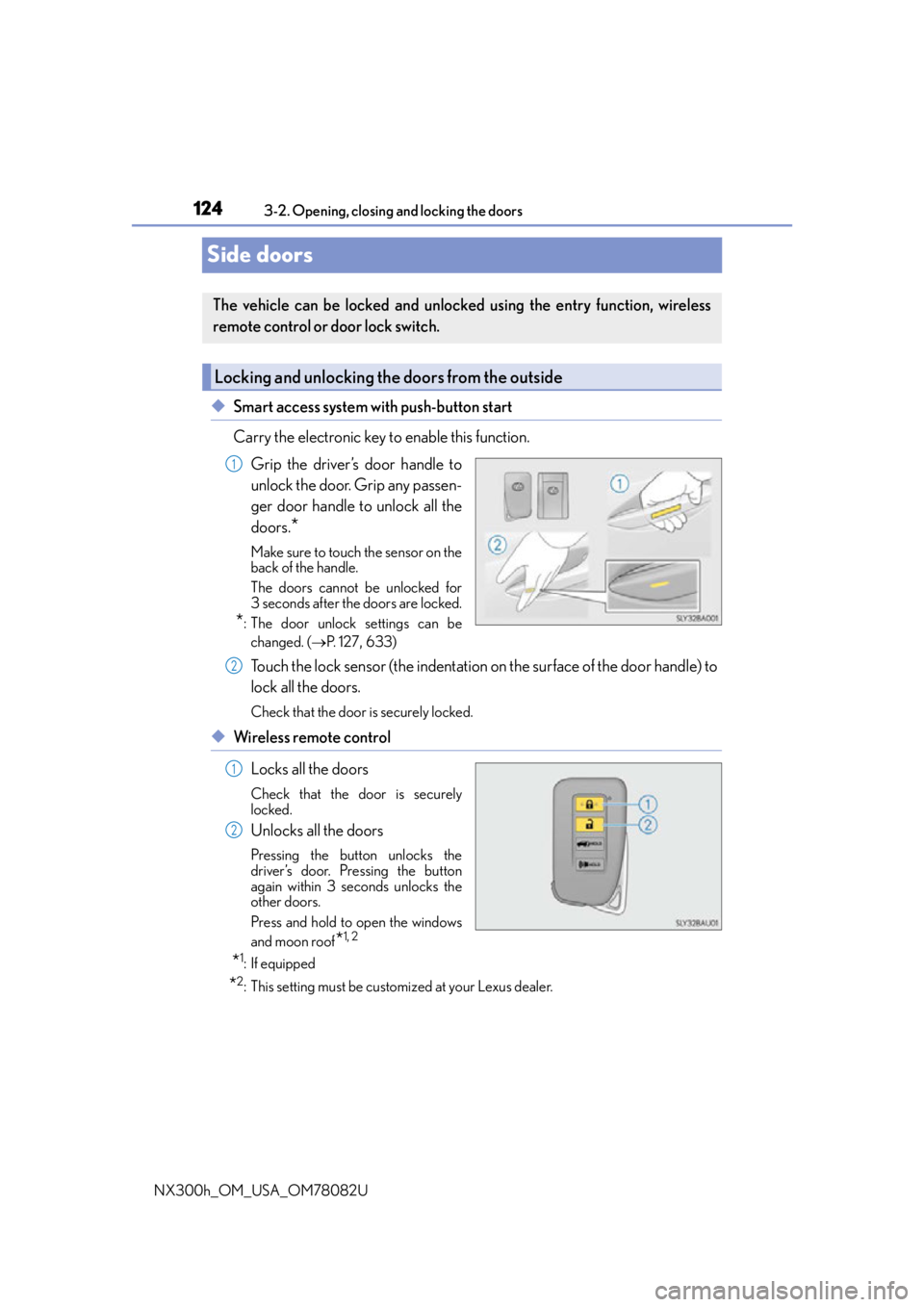
◆Smart access system with push-button start
Carry the electronic key to enable this function. Grip the driver’s door handle to
unlock the door. Grip any passen-
ger door handle to unlock all the
doors.
*
Make sure to touch the sensor on the
back of the handle.
The doors cannot be unlocked for
3 seconds after the doors are locked.
*: The door unlock settings can bechanged. ( P. 1 2 7 , 633)
Touch the lock sensor (the indentation on the surface of the door handle) to
lock all the doors.
Check that the door is securely locked.
◆Wireless remote control
Locks all the doors
Check that the door is securely
locked.
Unlocks all the doors
Pressing the button unlocks the
driver’s door. Pressing the button
again within 3 seconds unlocks the
other doors.
Press and hold to open the windows
and moon roof
*1, 2
*1:If equipped
*2: This setting must be customized at your Lexus dealer.
The vehicle can be locked and unlock ed using the entry function, wireless
remote control or door lock switch.
Locking and unlocking the doors from the outside
1
2
1
2