battery LEXUS NX300h 2018 Owner's Manual
[x] Cancel search | Manufacturer: LEXUS, Model Year: 2018, Model line: NX300h, Model: LEXUS NX300h 2018Pages: 460, PDF Size: 13.57 MB
Page 104 of 460

104 3-1. Key information
LEXUS NX300h Owners Manu-
al_USA_OM78212U The electronic keys are equipped with
the following wireless remote control:
Locks all the doors ( → P.106)
Unlocks all the doors ( → P.106)
Opens the windows and moon
roof *1, 2
( → P.106)
Opens and closes the power back
door *1
( → P.113)
Sounds the alarm ( → P.104)*1
: If equipped *2
: This setting must be customized at your
Lexus dealer.
■
Theft deterrent panic mode
When is pressed for longer than
about 1 second, an alarm will sound inter- mittently and the vehicle lights will flash to
deter any person from trying to break into
or damage your vehicle.
To stop the alarm, press any button on the
electronic key.
■
Back door reserve lock function (vehi-
cles with power back door)
This function is a function which reserves
locking of all doors, beforehand, when the
back door is open. When the follow is done,
all the doors except the back door are
locked and then back door will also be
locked at the same time it is closed.
1 Close all doors, except the back door.
2 Push the wireless lock button during the
automatic closing operation of the back
door.
To take out the mechanical key, push
the release button and take the key out. The mechanical key can only be inserted in
one direction, as the key only has grooves
on one side. If the key cannot be inserted in
a lock cylinder, turn it over and re-attempt
to insert it.
After using the mechanical key, store it in
the electronic key. Carry the mechanical
key together with the electronic key. If the
electronic key battery is depleted or the
entry function does not operate properly,
you will need the mechanical key.
( → P.387)NOTICE●
The surface of the card key may be
damaged, or its coating may peel off in
the following situations:
• The card key is carried together with
hard objects, such as coins and keys.
• The card key is scraped with a sharp
object, such as the tip of a mechanical
pencil.
• The surface of the card key is wiped
with thinner or benzene.
Wireless remote control
A
B
C
D
E Using the mechanical key
Page 108 of 460

108 3-2. Opening, closing and locking the doors
LEXUS NX300h Owners Manu-
al_USA_OM78212U ■
Door lock buzzer
If an attempt to lock the doors is made when
a door is not fully closed, a buzzer sounds
continuously for 5 seconds. Fully close the
door to stop the buzzer, and lock the vehi-
cle once more. ■
Setting the alarm
Locking the doors will set the alarm system.
( → P.71)■
Conditions affecting the operation of
the smart access system with push-but-
ton start or wireless remote control
→ P.123■
If the smart access system with push-
button start or the wireless remote con-
trol does not operate properly●
Use the mechanical key to lock and
unlock the doors. ( → P.387)●
Replace the key battery with a new one if
it is depleted. ( → P.347)■
Customization
Settings (e.g. unloc king function using a
key) can be changed. (Customizable fea-
tures: → P.419) ■
Using the door lock switch
1 Locks all the doors
2 Unlocks all the doorsWARNING■
To prevent an accident
Observe the following precautions while
driving the vehicle.
Failure to do so may result in a door
opening and an occupant falling out,
resulting in death or serious injury. ●
Ensure that all doors are properly
closed and locked.
●
Do not pull the inside handle of the
doors while driving.
Be especially care ful for the front
doors, as the door s may be opened
even if the inside lock buttons are in
locked position.
●
Set the rear door ch ild-protector locks
when children are seated in the rear
seats. ■
When opening or closing a door
Check the surroundings of the vehicle
such as whether the vehicle is on an
incline, whether there is enough space
for a door to open and whether a strong
wind is blowing. When opening or clos-
ing the door, hold the door handle tightly
to prepare for any unpredictable move-
ment. ■
When using the wire less remote con-
trol and operating the power windows
or moon roof (if equipped)
Operate the power window or moon
roof after checking to make sure that
there is no possibility of any passenger
having any of their body parts caught in
the window or moon roof. Also do not let
a child operate window by the mechani-
cal key. It is possible for children and
other passengers to get caught in the
power window or moon roof.
Unlocking and locking the doors
from the inside
Page 116 of 460

116 3-2. Opening, closing and locking the doors
LEXUS NX300h Owners Manu-
al_USA_OM78212U ter part of the rear bu mper, such as in the
rain or in a car wash●
When dirt is wiped off the lower center
part of the rear bumper●
When a metal object is brought near the
lower center part of the rear bumper●
When a vehicle cover is installed or
removed●
When pets or other moving things sud-
denly enter the area below the rear
bumper●
When attempting to remove an object
from below the lower center part of the
rear bumper●
When attempting to remove snow, etc.
from below the lower center part of the
rear bumper■
Situations in which the kick sensor does
not operate properly (vehicles with
power back door and kick sensor)
If the kick sensor does not operate in the
following situations, use the back door
opener switch or powe r back door switch
or wireless remote control to open the
power back door. ( → P.113)●
When the rear bumper is subjected to
strong impact●
When an external radio wave source
interferes with the communication
between the vehicle and electronic key
( → P.123)●
When a large amount of water is kept
applying to the lower center part of the
rear bumper, such as in heavy rain●
When the vehicle is being washed and
water is kept applying to lower center
part of the rear bumper
●
When the lower center part of the rear
bumper is covered with mud, snow, ice,
etc.
●
When a metal object, etc., such as a tow-
ing hitch is installed near the lower center
part of the rear bumper
●
When the vehicle has been parked for a
while near objects that may move and
contact the lower center part of the rear
bumper, such as grass or trees ●
When the vehicle is parked at an area
where an electric field is generated, such
as a road with an el ectric snow melting
system or parking meters ■
When reconnecting the 12-volt battery
To enable the power back door to operate
properly, close the back door manually. ■
Jam protection function
Sensors are installed in the right and left
sides of the power back door. When the
door is automatically closing and the sen-
sors are pushed due to an object being
clamped, etc., the jam protection function
operates.
From that position the door automatically
moves a little in the opposite direction and
then the function stops.
■
If the back door opener is inoperative
The back door can be unlocked from the
inside.
1 Remove the cover.
To protect the cover, place a rag between
the flathead screwdri ver and the cover as
shown in the illustration.
2 Move the lever.
Page 117 of 460

1173-2. Opening, closing and locking the doors
LEXUS NX300h Owners Manu-
al_USA_OM78212U 3
Before driving ■
Customization
Settings (e.g. back door automatic open
and stop position) can be changed. (Cus-
tomizable features: → P.427)
WARNING■
Back door closer●
In the event that the back door is left
slightly open, the back door closer will
automatically close it to the fully closed
position. It takes several seconds
before the back door closer begins to
operate. Be careful not to catch fingers
or anything else in the back door, as
this may cause bone fractures or other
serious injuries.
●
Use caution when using the back door
closer as it still operates when the
power back door system is canceled.
■
Power back door
Observe the following precautions when
operating the power back door.
Failure to do so may cause death or seri-
ous injury.
●
Check the safety of the surrounding
area to make sure there are no obsta-
cles or anything that could cause any
of your belongings to get caught. ●
If anyone is in the vicinity, make sure
they are safe and let them know that
the back door is about to open or
close. ●
If the power back door system is
turned off with the main switch while
the back door is operating automati-
cally, the automatic operation is
stopped. The back door then has to be
operated manually. Take extra care
when on an incline, as the back door
may open or close unexpectedly. ●
If the operating conditions of the
power back door are no longer met, a
buzzer may sound and the back door
may stop opening or closing. The back
door then has to be operated manu-
ally. Take extra care when on an incline,
as the back door may open or close
abruptly. ●
On an incline, the back door may sud-
denly shut after it opens. Make sure
the back door is fully open and secure. ●
In the following situations, the power
back door may detect an abnormality
and automatic operation may be
stopped. In this case, the back door
has to be operated manually. Take
extra care when on an incline, as the
back door may open or close abruptly.
• When the back door contacts an
obstacle
• When the 12-volt battery voltage sud-
denly drops, such as when the power
switch is turned to power ON mode or
the hybrid system is started during
automatic operation
●
If a bicycle carrier or similar heavy
object is attached to the back door, the
power back door may not operate,
causing itself to malfunction, or the
back door may suddenly shut again
after being opened, causing some-
one’s hands, head or neck to be caught
and injured. When installing an acces-
sory part to the back door, using a
genuine Lexus part is recommended.
Page 123 of 460

1233-2. Opening, closing and locking the doors
LEXUS NX300h Owners Manu-
al_USA_OM78212U 3
Before driving ■
When “Smart Access System Malfunc-
tion See Owner’s Manual” will be dis-
played on the multi-information display
The system may be ma lfunctioning. Have
the vehicle inspected by your Lexus dealer
immediately. ■
Battery-saving function
The battery-saving fu nction will be acti-
vated in order to prevent the electronic key
battery and the 12-volt battery from being
discharged while the vehicle is not in opera-
tion for a long time. ●
In the following situations, the smart
access system with pu sh-button start may
take some time to unlock the doors.
• The electronic key has been left in an
area of approximately 6 ft. (2 m) of the
outside of the vehicle for 10 minutes or
longer.
• The smart access system with push-but-
ton start has not been used for 5 days or
longer.
●
If the smart access system with push-but-
ton start has not been used for 14 days or
longer, the doors cannot be unlocked at
any doors except the driver’s door. In this
case, take hold of the driver’s door han-
dle, or use the wireless remote control or
the mechanical key, to unlock the doors.
■
Turning an electronic key to battery-
saving mode
When battery-saving mode is set, battery
depletion is minimized by stopping the elec- tronic key from receiving radio waves.
Press twice while pressing and
holding .
Confirm that the electronic key indicator
flashes 4 times. While the battery-saving
mode is set, the smart access system with
push-button start cannot be used. To cancel
the function, press any of the electronic key
buttons.
■
Conditions affecting operation
The smart access system with push-button
start, wireless remote control and immobi-
lizer system use weak radio waves. In the
following situations, the communication
between the electronic key and the vehicle
may be affected, preventing the smart
access system with push-button start, wire-
less remote control and immobilizer system
from operating properly. (Ways of coping:
→ P.387) ●
When the electronic key battery is
depleted ●
Near a TV tower, electric power plant,
gas station, radio stat ion, large display,
airport or other fac ility that generates
strong radio waves or electrical noise ●
When the electronic key is in contact
with, or is covered by the following metal-
lic objects
• Cards to which aluminum foil is attached
• Cigarette boxes that have aluminum foil
inside
• Metallic wallets or bags
•Coins
• Hand warmers made of metal
• Media such as CDs and DVDs
●
When other wireless keys (that emit radio
waves) are being used nearby
●
When carrying the electronic key
together with the following devices that Situation Correction proce-
dure
The power switch
was turned to
ACCESSORY
mode while the
driver’s door was
open (The driver’s
door was opened
when the power
switch was in
ACCESSORY
mode). Turn the power
switch off and close
the driver’s door.
Page 124 of 460

124 3-2. Opening, closing and locking the doors
LEXUS NX300h Owners Manu-
al_USA_OM78212U emit radio waves
• Portable radio, cellular phone, cordless
phone or other wireless communication
devices
• Another vehicle’s electronic key or a
wireless key that emits radio waves
• Personal computers or personal digital
assistants (PDAs)
• Digital audio players
• Portable game systems ●
If window tint with a metallic content or
metallic objects are attached to the rear
window●
When the electronic key is placed near a
battery charger or electronic devices■
Note for the entry function●
Even when the electronic key is within the
effective range (detection areas), the sys-
tem may not operate properly in the fol-
lowing cases:
• The electronic key is too close to the win-
dow or outside door handle, near the
ground, or in a high place when the doors
are locked or unlocked.
• The electronic key is near the ground or
in a high place, or too close to the rear
bumper center when the back door is
opened.
• The electronic key is on the instrument
panel, luggage room, floor, or in the door
pockets or glove box when the hybrid
system is started or power switch modes
are changed.●
Do not leave the electronic key on top of
the instrument panel or near the door
pockets when exiting the vehicle.
Depending on the radio wave reception
conditions, it may be detected by the
antenna outside the cabin and the door
will become lockable from the outside,
possibly trapping the electronic key
inside the vehicle.
●
As long as the electron ic key is within the
effective range, the doors may be locked
or unlocked by anyone.
●
Even if the electronic key is not inside the
vehicle, it may be possible to start the
hybrid system if the electronic key is near
the window.
●
The doors may unlock if a large amount
of water splashes on the door handle, such as in the rain or in a car wash when
the electronic key is within the effective
range. (The door will automatically be
locked after approximately 60 seconds if
the doors are not opened and closed.) ●
If the wireless remote control is used to
lock the doors when the electronic key is
near the vehicle, there is a possibility that
the door may not be unlocked by the
entry function. (Use the wireless remote
control to unlock the doors.) ●
Touching the door lock sensor while
wearing gloves may delay or prevent lock
operation. Remove the gloves and touch
the lock sensor again. ●
When the lock operation is performed
using the lock sensor, recognition signals
will be shown up to two consecutive
times. After this, no recognition signals
will be given. ●
If the door handle becomes wet while the
electronic key is within the effective
range, the door may lock and unlock
repeatedly. In that case, follow the follow-
ing correction procedures to wash the
vehicle:
• Place the electronic key in a location 6 ft.
(2 m) or more away from the vehicle.
(Take care to ensure that the key is not
stolen.)
• Set the electronic key to battery-saving
mode to disable the smart access system
with push-button start. ( → P.123)●
If the electronic key is inside the vehicle
and a door handle becomes wet during a
car wash, a message may be shown on
the multi-information display and a
buzzer will sound outside the vehicle. To
turn off the alarm, lock all the doors.
●
The lock sensor may not work properly if
it comes into contact with ice, snow, mud,
etc. Clean the lock sensor and attempt to
operate it again.
●
A sudden approach to the effective
range or door handle may prevent the
doors from being unlocked. In this case,
return the door handle to the original
position and check that the doors unlock
before pulling the door handle again.
●
If there is another electronic key in the
detection area, it may take slightly longer
Page 168 of 460
168 4-2. Driving procedures
LEXUS NX300h Owners Manu-
al_USA_OM78212U 4-2.Driving procedures
1 Check that the parking brake is set.
2 Check that the shift lever is in P.
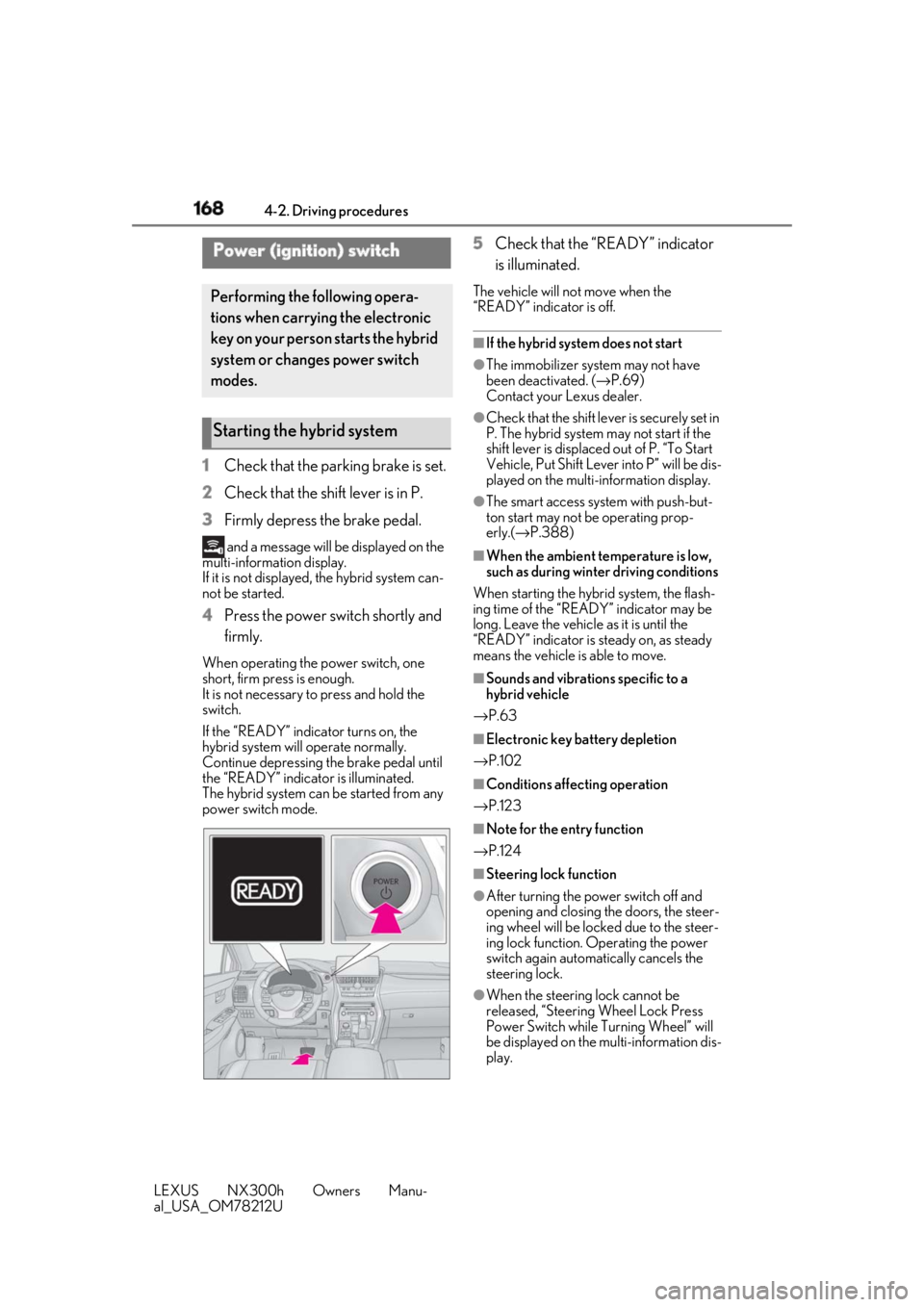
3 Firmly depress the brake pedal. and a message will be displayed on the
multi-information display.
If it is not displayed, the hybrid system can-
not be started.
4 Press the power switch shortly and
firmly.When operating the power switch, one
short, firm press is enough.
It is not necessary to press and hold the
switch.
If the “READY” indicator turns on, the
hybrid system will operate normally.
Continue depressing the brake pedal until
the “READY” indicator is illuminated.
The hybrid system can be started from any
power switch mode. 5 Check that the “READY” indicator
is illuminated. The vehicle will not move when the
“READY” indicator is off. ■
If the hybrid system does not start ●
The immobilizer system may not have
been deactivated. ( → P.69)
Contact your Lexus dealer. ●
Check that the shift leve r is securely set in
P. The hybrid system may not start if the
shift lever is displaced out of P. “To Start
Vehicle, Put Shift Lever into P” will be dis-
played on the multi-information display. ●
The smart access system with push-but-
ton start may not be operating prop-
erly.( → P.388)■
When the ambient temperature is low,
such as during winter driving conditions
When starting the hybrid system, the flash-
ing time of the “READY” indicator may be
long. Leave the vehicle as it is until the
“READY” indicator is steady on, as steady
means the vehicle is able to move. ■
Sounds and vibrations specific to a
hybrid vehicle
→ P.63 ■
Electronic key battery depletion
→ P.102 ■
Conditions affecting operation
→ P.123 ■
Note for the entry function
→ P.124
■
Steering lock function
●
After turning the power switch off and
opening and closing the doors, the steer-
ing wheel will be lock ed due to the steer-
ing lock function. Operating the power
switch again automatically cancels the
steering lock.
●
When the steering lock cannot be
released, “Steering Wheel Lock Press
Power Switch while Turning Wheel” will
be displayed on the multi-information dis-
play.Power (ignition) switch Performing the following opera-
tions when carryin g the electronic
key on your person starts the hybrid
system or changes power switch
modes.
Starting the hybrid system
Page 169 of 460
1694-2. Driving procedures
LEXUS NX300h Owners Manu-
al_USA_OM78212U 4
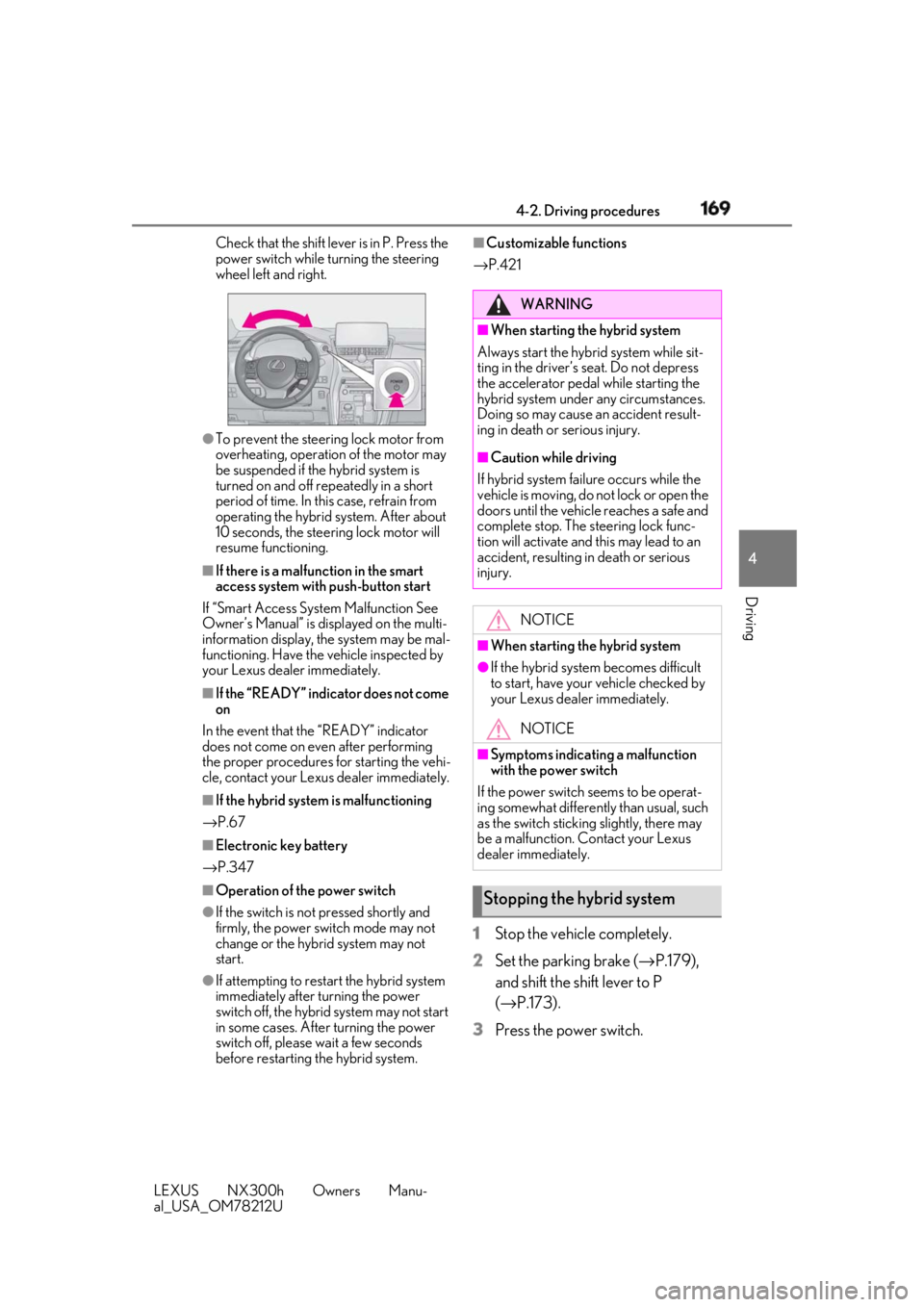
Driving Check that the shift leve r is in P. Press the
power switch while turning the steering
wheel left and right.
●
To prevent the steering lock motor from
overheating, operation of the motor may
be suspended if the hybrid system is
turned on and off repeatedly in a short
period of time. In this case, refrain from
operating the hybrid system. After about
10 seconds, the stee ring lock motor will
resume functioning.■
If there is a malfun ction in the smart
access system with push-button start
If “Smart Access System Malfunction See
Owner’s Manual” is di splayed on the multi-
information display, the system may be mal-
functioning. Have the vehicle inspected by
your Lexus dealer immediately. ■
If the “READY” indicator does not come
on
In the event that the “READY” indicator
does not come on even after performing
the proper procedures for starting the vehi-
cle, contact your Lexus dealer immediately. ■
If the hybrid system is malfunctioning
→ P.67
■
Electronic key battery
→ P.347
■
Operation of the power switch
●
If the switch is not pressed shortly and
firmly, the power switch mode may not
change or the hybrid system may not
start.
●
If attempting to restart the hybrid system
immediately after turning the power
switch off, the hybrid system may not start
in some cases. After turning the power
switch off, please wait a few seconds
before restarting the hybrid system. ■
Customizable functions
→ P.421
1 Stop the vehicle completely.
2 Set the parking brake ( → P.179),
and shift the shift lever to P
( → P.173).
3 Press the power switch. WARNING■
When starting the hybrid system
Always start the hybrid system while sit-
ting in the driver’s seat. Do not depress
the accelerator pedal while starting the
hybrid system under any circumstances.
Doing so may cause an accident result-
ing in death or serious injury. ■
Caution while driving
If hybrid system failure occurs while the
vehicle is moving, do not lock or open the
doors until the vehicle reaches a safe and
complete stop. The steering lock func-
tion will activate and this may lead to an
accident, resulting in death or serious
injury.
NOTICE■
When starting the hybrid system ●
If the hybrid system becomes difficult
to start, have your vehicle checked by
your Lexus dealer immediately.
NOTICE■
Symptoms indicating a malfunction
with the power switch
If the power switch seems to be operat-
ing somewhat differently than usual, such
as the switch sticking slightly, there may
be a malfunction. Contact your Lexus
dealer immediately.
Stopping the hybrid system
Page 170 of 460
170 4-2. Driving procedures
LEXUS NX300h Owners Manu-
al_USA_OM78212U 4 Release the brake pedal and check
that the display on the instrument
cluster is off.
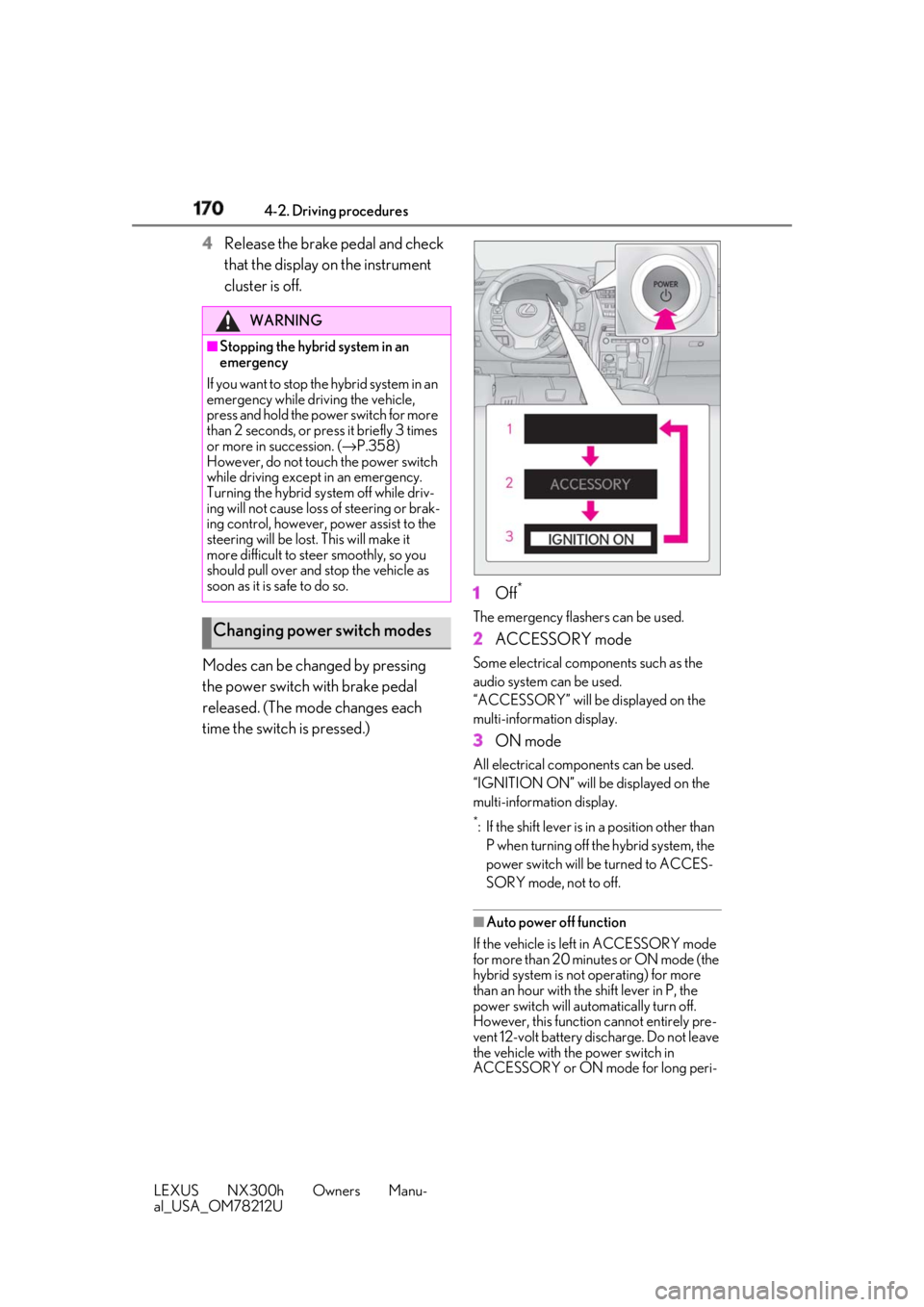
Modes can be changed by pressing
the power switch with brake pedal
released. (The mode changes each
time the switch is pressed.) 1 Off *
The emergency flashers can be used.
2 ACCESSORY mode Some electrical components such as the
audio system can be used.
“ACCESSORY” will be displayed on the
multi-information display.
3 ON mode All electrical components can be used.
“IGNITION ON” will be displayed on the
multi-information display. *
: If the shift lever is in a position other than
P when turning off the hybrid system, the
power switch will be turned to ACCES-
SORY mode, not to off.
■
Auto power off function
If the vehicle is left in ACCESSORY mode
for more than 20 minutes or ON mode (the
hybrid system is not operating) for more
than an hour with the shift lever in P, the
power switch will automatically turn off.
However, this function cannot entirely pre-
vent 12-volt battery discharge. Do not leave
the vehicle with the power switch in
ACCESSORY or ON mode for long peri-WARNING■
Stopping the hybrid system in an
emergency
If you want to stop the hybrid system in an
emergency while driving the vehicle,
press and hold the power switch for more
than 2 seconds, or press it briefly 3 times
or more in succession. ( → P.358)
However, do not touch the power switch
while driving except in an emergency.
Turning the hybrid sy stem off while driv-
ing will not cause loss of steering or brak-
ing control, however, power assist to the
steering will be lost. This will make it
more difficult to st eer smoothly, so you
should pull over and stop the vehicle as
soon as it is safe to do so.
Changing power switch modes
Page 171 of 460
1714-2. Driving procedures
LEXUS NX300h Owners Manu-
al_USA_OM78212U 4
Driving ods of time when the hybrid system is not
operating. ■
When stopping the hybrid system with
the shift lever in a po sition other than P
If the hybrid system is stopped with the shift
lever in a position ot her than P, the power
switch will not be turned off but instead be
turned to ACCESSORY mode. Perform
the following procedure to turn the switch
off:
1 Check that the parking brake is set.
2 Shift the shift lever to P.
3 Check that “Turn Off Vehicle” is dis-
played on the multi-information display
and then press the power switch once.
4 Check that “Turn Off Vehicle” on the
multi-information display is off.
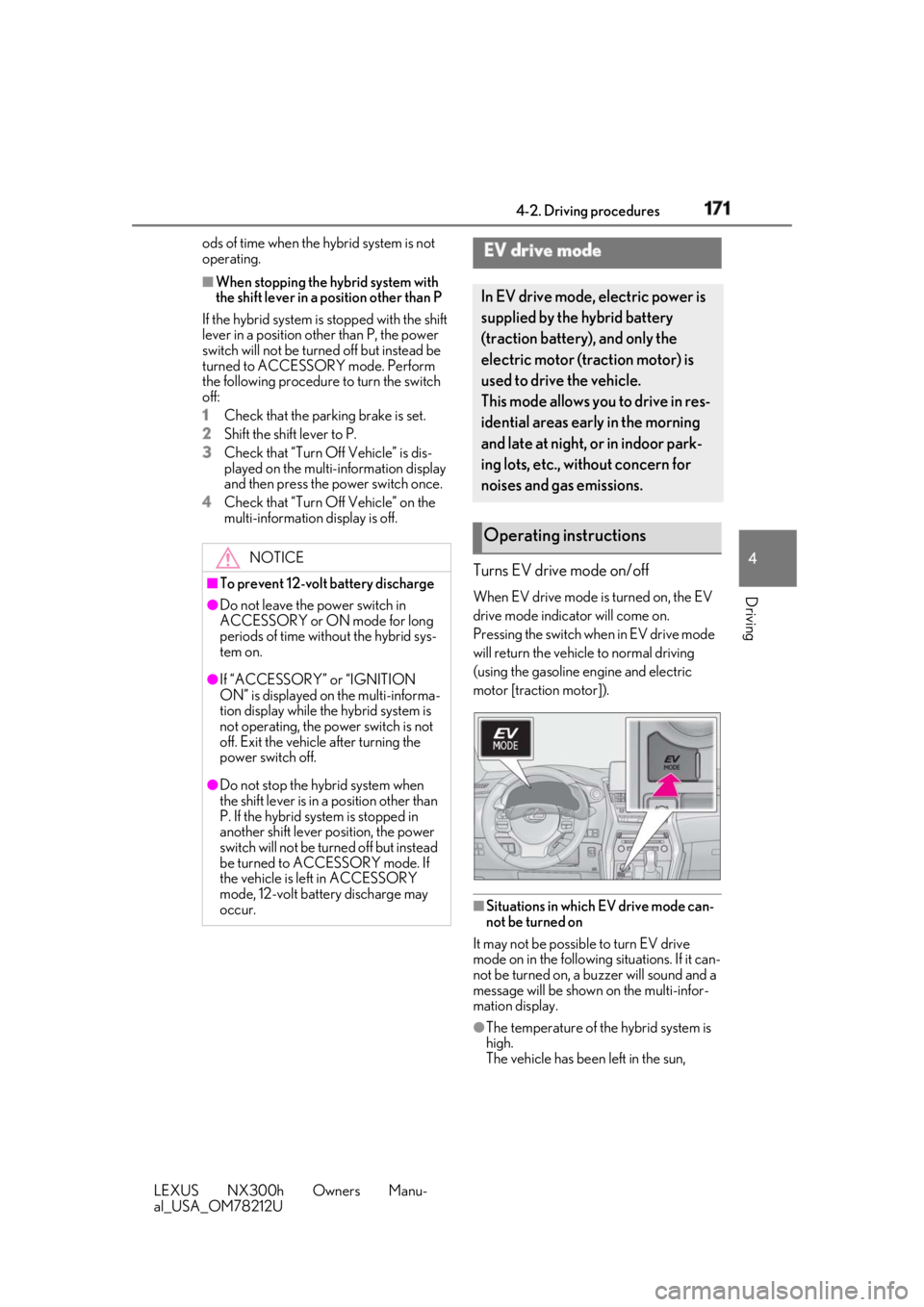
Turns EV drive mode on/off When EV drive mode is turned on, the EV
drive mode indicator will come on.
Pressing the switch wh en in EV drive mode
will return the vehicle to normal driving
(using the gasoline engine and electric
motor [traction motor]).
■
Situations in which EV drive mode can-
not be turned on
It may not be possible to turn EV drive
mode on in the following situations. If it can-
not be turned on, a buzzer will sound and a
message will be shown on the multi-infor-
mation display.
●
The temperature of the hybrid system is
high.
The vehicle has been left in the sun, NOTICE■
To prevent 12-volt battery discharge●
Do not leave the power switch in
ACCESSORY or ON mode for long
periods of time without the hybrid sys-
tem on.●
If “ACCESSORY” or “IGNITION
ON” is displayed on the multi-informa-
tion display while the hybrid system is
not operating, the power switch is not
off. Exit the vehicle after turning the
power switch off.
●
Do not stop the hybrid system when
the shift lever is in a position other than
P. If the hybrid sy stem is stopped in
another shift lever position, the power
switch will not be turned off but instead
be turned to ACCESSORY mode. If
the vehicle is left in ACCESSORY
mode, 12-volt battery discharge may
occur. EV drive mode In EV drive mode, electric power is
supplied by the hybrid battery
(traction battery), and only the
electric motor (traction motor) is
used to drive the vehicle.
This mode allows you to drive in res-
idential areas early in the morning
and late at night, or in indoor park-
ing lots, etc., without concern for
noises and gas emissions.
Operating instructions