towing LEXUS NX300H 2019 Owner's Manual
[x] Cancel search | Manufacturer: LEXUS, Model Year: 2019, Model line: NX300H, Model: LEXUS NX300H 2019Pages: 460, PDF Size: 6.82 MB
Page 203 of 460
2034-5. Using the driving support systems
LEXUS NX300h Owners Manu-
al_USA_M78287_en
4
Driving
WARNING
●Although this system is designed to
help avoid a collision or help reduce
the impact of the coll ision, its effective-
ness may change according to various
conditions, therefore the system may
not always be able to achieve the same
level of performance.
Read the following conditions care-
fully. Do not overly rely on this system
and always drive carefully.
• Conditions under which the system may operate even if there is no possi-
bility of a collision: P.206
• Conditions under which the system may not operate properly: P.207
●Do not attempt to test the operation of
the pre-collision system yourself, as the
system may not operate properly, pos-
sibly leading to an accident.
■Pre-collision braking
●When the pre-collision braking func-
tion is operating, a large amount of
braking force will be applied.
●If the vehicle is stopped by the opera-
tion of the pre-collision braking func-
tion, the pre-collision braking function
operation will be canceled after
approximately 2 seco nds. Depress the
brake pedal as necessary.
●The pre-collision braking function may
not operate if certain operations are
performed by the driver. If the acceler-
ator pedal is being depressed strongly
or the steering wheel is being turned,
the system may determine that the
driver is taking evasive action and pos-
sibly prevent the pre-collision braking
function from operating.
●In some situations, while the pre-colli-
sion braking function is operating,
operation of the function may be can-
celed if the accelerator pedal is
depressed strongly or the steering
wheel is turned and the system deter-
mines that the driver is taking evasive
action.
●If the brake pedal is being depressed,
the system may determine that the
driver is taking evasive action and pos-
sibly delay the operat ion timing of the
pre-collision braking function.
■When to disable the pre-collision sys-
tem
In the following situations, disable the
system, as it may not operate properly,
possibly leading to an accident resulting
in death or serious injury:
●When the vehicle is being towed
●When your vehicle is towing another
vehicle
●When transporting the vehicle via
truck, boat, train or similar means of
transportation
●When the vehicle is raised on a lift with
the hybrid system on and the tires are
allowed to rotate freely
●When inspecting the vehicle using a
drum tester such as a chassis dyna-
mometer or speedometer tester, or
when using an on vehicle wheel bal-
ancer
●When a strong impact is applied to the
front bumper or front grille, due to an
accident or other reasons
●If the vehicle cannot be driven in a sta-
ble manner, such as when the vehicle
has been in an accid ent or is malfunc-
tioning
●When the vehicle is driven in a sporty
manner or off-road
●When the tires are not properly
inflated
●When the tires are very worn
●When tires of a size other than speci-
fied are installed
●When tire chains are installed
Page 211 of 460
2114-5. Using the driving support systems
LEXUS NX300h Owners Manu-
al_USA_M78287_en
4
Driving
Press the LDA switch to turn the LDA
system on.
The LDA indicator illuminates and a mes-
sage is displayed on the multi-information
display.
Press the LDA switch again to turn the
LDA system off.
When the LDA system is turned on or off,
operation of the LDA system continues in
WARNING
■Before using LDA system
Do not rely solely upon the LDA system.
The LDA system does not automatically
drive the vehicle or reduce the amount of
attention that must be paid to the area in
front of the vehicle. The driver must
always assume full responsibility for driv-
ing safely by paying careful attention to
the surrounding conditions and operat-
ing the steering wheel to correct the path
of the vehicle. Also, the driver must take
adequate breaks when fatigued, such as
from driving for a long period of time.
Failure to perform appropriate driving
operations and pay careful attention may
lead to an accident, resulting in death or
serious injury.
■To avoid operating LDA system by
mistake
When not using the LDA system, use the
LDA switch to turn the system off.
■Situations unsuitable for LDA system
Do not use the LDA system in the follow-
ing situations.
The system may not operate properly
and lead to an accident, resulting in
death or serious injury.
●A spare tire, tire chains, etc. are
equipped.
●When the tires have been excessively
worn, or when the tire inflation pres-
sure is low.
●Tires which differ by structure, manu-
facturer, brand or tread pattern are
used.
●Objects or patterns that could be mis-
taken for white (yellow) lines are pres-
ent on the side of th e road (guardrails,
curbs, reflective poles, etc.).
●Vehicle is driven on a snow-covered
road.
●White (yellow) lines are difficult to see
due to rain, snow, fog, dust, etc.
●Asphalt repair marks, white (yellow)
line marks, etc. are present due to road
repair.
●Vehicle is driven in a temporary lane or
restricted lane due to construction
work.
●Vehicle is driven on a road surface
which is slippery due to rainy weather,
fallen snow, freezing, etc.
●Vehicle is driven in traffic lanes other
than on highways and freeways.
●Vehicle is driven in a construction
zone.
●Vehicle is towing a trailer or another
vehicle.
■Preventing LDA system malfunctions
and operations performed by mistake
●Do not modify the headlights or place
stickers, etc. on the surface of the
lights.
●Do not modify the suspension etc. If
the suspension etc. needs to be
replaced, contact your Lexus dealer.
●Do not install or place anything on the
hood or grille. Also, do not install a
grille guard (bull bars, kangaroo bar,
etc.).
●If your windshield needs repairs, con-
tact your Lexus dealer.
Turning LDA system on
Page 218 of 460
2184-5. Using the driving support systems
LEXUS NX300h Owners Manu-
al_USA_M78287_en
WARNING
●Assisting the driver to measure follow-
ing distance
The dynamic radar cruise control with
full-speed range is only intended to
help the driver in determining the fol-
lowing distance between the driver’s
own vehicle and a designated vehicle
traveling ahead. It is not a mechanism
that allows careless or inattentive driv-
ing, and it is not a system that can assist
the driver in low-visibility conditions. It
is still necessary for driver to pay close
attention to the vehicle’s surroundings.
●Assisting the driver to judge proper
following distance
The dynamic radar cruise control with
full-speed range determines whether
the following distance between the
driver’s own vehicle and a designated
vehicle traveling ahead is within a set
range. It is not capable of making any
other type of judgement. Therefore, it
is absolutely necessary for the driver to
remain vigilant and to determine
whether or not there is a possibility of
danger in any given situation.
●Assisting the driver to operate the
vehicle
The dynamic radar cruise control with
full-speed range has limited capability
to prevent or avoid a collision with a
vehicle traveling ahead. Therefore, if
there is ever any danger, the driver
must take immediate and direct con-
trol of the vehicle and act appropri-
ately in order to ensure the safety of all
involved.
■To avoid inadvertent dynamic radar
cruise control with full-speed range
activation
Switch the dynamic radar cruise control
with full-speed rang e off using the “ON/
OFF” button when not in use.
■Situations unsuitable for dynamic
radar cruise control with full-speed
range
Do not use dynamic radar cruise control
with full-speed range in any of the follow-
ing situations.
Doing so may result in inappropriate
speed control and could cause an acci-
dent resulting in death or serious injury.
●Roads where there are pedestrians,
cyclists, etc.
●In heavy traffic
●On roads with sharp bends
●On winding roads
●On slippery roads, such as those cov-
ered with rain, ice or snow
●On steep downhills, or where there
are sudden changes between sharp up
and down gradients
Vehicle speed may exceed the set
speed when driving down a steep hill.
●At entrances to freeways and highways
●When weather conditions are bad
enough that they may prevent the sen-
sors from detectin g correctly (fog,
snow, sandstorm, heavy rain, etc.)
●When there is rain, snow, etc. on the
front surface of th e radar sensor or
camera sensor
●In traffic conditions that require fre-
quent repeated acceleration and
deceleration
●When your vehicle is towing a trailer
or during emergency towing
●When an approach warning buzzer is
heard often
Page 229 of 460
2294-5. Using the driving support systems
LEXUS NX300h Owners Manu-
al_USA_M78287_en
4
Driving
■Sensor detectio n information
●The sensor’s detection areas are limited
to the areas around the vehicle’s bumper.
●Certain vehicle conditions and the sur-
rounding environment may affect the
ability of a sensor to correctly detect an
obstacle. Particular instances where this
may occur are listed below.
• There is dirt, snow or ice on the sensor. (Wiping the sensors will resolve this
problem.)
• The sensor is frozen. (Thawing the area will resolve this problem.)
In especially cold weather, if a sensor is
frozen the screen may show an abnormal
display, or obstacles may not be
detected.
• The sensor is covered in any way.
• The vehicle is leaning considerably to one side.
• On an extremely bumpy road, on an incline, on gravel, or on grass.
• The vicinity of the vehicle is noisy due to vehicle horns, motorcycle engines, air
brakes of large vehicles, or other loud
noises producing ultrasonic waves.
• There is another vehicle equipped with parking assist sensors in the vicinity.
• The sensor is coated with a sheet of spray or heavy rain.
• The vehicle is equipped with a fender
pole or wireless antenna.
• Towing eyelets are installed.
• The bumper or sensor receives a strong impact.
• A backlit license plate, license plate holder, etc., are installed.
• The vehicle is approaching a tall or curved curb.
• In harsh sunlight or intense cold weather.
• The area directly under the bumpers is
not detected.
• If obstacles draw too close to the sensor.
• A non-genuine Lexus suspension (low- ered suspension etc.) is installed.
• People may not be detected if they are wearing certain types of clothing.
In addition to the examples above, there are
instances in which, because of their shape,
signs and other objects may be judged by a
sensor to be closer than they are.
●The shape of the obstacle may prevent a sensor from detecting it. Pay particular
attention to the following obstacles:
• Wires, fences, ropes, etc.
• Cotton, snow and other materials that
absorb sound waves
• Sharply-angled objects
• Low obstacles
• Tall obstacles with upper sections pro- jecting outwards in the direction of your
vehicle
●The following situations may occur
during use.
• Depending on the shape of the obstacle and other factors, the detection distance
may shorten, or detection may be impos-
sible.
• Obstacles may not be detected if they
are too close to the sensor.
• There will be a short delay between obstacle detection and display. Even at
slow speeds, there is a possibility that the
obstacle will come within the sensor’s
detection areas befo re the display is
shown and the buzzer sounds.
• Thin posts or object s lower than the sen-
sor may not be detected when
approached, even if they have been
detected once.
• It might be difficult to hear beeps due to
the volume of audio system or air flow
noise of the air conditioning system.
■Customization
Some functions can be customized.
(Customizable features: P.421)
■Certification
For vehicles sold in the U.S.A.
This device complies with Part 15 of the
FCC Rules. Operation is subject to the fol-
lowing two conditions; (1) this device may
not cause harmful interference, and (2) this
device must accept any interference
received, including in terference that may
cause undesired operation.
For vehicles sold in Canada
This ISM device complies with Canadian
ICES-001.
Cet appareil ISM est conforme a la norme
NMB-001 du Canada.
Page 239 of 460
2394-5. Using the driving support systems
LEXUS NX300h Owners Manu-
al_USA_M78287_en
4
Driving
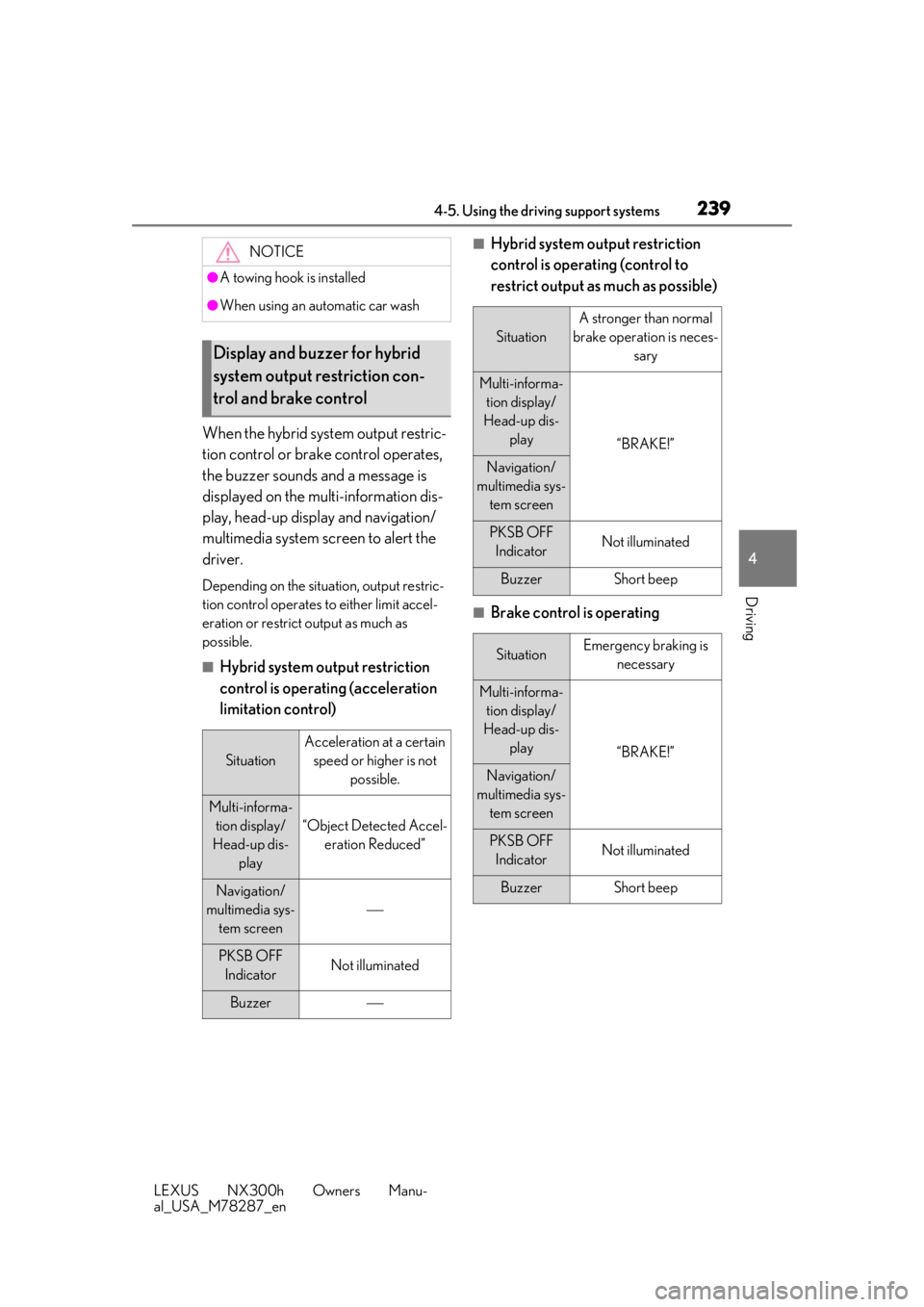
When the hybrid system output restric-
tion control or brake control operates,
the buzzer sounds and a message is
displayed on the multi-information dis-
play, head-up display and navigation/
multimedia system screen to alert the
driver.
Depending on the situation, output restric-
tion control operates to either limit accel-
eration or restrict output as much as
possible.
■Hybrid system output restriction
control is operating (acceleration
limitation control)
■Hybrid system output restriction
control is operating (control to
restrict output as much as possible)
■Brake control is operating
NOTICE
●A towing hook is installed
●When using an automatic car wash
Display and buzzer for hybrid
system output restriction con-
trol and brake control
Situation
Acceleration at a certain speed or higher is not possible.
Multi-informa-tion display/
Head-up dis- play
“Object Detected Accel-eration Reduced”
Navigation/
multimedia sys- tem screen
PKSB OFF IndicatorNot illuminated
Buzzer
Situation
A stronger than normal
brake operation is neces- sary
Multi-informa-tion display/
Head-up dis- play
“BRAKE!”
Navigation/
multimedia sys- tem screen
PKSB OFF IndicatorNot illuminated
BuzzerShort beep
SituationEmergency braking is necessary
Multi-informa-tion display/
Head-up dis- play
“BRAKE!”
Navigation/
multimedia sys- tem screen
PKSB OFF IndicatorNot illuminated
BuzzerShort beep
Page 244 of 460

2444-5. Using the driving support systems
LEXUS NX300h Owners Manu-
al_USA_M78287_en
●Another vehicle enters the detection
area when it changes lanes.
■Conditions under which the Blind Spot
Monitor function will not detect a vehi-
cle
The Blind Spot Monitor function is not
designed to detect the following types of
vehicles and/or objects:
●Small motorcycles, bicycles, pedestrians,
etc.*
●Vehicles traveling in the opposite direc-
tion
●Guardrails, walls, signs, parked vehicles
and similar stationary objects*
●Following vehicles th at are in the same
lane*
●Vehicles driving 2 lanes across from your
vehicle*
*
: Depending on conditions, detection of a vehicle and/or object may occur.
■Conditions under wh ich the Blind Spot
Monitor function may not function cor-
rectly
●The Blind Spot Monitor function may not
detect vehicles correctly in the following
situations:
• When the sensor is misaligned due to a strong impact to the sensor or its sur-
rounding area
• When mud, snow, ice, a sticker, etc. is covering the sensor or surrounding area
on the rear bumper
• When driving on a road surface that is wet with standing water during bad
weather, such as heavy rain, snow, or fog
• When multiple vehicles are approaching with only a small gap between each vehi-
cle
• When the distance between your vehicle and a following vehicle is short
• When there is a significant difference in
speed between your vehicle and the vehi-
cle that enters the detection area
• When the difference in speed between
your vehicle and another vehicle is
changing
• When a vehicle enters a detection area
traveling at about the same speed as your vehicle
• As your vehicle starts from a stop, a vehi- cle remains in the detection area
• When driving up and down consecutive steep inclines, such as hills, dips in the
road, etc.
• When driving on roads with sharp bends, consecutive curves, or uneven surfaces
• When vehicle lanes are wide, or when
driving on the edge of a lane, and the
vehicle in an adjacent lane is far away
from your vehicle
• When towing a trailer (vehicles with tow- ing package)
• When items such as a bicycle carrier are
installed on the rear of the vehicle
• When there is a significant difference in height between your vehicle and the
vehicle that enters the detection area
• Immediately after the Blind Spot Monitor function is turned on
●Instances of the Blind Spot Monitor func-
tion unnecessarily detecting a vehicle
and/or object may increase in the follow-
ing situations:
• When the sensor is misaligned due to a
strong impact to the sensor or its sur-
rounding area
• When the distance between your vehicle
and a guardrail, wall, etc. that enters the
detection area is short
• When driving up and down consecutive
steep inclines, such as hills, dips in the
road, etc.
• When vehicle lanes are narrow, or when
driving on the edge of a lane, and a vehi-
cle traveling in a lane other than the adja-
cent lanes enters the detection area
• When driving on roads with sharp bends, consecutive curves, or uneven surfaces
• When the tires are slipping or spinning
• When the distance between your vehicle
and a following vehicle is short
• When a bicycle carrier or other acces-
sory is installed to the rear of the vehicle
• When towing a trailer (vehicles with tow- ing package)
Page 281 of 460
2815-4. Using the storage features
LEXUS NX300h Owners Manu-
al_USA_M78287_en
5
Interior features
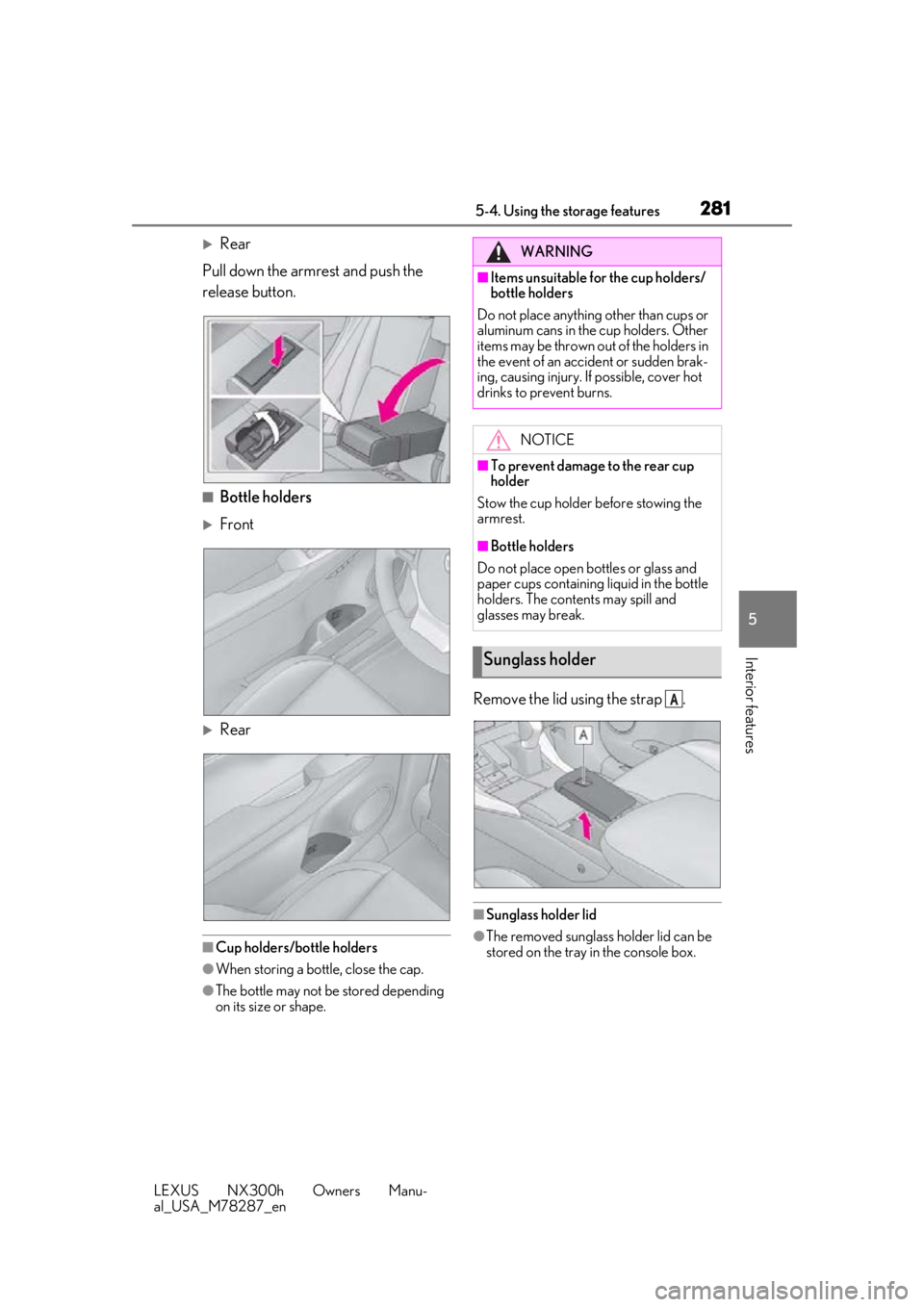
Rear
Pull down the armrest and push the
release button.
■Bottle holders
Front
Rear
■Cup holders/bottle holders
●When storing a bottle, close the cap.
●The bottle may not be stored depending
on its size or shape.
Remove the lid using the strap .
■Sunglass holder lid
●The removed sunglass holder lid can be
stored on the tray in the console box.
WARNING
■Items unsuitable for the cup holders/
bottle holders
Do not place anything other than cups or
aluminum cans in the cup holders. Other
items may be thrown out of the holders in
the event of an accident or sudden brak-
ing, causing injury. If possible, cover hot
drinks to prevent burns.
NOTICE
■To prevent damage to the rear cup
holder
Stow the cup holder before stowing the
armrest.
■Bottle holders
Do not place open bottles or glass and
paper cups containing liquid in the bottle
holders. The contents may spill and
glasses may break.
Sunglass holder
A
Page 284 of 460
2845-4. Using the storage features
LEXUS NX300h Owners Manu-
al_USA_M78287_en
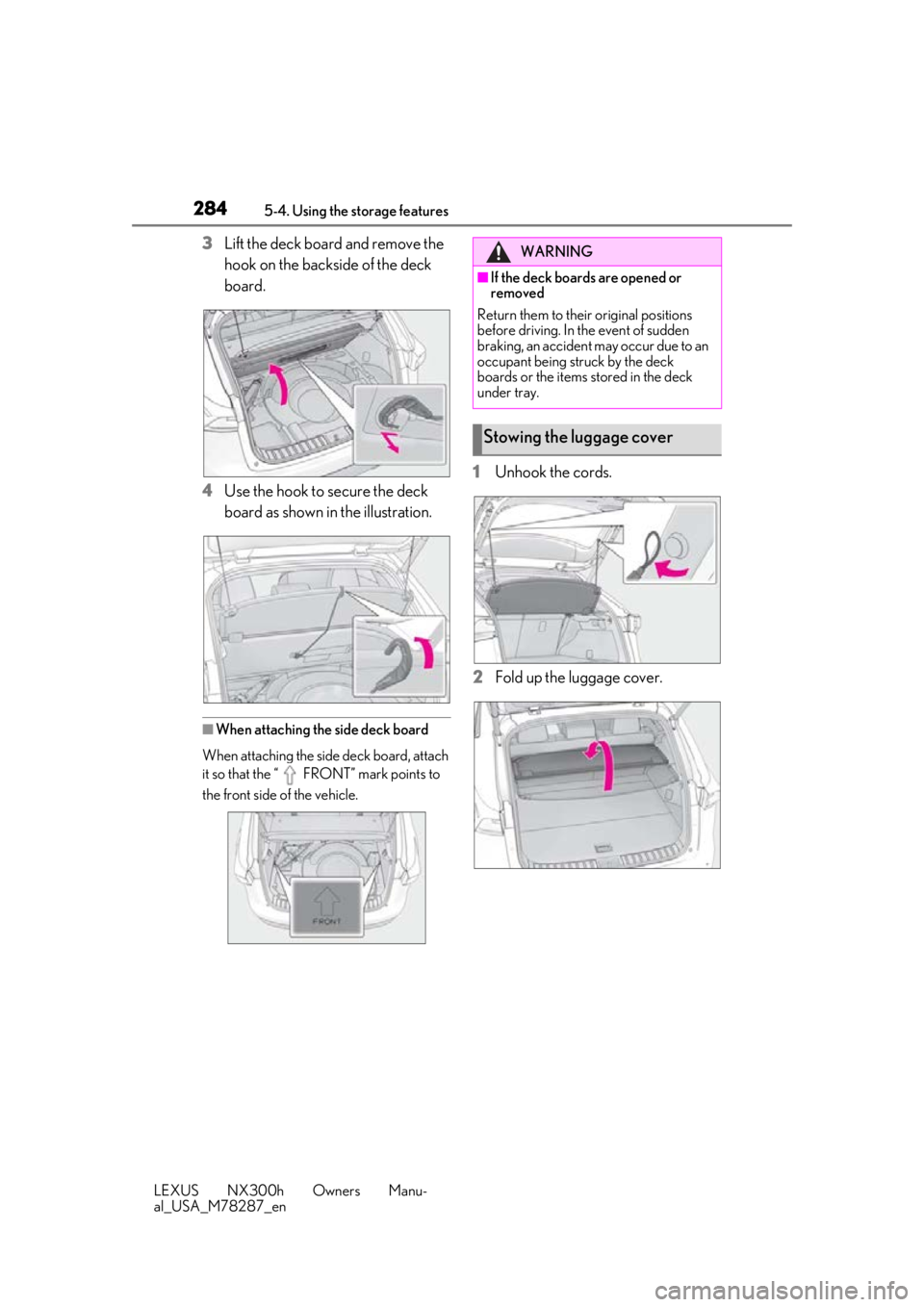
3Lift the deck board and remove the
hook on the backside of the deck
board.
4 Use the hook to secure the deck
board as shown in the illustration.
■When attaching the side deck board
When attaching the side deck board, attach
it so that the “ FRONT” mark points to
the front side of the vehicle.
1 Unhook the cords.
2 Fold up the luggage cover.
WARNING
■If the deck boards are opened or
removed
Return them to their original positions
before driving. In the event of sudden
braking, an accident may occur due to an
occupant being struck by the deck
boards or the items stored in the deck
under tray.
Stowing the luggage cover
Page 307 of 460
3075-5. Using the other interior features
LEXUS NX300h Owners Manu-
al_USA_M78287_en
5
Interior features
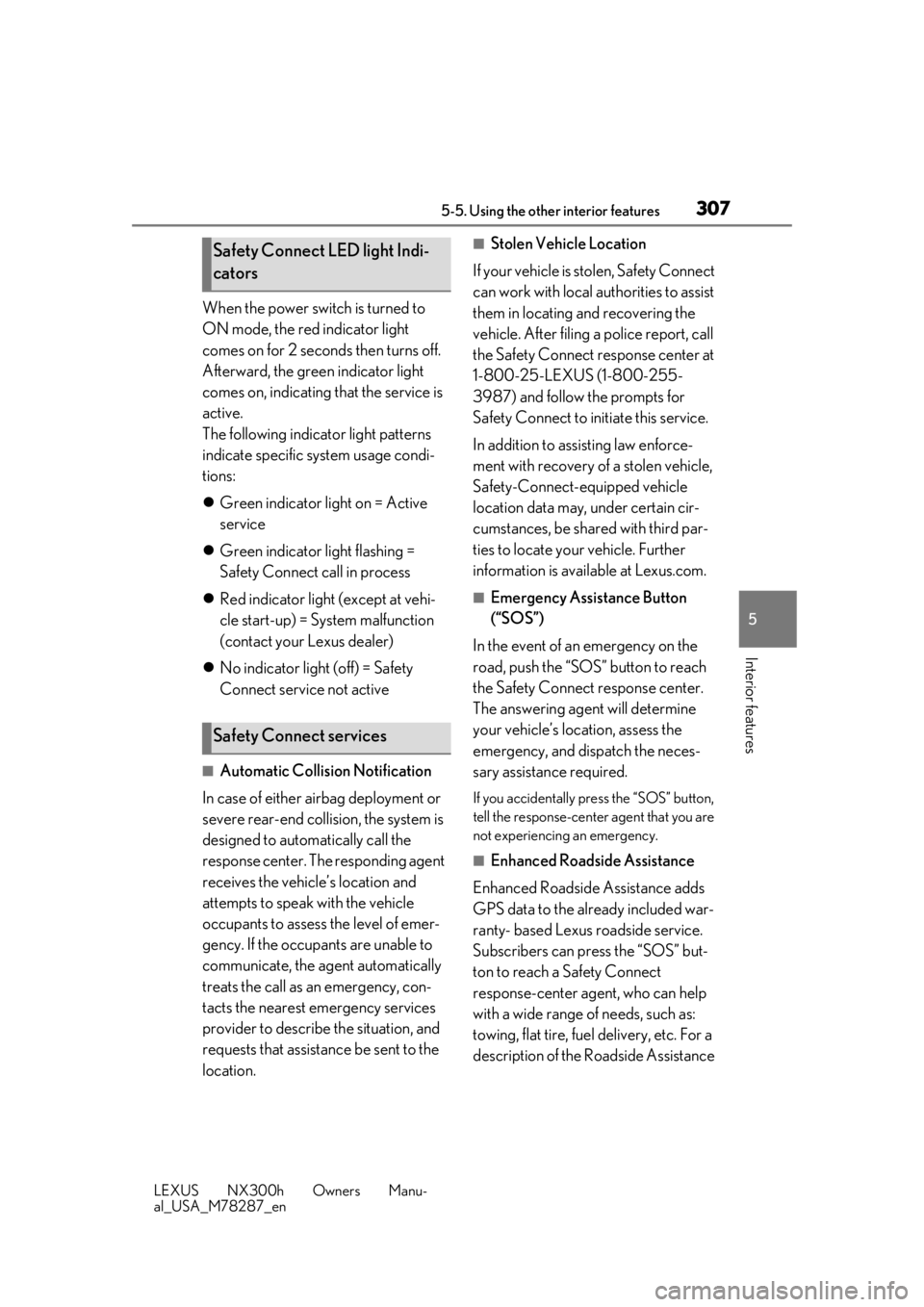
When the power switch is turned to
ON mode, the red indicator light
comes on for 2 seconds then turns off.
Afterward, the gree n indicator light
comes on, indicating that the service is
active.
The following indicator light patterns
indicate specific system usage condi-
tions:
Green indicator light on = Active
service
Green indicator light flashing =
Safety Connect call in process
Red indicator light (except at vehi-
cle start-up) = System malfunction
(contact your Lexus dealer)
No indicator light (off) = Safety
Connect service not active
■Automatic Collision Notification
In case of either airbag deployment or
severe rear-end collision, the system is
designed to automatically call the
response center. The responding agent
receives the vehicle’s location and
attempts to speak with the vehicle
occupants to assess the level of emer-
gency. If the occupants are unable to
communicate, the ag ent automatically
treats the call as an emergency, con-
tacts the nearest emergency services
provider to describe the situation, and
requests that assistance be sent to the
location.
■Stolen Vehicle Location
If your vehicle is stolen, Safety Connect
can work with local authorities to assist
them in locating and recovering the
vehicle. After filing a police report, call
the Safety Connect response center at
1-800-25-LEXUS (1-800-255-
3987) and follow the prompts for
Safety Connect to initiate this service.
In addition to assisting law enforce-
ment with recovery of a stolen vehicle,
Safety-Connect-equipped vehicle
location data may, under certain cir-
cumstances, be shared with third par-
ties to locate your vehicle. Further
information is available at Lexus.com.
■Emergency Assistance Button
(“SOS”)
In the event of an emergency on the
road, push the “SOS” button to reach
the Safety Connect response center.
The answering agent will determine
your vehicle’s location, assess the
emergency, and dispatch the neces-
sary assistance required.
If you accidentally press the “SOS” button,
tell the response-center agent that you are
not experiencing an emergency.
■Enhanced Roadside Assistance
Enhanced Roadside Assistance adds
GPS data to the already included war-
ranty- based Lexus roadside service.
Subscribers can press the “SOS” but-
ton to reach a Safety Connect
response-center agent, who can help
with a wide range of needs, such as:
towing, flat tire, fuel delivery, etc. For a
description of the Roadside Assistance
Safety Connect LED light Indi-
cators
Safety Connect services
Page 330 of 460
3306-3. Do-it-yourself maintenance
LEXUS NX300h Owners Manu-
al_USA_M78287_en
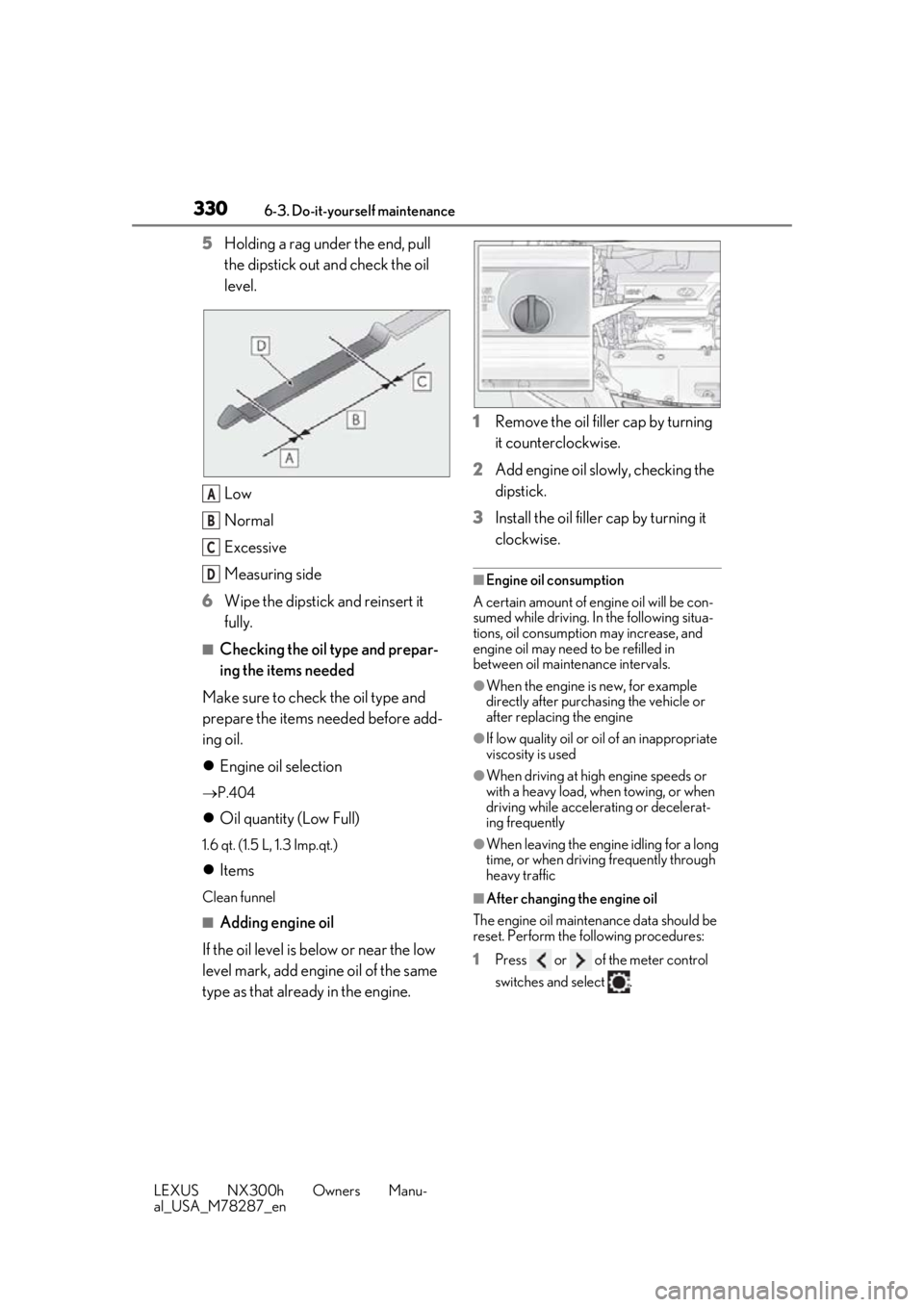
5Holding a rag under the end, pull
the dipstick out and check the oil
level.
Low
Normal
Excessive
Measuring side
6 Wipe the dipstick and reinsert it
fully.
■Checking the oil type and prepar-
ing the items needed
Make sure to check the oil type and
prepare the items needed before add-
ing oil.
Engine oil selection
P.404
Oil quantity (Low Full)
1.6 qt. (1.5 L, 1.3 Imp.qt.)
Items
Clean funnel
■Adding engine oil
If the oil level is below or near the low
level mark, add engine oil of the same
type as that already in the engine. 1
Remove the oil filler cap by turning
it counterclockwise.
2 Add engine oil slowly, checking the
dipstick.
3 Install the oil filler cap by turning it
clockwise.
■Engine oil consumption
A certain amount of engine oil will be con-
sumed while driving. In the following situa-
tions, oil consumption may increase, and
engine oil may need to be refilled in
between oil maintenance intervals.
●When the engine is new, for example
directly after purchasing the vehicle or
after replacing the engine
●If low quality oil or oil of an inappropriate
viscosity is used
●When driving at high engine speeds or
with a heavy load, when towing, or when
driving while accelerating or decelerat-
ing frequently
●When leaving the engine idling for a long
time, or when driving frequently through
heavy traffic
■After changing the engine oil
The engine oil maintenance data should be
reset. Perform the following procedures:
1 Press or of the meter control
switches and select .
A
B
C
D