steering LEXUS NX300h 2021 Workshop Manual
[x] Cancel search | Manufacturer: LEXUS, Model Year: 2021, Model line: NX300h, Model: LEXUS NX300h 2021Pages: 484, PDF Size: 10.53 MB
Page 228 of 484

2284-5. Using the driving support systems
LEXUS NX300h Owners Manual_USA_M78578_en
WARNING
■Before using LDA system
●Do not rely solely upon the LDA sys-
tem. The LDA system does not auto-
matically drive the vehicle or reduce
the amount of attention that must be
paid to the area in front of the vehicle.
The driver must always assume full
responsibility for driving safely by pay-
ing careful attention to the surround-
ing conditions and operating the
steering wheel to correct the path of
the vehicle. Also, the driver must take
adequate breaks when fatigued, such
as from driving for a long period of
time.
●Failure to perform appropriate driving
operations and pay careful attention
may lead to an accident, resulting in
death or serious injury.
●When not using the LDA system, use
the LDA switch to turn the system off.
■Situations unsuitable for LDA system
In the following situations, use the LDA
switch to turn the system off. Failure to do
so may lead to an acc ident, resulting in
death or serious injury.
●Vehicle is driven on a road surface
which is slippery due to rainy weather,
fallen snow, freezing, etc.
●Vehicle is driven on a snow-covered
road.
●White (yellow) lines are difficult to see
due to rain, snow, fog, dust, etc.
●A spare tire, tire chains, etc. are
equipped.
●When the tires have been excessively
worn, or when the tire inflation pres-
sure is low.
●When tires of a size other than speci-
fied are installed.
●Vehicle is driven in traffic lanes other
than that highways and freeways.
●When your vehicle is towing a trailer
or during emergency towing.
■Preventing LDA system malfunctions
and operations performed by mistake
●Do not modify the headlights or place
stickers, etc. on the surface of the
lights.
●Do not modify the su spension, etc. If
the suspension, etc. needs to be
replaced, contact your Lexus dealer.
●Do not install or place anything on the
hood or grille. Also, do not install a
grille guard (bull bars, kangaroo bar,
etc.).
●If your windshield needs repairs, con-
tact your Lexus dealer.
■Conditions in which functions may
not operate properly
In the following situations, the functions
may not operate properly and the vehicle
may depart from its la ne. Drive safely by
always paying careful attention to your
surroundings and operate the steering
wheel to correct the path of the vehicle
without relying solely on the functions.
●Vehicle is being driven around a sharp
curve.
●Objects or patterns that could be mis-
taken for white (yellow) lines are pres-
ent on the side of the road (guardrails,
reflective poles, etc.).
Page 230 of 484

2304-5. Using the driving support systems
LEXUS NX300h Owners Manual_USA_M78578_en
■Lane departure alert function
When the system determines that the
vehicle might depart from its lane or
course
*, a warning is displayed on the
multi-information display, and either a
warning buzzer will sound or the steer-
ing wheel will vibrate to alert the driver.
When the warning buzzer sounds or the
steering wheel vibrates, check the area
around your vehicle and carefully operate
the steering wheel to move the vehicle
back to the center of the lane.
*: Boundary between asphalt and the side of the road, such as grass, soil, or a curb
■Steering assist function
When the system determines that the
vehicle might depart from its lane or
course
*, the system provides assis-
tance as necessary by operating the
steering wheel in small amounts for a
short period of time to keep the vehicle
in its lane.
If the system detects that the steering
wheel has not been operated for a fixed
amount of time or the steering wheel is not
being firmly gripped, a warning is displayed
on the multi-informat ion display and the
function is temporarily canceled.
*: Boundary between asphalt and the side of the road, such as grass, soil, or a curb
WARNING
●The vehicle has just changed lanes or
crossed an intersection.
●Tires which differ by structure, manu-
facturer, brand or tread pattern are
used.
●Snow tires, etc. are equipped.
Functions included in LDA sys-
tem
Page 232 of 484
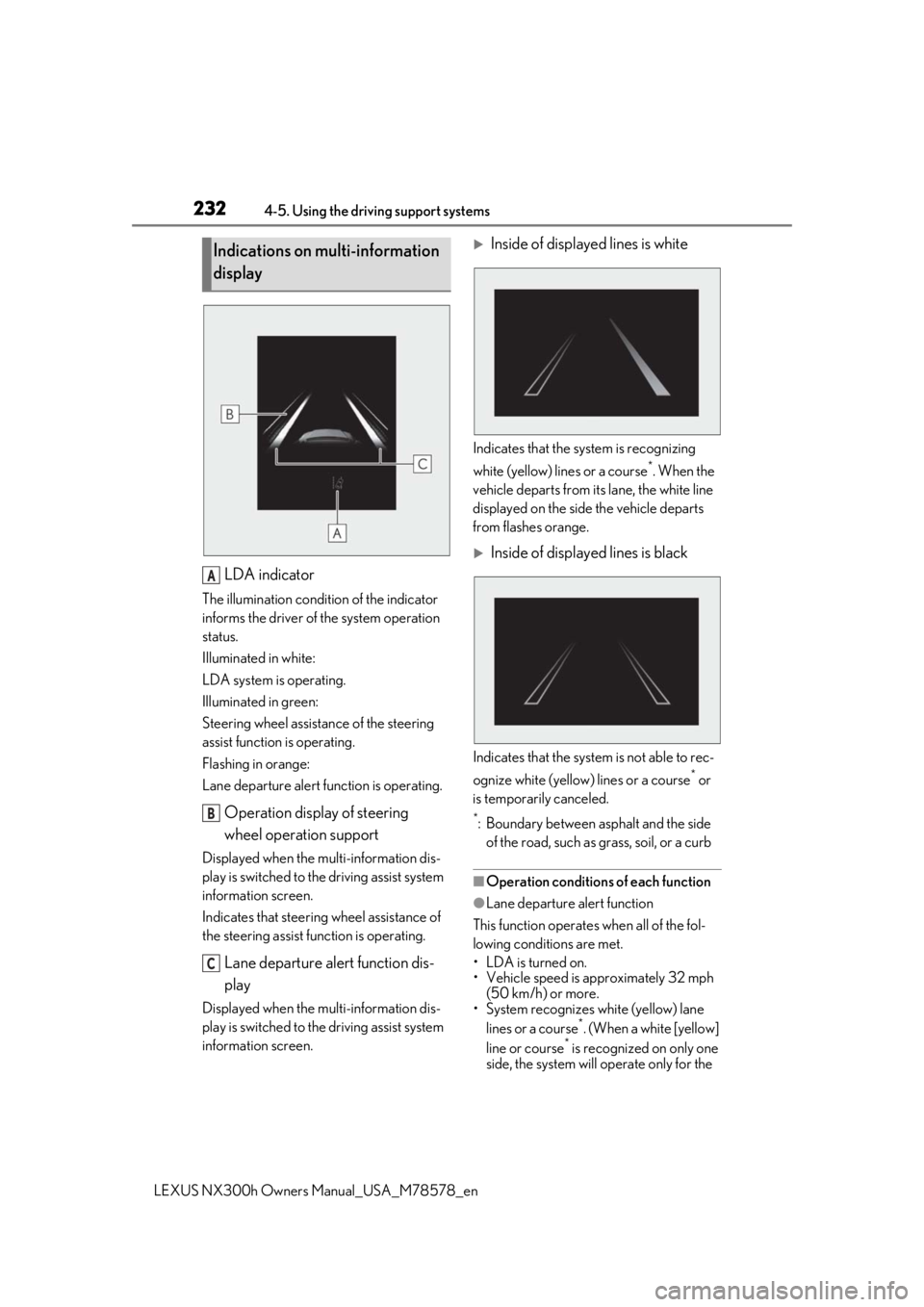
2324-5. Using the driving support systems
LEXUS NX300h Owners Manual_USA_M78578_en
LDA indicator
The illumination condition of the indicator
informs the driver of the system operation
status.
Illuminated in white:
LDA system is operating.
Illuminated in green:
Steering wheel assistance of the steering
assist function is operating.
Flashing in orange:
Lane departure alert function is operating.
Operation display of steering
wheel operation support
Displayed when the mu lti-information dis-
play is switched to the driving assist system
information screen.
Indicates that steering wheel assistance of
the steering assist function is operating.
Lane departure alert function dis-
play
Displayed when the mu lti-information dis-
play is switched to the driving assist system
information screen.
Inside of displayed lines is white
Indicates that the system is recognizing
white (yellow) lines or a course
*. When the
vehicle departs from it s lane, the white line
displayed on the side the vehicle departs
from flashes orange.
Inside of displayed lines is black
Indicates that the system is not able to rec-
ognize white (yellow) lines or a course
* or
is temporarily canceled.
*: Boundary between asphalt and the side of the road, such as grass, soil, or a curb
■Operation conditions of each function
●Lane departure alert function
This function operates when all of the fol-
lowing conditions are met.
• LDA is turned on.
• Vehicle speed is approximately 32 mph (50 km/h) or more.
• System recognizes white (yellow) lane
lines or a course
*. (When a white [yellow]
line or course* is recognized on only one
side, the system will operate only for the
Indications on multi-information
display
A
B
C
Page 233 of 484

2334-5. Using the driving support systems
LEXUS NX300h Owners Manual_USA_M78578_en
4
Driving
recognized side.)
• Width of traffic lane is approximately 9.8
ft. (3 m) or more.
• Turn signal lever is not operated.
• Vehicle is not being driven around a sharp curve.
• No system malfunctions are detected. ( P.234)
*: Boundary between asphalt and the side
of the road, such as grass, soil, or a curb
●Steering assist function
This function operates when all of the fol-
lowing conditions are me t in addition to the
operation conditions for the lane departure
alert function.
•Setting for “Steering Assist” in of the
multi-information display is set to “On”.
( P.89)
• Vehicle is not accelerated or decelerated
by a fixed amount or more.
• Steering wheel is not operated with a steering force level su itable for changing
lanes.
• ABS, VSC, TRAC and PCS are not oper- ating.
• TRAC or VSC is not turned off.
• Hands off steering wheel warning is not displayed. ( P.233)
●Vehicle sway warning function
This function operates when all of the fol-
lowing conditions are met.
• Setting for “Sway Warning” in of the
multi-information display is set to “On”.
( P.89)
• Vehicle speed is approximately 32 mph
(50 km/h) or more.
• Width of traffic lane is approximately 9.8
ft. (3 m) or more.
• No system malfunctions are detected. ( P.234)
■Temporary cancelation of functions
When operation conditions are no longer
met, a function may be temporarily can-
celed. However, when the operation condi-
tions are met again, operation of the
function is automatically restored.
( P.232)
■Steering assist function
●Depending on the vehicle speed, lane
departure situation, road conditions, etc.,
the driver may not feel the function is
operating or the function may not oper-
ate at all.
●The steering control of the function is
overridden by the driver’s steering wheel
operation.
●Do not attempt to test the operation of
the steering assist function.
■Lane departure alert function
●The warning buzzer may be difficult to
hear due to external noise, audio play-
back, etc. Also, it may be difficult to feel
steering wheel vibrations due to the road
conditions, etc.
●If the edge of the course* is not clear or
straight, the lane departure alert function
may not operate.
●Do not attempt to test the operation of
the lane departure alert function.
*: Boundary between asphalt and the side
of the road, such as grass, soil, or a curb
■Hands off steering wheel warning
In the following situations, a warning mes-
sage urging the driver to hold the steering
wheel and the symbol sh own in the illustra-
tion are displayed on the multi-information
display to warn the dr iver.The warning stops
when the system determines that the driver
holds the steering wheel. Always keep your
hands on the steering wheel when using this
system, regardle ss of warnings.
●When the system determines that the
driver is driving with out holding the steer-
ing wheel while the sy stem is operating
If the driver continues to keep their hands
off of the steering wheel, the buzzer sounds,
Page 234 of 484

2344-5. Using the driving support systems
LEXUS NX300h Owners Manual_USA_M78578_en
the driver is warned and the function is tem-
porarily canceled. This warning also oper-
ates in the same way when the driver
continuously operates the steering wheel
only a small amount.
The buzzer also sounds even if the alert
type is set to .
●When the system determines that the
vehicle may not turn and instead depart
from its lane while driving around a curve
Depending on the vehicle condition and
road conditions, the warning may not oper-
ate. Also, if the system determines that the
vehicle is driving around a curve, warnings
will occur earlier than during straight-lane
driving.
●When the system determines that the
driver is driving without holding the steer-
ing wheel while the st eering wheel assist
of the steering assist function is operating
If the driver continue s to keep their hands
off of the steering wheel and the steering
wheel assist is operating, the buzzer sounds
and the driver is warned. Each time the
buzzer sounds, the continuing time of the
buzzer becomes longer.
The buzzer also sounds even if the alert
type is set to .
■Vehicle sway warning function
When the system determines that the vehi-
cle is swaying while the vehicle sway warn-
ing function is operating, a buzzer sounds
and a warning message urging the driver to
rest and the symbol shown in the illustration
are simultaneously displayed on the multi-
information display. Depending on the vehicle and road condi-
tions, the warning may not operate.
■Warning message
If the following warning message is dis-
played on the multi-in formation display and
the LDA indicator illuminates in orange, fol-
low the appropriate troubleshooting proce-
dure. Also, if a different warning message is
displayed, follow the instructions displayed
on the screen.
●“Lane Departure Alert Malfunction Visit
Your Dealer”
The system may not be operating properly.
Have the vehicle inspected by your Lexus
dealer.
●“Lane Departure Alert Unavailable”
The system is temporarily canceled due to a
malfunction in a sensor other than the front
camera. Turn the LDA system off, wait for a
little while, and then turn the LDA system
back on.
●“Lane Departure Alert Unavailable at
Current Speed”
The function cannot be used as the vehicle
speed exceeds the LDA operation range.
Drive slower.
●“Lane Departure Alert Unavailable
Below Approx 50km/h”
The LDA system cannot be used as the
vehicle speed is less than approximately 32
mph (50 km/h). Drive the vehicle at
approximately 32 mph (50 km/h) or more.
■Customization
Function settings can be changed. (Cus-
tomizable features: P.443)
Page 241 of 484

2414-5. Using the driving support systems
LEXUS NX300h Owners Manual_USA_M78578_en
4
Driving
The system’s identification of what is an over taking lane may be determined solely based on
the location of the steering wheel in the vehicl e (left side driver position versus right side
driver position.) If the vehicle is driven to a re gion where the overtaking lane is on a different
side from where the vehicle is normally driven, the vehicle may accelerate when the turn
signal lever is operated in the opposite direction to the overtaking lane (e.g., if the driver
normally operates the vehicle in a region where the overtaking lane is to the right but then
drives to a region where the overtaking lane is to the left, the vehicle may accelerate when
the right turn signal is activated).
Example of acceleration
When there are no longer any preceding vehicles driving slower than the set
speed
The system accelerates until the set speed is re ached. The system then returns to constant
speed cruising.
1 Press the “ON/OFF” button to
activate the cruise control.
Dynamic radar cruise control indicator will
come on and a message will be displayed
on the multi-information display.
Press the button again to deactivate the
cruise control.
If the “ON/OFF” button is pressed and
held for 1.5 seconds or more, the system
turns on in constant speed control mode.
( P.244)
2 Accelerate or decelerate, with
accelerator pedal operation, to the
desired vehicle speed (at or above
approximately 20 mph [30 km/h]) and push the lever down to set the
speed.
Cruise control “SET”
indicator will come
on.
The vehicle speed at the moment the lever
is released beco mes the set speed.
To change the set speed, operate the
lever until the desired set speed is dis-
played.
C
Setting the vehicle speed (vehi-
cle-to-vehicle distance control
mode)
Adjusting the set speed
Page 246 of 484

2464-5. Using the driving support systems
LEXUS NX300h Owners Manual_USA_M78578_en
when acceleration is required.
As the sensor may not be able to correctly
detect these types of
vehicles, the approach
warning ( P.243) may not be activated.
●Vehicles that cut in suddenly
●Vehicles traveling at low speeds
●Vehicles that are not moving in the same
lane
●Vehicles with small rear ends (trailers
with no load on board, etc.)
●Motorcycles travelin g in the same lane
●When water or snow thrown up by the
surrounding vehicles hinders the detect-
ing of the sensor
●When your vehicle is pointing upwards
(caused by a heavy load in the luggage
compartment, etc.)
●Preceding vehicle has an extremely high
ground clearance
■Conditions under which the vehicle-to-
vehicle distance control mode may not
function correctly
In the case of the following conditions,
operate the brake pedal (or accelerator
pedal, depending on the situation) as nec-
essary.
As the sensor may not be able to correctly
detect vehicles ahead, the system may not
operate properly.
●When the road curves or when the lanes
are narrow
●When steering wheel operation or your
position in the lane is unstable
●When the vehicle ahead of you deceler-
ates suddenly
●When driving on a road surrounded by a
structure, such as in a tunnel or on a
bridge
●While the vehicle speed is decreasing to
the set speed after the vehicle acceler-
ates by depressing the accelerator pedal
Page 271 of 484

2714-5. Using the driving support systems
LEXUS NX300h Owners Manual_USA_M78578_en
4
Driving
“Eco” indicator will be shown on the multi-
information display.
3Sport mode
Assists acceleration response by con-
trolling the hybrid system and steering.
Suitable for when precise handling is desir-
able, for example when driving on moun-
tain roads.
When not in Sport mode and the driving
mode select switch is turned to the right,
“Sport” indicator will be shown on the
multi-information display and the hybrid
system indicator changes to the tachome-
ter. ( P.84)
Vehicles with Adaptive Variable
Suspension System
1 Normal/Custom mode
Press the switch and select Normal mode
or Custom mode. Each time the switch is
pressed, the system changes between
Normal mode and Custom mode. When
Custom mode is selected, the “Custom”
indicator comes on.
When in Eco mode or Sport mode, when
the switch is pressed, the system returns to Normal mode. Press th
e switch to change
the driving mode to Normal mode when
selected to Eco mode or Sport mode.
Custom mode can be setup on the naviga-
tion system or multimedia system screen.
• Normal mode
Suitable when driving in the city, for good
fuel consumption efficiency, silence, and
drive-ability.
• Custom mode
Driving is possible by setting the desired
function for power train control, chassis
control or air conditioning operations.
Custom mode settings can only be
changed using the Remote Touch.
( P.286)
2 Eco mode
In contrast to Normal mode when stepping
on the accelerator pedal, torque genera-
tion becomes slower, air conditioning
operations (heating/cooling) are
restrained, and driving is suited for
improved fuel consumption.
When not in Eco mode and the driving
mode select switch is turned to the left,
“Eco” indicator will be shown on the multi-
information display.
3Sport mode
• Sport S mode
Assists acceleration response by con-
trolling the hybrid system and transmission.
Suitable for when powe rful acceleration is
desirable.
When not in Sport S mode and the driving
mode select switch is turned to the right,
“Sport S” indicator will be shown on the
multi-information display.
•Sport S+ mode
Helps to ensure superior vehicle stability
by simultaneously cont rolling the steering
and suspension in addi tion to the hybrid
system and transmission. Suitable for
sporty driving.
Page 273 of 484
2734-5. Using the driving support systems
LEXUS NX300h Owners Manual_USA_M78578_en
4
Driving
Helps to maintain directional stability
when swerving on slippery road sur-
faces by controlling steering perfor-
mance.
■Trailer Sway Control
Helps the driver to control trailer sway
by selectively applying brake pressure
for individual wheels and reducing
driving torque when trailer sway is
detected.
■TRAC (Traction Control)
Helps to maintain drive power and pre-
vent the drive wheels from spinning
when starting the vehicle or accelerat-
ing on slippery roads
■Active Cornering Assist (ACA)
Helps to prevent the vehicle from drift-
ing to the outer side by performing
inner wheel brake control when
attempting to accelerate while turning
■Hill-start assist control
Helps to reduce the backward move-
ment of the vehicle when starting on an
uphill
■EPS (Electric Power Steering)
Employs an electric motor to reduce
the amount of effort needed to turn the
steering wheel
■E-Four
Electronic On-Demand AWD system.
Automatically switches from front-
wheel drive to all-wheel drive (AWD)
according to the driving conditions,
helping to ensure reliable handling and
stability. Examples of conditions where
the system will switch to AWD are when cornering, going uphill, starting
off or accelerating, and when the road
surface is slippery due to snow, rain,
etc.
■AVS (Adaptive Variable Suspen-
sion system) (if equipped)
By independently controlling the
damping force of th e shock absorbers
for each of the 4 wheels according to
the road and driving conditions, this
system helps riding comfort with supe-
rior vehicle stability, and helps good
vehicle posture. If Sport S+ mode is
selected using the driving mode select
switch, the damping force will become
more suitable for sporty driving.
( P.270)
■PCS (Pre-Collision System)
P.211
■BSM (Blind Spot Monitor) (if
equipped)
P.262
■When the TRAC/VSC/ABS/Trailer
Sway Control systems are operating
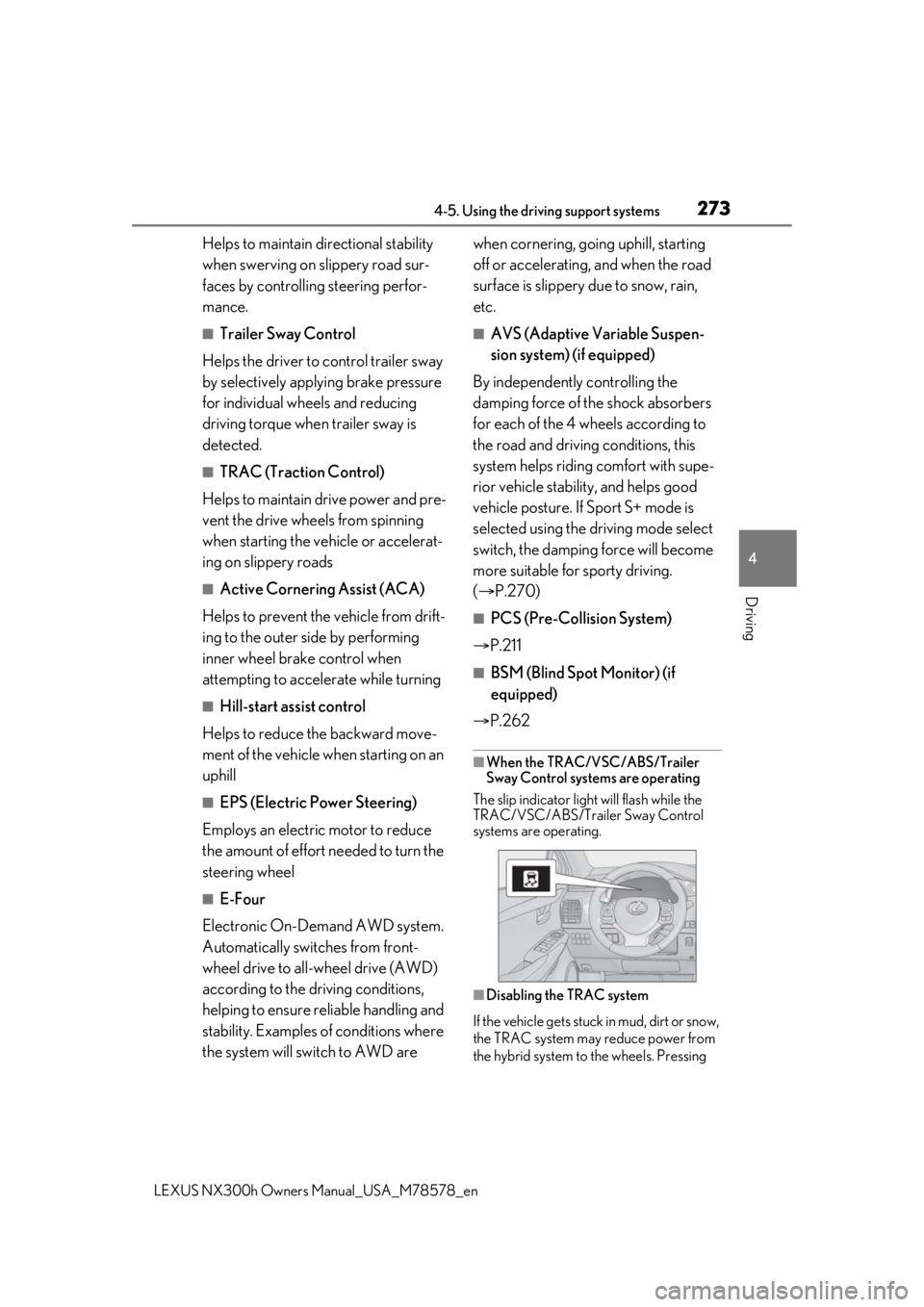
The slip indicator light will flash while the
TRAC/VSC/ABS/Trailer Sway Control
systems are operating.
■Disabling the TRAC system
If the vehicle gets stuck in mud, dirt or snow,
the TRAC system may reduce power from
the hybrid system to the wheels. Pressing
Page 274 of 484

2744-5. Using the driving support systems
LEXUS NX300h Owners Manual_USA_M78578_en
to turn the system off may make it eas-
ier for you to rock the vehicle in order to
free it.
To turn the TRAC system off, quickly press
and release .
The “Traction Control Turned Off” will be
shown on the multi-information display.
Press again to turn the system back on.
■Turning off both TR AC, VSC and Trailer
Sway Control systems
To turn the TRAC, VSC and Trailer Sway
Control systems off, press and hold for
more than 3 seconds while the vehicle is
stopped. The VSC OFF indicator light will
come on and the “Tra ction Control Turned
Off” will be shown on the multi-information
display.
* Press again to turn the system
back on.
*: On vehicles with pre-collision system, pre-collision brake assist and pre-colli-
sion braking will also be disabled. The
PCS warning light will come on and the
message will be shown on the multi-infor-
mation display. ( P.217)
■When the message is displayed on the
multi-information display showing that
TRAC has been disabled even if has
not been pressed
TRAC is temporary deactivated. If the infor-
mation continues to show, contact your
Lexus dealer.
■Sounds and vibrations caused by the
ABS, brake assist, VSC, Trailer Sway
Control, TRAC and hill-start assist con-
trol systems
●A sound may be heard from the engine
compartment when the brake pedal is
depressed repeatedly, when the hybrid
system is started or just after the vehicle
begins to move. This sound does not indi-
cate that a malfunction has occurred in
any of these systems.
●Any of the following conditions may
occur when the above systems are oper-
ating. None of these indicates that a mal-
function has occurred.
• Vibrations may be felt through the vehicle body and steering.
• A motor sound may be heard also after
the vehicle comes to a stop.
■ECB operating sound
ECB operating sound may be heard in the
following cases, but it does not indicate that
a malfunction has occurred.
●Operating sound heard from the engine
compartment when the brake pedal is
operated.
●Motor sound of the brake system heard
from the front part of the vehicle when
the driver’s door is opened.
●Operating sound heard from the engine
compartment when one or two minutes
passed after the stop of the hybrid sys-
tem.
■Active Cornering Assist operation
sounds and vibrations
When the Active Cornering Assist is oper-
ated, operation sounds and vibrations may
be generated from the brake system, but
this is not a malfunction.