change time LEXUS RC200T 2017 Owners Manual
[x] Cancel search | Manufacturer: LEXUS, Model Year: 2017, Model line: RC200T, Model: LEXUS RC200T 2017Pages: 724, PDF Size: 42.04 MB
Page 8 of 724
8
RC200t_RC F_EE(OM24728E)
Please note that this manual applies to all models and explains all equipment, including options. Therefore, you may find some expl anations for equipment not installed on your vehicle.
All specifications provided in this manual are current at the time of printing. However, because of the Lexus policy of continual pr oduct improvement, we reserve the right to make changes at any time without notice.
Depending on specifications, the vehicle sh own in the illustrations may differ from your vehicle in terms of color and equipment.
Both genuine Lexus and a wide variety of other spare parts and accessories for Lexus vehicles are currently available on the market. Should it be determined that any of the
genuine Lexus parts or accessories supplied with the vehicle need to be replaced, Lexus recommends that genuine Lexus parts or acce ssories, be used to replace them. Other parts or accessories of matching quality can also be used. Lexus cannot accept any liabil-
ity or guarantee spare parts and accessories which are not genuine Lexus products, nor for replacement or installation involving such parts. In addition, damage or performance problems resulting from the use of non-genu ine Lexus spare parts or accessories may
not be covered under warranty.
The installation of an RF-transmitter system in your vehicle could affect electronic sys- tems such as:
●Multiport fuel injection system/seque ntial multiport fuel injection system
●Dynamic radar cruise control system
●Cruise control system
●Anti-lock brake system
●Vehicle dynamics integrated management
●SRS airbag system
●Seat belt pretensioner system
Be sure to check with any authorized Lexus de aler or repairer, or another duly qualified and equipped professional for precautionary measures or special instructions regarding
installation of an RF-transmitter system.
Further information regarding frequency ba nds, power levels, antenna positions and installation provisions for the installation of RF-transmitters, is available on request at any
authorized Lexus dealer or repairer, or anot her duly qualified and equipped professional.
For your information
Main Owner’s Manual
Accessories, spare parts and modification of your Lexus
Installation of an RF-transmitter system
Page 106 of 724
1061-2. Theft deterrent system
RC200t_RC F_EE(OM24728E)
●The intrusion sensor detects intruders or movement in the vehicle.
●The tilt sensor detects changes in vehicle inclination, such as when the vehicle
is towed away.
This system is designed to deter and pr event vehicle theft but does not guarantee
absolute security against all intrusions.
■Setting the intrusion sensor and tilt sensor
The intrusion sensor and tilt sensor will be set automatically when the alarm is
set. ( P. 103)
■Canceling the intrusion sensor and tilt sensor
If you are leaving pets or other moving things inside the vehicle, make sure to
disable the intrusion sensor and tilt sensor before setting the alarm, as they will
respond to movement inside the vehicle.
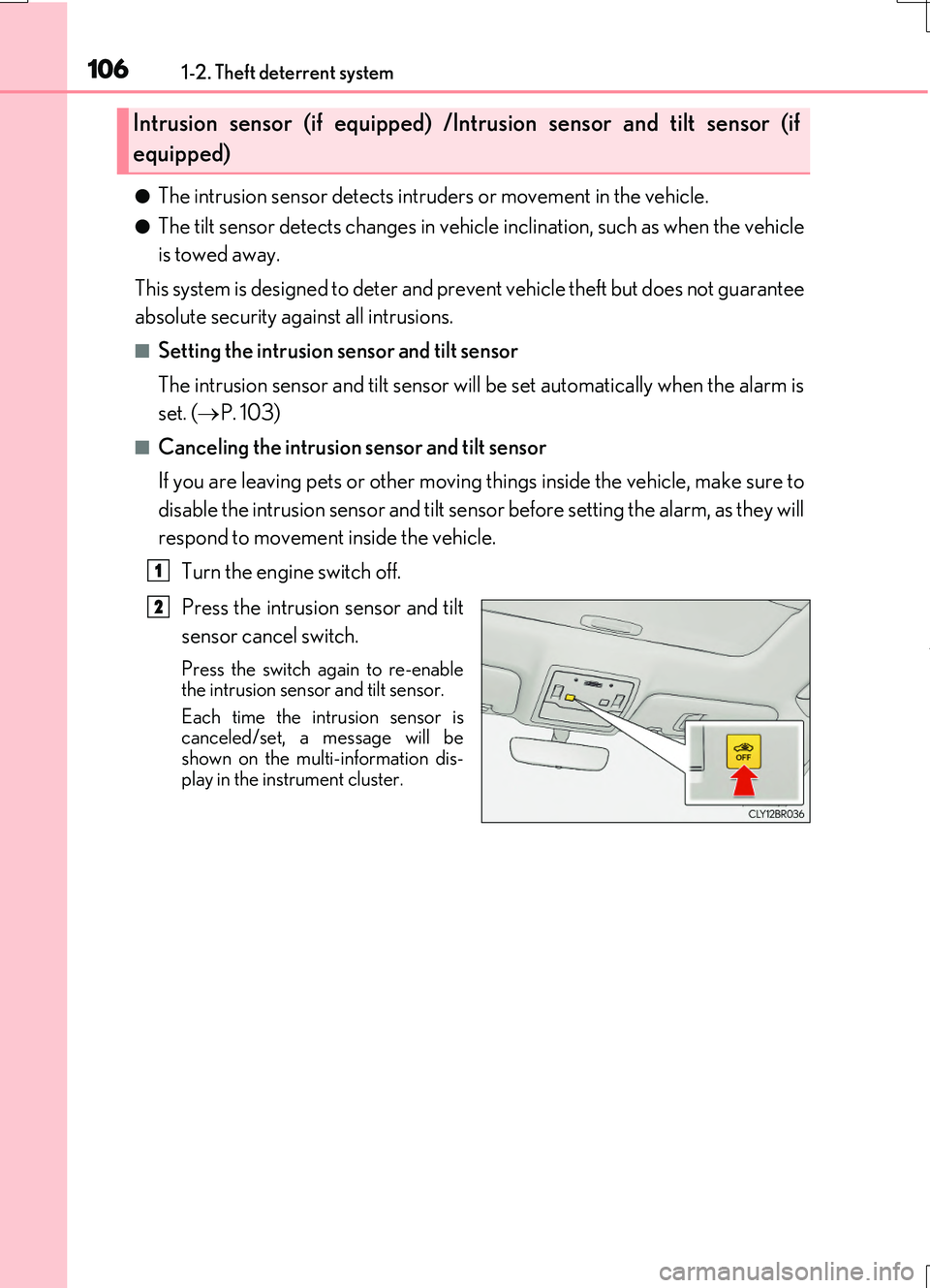
Turn the engine switch off.
Press the intrusion sensor and tilt
sensor cancel switch.
Press the switch again to re-enable the intrusion sensor and tilt sensor.
Each time the intrusion sensor is canceled/set, a message will beshown on the multi-information dis-
play in the instrument cluster.
Intrusion sensor (if equipped) /Intrusion sensor and tilt sensor (if
equipped)
1
2
Page 122 of 724
1222. Instrument cluster
RC200t_RC F_EE(OM24728E)
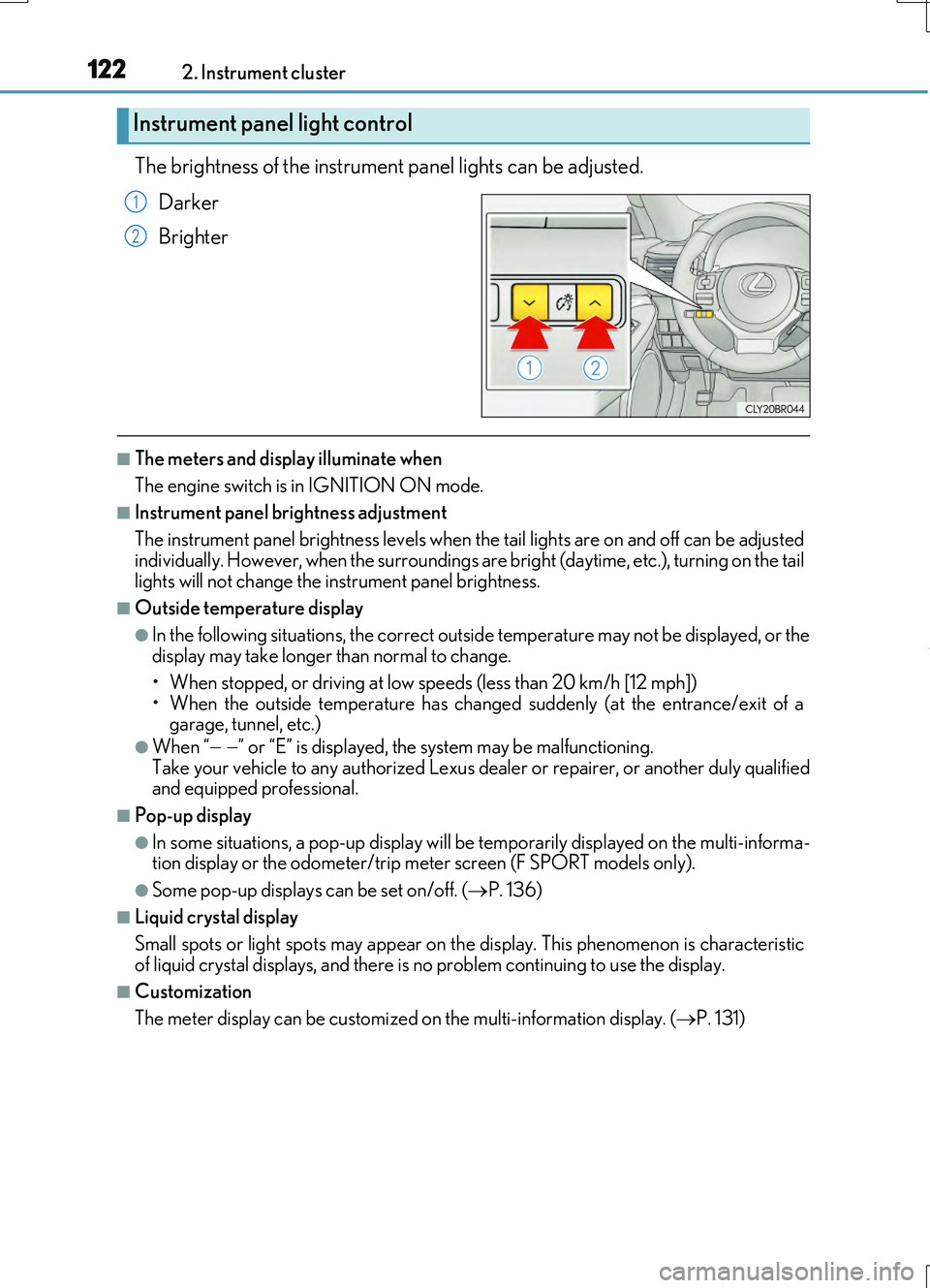
The brightness of the instrument panel lights can be adjusted.
Darker
Brighter
■The meters and display illuminate when
The engine switch is in IGNITION ON mode.
■Instrument panel brightness adjustment
The instrument panel brightness levels when th e tail lights are on and off can be adjusted
individually. However, when the surroundings ar e bright (daytime, etc.), turning on the tail lights will not change the in strument panel brightness.
■Outside temperature display
●In the following situations, the correct outside temperature may not be displayed, or the display may take longer than normal to change.
• When stopped, or driving at low speeds (less than 20 km/h [12 mph])
• When the outside temperature has changed suddenly (at the entrance/exit of a garage, tunnel, etc.)
●When “ ” or “E” is displayed, the system may be malfunctioning. Take your vehicle to any authorized Lexus de aler or repairer, or another duly qualified and equipped professional.
■Pop-up display
●In some situations, a pop-up display will be temporarily displayed on the multi-informa- tion display or the odometer/trip meter screen (F SPORT models only).
●Some pop-up displays can be set on/off. (P. 136)
■Liquid crystal display
Small spots or light spots may appear on th e display. This phenomenon is characteristic
of liquid crystal displays, and there is no problem continuing to use the display.
■Customization
The meter display can be customized on the multi-information display. (P. 131)
Instrument panel light control
1
2
Page 130 of 724
1302. Instrument cluster
RC200t_RC F_EE(OM24728E)
■Instrument panel brightness adjustment
The instrument panel brightness levels when th e tail lights are on and off can be adjusted
individually. However, when the surroundings ar e bright (daytime, etc.), turning on the tail
lights will not change the in strument panel brightness.
■Dimming the analog speedometer lighting
The analog speedometer lighting will be dimme d when the ambient light is bright, such
as during the daytime, and SPORT S or SPORT S+ mode is selected.
■Outside temperature display
●In the following situations, the correct outside temperature may not be displayed, or the
display may take longer than normal to change.
• When stopped, or driving at low speeds (less than 20 km/h [12 mph])
• When the outside temperature has changed suddenly (at the entrance/exit of a garage, tunnel, etc.)
●When “ ” or “E” is displayed, the sy stem may be malfunctioning.
Take your vehicle to any authorized Lexus de aler or repairer, or another duly qualified
and equipped professional.
■Pop-up display
●In some situations, such as when a switch operation is performed, a pop-up display will
be temporarily displayed on the multi-information display.
●Some pop-up displays can be set on/off. ( P. 148)
■Liquid crystal display
Small spots or light spots may appear on th e display. This phenomenon is characteristic
of liquid crystal displays, and there is no problem continuing to use the display.
■Customization
The meter display can be customized on the multi-information display. (P. 139)
NOTICE
■To prevent damage to the engine and its components
●Do not let the indicator of the tachometer enter the red zone, as it represents the
engine speed range which exceeds the maximum safe engine speed.
●In the following situations, the engine may be overheating. In this case, immediately
stop the vehicle in a safe place, and check the engine after it has cooled completely.
( P. 659)
• The engine coolant temperature gauge indicator ( ) is in the red zone and flash- ing.
• The engine oil temperature gauge indicator ( ) is in the red zone and flashing.
Page 135 of 724
1352. Instrument cluster
2
Instrument cluster
RC200t_RC F_EE(OM24728E)
●Resetting
The following displays can be reset: average fuel consumption after reset,
average vehicle speed after reset, and elapsed time after reset.
• To reset, display the desired item and press and hold .
• If both displayed items are resettable, a reset selection screen will
appear.
■Eco Driving Indicator
P. 116
■Boost Meter/Oil Temperature Gauge/Oil Pressure Gauge (F SPORT
models)
Boost Meter:
Displays the boost pressure. The display changes colors when the set pres-
sure is exceeded.
Oil Temperature Gauge:
Displays the temperature of the engine oil. The display flashes when the
engine oil exceeds 140°C (284°F).
Oil Pressure Gauge:
Displays the oil pressure for the engine interior. A buzzer sounds and warning
message is displayed when the oil pressure gets low. ( P. 604)
Depending on the road conditions, temperature, vehicle speed, etc., the actual
vehicle condition on the display screen may differ. Use the display screen as a reference.
■Tire pressure (if equipped)
P. 537
■Gear positions
Displays the current gear position when the shift lever is in D or M.
Page 142 of 724
1422. Instrument cluster
RC200t_RC F_EE(OM24728E)
●Resetting
The following displays can be reset: average fuel consumption after reset,
average vehicle speed after reset, and elapsed time after reset.
• To reset, display the desired item and press and hold .
• If both displayed items are resettable, a reset selection screen will
appear.
■Tire pressure
P. 537
■Gear positions
Displays the current gear position when the shift lever is in D or M.
■Units (if equipped)
The units of measure used can be changed while driving.
Unlike the units setting performed on the settings display, the units setting per-
formed on the drive information me nu can be changed while driving.
Page 143 of 724
1432. Instrument cluster
2
Instrument cluster
RC200t_RC F_EE(OM24728E)
■Lap timer
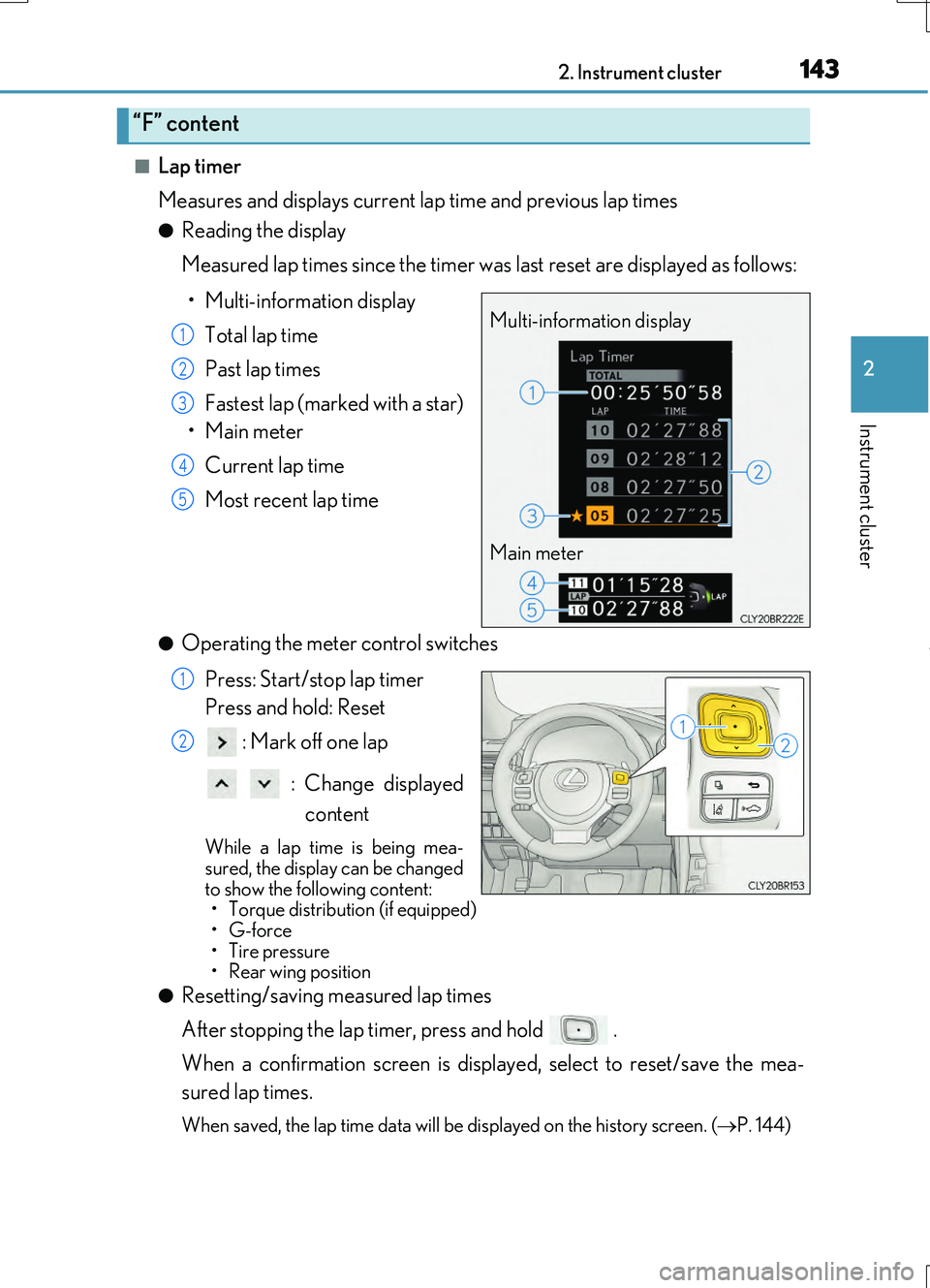
Measures and displays current la p time and previous lap times
●Reading the display
Measured lap times since the timer was last reset are displayed as follows:
• Multi-information display
Total lap time
Past lap times
Fastest lap (marked with a star)
•Main meter
Current lap time
Most recent lap time
●Operating the meter control switches
Press: Start/stop lap timer
Press and hold: Reset
: Mark off one lap
: Change displayed
content
While a lap time is being mea- sured, the display can be changed
to show the following content: • Torque distribution (if equipped)•G-force
• Tire pressure •Rear wing position
●Resetting/saving measured lap times
After stopping the lap timer, press and hold .
When a confirmation screen is displa yed, select to reset/save the mea-
sured lap times.
When saved, the lap time data will be displayed on the history screen. (P. 144)
“F” content
Multi-information display
Main meter
1
2
3
4
5
1
2
Page 150 of 724
1502. Instrument cluster
RC200t_RC F_EE(OM24728E)
■Suspension of the settings display
In the following situations, operation of th e settings display will be temporarily sus- pended.
●When a warning message appears on the multi-information display
●When the vehicle begins to move
■Tire pressure
●It may take a few minutes to display the tire inflation pressure after the engine switch is turned to IGNITION ON mode. It may also take a few minutes to display the tire infla-tion pressure after inflation pressure has been adjusted.
●“---” may be displayed if the tire position information cannot be determined due to unfavorable radio wave conditions.
●Tire inflation pressure changes with temperature. The displayed values may also be dif-
ferent from the values measured using a tire pressure gauge.
■When disconnecting and reconnecting battery terminals
The following information data will be reset:
●Drive information
●Lap timer: Measured lap times, history
●G-force: Record of the maximum G-forces
■Using the lap timer
If the engine is stopped while a lap is being timed, the lap timer will stop and the lap time up to that point will be recorded.
■Liquid crystal display
P. 130
WARNING
■Caution for use while driving
●When operating the multi-information display while driving, pay extra attention to the
safety of the area around the vehicle.
●Do not look continuously at the multi-info rmation display while driving as you may fail to see pedestrians, objects on the road, etc. ahead of the vehicle.
■The information display at low temperatures
Allow the interior of the vehicle to warm up before using the liquid crystal information display. At extremely low temperatures, th e information display monitor may respond
slowly, and display changes may be delayed. For example, there is a lag between the dr iver’s shifting and the new gear number appearing on the display. This lag could cau se the driver to downshift again, causing
rapid and excessive engine braking and po ssibly an accident resulting in death or injury.
■Cautions during setting up the display
As the engine needs to be running during setting up the display, ensure that the vehicle is parked in a place with adequate ventilation. In a closed area such as a garage,exhaust gases including harmful carbon monoxide (CO) may collect and enter the
vehicle. This may lead to death or a serious health hazard.
Page 168 of 724

1683-2. Opening, closing and locking the doors and trunk
RC200t_RC F_EE(OM24728E)
■Side window open/close function linked to door operation
When a door is opened, its window opens slightly. When a door is closed, its window closes completely.
■Switching the door unlock function
It is possible to set which doors the entry function unlocks using the wireless remote con- trol.
Turn the engine switch off.
For vehicles with an intrusion sensor: Cancel the intrusion sensor and tilt sensor of the alarm system to prevent unintended trigge ring of the alarm while changing the set- tings. ( P. 106)
When the indicator light on the key su rface is not on, press and hold or
for approximately 5 seconds wh ile pressing and holding .
The setting changes each time an operatio n is performed, as shown below. (When changing the setting continuously, release the buttons, wait for at least 5 seconds, and
repeat step .)
For vehicles with an alarm: To prevent unin tended triggering of the alarm, unlock the doors using the wireless remote control and op en and close a door once after the set-
tings have been changed. (If a door is not opened within 30 seconds after is
pressed, the doors will be locked again and the alarm will automatically be set.)
In a case that the alarm is triggered, immediately stop the alarm. ( P. 104)
1
2
3
3
Multi-information displayUnlocking functionBeep
(Left-hand drive vehi-cles)
(Right-hand drive vehicles)
Holding the driver’s door handleunlocks only the driver’s door.
Exterior: Beeps 3 timesInterior: Pings onceHolding the passenger’s doorhandle unlocks both side doors.
Holding either door handle
unlocks both side doors.
Exterior: Beeps twice
Interior: Pings once
Page 178 of 724

1783-2. Opening, closing and locking the doors and trunk
RC200t_RC F_EE(OM24728E)
■Note for the entry function
●Even when the electronic key is within the effective range (detection areas), the system may not operate properly in the following cases:
• The electronic key is too close to the window or outside door handle, near the ground, or in a high place when the doors are locked or unlocked.• The electronic key is near the ground or in a high place, or too close to the rear
bumper center when the trunk is opened. • The electronic key is on the instrument pa nel, rear package tray or floor, or in the door pockets or glove box when the engine is started or engine switch modes are
changed.
●Do not leave the electronic key on top of th e instrument panel or near the door pockets
when exiting the vehicle. Depending on the radio wave reception conditions, it may be detected by the antenna outside the cabin and the doors will become lockable from the outside, possibly trapping the electronic key inside the vehicle.
●As long as the electronic key is within the effective range, the doors may be locked orunlocked by anyone. However, only the doors detecting the electronic key can be usedto unlock the vehicle.
●Even if the electronic key is not inside the vehicle, it may be possible to start the engine if the electronic key is near the window.
●The doors may unlock or lock if a large amou nt of water splashes on the door handle,
such as in the rain or in a car wash, when th e electronic key is within the effective range. (The doors will automatically be locked after approximately 30 seconds if the doorsare not opened and closed.)
●If the wireless remote control is used to lock the doors when the electronic key is nearthe vehicle, there is a possibility that the d oor may not be unlocked by the entry func- tion. (Use the wireless remote control to unlock the doors.)
●Touching the door lock or unlock sensor while wearing gloves may prevent lock or unlock operation.
●If the door handle becomes wet while the electronic key is within the effective range,the door may lock and unlock repeatedly. In this case, follow the following correction procedures to wash the vehicle:
• Place the electronic key in a location 2 m (6 ft.) or more away from the vehicle. (Take care to ensure that the key is not stolen.)• Set the electronic key to battery-saving mode to disable the smart entry & start sys-
tem. ( P. 177)
●If the electronic key is inside the vehicle and a door handle becomes wet during a car
wash, a message may be shown on the mult i-information display and a buzzer will sound outside the vehicle. To turn off the alarm, lock both side doors.
●The lock sensor may not work properly if it comes into contact with ice, snow, mud, etc.
Clean the lock sensor and attempt to operate it again.
●A sudden handle operation or a handle oper ation immediately after entering the effec- tive range may prevent the doors from bein g unlocked. Touch the door unlock sensor
and check that the doors are unlocked before pulling the door handle again.
●Unlocking the vehicle may take more time if another electronic key is within the effec- tive range.