ECO mode LEXUS RC200T 2017 Service Manual
[x] Cancel search | Manufacturer: LEXUS, Model Year: 2017, Model line: RC200T, Model: LEXUS RC200T 2017Pages: 724, PDF Size: 42.04 MB
Page 306 of 724
3064-5. Using the driving support systems
RC200t_RC F_EE(OM24728E)
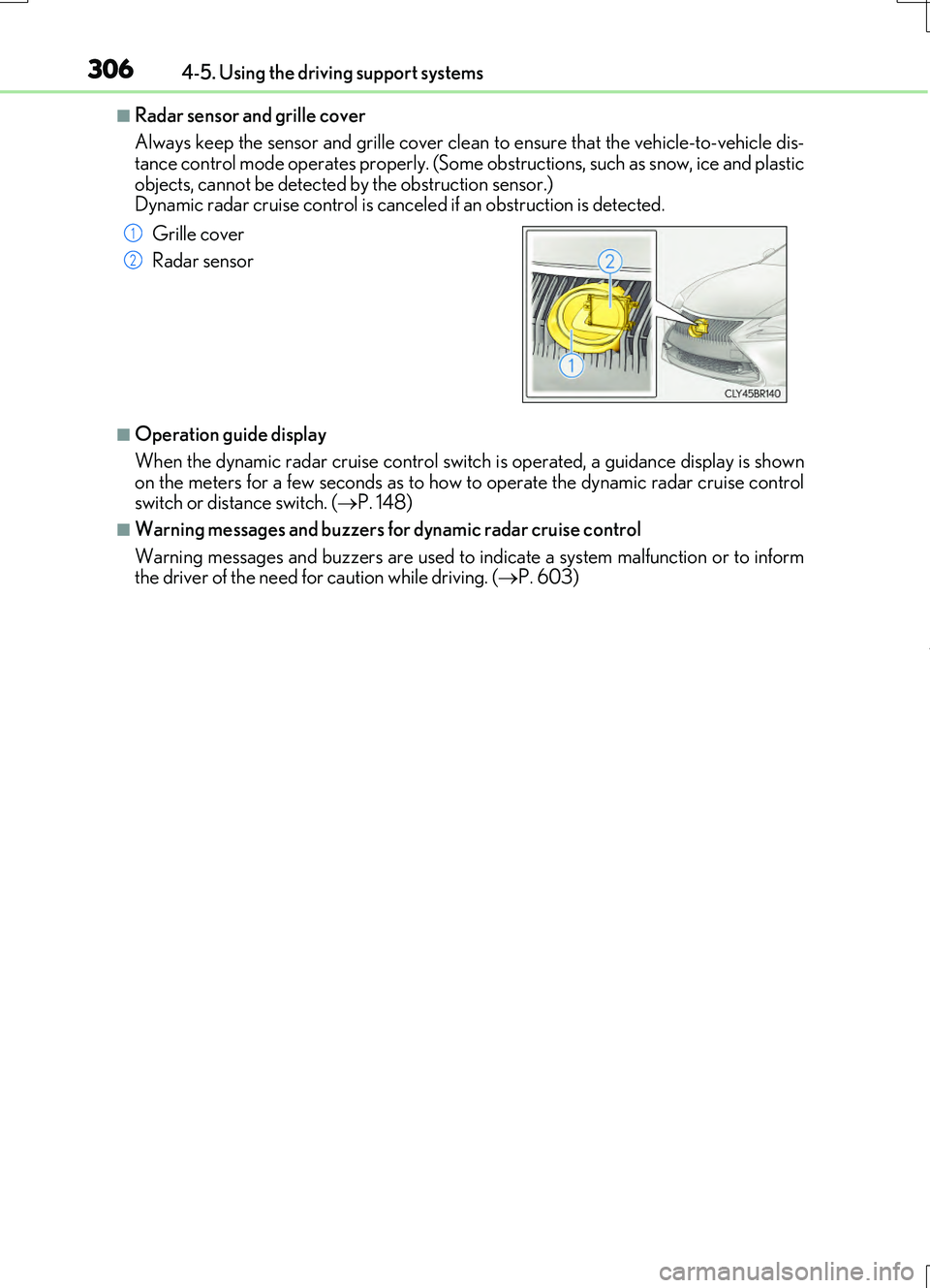
■Radar sensor and grille cover
Always keep the sensor and grille cover clean to ensure that the vehicle-to-vehicle dis- tance control mode operates properly. (Some ob structions, such as snow, ice and plastic
objects, cannot be detected by the obstruction sensor.) Dynamic radar cruise control is canceled if an obstruction is detected.
■Operation guide display
When the dynamic radar cruise control switch is operated, a guidance display is shown
on the meters for a few seconds as to how to operate the dynamic radar cruise control switch or distance switch. ( P. 148)
■Warning messages and buzzers for dynamic radar cruise control
Warning messages and buzzers are used to indicate a system malfunction or to inform the driver of the need for caution while driving. ( P. 603)
Grille cover
Radar sensor
1
2
Page 343 of 724
3434-5. Using the driving support systems
4
Driving
RC200t_RC F_EE(OM24728E)
WARNING
■When using the Lexus parking assist monitor system
The parking assist monitor is a supplemental device intended to assist the driver when backing up. When backing up, be sure to check visually behind and all around the vehi-
cle before proceeding.
Observe the following precautions to avoid an accident that could result in death or serious injuries.
●Never depend on the parking assist monitor entirely when backing up. The imageand the position of the guide lines displayed on the screen may differ from the actualstate.
Use caution, just as you would when backing up any vehicle.
●Be sure to back up slowly, depressing the brake pedal to control vehicle speed.
●If you seem likely to hit nearby vehicles , obstacles, people or mount the shoulder,
depress the brake pedal to stop the vehicle.
●The instructions given are only guidelines.
When and how much to turn the steering wheel will vary according to traffic condi-
tions, road surface conditions, vehicle condition, etc. when parking. It is necessary to be fully aware of this before using the parking assist system.
●When parking, be sure to check that th e parking space will accommodate your vehi-
cle before maneuvering into it.
●Do not use the parking assist monitor in the following cases:
• On icy or slick road surfaces, or in snow
• When using tire chains or emergency tires • When the trunk is not closed completely• On roads that are not flat or straight, such as curves or slopes.
●In low temperatures, the screen may darken or the image may become faint. Theimage could distort when the vehicle is moving, or you may become unable to see the
image on the screen. Be sure to check direct visually and with the mirrors all around the vehicle before proceeding.
●If the tire sizes are changed, the position of the guide lines displayed on the screen
may change.
●The camera uses a special lens. The distances between objects and pedestrians that appear in the image displayed on the screen will differ from the actual distances.
( P. 338)
●Estimated course line display mode: If the steering wheel is straight and the vehicle width guide lines and the estimated course lin es are not in alignment, have the vehicle
inspected by any authorized Lexus dealer or repairer, or another duly qualified and equipped professional.
Page 345 of 724
3454-5. Using the driving support systems
4
Driving
RC200t_RC F_EE(OM24728E)
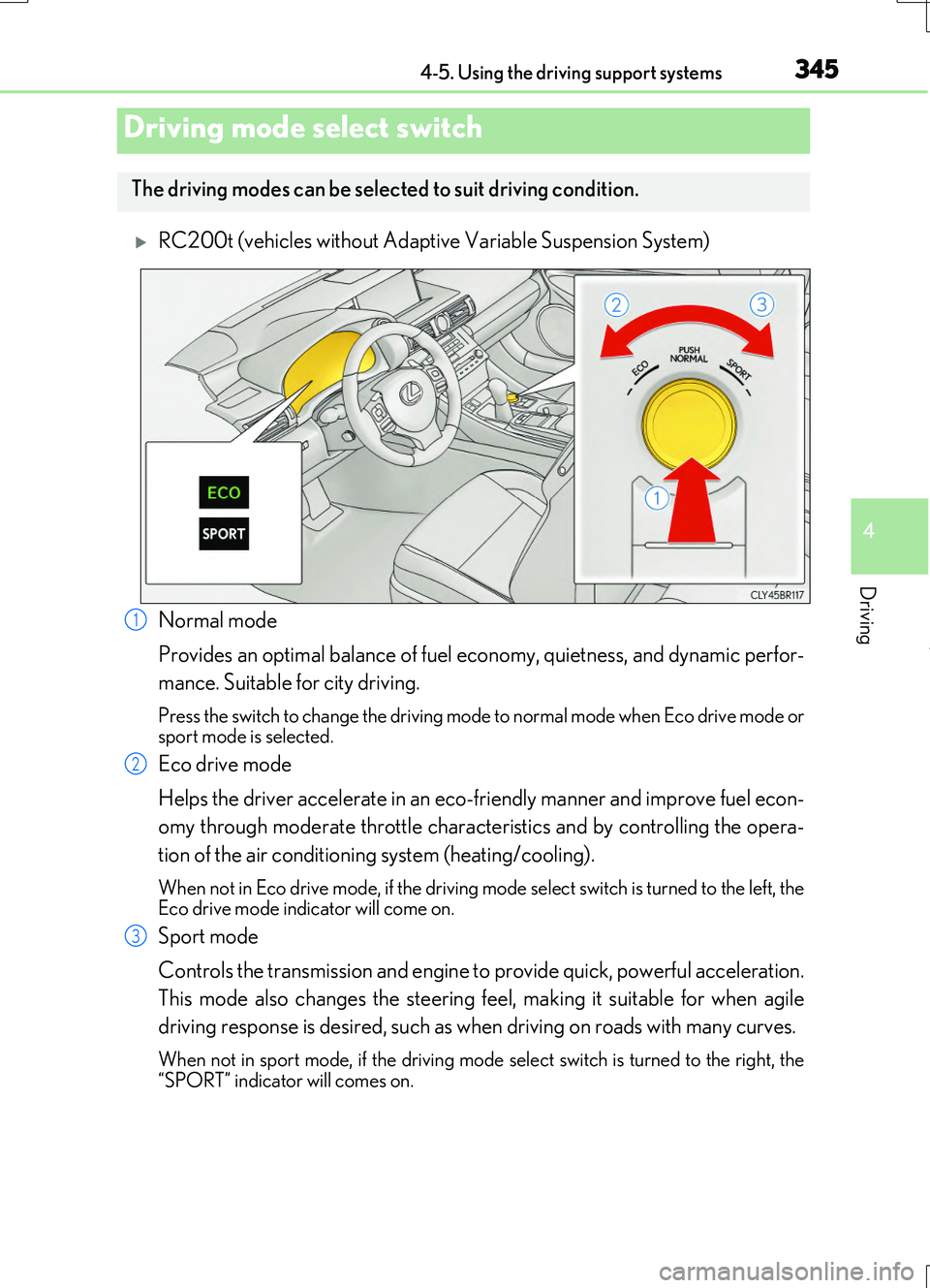
RC200t (vehicles without Adaptive Variable Suspension System)
Normal mode
Provides an optimal balance of fuel ec onomy, quietness, and dynamic perfor-
mance. Suitable for city driving.
Press the switch to change the driving mode to normal mode when Eco drive mode or sport mode is selected.
Eco drive mode
Helps the driver accelerate in an eco-friendly manner and improve fuel econ-
omy through moderate throttle characteristics and by controlling the opera-
tion of the air conditioning system (heating/cooling).
When not in Eco drive mode, if the driving mode select switch is turned to the left, the Eco drive mode indicator will come on.
Sport mode
Controls the transmission and engine to provide quick, powerful acceleration.
This mode also changes the steering feel, making it suitable for when agile
driving response is desired, such as when driving on roads with many curves.
When not in sport mode, if the driving mode se lect switch is turned to the right, the
“SPORT” indicator will comes on.
Driving mode select switch
The driving modes can be select ed to suit driving condition.
1
2
3
Page 346 of 724
3464-5. Using the driving support systems
RC200t_RC F_EE(OM24728E)
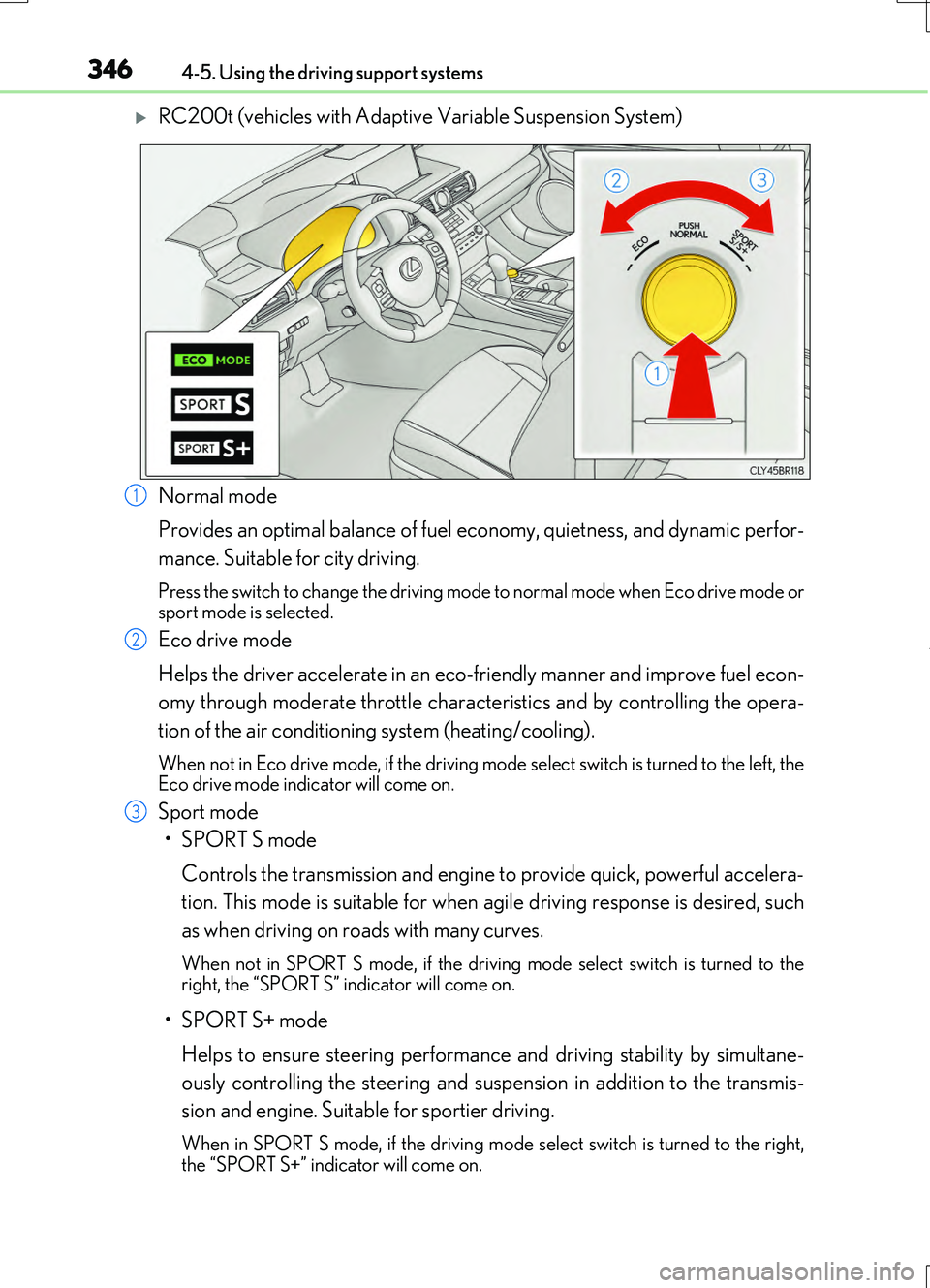
RC200t (vehicles with Adaptive Variable Suspension System)
Normal mode
Provides an optimal balance of fuel ec onomy, quietness, and dynamic perfor-
mance. Suitable for city driving.
Press the switch to change the driving mode to normal mode when Eco drive mode or sport mode is selected.
Eco drive mode
Helps the driver accelerate in an eco-friendly manner and improve fuel econ-
omy through moderate throttle characteristics and by controlling the opera-
tion of the air conditioning system (heating/cooling).
When not in Eco drive mode, if the driving mode select switch is turned to the left, the Eco drive mode indicator will come on.
Sport mode
•SPORT S mode
Controls the transmission and engine to provide quick, powerful accelera-
tion. This mode is suitable for when agile driving response is desired, such
as when driving on roads with many curves.
When not in SPORT S mode, if the drivin g mode select switch is turned to the right, the “SPORT S” indicator will come on.
•SPORT S+ mode
Helps to ensure steering performanc e and driving stability by simultane-
ously controlling the steering and susp ension in addition to the transmis-
sion and engine. Suitable for sportier driving.
When in SPORT S mode, if th e driving mode select switch is turned to the right, the “SPORT S+” indicator will come on.
1
2
3
Page 347 of 724
3474-5. Using the driving support systems
4
Driving
RC200t_RC F_EE(OM24728E)
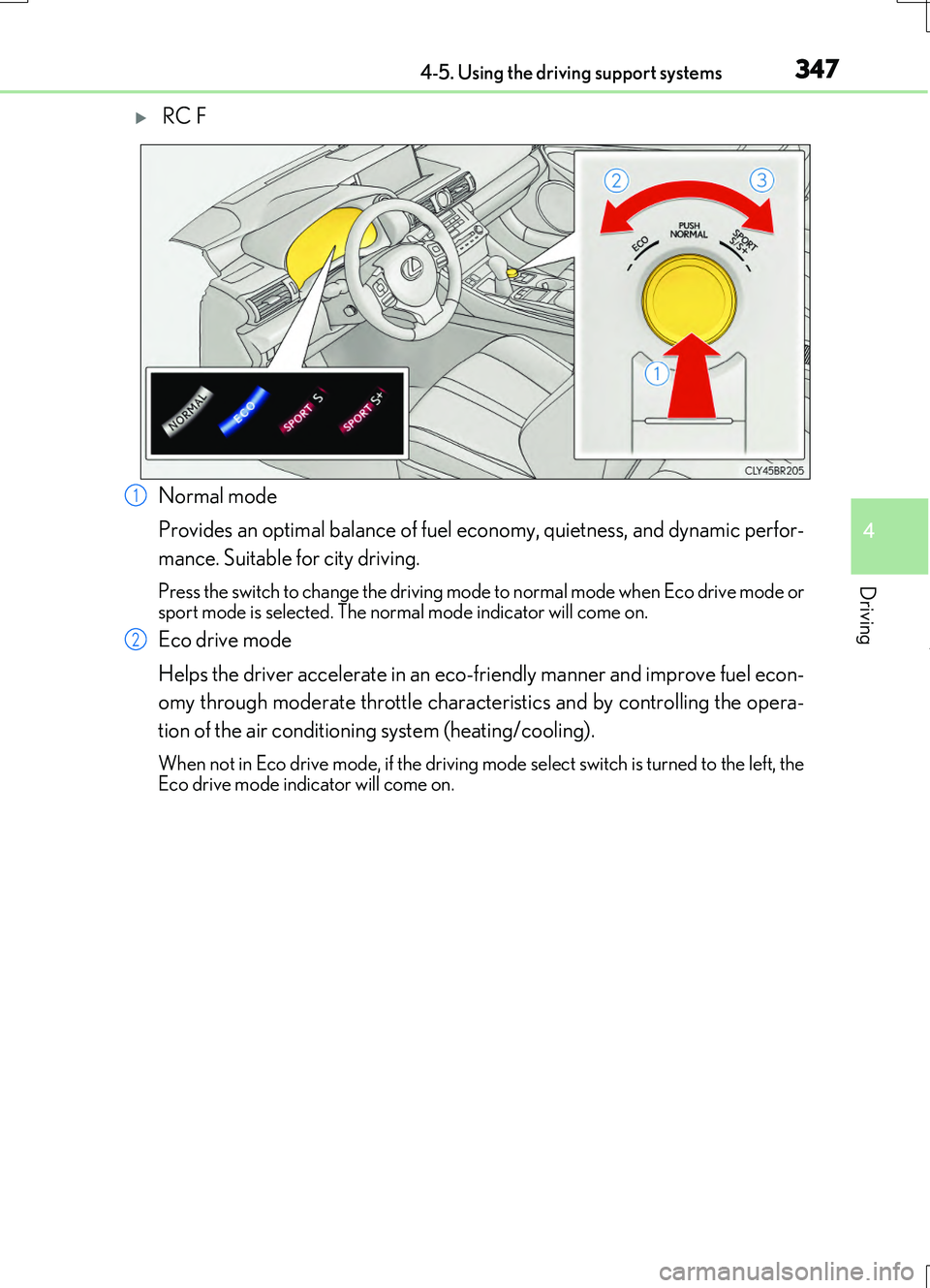
RC F
Normal mode
Provides an optimal balance of fuel ec onomy, quietness, and dynamic perfor-
mance. Suitable for city driving.
Press the switch to change the driving mode to normal mode when Eco drive mode or sport mode is selected. The norm al mode indicator will come on.
Eco drive mode
Helps the driver accelerate in an eco-friendly manner and improve fuel econ-
omy through moderate throttle characteristics and by controlling the opera-
tion of the air conditioning system (heating/cooling).
When not in Eco drive mode, if the driving mode select switch is turned to the left, the Eco drive mode indicator will come on.
1
2
Page 348 of 724
3484-5. Using the driving support systems
RC200t_RC F_EE(OM24728E)
Sport mode
•SPORT S mode
Controls the transmission and engine to provide quick, powerful accelera-
tion. Also, gear shift timing is controlled to suit sporty driving, making this
mode is suitable for when agile driving response is desired, such as when
driving on roads with many curves.
When not in SPORT S mode, if the drivin g mode select switch is turned to the right, the “SPORT S” indicator will come on.
•SPORT S+ mode
Provides earlier downshift timing than SPORT S mode in order to maintain
a high engine speed and provides faster gear changes. This mode also
changes the steering feel, suspension control and VDIM control, making it
suitable for powerful sporty driving.
When in SPORT S mode, if th e driving mode select switch is turned to the right,
the “SPORT S+” indicator will come on.
■Operation of the air conditioning system in Eco drive mode
Eco drive mode controls the heating/cooling operations and fan speed of the air condi- tioning system to enhance fuel efficiency ( P. 478). To improve air conditioning perfor- mance, adjust the fan speed or turn off Eco drive mode.
■Sport mode automatic deactivation
Sport mode is automatically deactivated if the engine switch is turned off after driving in sport mode.
3
Page 352 of 724
3524-5. Using the driving support systems
RC200t_RC F_EE(OM24728E)
■Turning off both TRC and VSC systems
RC200t
To turn the TRC and VSC systems off, press and hold ( ) for more than 3
seconds while the vehicle is stopped.
The VSC OFF indicator light will come on and the “TRC OFF” will be shown on the
multi-information display.*
Press ( ) again to turn the systems back on.
RC F
To turn the TRC and VSC systems off, press and hold ( ) for more than 3
seconds.
The “TRC OFF” indicator light and the VSC OFF indicator light will come on.*
Press ( ) again to turn the systems back on.
*: On vehicles with PCS (Pre-Crash Safety system), pre-crash brake assist and pre-
crash braking will also be disabled. The pr e-crash safety system warning light will
come on and a message will be displaye d on the multi-information display. (P. 611)
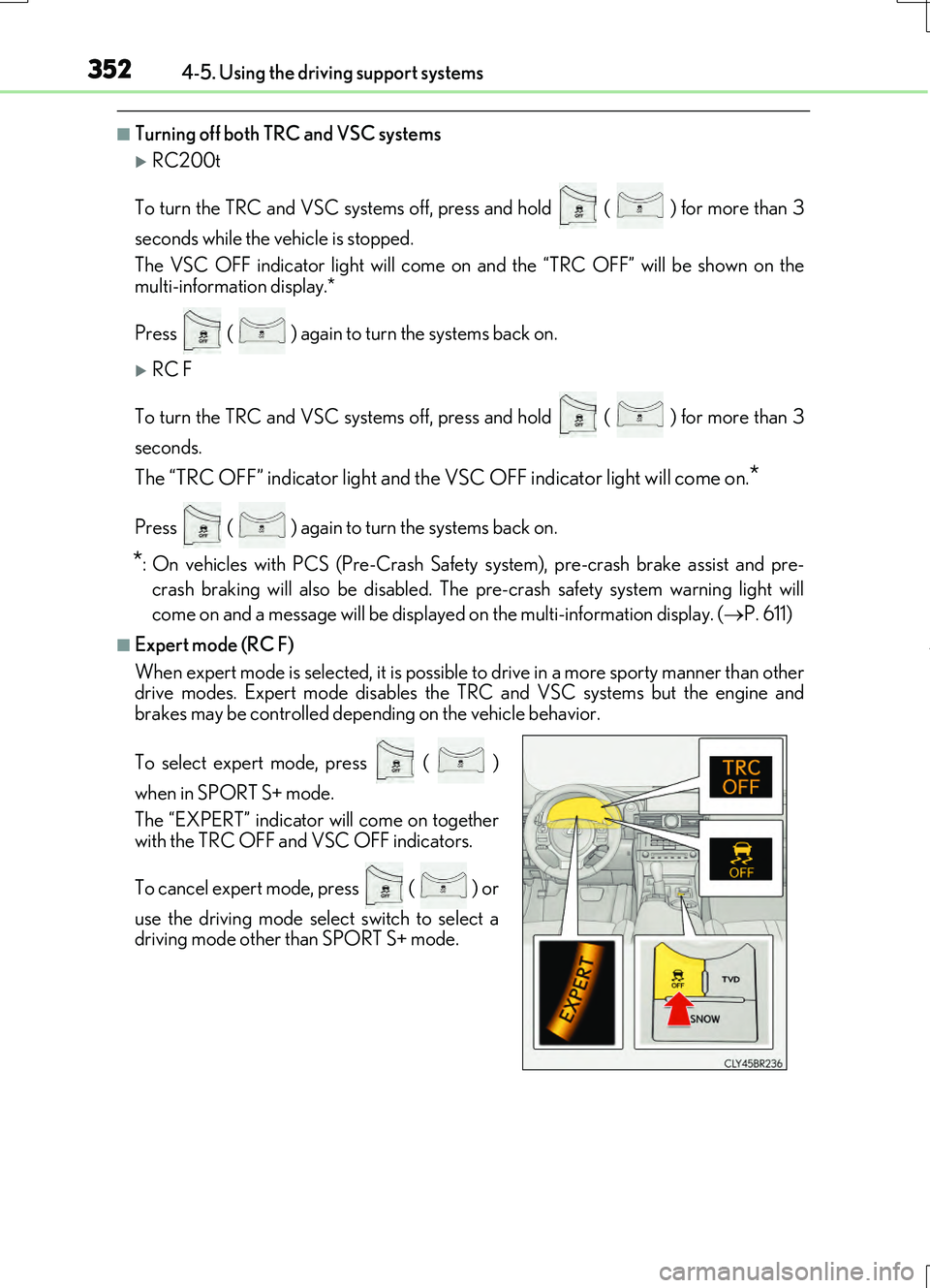
■Expert mode (RC F)
When expert mode is selected, it is possible to drive in a more sporty manner than other
drive modes. Expert mode disables the TR C and VSC systems but the engine and
brakes may be controlled depending on the vehicle behavior.
To select expert mode, press ( )
when in SPORT S+ mode.
The “EXPERT” indicator will come on together
with the TRC OFF and VSC OFF indicators.
To cancel expert mode, press ( ) or
use the driving mode select switch to select a
driving mode other than SPORT S+ mode.
Page 355 of 724
3554-5. Using the driving support systems
4
Driving
RC200t_RC F_EE(OM24728E)
WARNING
■When the VSC is activated
The slip indicator light flashes. Always drive carefully. Reckless driving may cause an accident. Exercise particular care when the indicator light flashes.
■When the TRC/VSC systems are turned off
Be especially careful and drive at a speed appropriate to the road conditions. As these are the systems to help ensure vehicle stability and driving force, do not turn the TRC/
VSC systems off unless necessary.
■Expert mode precautions
●Do not use on public roads.
●Use only when the road conditions and safety of the surrounding area can be ensured.
●Proper use of expert mode re quires a professional level of driving skill. When using
expert mode, always check the road condit ions and surrounding area and drive more carefully than usual.
■Replacing tires
Make sure that all tires are of the specified size, brand, tread pattern and total load capacity. In addition, make sure that the tire s are inflated to the recommended tire infla- tion pressure level.
The ABS, TRC and VSC systems will not function correctly if different tires are installed on the vehicle.Contact any authorized Lexus dealer or repairer, or another duly qualified and
equipped professional for further information when replacing tires or wheels.
■Handling of tires and the suspension
Using tires with any kind of problem or modif ying the suspension will affect the driving
assist systems, and may cause a system to malfunction.
Page 379 of 724
3794-5. Using the driving support systems
4
Driving
RC200t_RC F_EE(OM24728E)
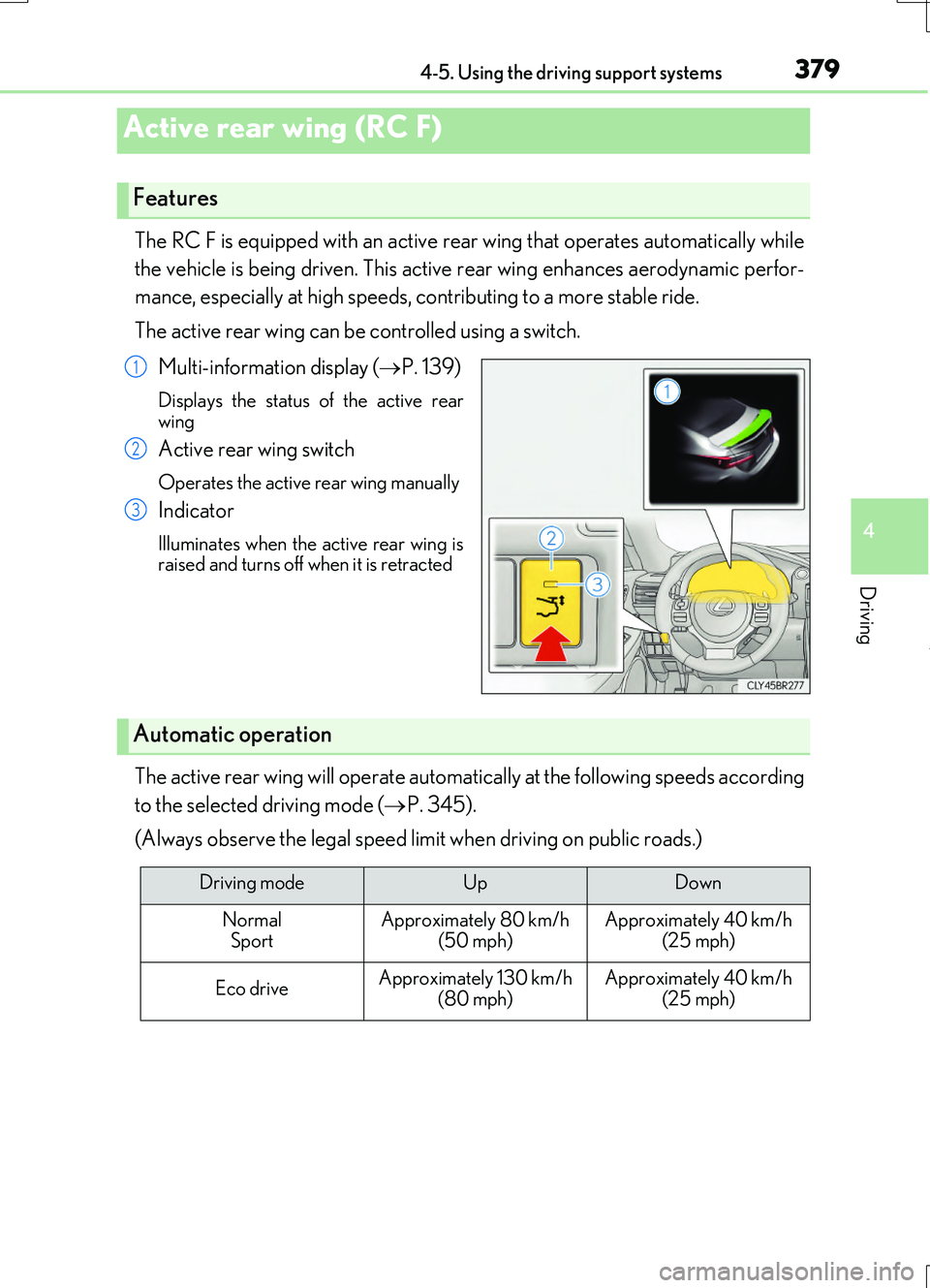
The RC F is equipped with an active rear wing that operates automatically while
the vehicle is being driven. This active rear wing enhances aerodynamic perfor-
mance, especially at high speeds, contributing to a more stable ride.
The active rear wing can be controlled using a switch.
Multi-information display ( P. 139)
Displays the status of the active rear wing
Active rear wing switch
Operates the active rear wing manually
Indicator
Illuminates when the active rear wing israised and turns off when it is retracted
The active rear wing will operate automatically at the following speeds according
to the selected driving mode ( P. 345).
(Always observe the legal speed limit when driving on public roads.)
Active rear wing (RC F)
Features
1
2
3
Automatic operation
Driving modeUpDown
Normal SportApproximately 80 km/h (50 mph)Approximately 40 km/h (25 mph)
Eco driveApproximately 130 km/h
(80 mph)
Approximately 40 km/h
(25 mph)
Page 383 of 724
3834-5. Using the driving support systems
4
Driving
RC200t_RC F_EE(OM24728E)
■Automatic cancelation of the selected TVD control mode
SLALOM and TRACK mode are canceled when the engine switch is turned off. When the engine switch is turned to IGNITION ON mode, the TVD system will be in STAN- DARD mode.
■Automatic disabling of the TVD system
If a malfunction is detected in the TVD sy stem, a warning message will be displayed on the multi-information display ( P. 607) and the TVD system will be disabled automati-
cally. If the system is disabled, driving force will not be distributed by the TVD but through normal differential operation.
■To protect the system
The TVD fluid temperature may become excessively high when driving for a long time under extremely high load conditions. In th is case, a warning message will be displayed on the multi-information display. ( P. 607)
WARNING
■Cautions regarding the use of the system
The driver is solely responsible for safe driv ing. Do not overly rely on the TVD system. Always drive safely, taking care to observe your surroundings.