ECO mode LEXUS RC200T 2017 User Guide
[x] Cancel search | Manufacturer: LEXUS, Model Year: 2017, Model line: RC200T, Model: LEXUS RC200T 2017Pages: 724, PDF Size: 42.04 MB
Page 134 of 724
1342. Instrument cluster
RC200t_RC F_EE(OM24728E)
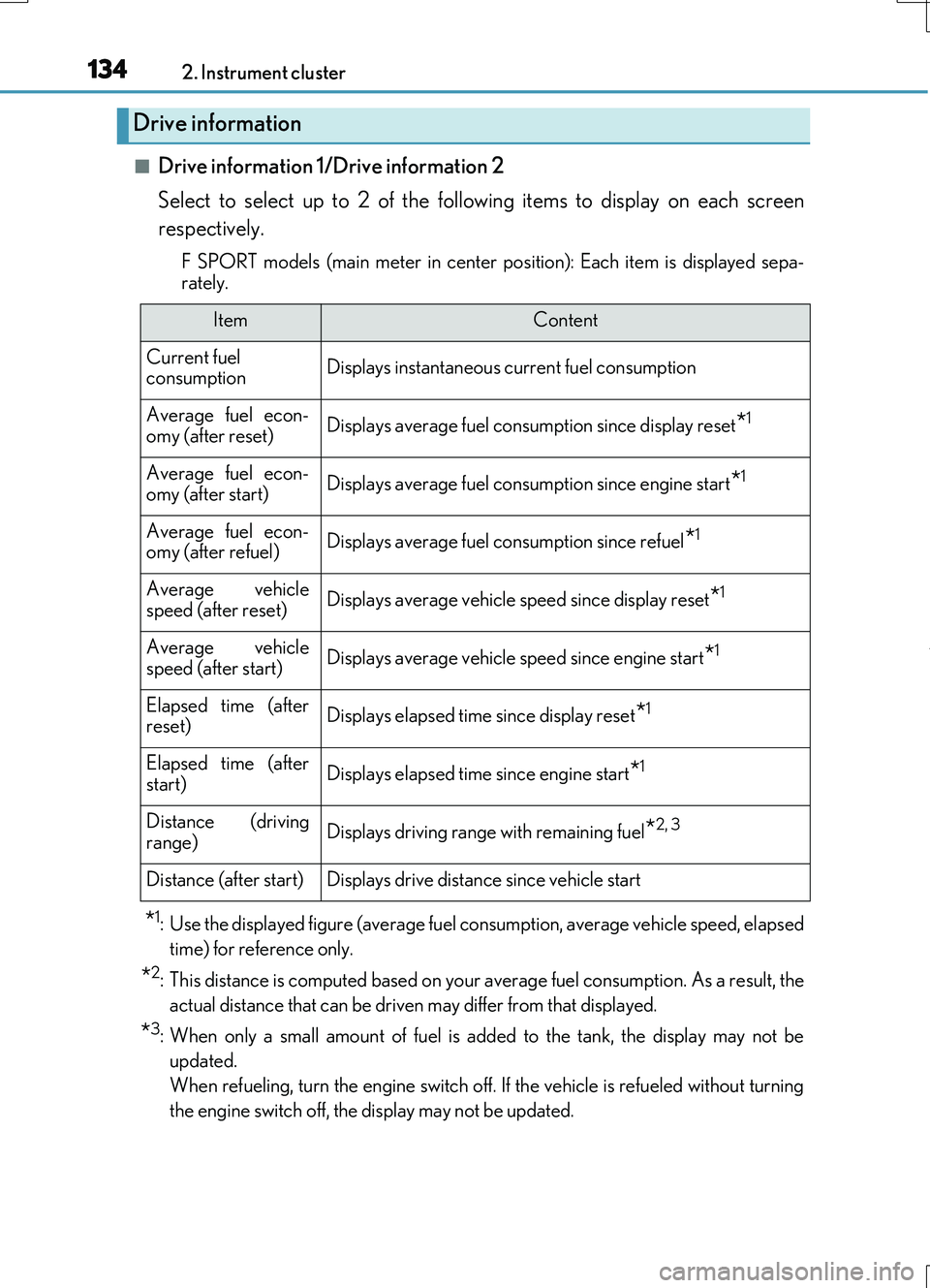
■Drive information 1/Drive information 2
Select to select up to 2 of the following items to display on each screen
respectively.
F SPORT models (main meter in center po sition): Each item is displayed sepa-
rately.
*1: Use the displayed figure (average fuel consumption, average vehicle speed, elapsed
time) for reference only.
*2: This distance is computed based on your average fuel consumption. As a result, the
actual distance that can be driven may differ from that displayed.
*3: When only a small amount of fuel is added to the tank, the display may not be
updated.
When refueling, turn the engine switch off. If the vehicle is refueled without turning
the engine switch off, the display may not be updated.
Drive information
ItemContent
Current fuel consumptionDisplays instantaneous current fuel consumption
Average fuel econ-omy (after reset)Displays average fuel consumption since display reset*1
Average fuel econ-
omy (after start)Displays average fuel cons umption since engine start*1
Average fuel econ- omy (after refuel)Displays average fuel consumption since refuel*1
Average vehiclespeed (after reset)Displays average vehicle speed since display reset*1
Average vehicle
speed (after start)Displays average vehicle speed since engine start*1
Elapsed time (after reset)Displays elapsed time since display reset*1
Elapsed time (afterstart)Displays elapsed time since engine start*1
Distance (driving
range)Displays driving range with remaining fuel*2, 3
Distance (after start)Displays drive distance since vehicle start
Page 135 of 724
1352. Instrument cluster
2
Instrument cluster
RC200t_RC F_EE(OM24728E)
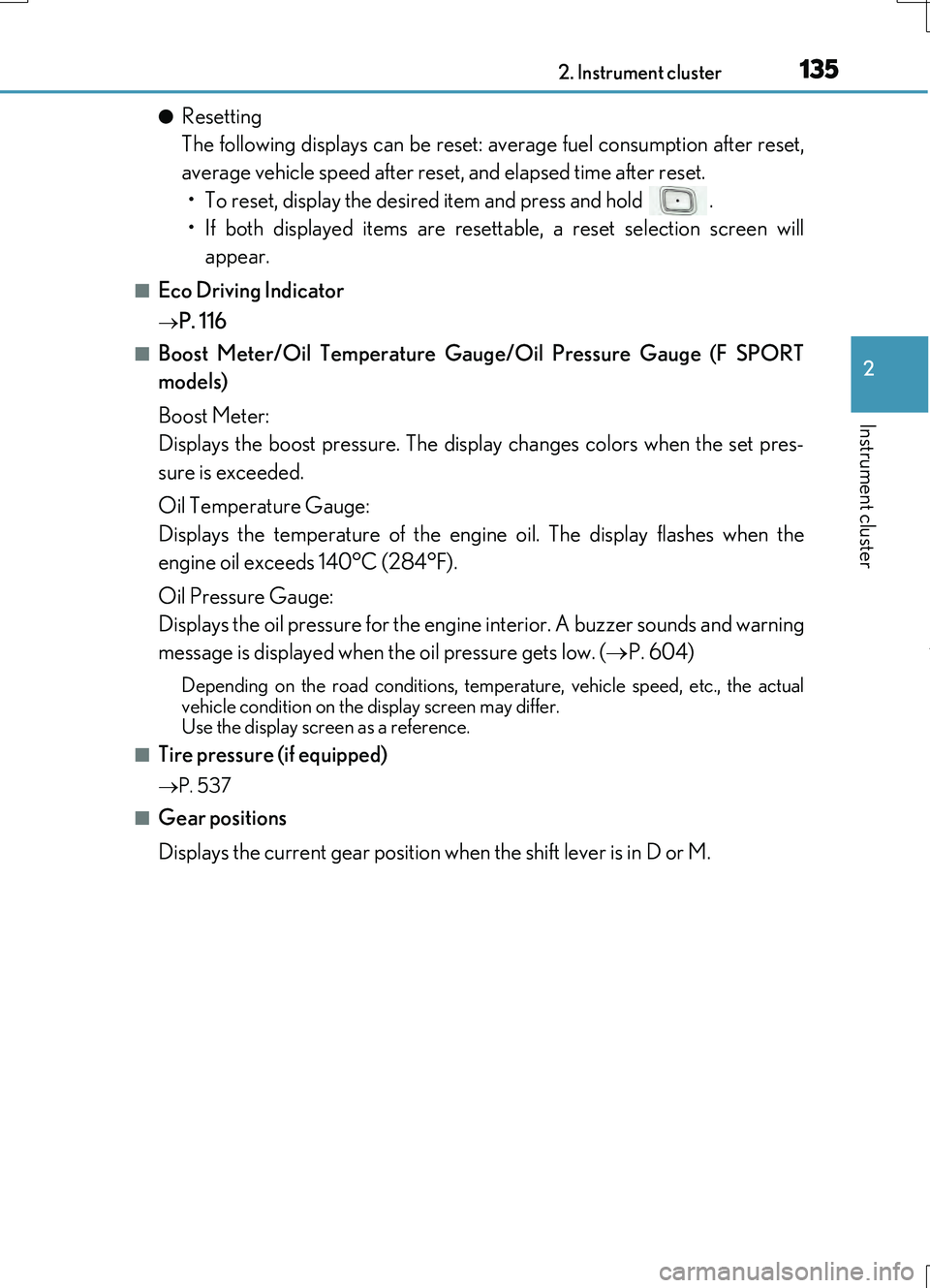
●Resetting
The following displays can be reset: average fuel consumption after reset,
average vehicle speed after reset, and elapsed time after reset.
• To reset, display the desired item and press and hold .
• If both displayed items are resettable, a reset selection screen will
appear.
■Eco Driving Indicator
P. 116
■Boost Meter/Oil Temperature Gauge/Oil Pressure Gauge (F SPORT
models)
Boost Meter:
Displays the boost pressure. The display changes colors when the set pres-
sure is exceeded.
Oil Temperature Gauge:
Displays the temperature of the engine oil. The display flashes when the
engine oil exceeds 140°C (284°F).
Oil Pressure Gauge:
Displays the oil pressure for the engine interior. A buzzer sounds and warning
message is displayed when the oil pressure gets low. ( P. 604)
Depending on the road conditions, temperature, vehicle speed, etc., the actual
vehicle condition on the display screen may differ. Use the display screen as a reference.
■Tire pressure (if equipped)
P. 537
■Gear positions
Displays the current gear position when the shift lever is in D or M.
Page 136 of 724
1362. Instrument cluster
RC200t_RC F_EE(OM24728E)
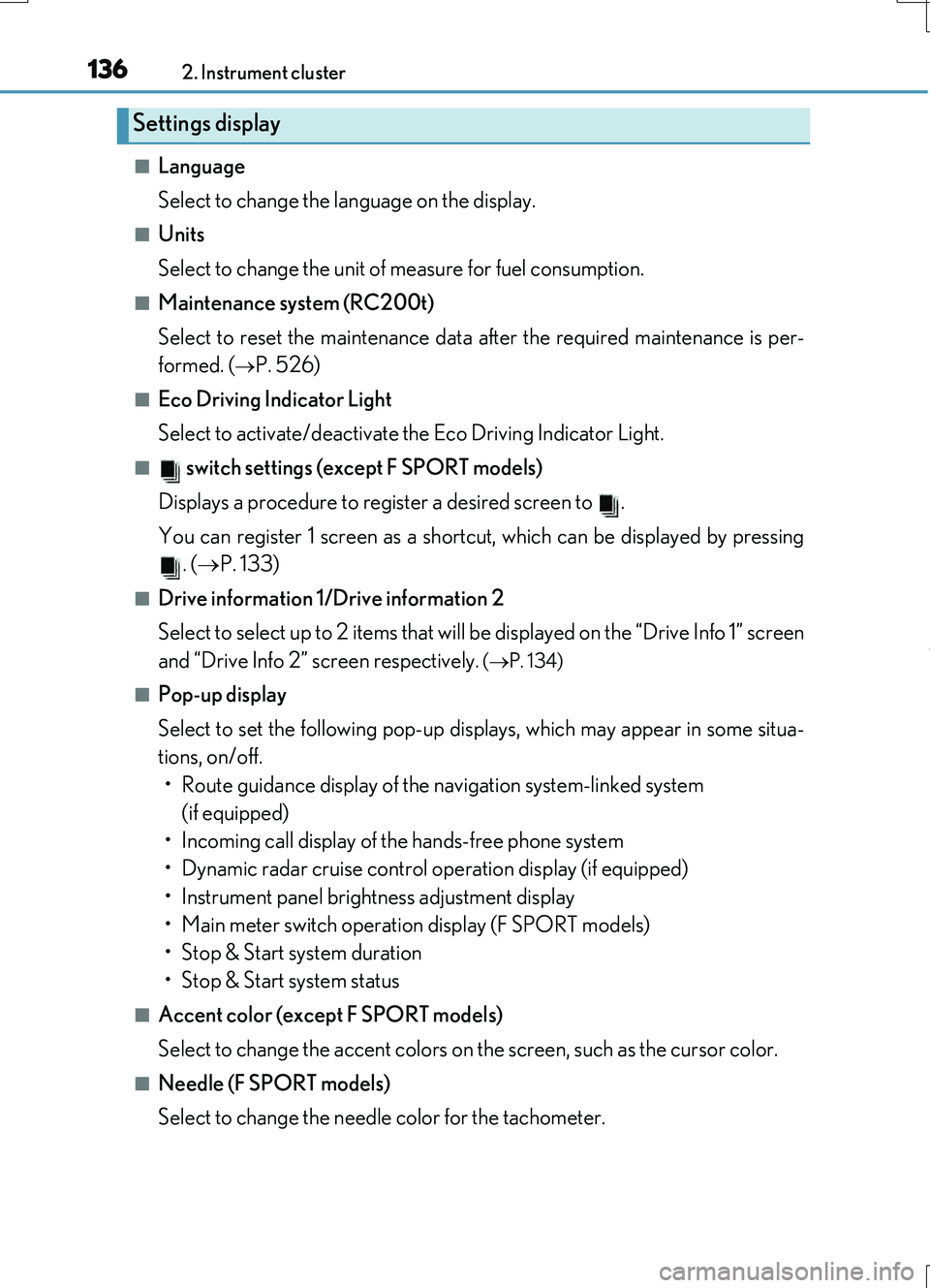
■Language
Select to change the language on the display.
■Units
Select to change the unit of measure for fuel consumption.
■Maintenance system (RC200t)
Select to reset the maintenance data after the required maintenance is per-
formed. (
P. 526)
■Eco Driving Indicator Light
Select to activate/deactivate the Eco Driving Indicator Light.
■ switch settings (except F SPORT models)
Displays a procedure to register a desired screen to .
You can register 1 screen as a shortcut, which can be displayed by pressing . ( P. 133)
■Drive information 1/Drive information 2
Select to select up to 2 items that will be displayed on the “Drive Info 1” screen
and “Drive Info 2” screen respectively.
( P. 134)
■Pop-up display
Select to set the following pop-up displays, which may appear in some situa-
tions, on/off.
• Route guidance display of the navigation system-linked system (if equipped)
• Incoming call display of the hands-free phone system
• Dynamic radar cruise control operation display (if equipped)
• Instrument panel brightness adjustment display
• Main meter switch operation display (F SPORT models)
• Stop & Start system duration
• Stop & Start system status
■Accent color (except F SPORT models)
Select to change the accent colors on the screen, such as the cursor color.
■Needle (F SPORT models)
Select to change the needle color for the tachometer.
Settings display
Page 138 of 724
1382. Instrument cluster
RC200t_RC F_EE(OM24728E)
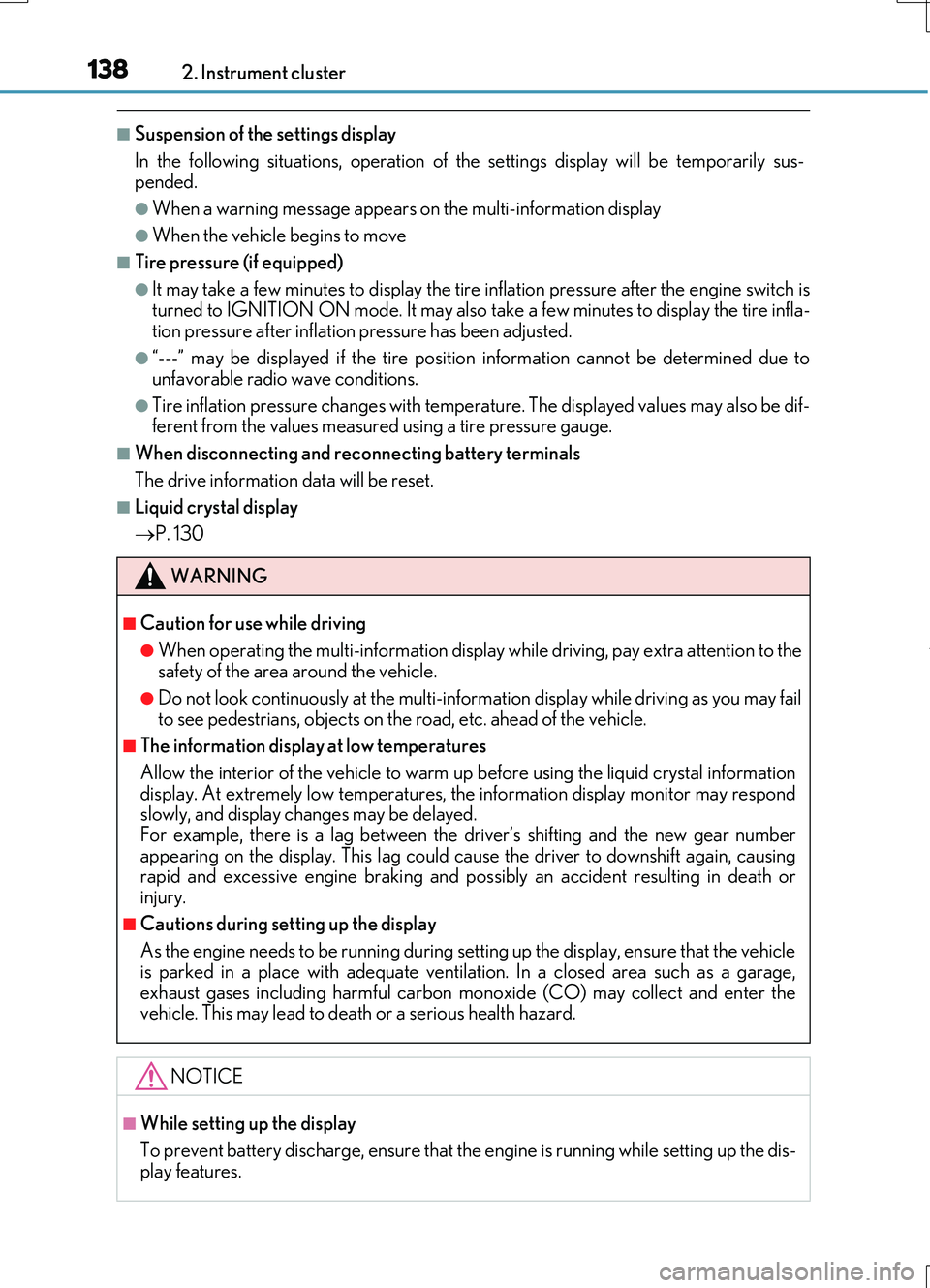
■Suspension of the settings display
In the following situations, operation of th e settings display will be temporarily sus- pended.
●When a warning message appears on the multi-information display
●When the vehicle begins to move
■Tire pressure (if equipped)
●It may take a few minutes to display the tire inflation pressure after the engine switch is
turned to IGNITION ON mode. It may also take a few minutes to display the tire infla- tion pressure after inflation pressure has been adjusted.
●“---” may be displayed if the tire position information cannot be determined due to
unfavorable radio wave conditions.
●Tire inflation pressure changes with temperature. The displayed values may also be dif- ferent from the values measured using a tire pressure gauge.
■When disconnecting and reconnecting battery terminals
The drive information data will be reset.
■Liquid crystal display
P. 130
WARNING
■Caution for use while driving
●When operating the multi-information display while driving, pay extra attention to the safety of the area around the vehicle.
●Do not look continuously at the multi-info rmation display while driving as you may fail to see pedestrians, objects on the road, etc. ahead of the vehicle.
■The information display at low temperatures
Allow the interior of the vehicle to warm up before using the liquid crystal information display. At extremely low temperatures, th e information display monitor may respond slowly, and display changes may be delayed.
For example, there is a lag between the dr iver’s shifting and the new gear number appearing on the display. This lag could cau se the driver to downshift again, causing rapid and excessive engine braking and po ssibly an accident resulting in death or
injury.
■Cautions during setting up the display
As the engine needs to be running during setting up the display, ensure that the vehicle
is parked in a place with adequate ventilation. In a closed area such as a garage, exhaust gases including harmful carbon monoxide (CO) may collect and enter thevehicle. This may lead to death or a serious health hazard.
NOTICE
■While setting up the display
To prevent battery discharge, ensure that the engine is running while setting up the dis- play features.
Page 148 of 724
1482. Instrument cluster
RC200t_RC F_EE(OM24728E)
■Language
Select to change the language on the display.
■Units
Select to change the unit of measure for fuel consumption.
■Eco Driving Indicator Light
Select to activate/deactivate the Eco Driving Indicator Light.
■ switch settings
Displays a procedure to register a desired screen to .
You can register 1 screen as a shortcut, which can be displayed by pressing .
( P. 140)
■Drive information 1/Drive information 2
Select to select up to 2 items that will be displayed on the “Drive Info 1” screen
and “Drive Info 2” screen respectively.
( P. 141)
■Pop-up display
Select to set the following pop-up displays, which may appear in some situa-
tions, on/off. • Route guidance display of the navigation system-linked system
(if equipped)
• Incoming call display of the hands-free phone system
• Dynamic radar cruise control operation display (if equipped)
• Instrument panel brightness adjustment display
• TVD control mode change display (if equipped)
• Driving mode change display
■Rev indicator
Select to set the rev indicator on/off.
When set to on, proceed to select the engine speed at which the rev indicator
will be displayed.
■Rev peak
Select to set the rev peak on/off.
Settings display
Page 149 of 724
1492. Instrument cluster
2
Instrument cluster
RC200t_RC F_EE(OM24728E)
■Speed indicator
Select to set the speed indicator on/off.
When set to on, proceed to set the vehicle speed at which the speed indicator
will be displayed.
Selectable speed range:
Except for United Kingdom: 50 km/h to 200 km/h (30 mph to 125 mph)*
For United Kingdom: 50 km/h to 160 km/h (30 mph to 100 mph)*
*: Always observe the legal speed limit when driving on public roads.
■Rear wing
Select to enable/disable the active rear wing.
■SPORT gauges
The SPORT S or SPORT S+ mode meter display can be selected and set as
the customized display for either SPORT S or SPORT S+ mode.
■Initialization
Select to reset the meter display settings. ( P. 686)
■Start-up display
When the engine is started, the name of the vehicle is displayed on the multi-information display.
While the start-up display is being displayed, the meter display cannot be changed even if the drive mode is changed. When the start-up display is finished, the meter display forthe currently selected mode will be displayed.
■Torque distribution display (if equipped)
Torque distribution may not be displayed corre ctly in some cases, such as when the vehi- cle passes over road expansion joints.
■G-force display
●The G-force values may not be zero even when the vehicle is parked, such as when it isparked on an incline.
●The steering amount, accelerator pedal input, and brake fluid pressure displays are dis-abled until the engine has warmed up (the variable red zone of the tachometer hasretracted to 7300 r/min).
After the engine has warmed up, these displays will be enabled.
●Depending on the vehicle usage conditions, the brake fluid pressure display may not reach its maximum reading even though the brake pedal is fully depressed.
●If a battery terminal is disconnected and reconnected, the steering amount display may be disabled temporarily. After driving the ve hicle for a while, the display will be enabled.
Page 150 of 724
1502. Instrument cluster
RC200t_RC F_EE(OM24728E)
■Suspension of the settings display
In the following situations, operation of th e settings display will be temporarily sus- pended.
●When a warning message appears on the multi-information display
●When the vehicle begins to move
■Tire pressure
●It may take a few minutes to display the tire inflation pressure after the engine switch is turned to IGNITION ON mode. It may also take a few minutes to display the tire infla-tion pressure after inflation pressure has been adjusted.
●“---” may be displayed if the tire position information cannot be determined due to unfavorable radio wave conditions.
●Tire inflation pressure changes with temperature. The displayed values may also be dif-
ferent from the values measured using a tire pressure gauge.
■When disconnecting and reconnecting battery terminals
The following information data will be reset:
●Drive information
●Lap timer: Measured lap times, history
●G-force: Record of the maximum G-forces
■Using the lap timer
If the engine is stopped while a lap is being timed, the lap timer will stop and the lap time up to that point will be recorded.
■Liquid crystal display
P. 130
WARNING
■Caution for use while driving
●When operating the multi-information display while driving, pay extra attention to the
safety of the area around the vehicle.
●Do not look continuously at the multi-info rmation display while driving as you may fail to see pedestrians, objects on the road, etc. ahead of the vehicle.
■The information display at low temperatures
Allow the interior of the vehicle to warm up before using the liquid crystal information display. At extremely low temperatures, th e information display monitor may respond
slowly, and display changes may be delayed. For example, there is a lag between the dr iver’s shifting and the new gear number appearing on the display. This lag could cau se the driver to downshift again, causing
rapid and excessive engine braking and po ssibly an accident resulting in death or injury.
■Cautions during setting up the display
As the engine needs to be running during setting up the display, ensure that the vehicle is parked in a place with adequate ventilation. In a closed area such as a garage,exhaust gases including harmful carbon monoxide (CO) may collect and enter the
vehicle. This may lead to death or a serious health hazard.
Page 176 of 724

1763-2. Opening, closing and locking the doors and trunk
RC200t_RC F_EE(OM24728E)
■Alarms and warning indicators
An alarm sounds and warning messages are di splayed on the multi-information display to protect against unexpected accidents or theft of the vehicle resulting from erroneous
operation. When a warning message is displayed, take appropriate measures based on the displayed message. ( P. 597)
When only an alarm sounds, circumstances and correction procedures are as follows.
■Battery-saving function
The battery-saving function will be activated in order to prevent the electronic key bat- tery and the vehicle battery from being discharged while the vehicle is not in operationfor a long time.
●In the following situations, the smart entry & start system may take some time to unlockthe doors.
• The electronic key has been left within approximately 2 m (6 ft.) of the outside of the
vehicle for 10 minutes or longer. • The smart entry & start system has no t been used for 5 days or longer.
●If the smart entry & start system has not been used for 14 days or longer, the doors can- not be unlocked at the passenger door. In this case, hold the driver’s door handle, or use the wireless remote control or mechanical key, to unlock the doors.
AlarmSituationCorrection procedure
Exterior alarm soundsonce for 5 seconds
The trunk was closed while
the electronic key was still inside the trunk and bothside doors were locked.
Retrieve the electronic keyfrom the trunk and close
the trunk lid.
An attempt was made to
lock the vehicle while a door was open.
Close both side doors andlock the doors again.
Interior alarm sounds con-
tinuously
The engine switch was turned to ACCESSORY
mode while the driver’s door was open (or thedriver’s door was opened
while the engine switch was in ACCESSORYmode).
Turn the engine switch offand close the driver’s door.
The engine switch was
turned off while the driver’s door was open.Close the driver’s door.
Page 178 of 724

1783-2. Opening, closing and locking the doors and trunk
RC200t_RC F_EE(OM24728E)
■Note for the entry function
●Even when the electronic key is within the effective range (detection areas), the system may not operate properly in the following cases:
• The electronic key is too close to the window or outside door handle, near the ground, or in a high place when the doors are locked or unlocked.• The electronic key is near the ground or in a high place, or too close to the rear
bumper center when the trunk is opened. • The electronic key is on the instrument pa nel, rear package tray or floor, or in the door pockets or glove box when the engine is started or engine switch modes are
changed.
●Do not leave the electronic key on top of th e instrument panel or near the door pockets
when exiting the vehicle. Depending on the radio wave reception conditions, it may be detected by the antenna outside the cabin and the doors will become lockable from the outside, possibly trapping the electronic key inside the vehicle.
●As long as the electronic key is within the effective range, the doors may be locked orunlocked by anyone. However, only the doors detecting the electronic key can be usedto unlock the vehicle.
●Even if the electronic key is not inside the vehicle, it may be possible to start the engine if the electronic key is near the window.
●The doors may unlock or lock if a large amou nt of water splashes on the door handle,
such as in the rain or in a car wash, when th e electronic key is within the effective range. (The doors will automatically be locked after approximately 30 seconds if the doorsare not opened and closed.)
●If the wireless remote control is used to lock the doors when the electronic key is nearthe vehicle, there is a possibility that the d oor may not be unlocked by the entry func- tion. (Use the wireless remote control to unlock the doors.)
●Touching the door lock or unlock sensor while wearing gloves may prevent lock or unlock operation.
●If the door handle becomes wet while the electronic key is within the effective range,the door may lock and unlock repeatedly. In this case, follow the following correction procedures to wash the vehicle:
• Place the electronic key in a location 2 m (6 ft.) or more away from the vehicle. (Take care to ensure that the key is not stolen.)• Set the electronic key to battery-saving mode to disable the smart entry & start sys-
tem. ( P. 177)
●If the electronic key is inside the vehicle and a door handle becomes wet during a car
wash, a message may be shown on the mult i-information display and a buzzer will sound outside the vehicle. To turn off the alarm, lock both side doors.
●The lock sensor may not work properly if it comes into contact with ice, snow, mud, etc.
Clean the lock sensor and attempt to operate it again.
●A sudden handle operation or a handle oper ation immediately after entering the effec- tive range may prevent the doors from bein g unlocked. Touch the door unlock sensor
and check that the doors are unlocked before pulling the door handle again.
●Unlocking the vehicle may take more time if another electronic key is within the effec- tive range.
Page 214 of 724
2143-3. Adjusting the seats
RC200t_RC F_EE(OM24728E)
Your preferred driving position (the position of the driver's seat, steering wheel
and outside rear view mirrors) can be recorded and recalled by pressing a but-
ton.
Three different driving positions can be recorded into memory.
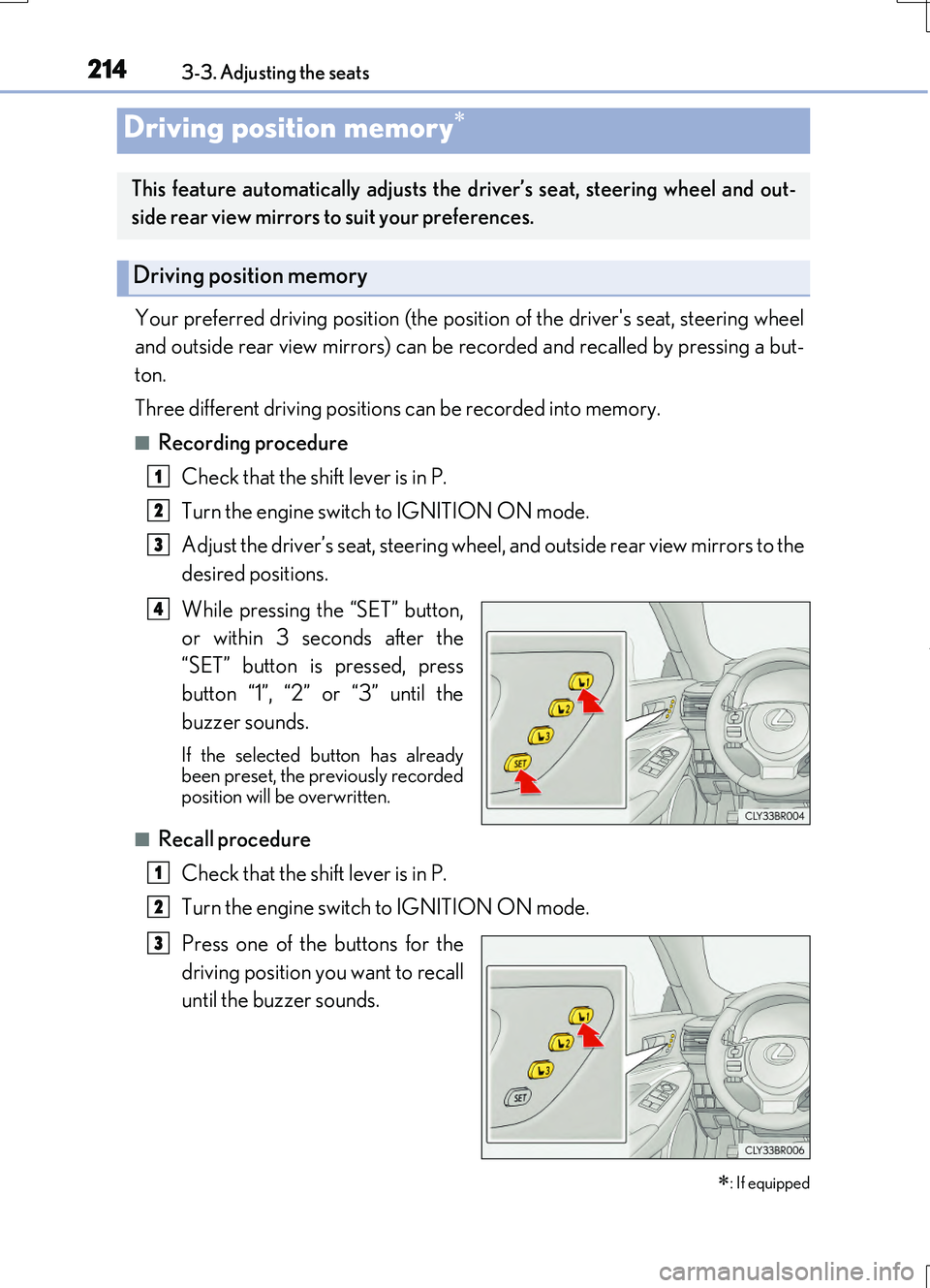
■Recording procedure
Check that the shift lever is in P.
Turn the engine switch to IGNITION ON mode.
Adjust the driver’s seat, steering wheel, and outside rear view mirrors to the
desired positions.
While pressing the “SET” button,
or within 3 seconds after the
“SET” button is pressed, press
button “1”, “2” or “3” until the
buzzer sounds.
If the selected button has already been preset, the previously recordedposition will be overwritten.
■Recall procedure
Check that the shift lever is in P.
Turn the engine switch to IGNITION ON mode.
Press one of the buttons for the
driving position you want to recall
until the buzzer sounds.
Driving position memory
: If equipped
This feature automatically adjusts the driver’s seat, steering wheel and out-
side rear view mirrors to suit your preferences.
Driving position memory
1
2
3
4
1
2
3