tire pressure reset LEXUS RC200T 2017 Owners Manual
[x] Cancel search | Manufacturer: LEXUS, Model Year: 2017, Model line: RC200T, Model: LEXUS RC200T 2017Pages: 724, PDF Size: 42.04 MB
Page 20 of 724
20Pictorial index
RC200t_RC F_EE(OM24728E)
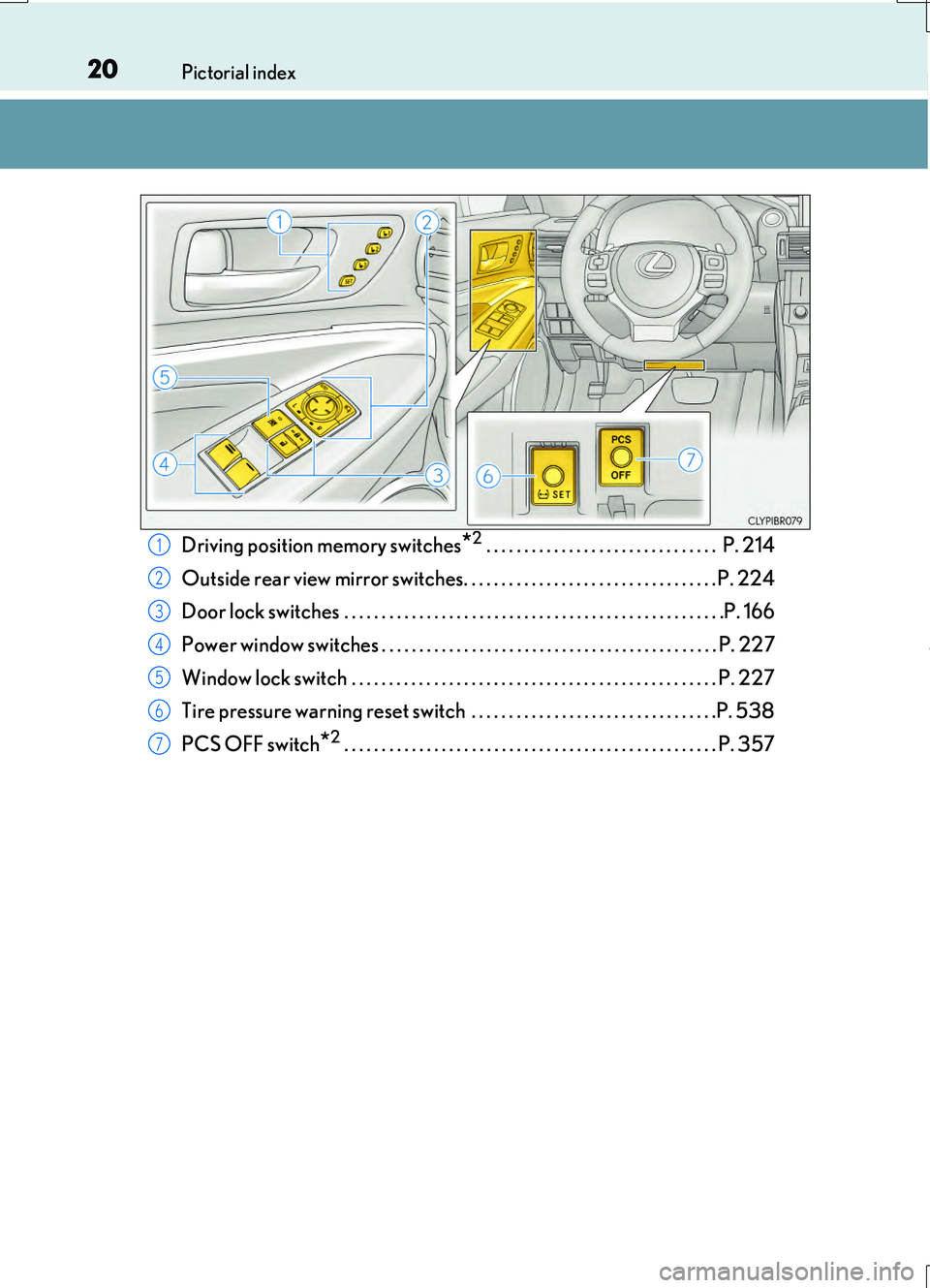
Driving position memory switches*2 . . . . . . . . . . . . . . . . . . . . . . . . . . . . . . . P. 214
Outside rear view mirror switches. . . . . . . . . . . . . . . . . . . . . . . . . . . . . . . . . . P. 224
Door lock switches . . . . . . . . . . . . . . . . . . . . . . . . . . . . . . . . . . . . . . . . . . . . . . . . . . .P. 166
Power window switches . . . . . . . . . . . . . . . . . . . . . . . . . . . . . . . . . . . . . . . . . . . . . P. 227
Window lock switch . . . . . . . . . . . . . . . . . . . . . . . . . . . . . . . . . . . . . . . . . . . . . . . . . P. 227
Tire pressure warning reset switch . . . . . . . . . . . . . . . . . . . . . . . . . . . . . . . . .P. 538
PCS OFF switch*2 . . . . . . . . . . . . . . . . . . . . . . . . . . . . . . . . . . . . . . . . . . . . . . . . . . P. 357
1
2
3
4
5
6
7
Page 31 of 724
31Pictorial index
RC200t_RC F_EE(OM24728E)
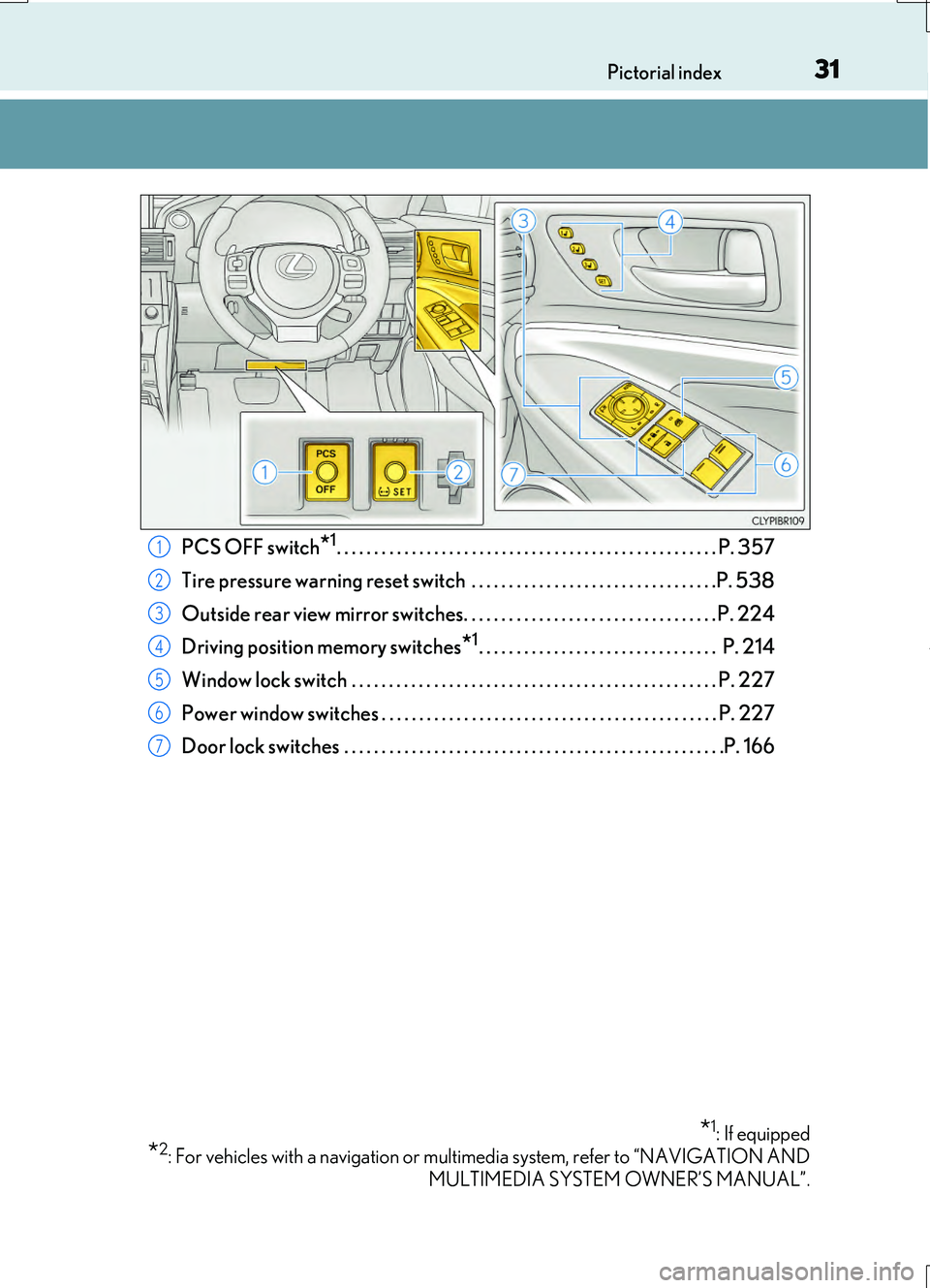
PCS OFF switch*1. . . . . . . . . . . . . . . . . . . . . . . . . . . . . . . . . . . . . . . . . . . . . . . . . . . P. 357
Tire pressure warning reset switch . . . . . . . . . . . . . . . . . . . . . . . . . . . . . . . . .P. 538
Outside rear view mirror switches. . . . . . . . . . . . . . . . . . . . . . . . . . . . . . . . . . P. 224
Driving position memory switches*1. . . . . . . . . . . . . . . . . . . . . . . . . . . . . . . . P. 214
Window lock switch . . . . . . . . . . . . . . . . . . . . . . . . . . . . . . . . . . . . . . . . . . . . . . . . . P. 227
Power window switches . . . . . . . . . . . . . . . . . . . . . . . . . . . . . . . . . . . . . . . . . . . . . P. 227
Door lock switches . . . . . . . . . . . . . . . . . . . . . . . . . . . . . . . . . . . . . . . . . . . . . . . . . . .P. 166
*1: If equipped
*2: For vehicles with a navigation or multimedia system, refer to “NAVIGATION AND
MULTIMEDIA SYSTEM OWNER’S MANUAL”.
1
2
3
4
5
6
7
Page 135 of 724
1352. Instrument cluster
2
Instrument cluster
RC200t_RC F_EE(OM24728E)
●Resetting
The following displays can be reset: average fuel consumption after reset,
average vehicle speed after reset, and elapsed time after reset.
• To reset, display the desired item and press and hold .
• If both displayed items are resettable, a reset selection screen will
appear.
■Eco Driving Indicator
P. 116
■Boost Meter/Oil Temperature Gauge/Oil Pressure Gauge (F SPORT
models)
Boost Meter:
Displays the boost pressure. The display changes colors when the set pres-
sure is exceeded.
Oil Temperature Gauge:
Displays the temperature of the engine oil. The display flashes when the
engine oil exceeds 140°C (284°F).
Oil Pressure Gauge:
Displays the oil pressure for the engine interior. A buzzer sounds and warning
message is displayed when the oil pressure gets low. ( P. 604)
Depending on the road conditions, temperature, vehicle speed, etc., the actual
vehicle condition on the display screen may differ. Use the display screen as a reference.
■Tire pressure (if equipped)
P. 537
■Gear positions
Displays the current gear position when the shift lever is in D or M.
Page 138 of 724
1382. Instrument cluster
RC200t_RC F_EE(OM24728E)
■Suspension of the settings display
In the following situations, operation of th e settings display will be temporarily sus- pended.
●When a warning message appears on the multi-information display
●When the vehicle begins to move
■Tire pressure (if equipped)
●It may take a few minutes to display the tire inflation pressure after the engine switch is
turned to IGNITION ON mode. It may also take a few minutes to display the tire infla- tion pressure after inflation pressure has been adjusted.
●“---” may be displayed if the tire position information cannot be determined due to
unfavorable radio wave conditions.
●Tire inflation pressure changes with temperature. The displayed values may also be dif- ferent from the values measured using a tire pressure gauge.
■When disconnecting and reconnecting battery terminals
The drive information data will be reset.
■Liquid crystal display
P. 130
WARNING
■Caution for use while driving
●When operating the multi-information display while driving, pay extra attention to the safety of the area around the vehicle.
●Do not look continuously at the multi-info rmation display while driving as you may fail to see pedestrians, objects on the road, etc. ahead of the vehicle.
■The information display at low temperatures
Allow the interior of the vehicle to warm up before using the liquid crystal information display. At extremely low temperatures, th e information display monitor may respond slowly, and display changes may be delayed.
For example, there is a lag between the dr iver’s shifting and the new gear number appearing on the display. This lag could cau se the driver to downshift again, causing rapid and excessive engine braking and po ssibly an accident resulting in death or
injury.
■Cautions during setting up the display
As the engine needs to be running during setting up the display, ensure that the vehicle
is parked in a place with adequate ventilation. In a closed area such as a garage, exhaust gases including harmful carbon monoxide (CO) may collect and enter thevehicle. This may lead to death or a serious health hazard.
NOTICE
■While setting up the display
To prevent battery discharge, ensure that the engine is running while setting up the dis- play features.
Page 142 of 724
1422. Instrument cluster
RC200t_RC F_EE(OM24728E)
●Resetting
The following displays can be reset: average fuel consumption after reset,
average vehicle speed after reset, and elapsed time after reset.
• To reset, display the desired item and press and hold .
• If both displayed items are resettable, a reset selection screen will
appear.
■Tire pressure
P. 537
■Gear positions
Displays the current gear position when the shift lever is in D or M.
■Units (if equipped)
The units of measure used can be changed while driving.
Unlike the units setting performed on the settings display, the units setting per-
formed on the drive information me nu can be changed while driving.
Page 143 of 724
1432. Instrument cluster
2
Instrument cluster
RC200t_RC F_EE(OM24728E)
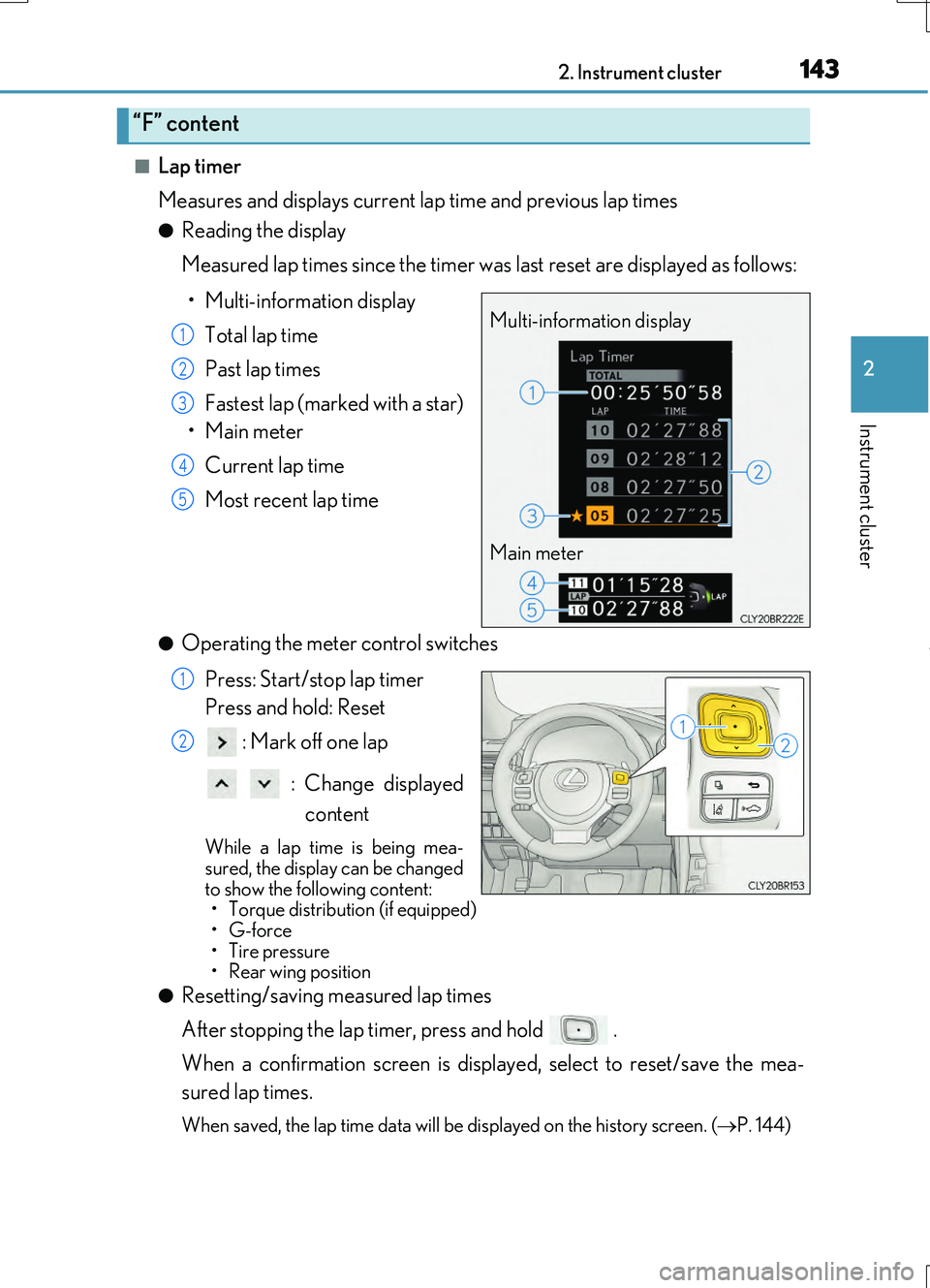
■Lap timer
Measures and displays current la p time and previous lap times
●Reading the display
Measured lap times since the timer was last reset are displayed as follows:
• Multi-information display
Total lap time
Past lap times
Fastest lap (marked with a star)
•Main meter
Current lap time
Most recent lap time
●Operating the meter control switches
Press: Start/stop lap timer
Press and hold: Reset
: Mark off one lap
: Change displayed
content
While a lap time is being mea- sured, the display can be changed
to show the following content: • Torque distribution (if equipped)•G-force
• Tire pressure •Rear wing position
●Resetting/saving measured lap times
After stopping the lap timer, press and hold .
When a confirmation screen is displa yed, select to reset/save the mea-
sured lap times.
When saved, the lap time data will be displayed on the history screen. (P. 144)
“F” content
Multi-information display
Main meter
1
2
3
4
5
1
2
Page 147 of 724
1472. Instrument cluster
2
Instrument cluster
RC200t_RC F_EE(OM24728E)
●Switching the display
To switch to advanced display, press .
To return to normal display, press .
●Resetting the record of maximum G-forces
With the record of maximum G-forces displayed, press and hold to
reset the display.
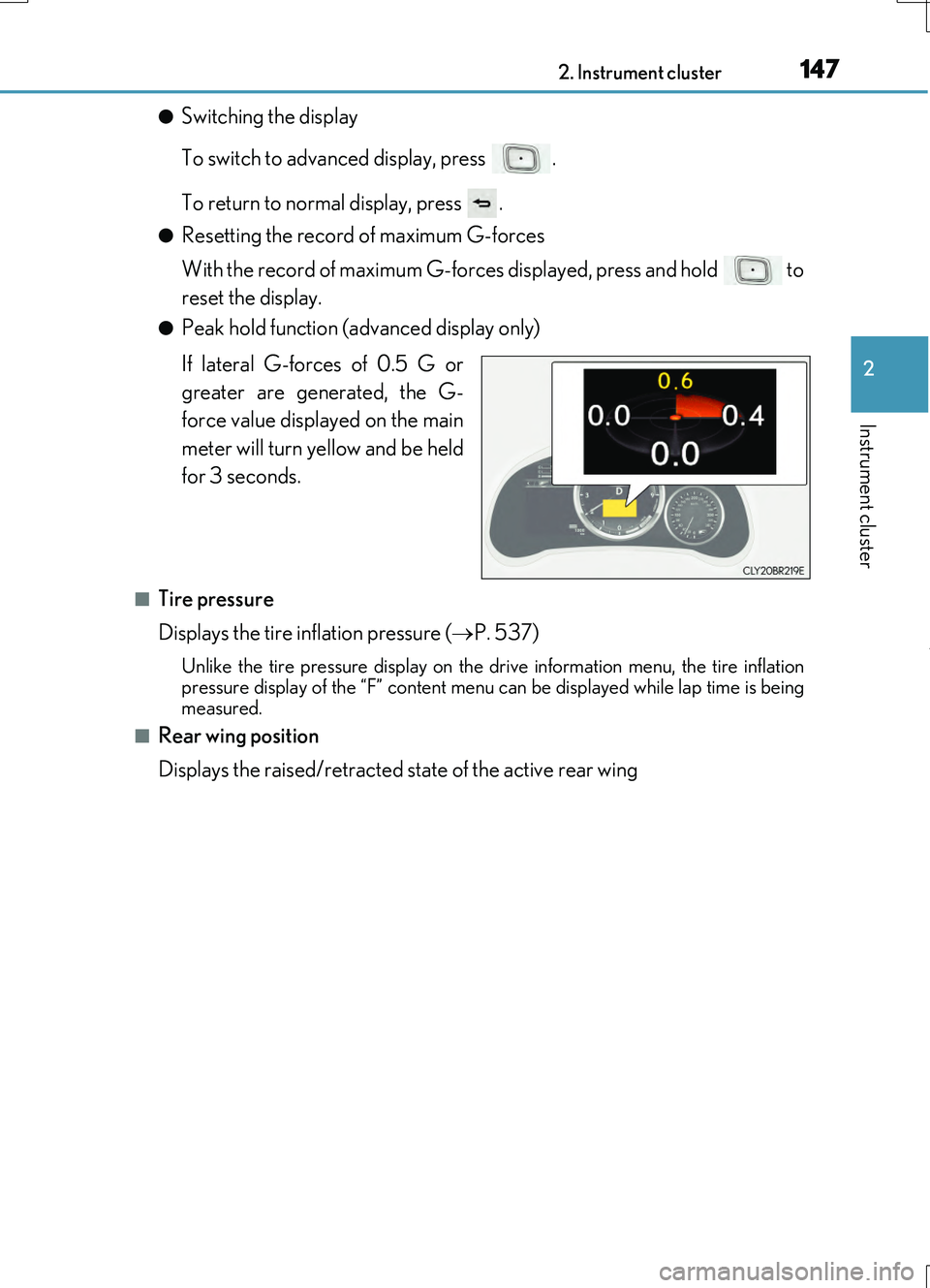
●Peak hold function (advanced display only)
If lateral G-forces of 0.5 G or
greater are generated, the G-
force value displayed on the main
meter will turn yellow and be held
for 3 seconds.
■Tire pressure
Displays the tire inflation pressure ( P. 537)
Unlike the tire pressure display on the dr ive information menu, the tire inflation
pressure display of the “F” content menu can be displayed while lap time is being
measured.
■Rear wing position
Displays the raised/retracted state of the active rear wing
Page 150 of 724
1502. Instrument cluster
RC200t_RC F_EE(OM24728E)
■Suspension of the settings display
In the following situations, operation of th e settings display will be temporarily sus- pended.
●When a warning message appears on the multi-information display
●When the vehicle begins to move
■Tire pressure
●It may take a few minutes to display the tire inflation pressure after the engine switch is turned to IGNITION ON mode. It may also take a few minutes to display the tire infla-tion pressure after inflation pressure has been adjusted.
●“---” may be displayed if the tire position information cannot be determined due to unfavorable radio wave conditions.
●Tire inflation pressure changes with temperature. The displayed values may also be dif-
ferent from the values measured using a tire pressure gauge.
■When disconnecting and reconnecting battery terminals
The following information data will be reset:
●Drive information
●Lap timer: Measured lap times, history
●G-force: Record of the maximum G-forces
■Using the lap timer
If the engine is stopped while a lap is being timed, the lap timer will stop and the lap time up to that point will be recorded.
■Liquid crystal display
P. 130
WARNING
■Caution for use while driving
●When operating the multi-information display while driving, pay extra attention to the
safety of the area around the vehicle.
●Do not look continuously at the multi-info rmation display while driving as you may fail to see pedestrians, objects on the road, etc. ahead of the vehicle.
■The information display at low temperatures
Allow the interior of the vehicle to warm up before using the liquid crystal information display. At extremely low temperatures, th e information display monitor may respond
slowly, and display changes may be delayed. For example, there is a lag between the dr iver’s shifting and the new gear number appearing on the display. This lag could cau se the driver to downshift again, causing
rapid and excessive engine braking and po ssibly an accident resulting in death or injury.
■Cautions during setting up the display
As the engine needs to be running during setting up the display, ensure that the vehicle is parked in a place with adequate ventilation. In a closed area such as a garage,exhaust gases including harmful carbon monoxide (CO) may collect and enter the
vehicle. This may lead to death or a serious health hazard.
Page 538 of 724
5387-3. Do-it-yourself maintenance
RC200t_RC F_EE(OM24728E)
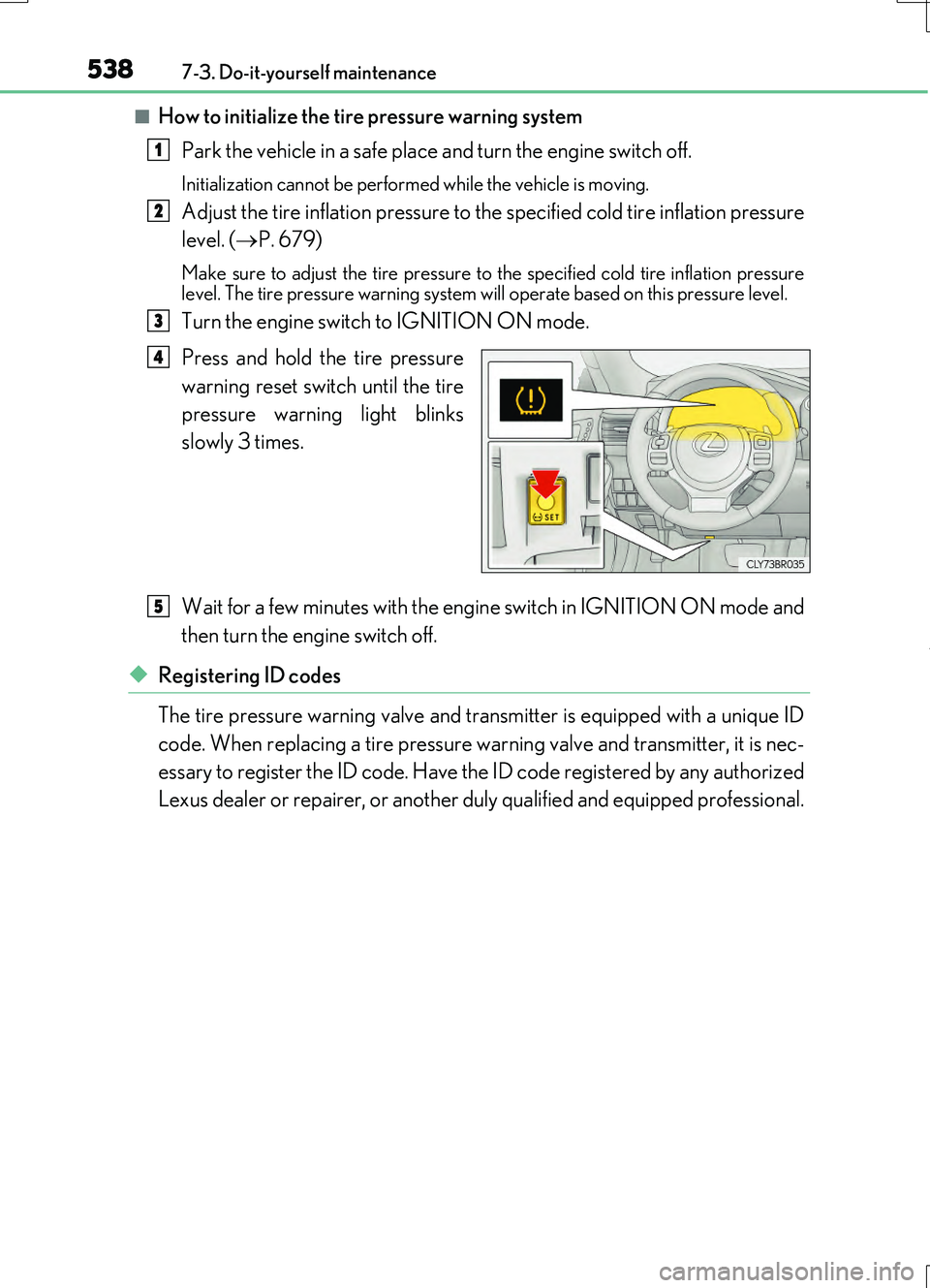
■How to initialize the tire pressure warning system
Park the vehicle in a safe place and turn the engine switch off.
Initialization cannot be perfor med while the vehicle is moving.
Adjust the tire inflation pressure to the specified cold tire inflation pressure
level. ( P. 679)
Make sure to adjust the tire pressure to the specified cold tire inflation pressure level. The tire pressure warning system will operate based on this pressure level.
Turn the engine switch to IGNITION ON mode.
Press and hold the tire pressure
warning reset switch until the tire
pressure warning light blinks
slowly 3 times.
Wait for a few minutes with the engine switch in IGNITION ON mode and
then turn the engine switch off.
◆Registering ID codes
The tire pressure warning valve and transmitter is equipped with a unique ID
code. When replacing a tire pressure wa rning valve and transmitter, it is nec-
essary to register the ID code. Have the ID code registered by any authorized
Lexus dealer or repairer, or another duly qualified and equipped professional.
1
2
3
4
5
Page 540 of 724
5407-3. Do-it-yourself maintenance
RC200t_RC F_EE(OM24728E)
■Situations in which the tire pressure warning system may not operate properly
●In the following cases, the tire pressure warning system may not operate properly.
• If non-genuine Lexus wheels are used.
• A tire has been replaced with a tire that is not an OE (Original Equipment) tire. • A tire has been replaced with a tire that is not of the specified size.• Tire chains etc. are equipped.
• An auxiliary-supported run-flat tire is equipped. • If a window tint that affects the radio wave signals is installed.• If there is a lot of snow or ice on the vehi cle, particularly around the wheels or wheel
housings. • If the tire inflation pressure is extr emely higher than the specified level. • If tires not equipped with tire pressure warning valves and transmitters are used.
• If the ID code on the tire pressure warning valves and transmitters is not registered in the tire pressure warning computer.
●Performance may be affected in the following situations.
• Near a TV tower, electric power plant, gas station, radio station, large display, air- port or other facility that generates st rong radio waves or electrical noise
• When carrying a portable radio, cellular phone, cordless phone or other wireless communication deviceVehicles with the tire inflation pressure display function: If tire position information is
not correctly displayed due to the radio wave conditions, the display may be corrected by driving and changing the radio wave conditions.
●When the vehicle is parked, the time taken for the warning to start or go off could be
extended.
●When tire inflation pressure declines rapi dly for example when a tire has burst, the warning may not function.
■The initialization operation
●Make sure to carry out initialization af ter adjusting the tire inflation pressure.
Also, make sure the tires are cold before carry ing out initialization or tire inflation pres- sure adjustment.
●If you have accidentally turned the engine swit ch off during initialization, it is not neces-
sary to press the reset switch again as init ialization will restart automatically when the engine switch has been turned to IGNITION ON mode for the next time.
●If you accidentally press the reset switch when initialization is not necessary, adjust the
tire inflation pressure to the specified leve l when the tires are cold, and conduct initial- ization again.
■Warning performance of the tire pressure warning system
The warning of the tire pressure warning syst em will change in accordance with the con- ditions under which it was initialized. For this reason, the system may give a warning even if the tire pressure does not reach a low enough level, or if the pressure is higher than the
pressure that was adjusted to when the system was initialized.