light LEXUS RC300 2018 Owners Manual
[x] Cancel search | Manufacturer: LEXUS, Model Year: 2018, Model line: RC300, Model: LEXUS RC300 2018Pages: 636, PDF Size: 6.88 MB
Page 263 of 636
2634-5. Using the driving support systems
4
Driving
RC350_RC300 AWD_RC3 00_RC F_U(OM24748U)WARNING ■
Before using LDA system
Do not rely solely upon the LDA system. The LDA system does not automatically drive
the vehicle or reduce the amount of attention that must be paid to the area in front of
the vehicle. The driver must always assume full responsibility for driving safely by pay-
ing careful attention to the surrounding cond itions and operating the steering wheel to
correct the path of the vehicle. Also, the driver must take adequate breaks when
fatigued, such as from driving for a long period of time.
Failure to perform appropriate driving operat ions and pay careful attention may lead to
an accident, resulting in death or serious injury. ■
To avoid operating LDA system by mistake
When not using the LDA system, use the LDA switch to turn the system off.■
Situations unsuitable for LDA system
Do not use the LDA system in the following situations.
The system may not operate properly and lead to an accident, resulting in death or
serious injury. ●
A spare tire, tire chains, etc. are equipped. ●
When the tires have been excessively worn, or when the tire inflation pressure is low. ●
Tires which differ by structure, manufacturer, brand or tread pattern are used. ●
Objects or patterns that could be mistaken for white (yellow) lines are present on the
side of the road (guardrails, cu rbs, reflective poles, etc.).●
Vehicle is driven on a snow-covered road. ●
White (yellow) lines are difficult to see due to rain, snow, fog, dust, etc.●
Asphalt repair marks, white (y ellow) line marks, etc. are present due to road repair.●
Vehicle is driven in a temporary lane or restricted lane due to construction work.●
Vehicle is driven on a road surface which is slippery due to rainy weather, fallen snow,
freezing, etc. ●
Vehicle is driven in traffic lanes ot her than on highways and freeways.●
Vehicle is driven in a construction zone. ●
During emergency towing ■
Preventing LDA system malfunctions and operations performed by mistake ●
Do not modify the headlights or place stickers, etc. on the surface of the lights.●
Do not modify the suspension etc. If the suspension etc. needs to be replaced, con-
tact your Lexus dealer. ●
Do not install or place anything on the hood or grille. Also, do not install a grille guard
(bull bars, kangaroo bar, etc.). ●
If your windshield needs repair s, contact your Lexus dealer.
Page 267 of 636
2674-5. Using the driving support systems
4
Driving
RC350_RC300 AWD_RC3 00_RC F_U(OM24748U)■
White (yellow) lines are only on one side of road
The LDA system will not operate for the side on which white (yellow) lines could not be
recognized. ■
Conditions in which functions may not operate properly
In the following situations, the camera sensor may not detect white (yellow) lines and var-
ious functions may not operate normally. ●
There are shadows on the road that run parallel with, or cover, the white (yellow) lines. ●
The vehicle is driven in an ar ea without white (yellow) lines, such as in front of a tollgate
or checkpoint, or at an intersection, etc.●
The white (yellow) lines are cracked, “Botts ’ dots”, “Raised pavement marker” or stones
are present. ●
The white (yellow) lines cannot be seen or are difficult to see due to sand, etc. ●
The vehicle is driven on a road surface that is wet due to rain, puddles, etc. ●
The traffic lines are yellow (which may be more difficult to recognize than lines that are
white). ●
The white (yellow) lines cross over a curb, etc. ●
The vehicle is driven on a bright surface, such as concrete. ●
The vehicle is driven on a surface that is bright due to reflected light, etc. ●
The vehicle is driven in an area where the brightness changes suddenly, such as at the
entrances and exits of tunnels, etc.●
Light from the headlights of an oncoming vehicle, the sun, etc. enters the camera.●
The vehicle is driven where the road diverges, merges, etc. ●
The vehicle is driven on a slope. ●
The vehicle is driven on a road which t ilts left or right, or a winding road.●
The vehicle is driven on an unpaved or rough road. ●
The vehicle is driven around a sharp curve. ●
The traffic lane is excessively narrow or wide. ●
The vehicle is extremely tilted due to carry ing heavy luggage or having improper tire
pressure. ●
The distance to the preceding vehicle is extremely short. ●
The vehicle is moving up and down a large am ount due to road conditions during driv-
ing (poor roads or road seams). ●
The headlight lenses are dirty and emit a faint amount of light at night, or the beam axis
has deviated. ●
The vehicle is struck by a crosswind. ●
The vehicle has just changed lane s or crossed an intersection.●
Snow tires, etc. are equipped. ■
Warning message
Warning messages are used to indicate a syst em malfunction or to inform the driver of
the need for caution while driving. ( P. 460)■
Customization
Some functions can be customized ( P. 111)
Page 271 of 636
2714-5. Using the driving support systems
4
Driving
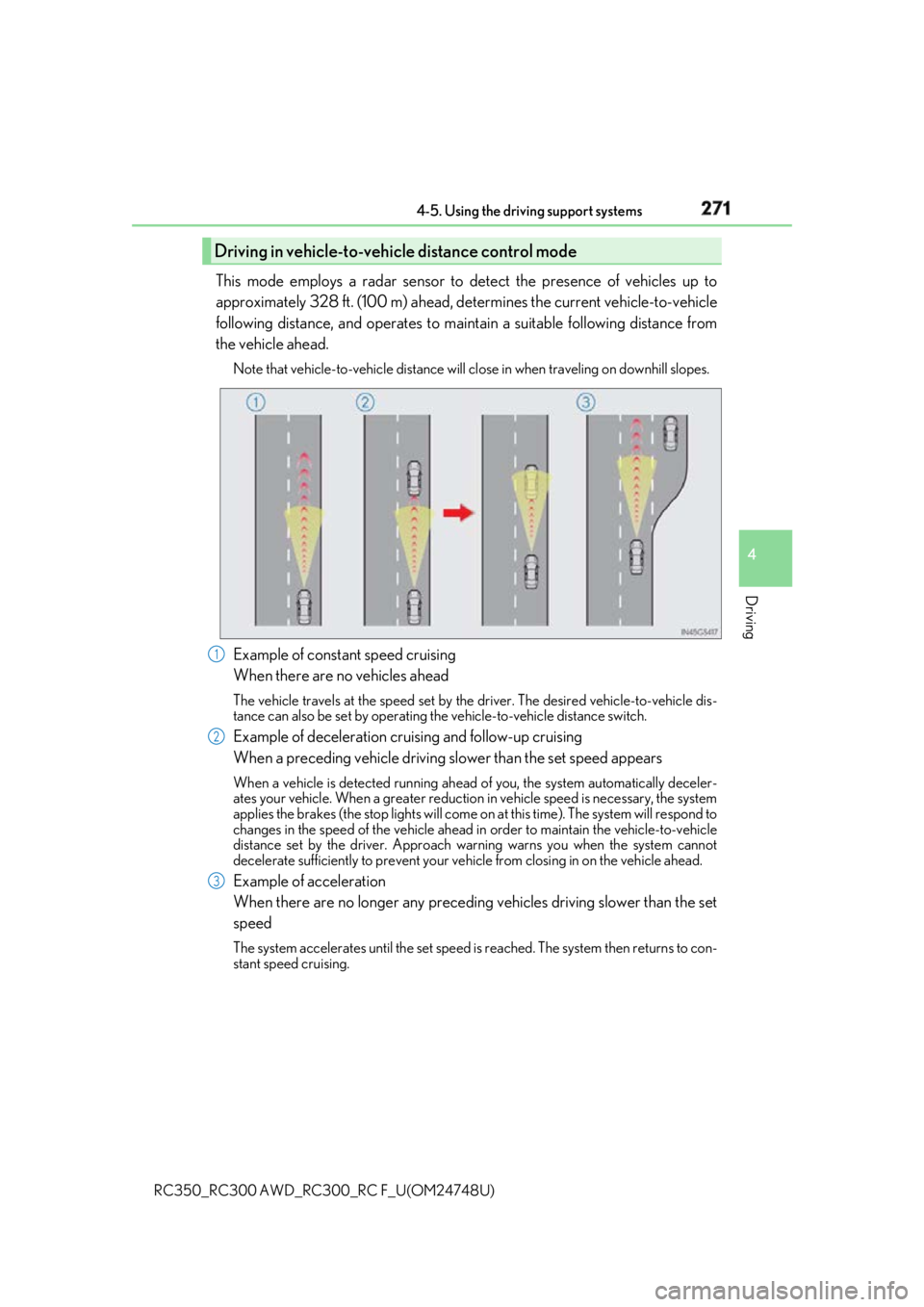
RC350_RC300 AWD_RC3 00_RC F_U(OM24748U)This mode employs a radar sensor to detect the presence of vehicles up to
approximately 328 ft. (100 m) ahead, de termines the current vehicle-to-vehicle
following distance, and operates to main tain a suitable following distance from
the vehicle ahead. Note that vehicle-to-vehicle distance will cl ose in when traveling on downhill slopes.
Example of constant speed cruising
When there are no vehicles ahead The vehicle travels at the speed set by the driver. The desired vehicle-to-vehicle dis-
tance can also be set by operating the vehicle-to-vehicle distance switch.
Example of deceleration cruising and follow-up cruising
When a preceding vehicle driving sl ower than the set speed appearsWhen a vehicle is detected running ahead of you, the system automatically deceler-
ates your vehicle. When a greater reduction in vehicle speed is necessary, the system
applies the brakes (the stop lights will come on at this time). Th e system will respond to
changes in the speed of the vehicle ahead in order to maintain the vehicle-to-vehicle
distance set by the driver. Approach warning warns you when the system cannot
decelerate sufficie ntly to prevent your vehicle from closing in on the vehicle ahead.
Example of acceleration
When there are no longer any preceding vehicles driving slower than the set
speed The system accelerates until the set speed is reached. The system then returns to con-
stant speed cruising.Driving in vehicle-to-vehicle distance control mode
1
2
3
Page 281 of 636
2814-5. Using the driving support systems
4
Driving
RC350_RC300 AWD_RC3 00_RC F_U(OM24748U)■
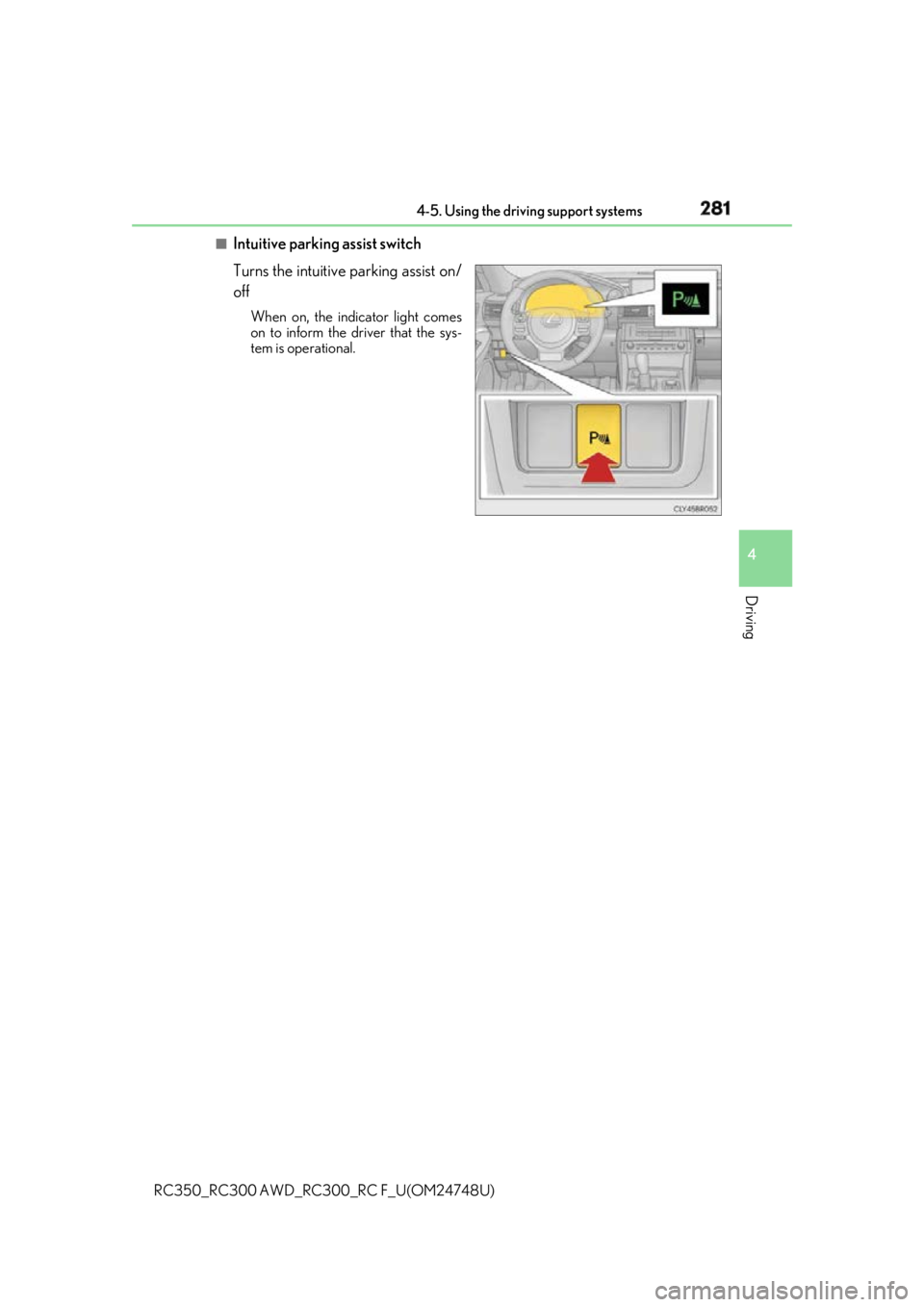
Intuitive parking assist switch
Turns the intuitive parking assist on/
off When on, the indicator light comes
on to inform the driver that the sys-
tem is operational.
Page 292 of 636
292 4-5. Using the driving support systems
RC350_RC300 AWD_RC3 00_RC F_U(OM24748U)■
Outside rear view mirro r indicator visibility
In strong sunlight, the outside rear view mirror indicator may be difficult to see.■
Hearing the RCTA buzzer
The RCTA buzzer may be difficult to hear over loud noises, such as if the audio system
volume is high. ■
When there is a malfunction in the Blind Spot Monitor
If a system malfunction is detected due to any of the following, a warning message will be
displayed: ( P. 460)●
A sensor is malfunctioning ●
A sensor is dirty or covere d with snow or a sticker●
The outside temperature is extremely high or low ●
Sensor voltage is abnormal ●
A sensor is misaligned
WARNING ■
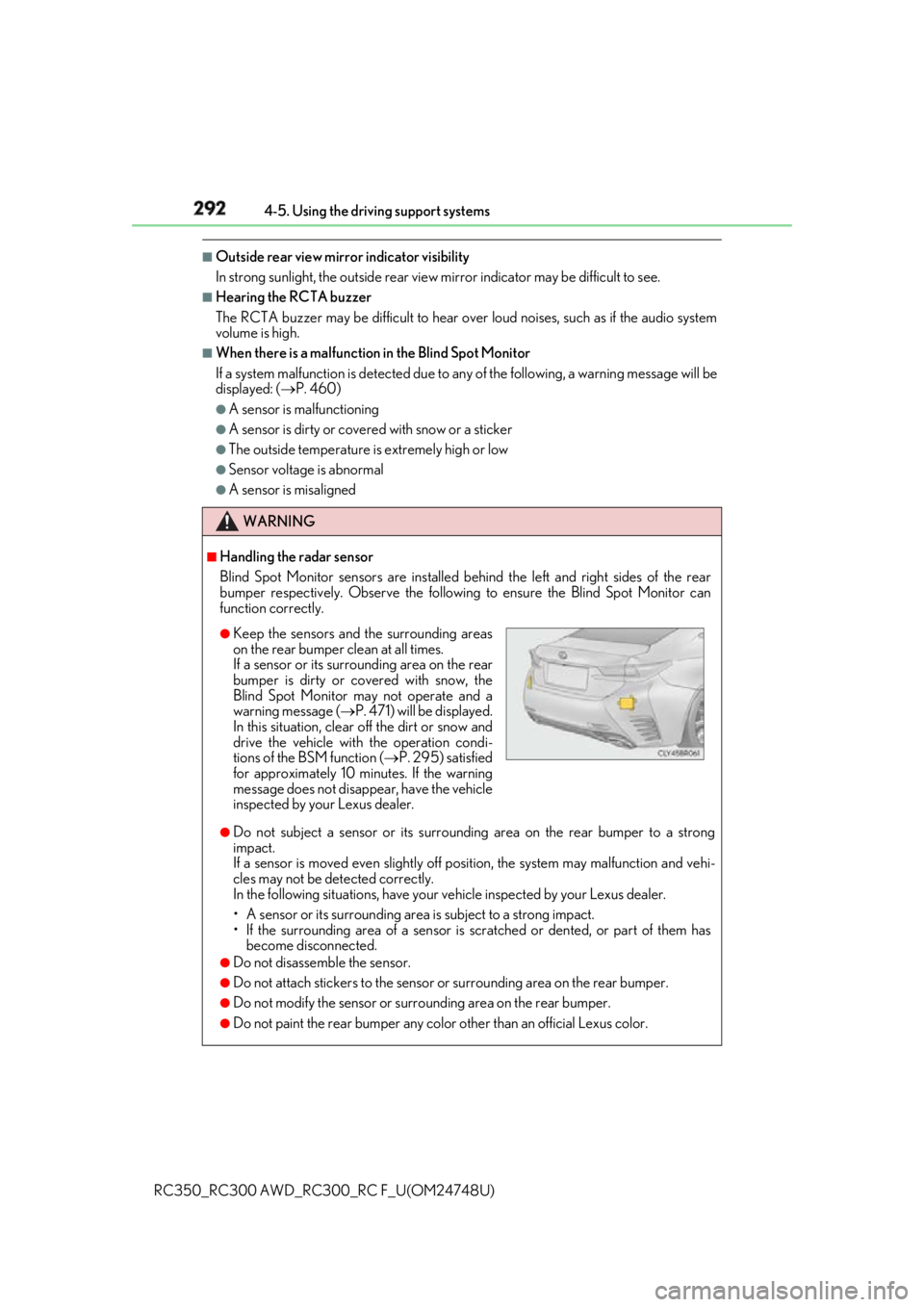
Handling the radar sensor
Blind Spot Monitor sensors ar e installed behind the left and right sides of the rear
bumper respectively. Observe the following to ensure the Blind Spot Monitor can
function correctly.
●
Do not subject a sensor or its surrounding area on the rear bumper to a strong
impact.
If a sensor is moved even slightly off po sition, the system may malfunction and vehi-
cles may not be detected correctly.
In the following situations , have your vehicle inspected by your Lexus dealer.
• A sensor or its surrounding area is subject to a strong impact.
• If the surrounding area of a sensor is sc ratched or dented, or part of them has
become disconnected. ●
Do not disassemble the sensor. ●
Do not attach stickers to the sensor or surrounding area on the rear bumper.●
Do not modify the sensor or surro unding area on the rear bumper.●
Do not paint the rear bumper any colo r other than an official Lexus color.●
Keep the sensors and the surrounding areas
on the rear bumper clean at all times.
If a sensor or its surrounding area on the rear
bumper is dirty or covered with snow, the
Blind Spot Monitor may not operate and a
warning message ( P. 471) will be displayed.
In this situation, clear off the dirt or snow and
drive the vehicle with the operation condi-
tions of the BSM function ( P. 295) satisfied
for approximately 10 minutes. If the warning
message does not disappear, have the vehicle
inspected by your Lexus dealer.
Page 314 of 636
314 4-5. Using the driving support systems
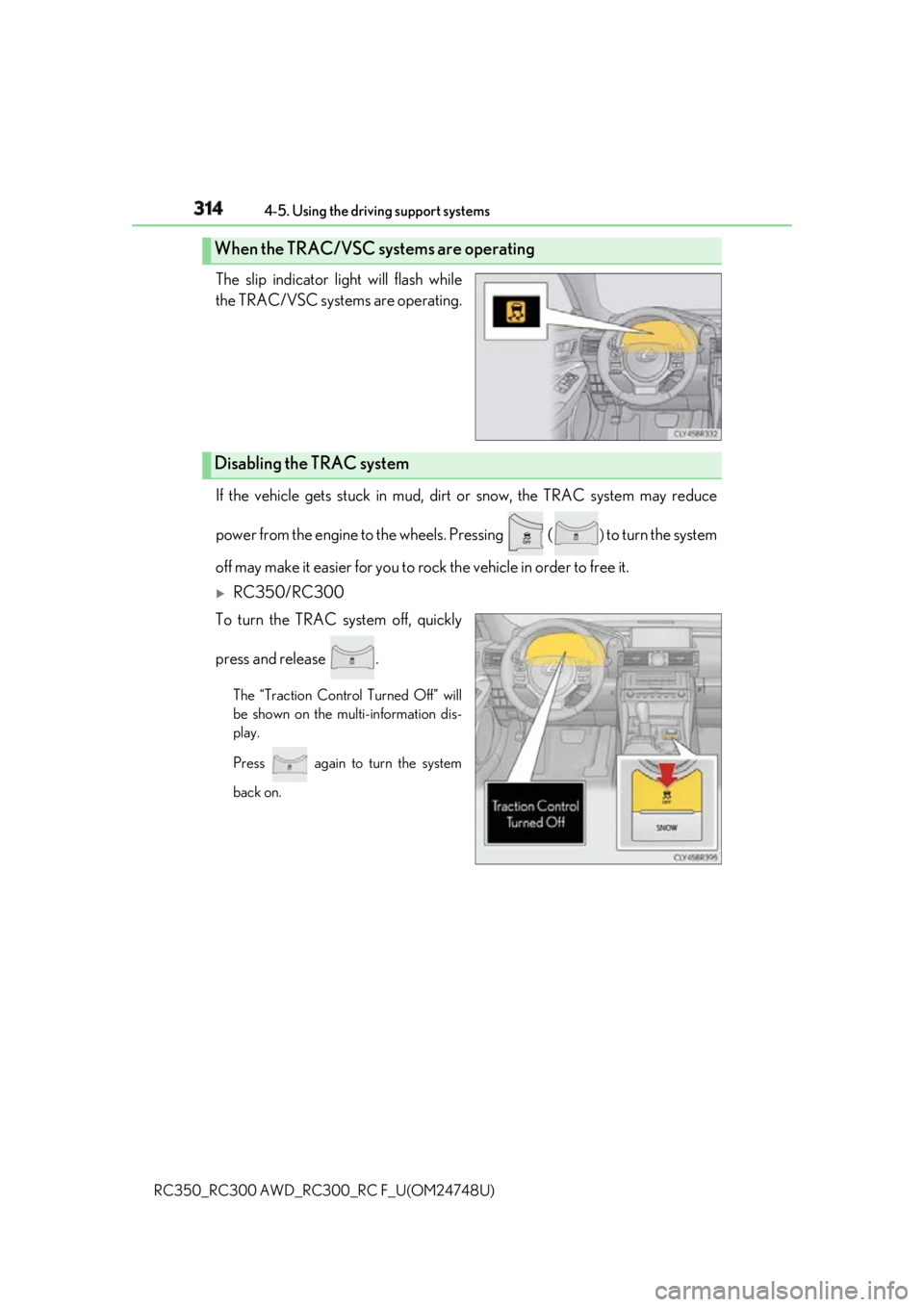
RC350_RC300 AWD_RC3 00_RC F_U(OM24748U)The slip indicator light will flash while
the TRAC/VSC systems are operating.
If the vehicle gets stuck in mud, dirt or snow, the TRAC system may reduce
power from the engine to the wheels. Pressing ( )
to turn the system
off may make it easier for you to ro ck the vehicle in order to free it.
RC350/RC300
To turn the TRAC system off, quickly
press and release . The “Traction Control Turned Off” will
be shown on the multi-information dis-
play.
Press again to turn the system
back on.When the TRAC/VSC systems are operating
Disabling the TRAC system
Page 315 of 636
3154-5. Using the driving support systems
4
Driving
RC350_RC300 AWD_RC3 00_RC F_U(OM24748U)
RC F
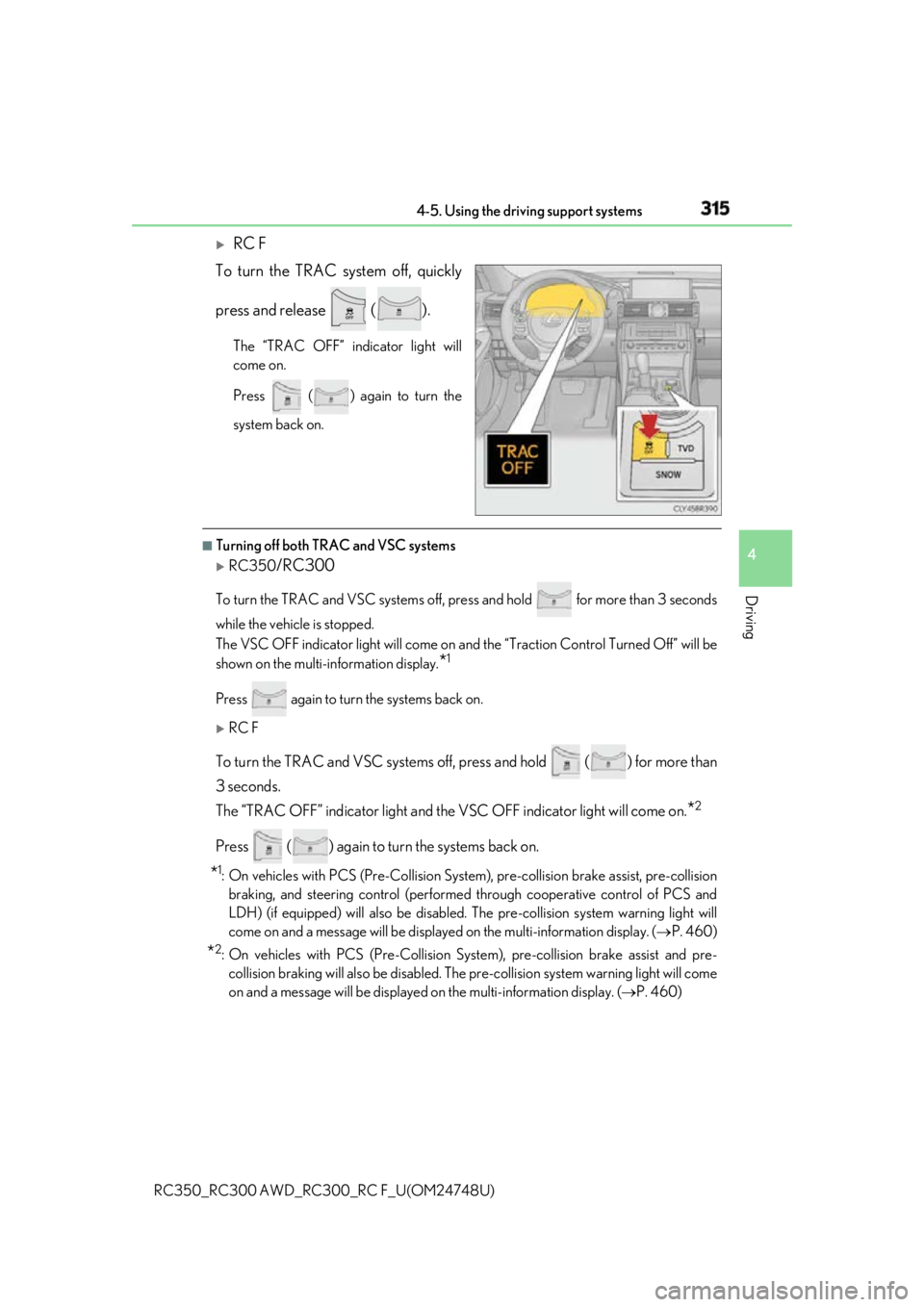
To turn the TRAC system off, quickly
press and release ( ). The “TRAC OFF” indicator light will
come on.
Press ( ) again to turn the
system back on. ■
Turning off both TRAC and VSC systems
RC350
/RC300To turn the TRAC and VSC systems off, pr ess and hold for more than 3 seconds
while the vehicle is stopped.
The VSC OFF indicator light will come on an d the “Traction Control Turned Off” will be
shown on the multi-information display.
* 1
Press again to turn the systems back on.
RC F
To turn the TRAC and VSC systems off, press and hold ( ) for more than
3 seconds.
The “TRAC OFF” indicator li ght and the VSC OFF indica tor light will come on.
* 2
Press ( ) again to turn the systems back on.
* 1
: On vehicles with PCS (Pre-Collision System ), pre-collision brake assist, pre-collision
braking, and steering control (performed through cooperative control of PCS and
LDH) (if equipped) will also be disabled. The pre-collision system warning light will
come on and a message will be displaye d on the multi-information display. ( P. 460)
* 2
: On vehicles with PCS (Pre-Collision Syst em), pre-collision brake assist and pre-
collision braking will also be disabled. The pre-collision system warning light will come
on and a message will be displayed on the multi-information display. ( P. 460)
Page 316 of 636
316 4-5. Using the driving support systems
RC350_RC300 AWD_RC3 00_RC F_U(OM24748U)■
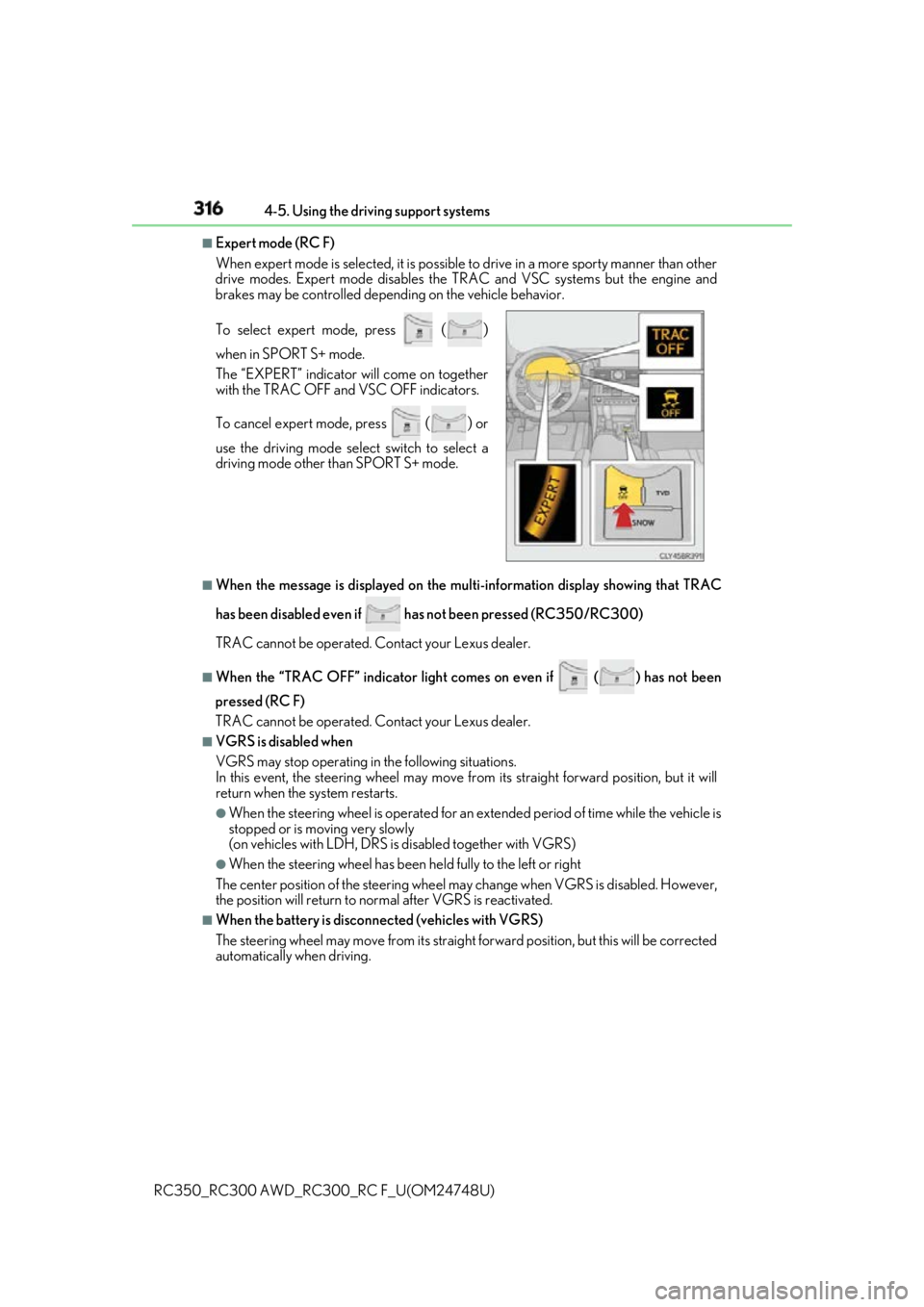
Expert mode (RC F)
When expert mode is se lected, it is possible to drive in a more sp orty manner than other
drive modes. Expert mode disables the TRAC and VSC systems but the engine and
brakes may be controlled depending on the vehicle behavior.
■
When the message is displayed on the mu lti-information displa y showing that TRAC
has been disabled even if has not been pressed (RC350/RC300)
TRAC cannot be operated. Contact your Lexus dealer.■
When the “TRAC OFF” indicator light comes on even if
( ) has not been
pressed (RC F)
TRAC cannot be operated. Contact your Lexus dealer.■
VGRS is disabled when
VGRS may stop operating in the following situations.
In this event, the steering wheel may move from its straight forward position, but it will
return when the system restarts. ●
When the steering wheel is operated for an extended period of time while the vehicle is
stopped or is moving very slowly
(on vehicles with LDH, DRS is disabled together with VGRS) ●
When the steering wheel has been held fully to the left or right
The center position of the steering wheel may change when VGRS is disabled. However,
the position will return to normal after VGRS is reactivated. ■
When the battery is disconnected (vehicles with VGRS)
The steering wheel may move from its straight forward position, but this will be corrected
automatically when driving.To select expert mode, press
()when in SPORT S+ mode.
The “EXPERT” indicator will come on together
with the TRAC OFF and VSC OFF indicators.
To cancel expert mode, press
() or
use the driving mode sele ct switch to select a
driving mode other than SPORT S+ mode.
Page 317 of 636
3174-5. Using the driving support systems
4
Driving
RC350_RC300 AWD_RC3 00_RC F_U(OM24748U)■
Sounds and vibrations caused by the ABS, brake assist, VSC, TRAC, hill-start assist
control and VGRS systems ●
A sound may be heard from the engine compartment when the brake pedal is
depressed repeatedly, when the engine is started or just after the vehicle begins to
move. This sound does not indicate that a malfunction has occurred in any of these sys-
tems. ●
Any of the following conditions may occur when the above systems are operating.
None of these indicates that a malfunction has occurred.
• Vibrations may be felt through the vehicle body and steering.
• A motor sound may be heard afte r the vehicle comes to a stop.
• The brake pedal may pulsate slig htly after the ABS is activated.
• The brake pedal may move down s lightly after the ABS is activated.■
EPS, VGRS and DRS operation sound
When the steering wheel is operated, a motor sound (whirring sound) may be heard.
This does not indicate a malfunction. ■
Reactivation of the TRAC/VSC systems
Even after the TRAC/VSC systems have been turned off, turning the engine off and then
on again will automatically reactivate the TRAC/VSC systems. ■
Reactivation of the TRAC sy stem linked to vehicle speed
When only the TRAC system is turned off, the TRAC system will turn on when vehicle
speed increases. However, wh en both TRAC/VSC systems are turned off, the systems
will not turn on even when vehicle speed increases.■
Reduced effectiveness of the EPS system
The effectiveness of the EPS system is reduced to prevent the system from overheating
when there is frequent steering input over an extended period of time. The steering
wheel may feel heavy as a result . Should this occur, refrain from excessive steering input
or stop the vehicle and turn the engine off. The EPS system should return to normal
within 10 minutes. ■
Operating conditions of hill-start assist control
When the following four conditions are met, the hill-start assist control will operate:●
The shift lever is in a position other than P or N (when starting off forward/backward on
an upward incline). ●
The vehicle is stopped. ●
The accelerator pedal is not depressed. ●
The parking brake is not engaged. ■
Automatic system cancelation of hill-start assist control
The hill-start assist control will turn off in any of the following situations: ●
The shift lever is moved to P or N. ●
The accelerator pedal is depressed. ●
The parking brake is engaged. ●
Approximately 2 seconds elapse af ter the brake pedal is released.
Page 318 of 636
318 4-5. Using the driving support systems
RC350_RC300 AWD_RC3 00_RC F_U(OM24748U)WARNING ■
The ABS does not operate effectively when ●
The limits of tire gripping performance have been exceeded (such as excessively
worn tires on a snow covered road). ●
The vehicle hydroplanes while driving at high speed on wet or slick roads.■
Stopping distance when the ABS is operating may exceed that of normal conditions
The ABS is not designed to shorten the vehi cle’s stopping distance . Always maintain a
safe distance from the vehicle in front of you, especially in the following situations: ●
When driving on dirt, grav el or snow-covered roads●
When driving with tire chains ●
When driving over bumps in the road ●
When driving over roads with potholes or uneven surfaces■
TRAC may not operate effectively when
Directional control an d power may not be achievable wh ile driving on slippery road
surfaces, even if the TRAC system is operating.
Drive the vehicle carefully in conditions where stability and power may be lost.■
Hill- start assist control does not operate effectively when ●
Do not overly rely on hill-start assist control. Hill-start assist control may not operate
effectively on steep inclines and roads covered with ice. ●
Unlike the parking brake, hill-start assist co ntrol is not intended to hold the vehicle
stationary for an exte nded period of time. Do not atte mpt to use hill-start assist con-
trol to hold the vehicle on an incline, as doing so may lead to an accident.■
When the VSC is activated
The slip indicator light flashes. Always drive carefully. Reckle ss driving may cause an
accident. Exercise particular care when the indicator light flashes.