air LEXUS RC300H 2017 Owners Manual
[x] Cancel search | Manufacturer: LEXUS, Model Year: 2017, Model line: RC300H, Model: LEXUS RC300H 2017Pages: 640, PDF Size: 35.53 MB
Page 382 of 640
3825-6. Using an external device
RC300h_EE(OM24740E)
Moving the controller to the right and selecting “Play video” while the USB video
screen is displayed changes to USB video mode.
This function cannot be used while USB photo or MirrorLink is in use.
■Menu screen
P. 366
■Selecting a file
Press the “ ” or “” button, turn the right side knob (left-hand drive vehicle) or
left side knob (right-hand drive vehicle) on the audio panel to select the
desired file number.
To fast-forward or reverse, press and hold the “ ” or “” button.
■Selecting a folder
Move the controller to the right and select “Browse”.
Select the desired folder, then select a file to begin using the selected
folder.
■Displaying the now playing list
Move the controller to the right and select “Now playing list”.
■USB memory functions
●Depending on the USB memory device that is connected to the system, the device
itself may not be operable and certain functions may not be available. If the device is inoperable or a function is unavailable du e to a malfunction (as opposed to a system specification), disconnecting the device and reconnecting it may resolve the problem.
●If the USB memory device still does not begin operation after being disconnected and reconnected, format the device.
■Error messages for USB memory
If the following error messages appear on the screen, refer to the table and take the appropriate measures. If the problem is not rectified, take the vehicle to any authorizedLexus dealer or repairer, or another duly qualified and equipped professional.
USB video
MessageCause/Correction procedures
“Connection error. Consult your
owner’s manual for instructions on how to reconnect the USBdevice.”
This indicates a problem with the USB memorydevice or its connection.
“There are no files available for
playback. Add compatible files to your USB device.”
This indicates that no MP3/WMA/AAC files areincluded on the USB memory device.
1
2
Page 389 of 640
3895-7. Connecting Bluetooth®
5
Lexus Display Audio system
RC300h_EE(OM24740E)
Turn the Bluetooth® connection setting of your device set to on.
Go to “Bluetooth
* setup”: “Setup” “Bluetooth*”
Move the controller to the left and then select “Add device”
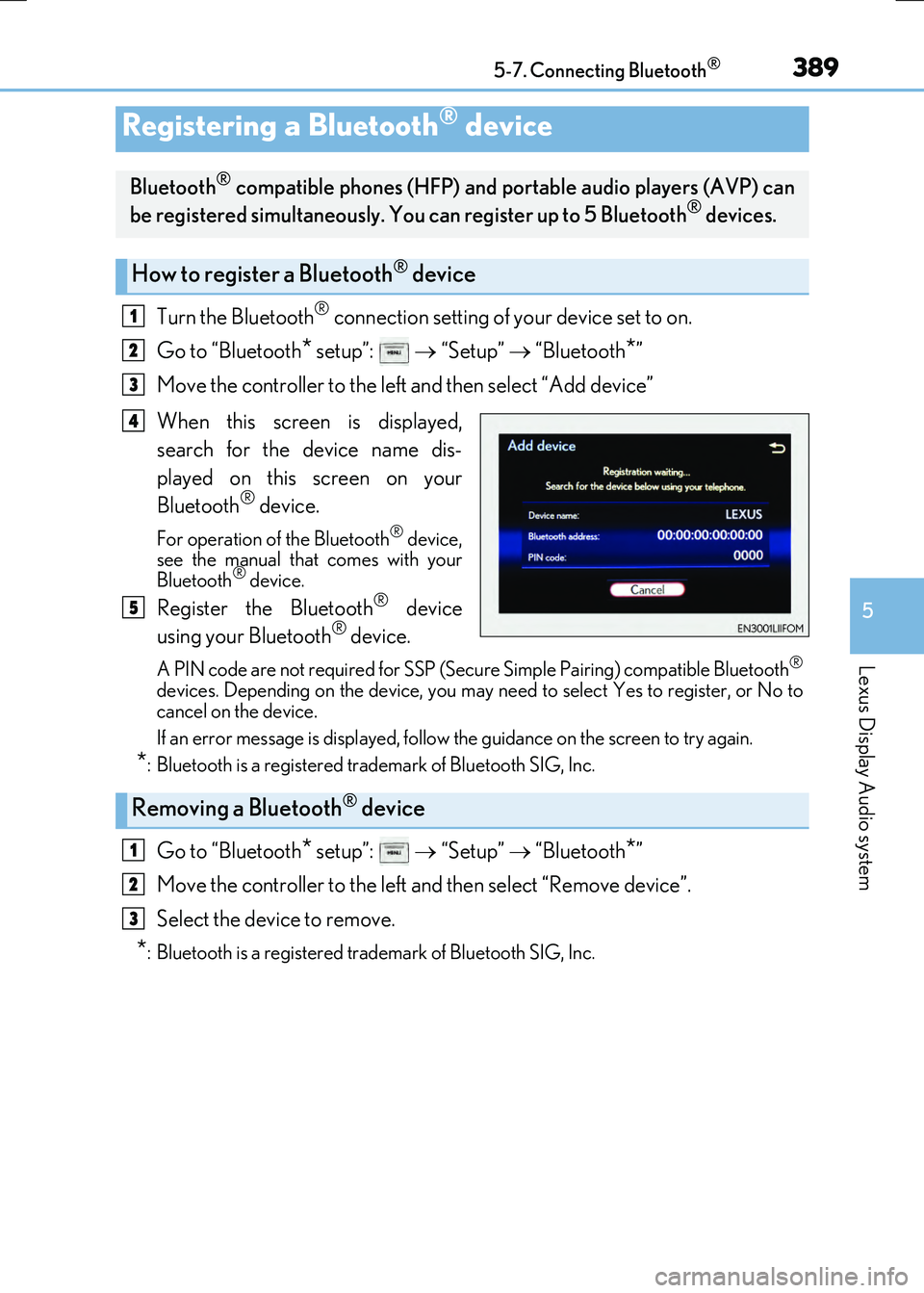
When this screen is displayed,
search for the device name dis-
played on this screen on your
Bluetooth
® device.
For operation of the Bluetooth® device,
see the manual that comes with your
Bluetooth
® device.
Register the Bluetooth® device
using your Bluetooth® device.
A PIN code are not required for SSP (Secur e Simple Pairing) compatible Bluetooth®
devices. Depending on the device, you may ne ed to select Yes to register, or No to
cancel on the device.
If an error message is displayed, follow the guidance on the screen to try again.
*: Bluetooth is a registered trademark of Bluetooth SIG, Inc.
Go to “Bluetooth* setup”: “Setup” “Bluetooth*”
Move the controller to the left and then select “Remove device”.
Select the device to remove.
*: Bluetooth is a registered trademark of Bluetooth SIG, Inc.
Registering a Bluetooth® device
Bluetooth® compatible phones (HFP) and po rtable audio players (AVP) can
be registered simultaneously. You can register up to 5 Bluetooth® devices.
How to register a Bluetooth® device
1
2
3
4
5
Removing a Bluetooth® device
1
2
3
Page 418 of 640
4185-11. Bluetooth®
RC300h_EE(OM24740E)
■When using the Bluetooth® audio system
●In the following situations, the system may not function.
• If the portable audio player is turned off • If the portable audio player is not connected
• If the portable audio player’s battery is low
●There may be a delay if a cellular phone connection is made during Bluetooth® audio
play.
●Depending on the type of portable audio player that is connected to the system, opera- tion may differ slightly and certain functions may not be available.
■When using the hands-free system
●The audio system is muted when making a call.
●If both parties speak at the same time, it may be difficult to hear.
●If the received call volume is over ly loud, an echo may be heard. If the Bluetooth® phone is too close to the system, quality of the sound may deteriorate and connection status may deteriorate.
●In the following situations, it may be difficult to hear the other party:
• When driving on unpaved roads • When driving at high speeds
•If a window is open • If the air conditioning is blowing directly on the microphone• If there is interference from the network of the cellular phone
●Depending on the type of phone, ce rtain functions may not be available.
■Conditions under which the system will not operate
●If using a cellular phone that does not support Bluetooth®
●If the cellular phone is turned off
●If you are outside of cellular phone service coverage
●If the cellular phone is not connected
●If the cellular phone’s battery is low
●When outgoing calls are controlled, due to heavy traffic on telephone lines, etc.
●When the cellular phone itself cannot be used
●When transferring phonebook data from the cellular phone
Bluetooth®
Page 431 of 640
431
6Interior features
RC300h_EE(OM24740E)
6-1. Using the air conditioning
system
Automatic air conditioning
system .......................................... 432
Heated steering wheel/
seat heaters/
seat ventilators ......................... 444
6-2. Using the interior lights
Interior lights list ......................... 446
• Interior lights .......................... 447
• Personal lights .......................448
6-3. Using the storage features
List of storage features ............ 449
• Glove box ...............................450
• Console box ..........................450
• Cup holders ............................ 451
Trunk features ............................. 452
6-4. Using the other interior
features
Other interior features ............ 455
• Sun visors ................................455
• Vanity mirrors .......................455
• Clock ........................................ 456
• Power outlet........................... 456
• Assist grips ............................. 457
• Coat hooks .............................458
Page 432 of 640
432
RC300h_EE(OM24740E)
6-1. Using the air conditioning system
Automatic air conditioning system
Air outlets and fan speed are automatically adjusted according to the tem-
perature setting.
Vehicles with a Lexus Display Audio system: Press the “MENU” button on the
Lexus Display Audio controller, then sele ct “Climate” to display the air condi-
tioning operation screen.
For details on the Lexus Display Audio controller, refer to “Lexus Display
Audio controller” on P. 346.
Vehicles with a navigation or multimedia system: Press the “MENU” button on
the Remote Touch, then select “Climate” to display the air conditioning con-
trol screen.
For details on the Remote Touch, refer to the “NAVIGATION AND MULTI-
MEDIA SYSTEM OWNER’S MANUAL”.
The illustrations below are for left-hand drive vehicles.
The button positions and shapes will di ffer for right-hand drive vehicles.
Also, the display and button positions will differ depending on the type of the
system.
Page 433 of 640
4336-1. Using the air conditioning system
6
Interior features
RC300h_EE(OM24740E)
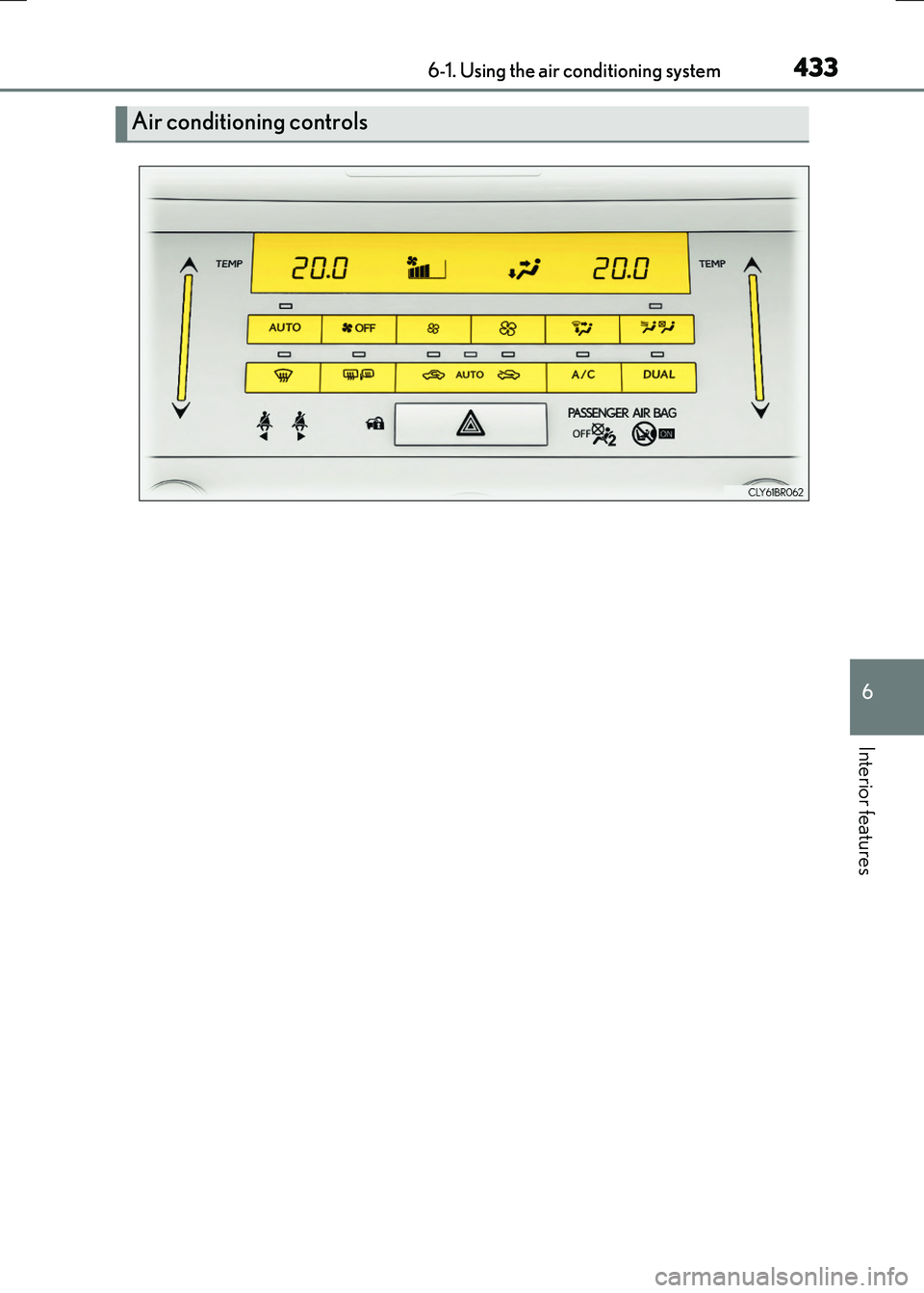
Air conditioning controls
Page 434 of 640
4346-1. Using the air conditioning system
RC300h_EE(OM24740E)
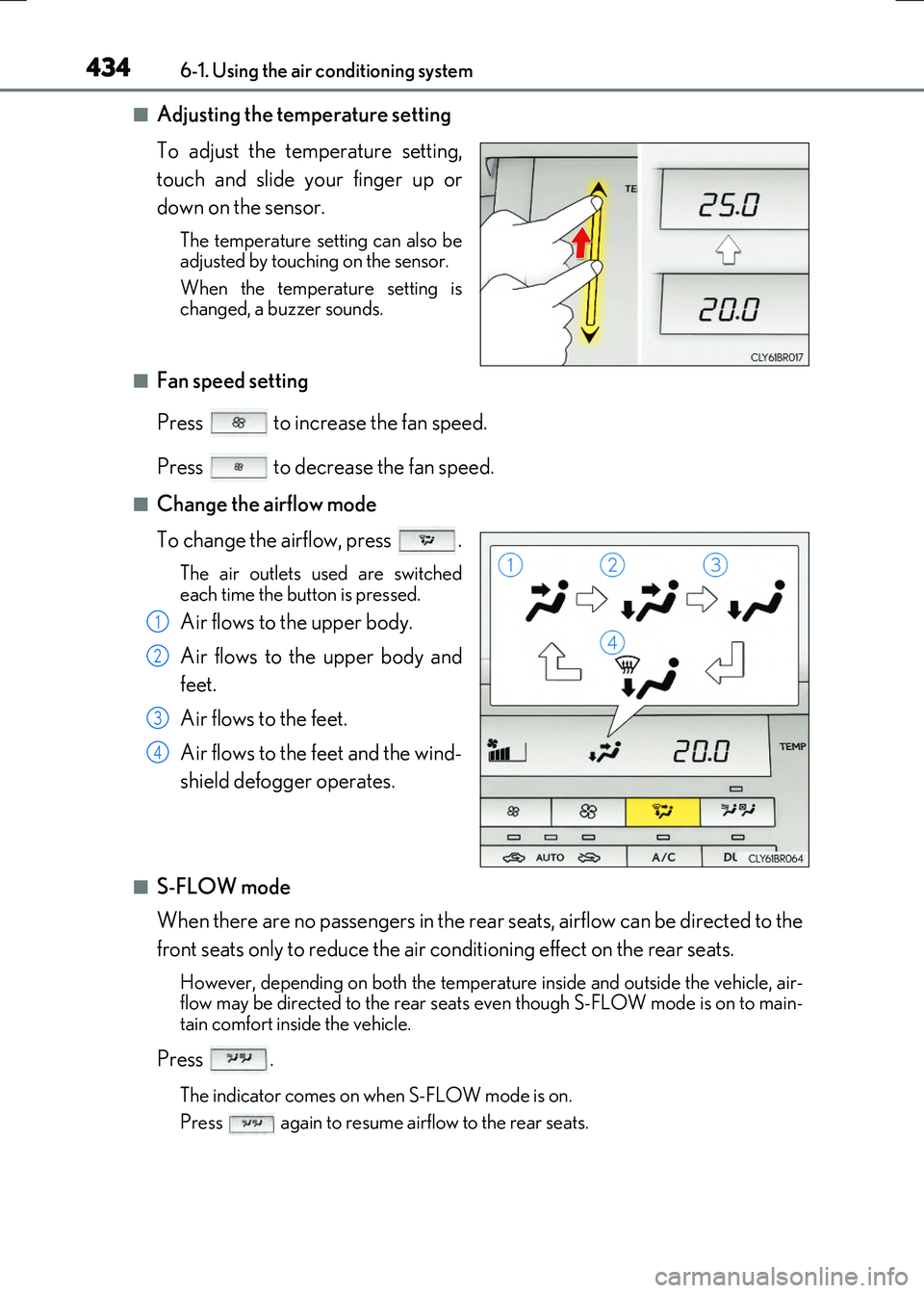
■Adjusting the temperature setting
To adjust the temperature setting,
touch and slide your finger up or
down on the sensor.
The temperature setting can also be adjusted by touching on the sensor.
When the temperature setting is changed, a buzzer sounds.
■Fan speed setting
Press to increase the fan speed.
Press to decrease the fan speed.
■Change the airflow mode
To change the airflow, press .
The air outlets used are switched
each time the button is pressed.
Air flows to the upper body.
Air flows to the upper body and
feet.
Air flows to the feet.
Air flows to the feet and the wind-
shield defogger operates.
■S-FLOW mode
When there are no passengers in the rear seats, airflow can be directed to the
front seats only to reduce the air conditioning effect on the rear seats.
However, depending on both the temperat ure inside and outside the vehicle, air- flow may be directed to the rear seats even though S-FLOW mode is on to main- tain comfort inside the vehicle.
Press .
The indicator comes on when S-FLOW mode is on.
Press again to resume airflow to the rear seats.
1
2
3
4
Page 435 of 640
4356-1. Using the air conditioning system
6
Interior features
RC300h_EE(OM24740E)
■Other functions
●Switching between outside air and recirculated air modes (P. 438)
●Defogging the windshield (P. 438)
●Defogging the rear window and outside rear view mirrors (P. 438)
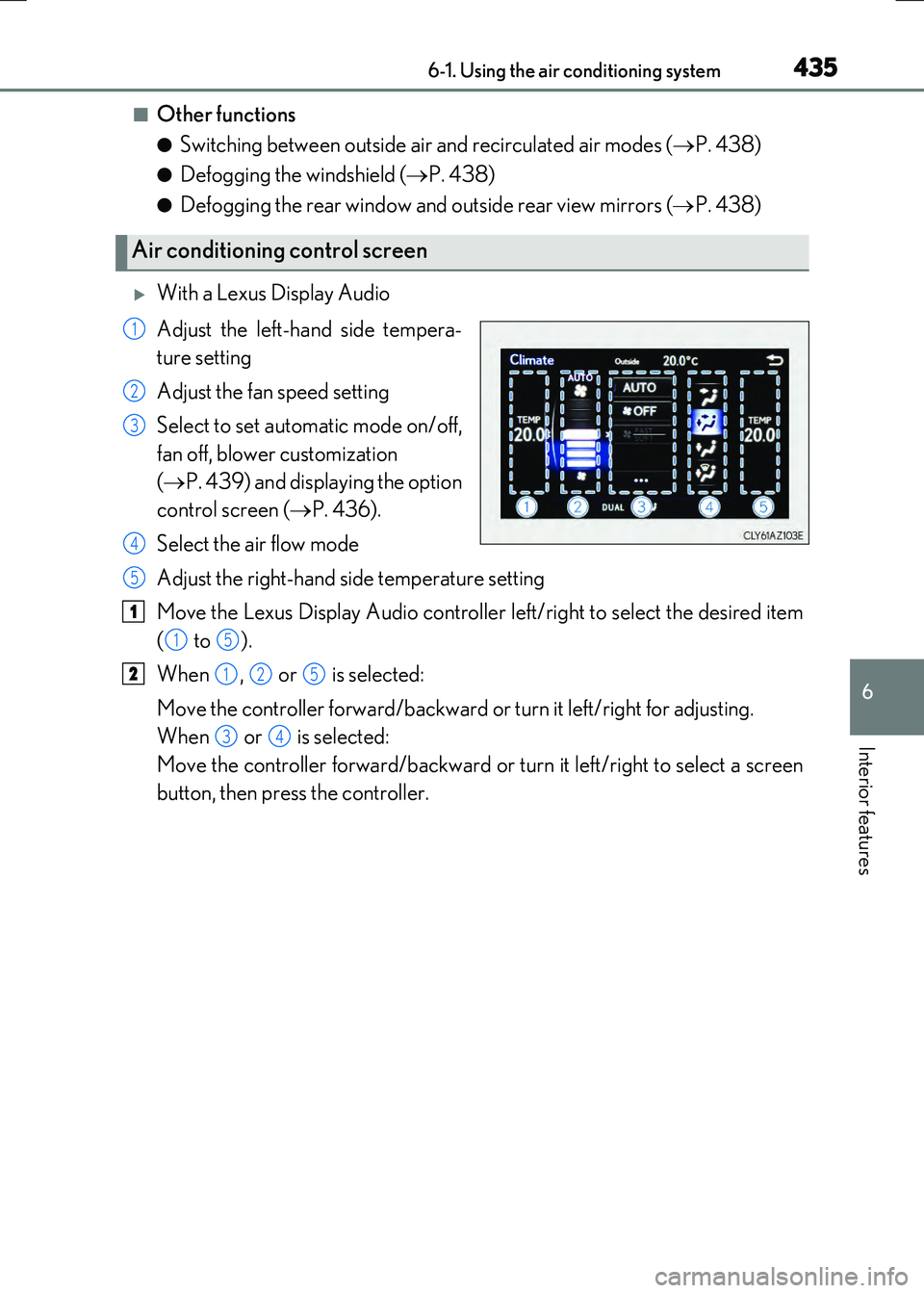
With a Lexus Display Audio
Adjust the left-hand side tempera-
ture setting
Adjust the fan speed setting
Select to set automatic mode on/off,
fan off, blower customization
( P. 439) and displaying the option
control screen ( P. 436).
Select the air flow mode
Adjust the right-hand side temperature setting
Move the Lexus Display Audio controller left/right to select the desired item
( to ).
When , or is selected:
Move the controller forward/backward or turn it left/right for adjusting.
When or is selected:
Move the controller forward/backward or turn it left/right to select a screen
button, then press the controller.
Air conditioning control screen
1
2
3
4
5
1
15
2125
34
Page 436 of 640
4366-1. Using the air conditioning system
RC300h_EE(OM24740E)
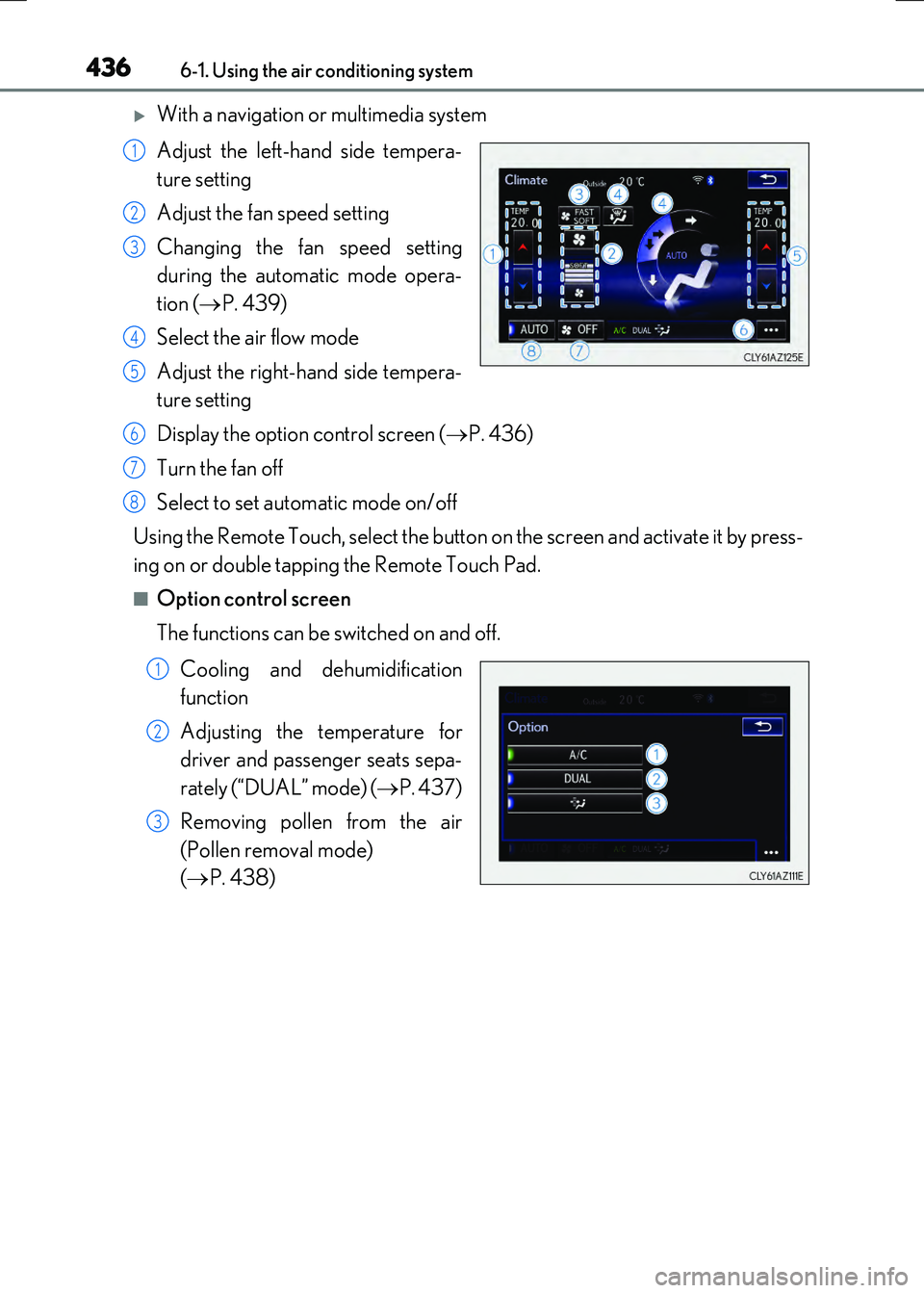
With a navigation or multimedia system
Adjust the left-hand side tempera-
ture setting
Adjust the fan speed setting
Changing the fan speed setting
during the automatic mode opera-
tion ( P. 439)
Select the air flow mode
Adjust the right-hand side tempera-
ture setting
Display the option control screen ( P. 436)
Turn the fan off
Select to set automatic mode on/off
Using the Remote Touch, select the button on the screen and activate it by press-
ing on or double tapping the Remote Touch Pad.
■Option control screen
The functions can be switched on and off.
Cooling and dehumidification
function
Adjusting the temperature for
driver and passenger seats sepa-
rately (“DUAL” mode) ( P. 437)
Removing pollen from the air
(Pollen removal mode)
( P. 438)
1
2
3
4
5
6
7
8
1
2
3
Page 437 of 640
4376-1. Using the air conditioning system
6
Interior features
RC300h_EE(OM24740E)
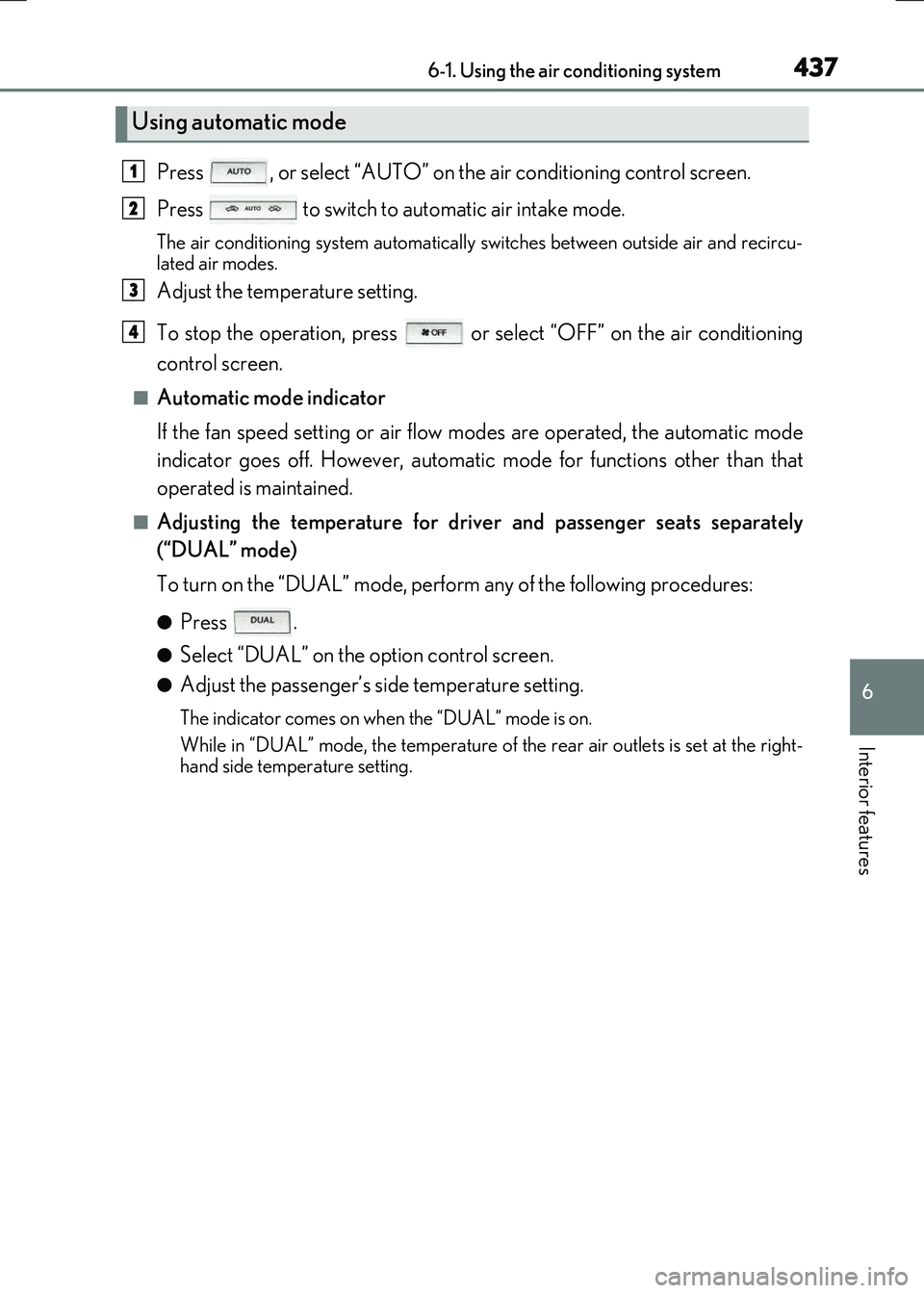
Press , or select “AUTO” on the air conditioning control screen.
Press to switch to automatic air intake mode.
The air conditioning system automatically switches between outside air and recircu-
lated air modes.
Adjust the temperature setting.
To stop the operation, press or select “OFF” on the air conditioning
control screen.
■Automatic mode indicator
If the fan speed setting or air flow modes are operated, the automatic mode
indicator goes off. However, automatic mode for functions other than that
operated is maintained.
■Adjusting the temperature for driv er and passenger seats separately
(“DUAL” mode)
To turn on the “DUAL” mode, perfor m any of the following procedures:
●Press .
●Select “DUAL” on the option control screen.
●Adjust the passenger’s side temperature setting.
The indicator comes on when the “DUAL” mode is on.
While in “DUAL” mode, the temperature of the rear air outlets is set at the right-
hand side temperature setting.
Using automatic mode
1
2
3
4