air LEXUS RC300H 2017 Manual Online
[x] Cancel search | Manufacturer: LEXUS, Model Year: 2017, Model line: RC300H, Model: LEXUS RC300H 2017Pages: 640, PDF Size: 35.53 MB
Page 299 of 640
2994-5. Using the driving support systems
4
Driving
RC300h_EE(OM24740E)
WARNING
■When using the Lexus parking assist monitor system
The parking assist monitor is a supplemental device intended to assist the driver when backing up. When backing up, be sure to check visually behind and all around the vehi-
cle before proceeding.
Observe the following precautions to avoid an accident that could result in death or serious injuries.
●Never depend on the parking assist monitor entirely when backing up. The imageand the position of the guide lines displayed on the screen may differ from the actualstate.
Use caution, just as you would when backing up any vehicle.
●Be sure to back up slowly, depressing the brake pedal to control vehicle speed.
●If you seem likely to hit nearby vehicles , obstacles, people or mount the shoulder,
depress the brake pedal to stop the vehicle.
●The instructions given are only guidelines.
When and how much to turn the steering wheel will vary according to traffic condi-
tions, road surface conditions, vehicle condition, etc. when parking. It is necessary to be fully aware of this before using the parking assist system.
●When parking, be sure to check that th e parking space will accommodate your vehi-
cle before maneuvering into it.
●Do not use the parking assist monitor in the following cases:
• On icy or slick road surfaces, or in snow
• When using tire chains or emergency tires • When the trunk is not closed completely• On roads that are not flat or straight, such as curves or slopes.
●In low temperatures, the screen may darken or the image may become faint. Theimage could distort when the vehicle is moving, or you may become unable to see the
image on the screen. Be sure to check direct visually and with the mirrors all around the vehicle before proceeding.
●If the tire sizes are changed, the position of the guide lines displayed on the screen
may change.
●The camera uses a special lens. The distances between objects and pedestrians that appear in the image displayed on the screen will differ from the actual distances.
( P. 294)
●Estimated course line display mode: If the steering wheel is straight and the vehicle width guide lines and the estimated course lin es are not in alignment, have the vehicle
inspected by any authorized Lexus dealer or repairer, or another duly qualified and equipped professional.
Page 300 of 640
3004-5. Using the driving support systems
RC300h_EE(OM24740E)
NOTICE
■How to use the camera
●The parking assist monitor may not operate properly in the following cases.
• If the back of the vehicle is hit, the position and mounting angle of the camera may
change. • As the camera has a water proof construction, do not detach, disassemble ormodify it. This may cause incorrect operation.
• When cleaning the camera lens, flush the camera with a large quantity of water and wipe it with a soft and wet cloth. Strongly rubbing the camera lens may causethe camera lens to be scratched and unable to transmit a clear image.
• Do not allow organic solvent, car wax, window cleaner or glass coat to adhere to the camera. If this happens, wipe it off as soon as possible.• If the temperature changes rapidly, such as when hot water is poured on the vehi-
cle in cold weather, the system may not operate normally. • When washing the vehicle, do not apply intensive bursts of water to the camera orcamera area. Doing so may result in the camera malfunctioning.
●Do not expose the camera to strong impact as this could cause a malfunction.If this happens, have the vehicle inspected by any authorized Lexus dealer or repairer,
or another duly qualified and equipped professional as soon as possible.
Page 301 of 640
3014-5. Using the driving support systems
4
Driving
RC300h_EE(OM24740E)
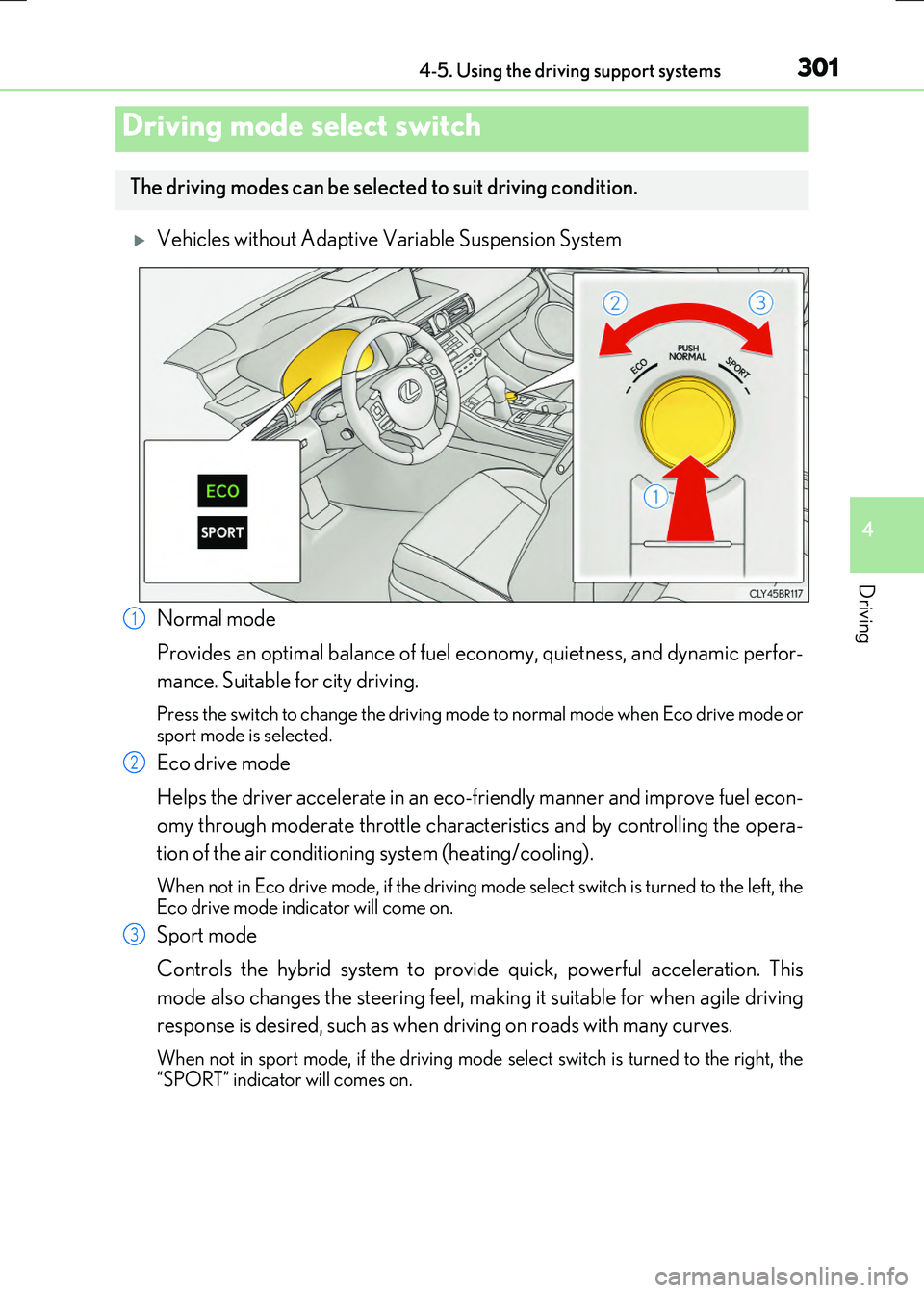
Vehicles without Adaptive Variable Suspension System
Normal mode
Provides an optimal balance of fuel ec onomy, quietness, and dynamic perfor-
mance. Suitable for city driving.
Press the switch to change the driving mode to normal mode when Eco drive mode or sport mode is selected.
Eco drive mode
Helps the driver accelerate in an eco-friendly manner and improve fuel econ-
omy through moderate throttle characteristics and by controlling the opera-
tion of the air conditioning system (heating/cooling).
When not in Eco drive mode, if the driving mode select switch is turned to the left, the Eco drive mode indicator will come on.
Sport mode
Controls the hybrid system to provide quick, powerful acceleration. This
mode also changes the steering feel, making it suitable for when agile driving
response is desired, such as when driving on roads with many curves.
When not in sport mode, if the driving mode select switch is turned to the right, the
“SPORT” indicator will comes on.
Driving mode select switch
The driving modes can be select ed to suit driving condition.
1
2
3
Page 302 of 640
3024-5. Using the driving support systems
RC300h_EE(OM24740E)
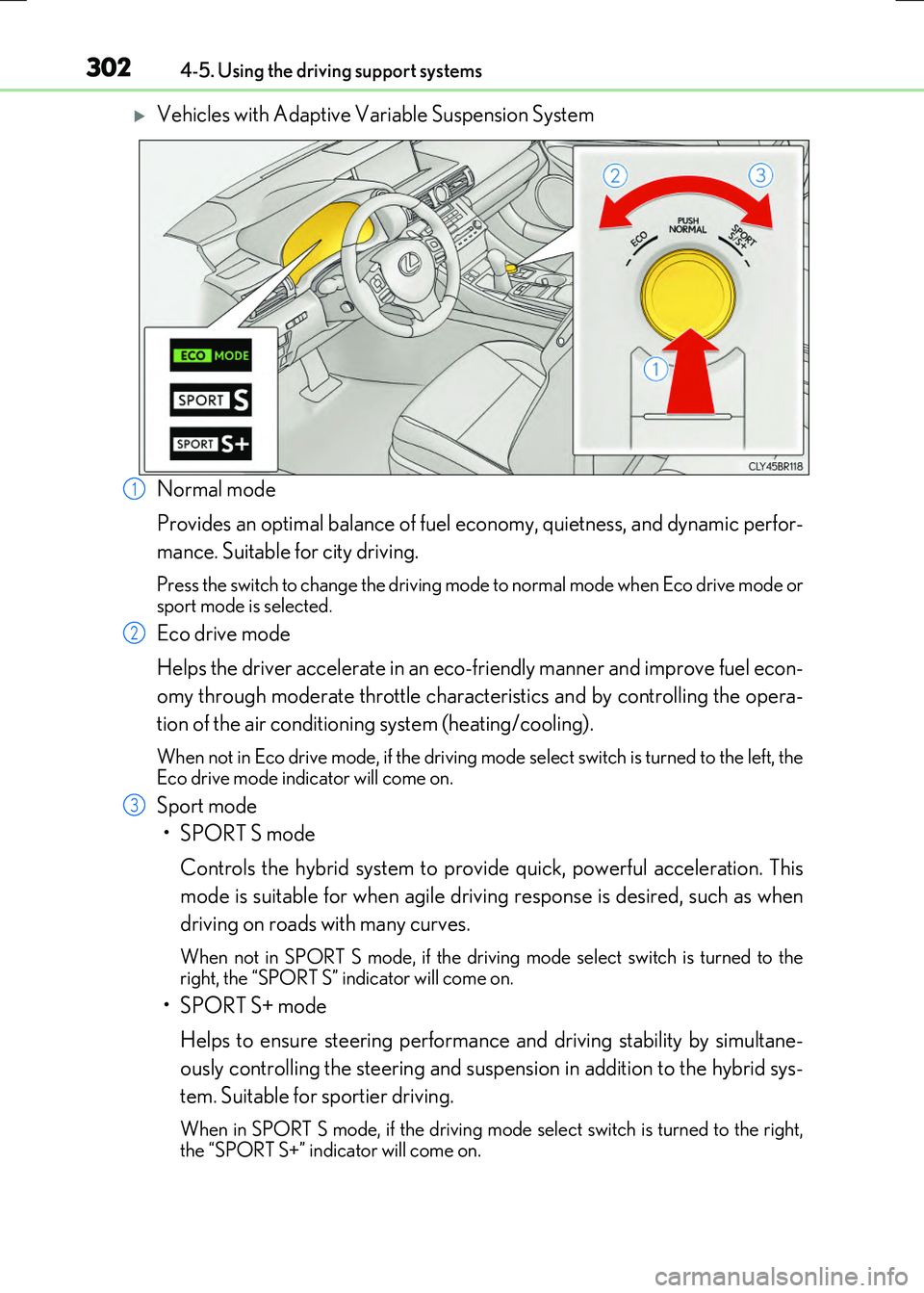
Vehicles with Adaptive Variable Suspension System
Normal mode
Provides an optimal balance of fuel ec onomy, quietness, and dynamic perfor-
mance. Suitable for city driving.
Press the switch to change the driving mode to normal mode when Eco drive mode or sport mode is selected.
Eco drive mode
Helps the driver accelerate in an eco-friendly manner and improve fuel econ-
omy through moderate throttle characteristics and by controlling the opera-
tion of the air conditioning system (heating/cooling).
When not in Eco drive mode, if the driving mode select switch is turned to the left, the Eco drive mode indicator will come on.
Sport mode
•SPORT S mode
Controls the hybrid system to provide quick, powerful acceleration. This
mode is suitable for when agile driving response is desired, such as when
driving on roads with many curves.
When not in SPORT S mode, if the drivin g mode select switch is turned to the right, the “SPORT S” indicator will come on.
•SPORT S+ mode
Helps to ensure steering performanc e and driving stability by simultane-
ously controlling the steering and suspen sion in addition to the hybrid sys-
tem. Suitable for sportier driving.
When in SPORT S mode, if th e driving mode select switch is turned to the right, the “SPORT S+” indicator will come on.
1
2
3
Page 303 of 640

3034-5. Using the driving support systems
4
Driving
RC300h_EE(OM24740E)
■Operation of the air conditioning system in Eco drive mode
Eco drive mode controls the heating/cooling operations and fan speed of the air condi- tioning system to enhance fuel efficiency ( P. 432). To improve air conditioning perfor- mance, adjust the fan speed or turn off Eco drive mode.
■Sport mode automatic deactivation
Sport mode is automatically deactivated if the power switch is turned off after driving in sport mode.
Page 307 of 640
3074-5. Using the driving support systems
4
Driving
RC300h_EE(OM24740E)
■Turning off both TRC and VSC systems
To turn the TRC and VSC systems off, press and hold for more than 3 seconds
while the vehicle is stopped.
The VSC OFF indicator light will come on and the “TRC OFF” will be shown on the
multi-information display.
*
Press again to turn the systems back on.
*: On vehicles with PCS (Pre-Crash Safety system), pre-crash brake assist and pre-
crash braking will also be disabled. The pr e-crash safety system warning light will
come on and a message will be displaye d on the multi-information display. (P. 554)
■When the message is displayed on the mult i-information display showing that TRC has
been disabled even if has not been pressed
TRC and hill-start assist control cannot be operated. Contact any authorized Lexus
dealer or repairer, or another duly qualified and equipped professional.
Page 310 of 640
3104-5. Using the driving support systems
RC300h_EE(OM24740E)
WARNING
■Replacing tires
Make sure that all tires are of the specified size, brand, tread pattern and total load capacity. In addition, make sure that the tire s are inflated to the recommended tire infla-
tion pressure level.
The ABS, TRC and VSC systems will not function correctly if different tires are installed on the vehicle.
Contact any authorized Lexus dealer or repairer, or another duly qualified and equipped professional for further information when replacing tires or wheels.
■Handling of tires and the suspension
Using tires with any kind of problem or modif ying the suspension will affect the driving assist systems, and may cause a system to malfunction.
Page 317 of 640
3174-5. Using the driving support systems
4
Driving
RC300h_EE(OM24740E)
WARNING
■Limitations of the pre-crash safety system
●The driver is solely responsible for safe driving. Always drive safely, taking care to observe your surroundings.
Do not use the pre-crash safety system in stead of normal braking operations under any circumstances. This system will not pr event collisions or lessen damage or inju- ries in all cases. Do not overly rely on this system. Failure to do so may cause an acci-
dent, resulting in death or serious injury.
●This system has been designed to help avoid and reduce the impact of collisions. However, the system operates differe ntly depending on the situation (P. 313). As a
result, the same level of performance may no t be expected in all cases. Also, the pre- crash safety brakes may not operate if th e driver is depressing the brake pedal or turning the steering wheel, as the system will determine such conditions as collision
avoidance operations.
●As the pre-crash safety system is designed to assist the driver in safe driving, it may operate under sporty driving conditions, which may cause an accident. For this rea-
son under sporty driving conditions, it is recommended that this system be disabled by using the PCS OFF switch.
■Handling the radar sensor
Observe the following to ensure the pre-crash safety system can function effectively. Otherwise, the system may not function correctly and could result in an accident.
●Keep the sensor and grille cover clean at all times.
Clean the sensor and grille cover with a soft cloth so you do not mark or damage them.
●Do not subject the sensor or surrounding area to a strong impact.
If the sensor moves even slightly off po sition, the system may become inaccurate or malfunction. If the sensor or surrounding area is subject to a strong impact, alwayshave the area inspected and adjusted by an y authorized Lexus dealer or repairer, or
another duly qualified an d equipped professional.
●Do not disassemble the sensor.
●Do not attach accessories or stickers to the sensor, grille cover or surrounding area.
●Do not modify or paint the sensor and grille cover.
●If the radar sensor needs to be replaced, contact any authorized Lexus dealer or repairer, or another duly qualified and equipped professional.
Page 324 of 640
3244-5. Using the driving support systems
RC300h_EE(OM24740E)
WARNING
■Handling the radar sensor
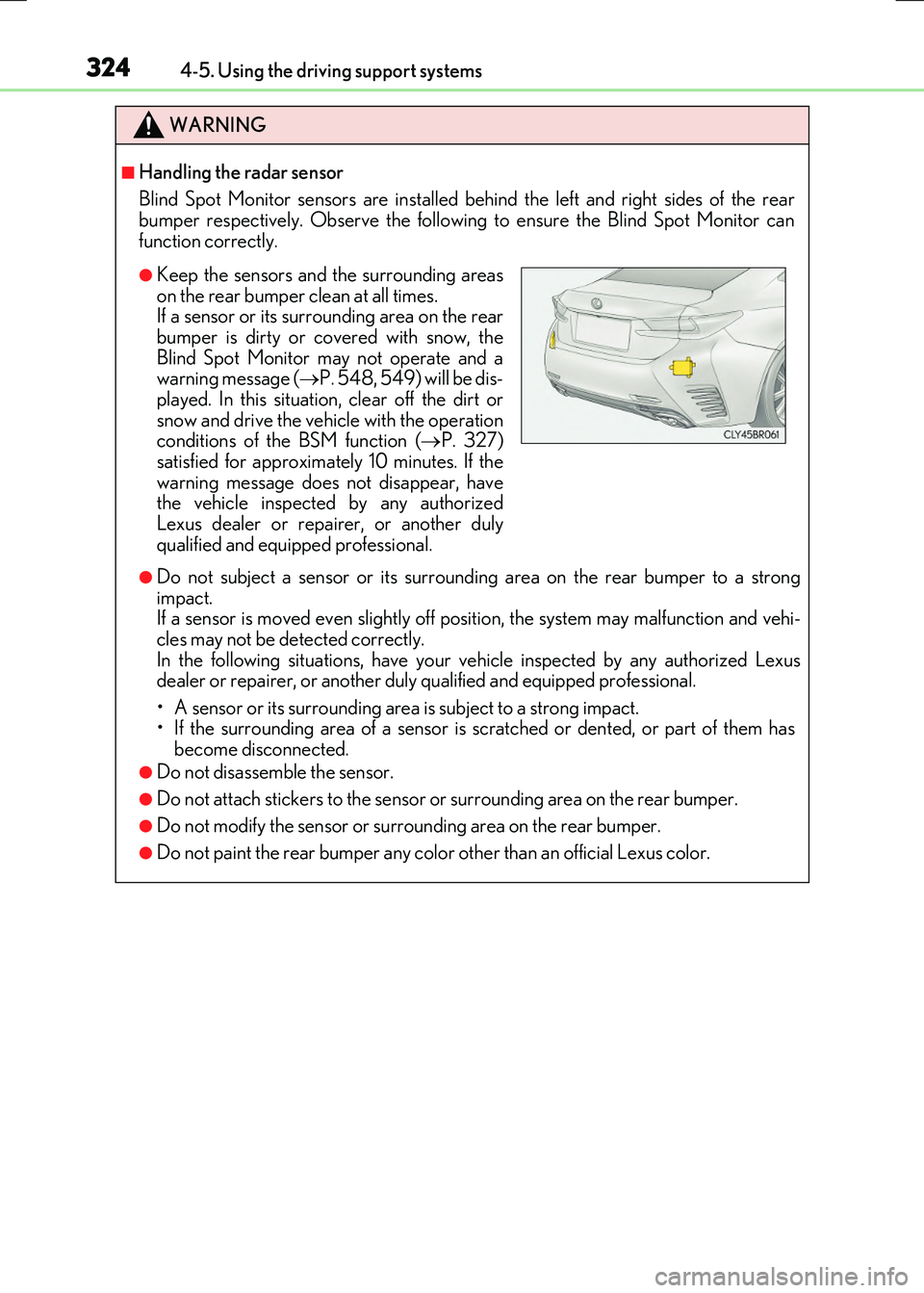
Blind Spot Monitor sensors are installed be hind the left and right sides of the rear bumper respectively. Observe the following to ensure the Blind Spot Monitor can
function correctly.
●Do not subject a sensor or its surrounding area on the rear bumper to a strong impact. If a sensor is moved even slightly off po sition, the system may malfunction and vehi-
cles may not be detected correctly. In the following situations, have your ve hicle inspected by any authorized Lexus dealer or repairer, or another duly qualified and equipped professional.
• A sensor or its surrounding area is subject to a strong impact. • If the surrounding area of a sensor is scratched or dented, or part of them hasbecome disconnected.
●Do not disassemble the sensor.
●Do not attach stickers to the sensor or surrounding area on the rear bumper.
●Do not modify the sensor or surrounding area on the rear bumper.
●Do not paint the rear bumper any color other than an official Lexus color.
●Keep the sensors and the surrounding areas
on the rear bumper clean at all times. If a sensor or its surrounding area on the rearbumper is dirty or covered with snow, the
Blind Spot Monitor may not operate and a warning message ( P. 548, 549) will be dis- played. In this situation, clear off the dirt or
snow and drive the vehicle with the operation conditions of the BSM function ( P. 327) satisfied for approximately 10 minutes. If the
warning message does not disappear, have the vehicle inspected by any authorizedLexus dealer or repairer, or another duly
qualified and equipped professional.
Page 334 of 640
334
RC300h_EE(OM24740E)
4-6. Driving tips
◆Using Eco drive mode
When using Eco drive mode, the torque corresponding to the accelerator
pedal depression amount can be generate d more smoothly than it is in normal
conditions. In addition, the operation of the air conditioning system (heating/
cooling) will be minimized, improving the fuel economy. ( P. 301)
◆Use of Hybrid System Indicator
The Eco-friendly driving is possible by keeping the needle of Hybrid System
Indicator within Eco area. ( P. 119)
◆Shift lever operation
Shift the shift lever to D when stopped at a traffic light, or driving in heavy traf-
fic etc. Shift the shift lever to P when parking. When using the N, there is no
positive effect on fuel consumption. In the N, the gasoline engine operates but
electricity cannot be generated. Also, when using the air conditioning system,
etc., the hybrid battery (traction battery) power is consumed.
◆Accelerator pedal/brake pedal operation
●Drive your vehicle smoothly. Avoid abrupt acceleration and deceleration.
Gradual acceleration and deceleration will make more effective use of the
electric motor (traction motor) without having to use gasoline engine
power.
●Avoid repeated acceleration. Repeated acceleration consumes hybrid bat-
tery (traction battery) power, resulting in poor fuel consumption. Battery
power can be restored by driving with the accelerator pedal slightly
released.
Hybrid vehicle driving tips
For economical and ecological driving, pay attention to the following points: