air LEXUS RC300H 2017 Owners Manual
[x] Cancel search | Manufacturer: LEXUS, Model Year: 2017, Model line: RC300H, Model: LEXUS RC300H 2017Pages: 640, PDF Size: 35.53 MB
Page 335 of 640
3354-6. Driving tips
4
Driving
RC300h_EE(OM24740E)
◆When braking
Make sure to operate the brakes gently and in a timely manner. A greater
amount of electrical energy can be regenerated when slowing down.
◆Delays
Repeated acceleration and deceleration, as well as long waits at traffic lights,
will lead to bad fuel economy. Check traffic reports before leaving and avoid
delays as much as possible. When driving in a traffic jam, gently release the
brake pedal to allow the vehicle to move forward slightly while avoiding over-
use of the accelerator pedal. Doing so can help control excessive gasoline
consumption.
◆Highway driving
Control and maintain the vehicle at a constant speed. Before stopping at a toll
booth or similar, allow plenty of time to release the accelerator and gently
apply the brakes. A greater amount of electrical energy can be regenerated
when slowing down.
◆Air conditioning
Use the air conditioning only when necessary. Doing so can help reduce
excessive gasoline consumption.
In summer: When the ambient temperature is high, use the recirculated air
mode. Doing so will help to reduce the burden on the air conditioning system
and reduce fuel consumption as well.
In winter: Because the gasoline engine will not automatically cut out until it
and the interior of the vehicle are warm, it will consume fuel. Also, fuel con-
sumption can be improved by av oiding overuse of the heater.
◆Checking tire inflation pressure
Make sure to check the tire inflation pressure frequently. Improper tire infla-
tion pressure can cause poor fuel economy.
Also, as snow tires can cause large amounts of friction, their use on dry roads
can lead to poor fuel economy. Use ti res that are appropriate for the season.
Page 337 of 640
3374-6. Driving tips
4
Driving
RC300h_EE(OM24740E)
●Use fluids that are appropriate to the prevailing outside temperatures.
•Engine oil
• Engine coolant
• Washer fluid
●Have a service technician inspect the condition of the 12-volt battery.
●Have the vehicle fitted with four snow tires or purchase a set of tire chains for
the rear tires.*
Ensure that all tires are the specified size and brand, and that chains match the size of the tires.
*: Tire chains cannot be mounted on vehicles with 19-inch tires.
Perform the following according to the driving conditions:
●Do not try to forcibly open a window or move a wiper that is frozen. Pour
warm water over the frozen area to melt the ice. Wipe away the water imme-
diately to prevent it from freezing.
●To ensure proper operation of the climate control system fan, remove any
snow that has accumulated on the air inlet vents in front of the windshield.
●Check for and remove any excess ice or snow that may have accumulated on
the exterior lights, vehicle’s roof, chassi s, around the tires or on the brakes.
●Remove any snow or mud from the bottom of your shoes before getting in the
vehicle.
Winter driving tips
Carry out the necessary preparations and inspections before driving the vehi-
cle in winter. Always drive the vehicle in a manner appropriate to the prevail-
ing weather conditions.
Preparation for winter
Before driving the vehicle
Page 338 of 640
3384-6. Driving tips
RC300h_EE(OM24740E)
Accelerate the vehicle slowly, keep a safe distance between you and the vehicle
ahead, and drive at a reduced speed suitable to road conditions.
●Park the vehicle and move the shift lever to P without setting the parking
brake. The parking brake may freeze up, preventing it from being released. If
the vehicle is parked without setting the parking brake, make sure to block the
wheels.
Failure to do so may be dangerous because it may cause the vehicle to move
unexpectedly, possibly leading to an accident.
●If the vehicle is parked without setting the parking brake, confirm that the shift
lever cannot be moved out of P*.
*: The shift lever will be locked if it is attempted to be shifted from P to any other posi-
tion without depressing the brake pedal. If the shift lever can be shifted from P,
there may be a problem with the shift lock system. Have the vehicle inspected by
your authorized Lexus retailer or Lexu s authorized repairer, or any reliable
repairer immediately.
Except for vehicles with 19- inch tires
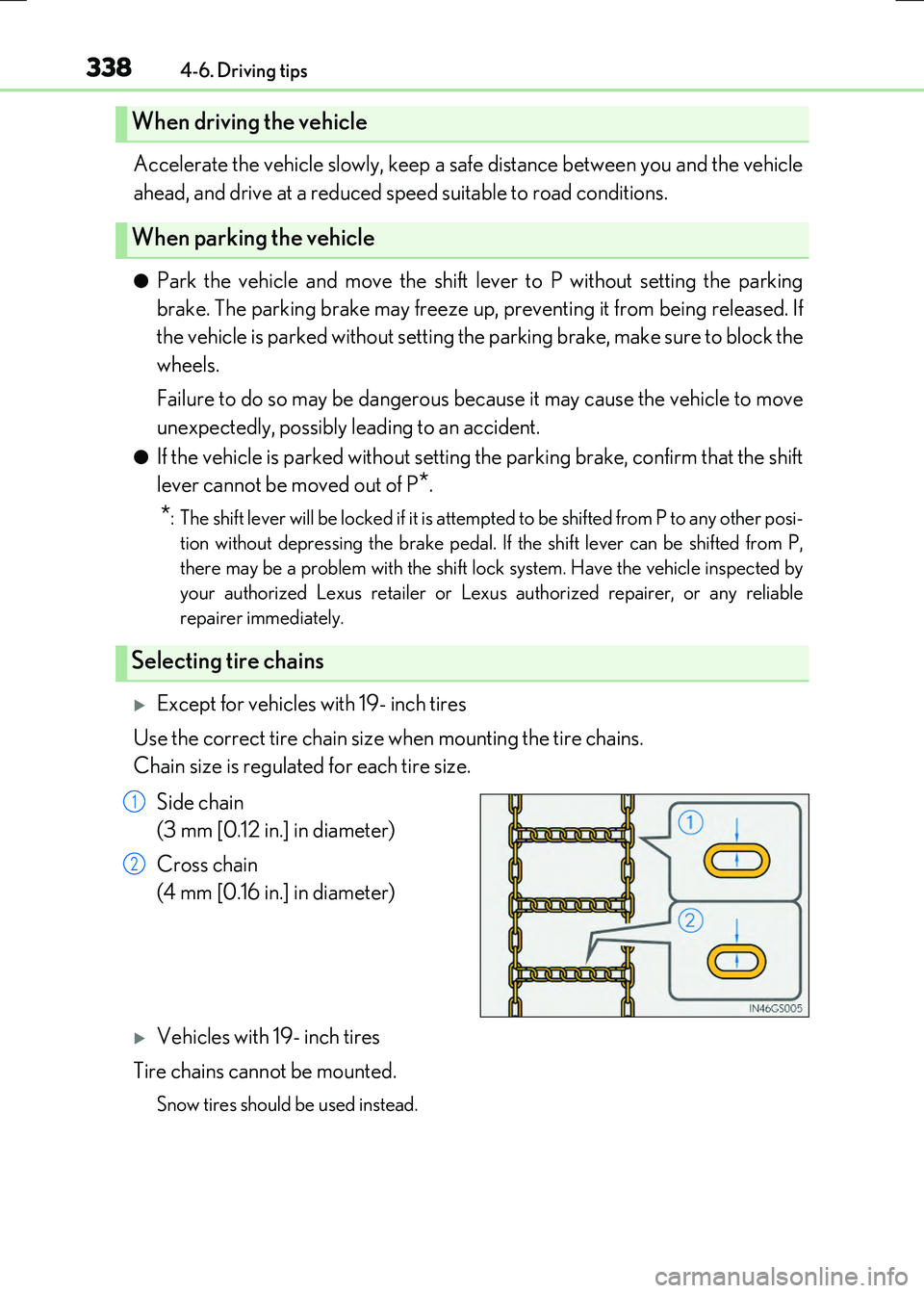
Use the correct tire chain size when mounting the tire chains.
Chain size is regulated for each tire size.
Side chain
(3 mm [0.12 in.] in diameter)
Cross chain
(4 mm [0.16 in.] in diameter)
Vehicles with 19- inch tires
Tire chains cannot be mounted.
Snow tires should be used instead.
When driving the vehicle
When parking the vehicle
Selecting tire chains
1
2
Page 339 of 640
3394-6. Driving tips
4
Driving
RC300h_EE(OM24740E)
Regulations regarding the use of tire chains vary depending on location and type
of road. Always check local regulations before installing chains.
■Tire chain installation
Observe the following precautions wh en installing and removing chains:
●Install and remove tire chains in a safe location.
●Install tire chains on the rear tires. Do not install tire chains on the front tires.
●Install tire chains on rear tires as tightly as possible. Retighten chains after driving 0.5
1.0 km (1/4 1/2 mile).
●Install tire chains following the instructions provided with the tire chains.
Regulations on the use of tire chains
WARNING
■Driving with snow tires
Observe the following precautions to reduce the risk of accidents.
Failure to do so may result in a loss of vehicle control and cause death or serious injury.
●Use tires of the specified size.
●Maintain the recommended level of air pressure.
●Do not drive at speeds in excess of the speed limit or the speed limit specified for the snow tires being used.
●Use snow tires on all, not just some wheels.
■Driving with tire chains
Observe the following precautions to reduce the risk of accidents. Failure to do so may result in the vehicle being unable to be driven safely, and may
cause death or serious injury.
●Do not drive in excess of the speed limit spec ified for the tire chains being used, or 50 km/h (30 mph), whichever is lower.
●Avoid driving on bumpy road surfaces or over potholes.
●Avoid sudden acceleration, abrupt steering, sudden braking and shifting operations that cause sudden engine braking.
●Slow down sufficiently before entering a curve to ensure that vehicle control is main-tained.
●Vehicles with LDA (Lane Departure Alert): Do not use the LDA system.
Page 340 of 640
3404-6. Driving tips
RC300h_EE(OM24740E)
NOTICE
■Repairing or replacing snow tires
Request repairs or replacement of snow ti res from Lexus dealers or legitimate tire retailers.
This is because the removal and attachment of snow tires affects the operation of the tire pressure warning valves and transmitters.
■Fitting tire chains
The tire pressure warning valves and transmitters may not function correctly when tire chains are fitted.
Page 345 of 640
3455-1. Basic Operations
5
Lexus Display Audio system
RC300h_EE(OM24740E)
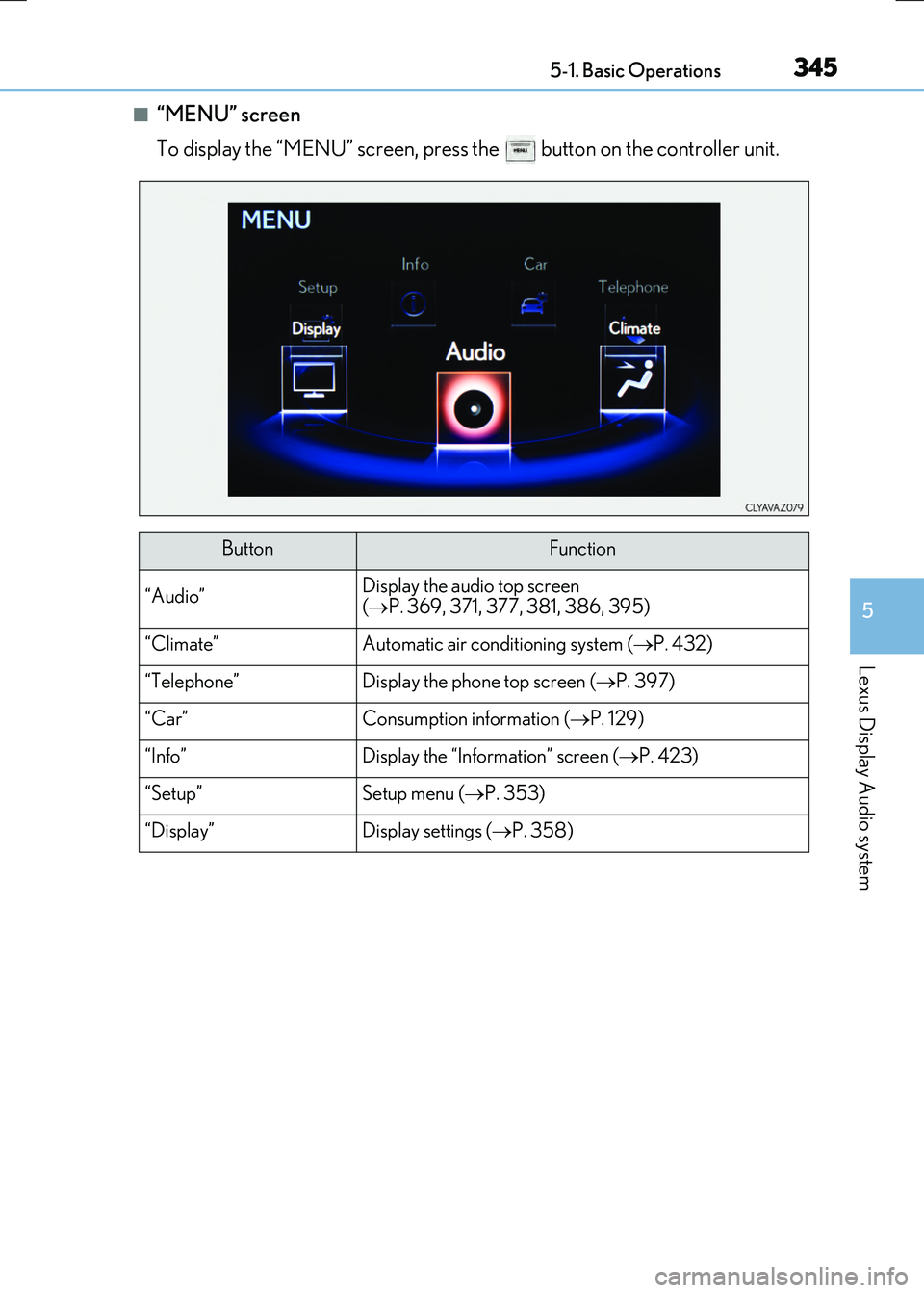
■“MENU” screen
To display the “MENU” screen, press the button on the controller unit.
ButtonFunction
“Audio”Display the audio top screen
( P. 369, 371, 377, 381, 386, 395)
“Climate”Automatic air conditioning system (P. 432)
“Telephone”Display the phone top screen (P. 397)
“Car” Consumption information (P. 129)
“Info”Display the “Information” screen (P. 423)
“Setup”Setup menu (P. 353)
“Display”Display settings (P. 358)
Page 349 of 640
3495-1. Basic Operations
5
Lexus Display Audio system
RC300h_EE(OM24740E)
■When using the screen
●Under extremely cold conditions, the Lexus Display Audio controller may react slowly.
●If the screen is cold, the display may be dark, or the system may seem to be operating slightly slower than normal.
●The screen may seem dark and hard to se e when viewed through sunglasses. Change your angle of viewing, adjust the display on the “Display” screen ( P. 358) or remove your sunglasses.
■Using cellular phones
Interference may be heard through the audio system's speakers if a cellular phone is being used inside or close to the vehicle while the audio system is operating.
WARNING
■Using the Lexus Display Audio controller
Be careful when touching the Lexus Display Audio controller in extreme temperatures as it may become very hot or cold due to the temperature inside the vehicle.
■Laser product
This product is a class 1 laser product.
Do not open the cover of the player or attempt to repair the unit yourself. Refer servic- ing to qualified personnel.
NOTICE
■To prevent Lexus Display Audio controller malfunction
●Do not allow the Lexus Display Audio controller to come into contact with food, liq-uid, stickers or lit cigarettes as doing so may cause it to change color, emit a strangeodor or stop functioning.
●Do not subject the Lexus Display Audio controller to excessive pressure or strongimpact as the controller may bend or break off.
■To prevent 12-volt battery discharge
Do not leave the audio system on longer than necessary when the hybrid system is off.
■To avoid damaging the audio system
Take care not to spill drinks or other fluids on the audio system.
Page 354 of 640
3545-2. Setup
RC300h_EE(OM24740E)
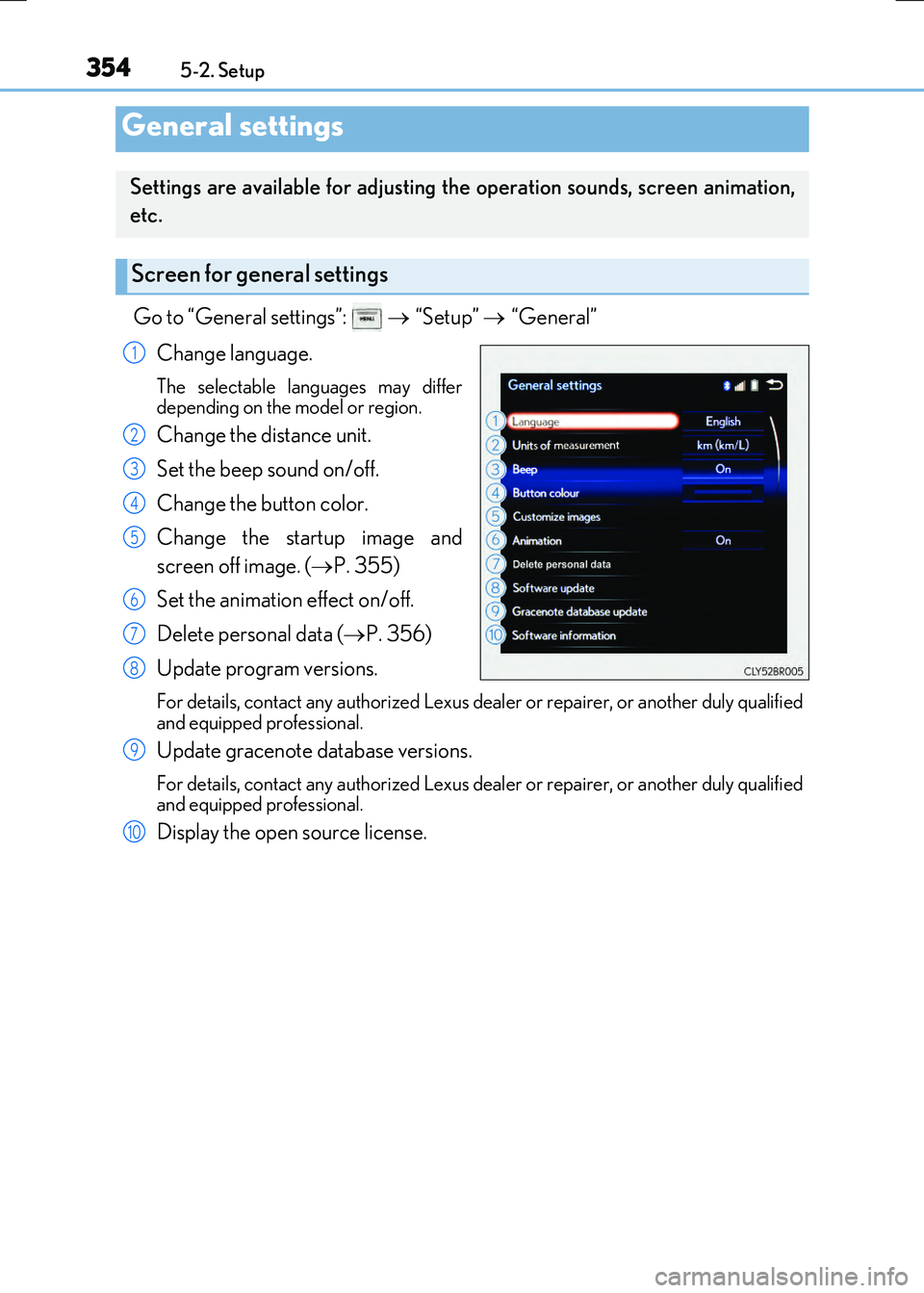
Go to “General settings”: “Setup” “General”
Change language.
The selectable languages may differ
depending on the model or region.
Change the distance unit.
Set the beep sound on/off.
Change the button color.
Change the startup image and
screen off image. ( P. 355)
Set the animation effect on/off.
Delete personal data ( P. 356)
Update program versions.
For details, contact any authorized Lexus dealer or repairer, or another duly qualified
and equipped professional.
Update gracenote database versions.
For details, contact any authorized Lexus dealer or repairer, or another duly qualified
and equipped professional.
Display the open source license.
General settings
Settings are available for adjusting the operation sounds, screen animation,
etc.
Screen for general settings
1
2
3
4
5
6
7
8
9
10
Page 372 of 640

3725-5. Playing an audio CD and MP3/WMA/AAC discs
RC300h_EE(OM24740E)
■Error messages
If the following error messages appear on the screen, refer to the table and take the appropriate measures. If the problem is not rectified, take the vehicle to any authorizedLexus dealer or repairer, or another duly qualified and equipped professional.
■Discs that can be used
Discs with the marks shown below can be used. Playback may not be possible depending on re cording format or disc features, or due to scratches, dirt or deterioration.
CDs with copy-protection features may not play correctly.
■Music disc player protection feature
To protect the internal components, playback is automatically stopped when a problem is detected.
■If a disc is left inside the Music disc player or in the ejected position for extended peri-ods
Disc may be damaged and may not play properly.
■Lens cleaners
Do not use lens cleaners. Doing so may damage the Music disc player.
■MP3, WMA and AAC files
MP3 (MPEG Audio LAYER3) is a standard audio compression format.
Files can be compressed to approximately 1/10 of their original size by using MP3 com- pression.
WMA (Windows Media Audio) is a Mi crosoft audio compression format.
This format compresses audio data to a size smaller than that of the MP3 format.
AAC is short for Advanced Audio Coding an d refers to an audio compression technol-
ogy standard used with MPEG2 and MPEG4.
MP3, WMA and AAC file and media/ formats compatibility are limited.
MessageCauseCorrection procedures
“Check disc”
• The disc is dirty or dam-
aged. • The disc is insertedupside down.
• The disc is not playable with the player.
•Clean the disc.• Insert the disc correctly.• Confirm the disc is play-
able with the player.
“DISC error”There is a malfunction within the system.Eject the disc.
“No music files found.”No playable data is
included on the disc.Eject the disc.
Page 379 of 640
3795-6. Using an external device
5
Lexus Display Audio system
RC300h_EE(OM24740E)
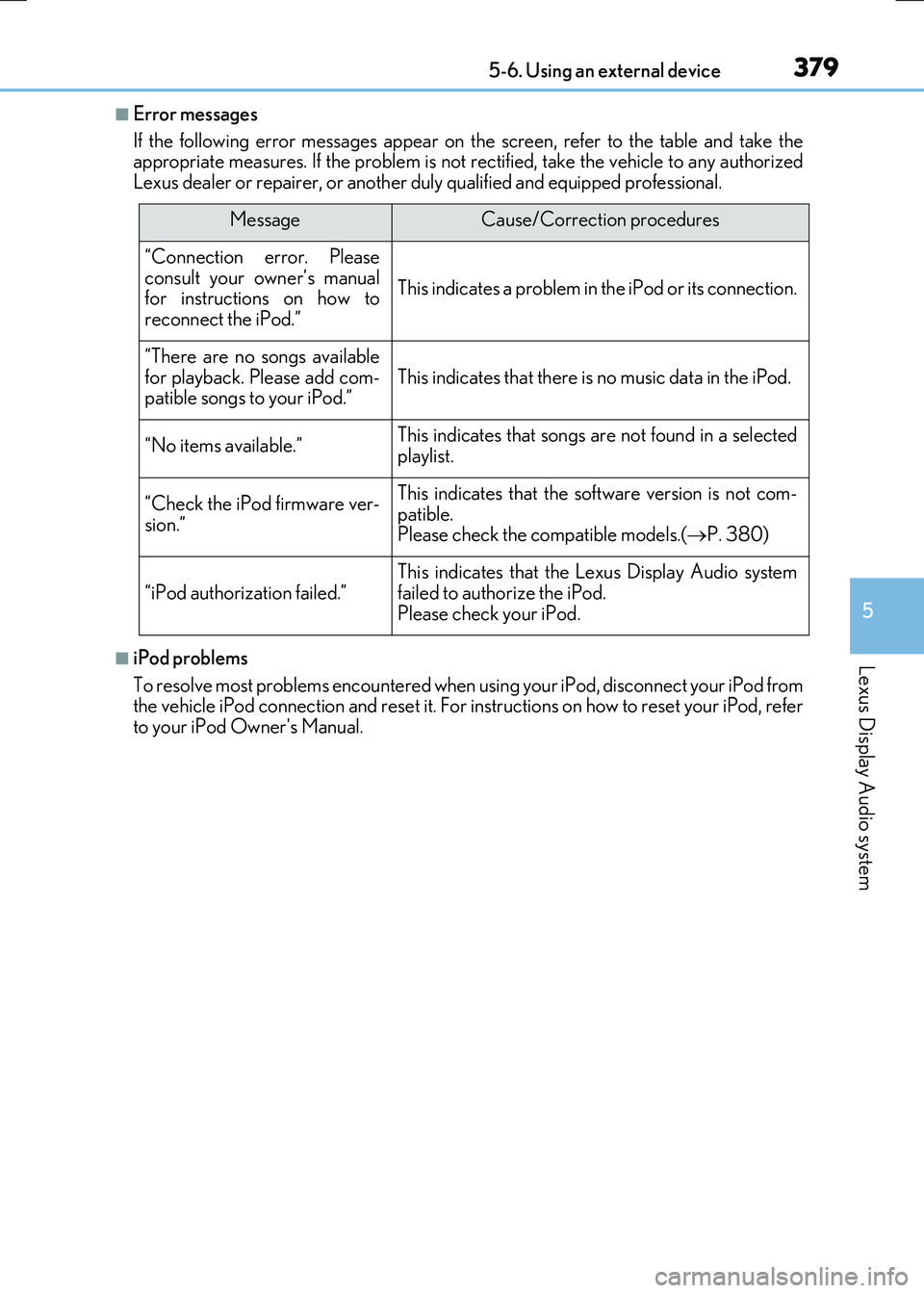
■Error messages
If the following error messages appear on the screen, refer to the table and take the appropriate measures. If the problem is not rectified, take the vehicle to any authorized
Lexus dealer or repairer, or another duly qualified and equipped professional.
■iPod problems
To resolve most problems encountered when us ing your iPod, disconnect your iPod from the vehicle iPod connection and reset it. For instructions on how to reset your iPod, referto your iPod Owner's Manual.
MessageCause/Correction procedures
“Connection error. Pleaseconsult your owner’s manualfor instructions on how to
reconnect the iPod.”
This indicates a problem in the iPod or its connection.
“There are no songs available for playback. Please add com-patible songs to your iPod.”This indicates that there is no music data in the iPod.
“No items available.”This indicates that songs are not found in a selected
playlist.
“Check the iPod firmware ver-
sion.”
This indicates that the software version is not com- patible.Please check the compatible models.( P. 380)
“iPod authorization failed.”
This indicates that the Lexus Display Audio system
failed to authorize the iPod. Please check your iPod.