turn LEXUS RC300H 2017 Owners Manual
[x] Cancel search | Manufacturer: LEXUS, Model Year: 2017, Model line: RC300H, Model: LEXUS RC300H 2017Pages: 640, PDF Size: 35.53 MB
Page 311 of 640
3114-5. Using the driving support systems
4
Driving
RC300h_EE(OM24740E)
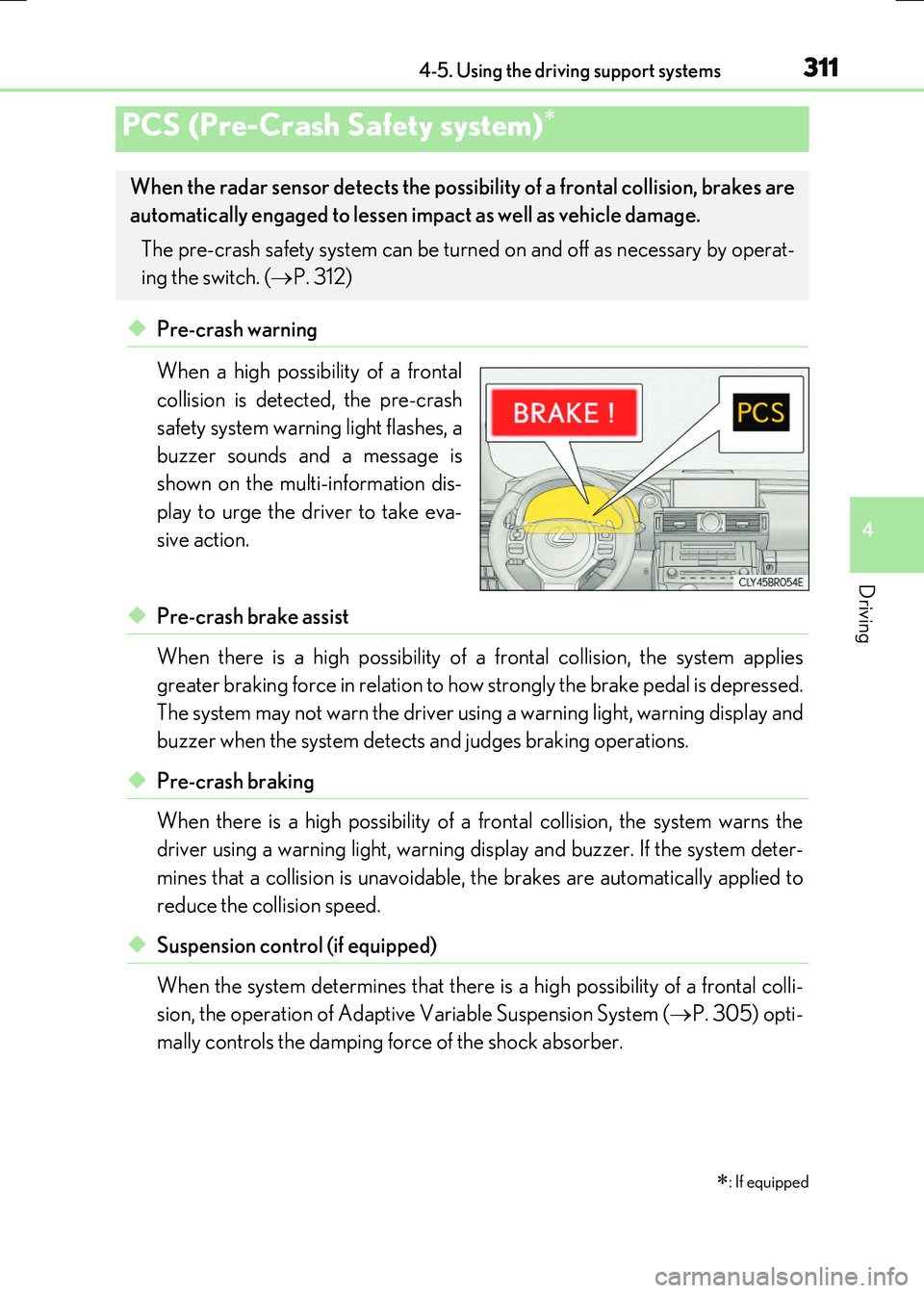
◆Pre-crash warning
When a high possibility of a frontal
collision is detected, the pre-crash
safety system warning light flashes, a
buzzer sounds and a message is
shown on the multi-information dis-
play to urge the driver to take eva-
sive action.
◆Pre-crash brake assist
When there is a high possibility of a frontal collision, the system applies
greater braking force in relation to how strongly the brake pedal is depressed.
The system may not warn the driver using a warning light, warning display and
buzzer when the system detects and judges braking operations.
◆Pre-crash braking
When there is a high possibility of a frontal collision, the system warns the
driver using a warning ligh t, warning display and buzzer. If the system deter-
mines that a collision is unavoidable, the brakes are automatically applied to
reduce the collision speed.
◆Suspension control (if equipped)
When the system determines that there is a high possibility of a frontal colli-
sion, the operation of Adaptive Variable Suspension System ( P. 305) opti-
mally controls the damping force of the shock absorber.
PCS (Pre-Crash Safety system)
: If equipped
When the radar sensor detects the possibil ity of a frontal collision, brakes are
automatically engaged to lessen im pact as well as vehicle damage.
The pre-crash safety system can be turn ed on and off as necessary by operat-
ing the switch. ( P. 312)
Page 313 of 640
3134-5. Using the driving support systems
4
Driving
RC300h_EE(OM24740E)
■The pre-crash safety system is operational when
The pre-crash safety system is enable d and the following conditions are met:
●Pre-crash warning:
• Vehicle speed is greater than about 15 km/h (10 mph).
• The speed at which your vehicle is approaching the obstacle or the vehicle running ahead of you is greater than about 15 km/h (10 mph).
●Pre-crash brake assist:
• The VSC system is not disabled. • Vehicle speed is greater than about 30 km/h (19 mph).
• The speed at which your vehicle is approaching the obstacle or the vehicle running ahead of you is greater than about 30 km/h (19 mph).• The brake pedal is depressed.
●Pre-crash braking:
• The VSC system is not disabled.
• Vehicle speed is greater than about 15 km/h (10 mph). • The speed at which your vehicle is approaching the obstacle or the vehicle runningahead of you is greater than about 15 km/h (10 mph).
●Suspension control:
• Vehicle speed is greater than about 5 km/h (4 mph).
• The speed at which your vehicle is approaching the obstacle or the vehicle running ahead of you is greater than about 30 km/h (19 mph).
■Conditions that may trigger the system even if there is no danger of a collision
In any of the following situations where the frontal area of the radar sensor is interrupted, the radar sensor may detect possibility of a frontal collision and the system may be acti- vated.
●When passing by an oncoming vehicle in a curve or a turn to the right or the left
●When rapidly approaching an obstacle ahead (e.g. preceding vehicle, toll gate barrier, etc.)
●When there is a structural object (billboard, low ceiling, fluorescent light, etc.) above the uphill road ahead
●When driving on a narrow road or throug h under a low overhead structure (bridge,
tunnel, fly-under, etc.)
●When driving on an uneven road surface
●When there is a metal object, bump, or protrusion on the road surface
●When vehicle’s front part is raised or lowered depending on loading conditions
●When the direction of radar sensor is misaligned by strong impact applied on an area
around the radar sensor, etc.
●When there is an obstacle (guard rail, etc.) by the roadside at the entrance to a curve
●When the front of your vehicle is pointing upwards (caused by putting a heavy load in
the trunk etc.)
When the system is activated in the situations described above, there is also a possibility that the brakes may be applied with a force greater than normal.
Page 314 of 640
3144-5. Using the driving support systems
RC300h_EE(OM24740E)
■Obstacles not detected
The sensor cannot detect plastic obstacles such as traffic cones. There may also be occa- sions when the sensor cannot detect pedestrians, animals, bicycles, motorcycles, trees,
or snowdrifts.
■Situations in which the pre-crash safe ty system does not function properly
The system may not function effectively in situations such as the following:
●On roads with sharp bends or uneven surfaces
●If a vehicle suddenly moves in front of your vehicle, such as at an intersection
●If a vehicle suddenly cuts in front of your vehicle, such as when overtaking
●In inclement weather such as heavy rain, fog, snow or sand storms
●If the vehicle is skidding when VSC is not operating
●When your vehicle is steeply inclined
●When only part of your vehicle’s front end collides with, or contacts, a vehicle or object in a frontal collision
●When the radar sensor moves off position due to its surrounding area being subjected
to a strong impact
●When an obstacle suddenly appears in front of the vehicle due to the steering wheel being turned sharply or another cause
■Automatic cancelation of the pre-crash safety system
When a malfunction occurs due to sensor contamination, etc. that results in the sensors being unable to detect obstacles, the pre-crash safety system will be automatically dis-
abled. In this case, the system will not activ ate even if there is a collision possibility.
■When there is a malfunction in the system or if the system is temporarily unusable
The pre-crash safety system warning light will flash and warning messages will be dis- played. ( P. 538, 549)
Page 317 of 640
3174-5. Using the driving support systems
4
Driving
RC300h_EE(OM24740E)
WARNING
■Limitations of the pre-crash safety system
●The driver is solely responsible for safe driving. Always drive safely, taking care to observe your surroundings.
Do not use the pre-crash safety system in stead of normal braking operations under any circumstances. This system will not pr event collisions or lessen damage or inju- ries in all cases. Do not overly rely on this system. Failure to do so may cause an acci-
dent, resulting in death or serious injury.
●This system has been designed to help avoid and reduce the impact of collisions. However, the system operates differe ntly depending on the situation (P. 313). As a
result, the same level of performance may no t be expected in all cases. Also, the pre- crash safety brakes may not operate if th e driver is depressing the brake pedal or turning the steering wheel, as the system will determine such conditions as collision
avoidance operations.
●As the pre-crash safety system is designed to assist the driver in safe driving, it may operate under sporty driving conditions, which may cause an accident. For this rea-
son under sporty driving conditions, it is recommended that this system be disabled by using the PCS OFF switch.
■Handling the radar sensor
Observe the following to ensure the pre-crash safety system can function effectively. Otherwise, the system may not function correctly and could result in an accident.
●Keep the sensor and grille cover clean at all times.
Clean the sensor and grille cover with a soft cloth so you do not mark or damage them.
●Do not subject the sensor or surrounding area to a strong impact.
If the sensor moves even slightly off po sition, the system may become inaccurate or malfunction. If the sensor or surrounding area is subject to a strong impact, alwayshave the area inspected and adjusted by an y authorized Lexus dealer or repairer, or
another duly qualified an d equipped professional.
●Do not disassemble the sensor.
●Do not attach accessories or stickers to the sensor, grille cover or surrounding area.
●Do not modify or paint the sensor and grille cover.
●If the radar sensor needs to be replaced, contact any authorized Lexus dealer or repairer, or another duly qualified and equipped professional.
Page 320 of 640
3204-5. Using the driving support systems
RC300h_EE(OM24740E)
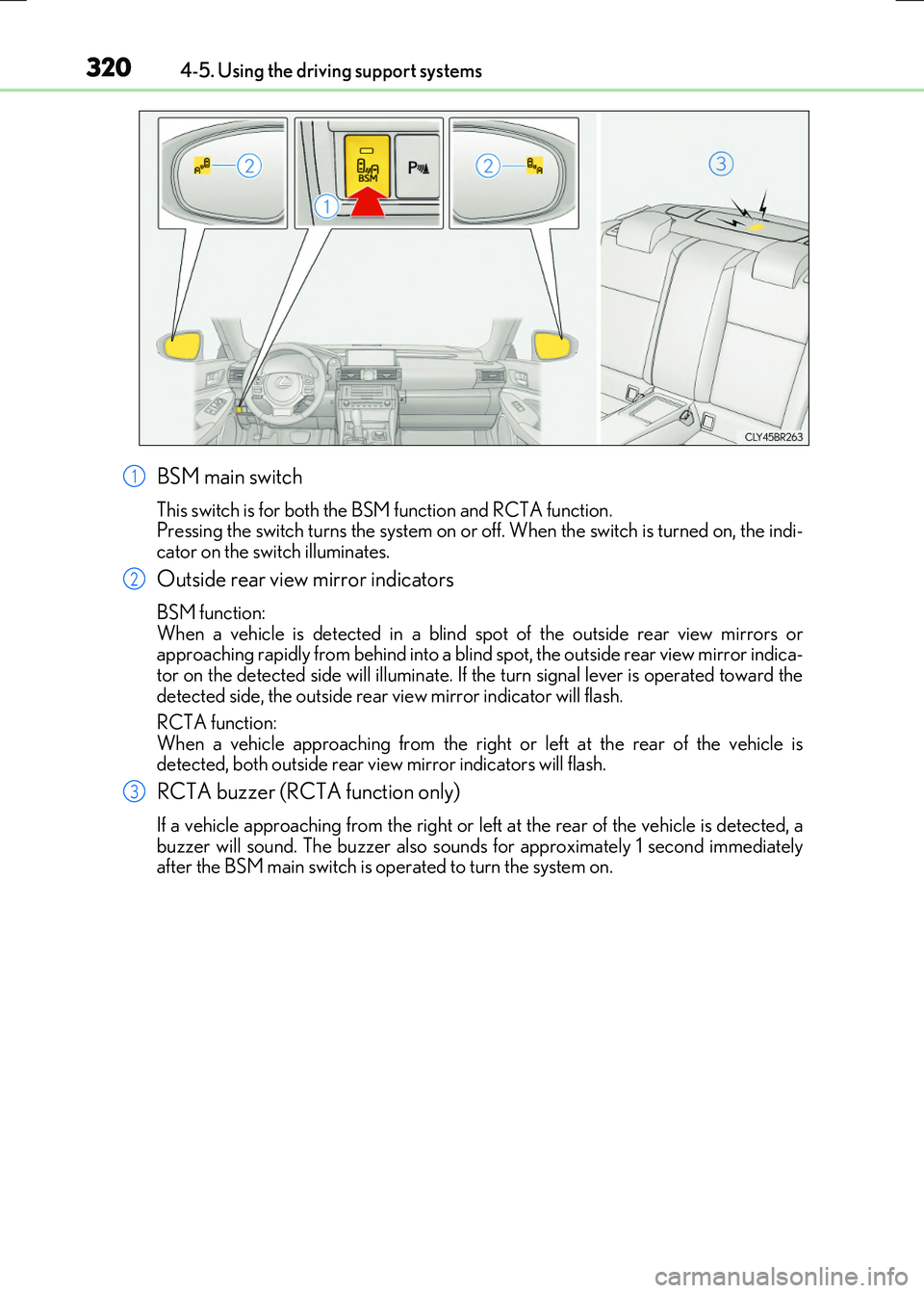
BSM main switch
This switch is for both the BSM function and RCTA function. Pressing the switch turns the system on or of f. When the switch is turned on, the indi-
cator on the switch illuminates.
Outside rear view mirror indicators
BSM function: When a vehicle is detected in a blind spot of the outside rear view mirrors orapproaching rapidly from behind into a blind spot, the outside rear view mirror indica-
tor on the detected side will illuminate. If th e turn signal lever is operated toward the detected side, the outside rear view mirror indicator will flash.
RCTA function:
When a vehicle approaching from the right or left at the rear of the vehicle is detected, both outside rear vi ew mirror indicators will flash.
RCTA buzzer (RCTA function only)
If a vehicle approaching from the right or left at the rear of the vehicle is detected, a buzzer will sound. The buzzer also sounds for approximately 1 second immediately after the BSM main switch is operated to turn the system on.
1
2
3
Page 328 of 640
3284-5. Using the driving support systems
RC300h_EE(OM24740E)
■Conditions under which the BSM function may not function correctly
●The BSM function may not detect vehicles correctly in the following situations:
• When the sensor is misaligned due to a strong impact to the sensor or its surround-
ing area • When mud, snow, ice, a sticker, etc. is covering the sensor or surrounding area onthe rear bumper
• When driving on a road surface that is wet with standing water during bad weather, such as heavy rain, snow, or fog• When multiple vehicles are approaching wi th only a small gap between each vehicle
• When the distance between your vehicle and a following vehicle is short • When there is a significant difference in speed between your vehicle and the vehiclethat enters the detection area
• When the difference in speed between your vehicle and another vehicle is changing • When a vehicle enters a detection area traveling at about the same speed as yourvehicle
• As your vehicle starts from a stop, a vehicle remains in the detection area • When driving up and down consecutive steep inclines, such as hills, dips in the road, etc.
• When driving on roads with sharp bends, consecutive curves, or uneven surfaces • When vehicle lanes are wide, or when driving on the edge of a lane, and the vehiclein an adjacent lane is far away from your vehicle
• When a bicycle carrier or other accessory is installed to the rear of the vehicle • When there is a significant difference in height between your vehicle and the vehiclethat enters the detection area
• Immediately after the BSM main switch is turned on
●Instances of the BSM function unnecessarily detecting a vehicle and/or object may
increase in the following situations:
• When the sensor is misaligned due to a strong impact to the sensor or its surround-
ing area • When the distance between your vehicle and a guardrail, wall, etc. that enters thedetection area is short
• When driving up and down consecutive steep inclines, such as hills, dips in the road, etc.• When vehicle lanes are narrow, or when driving on the edge of a lane, and a vehicle
traveling in a lane other than the adjacent lanes enters the detection area • When driving on roads with sharp bends, consecutive curves, or uneven surfaces• When the tires are slipping or spinning
• When the distance between your vehicle and a following vehicle is short • When a bicycle carrier or other accessory is installed to the rear of the vehicle
Page 332 of 640
3324-5. Using the driving support systems
RC300h_EE(OM24740E)
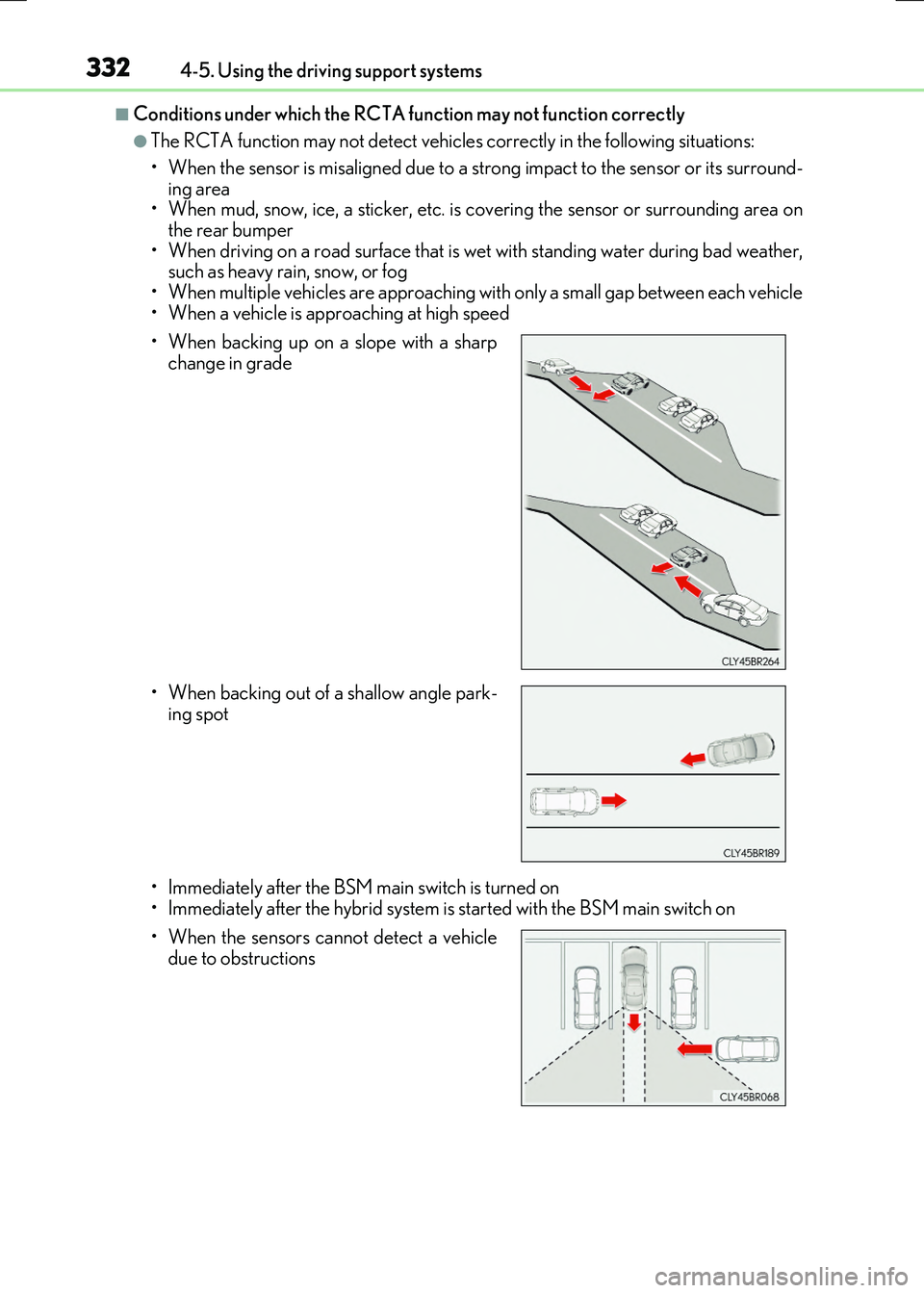
■Conditions under which the RCTA function may not function correctly
●The RCTA function may not detect vehicles correctly in the following situations:
• When the sensor is misaligned due to a strong impact to the sensor or its surround- ing area
• When mud, snow, ice, a sticker, etc. is covering the sensor or surrounding area on the rear bumper
• When driving on a road surface that is wet with standing water during bad weather, such as heavy rain, snow, or fog
• When multiple vehicles are approaching wi th only a small gap between each vehicle
• When a vehicle is approaching at high speed
• Immediately after the BSM main switch is turned on
• Immediately after the hybrid system is started with the BSM main switch on
• When backing up on a slope with a sharp
change in grade
• When backing out of a shallow angle park- ing spot
• When the sensors cannot detect a vehicle due to obstructions
Page 344 of 640
344
RC300h_EE(OM24740E)
5-1. Basic Operations
Lexus Display Audio System
: If equipped
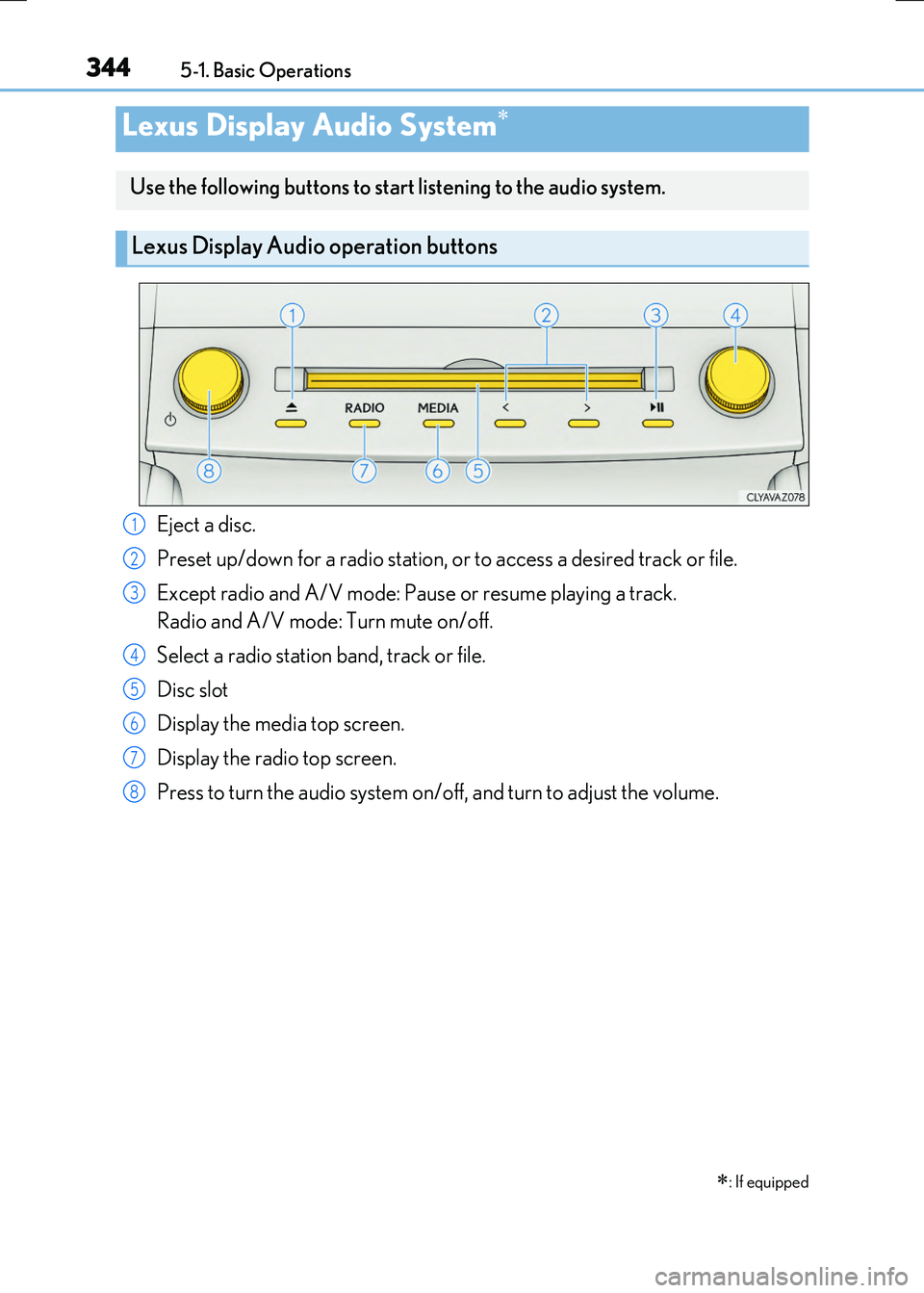
Use the following buttons to start listening to the audio system.
Lexus Display Audio operation buttons
Eject a disc.
Preset up/down for a radio station, or to access a desired track or file.
Except radio and A/V mode: Pause or resume playing a track.
Radio and A/V mode: Turn mute on/off.
Select a radio station band, track or file.
Disc slot
Display the media top screen.
Display the radio top screen.
Press to turn the audio system on/off, and turn to adjust the volume.
1
2
3
4
5
6
7
8
Page 346 of 640
3465-1. Basic Operations
RC300h_EE(OM24740E)
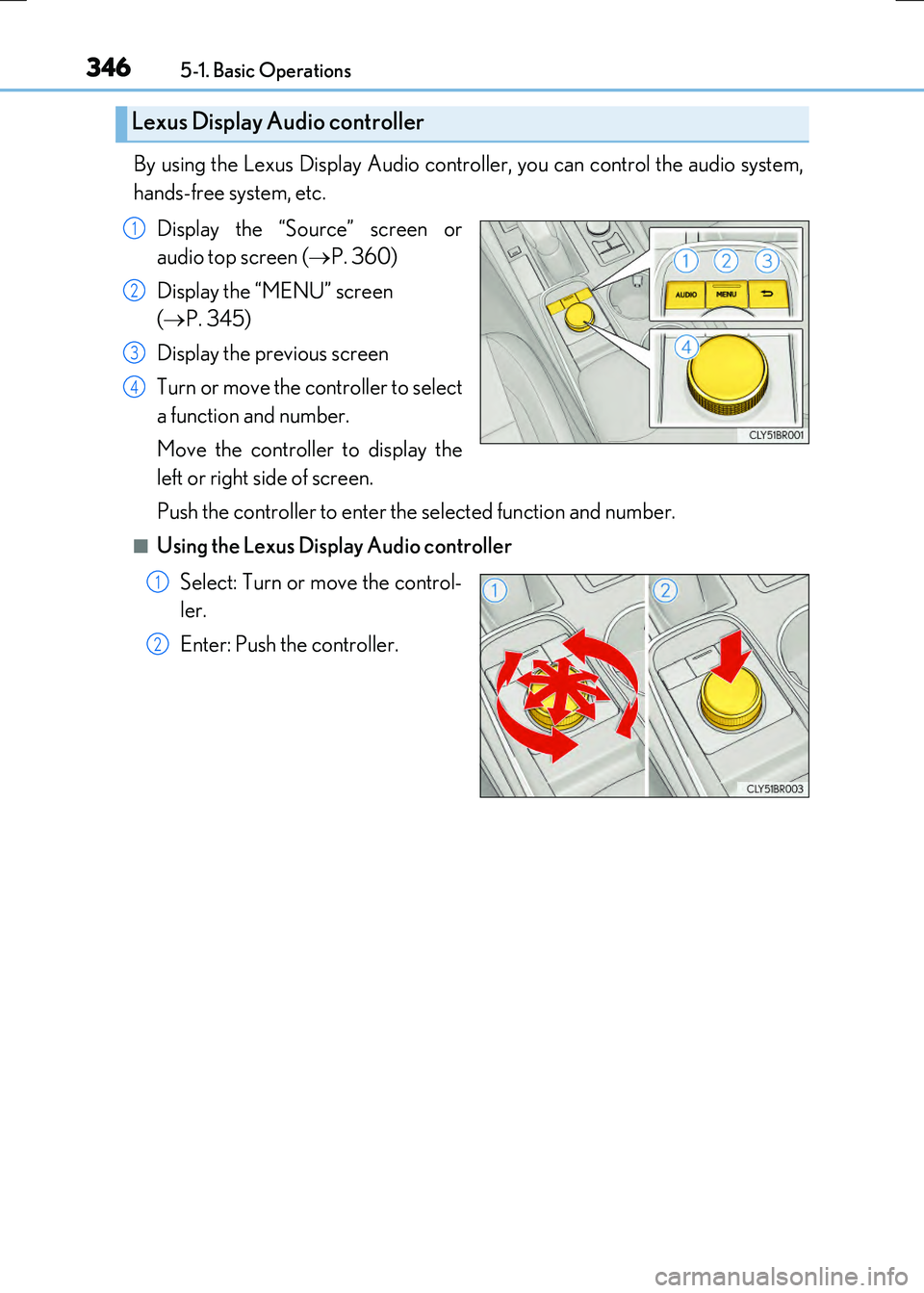
By using the Lexus Display Audio controller, you can control the audio system,
hands-free system, etc.
Display the “Source” screen or
audio top screen ( P. 360)
Display the “MENU” screen
( P. 345)
Display the previous screen
Turn or move the controller to select
a function and number.
Move the controller to display the
left or right side of screen.
Push the controller to enter the selected function and number.
■Using the Lexus Display Audio controller
Select: Turn or move the control-
ler.
Enter: Push the controller.
Lexus Display Audio controller
1
2
3
4
1
2
Page 347 of 640
3475-1. Basic Operations
5
Lexus Display Audio system
RC300h_EE(OM24740E)
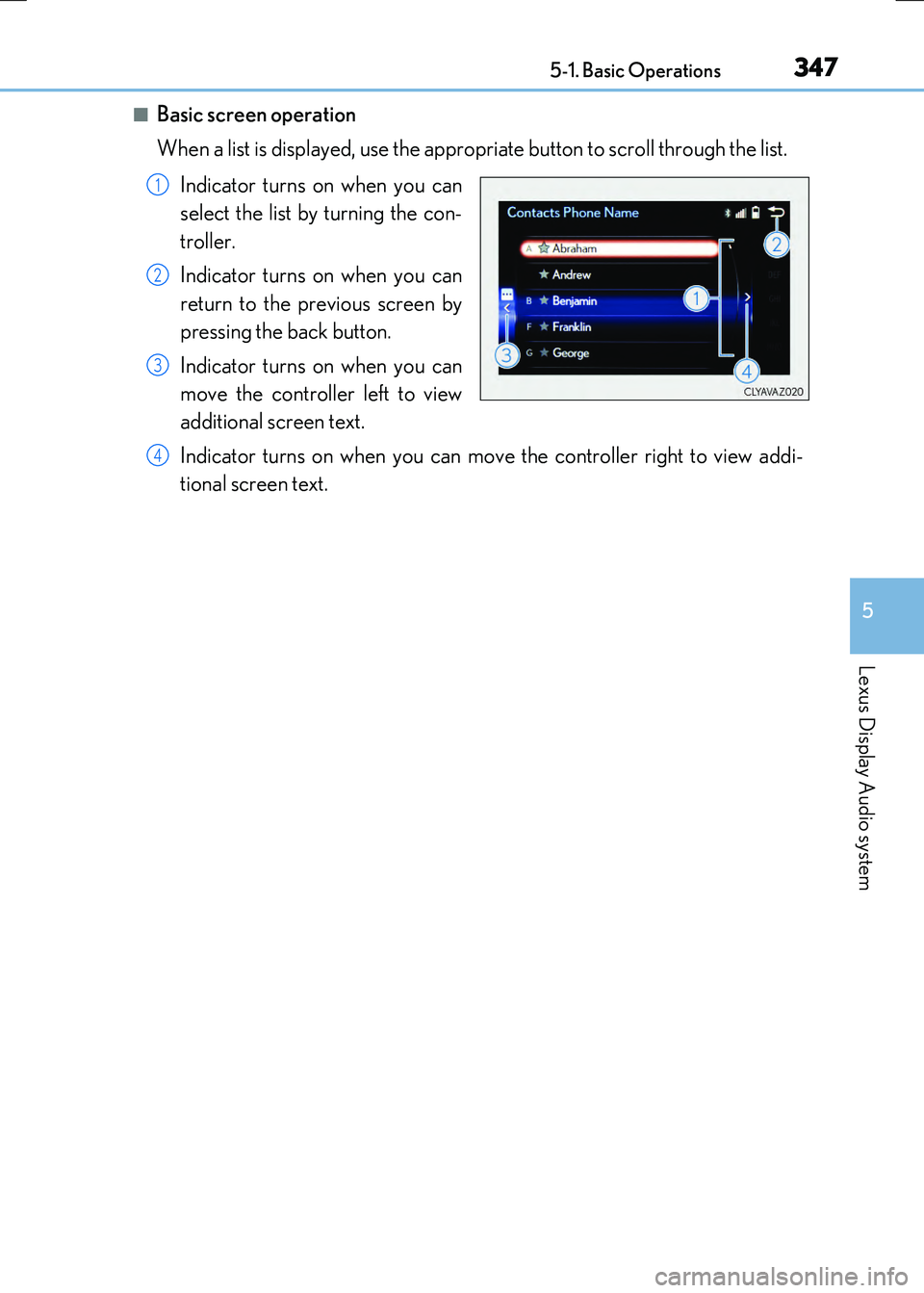
■Basic screen operation
When a list is displayed, use the approp riate button to scroll through the list.
Indicator turns on when you can
select the list by turning the con-
troller.
Indicator turns on when you can
return to the previous screen by
pressing the back button.
Indicator turns on when you can
move the controller left to view
additional screen text.
Indicator turns on when you can move the controller right to view addi-
tional screen text.
1
2
3
4