turn LEXUS RC300H 2017 Owners Manual
[x] Cancel search | Manufacturer: LEXUS, Model Year: 2017, Model line: RC300H, Model: LEXUS RC300H 2017Pages: 640, PDF Size: 35.53 MB
Page 412 of 640
4125-10. Phonebook
RC300h_EE(OM24740E)
■Return to the default settings
Move the controller to the left and select “Defaults”.
You can transfer the phone numbers in your Bluetooth® phone to the system.
Operation methods differ between PBAP compatible and PBAP incompatible
Bluetooth
® phones. If your cellular phone does not support either PBAP or
OPP services, you cannot transfer contacts.
Go to “Transfer contacts”: “Setup” “Telephone” “Contact/call his-
tory settings” “Update contacts from telephone”
For PBAP compatible Bluetooth® phones when “Automatic transfer” is set to
on
Start the update automatically.
For PBAP compatible Bluetooth® phones when “Automatic transfer” is set to
off and PBAP incompatible Bluetooth® phones
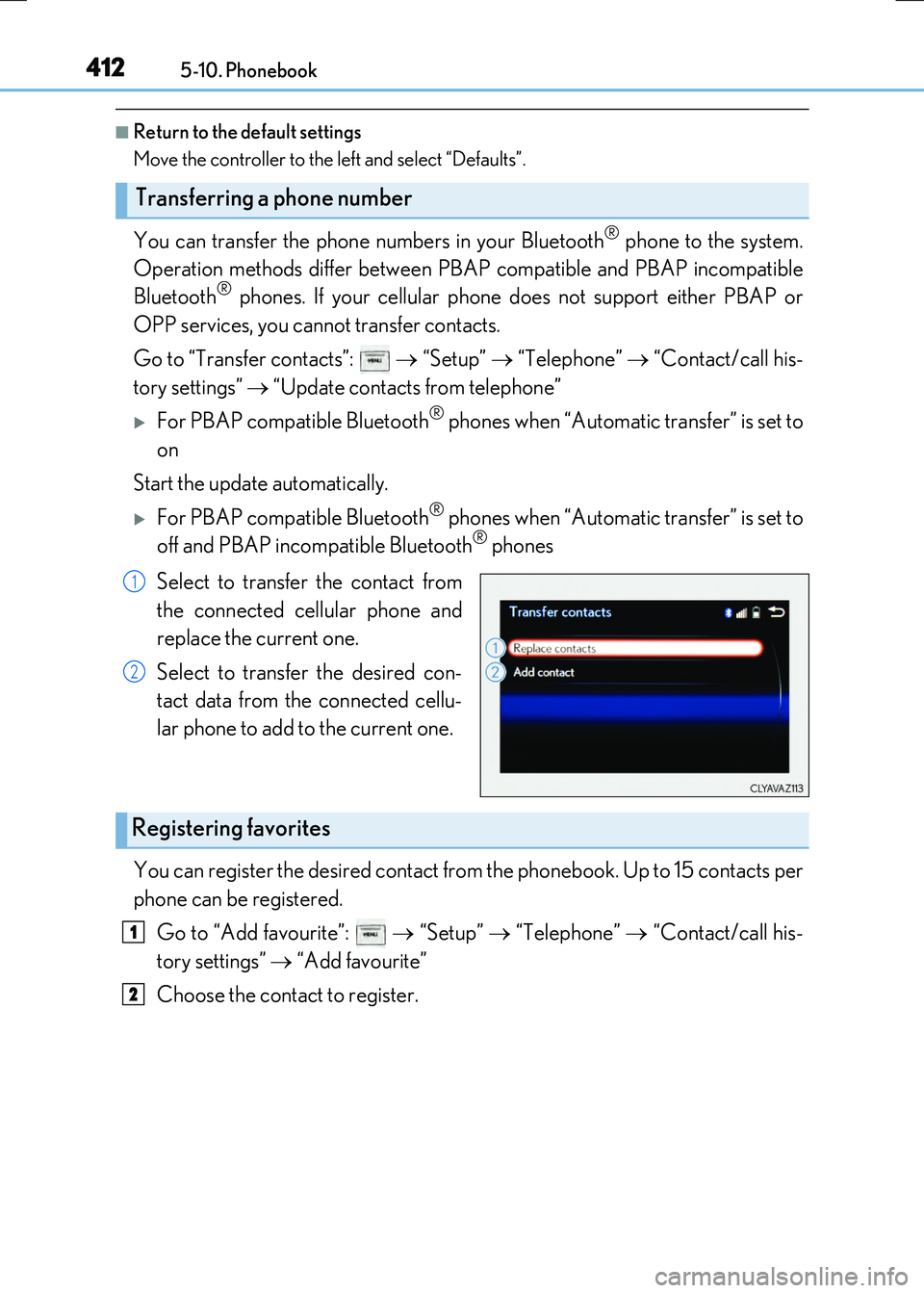
Select to transfer the contact from
the connected cellular phone and
replace the current one.
Select to transfer the desired con-
tact data from the connected cellu-
lar phone to add to the current one.
You can register the desired contact from the phonebook. Up to 15 contacts per
phone can be registered.
Go to “Add favourite”: “Setup” “Telephone” “Contact/call his-
tory settings” “Add favourite”
Choose the contact to register.
Transferring a phone number
1
2
Registering favorites
1
2
Page 417 of 640
4175-11. Bluetooth®
5
Lexus Display Audio system
RC300h_EE(OM24740E)
In other situations
Even though all conceivable measures have been taken, the symptom status does not
change.
The cellular phone is not close enough to this system. Bring the cellular phone closer to this system.
The cellular phone is the most likely cause of the symptom. Turn the cellular phone off, remove and reinstall the battery pack, and then
restart the cellular phone. Enable the cellular phone’s Bluetooth® connection. Stop the cellular phone’s security software and close all applications.
Before using an application installed on the cellular phone, carefully check its source and how its operation might affect this system.
Page 418 of 640
4185-11. Bluetooth®
RC300h_EE(OM24740E)
■When using the Bluetooth® audio system
●In the following situations, the system may not function.
• If the portable audio player is turned off • If the portable audio player is not connected
• If the portable audio player’s battery is low
●There may be a delay if a cellular phone connection is made during Bluetooth® audio
play.
●Depending on the type of portable audio player that is connected to the system, opera- tion may differ slightly and certain functions may not be available.
■When using the hands-free system
●The audio system is muted when making a call.
●If both parties speak at the same time, it may be difficult to hear.
●If the received call volume is over ly loud, an echo may be heard. If the Bluetooth® phone is too close to the system, quality of the sound may deteriorate and connection status may deteriorate.
●In the following situations, it may be difficult to hear the other party:
• When driving on unpaved roads • When driving at high speeds
•If a window is open • If the air conditioning is blowing directly on the microphone• If there is interference from the network of the cellular phone
●Depending on the type of phone, ce rtain functions may not be available.
■Conditions under which the system will not operate
●If using a cellular phone that does not support Bluetooth®
●If the cellular phone is turned off
●If you are outside of cellular phone service coverage
●If the cellular phone is not connected
●If the cellular phone’s battery is low
●When outgoing calls are controlled, due to heavy traffic on telephone lines, etc.
●When the cellular phone itself cannot be used
●When transferring phonebook data from the cellular phone
Bluetooth®
Page 425 of 640
4255-12. Other function
5
Lexus Display Audio system
RC300h_EE(OM24740E)
Go to “MirrorLink*”: “Info” “MirrorLink*”
Select the desired application on the application list screen.
■MirrorLink screen
Follow the specific operation procedures for the smartphone application.
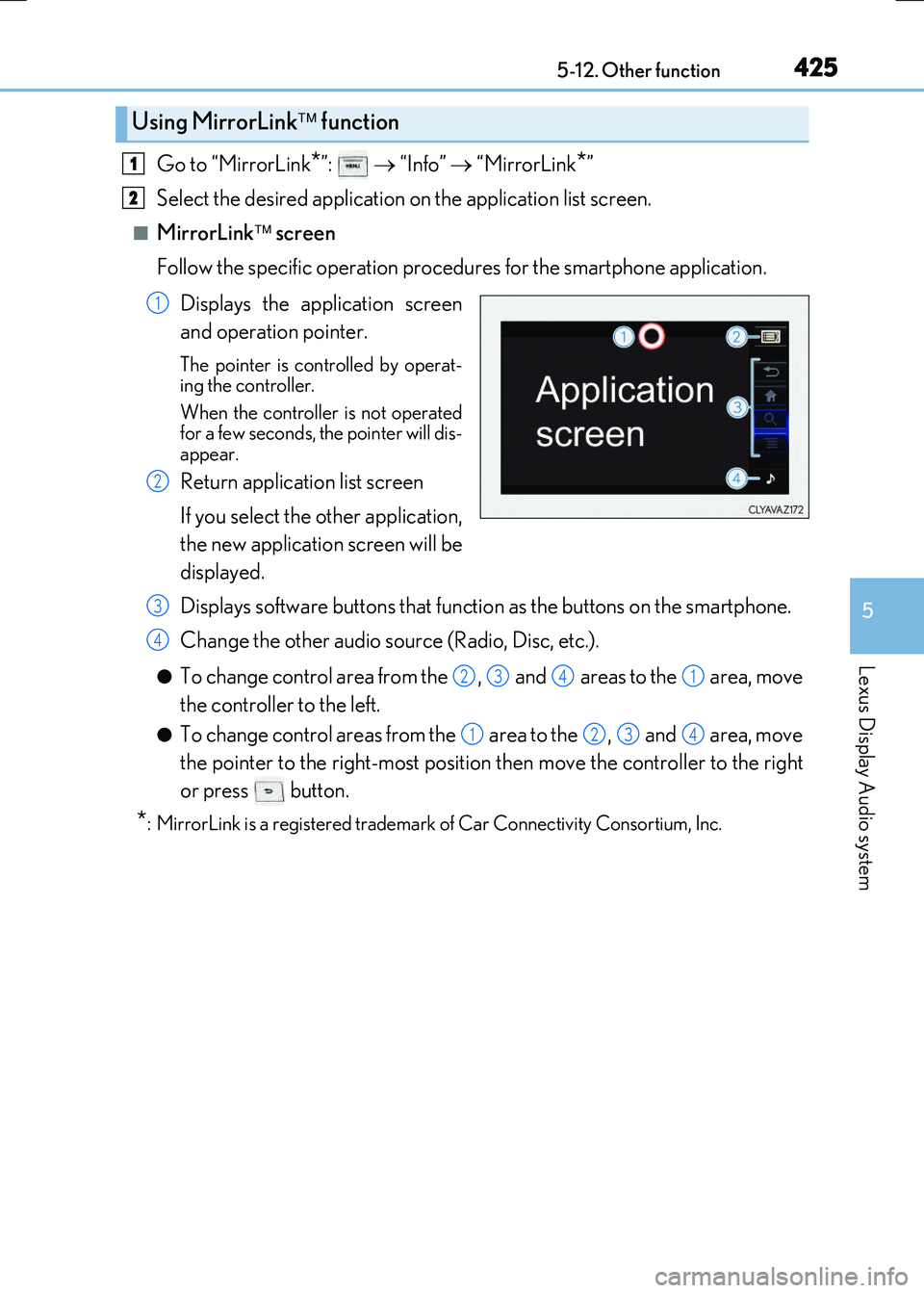
Displays the application screen
and operation pointer.
The pointer is controlled by operat-
ing the controller.
When the controller is not operated
for a few seconds, the pointer will dis-
appear.
Return application list screen
If you select the other application,
the new application screen will be
displayed.
Displays software buttons that function as the buttons on the smartphone.
Change the other audio source (Radio, Disc, etc.).
●To change control area from the , and areas to the area, move
the controller to the left.
●To change control areas from the area to the , and area, move
the pointer to the right-most position then move the controller to the right
or press button.
*: MirrorLink is a registered trademark of Car Connectivity Consortium, Inc.
Using MirrorLink function
1
2
1
2
3
4
2341
1234
Page 426 of 640
4265-12. Other function
RC300h_EE(OM24740E)
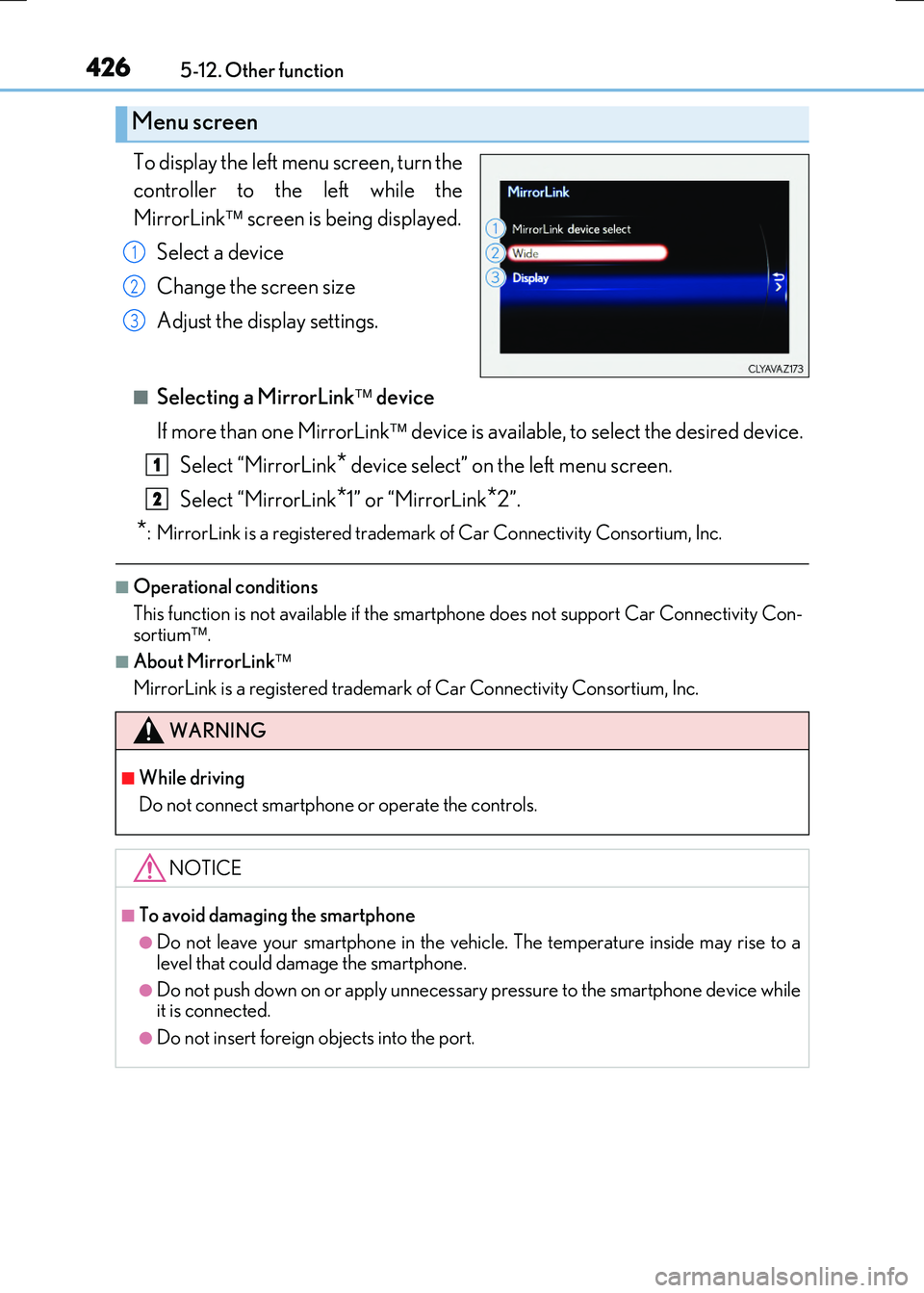
To display the left menu screen, turn the
controller to the left while the
MirrorLink screen is being displayed.
Select a device
Change the screen size
Adjust the display settings.
■Selecting a MirrorLink device
If more than one MirrorLink device is available, to select the desired device.
Select “MirrorLink* device select” on the left menu screen.
Select “MirrorLink*1” or “MirrorLink*2”.
*: MirrorLink is a registered trademark of Car Connectivity Consortium, Inc.
■Operational conditions
This function is not available if the smartp hone does not support Car Connectivity Con- sortium .
■About MirrorLink
MirrorLink is a registered trademark of Car Connectivity Consortium, Inc.
Menu screen
1
2
3
WARNING
■While driving
Do not connect smartphone or operate the controls.
NOTICE
■To avoid damaging the smartphone
●Do not leave your smartphone in the vehicle. The temperature inside may rise to a
level that could damage the smartphone.
●Do not push down on or apply unnecessary pressure to the smartphone device while it is connected.
●Do not insert foreign objects into the port.
1
2
Page 435 of 640
4356-1. Using the air conditioning system
6
Interior features
RC300h_EE(OM24740E)
■Other functions
●Switching between outside air and recirculated air modes (P. 438)
●Defogging the windshield (P. 438)
●Defogging the rear window and outside rear view mirrors (P. 438)
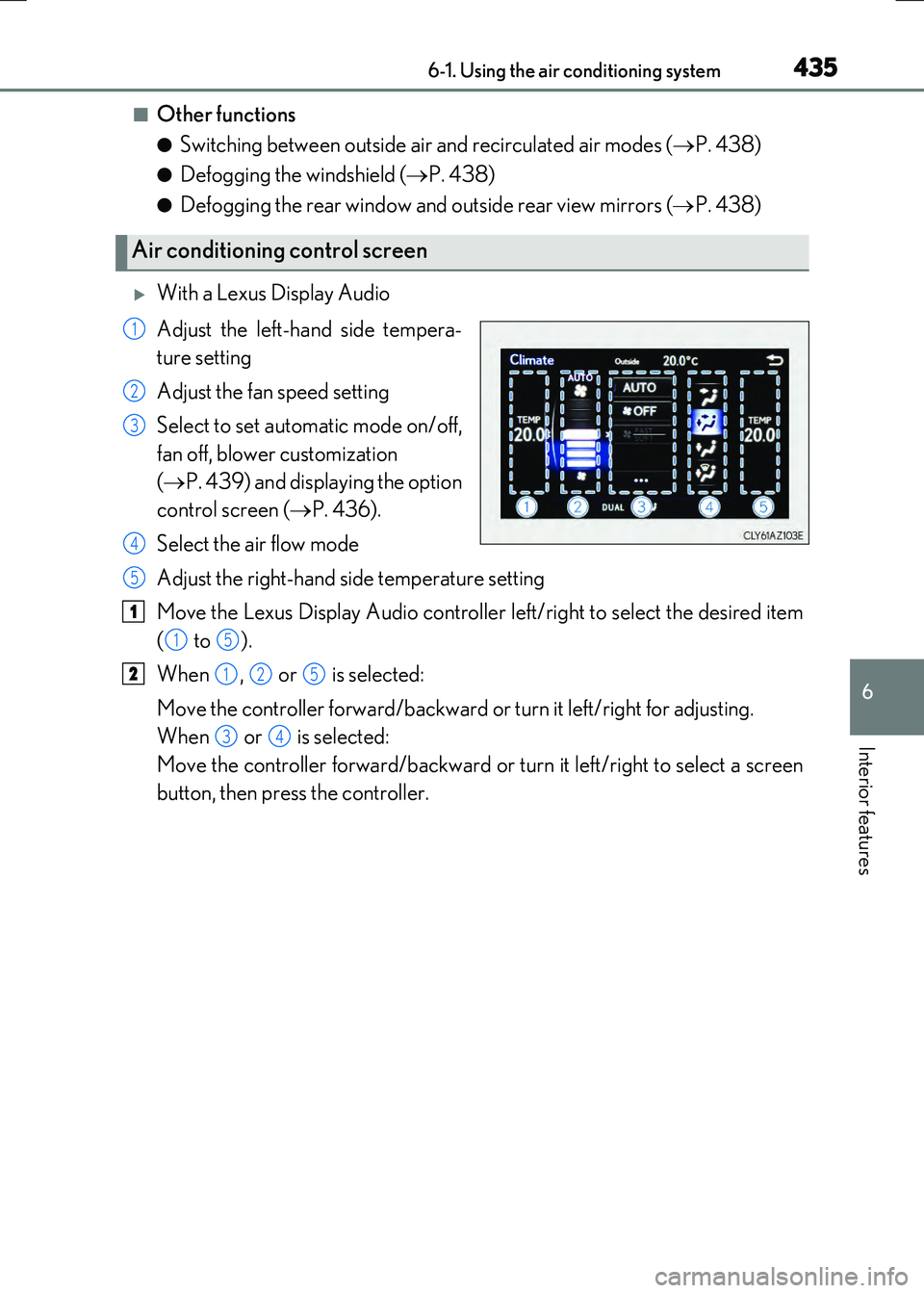
With a Lexus Display Audio
Adjust the left-hand side tempera-
ture setting
Adjust the fan speed setting
Select to set automatic mode on/off,
fan off, blower customization
( P. 439) and displaying the option
control screen ( P. 436).
Select the air flow mode
Adjust the right-hand side temperature setting
Move the Lexus Display Audio controller left/right to select the desired item
( to ).
When , or is selected:
Move the controller forward/backward or turn it left/right for adjusting.
When or is selected:
Move the controller forward/backward or turn it left/right to select a screen
button, then press the controller.
Air conditioning control screen
1
2
3
4
5
1
15
2125
34
Page 436 of 640
4366-1. Using the air conditioning system
RC300h_EE(OM24740E)
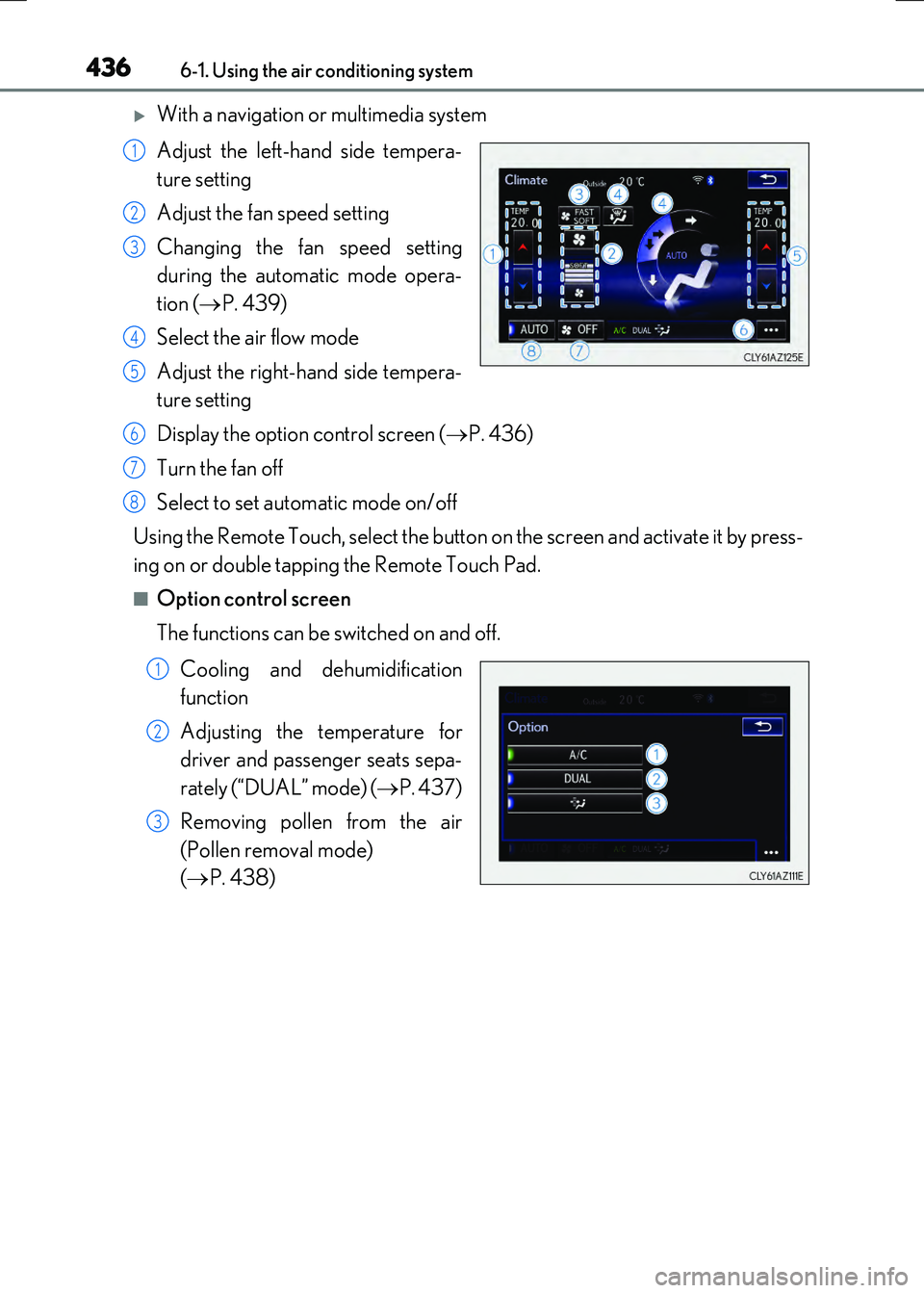
With a navigation or multimedia system
Adjust the left-hand side tempera-
ture setting
Adjust the fan speed setting
Changing the fan speed setting
during the automatic mode opera-
tion ( P. 439)
Select the air flow mode
Adjust the right-hand side tempera-
ture setting
Display the option control screen ( P. 436)
Turn the fan off
Select to set automatic mode on/off
Using the Remote Touch, select the button on the screen and activate it by press-
ing on or double tapping the Remote Touch Pad.
■Option control screen
The functions can be switched on and off.
Cooling and dehumidification
function
Adjusting the temperature for
driver and passenger seats sepa-
rately (“DUAL” mode) ( P. 437)
Removing pollen from the air
(Pollen removal mode)
( P. 438)
1
2
3
4
5
6
7
8
1
2
3
Page 437 of 640
4376-1. Using the air conditioning system
6
Interior features
RC300h_EE(OM24740E)
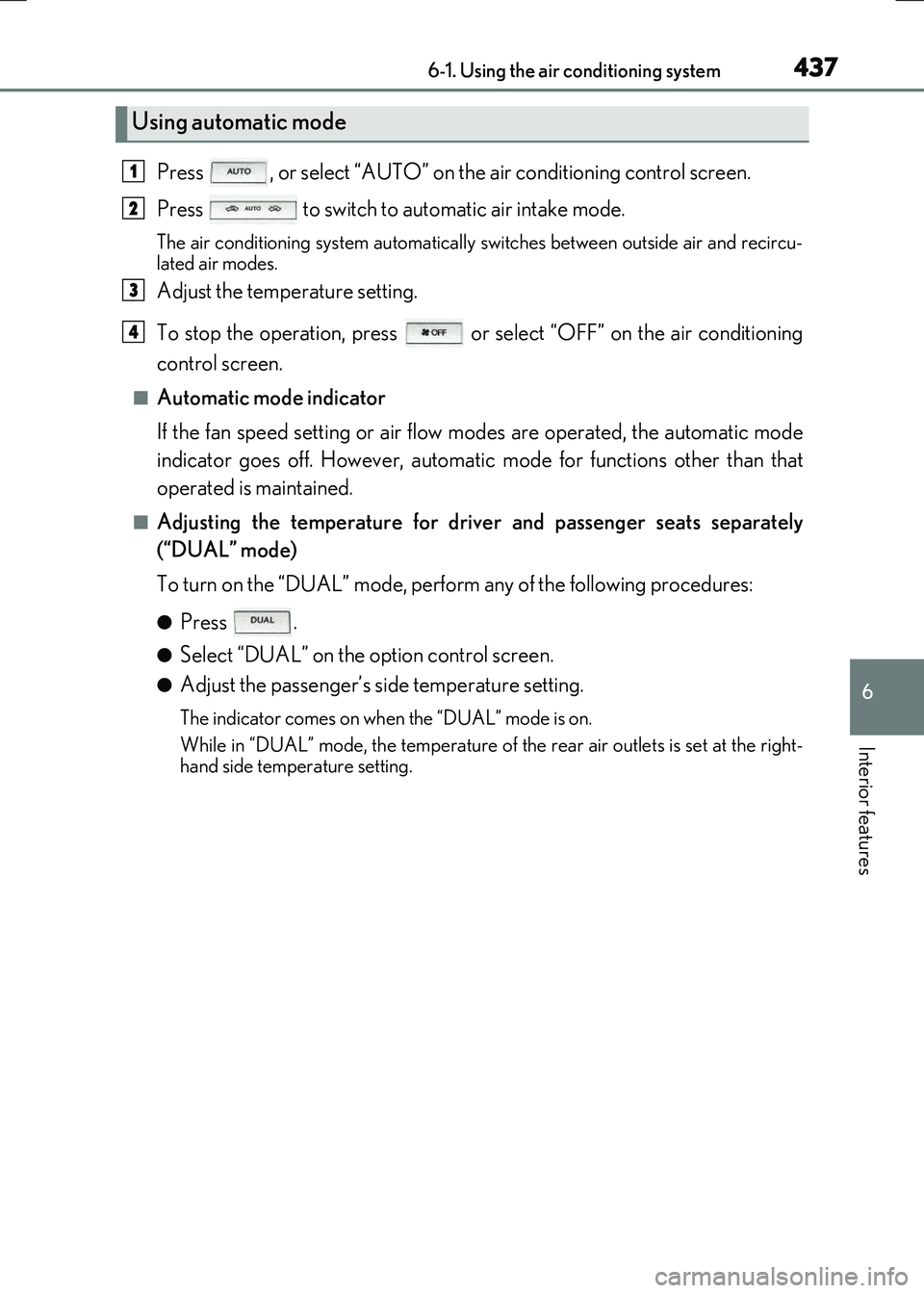
Press , or select “AUTO” on the air conditioning control screen.
Press to switch to automatic air intake mode.
The air conditioning system automatically switches between outside air and recircu-
lated air modes.
Adjust the temperature setting.
To stop the operation, press or select “OFF” on the air conditioning
control screen.
■Automatic mode indicator
If the fan speed setting or air flow modes are operated, the automatic mode
indicator goes off. However, automatic mode for functions other than that
operated is maintained.
■Adjusting the temperature for driv er and passenger seats separately
(“DUAL” mode)
To turn on the “DUAL” mode, perfor m any of the following procedures:
●Press .
●Select “DUAL” on the option control screen.
●Adjust the passenger’s side temperature setting.
The indicator comes on when the “DUAL” mode is on.
While in “DUAL” mode, the temperature of the rear air outlets is set at the right-
hand side temperature setting.
Using automatic mode
1
2
3
4
Page 438 of 640
4386-1. Using the air conditioning system
RC300h_EE(OM24740E)
■Switching between outside air and recirculated air modes
Press .
The mode switches among (recir culated air mode), automatic and
(outside air mode) modes each time the button is pressed.
When the system is switched to automatic mode, the air conditioning system oper-
ates automatically.
The indicator above the selected button comes on.
■Pollen removal mode
Pollen is removed from the air and the ai r flows to the upper part of the body.
Select
on the option control screen.
When pollen removal mode is on, is di splayed on the air conditioning con-
trol screen.
In order to prevent the windshield from fogg ing up when the outside air is cold, the
dehumidification function may operate.
Pollen is filtered even if the pollen removal mode is turned off.
■Defogging the windshield
Defoggers are used to defog the windshield and side windows.
Press .
Set the outside/recirculated air mode button to outside air mode if the recirculated
air mode is used. (It may switch automatically.)
To defog the windshield and the side windows early, turn the air flow and tempera-
ture up.
To return to the previous mode, press again when the windshield is
defogged.
■Defogging the rear window and outside rear view mirrors
Defoggers are used to defog the rear window, and to remove raindrops, dew
and frost from the outside rear view mirrors.
Press .
The defoggers will automatically turn off after a period of time.
Other functions
Page 439 of 640
4396-1. Using the air conditioning system
6
Interior features
RC300h_EE(OM24740E)
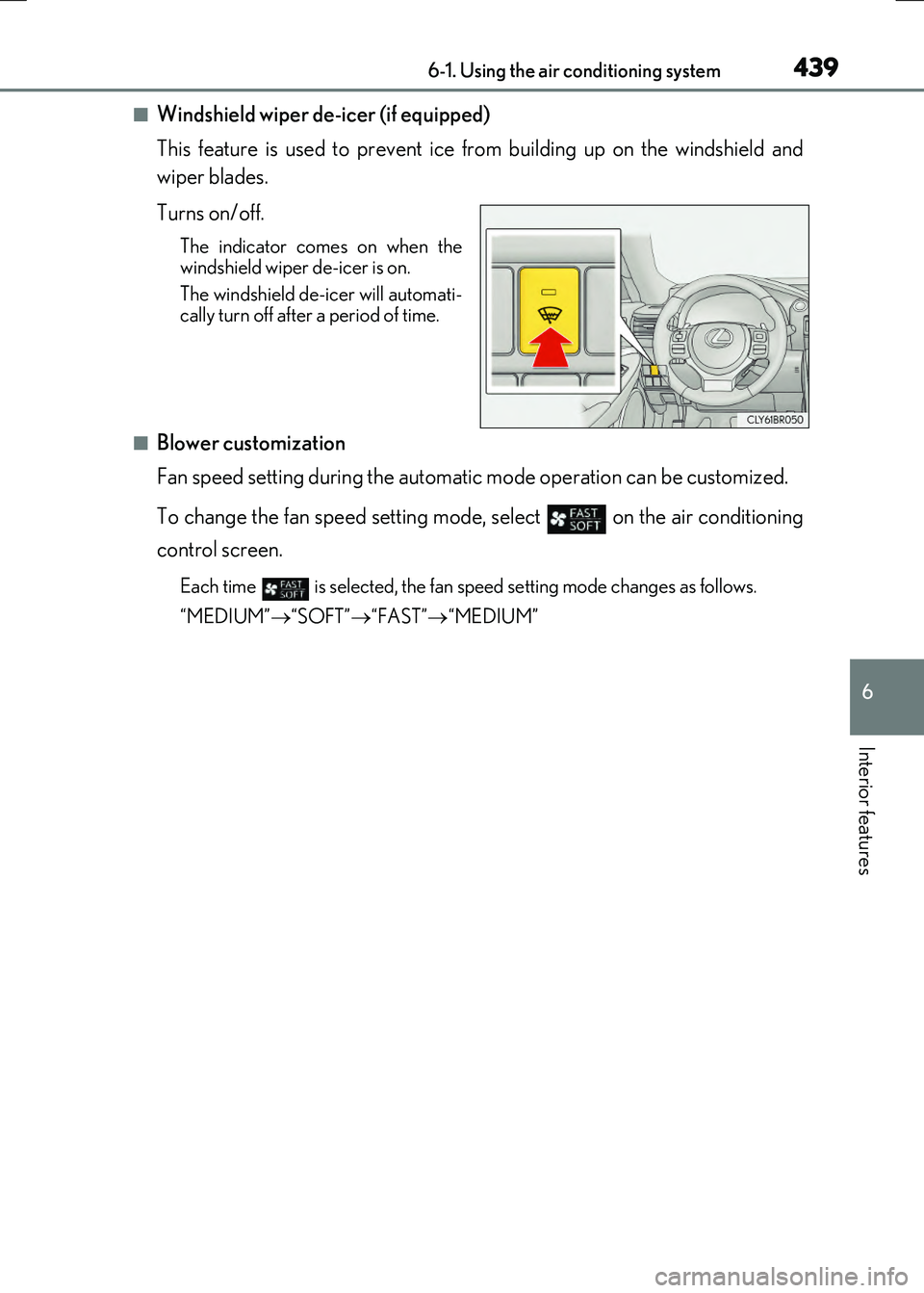
■Windshield wiper de-icer (if equipped)
This feature is used to prevent ice from building up on the windshield and
wiper blades.
Turns on/off.
The indicator come s on when the windshield wiper de-icer is on.
The windshield de-icer will automati- cally turn off after a period of time.
■Blower customization
Fan speed setting during the automatic mode operation can be customized.
To change the fan speed setting mode, select on the air conditioning
control screen.
Each time is selected, the fan speed setting mode changes as follows.
“MEDIUM” “SOFT”“FAST”“MEDIUM”