turn LEXUS RC300H 2017 Owners Manual
[x] Cancel search | Manufacturer: LEXUS, Model Year: 2017, Model line: RC300H, Model: LEXUS RC300H 2017Pages: 640, PDF Size: 35.53 MB
Page 377 of 640
377
5
Lexus Display Audio system
RC300h_EE(OM24740E)
5-6. Using an external device
P. 351
Pressing the “MEDIA” button displays the iPod top screen from any screen of the
selected source.
■Menu screen
P. 366
■Selecting a song
Press the “ ” or “” button, turn the right side knob (left-hand drive vehicle) or
left side knob (right-hand drive vehicle) on the audio panel to select the
desired song number.
To fast-forward or rewind, press and hold the “ ” or “” button.
■Selecting a play mode
Move the controller to the right and then select “Browse”.
Select the desired play mode, and th en select a song to begin using the
selected play mode.
■Displaying the now playing list
Move the controller to the right and then select “Now playing list”.
Listening to an iPod
Connecting an iPod enables you to enjoy music from the vehicle speakers.
Press the “MEDIA” button or select “iPod” on the “Source” screen.
Connecting an iPod
iPod top screen
1
2
Page 381 of 640
3815-6. Using an external device
5
Lexus Display Audio system
RC300h_EE(OM24740E)
P. 351
Pressing the “MEDIA” button displays the USB top screen from any screen of the
selected source.
Moving the controller to the right and selecting “Play music” while the USB video
screen is displayed changes to USB audio mode.
■Menu screen
P. 366
■Selecting a file
Press the “ ” or “” button, turn the right side knob (left-hand drive vehicle) or
left side knob (right-hand drive vehicle) on the audio panel to select the
desired file number.
To fast-forward or rewind, press and hold the “ ” or “” button.
■Selecting a play mode
Move the controller to the right and select “Browse”.
Select the desired play mode, and select a file to begin the selected play
mode.
■Displaying the now playing list
Move the controller to the right and select “Now playing list”.
Using USB memory device
Connecting a USB memory device enables you to enjoy music from the vehi-
cle speakers.
Select “USB1” or “USB2” on the “Source” screen.
Connecting a USB memory device
USB top screen
USB audio
1
2
Page 382 of 640
3825-6. Using an external device
RC300h_EE(OM24740E)
Moving the controller to the right and selecting “Play video” while the USB video
screen is displayed changes to USB video mode.
This function cannot be used while USB photo or MirrorLink is in use.
■Menu screen
P. 366
■Selecting a file
Press the “ ” or “” button, turn the right side knob (left-hand drive vehicle) or
left side knob (right-hand drive vehicle) on the audio panel to select the
desired file number.
To fast-forward or reverse, press and hold the “ ” or “” button.
■Selecting a folder
Move the controller to the right and select “Browse”.
Select the desired folder, then select a file to begin using the selected
folder.
■Displaying the now playing list
Move the controller to the right and select “Now playing list”.
■USB memory functions
●Depending on the USB memory device that is connected to the system, the device
itself may not be operable and certain functions may not be available. If the device is inoperable or a function is unavailable du e to a malfunction (as opposed to a system specification), disconnecting the device and reconnecting it may resolve the problem.
●If the USB memory device still does not begin operation after being disconnected and reconnected, format the device.
■Error messages for USB memory
If the following error messages appear on the screen, refer to the table and take the appropriate measures. If the problem is not rectified, take the vehicle to any authorizedLexus dealer or repairer, or another duly qualified and equipped professional.
USB video
MessageCause/Correction procedures
“Connection error. Consult your
owner’s manual for instructions on how to reconnect the USBdevice.”
This indicates a problem with the USB memorydevice or its connection.
“There are no files available for
playback. Add compatible files to your USB device.”
This indicates that no MP3/WMA/AAC files areincluded on the USB memory device.
1
2
Page 389 of 640
3895-7. Connecting Bluetooth®
5
Lexus Display Audio system
RC300h_EE(OM24740E)
Turn the Bluetooth® connection setting of your device set to on.
Go to “Bluetooth
* setup”: “Setup” “Bluetooth*”
Move the controller to the left and then select “Add device”
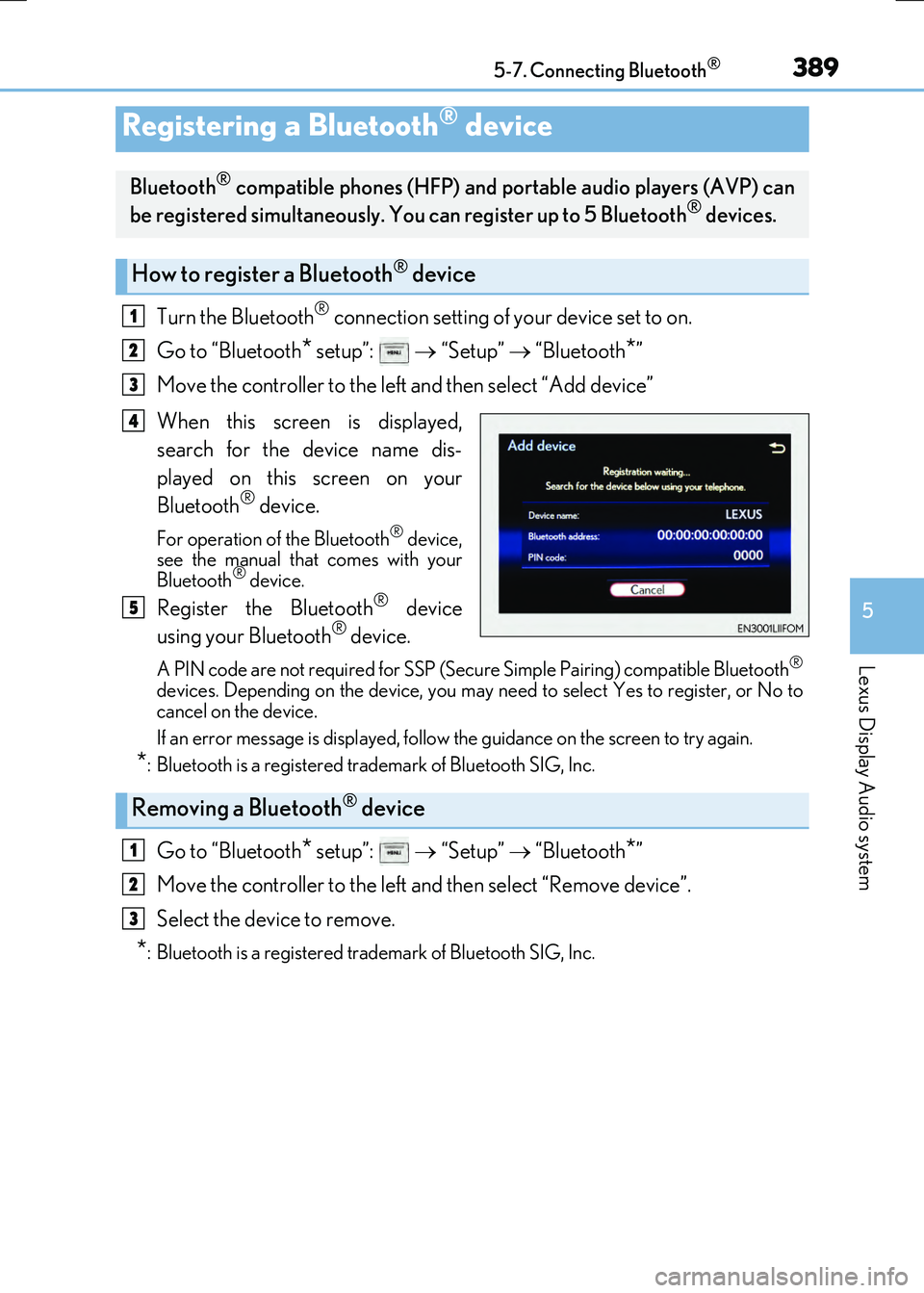
When this screen is displayed,
search for the device name dis-
played on this screen on your
Bluetooth
® device.
For operation of the Bluetooth® device,
see the manual that comes with your
Bluetooth
® device.
Register the Bluetooth® device
using your Bluetooth® device.
A PIN code are not required for SSP (Secur e Simple Pairing) compatible Bluetooth®
devices. Depending on the device, you may ne ed to select Yes to register, or No to
cancel on the device.
If an error message is displayed, follow the guidance on the screen to try again.
*: Bluetooth is a registered trademark of Bluetooth SIG, Inc.
Go to “Bluetooth* setup”: “Setup” “Bluetooth*”
Move the controller to the left and then select “Remove device”.
Select the device to remove.
*: Bluetooth is a registered trademark of Bluetooth SIG, Inc.
Registering a Bluetooth® device
Bluetooth® compatible phones (HFP) and po rtable audio players (AVP) can
be registered simultaneously. You can register up to 5 Bluetooth® devices.
How to register a Bluetooth® device
1
2
3
4
5
Removing a Bluetooth® device
1
2
3
Page 392 of 640
3925-7. Connecting Bluetooth®
RC300h_EE(OM24740E)
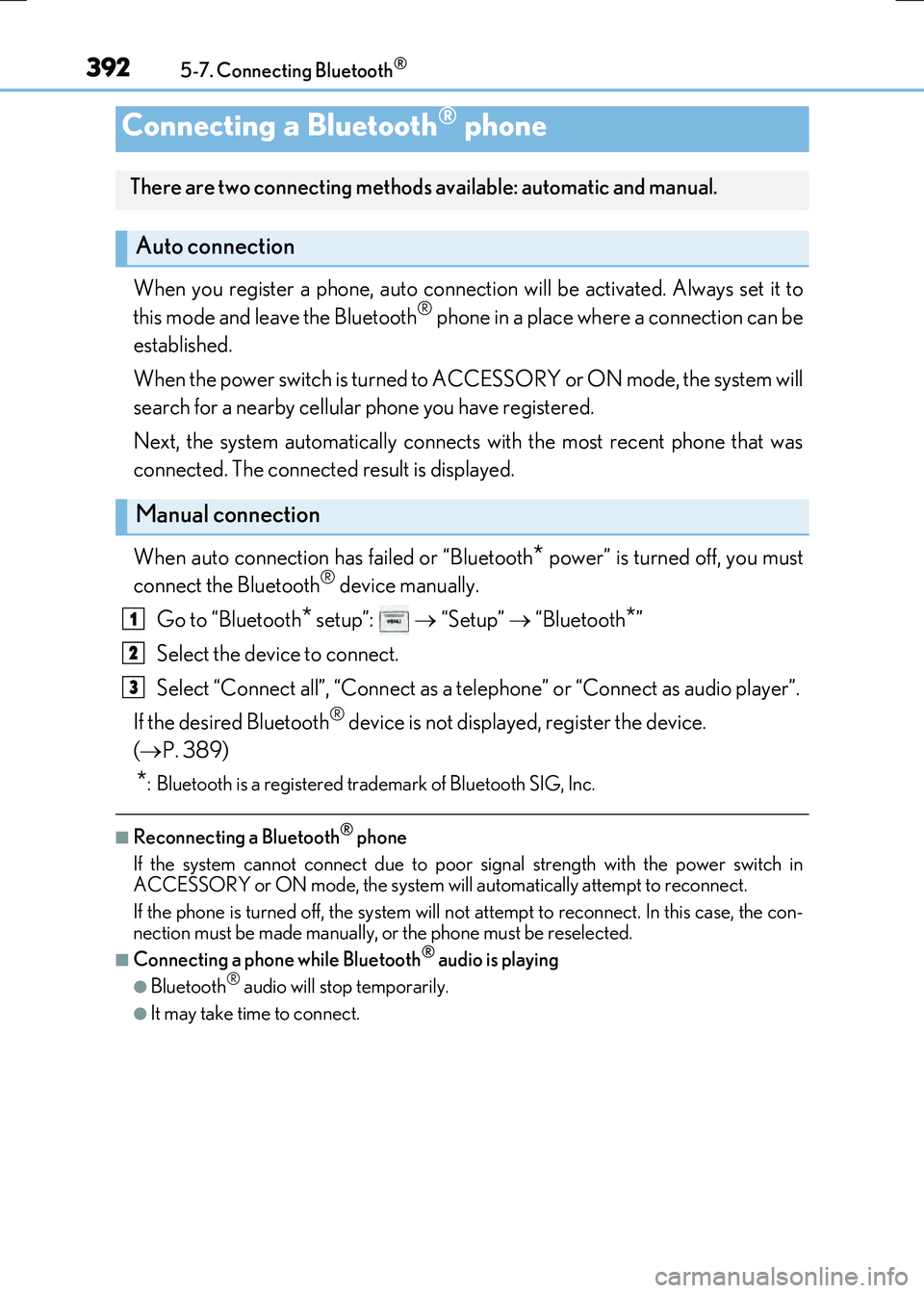
When you register a phone, auto connection will be activated. Always set it to
this mode and leave the Bluetooth® phone in a place where a connection can be
established.
When the power switch is turned to ACCESSORY or ON mode, the system will
search for a nearby cellular phone you have registered.
Next, the system automatically connects with the most recent phone that was
connected. The connected result is displayed.
When auto connection has failed or “Bluetooth
* power” is turned off, you must
connect the Bluetooth® device manually.
Go to “Bluetooth
* setup”: “Setup” “Bluetooth*”
Select the device to connect.
Select “Connect all”, “Connect as a telephone” or “Connect as audio player”.
If the desired Bluetooth
® device is not displayed, register the device.
( P. 389)
*: Bluetooth is a registered trademark of Bluetooth SIG, Inc.
■Reconnecting a Bluetooth® phone
If the system cannot connect due to poor signal strength with the power switch in
ACCESSORY or ON mode, the system will automatically attempt to reconnect.
If the phone is turned off, the system will no t attempt to reconnect. In this case, the con-
nection must be made manually, or the phone must be reselected.
■Connecting a phone while Bluetooth® audio is playing
●Bluetooth® audio will stop temporarily.
●It may take time to connect.
Connecting a Bluetooth® phone
There are two connecting methods available: automatic and manual.
Auto connection
Manual connection
1
2
3
Page 396 of 640
3965-8. Bluetooth® Audio
RC300h_EE(OM24740E)
Pressing the “MEDIA” button displays the Bluetooth® audio top screen from any
screen of the selected source.
■Menu screen
P. 366
■Selecting a song
Press the “ ” or “” button, turn the right side knob (left-hand drive vehicle) or
left side knob (right-hand drive vehicle) on the audio panel to select the
desired song number.
To fast-forward or rewind, press and hold the “ ” or “” button.
■Selecting a play mode
Move the controller to the right and then select “Browse”.
Select the desired play mode, and th en select a song to begin using the
selected play mode.
■Displaying the now playing list
Move the controller to the right and then select “Now playing list”.
Bluetooth® audio top screen
1
2
Page 405 of 640
4055-9. Bluetooth® Phone
5
Lexus Display Audio system
RC300h_EE(OM24740E)
Go to “Message inbox”: “Telephone” “Message inbox”
Select a message.
Moving the controller to the left while on th e “Message inbox” screen displays the set-
ting screen. ( P. 414)
Move the controller to the right while on the “Message inbox” screen and then select
an account to display a message list for the selected account.
Selecting “Next” or “Previous” displays the next or previous message.
If a message is too long, select “Read more” to display the full text.
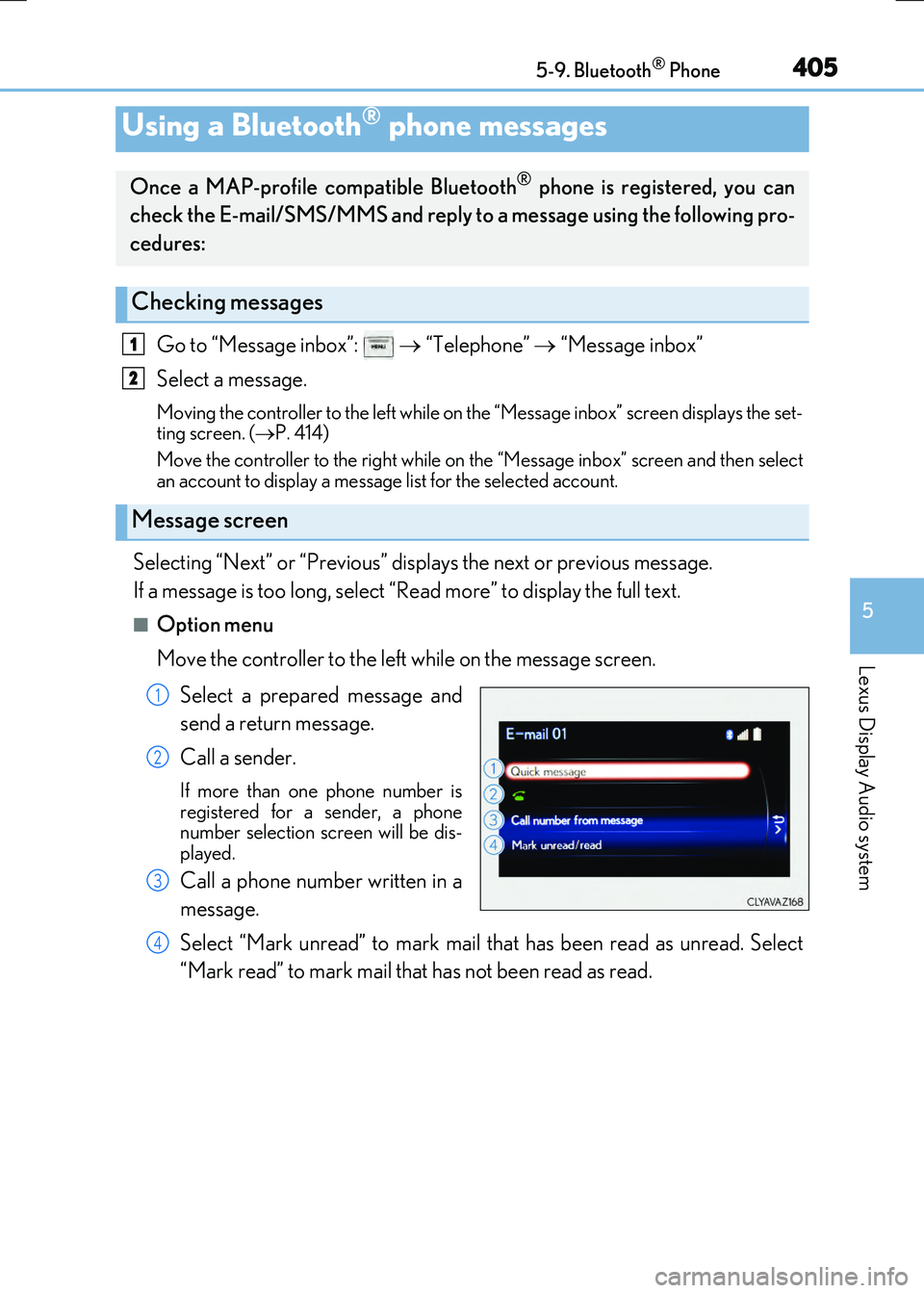
■Option menu
Move the controller to the left while on the message screen.
Select a prepared message and
send a return message.
Call a sender.
If more than one phone number is
registered for a sender, a phone
number selection screen will be dis-
played.
Call a phone number written in a
message.
Select “Mark unread” to mark mail that has been read as unread. Select
“Mark read” to mark mail that has not been read as read.
Using a Bluetooth® phone messages
Once a MAP-profile compatible Bluetooth® phone is registered, you can
check the E-mail/SMS/MMS and reply to a message using the following pro-
cedures:
Checking messages
Message screen
1
2
1
2
3
4
Page 406 of 640
4065-9. Bluetooth® Phone
RC300h_EE(OM24740E)
Move the controller to the left while on the message screen.
Select “Quick message” to display the “Quick message” screen.
Select the desired message and then select “Send”.
■Editing a quick message
Move the controller to the left while on the message screen.
Select “Quick message” and then th e desired message. Move the control-
ler to the left while the desired message is displayed.
Select “Edit”.
To return to the default message after editing, select “Default”.
Replying to a message
1
2
3
1
2
3
Page 408 of 640
4085-9. Bluetooth® Phone
RC300h_EE(OM24740E)
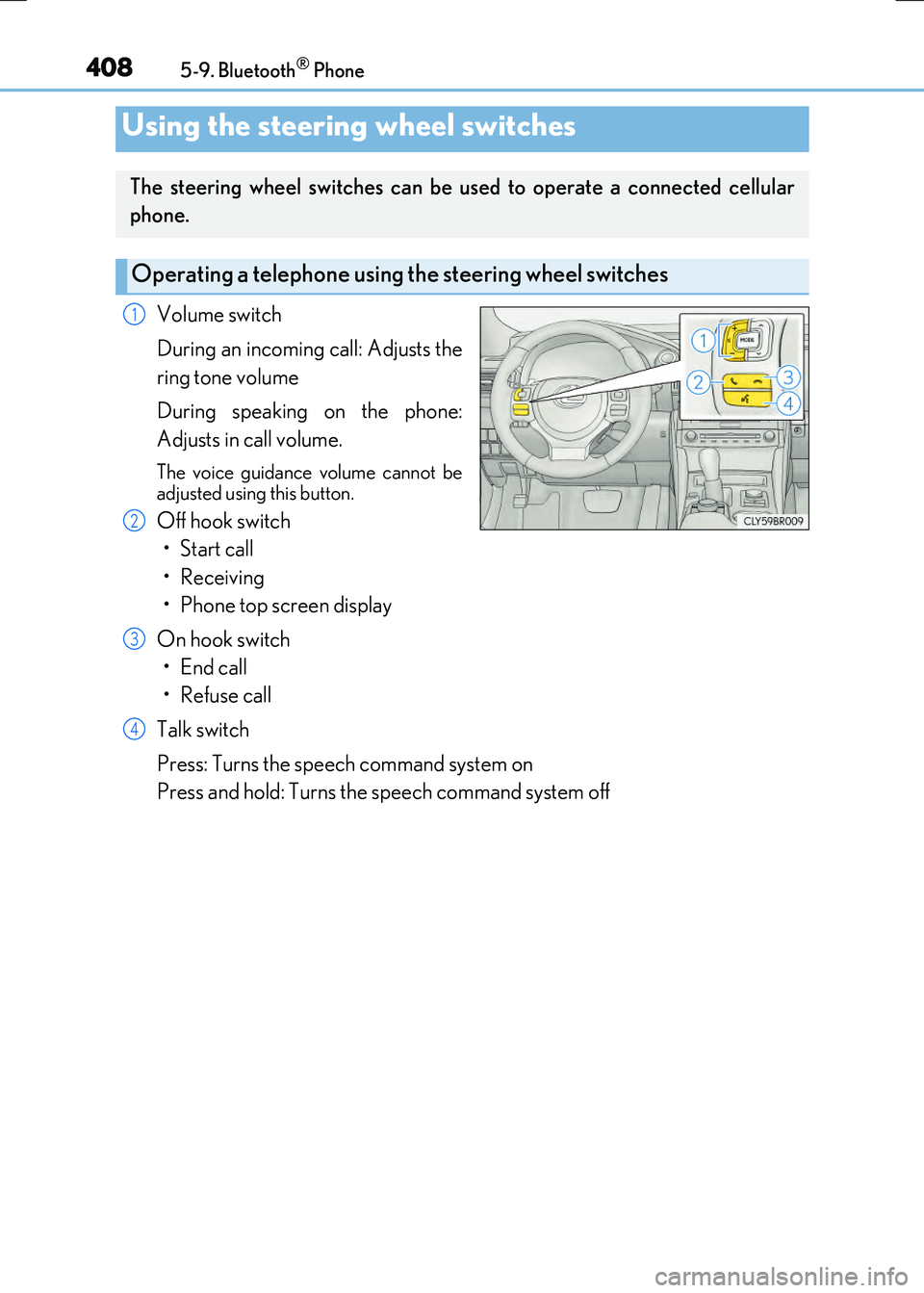
Volume switch
During an incoming call: Adjusts the
ring tone volume
During speaking on the phone:
Adjusts in call volume.
The voice guidance volume cannot be
adjusted using this button.
Off hook switch
• Start call
• Receiving
• Phone top screen display
On hook switch
•End call
•Refuse call
Talk switch
Press: Turns the speech command system on
Press and hold: Turns the speech command system off
Using the steering wheel switches
The steering wheel switches can be used to operate a connected cellular
phone.
Operating a telephone using the steering wheel switches
1
2
3
4
Page 410 of 640
4105-9. Bluetooth® Phone
RC300h_EE(OM24740E)
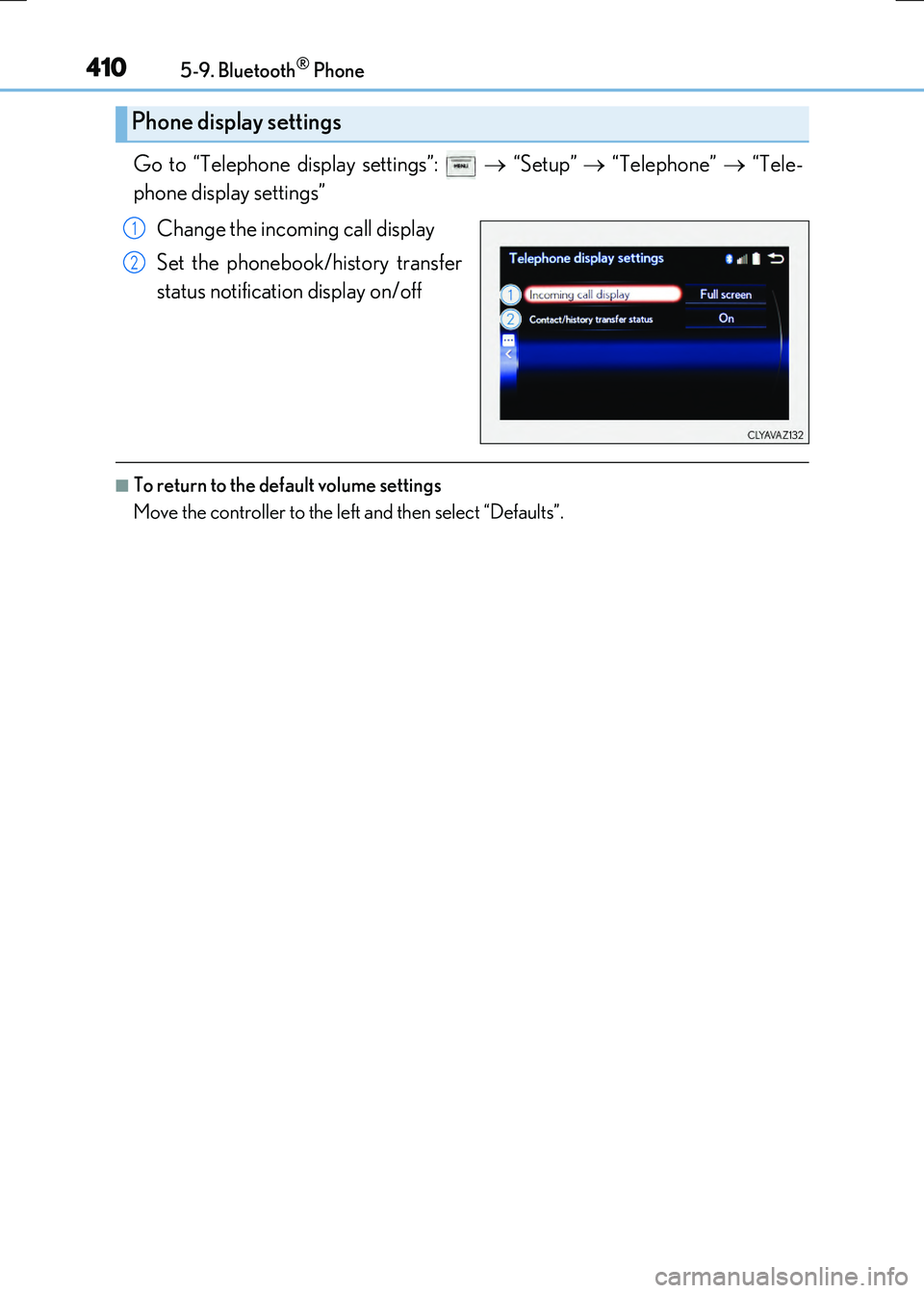
Go to “Telephone display settings”: “Setup” “Telephone” “Tele-
phone display settings”
Change the incoming call display
Set the phonebook/history transfer
status notification display on/off
■To return to the default volume settings
Move the controller to the left and then select “Defaults”.
Phone display settings
1
2