audio LEXUS RC300H 2017 User Guide
[x] Cancel search | Manufacturer: LEXUS, Model Year: 2017, Model line: RC300H, Model: LEXUS RC300H 2017Pages: 640, PDF Size: 35.53 MB
Page 129 of 640
1292. Instrument cluster
2
Instrument cluster
RC300h_EE(OM24740E)
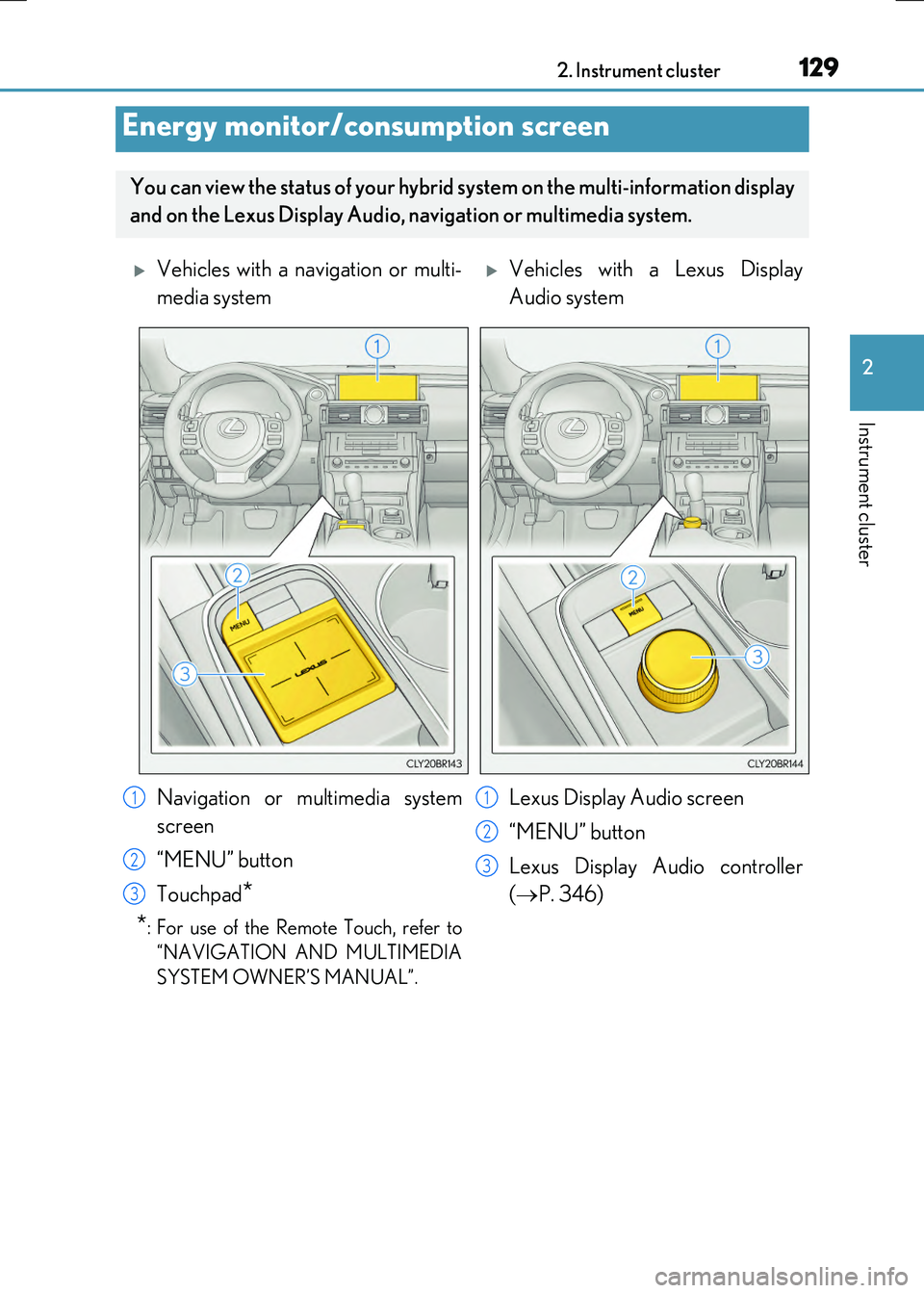
Energy monitor/consumption screen
You can view the status of your hybrid system on the multi-information display
and on the Lexus Display Audio, na vigation or multimedia system.
Vehicles with a navigation or multi-
media system
Vehicles with a Lexus Display
Audio system
Navigation or multimedia system
screen
“MENU” button
Touchpad*
*: For use of the Remote Touch, refer to
“NAVIGATION AND MULTIMEDIA
SYSTEM OWNER’S MANUAL”.
Lexus Display Audio screen
“MENU” button
Lexus Display Audio controller
( P. 346)
1
2
3
1
2
3
Page 130 of 640
1302. Instrument cluster
RC300h_EE(OM24740E)
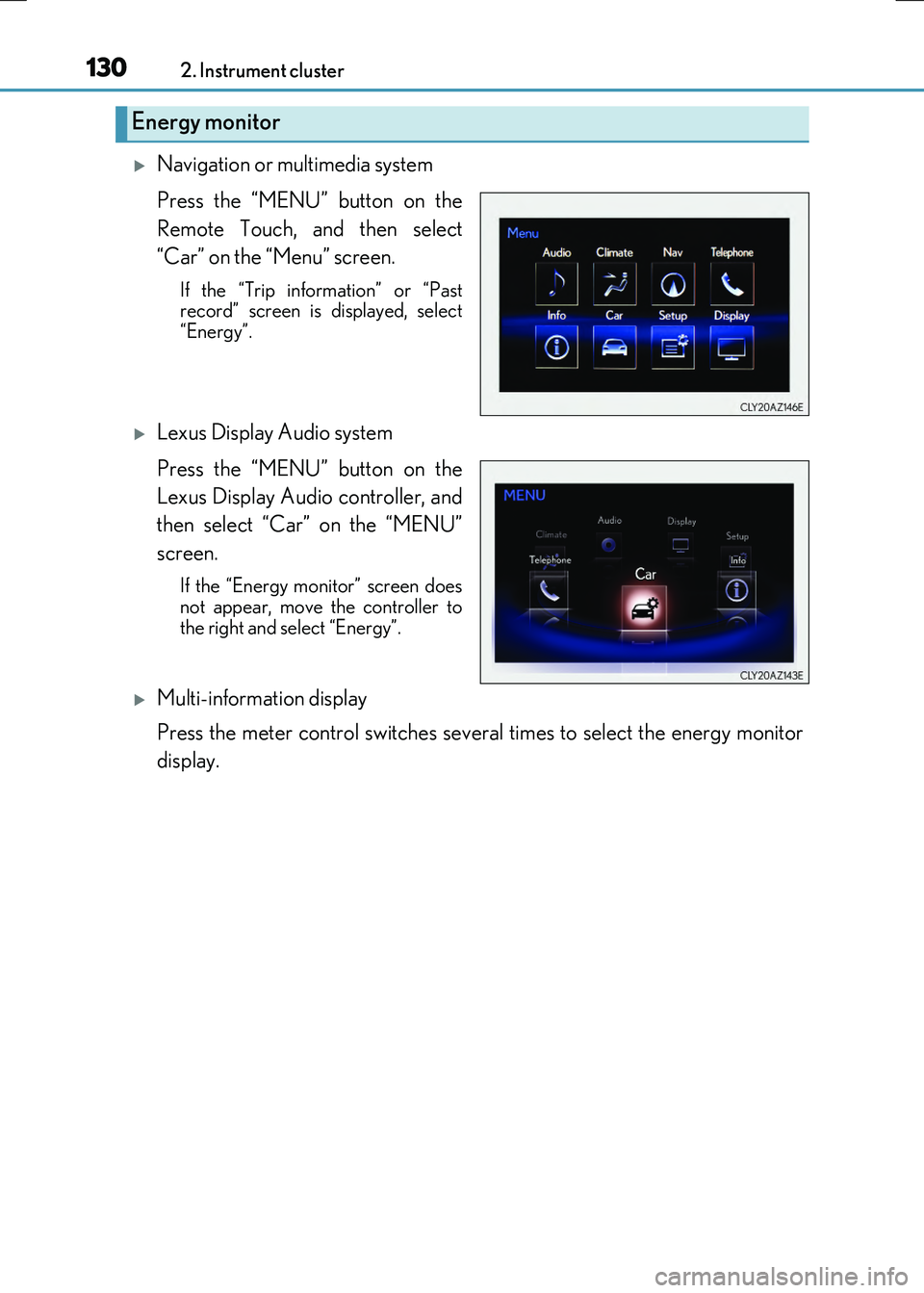
Navigation or multimedia system
Press the “MENU” button on the
Remote Touch, and then select
“Car” on the “Menu” screen.
If the “Trip information” or “Past record” screen is displayed, select
“Energy”.
Lexus Display Audio system
Press the “MENU” button on the
Lexus Display Audio controller, and
then select “Car” on the “MENU”
screen.
If the “Energy monitor” screen does
not appear, move the controller to the right and select “Energy”.
Multi-information display
Press the meter control switches several times to select the energy monitor
display.
Energy monitor
Page 131 of 640
1312. Instrument cluster
2
Instrument cluster
RC300h_EE(OM24740E)
Navigation or multimedia system screen
Lexus Display Audio
screenMulti-information display
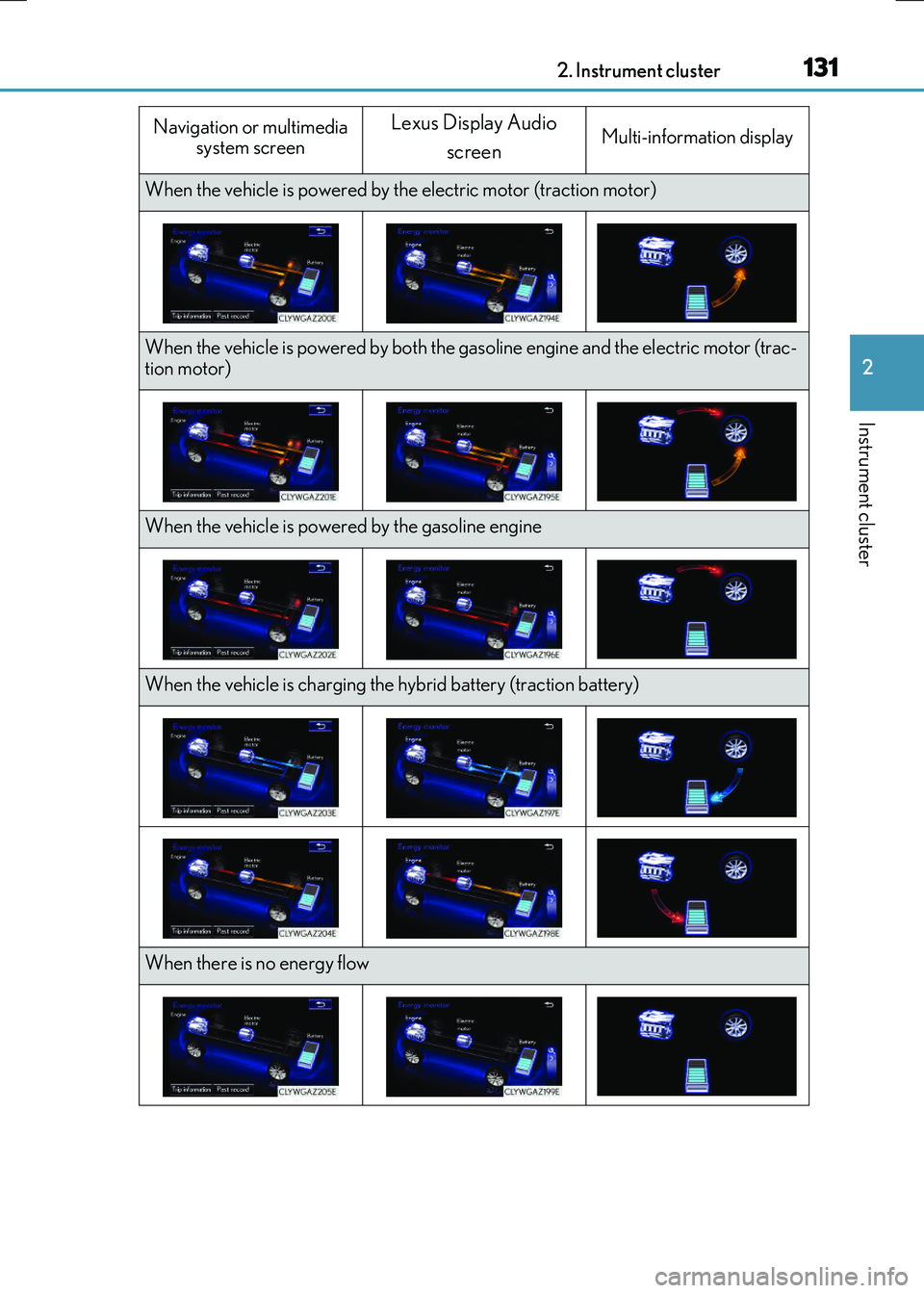
When the vehicle is powered by th e electric motor (traction motor)
When the vehicle is powered by both the gasoline engine and the electric motor (trac- tion motor)
When the vehicle is powered by the gasoline engine
When the vehicle is charging the hybrid battery (traction battery)
When there is no energy flow
Page 132 of 640
1322. Instrument cluster
RC300h_EE(OM24740E) These images are examples only.
■Trip information
Navigation or multimedia system
Press the “MENU” button on the Remote Touch, and then select “Car” on the
“Menu” screen.
If the “Energy monitor” or “Past record” sc reen is displayed, select “Trip informa-
tion”.
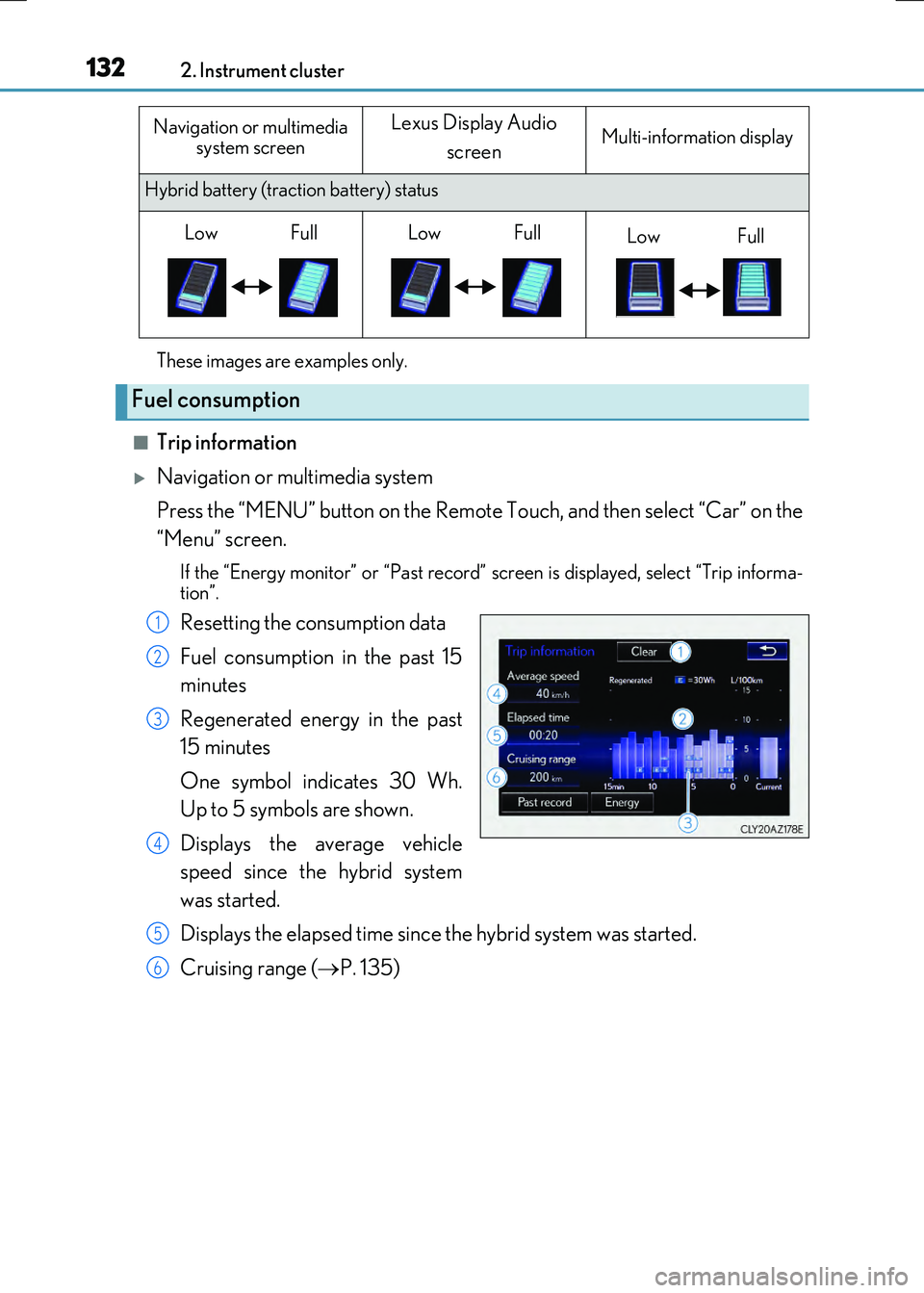
Resetting the consumption data
Fuel consumption in the past 15
minutes
Regenerated energy in the past
15 minutes
One symbol indicates 30 Wh.
Up to 5 symbols are shown.
Displays the average vehicle
speed since the hybrid system
was started.
Displays the elapsed time since the hybrid system was started.
Cruising range ( P. 135)
Hybrid battery (traction battery) status
Fuel consumption
Navigation or multimedia
system screenLexus Display Audio
screenMulti-information display
LowFullLowFullLowFull
1
2
3
4
5
6
Page 133 of 640
1332. Instrument cluster
2
Instrument cluster
RC300h_EE(OM24740E)
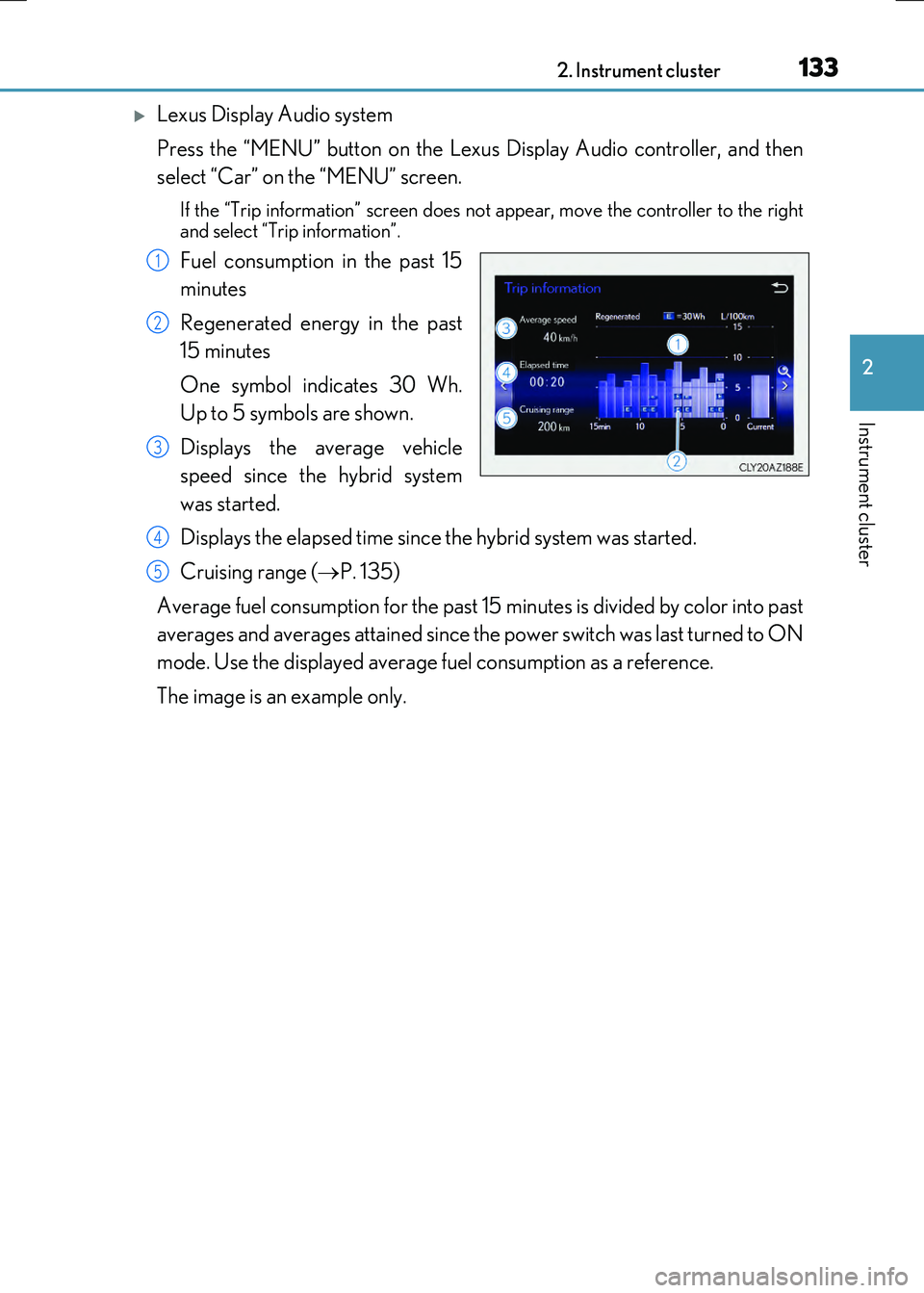
Lexus Display Audio system
Press the “MENU” button on the Lexus Display Audio controller, and then
select “Car” on the “MENU” screen.
If the “Trip information” screen does no t appear, move the controller to the right
and select “Trip information”.
Fuel consumption in the past 15
minutes
Regenerated energy in the past
15 minutes
One symbol indicates 30 Wh.
Up to 5 symbols are shown.
Displays the average vehicle
speed since the hybrid system
was started.
Displays the elapsed time since the hybrid system was started.
Cruising range ( P. 135)
Average fuel consumption for the past 15 minutes is divided by color into past
averages and averages attained since the power switch was last turned to ON
mode. Use the displayed average fuel consumption as a reference.
The image is an example only.
1
2
3
4
5
Page 134 of 640
1342. Instrument cluster
RC300h_EE(OM24740E)
■Past record
Navigation or multimedia system
Press the “MENU” button on the Remote Touch, and then select “Car” on the
“Menu” screen.
If the “Energy monitor” or “Trip informatio n” screen is displayed, select “Past record”.
Resetting the past record data
Best recorded fuel consumption
Average fuel consumption
Previous fuel consumption record
Updating the average fuel con-
sumption data
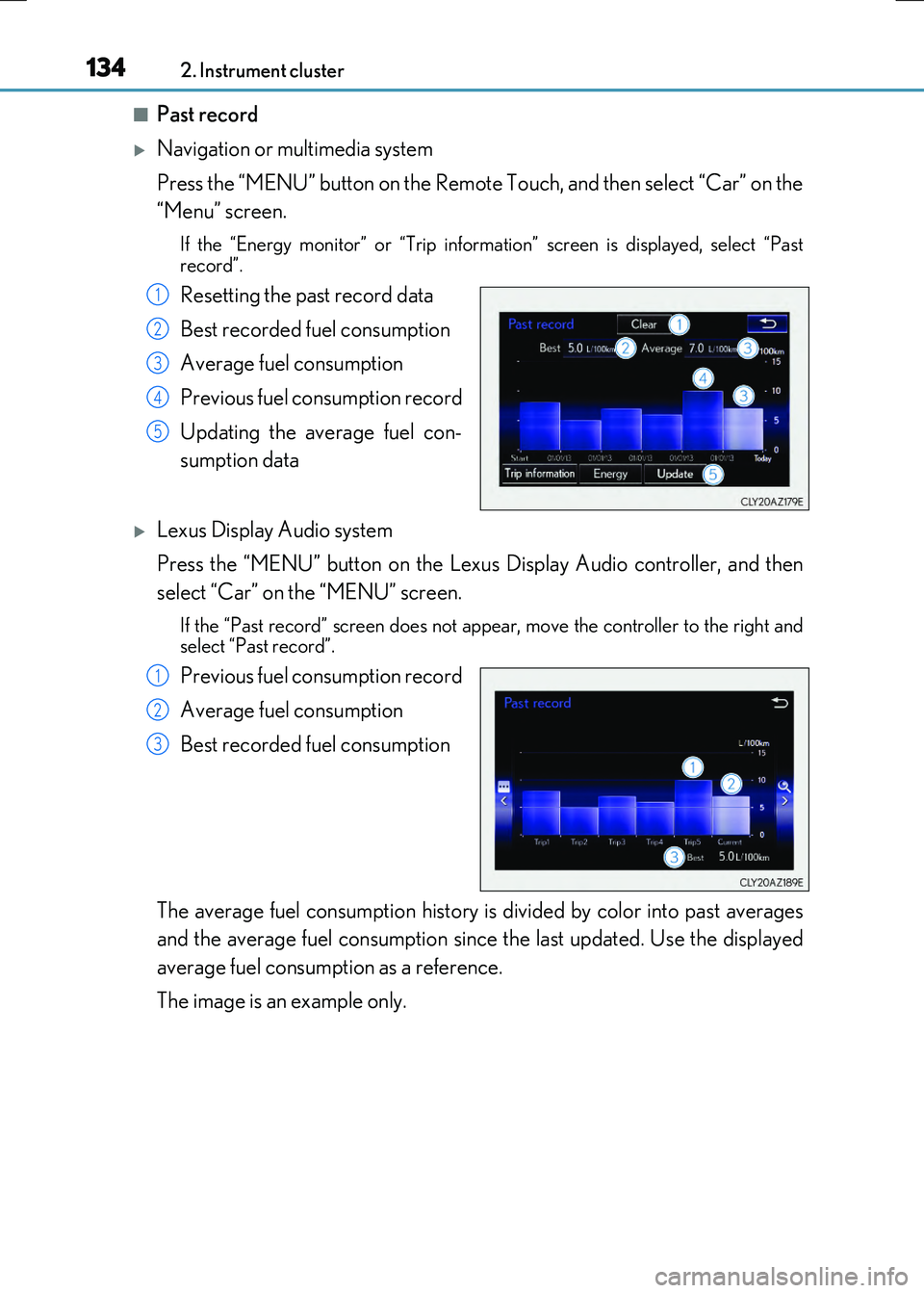
Lexus Display Audio system
Press the “MENU” button on the Lexus Display Audio controller, and then
select “Car” on the “MENU” screen.
If the “Past record” screen does not appear, move the controller to the right and select “Past record”.
Previous fuel consumption record
Average fuel consumption
Best recorded fuel consumption
The average fuel consumption history is divided by color into past averages
and the average fuel consumption since the last updated. Use the displayed
average fuel consumption as a reference.
The image is an example only.
1
2
3
4
5
1
2
3
Page 135 of 640
1352. Instrument cluster
2
Instrument cluster
RC300h_EE(OM24740E)
■Updating the past record data
Navigation or multimedia system
Update the average fuel consumption by selecting “Update” to measure the current fuel consumption again.
Lexus Display Audio system
Update the average fuel consumption by moving the controller to the left and select “Update” to measure the current fuel consumption again.
■Resetting the data
Navigation or multimedia system
The fuel consumption data can be deleted by selecting “Clear”.
Lexus Display Audio system
The fuel consumption data can be deleted by moving the controller to the left and select “Clear”.
■Cruising range
Displays the estimated maximum distance that can be driven with the quantity of fuel remaining.
This distance is computed based on your average fuel consumption. As a result, the actual distance that can be driven may differ from that displayed.
Page 142 of 640
1423-1. Key information
RC300h_EE(OM24740E)
NOTICE
■To prevent key damage
●Do not drop the keys, subject them to strong shocks or bend them.
●Do not expose the keys to high temperatures for long periods of time.
●Do not get the keys wet or wash them in an ultrasonic washer etc.
●Do not attach metallic or magnetic materials to the keys or place the keys close to such materials.
●Do not disassemble the keys.
●Do not attach a sticker or anything else to the surface of the electronic key.
●Do not place the keys near objects that produce magnetic fields, such as TVs, audio
systems and induction cookers.
■Carrying the electronic key on your person
Carry the electronic key 10 cm (3.9 in.) or more away from electric appliances that are
turned on. Radio waves emitted from electric a ppliances within 10 cm (3.9 in.) of the electronic key may interfere with the key, causing the key to not function properly.
■In case of a smart entry & start system malfunction or other key-related problems
Take your vehicle with all the electronic keys provided with your vehicle, including the card key, to any authorized Lexus dealer or repairer, or another duly qualified and equipped professional.
Page 157 of 640
1573-2. Opening, closing and locking the doors and trunk
3
Operation of each component
RC300h_EE(OM24740E)
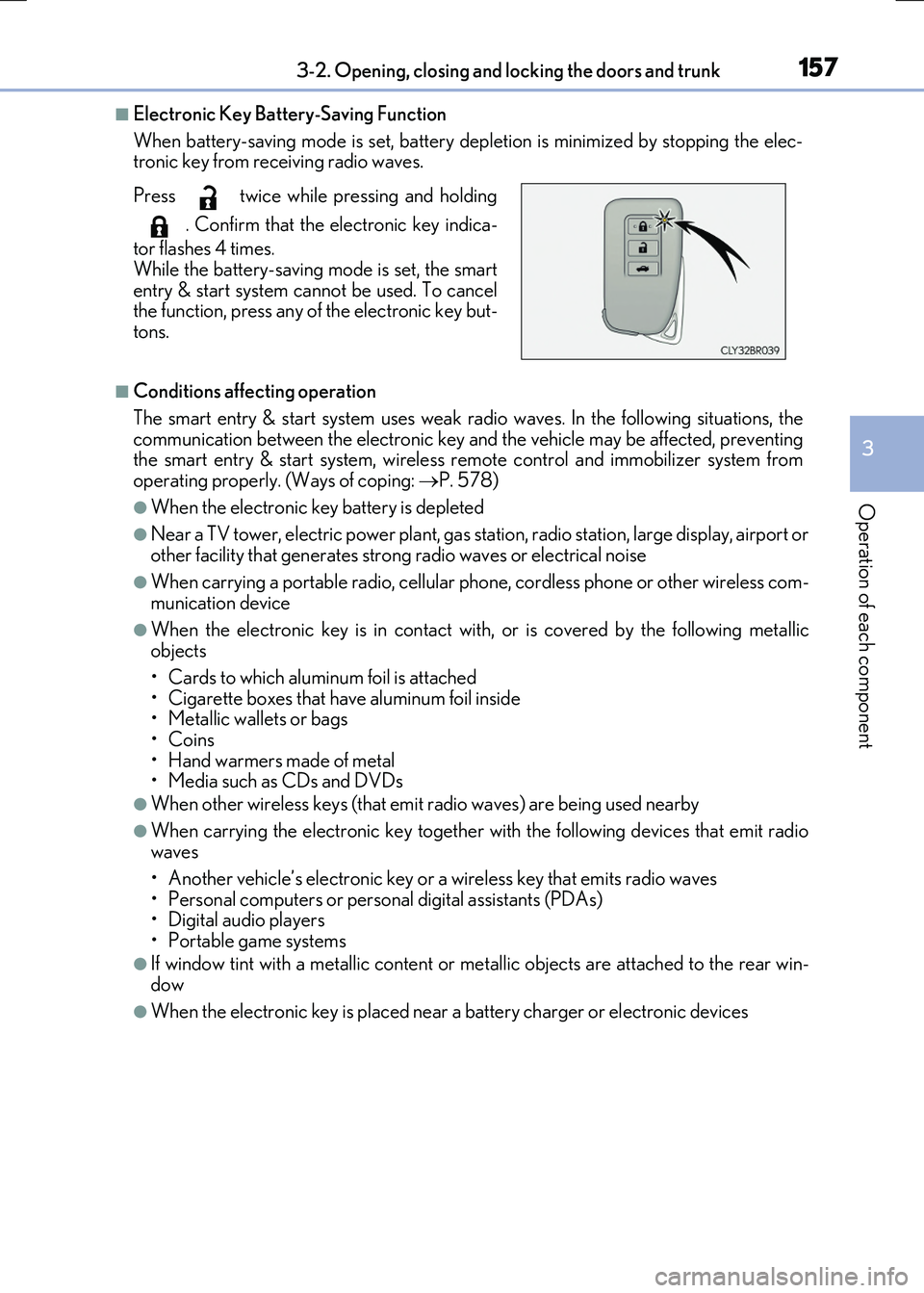
■Electronic Key Battery-Saving Function
When battery-saving mode is set, battery depl etion is minimized by stopping the elec- tronic key from receiving radio waves.
■Conditions affecting operation
The smart entry & start system uses weak ra dio waves. In the following situations, the communication between the electronic key an d the vehicle may be affected, preventing the smart entry & start system, wireless remote control and immobilizer system from
operating properly. (Ways of coping: P. 578)
●When the electronic key battery is depleted
●Near a TV tower, electric power plant, gas station, radio station, large display, airport or
other facility that gene rates strong radio waves or electrical noise
●When carrying a portable radio, cellular phone, cordless phone or other wireless com- munication device
●When the electronic key is in contact wi th, or is covered by the following metallic objects
• Cards to which aluminum foil is attached
• Cigarette boxes that have aluminum foil inside • Metallic wallets or bags•Coins
• Hand warmers made of metal • Media such as CDs and DVDs
●When other wireless keys (that emit radio waves) are being used nearby
●When carrying the electronic key together with the following devices that emit radiowaves
• Another vehicle’s electronic key or a wireless key that emits radio waves • Personal computers or personal digital assistants (PDAs)• Digital audio players
• Portable game systems
●If window tint with a metallic content or me tallic objects are attached to the rear win-
dow
●When the electronic key is placed near a battery charger or electronic devices
Press twice while pressing and holding
. Confirm that the electronic key indica-
tor flashes 4 times.
While the battery-saving mode is set, the smart entry & start system cannot be used. To cancelthe function, press any of the electronic key but-
tons.
Page 213 of 640
2134-1. Before driving
4
Driving
RC300h_EE(OM24740E)
Cargo and luggage
Take notice of the following information about storage precautions, cargo
capacity and load:
WARNING
■Things that must not be carried in the trunk
The following things may cause a fire if loaded in the trunk:
●Receptacles containing gasoline
●Aerosol cans
■Storage precautions
Observe the following precautions. Failure to do so may prevent the pedals from being depressed properly, may block the driver’s vision, or may result in items hitting the driver or passengers, possibly causing
an accident.
●Stow cargo and luggage in the trunk whenever possible.
●To prevent cargo and luggage from sliding forward during braking, do not stack any-
thing in the enlarged trunk. Keep cargo and luggage low, as close to the floor as pos- sible.
●When you fold down the rear seats, long items should not be placed directly behind
the front seats.
●Never allow anyone to ride in the enlarged trunk. It is not designed for passengers. They should ride in their seats with their seat belts properly fastened.
●Do not place cargo or luggage in or on the following locations.
• At the feet of the driver • On the front passenger or rear seats (when stacking items)
• On the package tray • On the instrument panel• On the dashboard
• In front of the navigation or multimedia system screen (if equipped) or Lexus Dis- play Audio screen (if equipped)
●Secure all items in the occupant compartment.
■Load and distribution
●Do not overload your vehicle.
●Do not apply loads unevenly. Improper loading may cause deterioration of steering or braking control which may cause death or serious injury.