front LEXUS RC350 2015 Workshop Manual
[x] Cancel search | Manufacturer: LEXUS, Model Year: 2015, Model line: RC350, Model: LEXUS RC350 2015Pages: 684, PDF Size: 9.31 MB
Page 254 of 684
2544-5. Using the driving support systems
RC350/RCF_U (OM24636U)
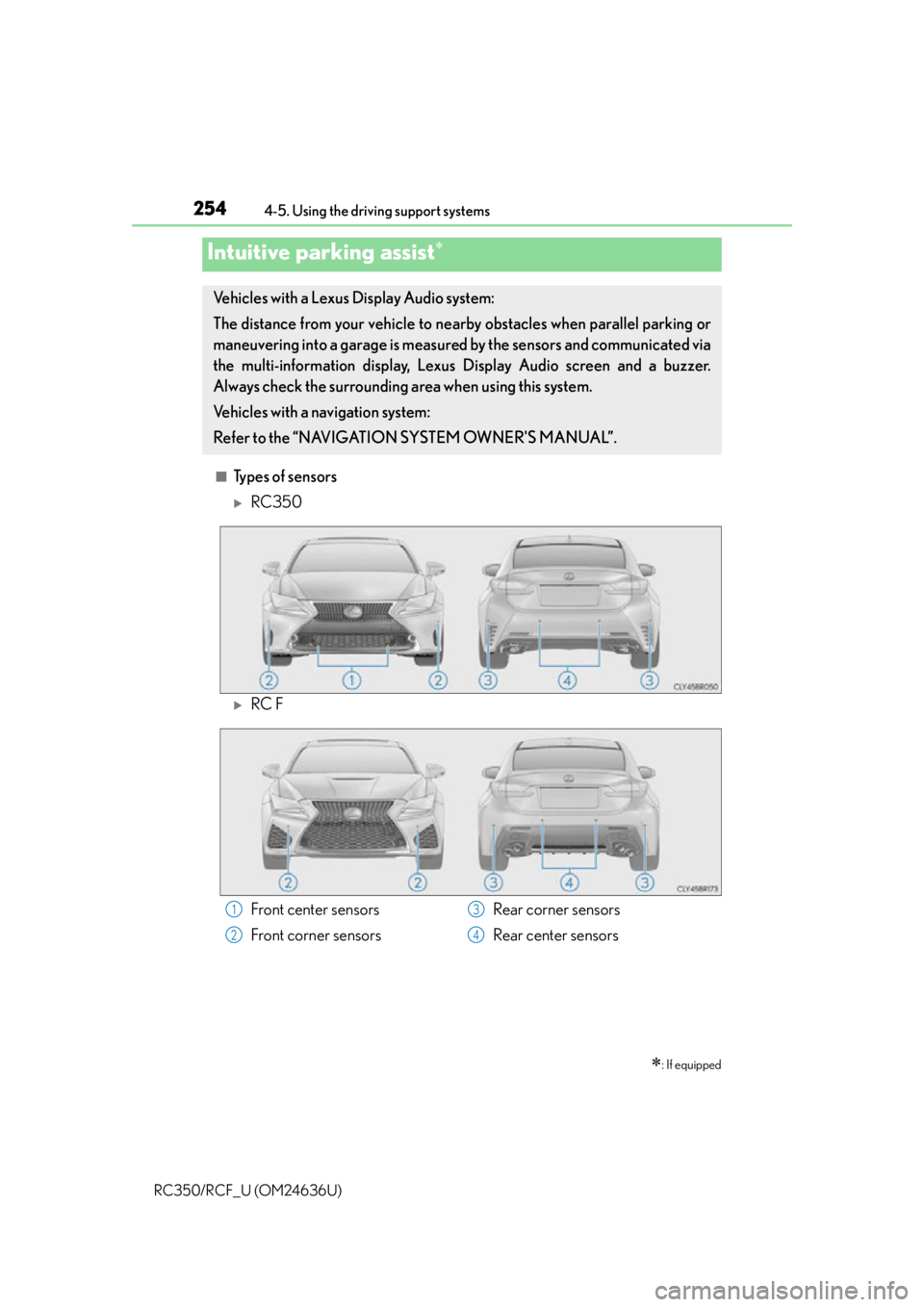
■Types of sensors
RC350
RC F
Intuitive parking assist
: If equipped
Vehicles with a Lexus Display Audio system:
The distance from your vehicle to near by obstacles when parallel parking or
maneuvering into a garage is measure d by the sensors and communicated via
the multi-information display, Lexus Display Audio screen and a buzzer.
Always check the surrounding area when using this system.
Vehicles with a navigation system:
Refer to the “NAVIGATION SYSTEM OWNER'S MANUAL”.
Front center sensors
Front corner sensors Rear corner sensors
Rear center sensors1
2
3
4
Page 256 of 684
2564-5. Using the driving support systems
RC350/RCF_U (OM24636U)
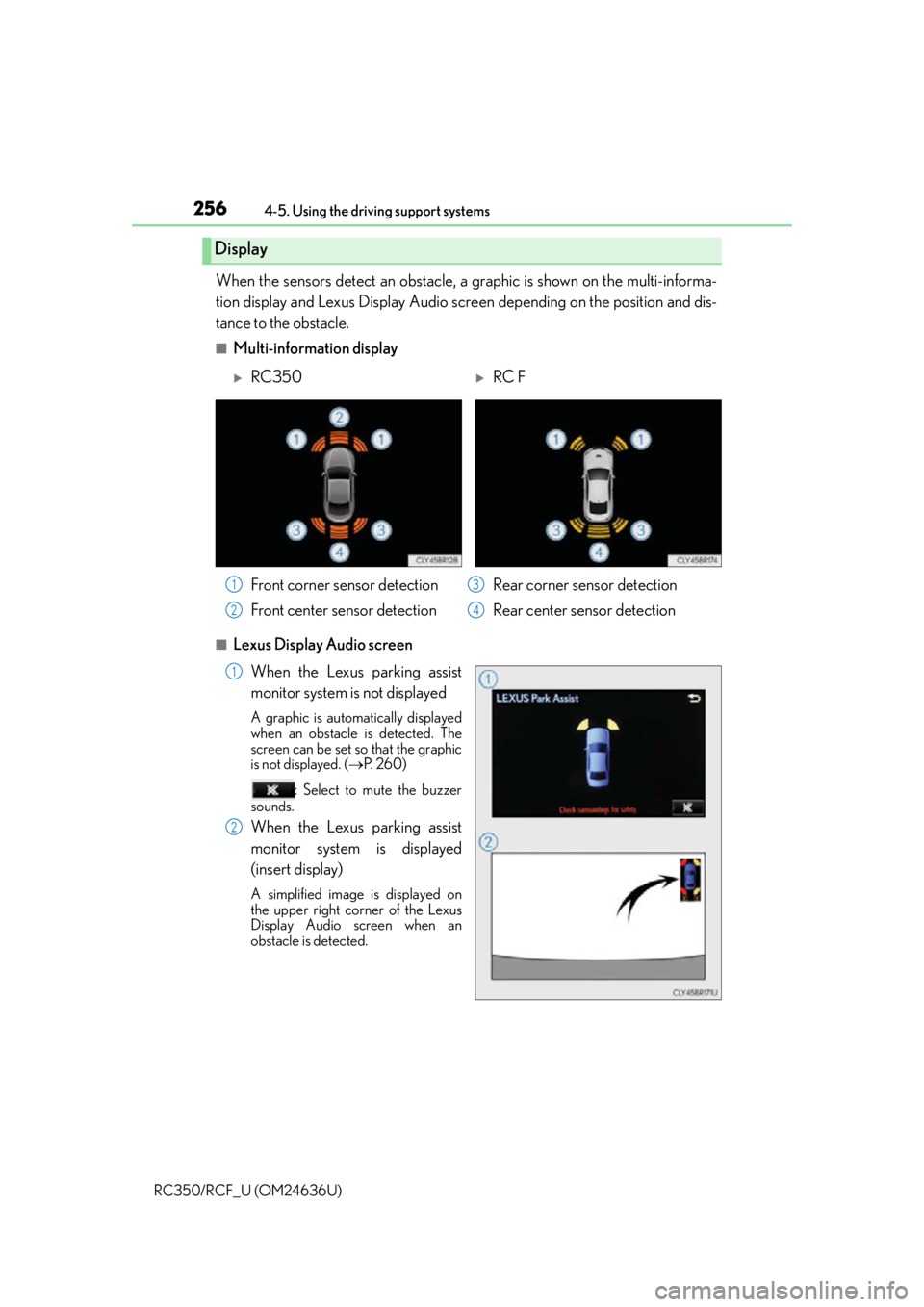
When the sensors detect an obstacle, a graphic is shown on the multi-informa-
tion display and Lexus Display Audio scr een depending on the position and dis-
tance to the obstacle.
■Multi-information display
■Lexus Display Audio screen
When the Lexus parking assist
monitor system is not displayed
A graphic is automatically displayed
when an obstacle is detected. The
screen can be set so that the graphic
is not displayed. ( P. 2 6 0 )
: Select to mute the buzzer
sounds.
When the Lexus parking assist
monitor system is displayed
(insert display)
A simplified image is displayed on
the upper right corner of the Lexus
Display Audio screen when an
obstacle is detected.
Display
RC350RC F
Front corner sensor detection
Front center sensor detection Rear corner sensor detection
Rear center sensor detection
1
2
3
4
1
2
Page 257 of 684
2574-5. Using the driving support systems
4
Driving
RC350/RCF_U (OM24636U)
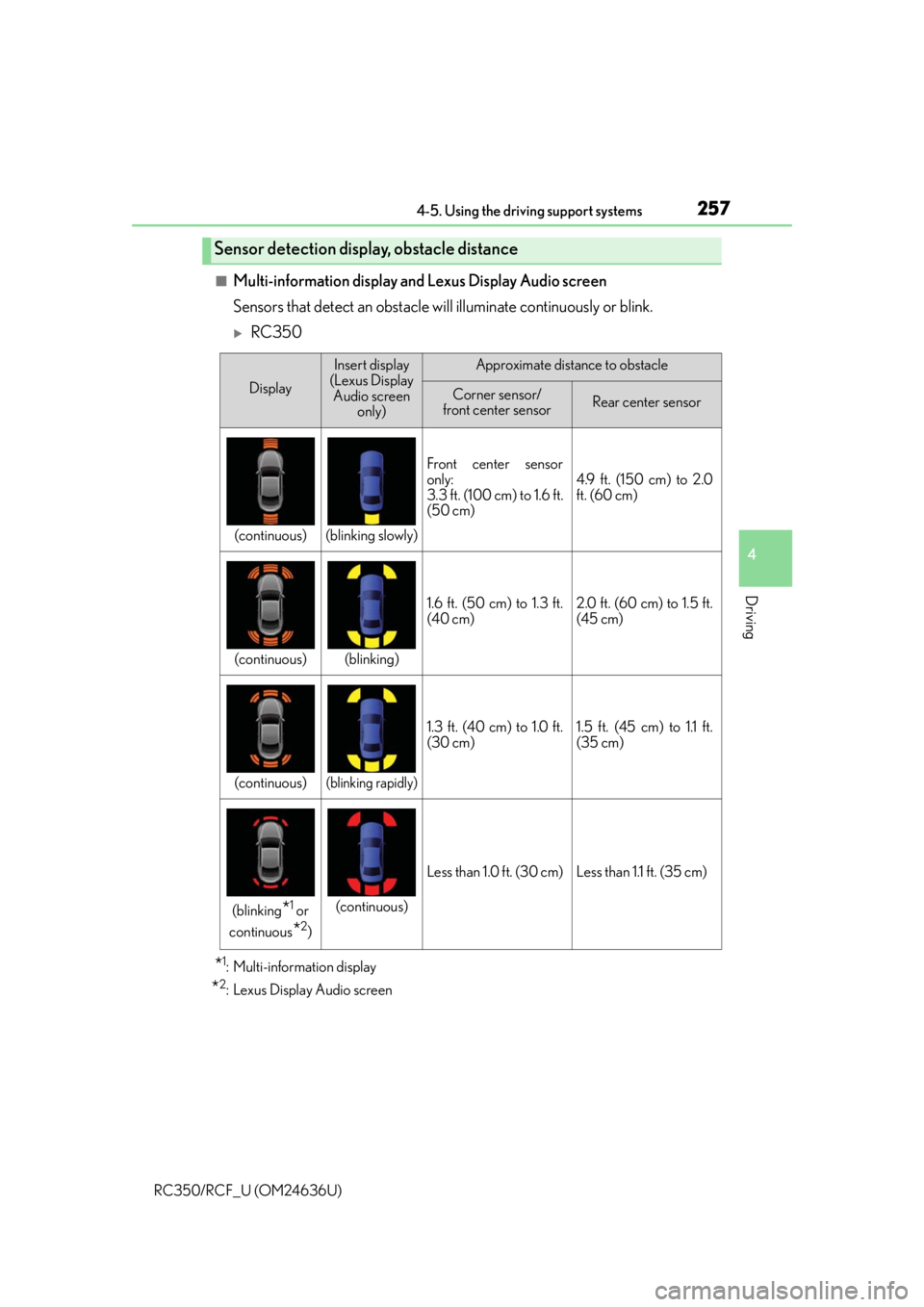
■Multi-information display and Lexus Display Audio screen
Sensors that detect an obstacle will illuminate continuously or blink.
RC350
*1: Multi-information display
*2: Lexus Display Audio screen
Sensor detection display, obstacle distance
Display
Insert display
(Lexus Display Audio screen only)Approximate distance to obstacle
Corner sensor/
front center sensorRear center sensor
(continuous)(blinking slowly)
Front center sensor
only:
3.3 ft. (100 cm) to 1.6 ft.
(50 cm)
4.9 ft. (150 cm) to 2.0
ft. (60 cm)
(continuous)(blinking)
1.6 ft. (50 cm) to 1.3 ft.
(40 cm)2.0 ft. (60 cm) to 1.5 ft.
(45 cm)
(continuous)(blinking rapidly)
1.3 ft. (40 cm) to 1.0 ft.
(30 cm)1.5 ft. (45 cm) to 1.1 ft.
(35 cm)
(blinking*1 or
continuous
*2)
(continuous)
Less than 1.0 ft. (30 cm)Less than 1.1 ft. (35 cm)
Page 258 of 684
2584-5. Using the driving support systems
RC350/RCF_U (OM24636U)
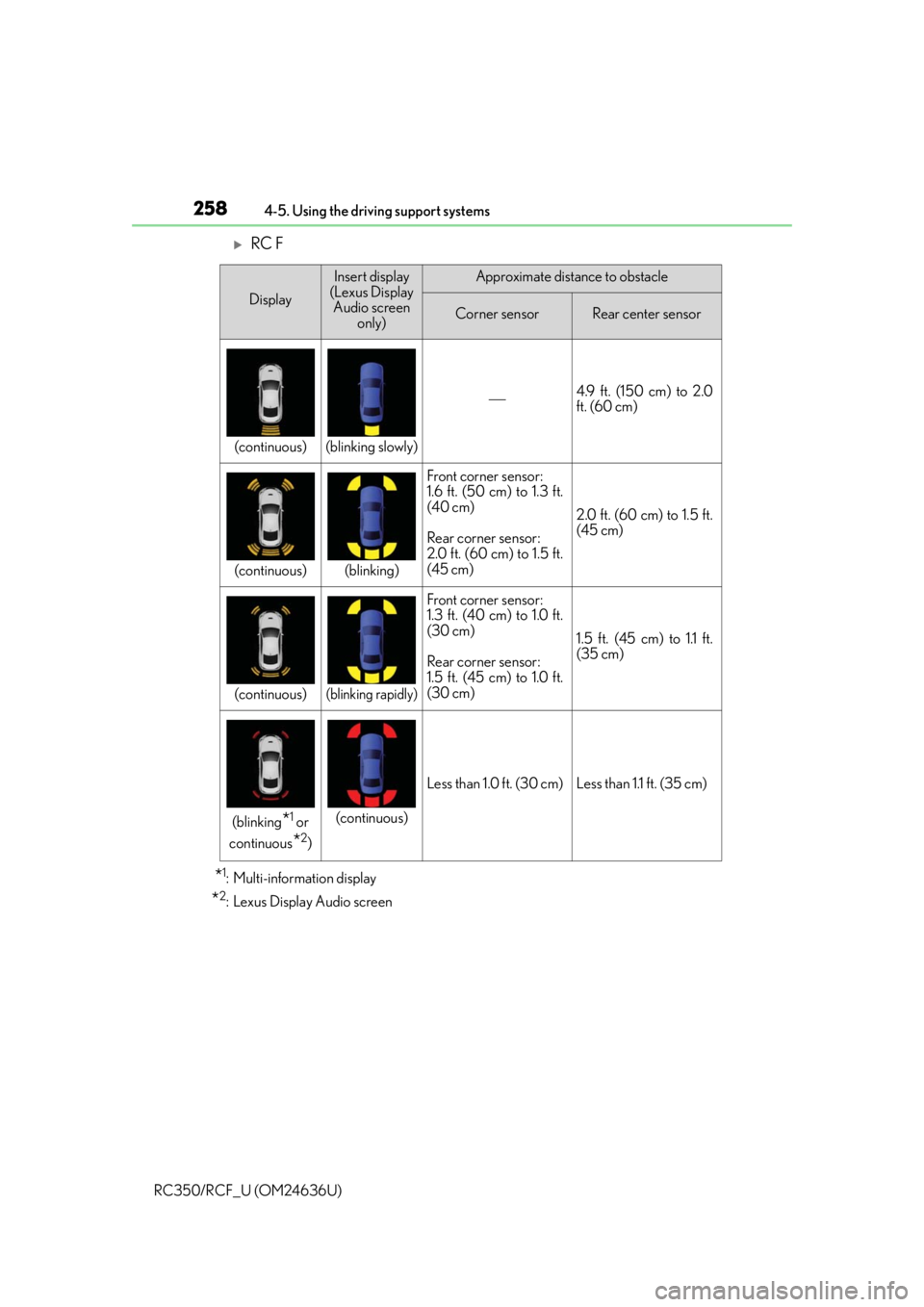
RC F
*1: Multi-information display
*2: Lexus Display Audio screen
Display
Insert display
(Lexus Display Audio screen only)Approximate distance to obstacle
Corner sensorRear center sensor
(continuous)(blinking slowly)
4.9 ft. (150 cm) to 2.0
ft. (60 cm)
(continuous)(blinking)
Front corner sensor:
1.6 ft. (50 cm) to 1.3 ft.
(40 cm)
Rear corner sensor:
2.0 ft. (60 cm) to 1.5 ft.
(45 cm)
2.0 ft. (60 cm) to 1.5 ft.
(45 cm)
(continuous)(blinking rapidly)
Front corner sensor:
1.3 ft. (40 cm) to 1.0 ft.
(30 cm)
Rear corner sensor:
1.5 ft. (45 cm) to 1.0 ft.
(30 cm)
1.5 ft. (45 cm) to 1.1 ft.
(35 cm)
(blinking*1 or
continuous
*2)
(continuous)
Less than 1.0 ft. (30 cm)Less than 1.1 ft. (35 cm)
Page 259 of 684
2594-5. Using the driving support systems
4
Driving
RC350/RCF_U (OM24636U)
■Buzzer operation and distance to an obstacle
A buzzer sounds when the sensors are operating.
●The buzzer beeps faster as the vehicle approaches an obstacle. When the
vehicle comes within the following distance of the obstacle, the buzzer
sounds continuously:• Front center sensors (RC350 only): Approximately 1.0 ft. (30 cm)
• Corner sensors: Approximately 1.0 ft. (30 cm)
• Rear center sensors: Approximately 1.1 ft. (35 cm)
●When 2 or more obstacles are detected simultaneously, the buzzer system
responds to the nearest obstacle. If one or both come within the above dis-
tances, the beep will repeat a long tone, followed by fast beeps.
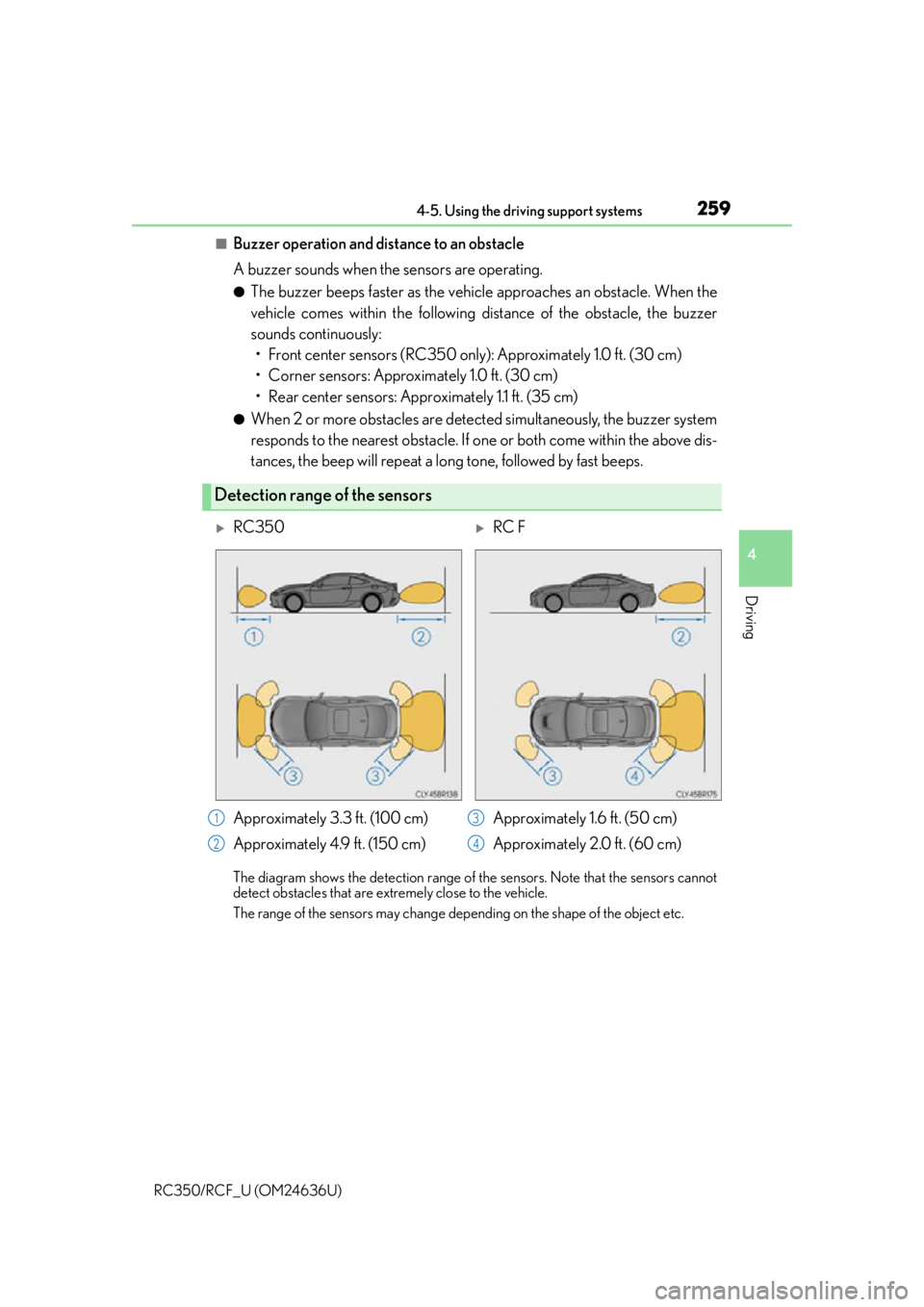
The diagram shows the detection range of th e sensors. Note that the sensors cannot
detect obstacles that are extremely close to the vehicle.
The range of the sensors may change depending on the shape of the object etc.
Detection range of the sensors
RC350RC F
Approximately 3.3 ft. (100 cm)
Approximately 4.9 ft. (150 cm) Approximately 1.6 f t. (50 cm)
Approximately 2.0 ft. (60 cm)
1
2
3
4
Page 260 of 684
2604-5. Using the driving support systems
RC350/RCF_U (OM24636U)
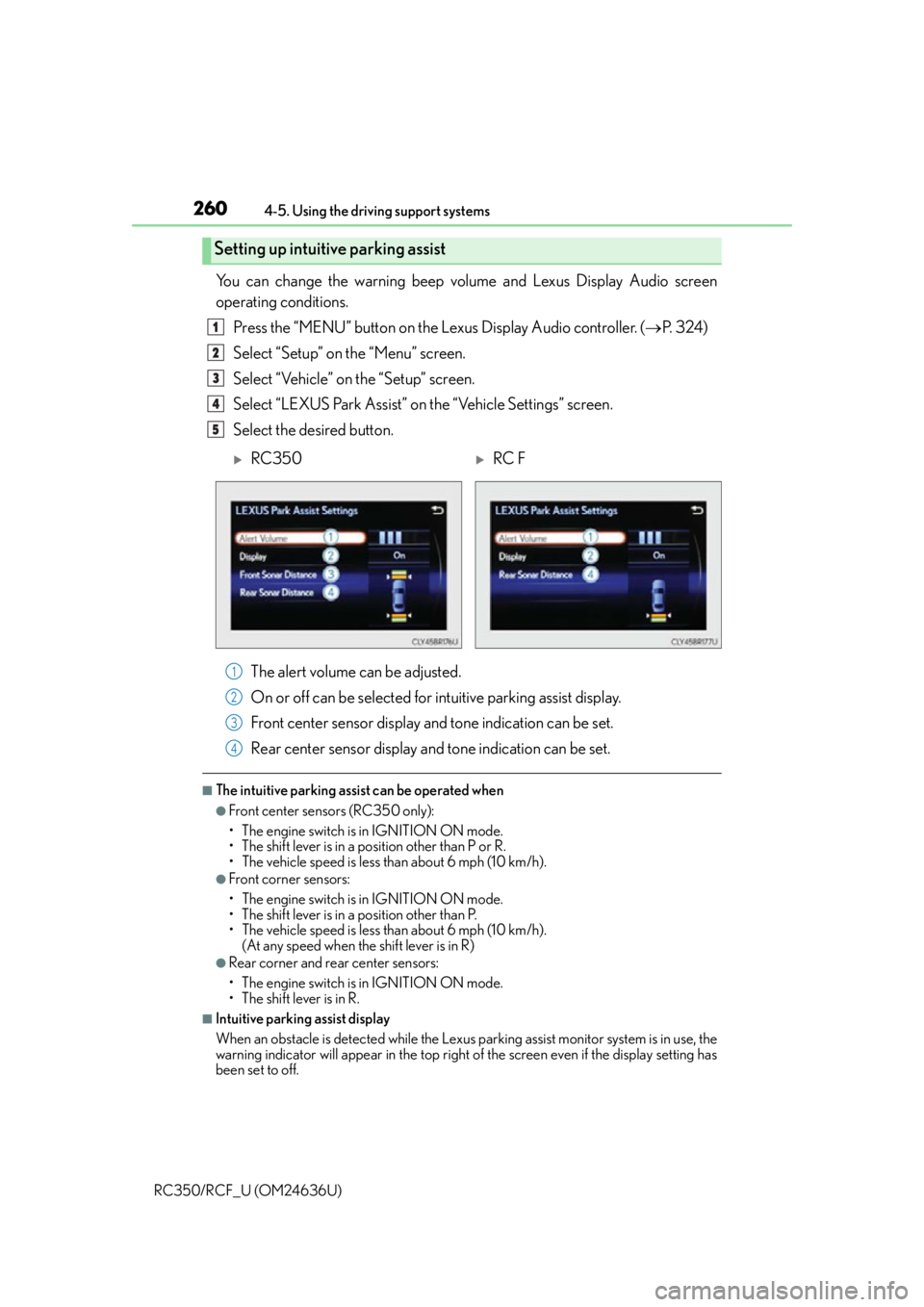
You can change the warning beep volume and Lexus Display Audio screen
operating conditions. Press the “MENU” button on the Lexus Display Audio controller. ( P. 3 2 4 )
Select “Setup” on the “Menu” screen.
Select “Vehicle” on the “Setup” screen.
Select “LEXUS Park Assist” on the “Vehicle Settings” screen.
Select the desired button.
The alert volume can be adjusted.
On or off can be selected for intuitive parking assist display.
Front center sensor display an d tone indication can be set.
Rear center sensor display an d tone indication can be set.
■The intuitive parking assist can be operated when
●Front center sensors (RC350 only):
• The engine switch is in IGNITION ON mode.
• The shift lever is in a position other than P or R.
• The vehicle speed is less than about 6 mph (10 km/h).
●Front corner sensors:
• The engine switch is in IGNITION ON mode.
• The shift lever is in a position other than P.
• The vehicle speed is less than about 6 mph (10 km/h).
(At any speed when the shift lever is in R)
●Rear corner and rear center sensors:
• The engine switch is in IGNITION ON mode.
• The shift lever is in R.
■Intuitive parking assist display
When an obstacle is detected while the Lexus parking assist monitor system is in use, the
warning indicator will appear in the top right of the screen even if the display setting has
been set to off.
Setting up intuitive parking assist
1
2
3
4
5
RC350RC F
1
2
3
4
Page 261 of 684

2614-5. Using the driving support systems
4
Driving
RC350/RCF_U (OM24636U)
■Sensor detection information
●RC350: The sensor’s detection areas are limited to the areas around the vehicle’s front
and rear bumpers.
●RC F: The sensor’s detection areas are limited to the areas around the vehicle’s front
corner and rear bumpers.
●Certain vehicle conditions and the surround ing environment may affect the ability of
the sensor to correctly detect obstacles. Particular instances where this may occur are
listed below.
• There is dirt, snow or ice on the sensor . (Wiping the sensors will resolve this prob-
lem.)
• The sensor is frozen. (Thawing th e area will resolve this problem.)
In especially cold weather, if a sensor is frozen the screen may show an abnormal
display, or obstacles may not be detected.
• The sensor is covered in any way.
• The vehicle is leaning co nsiderably to one side.
• On an extremely bumpy road, on an incline, on gravel, or on grass.
• The vicinity of the vehicle is noisy due to vehicle horns, motorcycle engines, air brakes of large vehicles, or other loud noises producing ultrasonic waves.
• There is another vehicle equipped with parking assist sensor in the vicinity.
• The sensor is coated with a sheet of spray or heavy rain.
• The vehicle is equipped with a fender pole or wireless antenna.
• Towing eyelets are installed.
• The bumper or sensor receives a strong impact.
• The vehicle is approaching a tall or curved curb.
• In harsh sunlight or intense cold weather.
• The area directly under the bumpers is not detected.
• If obstacles draw too close to the sensor.
• A non-genuine Lexus suspension (low ered suspension etc.) is installed.
• People may not be detected if they are wearing certain types of clothing.
In addition to the examples above, there are instances in which, because of their shape,
signs and other objects may be judged by the sensor to be closer than they are.
●The shape of the obstacle may prevent the sensor from detecting it. Pay particular
attention to the following obstacles:
• Wires, fences, ropes, etc.
• Cotton, snow and other materials that absorb sound waves
• Sharply-angled objects
•Low obstacles
• Tall obstacles with upper sections projecting outwards in the direction of your vehi-
cle
●The following situations may occur during use.
• Depending on the shape of the obstacle and other factors, the detection distance
may shorten, or detect ion may be impossible.
• Obstacles may not be detected if they are too close to the sensor.
• There will be a short delay between obst acle detection and display. Even at slow
speeds, there is a possibility that the obstacle will come within the sensor’s detection
areas before the display is shown and the warning beep sounds.
• Thin posts or objects lower than the sensor may not be detected when approached, even if they have been detected once.
• It might be difficult to hear beeps due to the volume of the audio system or air flow noise of the air conditioning system.
Page 282 of 684
2824-5. Using the driving support systems
RC350/RCF_U (OM24636U)
◆ABS (Anti-lock Brake System)
Helps to prevent wheel lock when the brakes are applied suddenly, or if the
brakes are applied while drivin g on a slippery road surface
◆Brake assist
Generates an increased level of braking force after the brake pedal is
depressed when the system detects a panic stop situation
◆VSC (Vehicle Stability Control)
Helps the driver to control skidding when swerving suddenly or turning on
slippery road surfaces
◆Enhanced VSC (Enhanced Vehicle Stability Control)
Provides cooperative control of the ABS, TRAC, VSC and EPS.
Helps to maintain directional stability when swerving on slippery road sur-
faces by controlling steering performance.
◆TRAC (Traction Control)
Helps to maintain drive power and prevent the drive wheels from spinning
when starting the vehicle or accelerating on slippery roads
◆Hill-start assist control
Prevents the vehicle from rolling backward when starting on an incline or slip-
pery slope
◆VGRS (Variable Gear Ratio Steering) (if equipped)
Adjusts the front wheel turning angle in accordance with the vehicle speed
and steering wheel movement
◆DRS (Dynamic Rear Steering) (if equipped)
Contributes to the turning characteristics and responsiveness of the vehicle
by slightly adjusting the rear wheel angle of the vehicle in accordance with
steering wheel movement.
Driving assist systems
To help enhance driving safety and performance, the following systems oper-
ate automatically in response to various driving situations. Be aware, however,
that these systems are supplementary and should not be relied upon too
heavily when operating the vehicle.
Page 283 of 684

2834-5. Using the driving support systems
4
Driving
RC350/RCF_U (OM24636U)
◆EPS (Electric Power Steering)
Employs an electric motor to reduce the amount of effort needed to turn the
steering wheel
◆Adaptive Variable Suspension system (if equipped)
By independently controlling the dampin g force of the shock absorbers for
each of the 4 wheels according to the road and driving conditions, this system
combines riding comfort with superior steering stability, and helps good vehi-
cle posture. ( P. 2 7 9 )
◆LDH (Lexus Dynamic Handling system) (if equipped)
Provides integrated control of the VGRS, DRS and EPS. Contributes to turn-
ing characteristics at low speeds, re sponsiveness at medium speeds and
safety at high speeds by controlling the steering angle of the front and rear
wheels in accordance with the steering wheel operation and vehicle speed.
◆VDIM (Vehicle Dynamics Integrated Management)
Provides integrated control of the ABS, brake assist, TRAC, VSC, hill-start
assist control, EPS, VGRS (if equi pped) and DRS (if equipped) systems
Helps to maintain vehicle stability when swerving on slippery road surfaces by
controlling the brakes, engine output, steering assist, and if equipped with
VGRS, steering ratio
◆PCS (Pre-Collision System) (if equipped)
P. 2 9 0
◆BSM (Blind Spot Monitor) (if equipped)
P. 2 9 7
◆TVD (Torque Vectoring Differential) (if equipped)
P. 3 1 3
Page 288 of 684
2884-5. Using the driving support systems
RC350/RCF_U (OM24636U)
WA R N I N G
■The ABS does not operate effectively when
●The limits of tire gripping performance have been exceeded (such as excessively
worn tires on a snow covered road).
●The vehicle hydroplanes while driving at high speed on wet or slick roads.
■Stopping distance when the ABS is operat ing may exceed that of normal conditions
The ABS is not designed to shorten the vehicle’s stopping distance. Always maintain a
safe distance from the vehicle in front of you, especially in the following situations:
●When driving on dirt, gravel or snow-covered roads
●When driving with tire chains
●When driving over bumps in the road
●When driving over roads with potholes or uneven surfaces
■TRAC may not operate effectively when
Directional control and power may not be achievable while drivin g on slippery road
surfaces, even if the TRAC system is operating.
Drive the vehicle carefully in conditions where stability and power may be lost.
■Hill- start assist control does not operate effectively when
●Do not overly rely on hill-start assist contro l. Hill-start assist control may not operate
effectively on steep inclines and roads covered with ice.
●Unlike the parking brake, hill-start assist control is not intended to hold the vehicle
stationary for an extended period of time. Do not attempt to use hill-start assist con-
trol to hold the vehicle on an incline, as doing so may lead to an accident.
■When the VSC is activated
The slip indicator light flashes. Always drive carefully. Reckless driving may cause an
accident. Exercise particular care when the indicator light flashes.