front LEXUS RC350 2015 Repair Manual
[x] Cancel search | Manufacturer: LEXUS, Model Year: 2015, Model line: RC350, Model: LEXUS RC350 2015Pages: 684, PDF Size: 9.31 MB
Page 290 of 684
2904-5. Using the driving support systems
RC350/RCF_U (OM24636U)
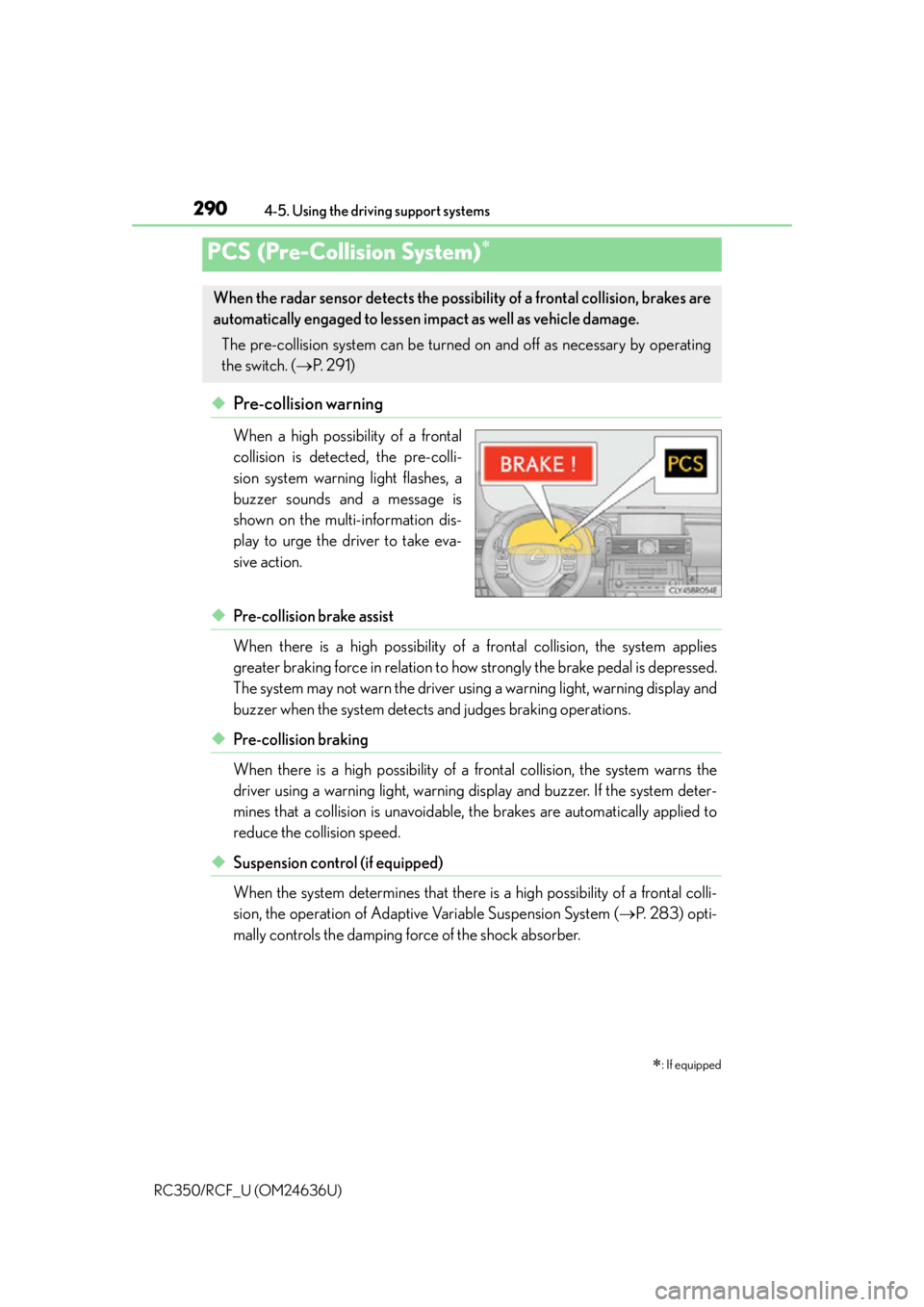
◆ Pre-collision warning
When a high possibility of a frontal
collision is detected, the pre-colli-
sion system warning light flashes, a
buzzer sounds and a message is
shown on the multi-information dis-
play to urge the driver to take eva-
sive action.
◆Pre-collision brake assist
When there is a high possibility of a frontal collision, the system applies
greater braking force in relation to ho w strongly the brake pedal is depressed.
The system may not warn the driver using a warning light, warning display and
buzzer when the system detects and judges braking operations.
◆Pre-collision braking
When there is a high possibility of a frontal collision, the system warns the
driver using a warning light, warning di splay and buzzer. If the system deter-
mines that a collision is unavoidable, the brakes are automatically applied to
reduce the collision speed.
◆Suspension control (if equipped)
When the system determines that there is a high possibility of a frontal colli-
sion, the operation of Adaptive Variable Suspension System ( P. 2 8 3 ) o p t i -
mally controls the damping force of the shock absorber.
PCS (Pre-Collision System)
: If equipped
When the radar sensor detects the possibility of a frontal collision, brakes are
automatically engaged to lessen im pact as well as vehicle damage.
The pre-collision system can be turned on and off as necessary by operating
the switch. ( P. 2 9 1 )
Page 291 of 684
2914-5. Using the driving support systems
4
Driving
RC350/RCF_U (OM24636U)
◆Steering control (if equipped)
When the system determines that there is a high possibility of a frontal colli-
sion while the steering wheel is being operated, the LDH (Lexus Dynamic
Handling) system controls the steering angle of the front and rear wheels and
torque applied to the steering wheel to enhance the steering wheel operation
response.
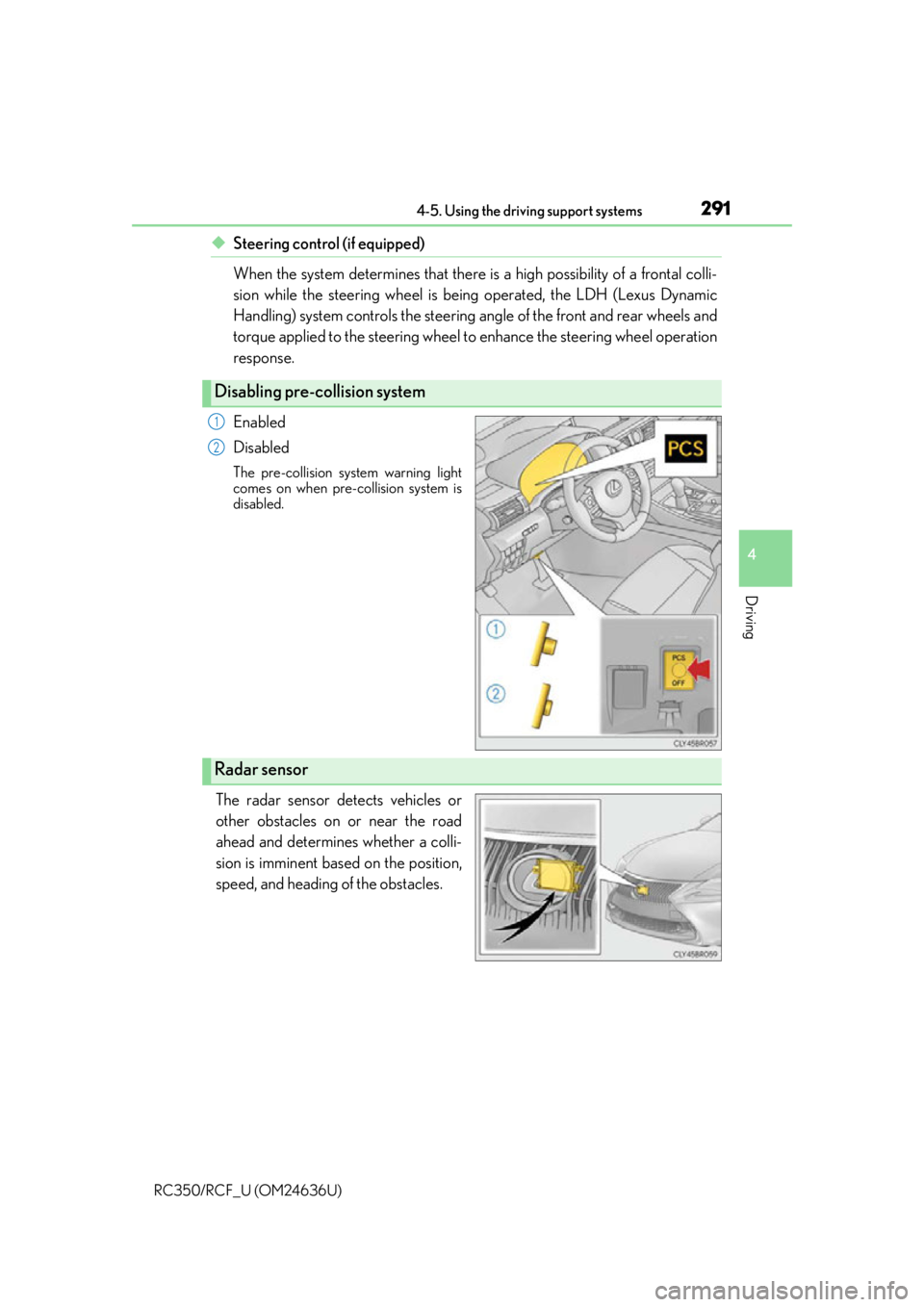
Enabled
Disabled
The pre-collision system warning light
comes on when pre-collision system is
disabled.
The radar sensor detects vehicles or
other obstacles on or near the road
ahead and determines whether a colli-
sion is imminent based on the position,
speed, and heading of the obstacles.
Disabling pre-collision system
1
2
Radar sensor
Page 293 of 684

2934-5. Using the driving support systems
4
Driving
RC350/RCF_U (OM24636U)
■Conditions that may trigger the system even if there is no danger of a collision
In the following situations, the front of the sensor may be obstructed causing the system
to determine that there is a poss ibility of a collision and operate:
●When passing an oncoming vehicle on a cu rb or while making a left or right turn
●When rapidly closing on an obstruction in front of the vehicle, such as a vehicle or toll
gate
●When climbing a hill, and an overhead structure (billboard, low ceiling, street lamps,
etc.) appears in the vehicle’s line of travel
●When driving through a narrow passage or a place with a low ceiling (bridges, tunnels,
overhead passes, etc.)
●When driving on an uneven road surface
●When there is a metal object on the road surf ace, or a gap or protrusion in the road sur-
face
●When there is an extreme change in the vehicle height
●When the sensor is misaligned due to a stro ng impact to the surrounding area of the
sensor
●When there is an object on the side of the road at the entrance to a curve, such as
guardrails
●When the front of your vehicle is inclined (during emergency towing, carrying a heavy
load in the trunk, etc.)
When the system is activated in the situations described above, there is also a possibility
that the brakes will be applied with a force greater than normal.
■Obstacles not detected
The sensor cannot detect plasti c obstacles such as traffic cones. There may also be occa-
sions when the sensor cannot detect pedestrians, animals, bicycles, motorcycles, trees,
or snowdrifts.
■Situations in which the pre-collision system does not function properly
The system may not function effectively in situations such as the following:
●On roads with sharp bends or uneven surfaces
●If a vehicle suddenly moves in front of your vehicle, such as at an intersection
●If a vehicle suddenly cuts in front of your vehicle, such as when overtaking
●In inclement weather such as heavy rain, fog, snow or sand storms
●If the vehicle is skidding when VSC is not operating
●When your vehicle is steeply inclined
●When the radar sensor moves off position due to its surrounding area being subjected
to a strong impact
●When an obstacle suddenly appears in front of the vehicle due to the steering wheel
being turned sharply or another cause
■Automatic cancelation of the pre-collision system
When a malfunction occurs due to sensor cont amination, etc. that results in the sensors
being unable to detect obstacles, the pre-collision syst em will be automatically disabled.
In this case, the system will not activate even if there is a collision possibility.
■When there is a malfunction in the system or if the system is temporarily unusable
The pre-collision system warning light will flash or illuminate and warning messages will
be displayed. ( P. 5 3 4 , 5 4 5 )
Page 296 of 684

2964-5. Using the driving support systems
RC350/RCF_U (OM24636U)
WA R N I N G
■Cautions regarding the assist contents of the system
By means of alarms and brake control, the pre- collision system is intended to assist the
driver in avoiding collisions through the process of LOOK-JUDGE-ACT. There are
limits to the degree of assistance the system can provide, so please keep in mind the
following important points.
●Assisting the driver in watching the road
The pre-collision system is only able to detect obstacles directly in front of the vehicle,
and only within a limited range. It is not a mechanism that allows careless or inatten-
tive driving, and it is not a system that can assist the driver in low-visibility conditions. It
is still necessary for the driver to pay cl ose attention to the vehicle’s surroundings.
●Assisting the driver in making correct judgment
When attempting to estimate the possibility of a collision, the only data available to
the pre-collision system is that from obstacle s it has detected directly in front of the
vehicle. Therefore, it is absolutely necess ary for the driver to remain vigilant and to
determine whether or not there is a possib ility of collision in any given situation.
●Assisting the driver in taking action
The pre-collision brake assist function of th e pre-collision safety system is designed to
help reduce the severity of a collision, an d will only operate when the system deter-
mines that a collision is unavoidable. Withou t proper input from the driver, this system
is not capable of avoiding a collision or brin ging the vehicle to a stop safely. For this
reason, when encountering a dangerous situation the driver must take direct and
immediate action in order to ensu re the safety of all involved.
Page 315 of 684
315
4
Driving
RC350/RCF_U (OM24636U)4-6. Driving tips
●Use fluids that are appropriate to the prevailing outside temperatures.
•Engine oil
• Engine coolant
• Washer fluid
●Have a service technician inspect the condition of the battery.
●Have the vehicle fitted with four snow tires or purchase a set of tire chains for
the rear tires.
*
Ensure that all tires are the specified size and brand, and that chains match the size
of the tires.
*: Tire chains cannot be mounted on the vehicles with front and rear tires of differing sizes.
●Use fluids that are appropriate to the prevailing outside temperatures.
•Engine oil
• Engine coolant
• Washer fluid
●Have a service technician inspect the condition of the battery.
●Have the vehicle fitted with four snow tires.
Ensure that all tires are the specified size and brand.
Winter driving tips
Carry out the necessary preparations and inspections before driving the vehi-
cle in winter. Always drive the vehicle in a manner appropriate to the prevail-
ing weather conditions.
Preparation for winter (RC350)
Preparation for winter (RC F)
Page 316 of 684
3164-6. Driving tips
RC350/RCF_U (OM24636U)
Perform the following according to the driving conditions:
●Do not try to forcibly open a window or move a wiper that is frozen. Pour
warm water over the frozen area to melt the ice. Wipe away the water imme-
diately to prevent it from freezing.
●To ensure proper operation of the climate control system fan, remove any
snow that has accumulated on the air inlet vents in front of the windshield.
●Check for and remove any excess ice or snow that may have accumulated on
the exterior lights, vehicle’s roof, chassis, around the tires or on the brakes.
●Remove any snow or mud from the bottom of your shoes before getting in the
vehicle.
Accelerate the vehicle slowly, keep a safe distance between you and the vehicle
ahead, and drive at a reduced speed suitable to road conditions.
Park the vehicle and move the shift lever to P without setting the parking brake.
The parking brake may freeze up, preventing it from being released. If necessary,
block the wheels to prevent in advertent sliding or creeping.
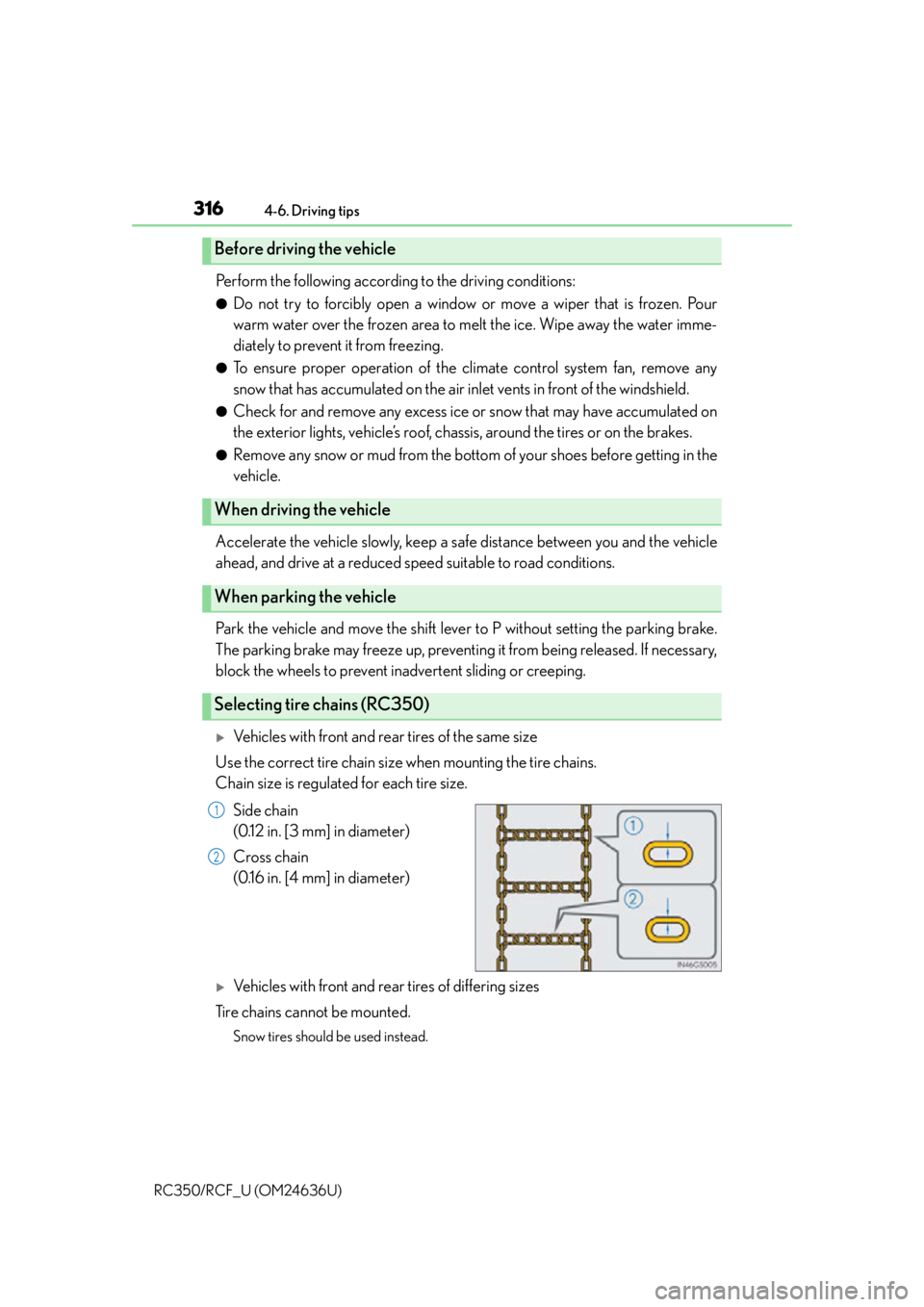
Vehicles with front and rear tires of the same size
Use the correct tire chain size when mounting the tire chains.
Chain size is regulated for each tire size.
Side chain
(0.12 in. [3 mm] in diameter)
Cross chain
(0.16 in. [4 mm] in diameter)
Vehicles with front and rear tires of differing sizes
Tire chains cannot be mounted.
Snow tires should be used instead.
Before driving the vehicle
When driving the vehicle
When parking the vehicle
Selecting tire chains (RC350)
1
2
Page 317 of 684

3174-6. Driving tips
4
Driving
RC350/RCF_U (OM24636U)
Tire chains cannot be mounted.
Snow tires should be used instead.
Regulations regarding the use of tire chains vary depending on location and type
of road. Always check local regulations before installing chains.
■Tire chain installation
Observe the following precautions when installing and removing chains:
●Install and remove tire chains in a safe location.
●Install tire chains on the rear tires. Do not install tire chains on the front tires.
●Install tire chains on rear tires as tightly as possible. Retighten chains after driving 1 /4
1 /2 mile (0.5 1.0 km).
●Install tire chains following the instru ctions provided with the tire chains.
Selecting tire chains (RC F)
Regulations on the use of tire chains
WA R N I N G
■Driving with snow tires
Observe the following precautions to reduce the risk of accidents.
Failure to do so may result in a loss of ve hicle control and cause death or serious injury.
●Use tires of the specified size.
●Maintain the recommended level of air pressure.
●Do not drive in excess of 75 mph (120 km/h), regardless of the type of snow tires
being used.
●Use snow tires on all, not just some wheels.
■Driving with tire chains
Observe the following precautions to reduce the risk of accidents.
Failure to do so may result in the vehicle being unable to be driven safely, and may
cause death or serious injury.
●Do not drive in excess of the speed limit specified for the tire chains being used, or 30
mph (50 km/h), whichever is lower.
●Avoid driving on bumpy road surfaces or over potholes.
●Avoid sudden acceleration, ab rupt steering, sudden braking and shifting operations
that cause sudden engine braking.
●Slow down sufficiently before entering a cu rve to ensure that vehicle control is main-
tained.
●Vehicles with LDA (Lane Departure Alert): Do not use the LDA system.
Page 339 of 684
3395-3. Using the audio system
5
Lexus Display Audio system
RC350/RCF_U (OM24636U)
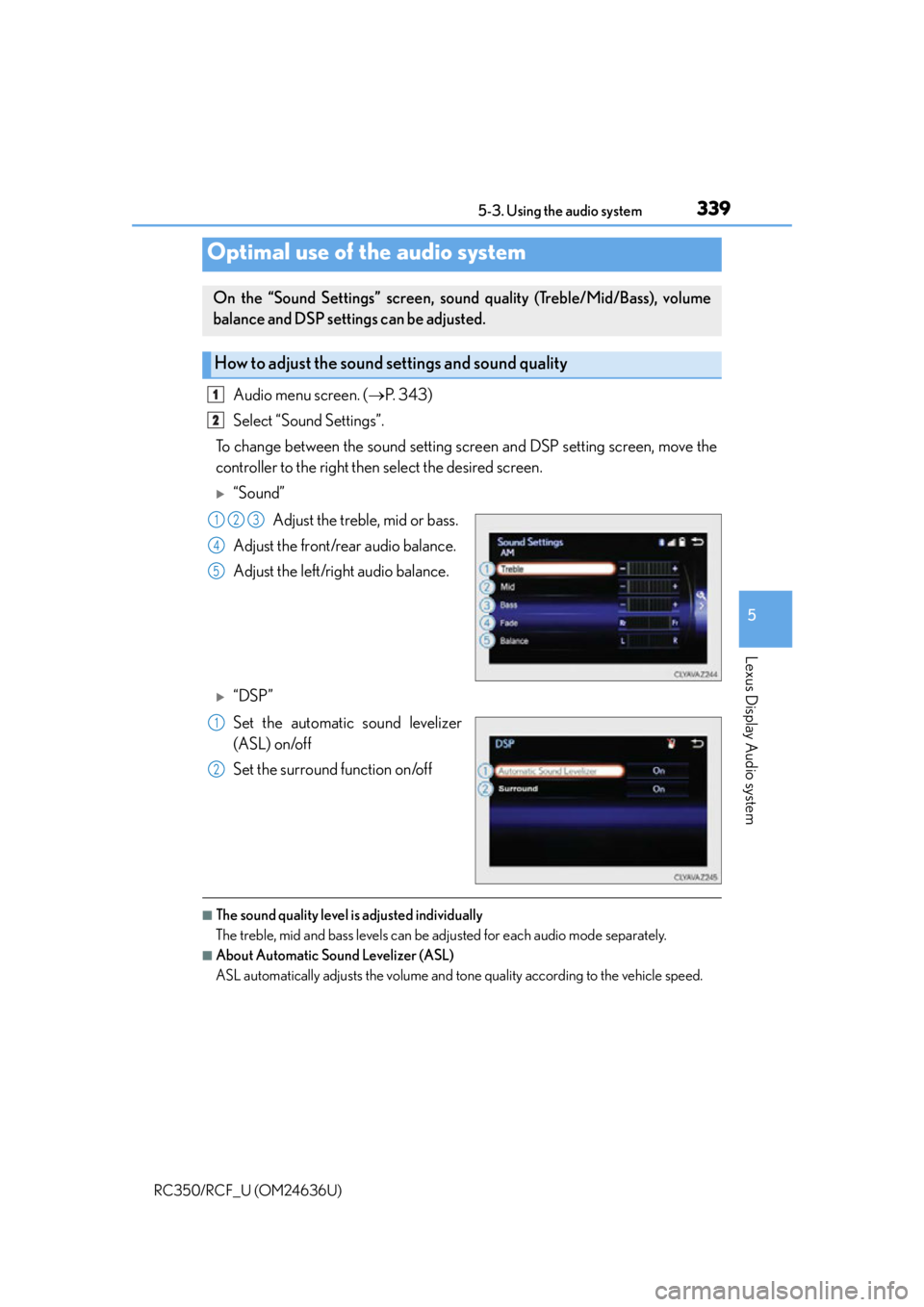
Audio menu screen. (P. 3 4 3 )
Select “Sound Settings”.
To change between the sound setting screen and DSP setting screen, move the
controller to the right then select the desired screen.
“Sound”
Adjust the treble, mid or bass.
Adjust the front/rear audio balance.
Adjust the left/right audio balance.
“DSP”
Set the automatic sound levelizer
(ASL) on/off
Set the surround function on/off
■The sound quality level is adjusted individually
The treble, mid and bass levels can be ad justed for each audio mode separately.
■About Automatic Sound Levelizer (ASL)
ASL automatically adjusts the volume and tone quality according to the vehicle speed.
Optimal use of the audio system
On the “Sound Settings” screen, sound quality (Treble/Mid/Bass), volume
balance and DSP settings can be adjusted.
How to adjust the sound settings and sound quality
1
2
123
4
5
1
2
Page 379 of 684
3795-9. Bluetooth® Phone
5
Lexus Display Audio system
RC350/RCF_U (OM24636U)
◆Te l e p h o n e s w i t c h (P. 388)
◆Microphone
The vehicle’s built-in microphone is
used when talking on the phone.
The person you are speaking to can
be heard from the front speakers.
To use the hands-free system, you must register your Bluetooth
® phone in the
system. ( P. 3 7 0 )
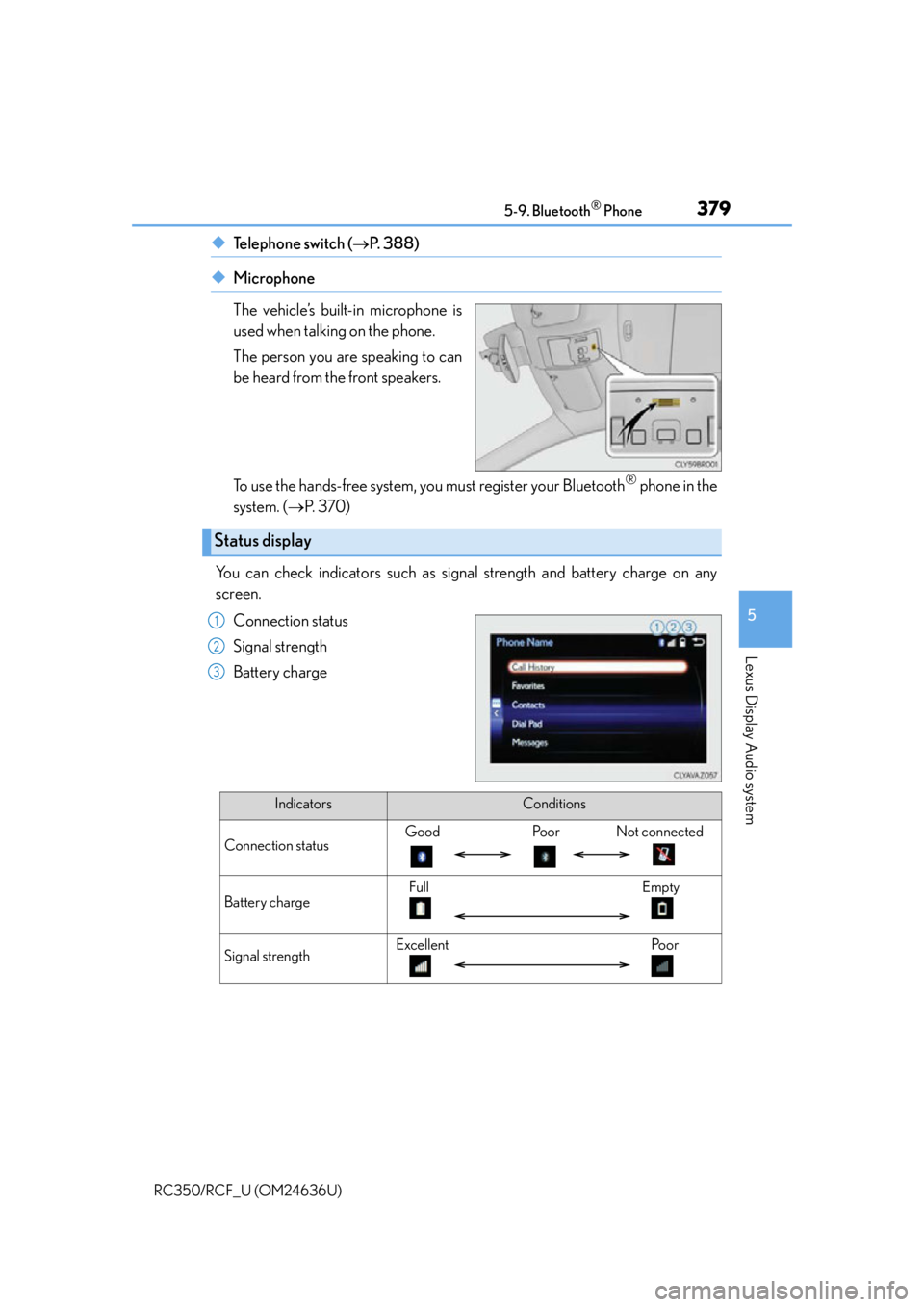
You can check indicators such as signal strength and battery charge on any
screen.
Connection status
Signal strength
Battery charge
Status display
1
2
3
IndicatorsConditions
Connection statusGood Poor Not connected
Battery chargeFull Empty
Signal strengthExcellent Poor
Page 421 of 684
4216-1. Using the air conditioning system
6
Interior features
RC350/RCF_U (OM24636U)
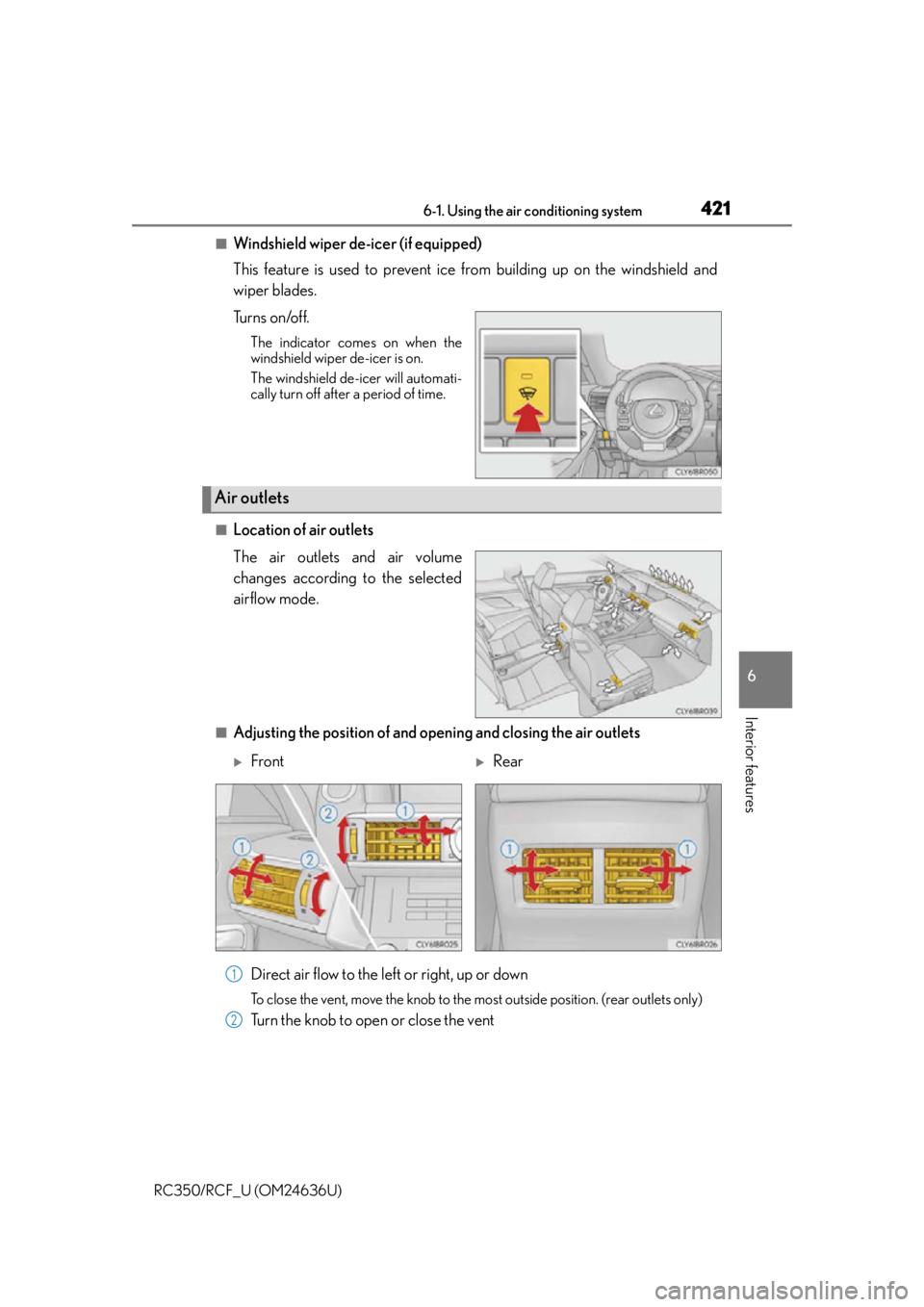
■Windshield wiper de-icer (if equipped)
This feature is used to prevent ice from building up on the windshield and
wiper blades.
Tu r n s o n /o f f .
The indicator comes on when the
windshield wiper de-icer is on.
The windshield de-icer will automati-
cally turn off after a period of time.
■Location of air outlets
The air outlets and air volume
changes according to the selected
airflow mode.
■Adjusting the position of and opening and closing the air outlets
Direct air flow to the left or right, up or down
To close the vent, move the knob to the most outside position. (rear outlets only)
Turn the knob to open or close the vent
Air outlets
FrontRear
1
2