change time LEXUS RCF 2018 User Guide
[x] Cancel search | Manufacturer: LEXUS, Model Year: 2018, Model line: RCF, Model: LEXUS RCF 2018Pages: 636, PDF Size: 6.88 MB
Page 121 of 636
1212. Instrument cluster
2
Instrument cluster
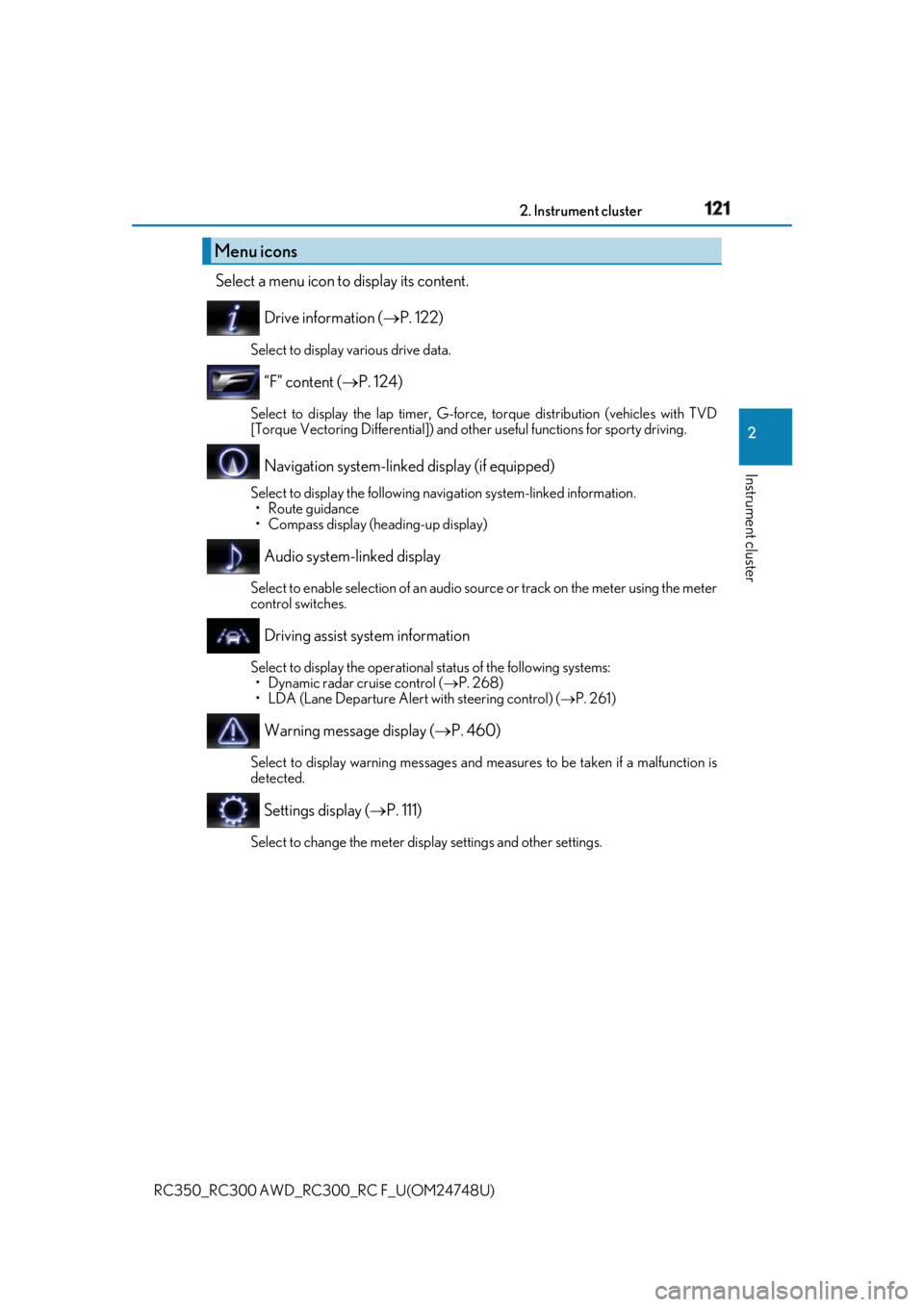
RC350_RC300 AWD_RC3 00_RC F_U(OM24748U)Select a menu icon to display its content.
Drive information ( P. 122)Select to display various drive data.
“F” content ( P. 124)Select to display the lap timer, G-force, torque distribution (vehicles with TVD
[Torque Vectoring Differential]) and othe r useful functions for sporty driving.
Navigation system-linked display (if equipped) Select to display the following na vigation system-linked information.
•Route guidance
• Compass display (heading-up display)
Audio system-linked display Select to enable selection of an audio source or track on the meter using the meter
control switches.
Driving assist system information Select to display the operational status of the following systems:
• Dynamic radar cruise control ( P. 268)
• LDA (Lane Departure Alert with steering control) ( P. 261)
Warning message display ( P. 460)Select to display warning messages and me asures to be taken if a malfunction is
detected.
Settings display ( P. 111)Select to change the meter display settings and other settings.Menu icons
Page 122 of 636
122 2. Instrument cluster
RC350_RC300 AWD_RC3 00_RC F_U(OM24748U)■
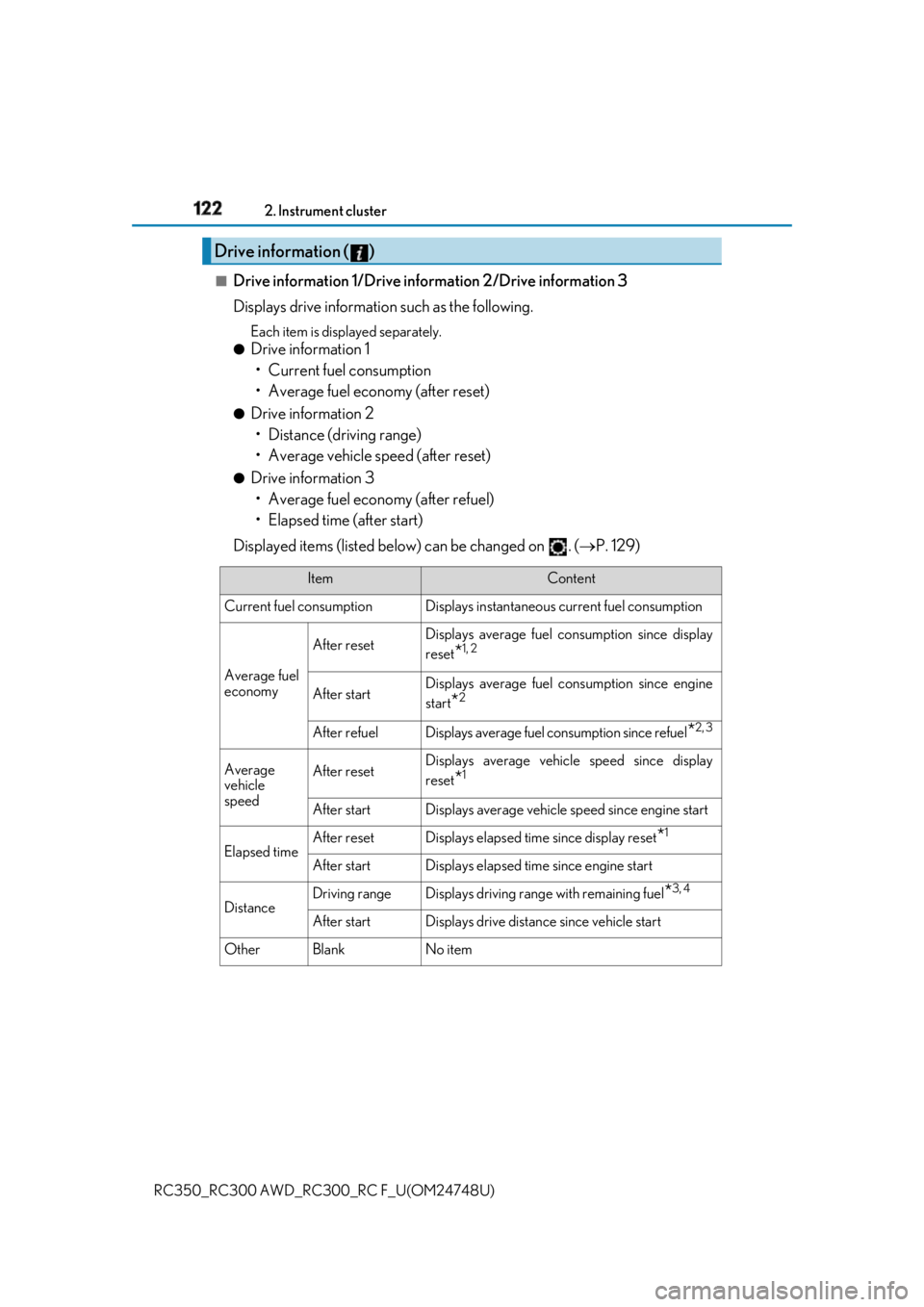
Drive information 1/Drive information 2/Drive information 3
Displays drive informatio n such as the following.Each item is displayed separately.●
Drive information 1
• Current fuel consumption
• Average fuel economy (after reset) ●
Drive information 2
• Distance (driving range)
• Average vehicle speed (after reset) ●
Drive information 3
• Average fuel economy (after refuel)
• Elapsed time (after start)
Displayed items (listed below) can be changed on . ( P. 129)Drive information ( )
Item Content
Current fuel consumption Displays in stantaneous current fuel consumption
Average fuel
economy After reset Displays average fuel consumption since display
reset
* 1, 2
After start Displays average fuel consumption since engine
start
* 2
After refuel Displays average fuel consumption since refuel
* 2, 3
Average
vehicle
speed After reset Displays average vehicle speed since display
reset
* 1
After start Displays average vehicle speed since engine start
Elapsed time After reset Displays elapsed time since display reset
* 1
After start Displays elapsed time since engine start
Distance Driving range Displays driving rang e with remaining fuel
* 3, 4
After start Displays drive distance since vehicle start
Other Blank No item
Page 124 of 636

124 2. Instrument cluster
RC350_RC300 AWD_RC3 00_RC F_U(OM24748U)■
Lap timer
Measures and displays current la p time and previous lap times●
Reading the display
Measured lap times since the timer was last reset are displayed as follows:
• Content display area
Total lap time
Past lap times
Fastest lap (marked with a star)
• Sub-content display area
Current lap time
Most recent lap time
●
Operating the meter control switches
Press: Start/stop lap timer
Press and hold: Reset
: Mark off one lap
: Change displayed
contentWhile a lap time is being mea-
sured, the display can be changed
to show the following content:
• Torque distribution (if equipped)
•G-force
• Tire pressure
• Rear wing position●
Resetting/saving measured lap times
After stopping the lap timer, press and hold .
When a confirmation screen is displa yed, select to reset/save the mea-
sured lap times. When saved, the lap time data will be displayed on the history screen. ( P. 125)“F” content
Content display area
Sub-content display area1
2
3
4
5
1
2
Page 133 of 636

1332. Instrument cluster
2
Instrument cluster
RC350_RC300 AWD_RC3 00_RC F_U(OM24748U)■
G-force display ●
The G-force values may not be zero even when the vehicle is parked, such as when it is
parked on an incline. ●
The steering amount, accelerator pedal input, and brake fluid pressure displays are dis-
abled until the engine has warmed up (the variable red zone of the tachometer has
retracted to 7300 rpm).
After the engine has warmed up, these displays will be enabled. ●
Depending on the vehicle usage conditions, the brake fluid pressure display may not
reach its maximum reading even though the brake pedal is fully depressed. ●
If a battery terminal is disconnected and reconnected, the steering amount display may
be disabled temporarily. Afte r driving the vehicle for a while , the display will be enabled.■
Suspension of the settings display
In the following situations, op eration of the settings disp lay will be temporarily sus-
pended. ●
When a warning message appears on the multi-information display●
When the vehicle begins to move ■
Tire pressure ●
It may take a few minutes to display the tire inflation pressure after the engine switch is
turned to IGNITION ON mode. It may also take a few minutes to display the tire infla-
tion pressure after inflation pressure has been adjusted.●
“---” may be displayed if the tire position information cannot be determined due to
unfavorable radio wave conditions. ●
Tire inflation pressure changes with temperat ure. The displayed values may also be dif-
ferent from the values measured using a tire pressure gauge. ■
When disconnecting and reco nnecting battery terminals
The following information data will be reset: ●
Drive information ●
Lap timer: Measured lap times, history ●
G-force: Record of the maximum G-forces■
Using the lap timer
If the engine is stopped while a lap is being timed, the lap timer will stop and the lap time
up to that point will be recorded. ■
Liquid crystal display
Small spots or light spots may appear on the display. This phenomenon is characteristic
of liquid crystal displays, and there is no problem continuing to use the display.
Page 149 of 636

1493-2. Opening, closing and locking the doors and trunk
3
Operation of each component
RC350_RC300 AWD_RC3 00_RC F_U(OM24748U)■
Side window open/close function linked to door operation
When a door is opened, its window opens s lightly. When a door is closed, its window
closes completely. ■
Switching the door unlock function
It is possible to set which doors the entry function unlock s using the wireless remote con-
trol.
Turn the engine switch off.
When the indicator light on the key surface is not on, press and hold , or
for approximately 5 seconds while pressing and holding .
The setting changes each time an operation is performed, as shown below. (When
changing the setting continuously, release the buttons, wait for at least 5 seconds, and
repeat step .)
To prevent unintended triggering of the alarm, unlock the doors using the wireless
remote control and open and close a door once after the settings have been changed. (If
a door is not opened within 60 seconds af ter is pressed, the doors will be locked
again and the alarm will automatically be set.)
In a case that the alarm is triggered, immediately stop the alarm. ( P. 80)■
Impact detection door lock release system
In the event that the vehicle is subject to a strong impact, both side doors are unlocked.
Depending on the force of the impact or the type of accident, however, the system may
not operate. ■
Using the mechanical key
The doors can also be unlocked with the mechanical key. ( P. 518)■
Conditions affecting the oper ation of the smart access sy stem with push-button start
or wireless remote control
P. 158 ■
Customization
Settings (e.g. unlocking function using a key) can be changed.
(Customizable features: P. 569) 1
2
2
Multi-information
display Unlocking function Beep
Holding the driver’s door handle
unlocks only the driver’s door.
Exterior: Beeps 3 times
Interior: Pings once
Holding the passenger’s door
handle unlocks both side doors.
Holding either door handle
unlocks both side doors. Exterior: Beeps twice
Interior: Pings once
Page 153 of 636
1533-2. Opening, closing and locking the doors and trunk
3
Operation of each component
RC350_RC300 AWD_RC3 00_RC F_U(OM24748U)■
Trunk light ●
The trunk light turns on when the trunk is opened. ●
If the trunk light is left on when the engine sw itch is turned off, the light will go off auto-
matically after 20 minutes. ■
Function to prevent the trunk being lo cked with the electronic key inside ●
When both side doors are locked, closing the trunk lid with the electronic key left inside
the trunk will sound an alarm.
In this case, the trunk lid can be opened by pressing the trunk release button on the
trunk lid. ●
If the spare electronic key is put in the trunk with both side doors locked, the key con-
finement prevention function is activated so the trunk can be opened. In order to pre-
vent theft, take all el ectronic keys with you when leaving the vehicle.●
If the electronic key is put in the trunk with both side doors locked, the key may not be
detected depending on the location of the key and the surrounding radio wave condi-
tions. In this case, the key confinement prev ention function cannot be activated, causing
the doors to lock when the trunk is closed. Make sure to check where the key is before
closing the trunk. ●
The key confinement prevention function cannot be activated if either door is unlocked.
In this case, open the trunk using the trunk opener. ■
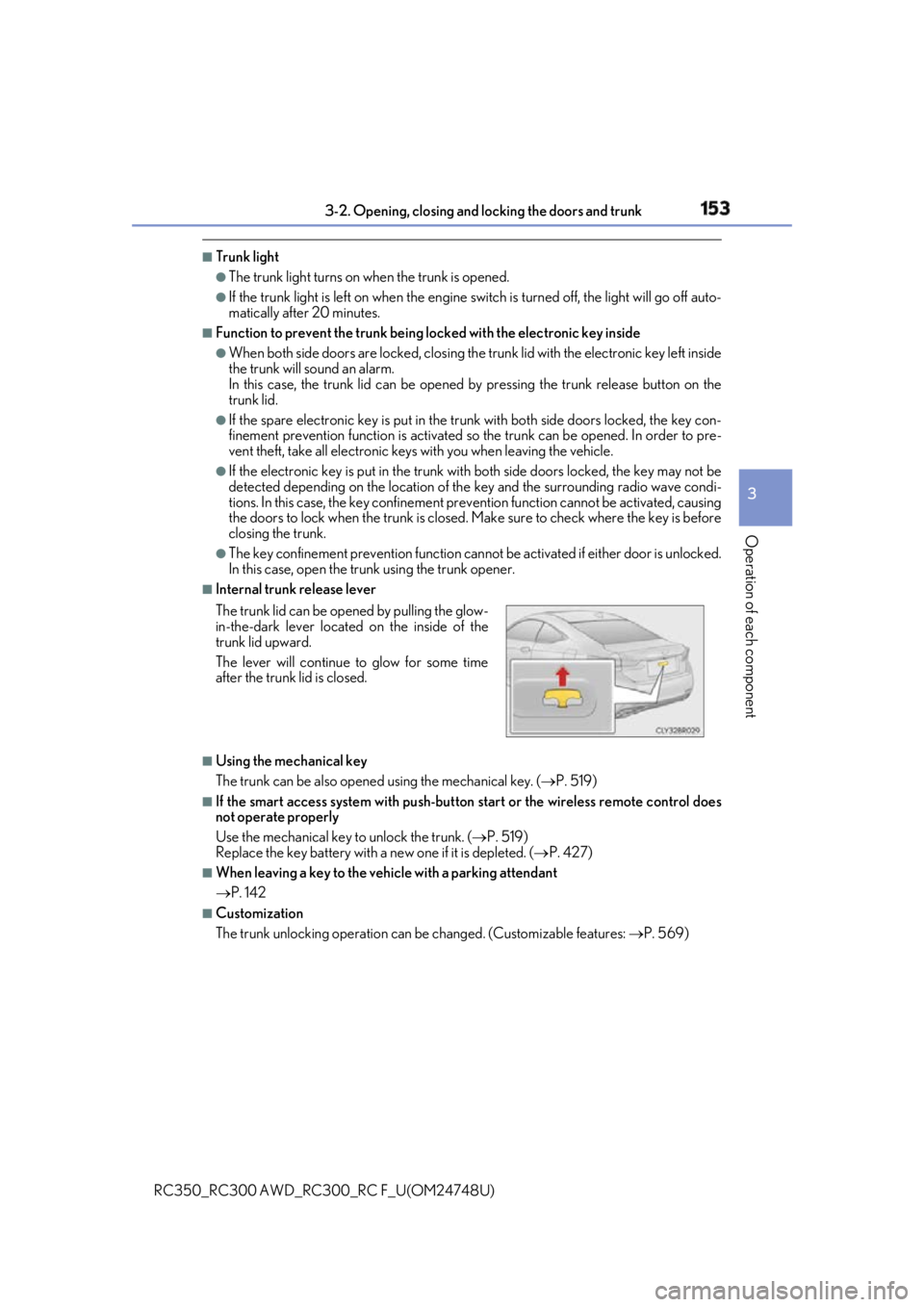
Internal trunk release lever
■
Using the mechanical key
The trunk can be also opened using the mechanical key. ( P. 519)■
If the smart access system with push-button start or the wireless remote control does
not operate properly
Use the mechanical key to unlock the trunk. ( P. 519)
Replace the key battery with a new one if it is depleted. ( P. 427)■
When leaving a key to the vehicle with a parking attendant
P. 142 ■
Customization
The trunk unlocking operation can be changed. (Customizable features: P. 569)The trunk lid can be open ed by pulling the glow-
in-the-dark lever located on the inside of the
trunk lid upward.
The lever will continue to glow for some time
after the trunk lid is closed.
Page 159 of 636

1593-2. Opening, closing and locking the doors and trunk
3
Operation of each component
RC350_RC300 AWD_RC3 00_RC F_U(OM24748U)■
Note for the entry function ●
Even when the electronic key is within the effective range (detection areas), the system
may not operate properly in the following cases:
• The electronic key is too close to the window or outside door handle, near the
ground, or in a high place when the doors are locked or unlocked.
• The electronic key is near the ground or in a high place, or too close to the rear
bumper center when the trunk is opened.
• The electronic key is on th e instrument panel, rear pack age tray or floor, or in the
door pockets or glove box when the engine is started or engine switch modes are
changed. ●
Do not leave the electronic key on top of th e instrument panel or near the door pockets
when exiting the vehicle. Depending on the radio wave reception conditions, it may be
detected by the antenna outside the cabin an d the doors will become lockable from the
outside, possibly trapping the electronic key inside the vehicle. ●
As long as the electronic key is within th e effective range, the doors may be locked or
unlocked by anyone. However, only the door s detecting the electronic key can be used
to unlock the vehicle. ●
Even if the electronic key is not inside the vehicle, it may be possible to start the engine
if the electronic key is near the window. ●
The doors may unlock or lock if a large amou nt of water splashes on the door handle,
such as in the rain or in a car wash, when th e electronic key is with in the effective range.
(The doors will automatically be locked af ter approximately 60 seconds if the doors
are not opened and closed.) ●
If the wireless remote control is used to lo ck the doors when the electronic key is near
the vehicle, there is a possibility that the d oor may not be unlocked by the entry func-
tion. (Use the wireless remote control to unlock the doors.) ●
Touching the door lock or unlock sensor while wearing gloves may prevent lock or
unlock operation. ●
When the lock operation is performed using the lock sensor, recognition signals will be
shown up to two consecutive times. After this, no recognition signals will be given.●
If the door handle becomes wet while the el ectronic key is within the effective range,
the door may lock and unlock repeatedly. In this case, follow th e following correction
procedures to wash the vehicle:
• Place the electronic key in a location 6 ft. (2 m) or more away from the vehicle. (Take
care to ensure that the key is not stolen.)
• Set the electronic key to battery-saving mode to disable the smart access system
with push-button start. ( P. 158)●
If the electronic key is inside the vehicle and a door handle becomes wet during a car
wash, a message may be shown on the mult i-information display and a buzzer will
sound outside the vehicle. To turn of f the alarm, lock both side doors.●
The lock sensor may not work properly if it comes into contact with ice, snow, mud, etc.
Clean the lock sensor and attempt to operate it again. ●
A sudden handle operation or a handle operation immediately after entering the effec-
tive range may prevent the doors from bein g unlocked. Touch the door unlock sensor
and check that the doors are unlocked before pulling the door handle again.●
Unlocking the vehicle may take more time if another electronic key is within the effec-
tive range.
Page 179 of 636
1793-4. Adjusting the steering wheel and mirrors
3
Operation of each component
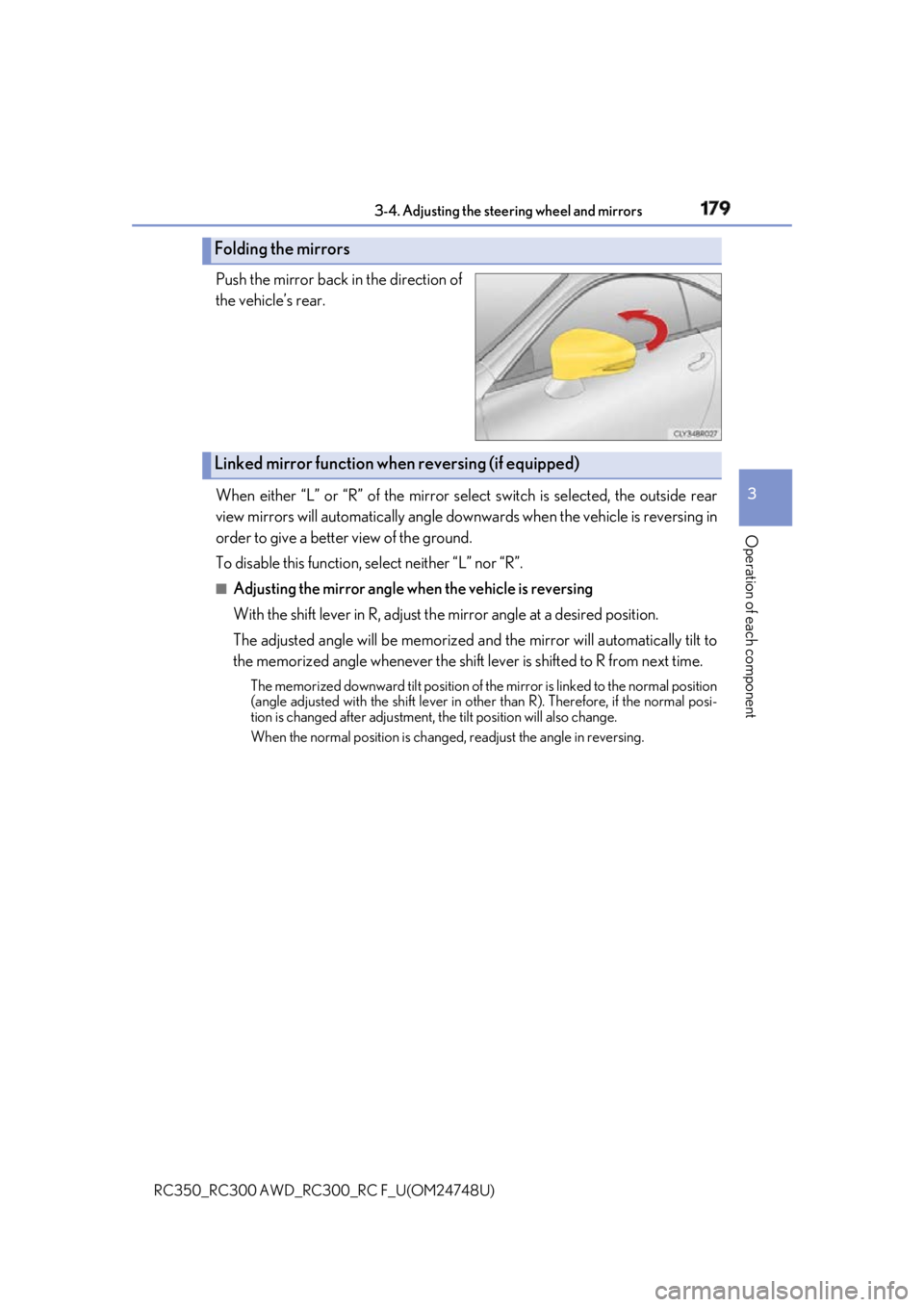
RC350_RC300 AWD_RC3 00_RC F_U(OM24748U)Push the mirror back in the direction of
the vehicle’s rear.
When either “L” or “R” of the mirror select switch is selected, the outside rear
view mirrors will automatically angle down wards when the vehicle is reversing in
order to give a better view of the ground.
To disable this function, select neither “L” nor “R”. ■
Adjusting the mirror angle when the vehicle is reversing
With the shift lever in R, adjust th e mirror angle at a desired position.
The adjusted angle will be memorized and the mirror will automatically tilt to
the memorized angle whenever the shift lever is shifted to R from next time. The memorized downward tilt position of th e mirror is linked to the normal position
(angle adjusted with the shif t lever in other than R). Ther efore, if the normal posi-
tion is changed after adjustment, the tilt position will also change.
When the normal position is chang ed, readjust the angle in reversing.Folding the mirrors
Linked mirror function when reversing (if equipped)
Page 188 of 636

188 3-5. Opening, closing the windows and moon roof
RC350_RC300 AWD_RC3 00_RC F_U(OM24748U)■
If the moon roof does not move normally
If the moon roof does not open or close no rmally or the automatic opening function does
not operate, perform the follo wing initialization procedure.
Turn the engine switch to IGNITION ON mode.
Operate the moon roof.
Depending on the kind of malfunction perform ei ther of the following:
If the moon roof does not open wh en the “OPEN” switch is pressed
Press and hold the “DOWN” switch or “CLO SE” switch until the moon roof is com-
pletely closed.
The moon roof will open and close a fe w times before it closes completely.
Confirm that the moon roof has comple tely stopped and release the switch.
If the moon roof does not open completely automatically even though it tilts up and
opens while the “OPEN” switch is being pressed and held
Press and hold the “OPEN” switch un til the moon roof opens completely.
Press and hold the “CLOSE” switch unti l the moon roof closes completely.
Press and hold the “UP” switch unti l the moon roof tilts up and stops.
Press and hold the “DOWN” switch until th e moon roof tilts down and stops at the
completely closed position.
If you release the switch while the moon roof is moving, perform the procedure again
from the beginning.
If, after performing the above procedures corr ectly, the moon roof still does not open or
close normally or the automatic opening function does not operate, have the vehicle
inspected by your Lexus dealer. ■
Moon roof open warning buzzer
The buzzer sounds and a message is shown on the multi-information display in the instru-
ment cluster when the engine switch is turned off and the driver’s door is opened with the
moon roof open. ■
Customization
Settings (e.g. linked door lock operation) can be changed.
(Customizable features: P. 569) 1
2
3
4
3
4
5
6
Page 200 of 636

200 4-1. Before driving
RC350_RC300 AWD_RC3 00_RC F_U(OM24748U)NOTICE ■
When driving the vehicle ●
Do not depress the accelerator and brake pedals at the same time while driving, as
this may restrain the engine output.●
Do not use the accelerator pedal or depre ss the accelerator and brake pedals at the
same time to hold the vehicle on a hill. ■
When parking the vehicle
Always set the parking brake, and shift the sh ift lever to P. Failure to do so may cause
the vehicle to move or the vehicle may acce lerate suddenly if th e accelerator pedal is
accidentally depressed. ■
Avoiding damage to vehicle parts ●
Do not turn the steering wheel fully in either direction and hold it there for an
extended period of time.
Doing so may damage the power steering motor. ●
When driving over bumps in the road, drive as slowly as possible to avoid damaging
the wheels, underside of the vehicle, etc. ●
RC300: Make sure to idle the engine immediately after high-load driving. Stop the
engine only after the turb ocharger has cooled down.
Failure to do so may cause damage to the turbocharger. ■
If you get a flat tire while driving
A flat or damaged tire may cause the following situations . Hold the steering wheel
firmly and gradually depress the brake pedal to slow down the vehicle. ●
It may be difficult to control your vehicle. ●
The vehicle will make abnormal sounds or vibrations. ●
The vehicle will lean abnormally.
Information on what to do in case of a flat tire ( P. 489, 502)■
When encountering flooded roads
Do not drive on a road that has flooded af ter heavy rain etc. Doing so may cause the
following serious damage to the vehicle: ●
Engine stalling ●
Short in electrical components ●
Engine damage caused by water immersion
In the event that you drive on a flooded road and the vehicle is flooded, be sure to have
your Lexus dealer check the following: ●
Brake function ●
Changes in quantity and quality of oil and fluid used for the engine, transmission,
transfer (AWD models), differential, etc. ●
Lubricant condition for the propeller shaft, bearings and suspension joints (where
possible), and the function of all joints, bearings, etc.