change time LEXUS RCF 2018 Owner's Manual
[x] Cancel search | Manufacturer: LEXUS, Model Year: 2018, Model line: RCF, Model: LEXUS RCF 2018Pages: 636, PDF Size: 6.88 MB
Page 208 of 636
208 4-2. Driving procedures
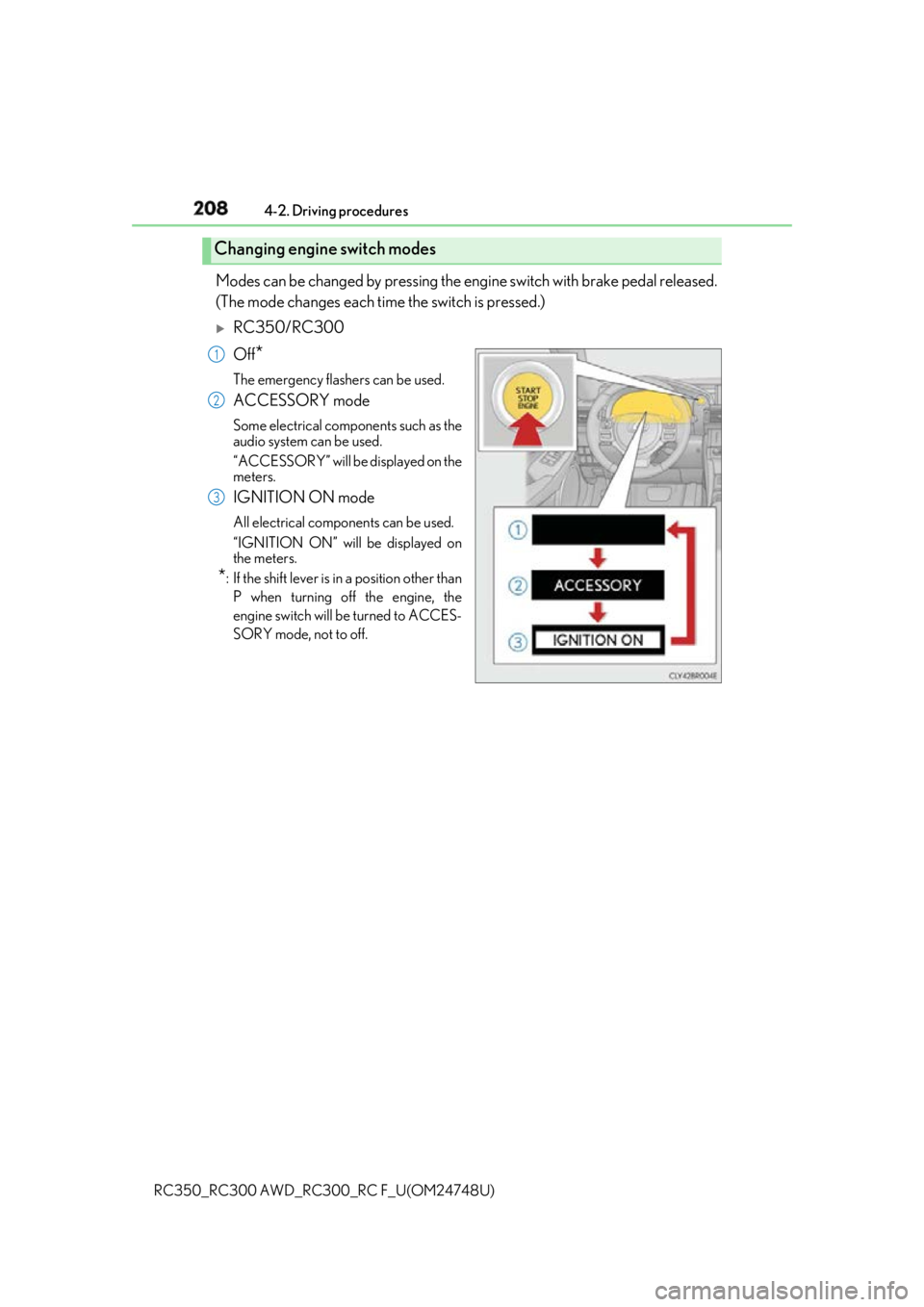
RC350_RC300 AWD_RC3 00_RC F_U(OM24748U)Modes can be changed by pressing the en gine switch with brake pedal released.
(The mode changes each time the switch is pressed.)
RC350/RC300
Off
* The emergency flashers can be used.
ACCESSORY mode Some electrical components such as the
audio system can be used.
“ACCESSORY” will be displayed on the
meters.
IGNITION ON mode All electrical components can be used.
“IGNITION ON” will be displayed on
the meters.
* : If the shift le ver is in a position other than
P when turning off the engine, the
engine switch will be turned to ACCES-
SORY mode, not to off.Changing engine switch modes 1
2
3
Page 211 of 636

2114-2. Driving procedures
4
Driving
RC350_RC300 AWD_RC3 00_RC F_U(OM24748U)■
Operation of the engine switch ●
If the switch is not pressed shortly and firmly, the engine switch mode may not change
or the engine may not start. ●
If attempting to restart the engine immediately after turning the engine switch off, the
engine may not start in some cases. After turning the engine switch off, please wait a
few seconds before restarting the engine. ■
If the smart access system wi th push-button start has been deactivated by a customized
setting
P. 518
WARNING ■
When starting the engine
Always start the engine while sitting in the driver’s seat. Do not depress the accelerator
pedal while starting the engine under any circumstances.
Doing so may cause an accident resu lting in death or serious injury.■
Caution while driving
If engine failure occurs while the vehicle is moving, do not lock or open the doors until
the vehicle reaches a safe and complete stop. Activation of the steering lock in this cir-
cumstance may lead to an accident, re sulting in death or serious injury.■
Stopping the engine in an emergency
If you want to stop the engine in an emergency while driving the vehicle, press and hold
the engine switch for more than 2 seconds, or press it briefly 3 times or more in succes-
sion. ( P. 443)
However, do not touch the engi ne switch while driv ing except in an emergency. Turning
the engine off while driving will not cause lo ss of steering or braking control, but the
power assist to these systems will be lost. Th is will make it more difficult to steer and
brake, so you should pull over and stop the vehicle as soon as it is safe to do so.
Page 216 of 636
216 4-2. Driving procedures
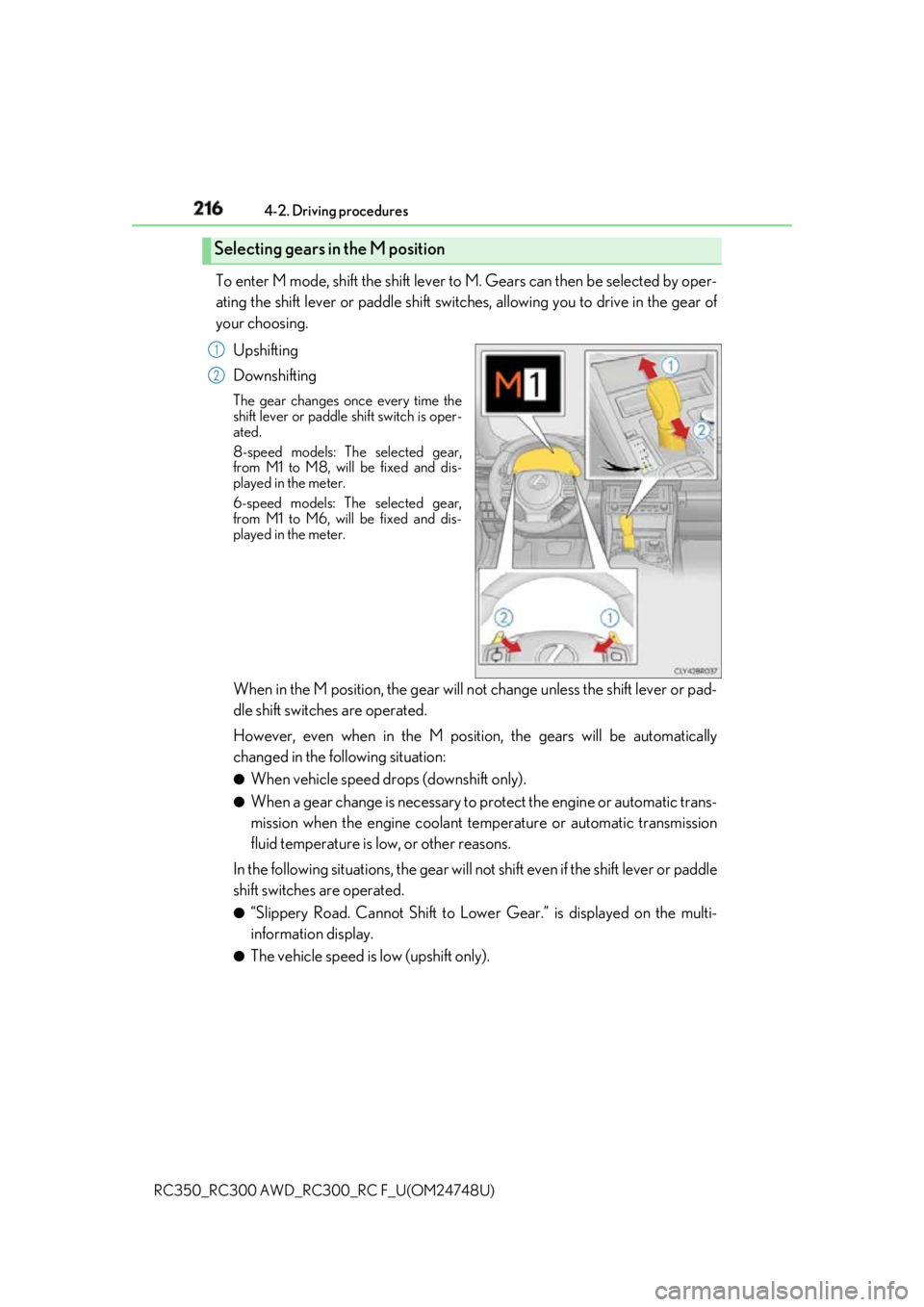
RC350_RC300 AWD_RC3 00_RC F_U(OM24748U)To enter M mode, shift the shift lever to M. Gears can then be selected by oper-
ating the shift lever or paddle shift switch es, allowing you to drive in the gear of
your choosing.
Upshifting
Downshifting The gear changes once every time the
shift lever or paddle shift switch is oper-
ated.
8-speed models: Th e selected gear,
from M1 to M8, will be fixed and dis-
played in the meter.
6-speed models: The selected gear,
from M1 to M6, will be fixed and dis-
played in the meter.
When in the M position, the gear will not change unless the shift lever or pad-
dle shift switches are operated.
However, even when in the M positi on, the gears will be automatically
changed in the following situation: ●
When vehicle speed drops (downshift only). ●
When a gear change is necessary to protect the engine or automatic trans-
mission when the engine coolant te mperature or automatic transmission
fluid temperature is low, or other reasons.
In the following situations, the gear will no t shift even if the shift lever or paddle
shift switches are operated. ●
“Slippery Road. Cannot Shift to Lowe r Gear.” is displayed on the multi-
information display. ●
The vehicle speed is low (upshift only).Selecting gears in the M position 1
2
Page 221 of 636
2214-2. Driving procedures
4
Driving
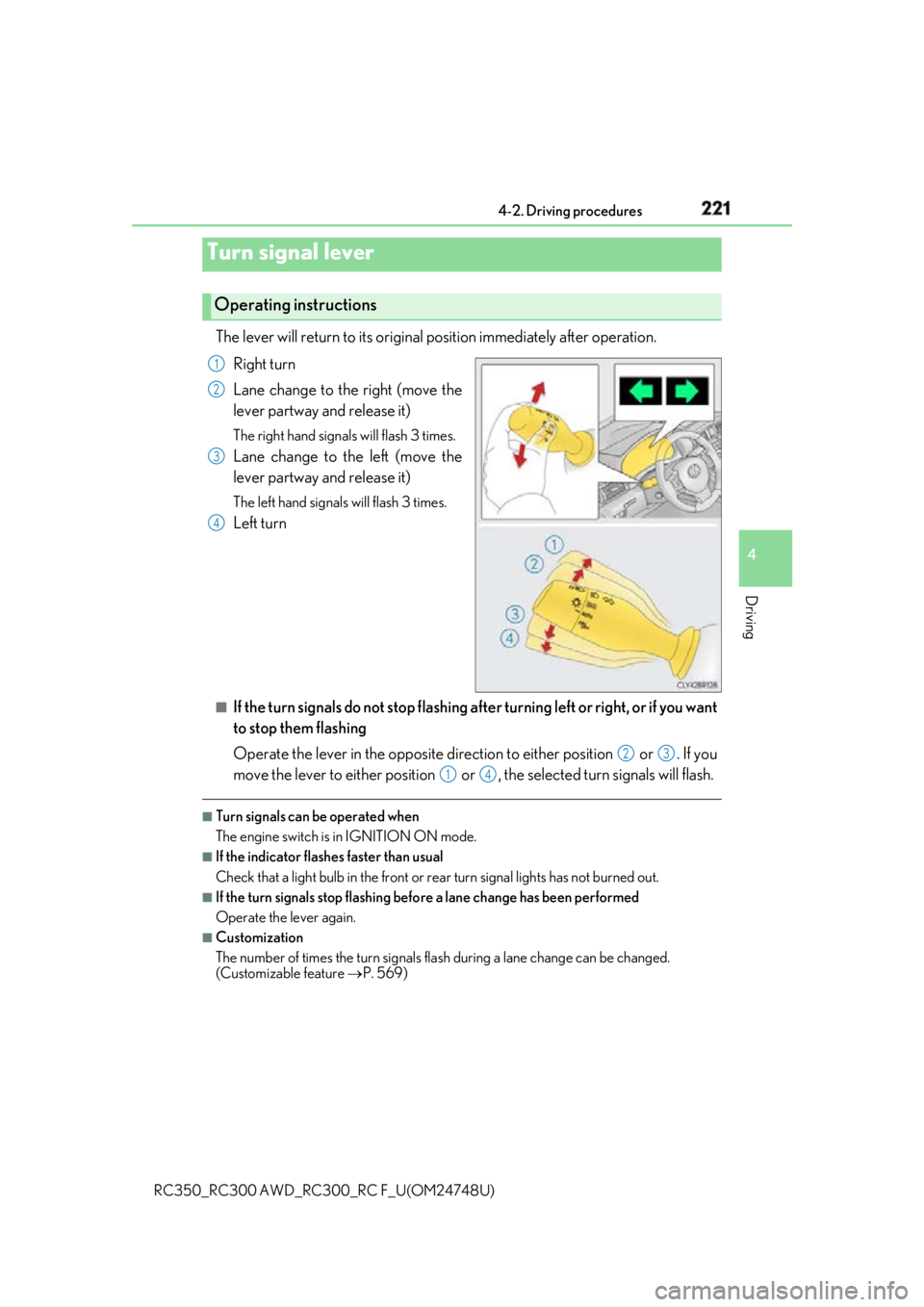
RC350_RC300 AWD_RC3 00_RC F_U(OM24748U)The lever will return to its original position immediately after operation.
Right turn
Lane change to the right (move the
lever partway and release it) The right hand signals will flash 3 times.
Lane change to the left (move the
lever partway and release it) The left hand signals will flash 3 times.
Left turn
■
If the turn signals do not stop flashing af ter turning left or right, or if you want
to stop them flashing
Operate the lever in the opposite direct ion to either position or . If you
move the lever to either position or , the selected turn signals will flash. ■
Turn signals can be operated when
The engine switch is in IGNITION ON mode. ■
If the indicator flashes faster than usual
Check that a light bulb in the front or rear turn signal lights has not burned out.■
If the turn signals stop flashing befo re a lane change has been performed
Operate the lever again. ■
Customization
The number of times the turn signals flas h during a lane change can be changed.
(Customizable feature P. 569)Turn signal lever Operating instructions 1
2
3
4
2 3
1 4
Page 230 of 636

230 4-3. Operating the lights and wipers
RC350_RC300 AWD_RC3 00_RC F_U(OM24748U)■
Conditions to turn the high beams on/off automatically●
When all of the following conditions are met, the high beams will be turned on automat-
ically (after approximately 1 second):
• The vehicle speed is approximately 21 mph (34 km/h) or more.
• The area ahead of the vehicle is dark.
• There are no vehicles ahead with headlights or tail lights turned on.
• There are few streetlights on the road ahead. ●
If any of the following condit ions is met, the high beams will turn off automatically:
• The vehicle speed is below ap proximately 17 mph (27 km/h).
• The area ahead of the vehicle is not dark.
• Vehicles ahead have th eir headlights or tail lights turned on.
• There are many streetlights on the road ahead. ■
Camera sensor detection information ●
The high beams may not be automatically turned off in the following situations:
• When a vehicle suddenly appears from around a curve
• When the vehicle is cut in front of by another vehicle
• When vehicles ahead cannot be detected du e to repeated curves , road dividers or
roadside trees
• When vehicles ahead appear in a faraway lane on a wide road
• When the lights of vehicles ahead are not on ●
The high beams may be turned off if a vehicl e ahead that is using fog lights without its
headlights turned on is detected. ●
House lights, street lights, traffic signals, and illuminated billboards or signs and other
reflective objects may cause the high beams to change to the low beams, or the low
beams to remain on. ●
The following factors may affect the amount of time taken for the high beams to turn on
or off:
• The brightness of the headlights, fog lights, and tail lights of vehicles ahead
• The movement and direction of vehicles ahead
• When a vehicle ahead only has operational lights on one side
• When a vehicle ahead is a two-wheeled vehicle
• The condition of the road (gradient, cu rve, condition of the road surface, etc.)
• The number of passengers and amount of luggage in the vehicle ●
The high beams may turn on or off unexpectedly.
Page 231 of 636

2314-3. Operating the lights and wipers
4
Driving
RC350_RC300 AWD_RC3 00_RC F_U(OM24748U)●
Bicycles or similar vehicles may not be detected. ●
In the following situations the system may not be able to correctly detect the surround-
ing brightness level. This may cause the lo w beams to remain on or the high beams to
flash or dazzle pedestrians or vehicles ahead. In such a case, it is necessary to manually
switch between the high and low beams.
• When driving in inclement weather (heavy ra in, snow, fog, sandstorms, etc.)
• When the windshield is obscured by fog, mist, ice, dirt, etc.
• When the windshield is cracked or damaged
• When the camera sensor is deformed or dirty
• When the temperature of the camera sensor is extremely high
• When the surrounding brightness level is equal to that of he adlights, tail lights or fog
lights
• When headlights or tail lights of vehicles ahead are turned off, dirty, changing color,
or not aimed properly
• When the vehicle is hit by water, snow, dust, etc. from a preceding vehicle
• When driving through an area of intermittently changi ng brightness and darkness
• When frequently and repeated ly driving ascendin g/descending roads, or roads with
rough, bumpy or uneven surfaces (such as stone-paved roads, gravel roads, etc.)
• When frequently and repeatedly taking curves or driving on a winding road
• When there is a highly reflective object ahea d of the vehicle, such as a sign or mirror
• When the back of a preceding vehicle is highly reflective, such as a container on a
truck
• When the vehicle's headlights are damaged or dirty, or are not aimed properly
• When the vehicle is listing or titling due to a flat tire, a trailer being towed, etc.
• When the headlights are changed between the high beams and low beams repeat-
edly in an abnormal manner
• When the driver believes that the high beams may be flashing or dazzling pedestri-
ans or other drivers■
Temporarily lowering sensor sensitivity
The sensitivity of the sensor can be temporarily lowered.
Turn the engine switch off while the following conditions are met.
• The headlight switch is in or .
• The headlight switch lever is in high beam position.
• Automatic High Beam switch is on.
Turn the engine switch to IGNITION ON mode.
Within 30 seconds after , re peat pulling the he adlight switch lever to the original
position then pushing it to the high beam position quickly 10 times, then leave the lever
in high beam position.
If the sensitivity is changed, the Automatic High Beam indicator is turn on and off 3
times.
Automatic High Beam (head lights) may turn on even the vehicle is stopped.1
2
3 2
4
Page 254 of 636
254 4-5. Using the driving support systems
RC350_RC300 AWD_RC3 00_RC F_U(OM24748U)■
Enabling/disabling the pre-collision system
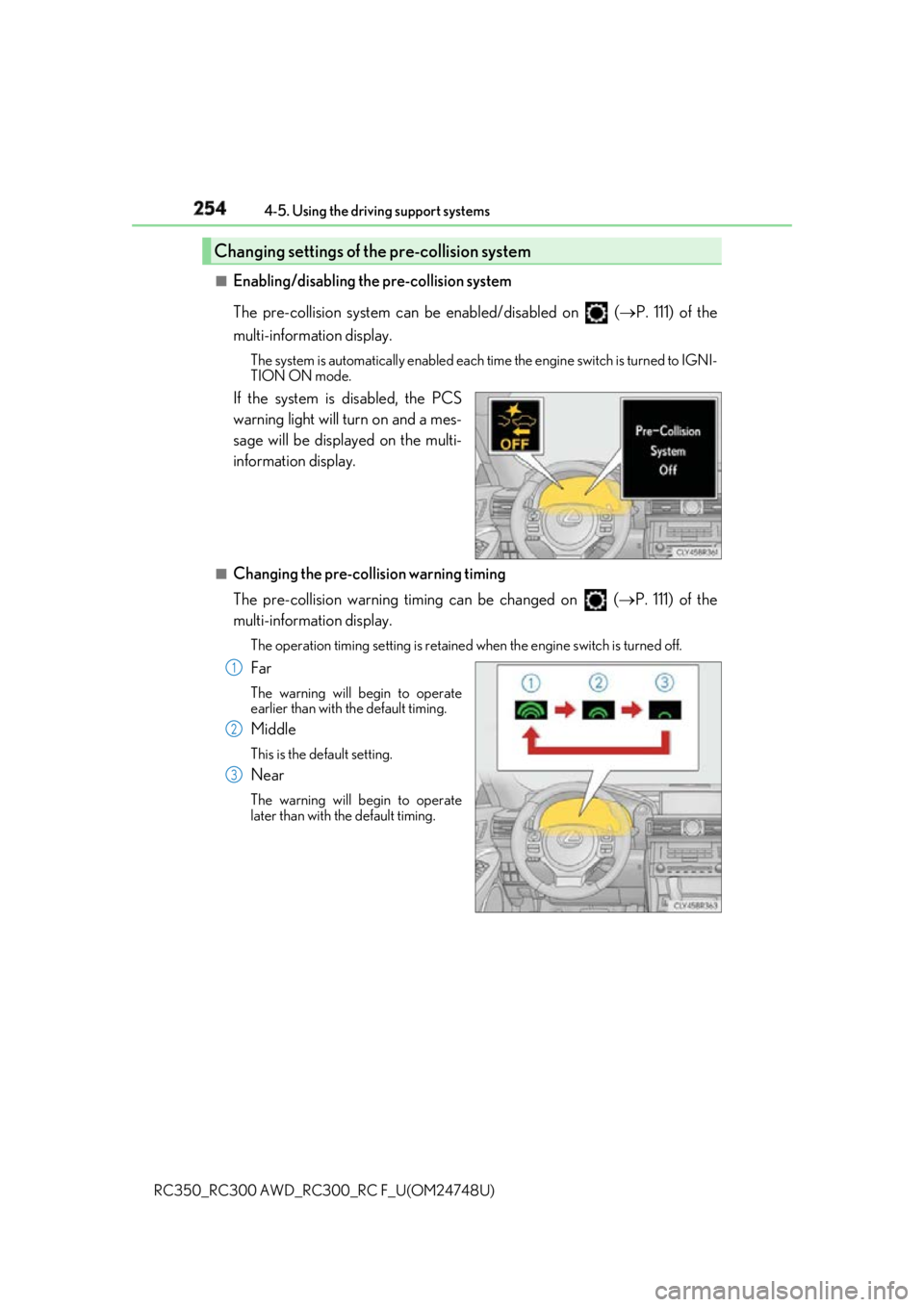
The pre-collision system can be enabled/disabled on ( P. 111) of the
multi-information display. The system is automatically enabled each time the engine switch is turned to IGNI-
TION ON mode.
If the system is disabled, the PCS
warning light will turn on and a mes-
sage will be displayed on the multi-
information display. ■
Changing the pre-collision warning timing
The pre-collision warning timing can be changed on ( P. 111) of the
multi-information display. The operation timing setting is retained when the engi ne switch is turned off.
Far The warning will begin to operate
earlier than with the default timing.
Middle This is the default setting.
Near The warning will begin to operate
later than with the default timing.Changing settings of the pre-collision system
1
2
3
Page 271 of 636
2714-5. Using the driving support systems
4
Driving
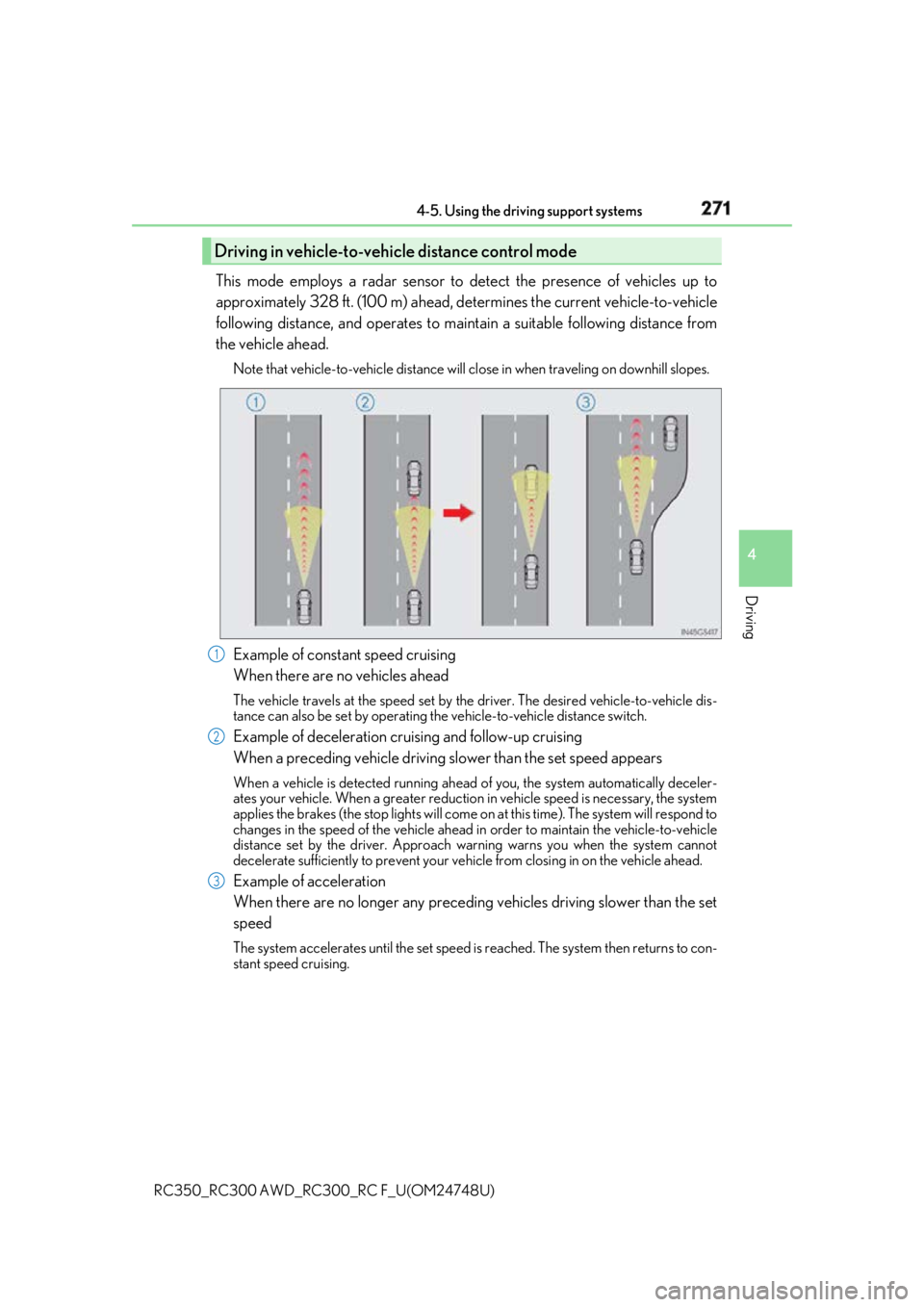
RC350_RC300 AWD_RC3 00_RC F_U(OM24748U)This mode employs a radar sensor to detect the presence of vehicles up to
approximately 328 ft. (100 m) ahead, de termines the current vehicle-to-vehicle
following distance, and operates to main tain a suitable following distance from
the vehicle ahead. Note that vehicle-to-vehicle distance will cl ose in when traveling on downhill slopes.
Example of constant speed cruising
When there are no vehicles ahead The vehicle travels at the speed set by the driver. The desired vehicle-to-vehicle dis-
tance can also be set by operating the vehicle-to-vehicle distance switch.
Example of deceleration cruising and follow-up cruising
When a preceding vehicle driving sl ower than the set speed appearsWhen a vehicle is detected running ahead of you, the system automatically deceler-
ates your vehicle. When a greater reduction in vehicle speed is necessary, the system
applies the brakes (the stop lights will come on at this time). Th e system will respond to
changes in the speed of the vehicle ahead in order to maintain the vehicle-to-vehicle
distance set by the driver. Approach warning warns you when the system cannot
decelerate sufficie ntly to prevent your vehicle from closing in on the vehicle ahead.
Example of acceleration
When there are no longer any preceding vehicles driving slower than the set
speed The system accelerates until the set speed is reached. The system then returns to con-
stant speed cruising.Driving in vehicle-to-vehicle distance control mode
1
2
3
Page 273 of 636
2734-5. Using the driving support systems
4
Driving
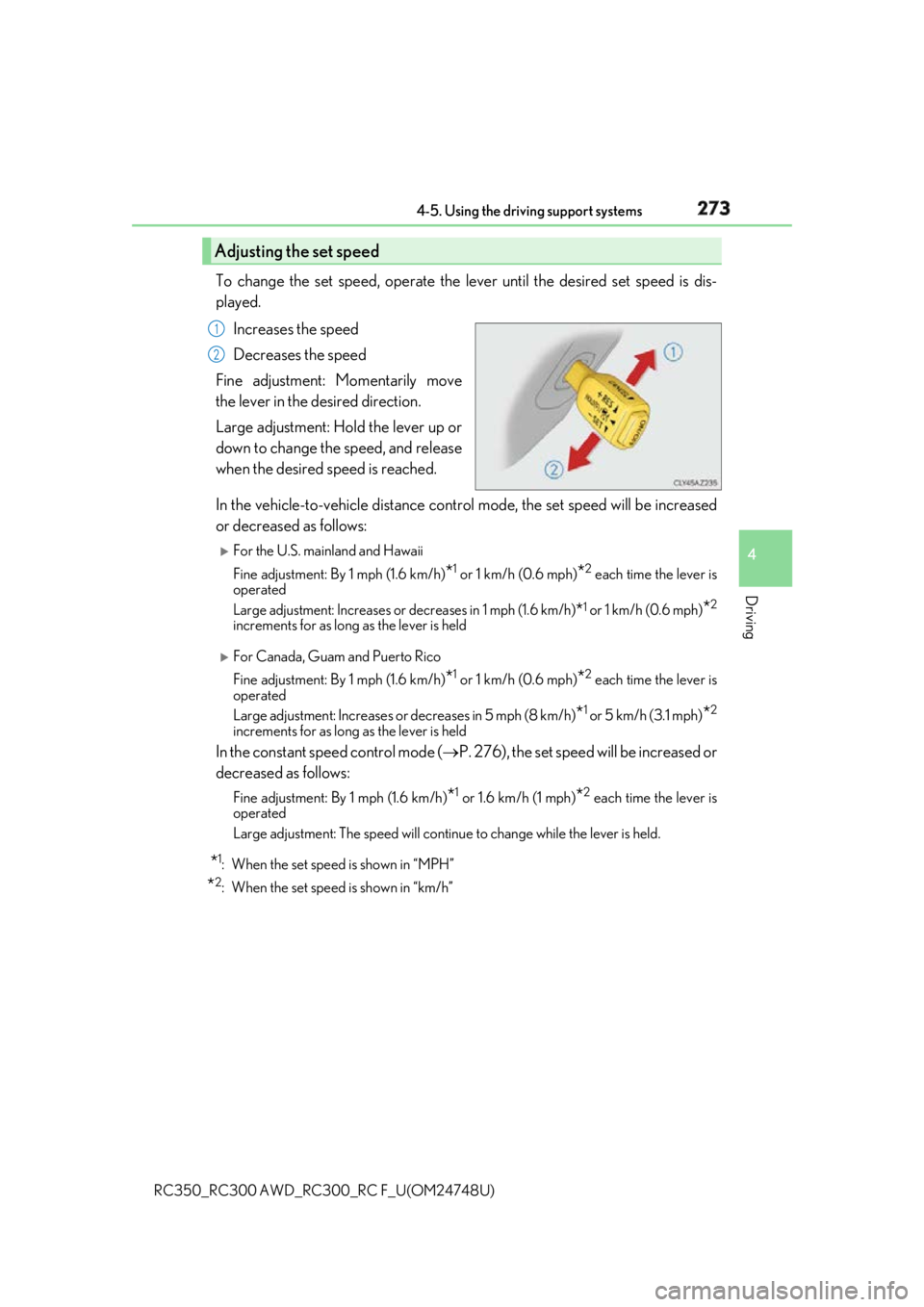
RC350_RC300 AWD_RC3 00_RC F_U(OM24748U)To change the set speed, operate the lever until the desired set speed is dis-
played.
Increases the speed
Decreases the speed
Fine adjustment: Momentarily move
the lever in the desired direction.
Large adjustment: Hold the lever up or
down to change the speed, and release
when the desired speed is reached.
In the vehicle-to-vehicle distance cont rol mode, the set speed will be increased
or decreased as follows:
For the U.S. mainland and Hawaii
Fine adjustment: By 1 mph (1.6 km/h)
* 1
or 1 km/h (0.6 mph)
* 2
each time the lever is
operated
Large adjustment: Increases or decreases in 1 mph (1.6 km/h )
* 1
or 1 km/h (0.6 mph)
* 2
increments for as long as the lever is held
For Canada, Guam and Puerto Rico
Fine adjustment: By 1 mph (1.6 km/h)
* 1
or 1 km/h (0.6 mph)
* 2
each time the lever is
operated
Large adjustment: Increases or decreases in 5 mph (8 km/h)
* 1
or 5 km/h (3.1 mph)
* 2
increments for as long as the lever is held
In the constant speed control mode ( P. 276), the set speed will be increased or
decreased as follows: Fine adjustment: By 1 mph (1.6 km/h)
* 1
or 1.6 km/h (1 mph)
* 2
each time the lever is
operated
Large adjustment: The speed will continue to change while the lever is held.
* 1
: When the set speed is shown in “MPH”
* 2
: When the set speed is shown in “km/h”Adjusting the set speed 1
2
Page 302 of 636
302 4-5. Using the driving support systems
RC350_RC300 AWD_RC3 00_RC F_U(OM24748U)
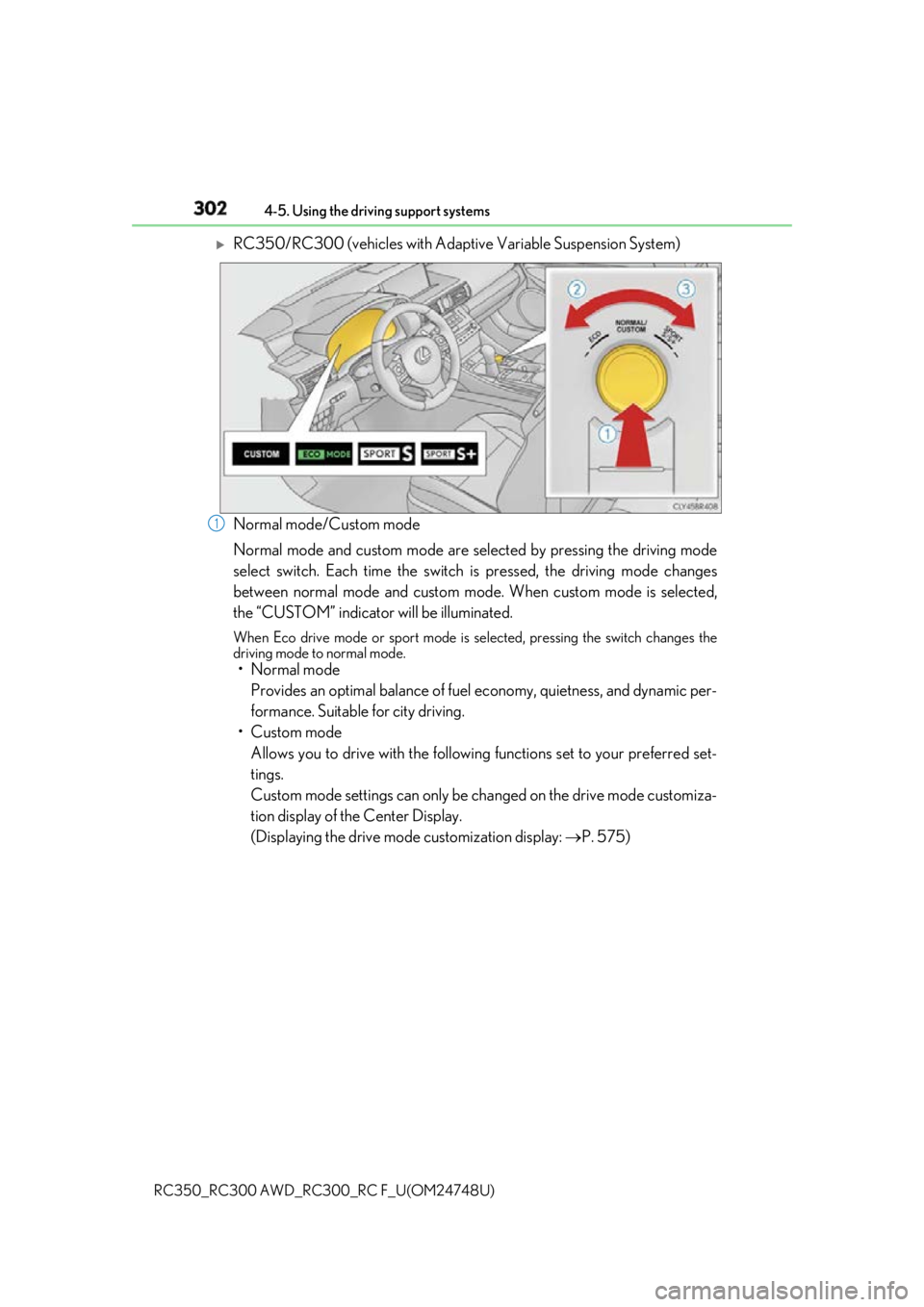
RC350/RC300 (vehicles with Adaptive Variable Suspension System)
Normal mode/Custom mode
Normal mode and custom mode are se lected by pressing the driving mode
select switch. Each time the switch is pressed, the driving mode changes
between normal mode and custom mode . When custom mode is selected,
the “CUSTOM” indicator will be illuminated. When Eco drive mode or sport mode is se lected, pressing the switch changes the
driving mode to normal mode.
• Normal mode
Provides an optimal balance of fuel economy, quietness, and dynamic per-
formance. Suitable for city driving.
• Custom mode
Allows you to drive with the following functions set to your preferred set-
tings.
Custom mode settings can only be ch anged on the drive mode customiza-
tion display of the Center Display.
(Displaying the drive mode customization display: P. 575)1