door lock LEXUS RCF 2018 User Guide
[x] Cancel search | Manufacturer: LEXUS, Model Year: 2018, Model line: RCF, Model: LEXUS RCF 2018Pages: 636, PDF Size: 6.88 MB
Page 146 of 636

146 3-2. Opening, closing and locking the doors and trunk
RC350_RC300 AWD_RC3 00_RC F_U(OM24748U)■
Operation signals
A buzzer sounds and the emergency flashers flash to indicate that the doors have been
locked/unlocked. (Locked: once; Unlocked: twice)
A buzzer sounds to indicate that th e windows and moon roof are operating.■
Security feature
If a door is not opened within approximately 60 seconds after the vehicle is unlocked, the
security feature automatically locks the vehicle again. ■
Welcome light illumination control
The side marker, parking, tail and license plate lights automati cally turn on at night when
the doors are unlocked using the entry function or wireless remote control if the light
switch is in the “AUTO” position. ■
When the door cannot be locked by the lock sensor on the surface of the door handle
■
Door lock buzzer
If an attempt to lock the doors is made when a door is not fully closed, a buzzer sounds
continuously for 5 seconds. Fully close the d oor to stop the buzzer, and lock the vehicle
once more. ■
Setting the alarm
Locking the doors will set the alarm system. ( P. 80)■
If the smart access system with push-button start or the wireless remote control does
not operate properly
Use the mechanical key and/or inside lock buttons to lock and unlock the doors.
( P. 518)
Replace the key battery with a new one if it is depleted. ( P. 427)Use your palm to touch the lock sensor.
Page 147 of 636
1473-2. Opening, closing and locking the doors and trunk
3
Operation of each component
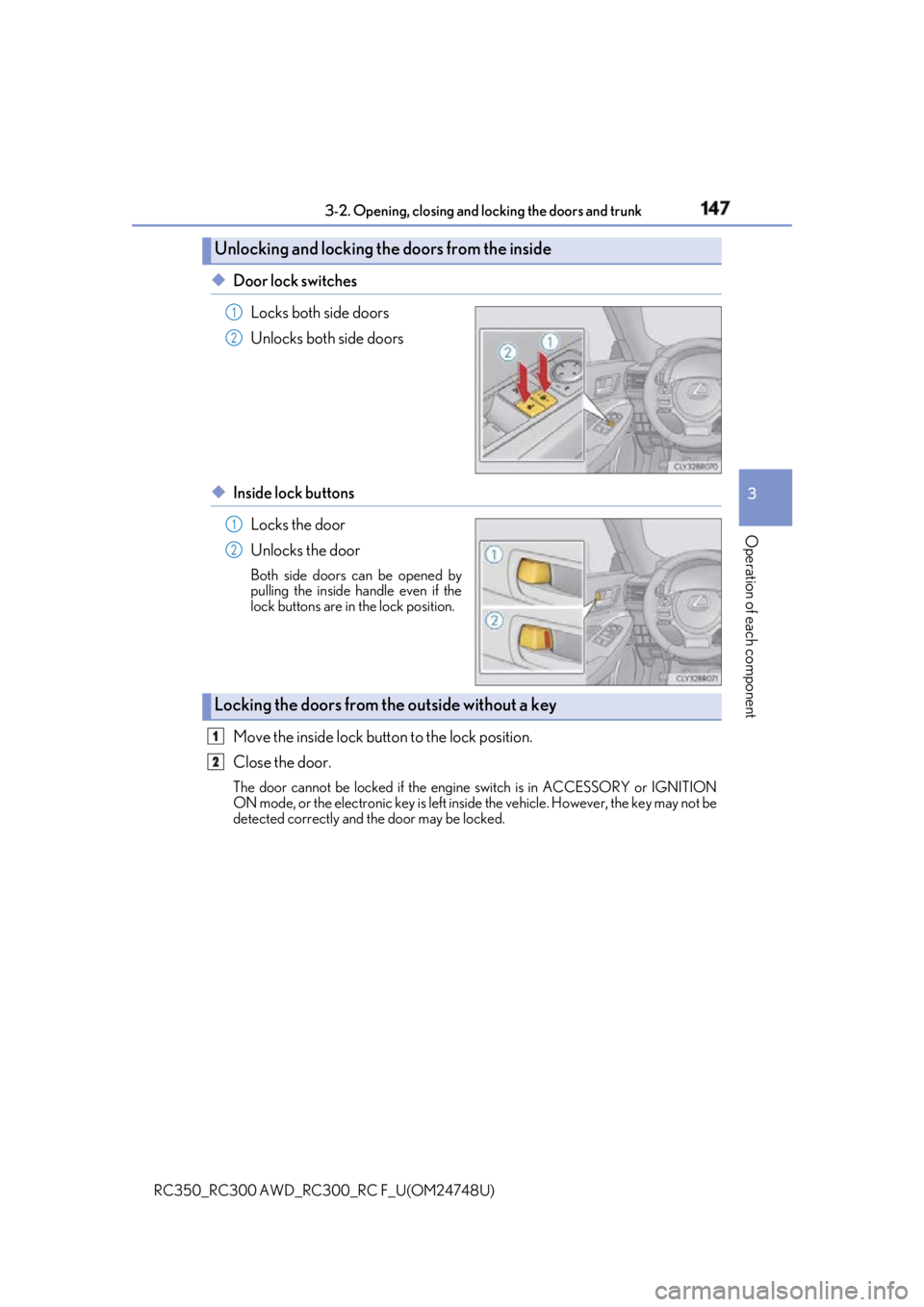
RC350_RC300 AWD_RC3 00_RC F_U(OM24748U)◆ Door lock switches
Locks both side doors
Unlocks both side doors
◆ Inside lock buttons
Locks the door
Unlocks the door Both side doors can be opened by
pulling the inside handle even if the
lock buttons are in the lock position.
Move the inside lock button to the lock position.
Close the door. The door cannot be locked if the engine switch is in ACCESSORY or IGNITION
ON mode, or the electronic key is left insi de the vehicle. However, the key may not be
detected correctly and the door may be locked.Unlocking and locking the doors from the inside 1
2
1
2
Locking the doors from the outside without a key 1
2
Page 148 of 636
148 3-2. Opening, closing and locking the doors and trunk
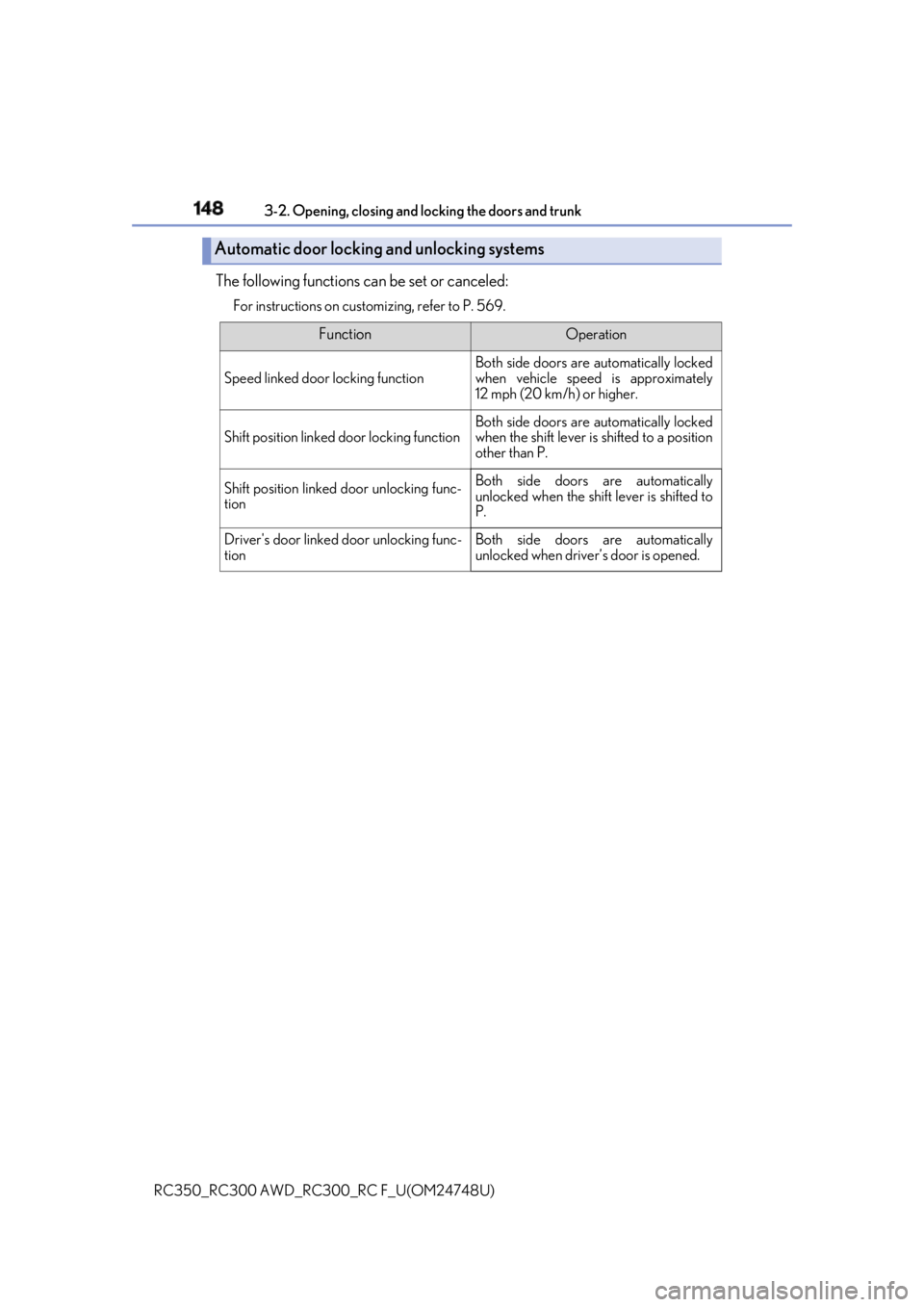
RC350_RC300 AWD_RC3 00_RC F_U(OM24748U)The following functions can be set or canceled: For instructions on custom izing, refer to P. 569.
Automatic door locking and unlocking systems Function Operation
Speed linked door locking function Both side doors are automatically locked
when vehicle speed is approximately
12 mph (20 km/h) or higher.
Shift position linked door locking function Both side doors are automatically locked
when the shift lever is shifted to a position
other than P.
Shift position linked door unlocking func-
tion Both side doors are automatically
unlocked when the shift lever is shifted to
P.
Driver's door linked door unlocking func-
tion Both side doors are automatically
unlocked when driver’s door is opened.
Page 149 of 636

1493-2. Opening, closing and locking the doors and trunk
3
Operation of each component
RC350_RC300 AWD_RC3 00_RC F_U(OM24748U)■
Side window open/close function linked to door operation
When a door is opened, its window opens s lightly. When a door is closed, its window
closes completely. ■
Switching the door unlock function
It is possible to set which doors the entry function unlock s using the wireless remote con-
trol.
Turn the engine switch off.
When the indicator light on the key surface is not on, press and hold , or
for approximately 5 seconds while pressing and holding .
The setting changes each time an operation is performed, as shown below. (When
changing the setting continuously, release the buttons, wait for at least 5 seconds, and
repeat step .)
To prevent unintended triggering of the alarm, unlock the doors using the wireless
remote control and open and close a door once after the settings have been changed. (If
a door is not opened within 60 seconds af ter is pressed, the doors will be locked
again and the alarm will automatically be set.)
In a case that the alarm is triggered, immediately stop the alarm. ( P. 80)■
Impact detection door lock release system
In the event that the vehicle is subject to a strong impact, both side doors are unlocked.
Depending on the force of the impact or the type of accident, however, the system may
not operate. ■
Using the mechanical key
The doors can also be unlocked with the mechanical key. ( P. 518)■
Conditions affecting the oper ation of the smart access sy stem with push-button start
or wireless remote control
P. 158 ■
Customization
Settings (e.g. unlocking function using a key) can be changed.
(Customizable features: P. 569) 1
2
2
Multi-information
display Unlocking function Beep
Holding the driver’s door handle
unlocks only the driver’s door.
Exterior: Beeps 3 times
Interior: Pings once
Holding the passenger’s door
handle unlocks both side doors.
Holding either door handle
unlocks both side doors. Exterior: Beeps twice
Interior: Pings once
Page 150 of 636

150 3-2. Opening, closing and locking the doors and trunk
RC350_RC300 AWD_RC3 00_RC F_U(OM24748U)WARNING ■
To prevent an accident
Observe the following precautions while driving the vehicle.
Failure to do so may result in a door open ing and an occupant being thrown out of the
vehicle, resulting in death or serious injury. ●
Ensure that both side doors ar e properly closed and locked.●
Do not pull the inside handle of the doors while driving.
The doors may be opened even if the inside lock buttons are in locked position. ■
Side window open/close function linked to door operation
Do not hold the upper edge of the side window when you close the door. Otherwise,
your fingers or hand may be caught in the window.
Page 151 of 636
1513-2. Opening, closing and locking the doors and trunk
3
Operation of each component
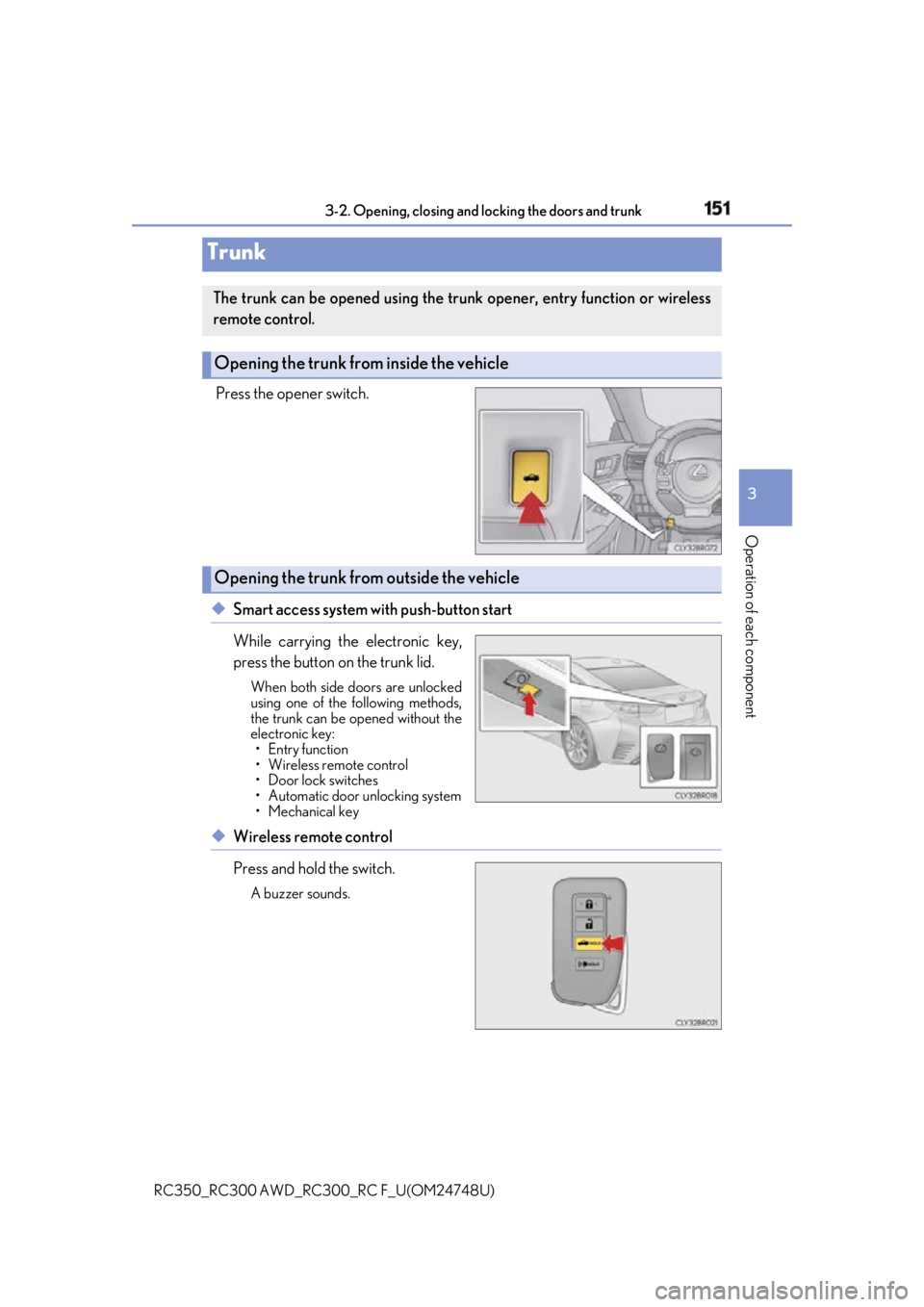
RC350_RC300 AWD_RC3 00_RC F_U(OM24748U)Press the opener switch.
◆ Smart access system with push-button start
While carrying the electronic key,
press the button on the trunk lid. When both side doors are unlocked
using one of the following methods,
the trunk can be opened without the
electronic key:
• Entry function
• Wireless remote control
• Door lock switches
• Automatic door unlocking system
• Mechanical key
◆ Wireless remote control
Press and hold the switch. A buzzer sounds.Trunk The trunk can be opened using the trunk opener, entry function or wireless
remote control.
Opening the trunk from inside the vehicle
Opening the trunk from outside the vehicle
Page 152 of 636
152 3-2. Opening, closing and locking the doors and trunk
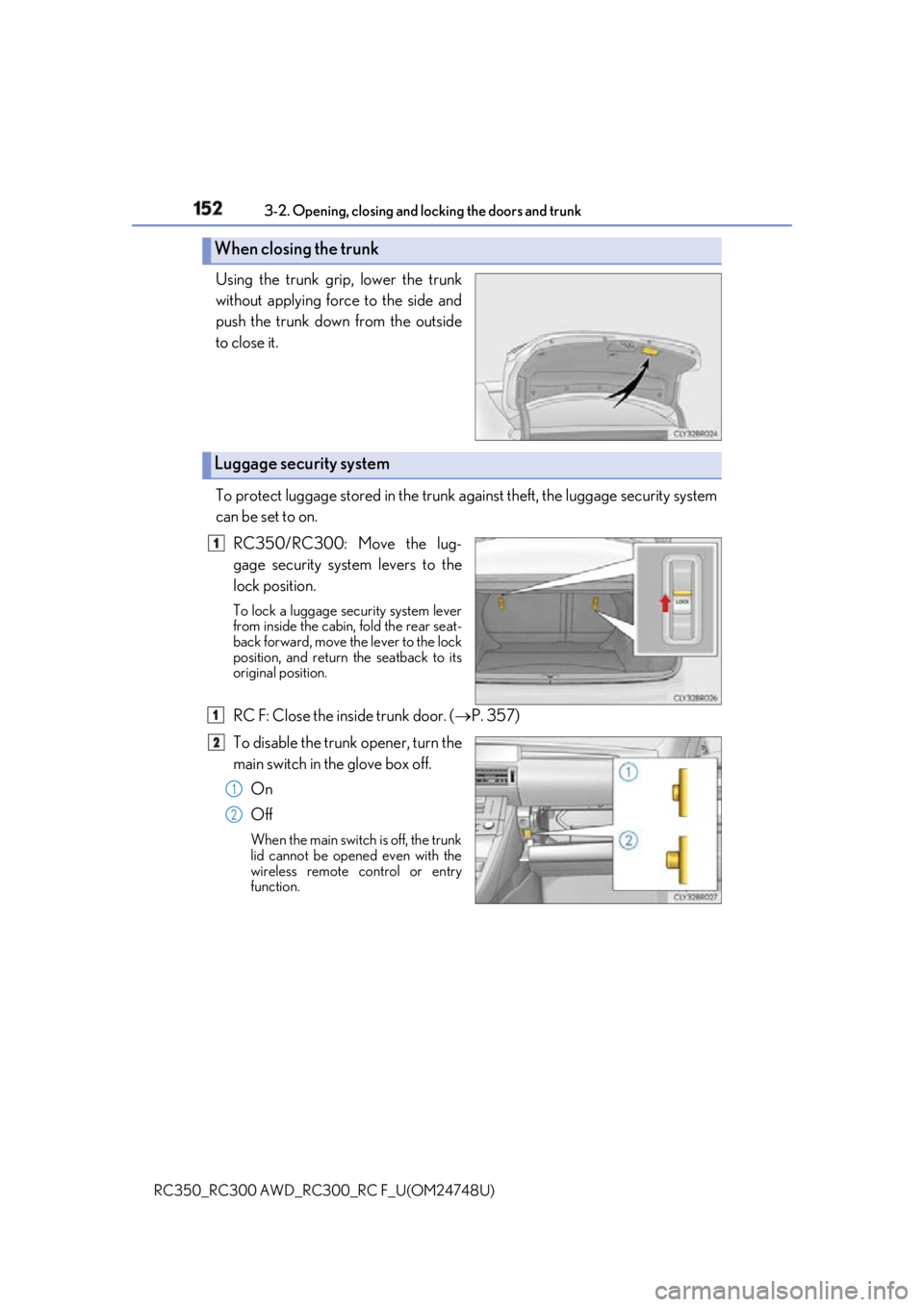
RC350_RC300 AWD_RC3 00_RC F_U(OM24748U)Using the trunk grip, lower the trunk
without applying force to the side and
push the trunk down from the outside
to close it.
To protect luggage stored in the trunk ag ainst theft, the luggage security system
can be set to on.
RC350/RC300: Move the lug-
gage security system levers to the
lock position. To lock a luggage security system lever
from inside the cabin, fold the rear seat-
back forward, move the lever to the lock
position, and return the seatback to its
original position.
RC F: Close the inside trunk door. ( P. 357)
To disable the trunk opener, turn the
main switch in the glove box off.
On
Off When the main switch is off, the trunk
lid cannot be opened even with the
wireless remote co ntrol or entry
function.When closing the trunk
Luggage security system 1
1
2
1
2
Page 153 of 636
1533-2. Opening, closing and locking the doors and trunk
3
Operation of each component
RC350_RC300 AWD_RC3 00_RC F_U(OM24748U)■
Trunk light ●
The trunk light turns on when the trunk is opened. ●
If the trunk light is left on when the engine sw itch is turned off, the light will go off auto-
matically after 20 minutes. ■
Function to prevent the trunk being lo cked with the electronic key inside ●
When both side doors are locked, closing the trunk lid with the electronic key left inside
the trunk will sound an alarm.
In this case, the trunk lid can be opened by pressing the trunk release button on the
trunk lid. ●
If the spare electronic key is put in the trunk with both side doors locked, the key con-
finement prevention function is activated so the trunk can be opened. In order to pre-
vent theft, take all el ectronic keys with you when leaving the vehicle.●
If the electronic key is put in the trunk with both side doors locked, the key may not be
detected depending on the location of the key and the surrounding radio wave condi-
tions. In this case, the key confinement prev ention function cannot be activated, causing
the doors to lock when the trunk is closed. Make sure to check where the key is before
closing the trunk. ●
The key confinement prevention function cannot be activated if either door is unlocked.
In this case, open the trunk using the trunk opener. ■
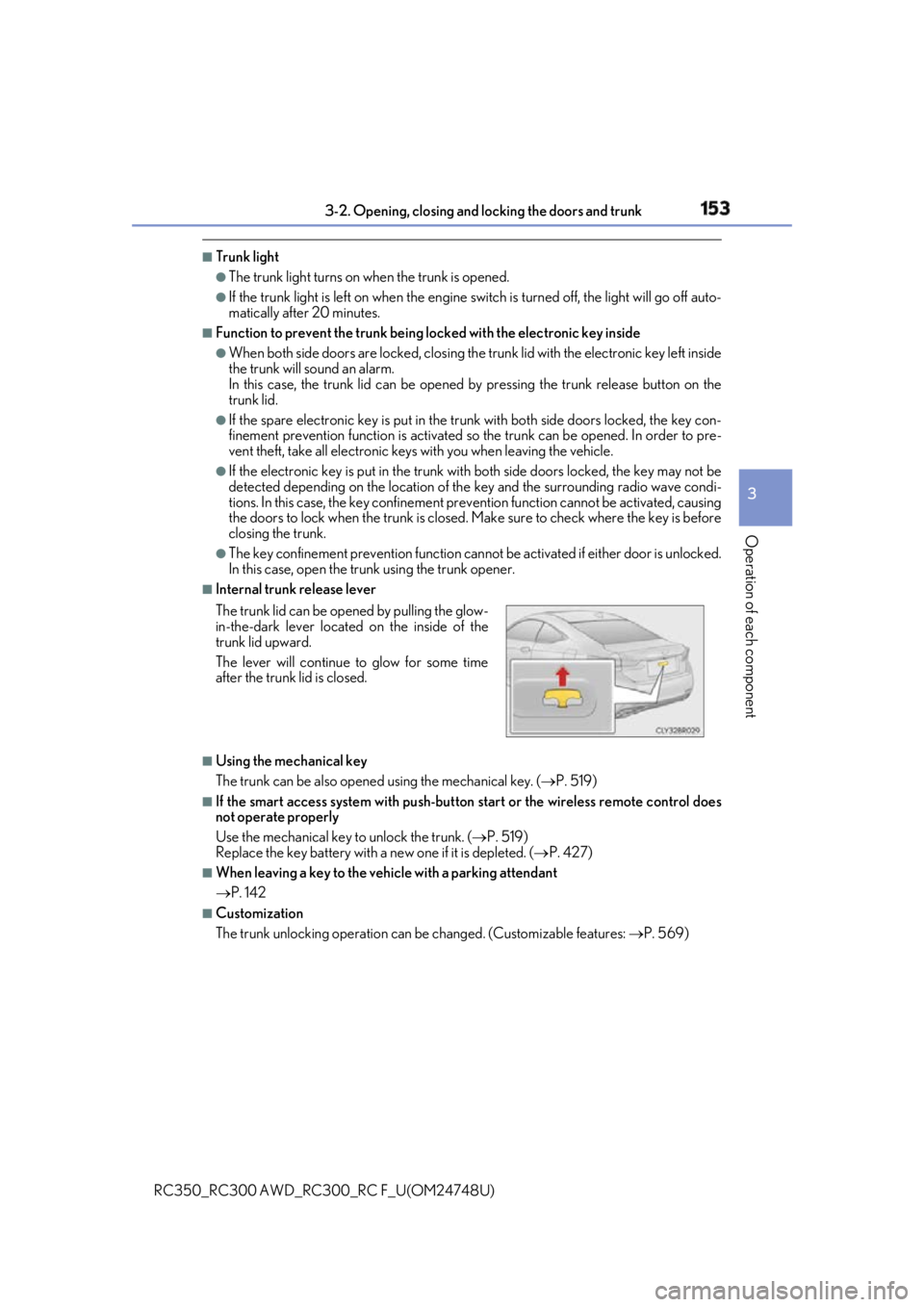
Internal trunk release lever
■
Using the mechanical key
The trunk can be also opened using the mechanical key. ( P. 519)■
If the smart access system with push-button start or the wireless remote control does
not operate properly
Use the mechanical key to unlock the trunk. ( P. 519)
Replace the key battery with a new one if it is depleted. ( P. 427)■
When leaving a key to the vehicle with a parking attendant
P. 142 ■
Customization
The trunk unlocking operation can be changed. (Customizable features: P. 569)The trunk lid can be open ed by pulling the glow-
in-the-dark lever located on the inside of the
trunk lid upward.
The lever will continue to glow for some time
after the trunk lid is closed.
Page 154 of 636

154 3-2. Opening, closing and locking the doors and trunk
RC350_RC300 AWD_RC3 00_RC F_U(OM24748U)WARNING
Observe the following precautions.
Failure to do so may result in death or serious injury. ■
Before driving ●
Make sure that the trunk lid is fully closed. If the trunk lid is not fully closed, it may
open unexpectedly while driv ing and hit near-by objects or luggage in the trunk may
be thrown out, causing an accident. ●
Do not allow children to play in the trunk.
If a child is accidentally locked in the trun k, they could suffer from heat exhaustion,
suffocation or other injuries. ●
Do not allow a child to open or close the trunk lid.
Doing so may cause the trunk lid to open unexpectedly, or cause the child’s hands,
head, or neck to be caught by the closing trunk lid. ■
Important points while driving
Never let anyone sit in the trunk. In the even t of sudden braking or a collision, they are
susceptible to death or serious injury.
Page 155 of 636
1553-2. Opening, closing and locking the doors and trunk
3
Operation of each component
RC350_RC300 AWD_RC3 00_RC F_U(OM24748U)WARNING ■
Using the trunk
Observe the following precautions.
Failure to do so may cause parts of the body to be caught, resulting in serious injury.●
Remove any heavy loads, such as snow and ice, from the trunk lid before opening it.
Failure to do so may cause the trunk lid to suddenly shut again after it is opened.●
When opening or closing the trunk lid, thoroughly check to make sure the surround-
ing area is safe. ●
If anyone is in the vicinity, make sure they are safe and let them know that the trunk is
about to open or close. ●
Use caution when opening or closing the tr unk lid in windy weather as it may move
abruptly in strong wind. ●
On an incline it is more difficult to open or close the trunk lid th an on a level surface,
so beware of the trunk lid un expectedly opening or closin g by itself. Make sure that
the trunk lid is fully open and secure before using the trunk.
●
Do not attach any accessories other than genuine Lexus parts to the trunk lid. Such
additional weight on the trunk lid may cause the lid to suddenly shut again after it is
opened. ●
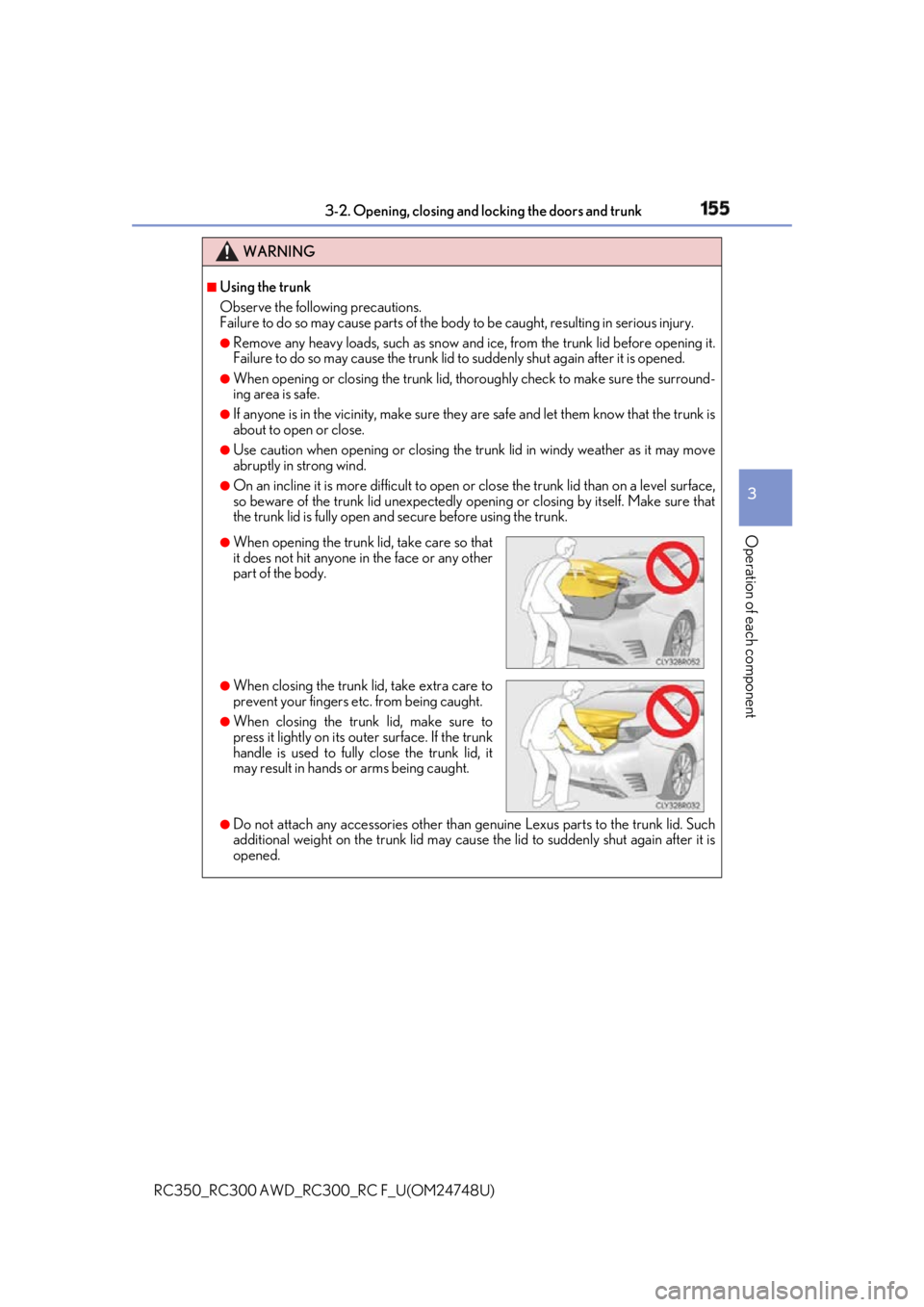
When opening the trunk lid, take care so that
it does not hit anyone in the face or any other
part of the body.
●
When closing the trunk li d, take extra care to
prevent your fingers etc. from being caught. ●
When closing the trunk lid, make sure to
press it lightly on its outer surface. If the trunk
handle is used to fully close the trunk lid, it
may result in hands or arms being caught.