instrument cluster LEXUS RCF 2019 Workshop Manual
[x] Cancel search | Manufacturer: LEXUS, Model Year: 2019, Model line: RCF, Model: LEXUS RCF 2019Pages: 636, PDF Size: 12.48 MB
Page 131 of 636
1312. Instrument cluster
2
Instrument cluster
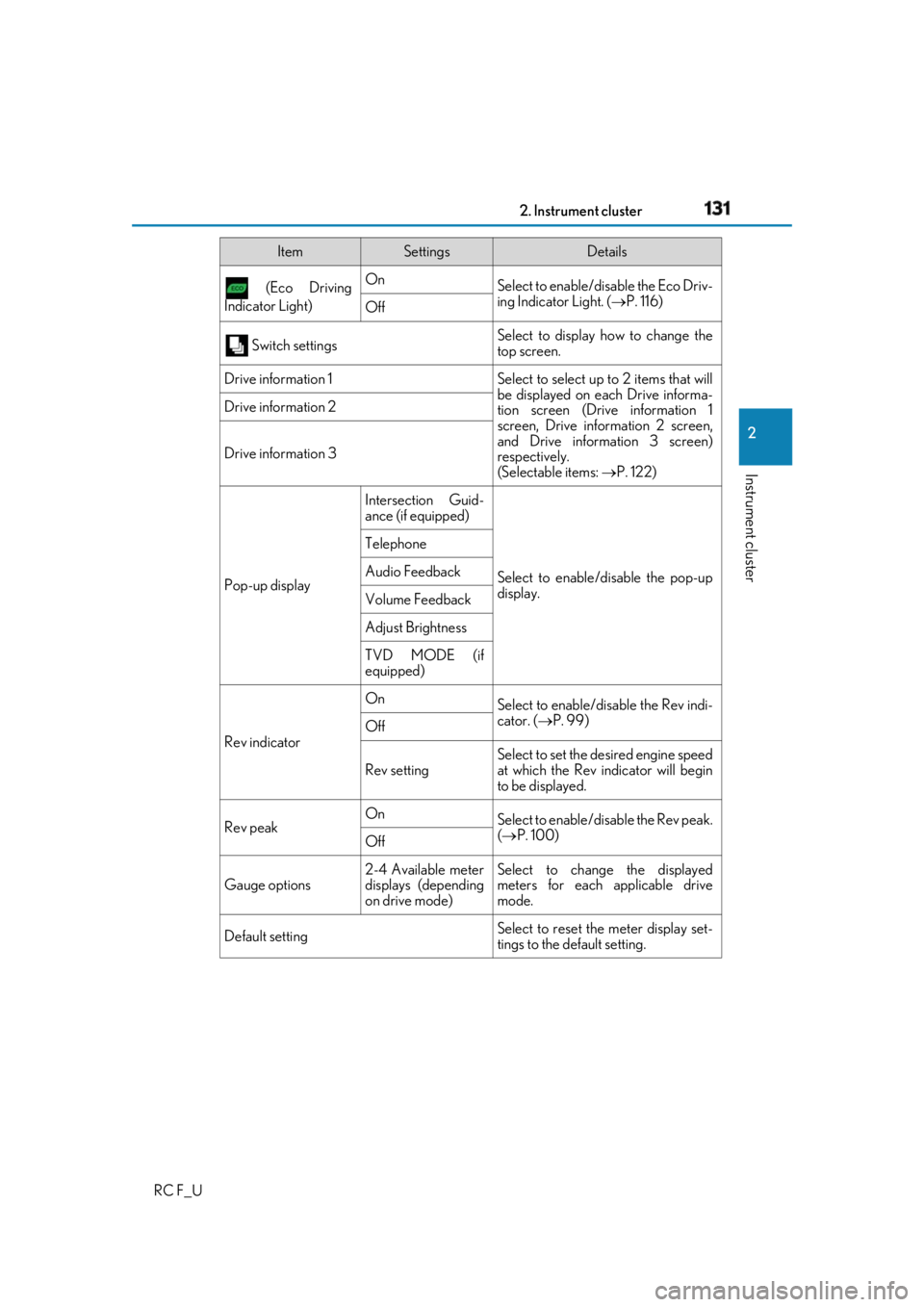
RC F_U (Eco Driving
Indicator Light) On
Select to enable/dis able the Eco Driv-
ing Indicator Light. ( P. 116)
Off
Switch settings Select to display how to change the
top screen.
Drive information 1 Select to select up to 2 items that will
be displayed on ea ch Drive informa-
tion screen (Drive information 1
screen, Drive information 2 screen,
and Drive inform ation 3 screen)
respectively.
(Selectable items: P. 122)Drive information 2
Drive information 3
Pop-up display Intersection Guid-
ance (if equipped)
Select to enable/disable the pop-up
display.Telephone
Audio Feedback
Volume Feedback
Adjust Brightness
TVD MODE (if
equipped)
Rev indicator On
Select to enable/disable the Rev indi-
cator. ( P. 99)
Off
Rev setting Select to set the desired engine speed
at which the Rev indicator will begin
to be displayed.
Rev peak On
Select to enable/disable the Rev peak.
( P. 100)
Off
Gauge options 2-4 Available meter
displays (depending
on drive mode) Select to change the displayed
meters for each applicable drive
mode.
Default setting Select to reset the meter display set-
tings to the default setting.Item Settings Details
Page 132 of 636
132 2. Instrument cluster
RC F_U ■
Odometer
Displays the total distance the vehicle has been driven. ■
Trip meter A/trip meter B
Displays the distance the vehicle has been driven since the meter was last
reset. Trip meters A and B can be used to record and display different dis-
tances independently. To reset, display the desired trip meter and press and hold the odometer/trip meter
and trip meter reset button.■
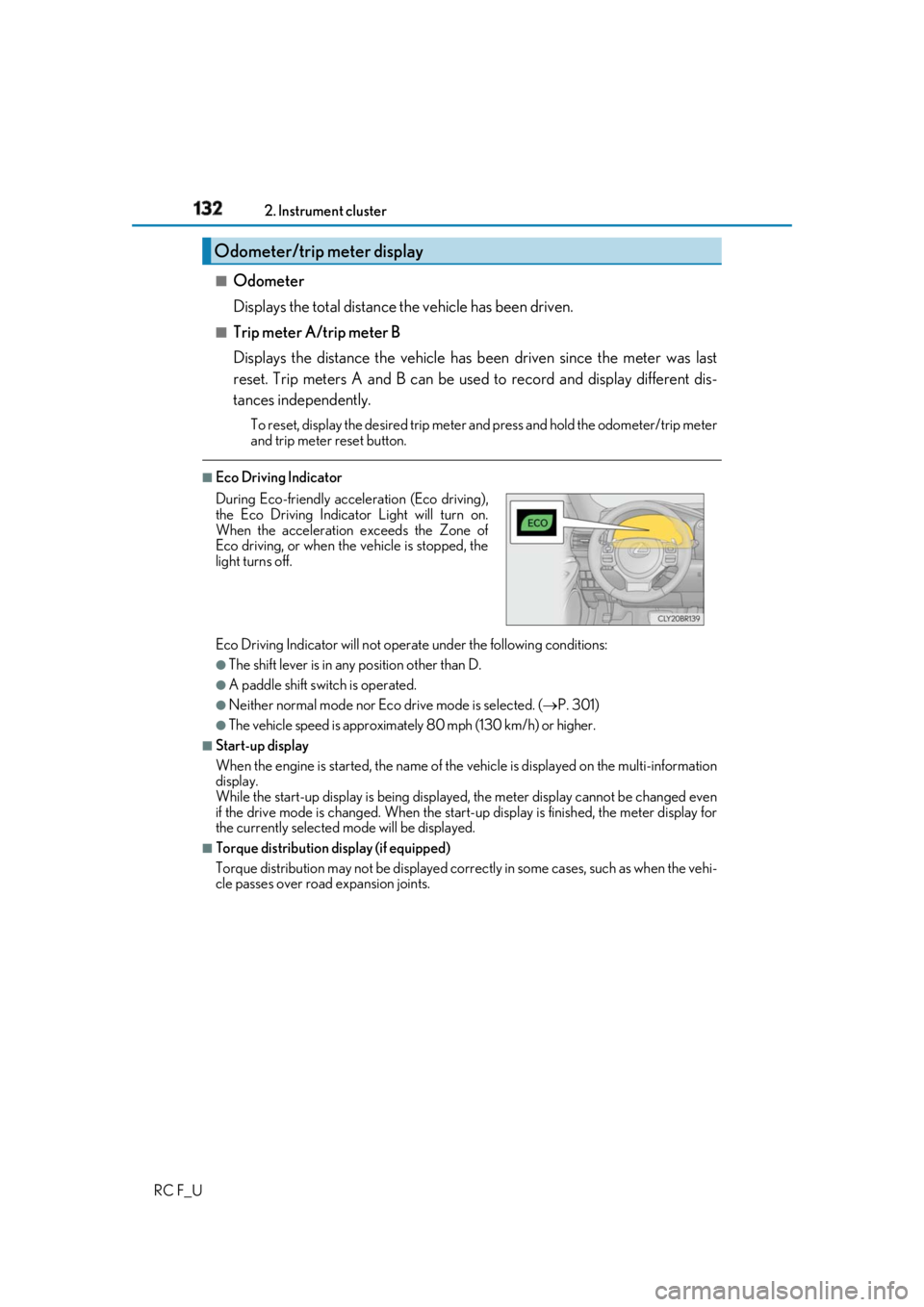
Eco Driving Indicator
Eco Driving Indicator will not operate under the following conditions: ●
The shift lever is in any position other than D. ●
A paddle shift swit ch is operated.●
Neither normal mode nor Eco drive mode is selected. ( P. 301)●
The vehicle speed is approximatel y 80 mph (130 km/h) or higher.■
Start-up display
When the engine is started, the name of the vehicle is displayed on the multi-information
display.
While the start-up display is being displaye d, the meter display cannot be changed even
if the drive mode is changed. When the start- up display is finished, the meter display for
the currently selected mode will be displayed.■
Torque distribution display (if equipped)
Torque distribution may not be displayed correctly in some ca ses, such as when the vehi-
cle passes over road expansion joints.Odometer/trip meter display
During Eco-friendly acceleration (Eco driving),
the Eco Driving Indicator Light will turn on.
When the acceleration exceeds the Zone of
Eco driving, or when the vehicle is stopped, the
light turns off.
Page 133 of 636
1332. Instrument cluster
2
Instrument cluster
RC F_U ■
G-force display ●
The G-force values may not be zero even when the vehicle is parked, such as when it is
parked on an incline. ●
The steering amount, accelerator pedal input, and brake fluid pressure displays are dis-
abled until the engine has warmed up (the variable red zone of the tachometer has
retracted to 7300 rpm).
After the engine has warmed up, these displays will be enabled. ●
Depending on the vehicle usage conditions, the brake fluid pressure display may not
reach its maximum reading even though the brake pedal is fully depressed. ●
If a battery terminal is disconnected and reconnected, the steering amount display may
be disabled temporarily. Afte r driving the vehicle for a while , the display will be enabled.■
Suspension of the settings display
In the following situations, op eration of the settings disp lay will be temporarily sus-
pended. ●
When a warning message appears on the multi-information display●
When the vehicle begins to move ■
Tire pressure ●
It may take a few minutes to display the tire inflation pressure after the engine switch is
turned to IGNITION ON mode. It may also take a few minutes to display the tire infla-
tion pressure after inflation pressure has been adjusted.●
“---” may be displayed if the tire position information cannot be determined due to
unfavorable radio wave conditions. ●
Tire inflation pressure changes with temperat ure. The displayed values may also be dif-
ferent from the values measured using a tire pressure gauge. ■
When disconnecting and reco nnecting battery terminals
The following information data will be reset: ●
Drive information ●
Lap timer: Measured lap times, history ●
G-force: Record of the maximum G-forces■
Using the lap timer
If the engine is stopped while a lap is being timed, the lap timer will stop and the lap time
up to that point will be recorded. ■
Liquid crystal display
Small spots or light spots may appear on the display. This phenomenon is characteristic
of liquid crystal displays, and there is no problem continuing to use the display.
Page 134 of 636
134 2. Instrument cluster
RC F_U WARNING ■
Caution for use while driving ●
When operating the multi-information display while driving, pay extra attention to the
safety of the area around the vehicle. ●
Do not look continuously at the multi-info rmation display while dr iving as you may fail
to see pedestrians, objects on the road, etc. ahead of the vehicle. ■
The information display at low temperatures
Allow the interior of the vehicle to warm up before using the liquid crystal information
display. At extremely low temperatures, th e information display monitor may respond
slowly, and display changes may be delayed.
For example, there is a lag between the dr iver’s shifting and the new gear number
appearing on the display. This lag could ca use the driver to downshift again, causing
rapid and excessive engine braking and possibly an accident resulting in death or
injury. ■
Cautions during setting up the display
As the engine needs to be running during sett ing up the display, en sure that the vehicle
is parked in a place with adequate ventilation. In a closed area such as a garage,
exhaust gases including harmful carbon mo noxide (CO) may collect and enter the
vehicle. This may lead to death or a serious health hazard.
NOTICE ■
While setting up the display
To prevent battery discharge, ensure that the engine is running while setting up the dis-
play features.
Page 135 of 636
1352. Instrument cluster
2
Instrument cluster
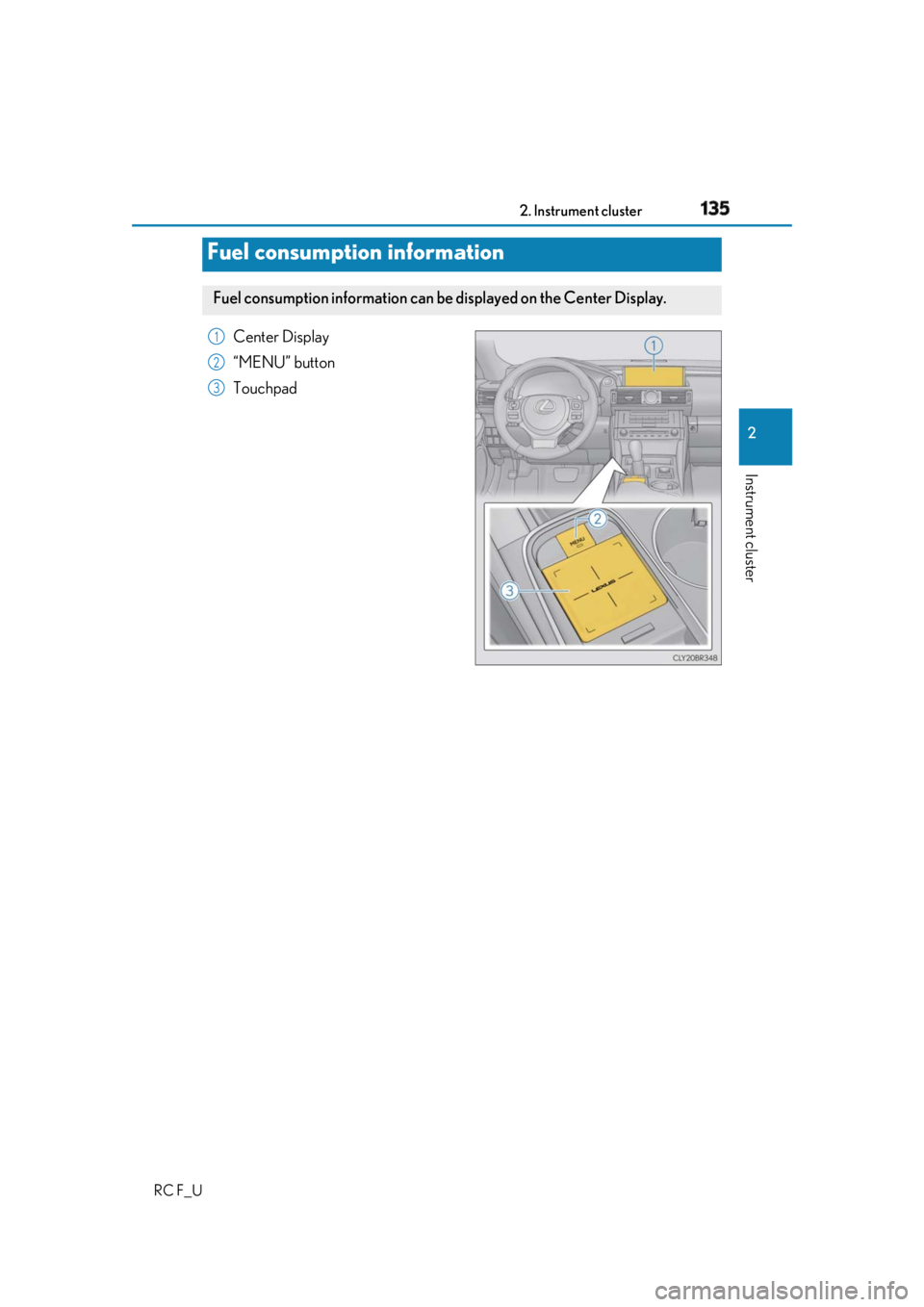
RC F_U Center Display
“MENU” button
Touchpad
Fuel consumption information Fuel consumption information can be displayed on the Center Display. 1
2
3
Page 136 of 636
136 2. Instrument cluster
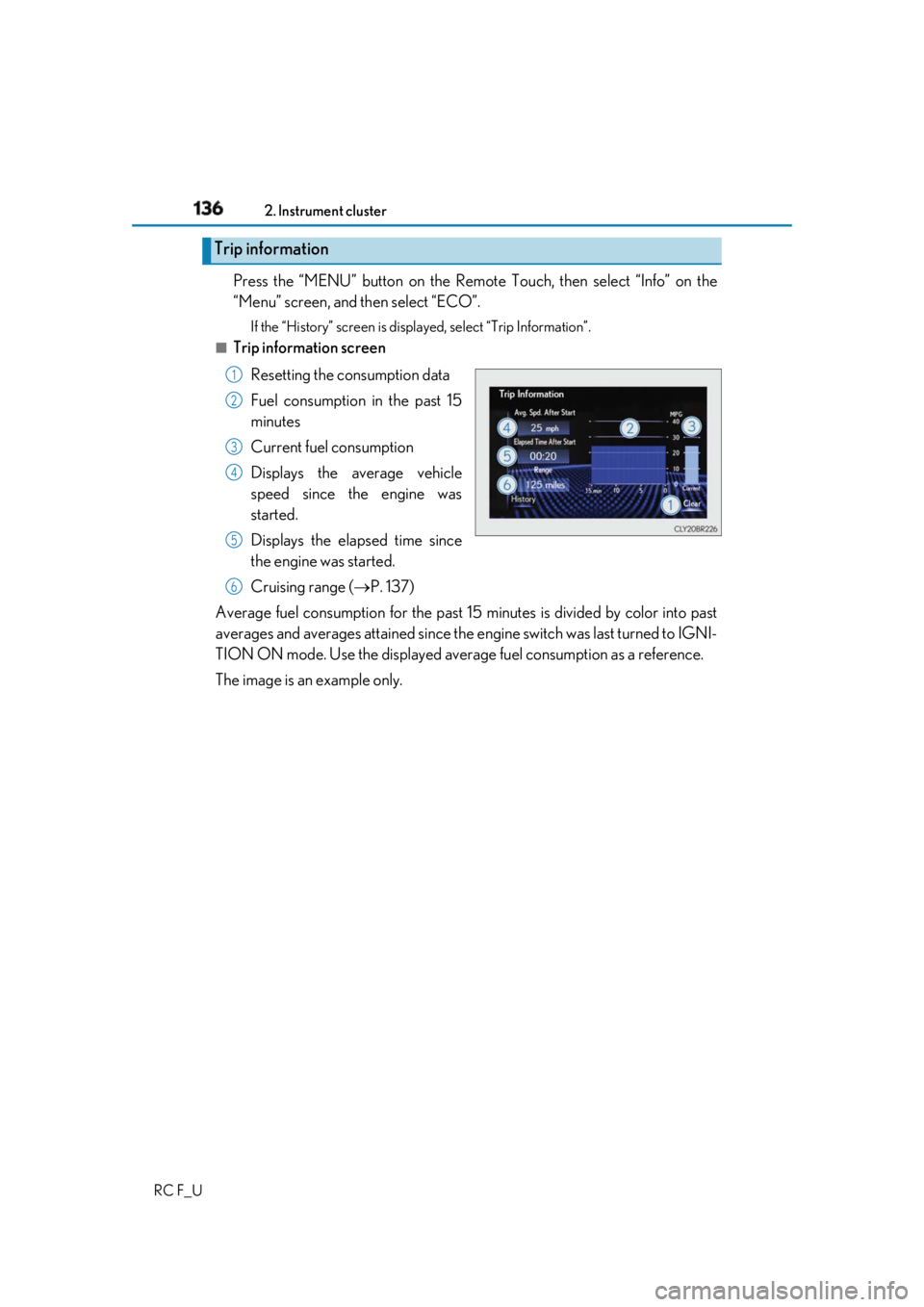
RC F_U Press the “MENU” button on the Remote Touch, then select “Info” on the
“Menu” screen, and then select “ECO”. If the “History” screen is displayed, select “Trip Information”.■
Trip information screen
Resetting the consumption data
Fuel consumption in the past 15
minutes
Current fuel consumption
Displays the average vehicle
speed since the engine was
started.
Displays the elapsed time since
the engine was started.
Cruising range ( P. 137)
Average fuel consumption for the past 15 minutes is divided by color into past
averages and averages attained since the engine switch was last turned to IGNI-
TION ON mode. Use the displayed average fuel consumption as a reference.
The image is an example only.Trip information 1
2
3
4
5
6
Page 137 of 636
1372. Instrument cluster
2
Instrument cluster
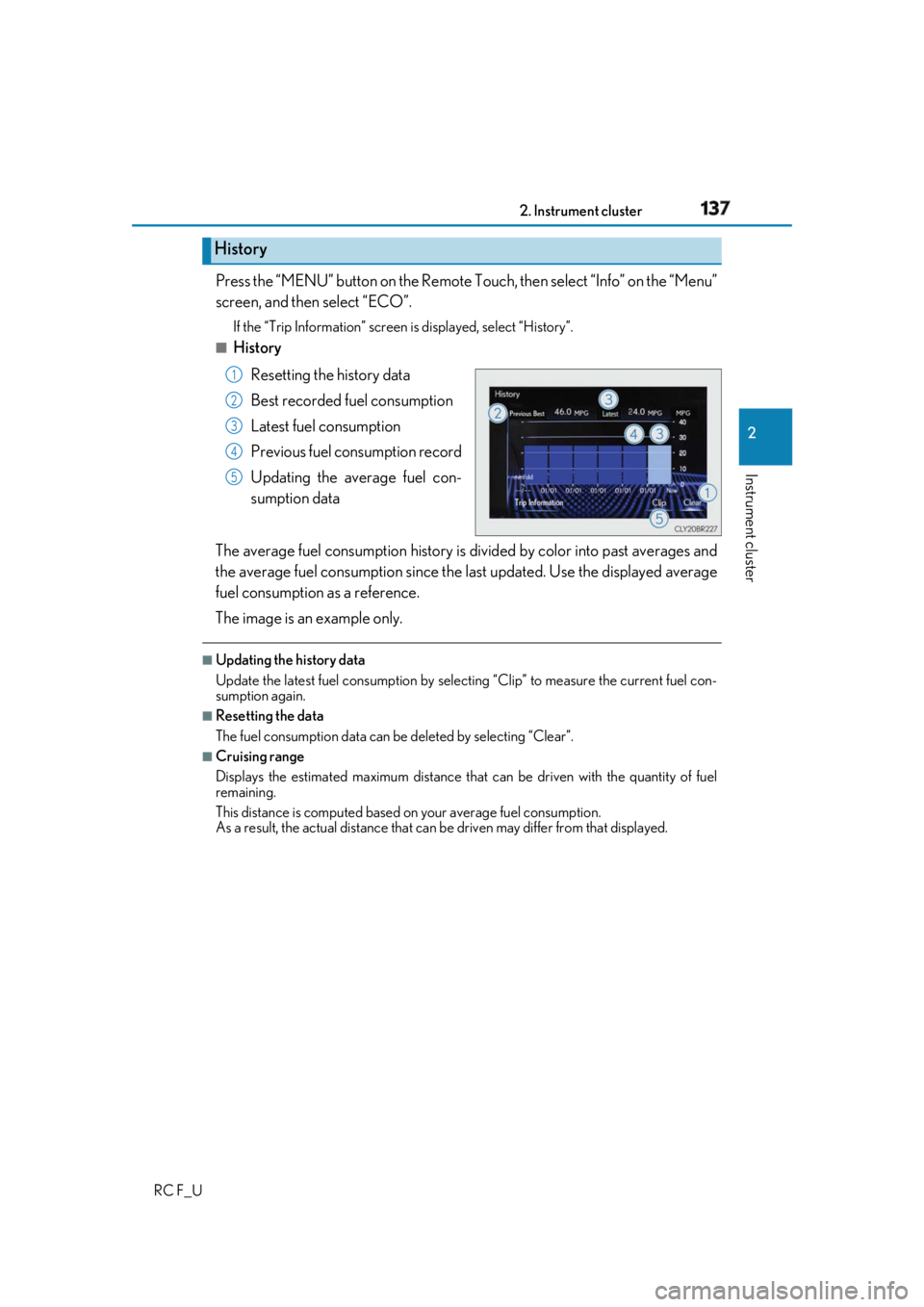
RC F_U Press the “MENU” button on the Remote To uch, then select “Info” on the “Menu”
screen, and then select “ECO”. If the “Trip Information” screen is displayed, select “History”.■
History
Resetting the history data
Best recorded fuel consumption
Latest fuel consumption
Previous fuel consumption record
Updating the average fuel con-
sumption data
The average fuel consumption history is di vided by color into past averages and
the average fuel consumption since the last updated. Use the displayed average
fuel consumption as a reference.
The image is an example only. ■
Updating the history data
Update the latest fuel consumption by sele cting “Clip” to measure the current fuel con-
sumption again. ■
Resetting the data
The fuel consumption data can be deleted by selecting “Clear”. ■
Cruising range
Displays the estimated maximum distance that can be driven with the quantity of fuel
remaining.
This distance is computed based on your average fuel consumption.
As a result, the actual distance that can be driven may differ from that displayed.History 1
2
3
4
5
Page 138 of 636
138 2. Instrument cluster
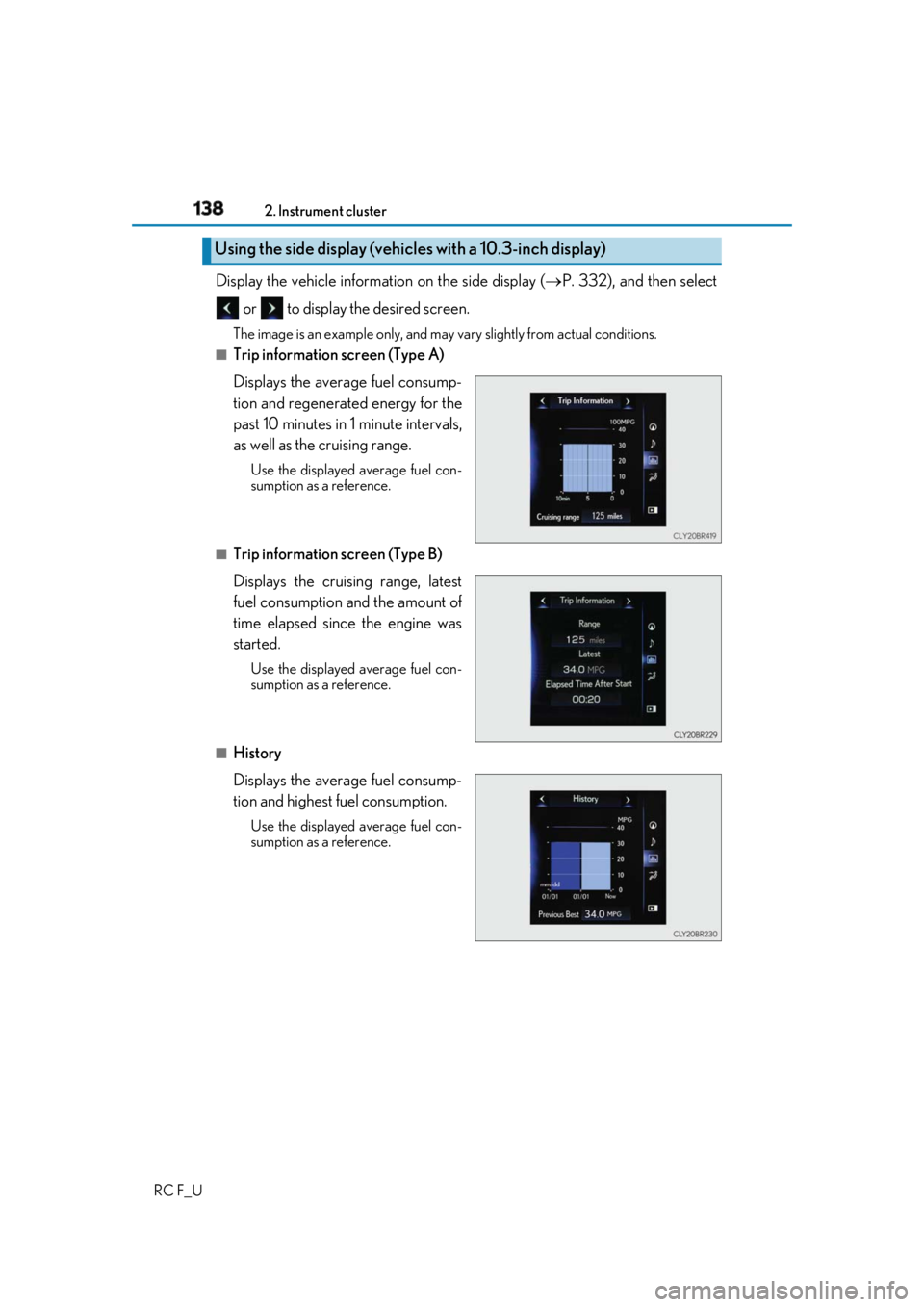
RC F_U Display the vehicle information on the side display ( P. 332), and then select
or to display the desired screen. The image is an example only, and may va ry slightly from actual conditions.■
Trip information screen (Type A)
Displays the average fuel consump-
tion and regenerated energy for the
past 10 minutes in 1 minute intervals,
as well as the cruising range. Use the displayed average fuel con-
sumption as a reference.
■
Trip information screen (Type B)
Displays the cruising range, latest
fuel consumption and the amount of
time elapsed since the engine was
started. Use the displayed average fuel con-
sumption as a reference.
■
History
Displays the average fuel consump-
tion and highest fuel consumption. Use the displayed average fuel con-
sumption as a reference.Using the side display (vehicles with a 10.3-inch display)