car LEXUS RX200T 2017 Owners Manual
[x] Cancel search | Manufacturer: LEXUS, Model Year: 2017, Model line: RX200T, Model: LEXUS RX200T 2017Pages: 776, PDF Size: 44.51 MB
Page 515 of 776
5155-11. Bluetooth®
5
Lexus Display Audio system
RX350/RX200t_EE_OM48F32E
■Compatible models
The Bluetooth® audio system supports portable audio players with the following specifi- cations
●Bluetooth® specifications: Ver. 2.0, or higher (Recommend ed: Ver. 3.0 +EDR or higher)
●Profiles:
• A2DP (Advanced Audio Distribution Profile) Ver. 1.0, or higher (Recommended: Ver. 1.2 or higher) This is a profile to transmit stereo audio or high quality sound to the audio system.
• AVRCP (Audio/Video Remote Control Profile) Ver. 1.0 or higher (Recommended: Ver. 1.4 or higher) This is a profile to allow remote control the A/V equipment.
However, please note that some functions may be limited depending on the type of por- table audio player connected.
The hands-free system supports cellular ph ones with the following specifications.
●Bluetooth® specification: Ver. 2.0 or higher (Recommended : Ver. 3.0 +EDR or higher)
●Profiles:
• HFP (Hands Free Profile) Ver. 1.0 or higher (Recommended: Ver. 1.6 or higher) This is a profile to allow hands-free phone calls using a cellular phone or head set. It has outgoing and incoming call functions.
• OPP (Object Push Profile) Ver. 1.1 or higher (Recommended: Ver. 1.2) This is a profile to transfer phonebook data. When a Bluetooth® compatible cellular phone has both PBAP and OPP, OPP cannot be used.
• PBAP (Phone Book Access Profile) Ver. 1.0 or higher (Recommended: Ver. 1.1) This is a profile to tr ansfer phonebook data.
• MAP (Message Access Profile) Ver.1.0 or higher This is a profile to using phone message.If the cellular phone does not support HFP, you cannot register it with the hands-free sys-
tem. OPP, PBAP or MAP services must be selected individually.
■Reconnecting the portable audio player
If the portable audio player is disconnect ed due to poor reception when the engine
switch is turned to ACCESSORY or IGNITION ON mode, the system automatically reconnects the portable audio player.
If you have switched off the portable audio player yourself, follow the instructions below
to reconnect:
●Select the portable audio player again
●Enter the portable audio player
■When you sell your car
Be sure to delete your personal data. ( P. 451)
Page 518 of 776
5185-11. Bluetooth®
RX350/RX200t_EE_OM48F32E
WARNING
■While driving
Do not operate the portable audio player, cellular phone or connect a device to the Bluetooth® system.
■Caution regarding interference with electronic devices
●Your audio unit is fitted with Bluetooth® antennas. People with implantable cardiacpacemakers, cardiac resynchronization therapy-pacemakers or implantable
cardioverter defibrillators should maintain a reasonable distance between them- selves and the Bluetooth® antennas. The radio waves may affect the operation ofsuch devices.
●Before using Bluetooth® devices, users of any electrical medical device other thanimplantable cardiac pacemakers, cardiac resynchronization therapy-pacemakers orimplantable cardioverter defibrillators should consult the manufacturer of the device
for information about its operation under th e influence of radio waves. Radio waves could have unexpected effects on the operation of such medical devices.
NOTICE
■When leaving the vehicle
Do not leave your portable audio player or cellular phone in the vehicle. The inside of
the vehicle may become hot, causing damage to the portable audio player or cellular phone.
Page 522 of 776
5225-12. Other function
RX350/RX200t_EE_OM48F32E
■Operational conditions
●When MirrorLink™ is activated, previous applications, run with a USB, are closed, and vice versa.
●Compatible devices
Smartphones, which passed the Car Connectivity Consortium certification program ver1.1 or later. Confirm with the smartphone manufacture or the distributor for theMirrorLink™ compatibility.
●Compatible applications Applications, which are certified by Car Connectivity Consortium as MirrorLink™Base-Certified or Drive-Certified applications.
■About MirrorLink™
MirrorLink is a registered trademark of Car Connectivity Consortium, Inc.
■When using MirrorLink™
●Check that the smartphone screen is unlo cked. Unlock the smartphone screen before connecting it to the Lexus Display Audio system. (Some smartphones may not be able to be connected via MirrorLink™ if the screen is locked.)
●Make sure that the smartphone has been connected via Bluetooth®. (Some smart-phones may not be able to perform hands-free calls using the MirrorLink™ function if it has not been connected to the vehicle via Bluetooth®.
●If a MirrorLink™ application cannot be started, check that the MirrorLink™ applica-tion certificate has not expired. The certificates of MirrorLink™ applications have an expiration date. (An internet connection is required to automatically update the certifi-
cate.) If a MirrorLink™ application becomes unavailable, it may be due to the certifi- cate expiring. In this case, the certificat e must be updated manually. Check with the smartphone manufacturer or application developer for how to update the certificate.
●Make sure the volume of the smartphone is set to an appropriate level. If the Mirror-Link™ application volume is excessively low even when the volume of the Lexus Dis- play Audio system is increased, check the vo lume of the smartphone and increase it as
necessary.
WARNING
■While driving
Do not connect smartphone or operate the controls.
Page 531 of 776
5316-1. Basic operation of the Remote Touch screen
6
Interior features
RX350/RX200t_EE_OM48F32E
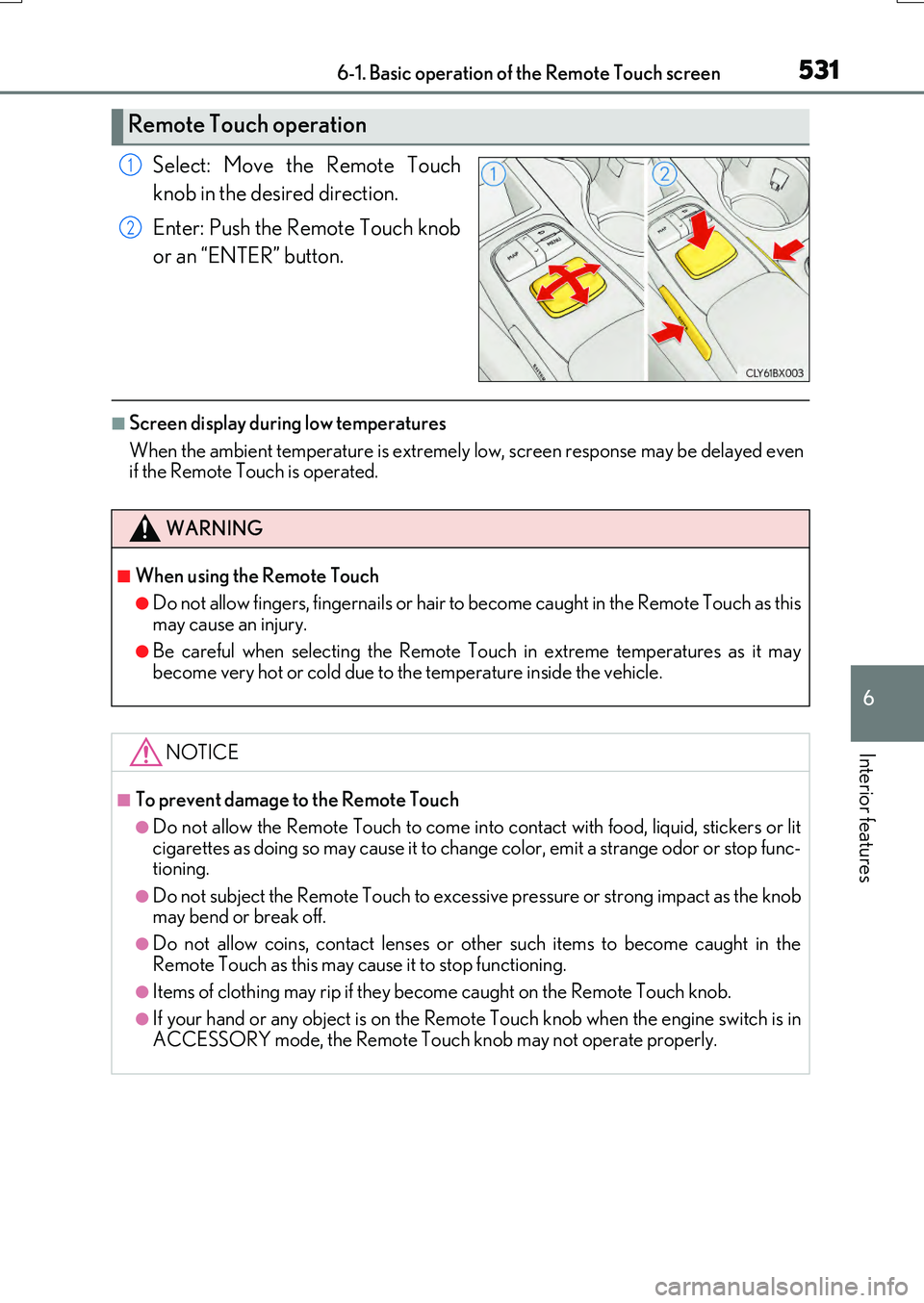
Select: Move the Remote Touch
knob in the desired direction.
Enter: Push the Remote Touch knob
or an “ENTER” button.
■Screen display during low temperatures
When the ambient temperature is extremely low, screen response may be delayed even if the Remote Touch is operated.
Remote Touch operation
1
2
WARNING
■When using the Remote Touch
●Do not allow fingers, fingernails or hair to become caught in the Remote Touch as this
may cause an injury.
●Be careful when selecting the Remote Touch in extreme temperatures as it may become very hot or cold due to the temperature inside the vehicle.
NOTICE
■To prevent damage to the Remote Touch
●Do not allow the Remote Touch to come into contact with food, liquid, stickers or lit
cigarettes as doing so may cause it to change color, emit a strange odor or stop func- tioning.
●Do not subject the Remote Touch to excessiv e pressure or strong impact as the knob may bend or break off.
●Do not allow coins, contact lenses or other such items to become caught in the
Remote Touch as this may cause it to stop functioning.
●Items of clothing may rip if they be come caught on the Remote Touch knob.
●If your hand or any object is on the Remote Touch knob when the engine switch is in
ACCESSORY mode, the Remote Touch knob may not operate properly.
Page 549 of 776
5496-2. Using the air conditioning system and defogger
6
Interior features
RX350/RX200t_EE_OM48F32E
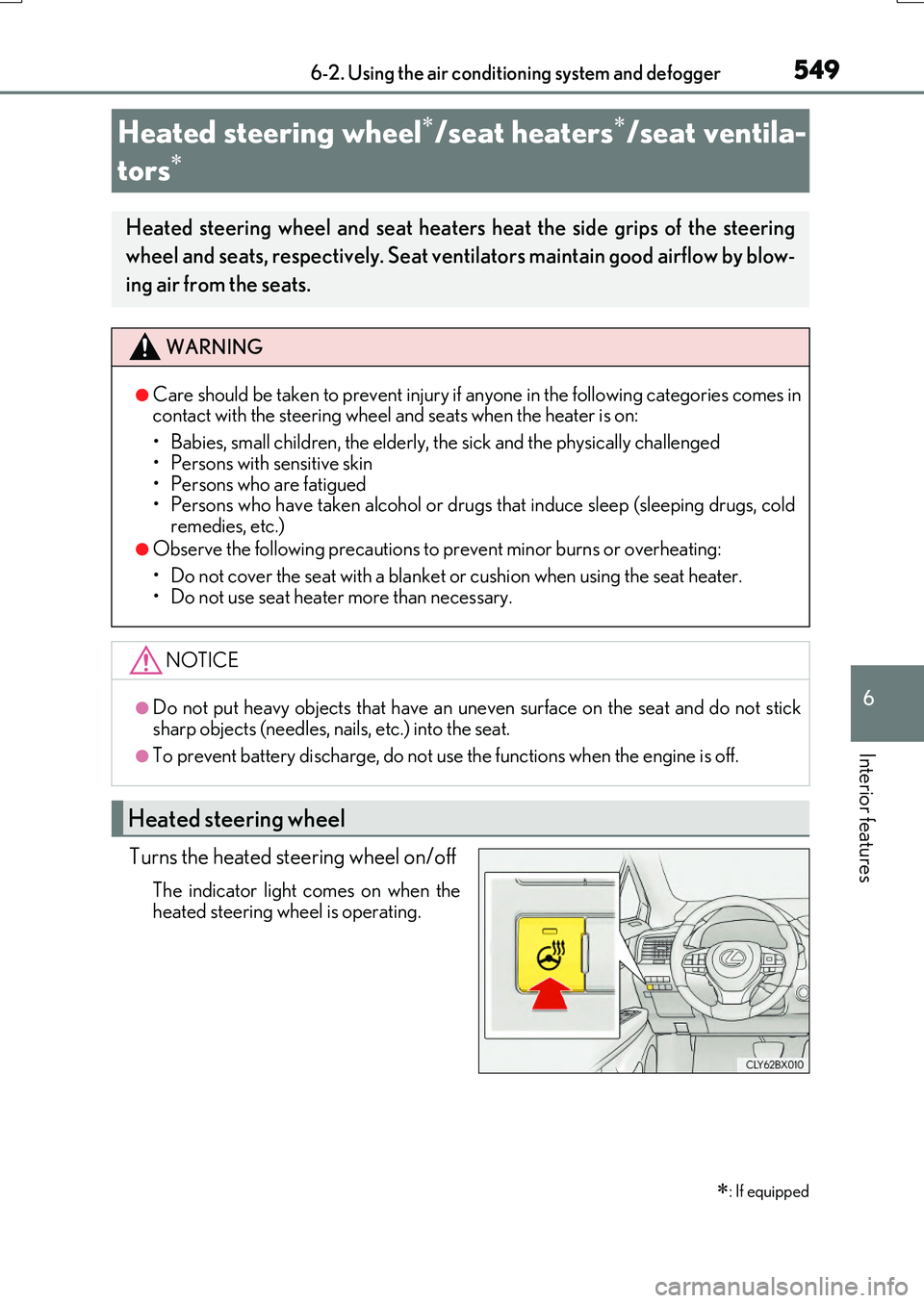
Turns the heated steering wheel on/off
The indicator light comes on when the
heated steering wheel is operating.
Heated steering wheel/seat heaters/seat ventila-
tors
: If equipped
Heated steering wheel and seat heaters heat the side grips of the steering
wheel and seats, respectively. Seat ventilators maintain good airflow by blow-
ing air from the seats.
WARNING
●Care should be taken to prevent injury if anyone in the following categories comes in contact with the steering wheel and seats when the heater is on:
• Babies, small children, the elderly, the sick and the physically challenged
• Persons with sensitive skin • Persons who are fatigued• Persons who have taken alcohol or drugs that induce sleep (sleeping drugs, cold
remedies, etc.)
●Observe the following precautions to prevent minor burns or overheating:
• Do not cover the seat with a blanket or cushion when using the seat heater. • Do not use seat heater more than necessary.
NOTICE
●Do not put heavy objects that have an uneven surface on the seat and do not sticksharp objects (needles, na ils, etc.) into the seat.
●To prevent battery discharge, do not use the functions when the engine is off.
Heated steering wheel
Page 562 of 776
5626-4. Using the storage features
RX350/RX200t_EE_OM48F32E
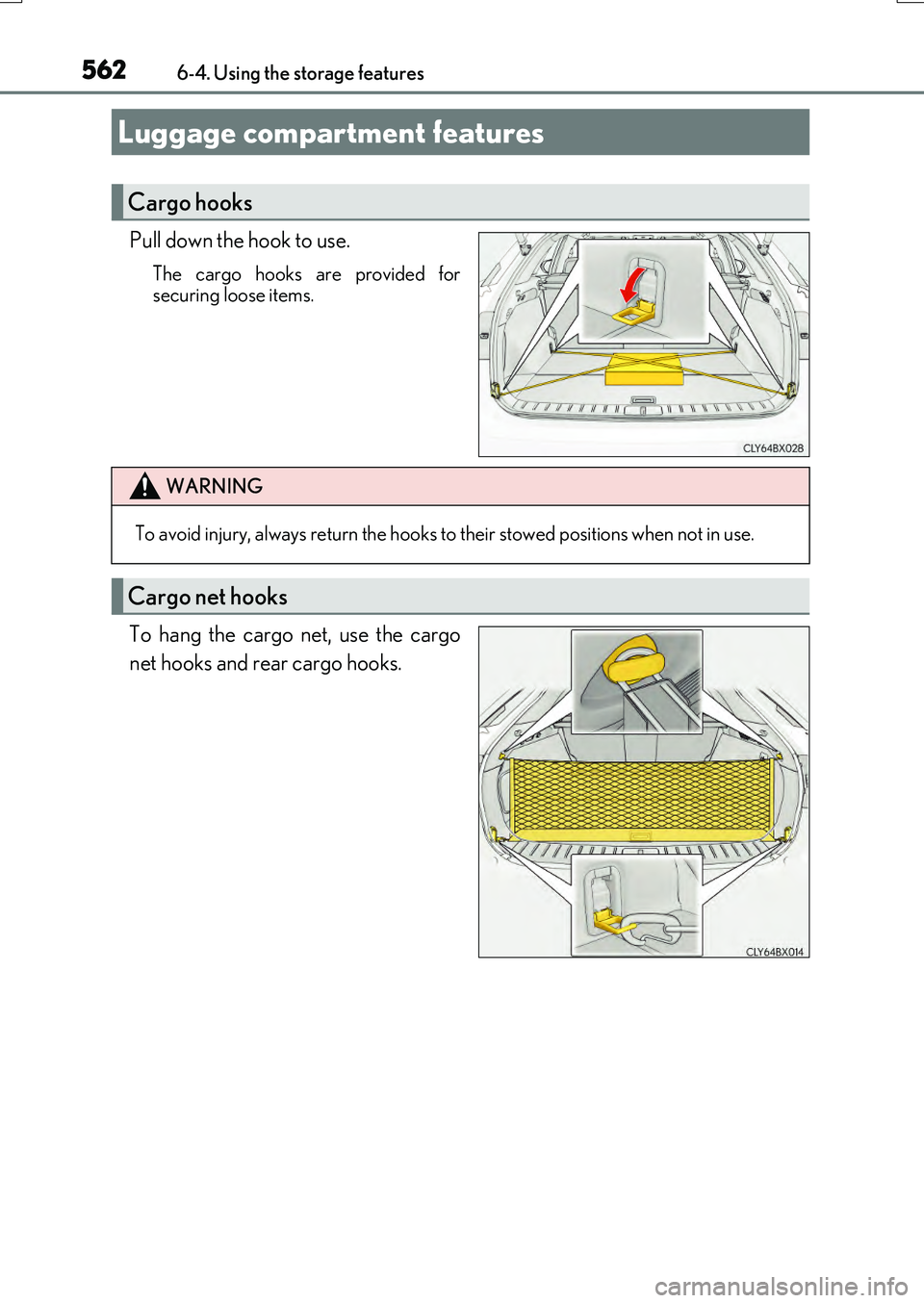
Pull down the hook to use.
The cargo hooks are provided for securing loose items.
To hang the cargo net, use the cargo
net hooks and rear cargo hooks.
Luggage compartment features
Cargo hooks
WARNING
To avoid injury, always return the hooks to their stowed positions when not in use.
Cargo net hooks
Page 572 of 776
5726-5. Using the other interior features
RX350/RX200t_EE_OM48F32E
WARNING
■Caution while driving
When charging a portable device while driv ing, for safety reasons, the driver should not operate the portable device.
■Caution regarding interference with electronic devices
People with implantable cardiac pacemakers , cardiac resynchronization therapy pace- makers or implantable cardioverter defibrillato rs, as well as any other electrical medi-
cal device, should consult their physicia n about the usage of the wireless charger.
Operations of the wireless charger may have an affect on medical devices.
■To prevent damage or burns
Observe the following precautions.
Failure to do so may result in the possib ility of fire, equipment failure or damage, or burns due to heat.
●Do not put any metallic objects between th e charging area and the portable device while charging.
●Do not attach metallic objects, such as aluminum stickers, to the charging area.
●Do not cover the wireless charger with a cloth or other object while charging.
●Do not attempt to charge portable devices which are not compatible with the Qi wireless charging standard.
●Do not disassemble, modify or remove the wireless charger.
●Do not apply force or impact to the wireless charger.
Page 573 of 776
5736-5. Using the other interior features
6
Interior features
RX350/RX200t_EE_OM48F32E
NOTICE
■Conditions in which the wireless charger may not operate correctly
In the following situations, the wireless charger may not operate correctly:
●When a portable device is fully charged
●When there is a foreign object between the charging area and portable device
●When a portable device becomes hot while charging
●When a portable device is placed on the wireless area with its charging surface fac-
ing up
●When a portable device is not centered on the charging area
●When the vehicle is near a TV tower, electric power plant, gas station, radio station,
large display, airport or othe r facility that generates strong radio waves or electrical noise
●When the portable device is in contact wi th, or is covered by any of the following
metallic objects
• Cards to which aluminum foil is attached • Cigarette boxes that ha ve aluminum foil inside
• Metallic wallets or bags •Coins• Metal hand warmers
• Media such as CDs and DVDs
●When wireless keys (that emit radio waves) other than those of your vehicle are being
used nearby.
If in situations other than above the wireless charger does not operate properly or the operation indicator light is blinking, the wireless charger may be malfunctioning. Con-
tact any authorized Lexus dealer or repair er, or another duly qualified and equipped professional.
■To prevent failure or damage to data
●Do not bring magnetic cards, such as a credit card, or magnetic recording media,close to the wireless charger while chargi ng. Otherwise, data may be erased due to the influence of magnetism.
Additionally, do not bring precision instruments such as wrist watches, close to the wireless charger, as such objects may malfunction.
●Do not leave portable devices in the cabin. The temperature inside the cabin may
become high when parked in the su n, and cause damage to the device.
■To prevent battery discharge
Do not use the wireless charger for a long period of time with the engine is stopped.
Page 583 of 776
583
7Maintenance and care
RX350/RX200t_EE_OM48F32E
7-1. Maintenance and care
Cleaning and protecting
the vehicle exterior ................584
Cleaning and protecting
the vehicle interior..................589
7-2. Maintenance
Maintenance
requirements ............................ 592
7-3. Do-it-yourself
maintenance
Do-it-yourself service
precautions................................595
Hood ............................................... 597
Positioning a floor jack ............598
Engine compartment ............... 599
Tires ...................................................612
Tire inflation pressure .............. 629
Wheels ............................................ 631
Air conditioning filter ............... 633
Windshield wiper inserts ........ 636
Electronic key battery..............638
Checking and
replacing fuses .........................640
Light bulbs..................................... 643
Page 584 of 776
584
RX350/RX200t_EE_OM48F32E
7-1. Maintenance and care
●Working from top to bottom, liberally apply water to the vehicle body, wheel
wells and underside of the vehicle to remove any dirt and dust.
●Wash the vehicle body using a sponge or soft cloth, such as a chamois.
●For hard-to-remove marks, use car wash soap and rinse thoroughly with
water.
●Wipe away any water.
●Wax the vehicle when the waterproof coating deteriorates.
If water does not bead on a clean surface, apply wax when the vehicle body is cool.
■Self-restoring coat
The vehicle body has a self-restoring coating that is resistant to small surface scratches caused in a car wash, etc.
●The coating lasts for 5 to 8 years from when the vehicle is delivered from the plant.
●The restoration time differs depending on the depth of the scratch and outside tem-perature. The restoration time may become shorter when the coating is warmed by
applying warm water.
●Deep scratches caused by keys, co ins, etc., cannot be restored.
●Do not use wax that contain abrasives.
■Automatic car washes
●Before washing the vehicle:
• Fold the mirrors
• Turn off the power back door (if equipped) Start washing from the front of the vehicle. Extend the mirrors before driving.
●Brushes used in automatic car washes may scratch the vehicle surface and harm your
vehicle’s paint.
●Rear spoiler may not be washable in some automatic car washes. There may also be an increased risk of damage to vehicle.
■High pressure car washes
●Do not allow the nozzles of the car wash to come within close proximity of the windows.
●Before using the car wash, check that the fuel filler door on your vehicle is closed prop- erly.
Cleaning and protecting the vehicle exterior
Perform the following to protect the vehicle and maintain it in prime condi-
tion: