car LEXUS RX200T 2017 Repair Manual
[x] Cancel search | Manufacturer: LEXUS, Model Year: 2017, Model line: RX200T, Model: LEXUS RX200T 2017Pages: 776, PDF Size: 44.51 MB
Page 274 of 776
2744-3. Operating the lights and wipers
RX350/RX200t_EE_OM48F32E
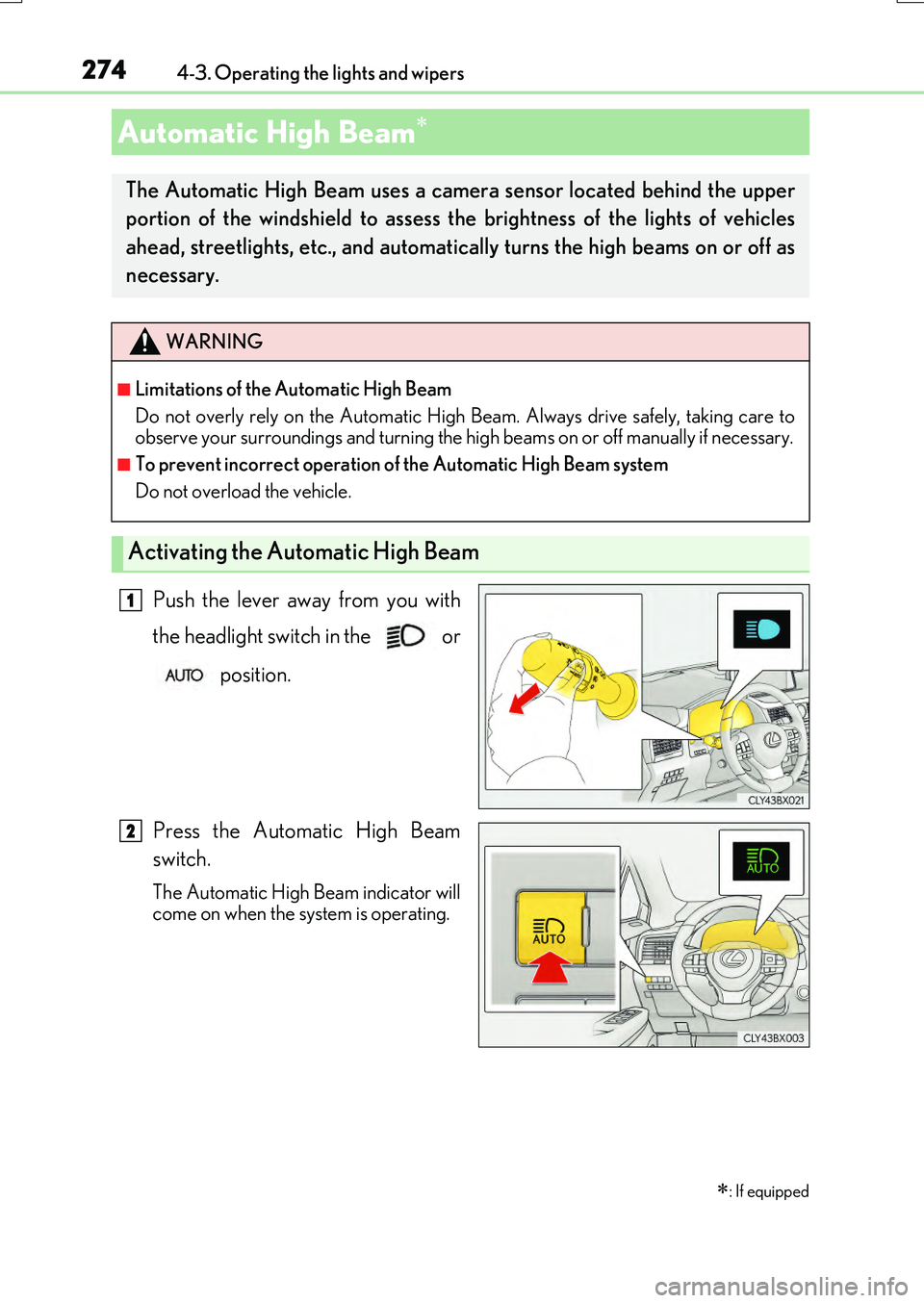
Push the lever away from you with
the headlight switch in the or
position.
Press the Automatic High Beam
switch.
The Automatic High Beam indicator will
come on when the system is operating.
Automatic High Beam
: If equipped
The Automatic High Beam uses a came ra sensor located behind the upper
portion of the windshield to assess the brightness of the lights of vehicles
ahead, streetlights, etc., and automatically turns the high beams on or off as
necessary.
WARNING
■Limitations of the Automatic High Beam
Do not overly rely on the Automatic High Beam. Always drive safely, taking care to
observe your surroundings and turning the high beams on or off manually if necessary.
■To prevent incorrect operation of the Automatic High Beam system
Do not overload the vehicle.
Activating the Automatic High Beam
1
2
Page 282 of 776
2824-3. Operating the lights and wipers
RX350/RX200t_EE_OM48F32E
■Front door opening linked windshield wiper stop function (vehicles with rain-sensing windshield wipers)
When “AUTO” is selected and the windshield wipers are operating, if a front door is
opened, the operation of the windshield wipers will be stopped to prevent anyone near the vehicle from being sprayed by water from the wipers, provided the vehicle is stoppedwith the parking brake applied or the shift leve r in P. When the front door is closed, wiper
operation will resume.
■Customization
Some functions can be customized. ( P. 740)
WARNING
■Caution regarding the use of windshield wipers in AUTO mode (vehicles with rain-
sensing windshield wipers)
The windshield wipers may operate unexpectedly if the sensor is touched or the wind- shield is subject to vibration in AUTO mode. Take care that your fingers, etc. do not
become caught in th e windshield wipers.
■Caution regarding the use of washer fluid
When it is cold, do not use the washer fluid until the windshield becomes warm. The
fluid may freeze on the windshield and cause low visibility. This may lead to an accident, resulting in death or serious injury.
■When the washer nozzle heaters are operating (if equipped)
Do not touch the area around the washer no zzle heaters, as they can become very hot and burn you.
NOTICE
■When the windshield is dry
Do not use the wipers, as they may damage the windshield.
■When the washer fluid tank is empty
Do not operate the switch continually as the washer fluid pump may overheat.
■When a nozzle becomes blocked
In this case, contact any authorized Lexus de aler or repairer, or another duly qualified and equipped professional.Do not try to clear it with a pin or other object. The nozzle will be damaged.
Page 302 of 776
3024-5. Using the driving support systems
RX350/RX200t_EE_OM48F32E
WARNING
■Limitations of the pre-crash safety system
●The driver is solely responsible for safe driving. Always drive safely, taking care to observe your surroundings.
Do not use the pre-crash safety system instead of normal braking operations under any circumstances. This system will not pr event collisions or lessen collision damage or injury in every situation. Do not overly rely on this system. Failure to do so may lead
to an accident, resulting in death or serious injury.
●Although this system is designed to help avoid a collision or help reduce the impact of the collision, its effectiveness may change according to various conditions, therefore
the system may not always be able to achieve the same level of performance. Read the following conditions carefully. Do not overly rely on this system and always drive carefully.
• Conditions under which the system may oper ate even if there is no possibility of a collision: P. 307 • Conditions under which the system may not operate properly: P. 310
●Do not attempt to test the operation of the pre-crash safety system yourself, as the system may not operate properly, possibly leading to an accident.
■Pre-crash braking*3
●When the pre-crash braking function is operating, a large amount of braking forcewill be applied.
●If the vehicle is stopped by the operation of the pre-crash braking function, the pre- crash braking function operation will be canceled after approximately 2 seconds. Depress the brake pedal as necessary.
●The pre-crash braking function may not operate if certain operations are performedby the driver. If the accelerator pedal is being depressed strongly or the steering wheel is being turned, the system may determine that the driver is taking evasive
action and possibly prevent the pre-crash braking function from operating.
●In some situations, while the pre-crash brakin g function is operating, operation of the function may be canceled if the accelerator pedal is depressed strongly or the steer-
ing wheel is turned and the system determines that the driver is taking evasive action.
●If the brake pedal is being depressed, the system may determine that the driver is tak- ing evasive action and possibly delay the operation timing of the pre-crash braking
function.
*3: Depending on the region in which the vehicle was sold, the pre-crash braking func-
tion may not be available.
Page 309 of 776
3094-5. Using the driving support systems
4
Driving
RX350/RX200t_EE_OM48F32E
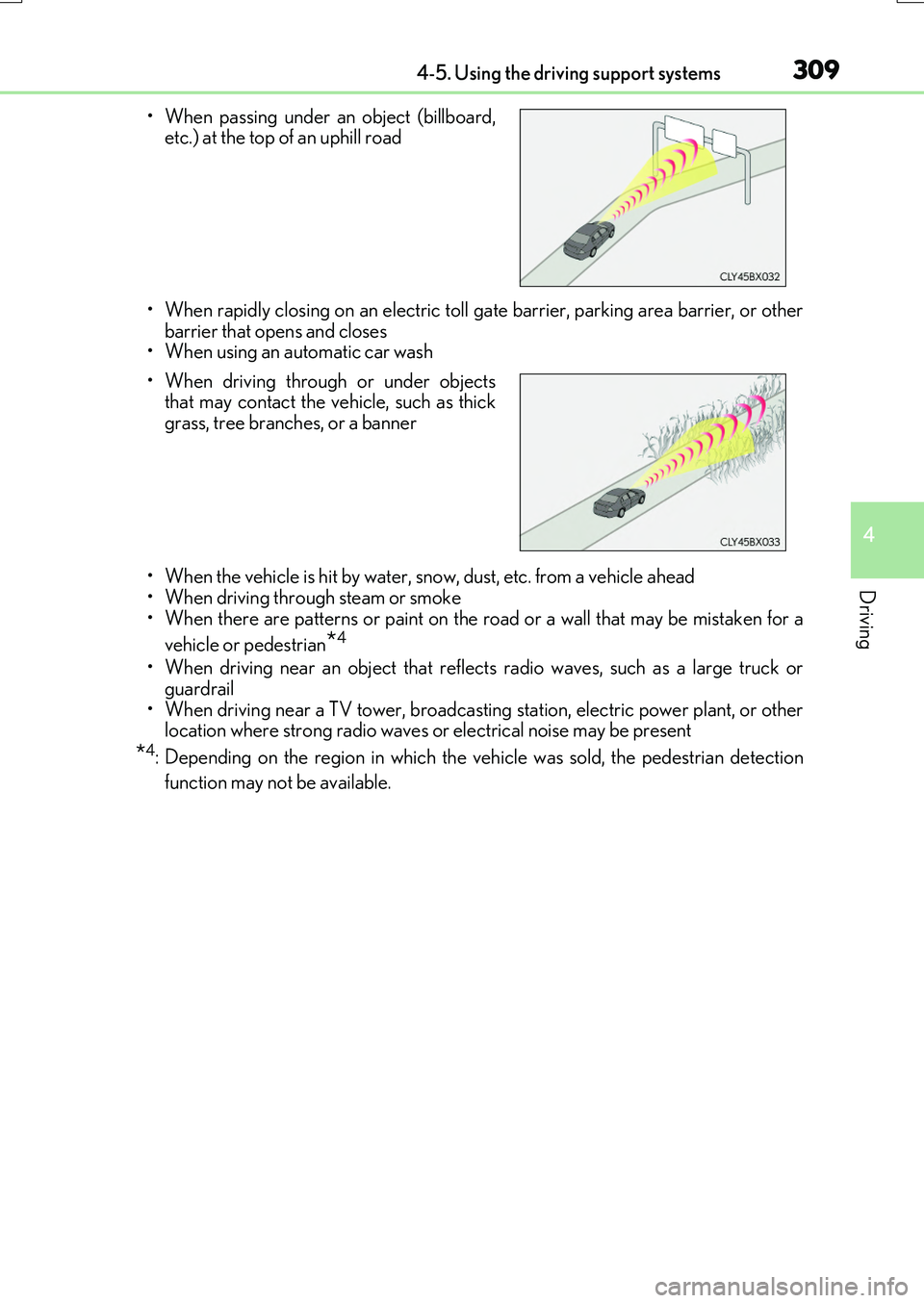
• When rapidly closing on an electric toll gate barrier, parking area barrier, or other barrier that opens and closes• When using an automatic car wash
• When the vehicle is hit by water, snow, dust, etc. from a vehicle ahead • When driving through steam or smoke
• When there are patterns or paint on the road or a wall that may be mistaken for a
vehicle or pedestrian*4
• When driving near an object that reflects radio waves, such as a large truck or guardrail
• When driving near a TV tower, broadcasting station, electric power plant, or other location where strong radio waves or electrical noise may be present
*4: Depending on the region in which the vehicle was sold, the pedestrian detection
function may not be available.
• When passing under an object (billboard, etc.) at the top of an uphill road
• When driving through or under objects that may contact the vehicle, such as thick
grass, tree branches, or a banner
Page 310 of 776
3104-5. Using the driving support systems
RX350/RX200t_EE_OM48F32E
■Situations in which the system may not operate properly
●In some situations such as the following, a vehicle may not be detected by the radar sensor and camera sensor, preventing the system from operating properly:
• If an oncoming vehicle is approaching your vehicle • If a vehicle ahead is a motorcycle or bicycle• When approaching the side or front of a vehicle
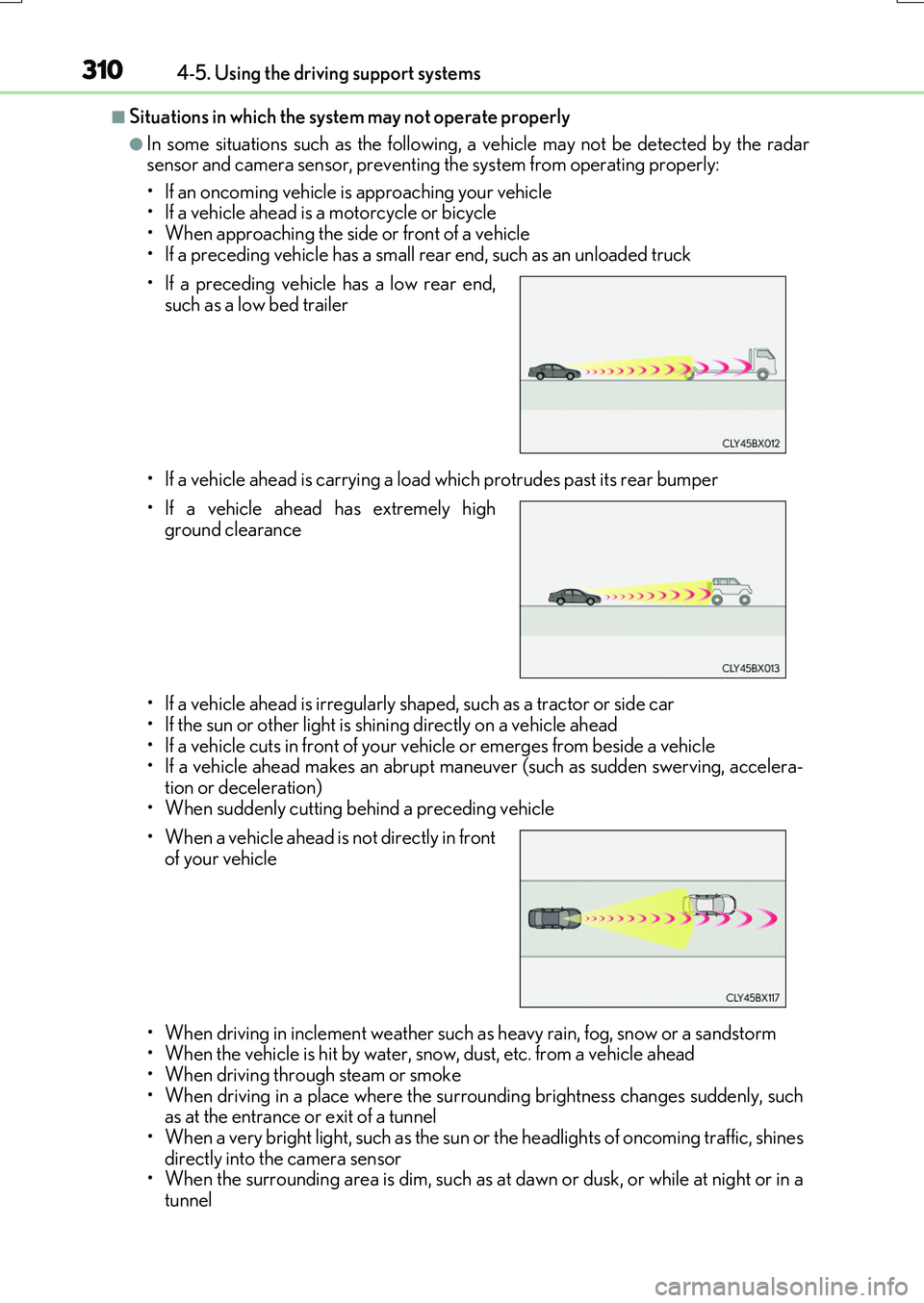
• If a preceding vehicle has a small rear end, such as an unloaded truck
• If a vehicle ahead is carrying a load which protrudes past its rear bumper
• If a vehicle ahead is irregularly sh aped, such as a tractor or side car
• If the sun or other light is shin ing directly on a vehicle ahead • If a vehicle cuts in front of your vehicle or emerges from beside a vehicle• If a vehicle ahead makes an abrupt mane uver (such as sudden swerving, accelera-
tion or deceleration) • When suddenly cutting behind a preceding vehicle
• When driving in inclement we ather such as heavy rain, fog, snow or a sandstorm • When the vehicle is hit by water, snow, dust, etc. from a vehicle ahead
• When driving through steam or smoke • When driving in a place where the surro unding brightness changes suddenly, such as at the entrance or exit of a tunnel
• When a very bright light, such as the sun or the headlights of oncoming traffic, shines directly into the camera sensor• When the surrounding area is dim, such as at dawn or dusk, or while at night or in a
tunnel
• If a preceding vehicle has a low rear end,
such as a low bed trailer
• If a vehicle ahead has extremely high
ground clearance
• When a vehicle ahead is not directly in front of your vehicle
Page 312 of 776
3124-5. Using the driving support systems
RX350/RX200t_EE_OM48F32E
●Some pedestrians such as the following may not be detected by the radar sensor and
camera sensor, preventing the system from operating properly*4:
• Pedestrians shorter than approximately 1 m (3 .2 ft.) or taller than approximately 2 m (6.5 ft.)
• Pedestrians wearing oversized clothing (a rain coat, long skirt, etc.), making their sil- houette obscure• Pedestrians who are carrying large baggage, holding an umbrella, etc., hiding part
of their body • Pedestrians who are bending forward or squatting• Pedestrians who are pushing a stroller , wheelchair, bicycle or other vehicle
• Groups of pedestrians which are close together • Pedestrians who are wearing white and look extremely bright• Pedestrians in the dark, such as at night or while in a tunnel
• Pedestrians whose clothing appears to be nearly the same color or brightness as their surroundings• Pedestrians near walls, fences, guardrails, or large objects
• Pedestrians who are on a metal object (manhole cover, steel plate, etc.) on the road • Pedestrians who are walking fast• Pedestrians who are changing speed abruptly
• Pedestrians running out from behi nd a vehicle or a large object • Pedestrians who are extremely close to the side of the vehicle (outside rear viewmirror, etc.)
*4: Depending on the region in which the vehicle was sold, the pedestrian detection
function may not be available.
■If the PCS warning light flashes and a warning message is displayed on the multi-infor- mation display
The pre-crash safety system may be temporar ily unavailable or there may be a malfunc-
tion in the system.
●In the following situations, the warning light will turn off, the message will disappear and the system will become operational when normal operating conditions return:
• When the radar sensor or camera sensor or the area around either sensor is hot, such as in the sun• When the radar sensor or camera sensor or the area around either sensor is cold,
such as in an extremely cold environment • When the radar sensor or front grille embl em is dirty or covered with snow, etc. • When the part of the windshield in front of the camera sensor is fogged up or cov-
ered with condensation or ice (Defogging the windshield: P. 542) • If the camera sensor is obstructed, such as when the hood is open or a sticker isattached to the windshield near the camera sensor
●If the PCS warning light continues to flash or the warning message does not disappear,the system may be malfunctioning. Have the vehicle inspected by any authorized Lexus
dealer or repairer, or another duly qua lified and equipped professional immediately.
■If VSC is disabled
●If VSC is disabled (P. 425), the pre-crash brake assist and pre-crash braking func-
tions are also disabled.
●The PCS warning light will tu rn on and “VSC Turned Off Pre-Crash Brake System Unavailable” will be displayed on the multi-information display.
Page 314 of 776
3144-5. Using the driving support systems
RX350/RX200t_EE_OM48F32E
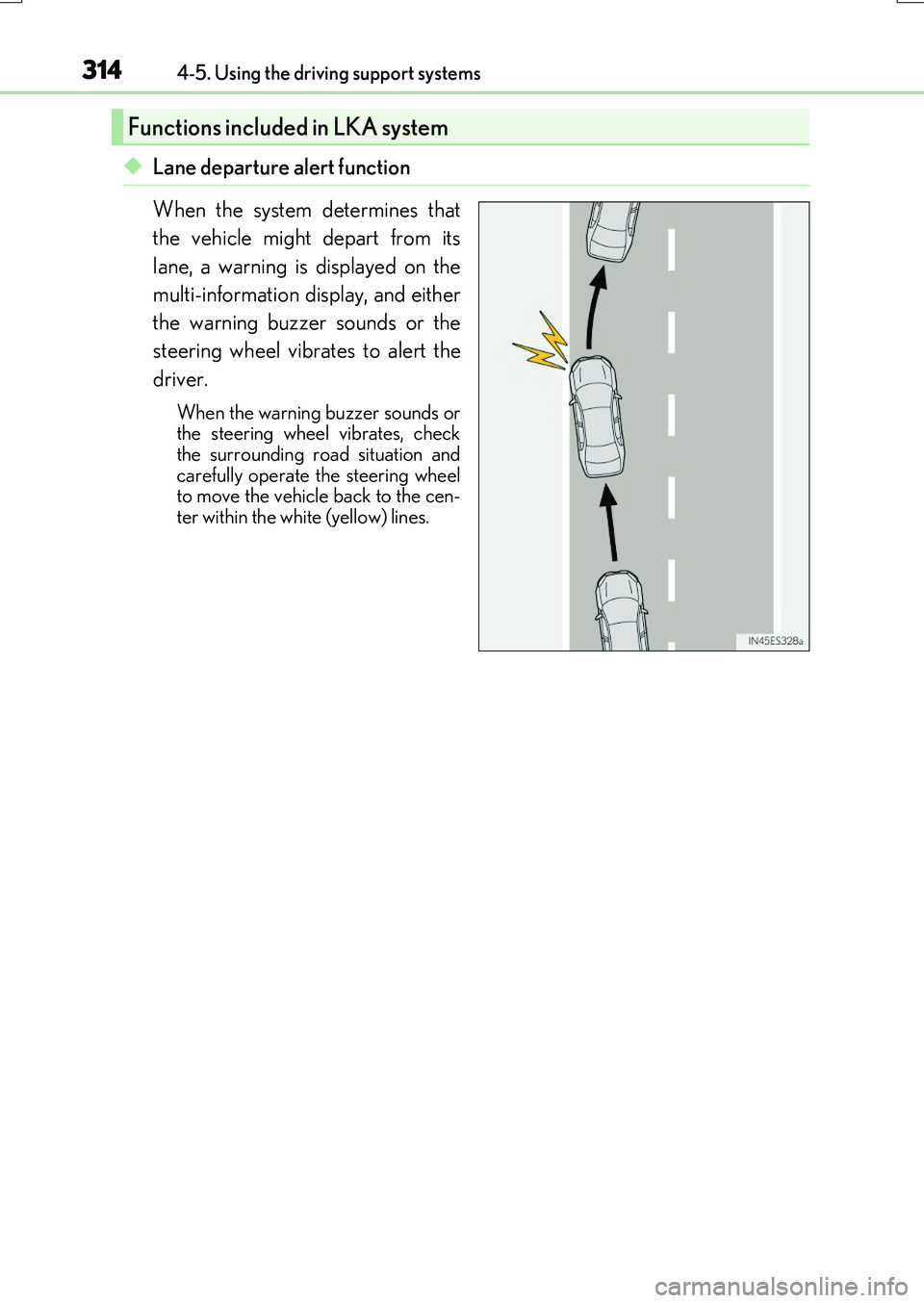
◆Lane departure alert function
When the system determines that
the vehicle might depart from its
lane, a warning is displayed on the
multi-information display, and either
the warning buzzer sounds or the
steering wheel vibrates to alert the
driver.
When the warning buzzer sounds or the steering wheel vibrates, checkthe surrounding road situation and
carefully operate the steering wheel to move the vehicle back to the cen-ter within the white (yellow) lines.
Functions included in LKA system
Page 317 of 776
3174-5. Using the driving support systems
4
Driving
RX350/RX200t_EE_OM48F32E
WARNING
■Before using LKA system
Do not rely solely upon the LKA system. LKA is not a system which automatically drives the vehicle or reduces the amount of attention that must be paid to the area in
front of the vehicle. The driver must always assume full responsibility for driving safely by always paying careful attention to the surrounding conditions and operate the steer-ing wheel to correct the path of the vehicle. Also, make sure to take adequate breaks
when fatigued, such as from driv ing for a long period of time. Failure to perform appropriate driving operat ions and pay careful attention may lead to an accident, resulting in death or serious injury.
■To avoid operating LKA by mistake
When not using the LKA system, use the LKA switch to turn the system off.
■Situations unsuitable for LKA
Do not use the LKA system in the following situations. The system may not operate properly and le ad to an accident, resulting in death or serious injury.
●A spare tire, tire chains, etc., are equipped.
●When the tires have been excessively worn, or when the tire inflation pressure is low.
●Tires which differ by structure, manufacturer, brand or tread pattern are used.
●Objects or patterns that could be mistaken for white (yellow) lines are present on the side of the road (guardrails, cu rbs, reflective poles, etc.).
●Vehicle is driven on a snow-covered road.
●White (yellow) lines are difficult to see due to rain, snow, fog, dust, etc.
●Asphalt repair marks, white (yellow) line marks, etc., are present due to road repair.
●Vehicle is driven in a temporary lane or restricted lane due to construction work.
●Vehicle is driven on a road surface which is slippery due to rainy weather, fallen snow, freezing, etc.
●Vehicle is driven in traffic lanes other than on highways and freeways.
●Vehicle is driven in a construction zone.
●When your vehicle is towing a trailer or during emergency towing
■Preventing LKA system malfunctions and operations performed by mistake
●Do not modify the headlights or place stic kers, etc., on the surface of the lights.
●Do not modify the suspension etc. If the suspension etc. needs to be replaced, con- tact any authorized Lexus dealer or repair er, or another duly qualified and equipped
professional.
●Do not install or place anything on the hood or grille. Also, do not install a grille guard (bull bars, kangaroo bar, etc.).
●If your windshield needs repairs, contact any authorized Lexus dealer or repairer, oranother duly qualified an d equipped professional.
Page 322 of 776
3224-5. Using the driving support systems
RX350/RX200t_EE_OM48F32E
■Conditions in which functions may not operate properly
In the following situations, the camera sensor may not detect white (yellow) lines and var- ious functions may not operate normally.
●There are shadows on the road that run paralle l with, or cover, the white (yellow) lines.
●The vehicle is driven in an area without white (yellow) lines, such as in front of a tollgate or checkpoint, or at an intersection, etc.
●The white (yellow) lines are cracked, “Raised pavement marker” or stones are present.
●The white (yellow) lines cannot be seen or are difficult to see due to sand, etc.
●The vehicle is driven on a road surface that is wet due to rain, puddles, etc.
●The traffic lines are yellow (which may be more difficult to recognize than lines that are white).
●The white (yellow) lines cross over a curb, etc.
●The vehicle is driven on a bright surface, such as concrete.
●The vehicle is driven on a surface that is bright due to reflected light, etc.
●The vehicle is driven in an area where the brightness changes suddenly, such as at the
entrances and exits of tunnels, etc.
●Light from the headlights of an oncoming ve hicle, the sun, etc., enters the camera.
●The vehicle is driven where the road diverges, merges, etc.
●The vehicle is driven on a slope.
●The vehicle is driven on a road which tilts left or right, or a winding road.
●The vehicle is driven on an unpaved or rough road.
●The vehicle is driven around a sharp curve.
●The traffic lane is excessively narrow or wide.
●The vehicle is extremely tilted due to carrying heavy luggage or having improper tire pressure.
●The distance to the preceding vehicle is extremely short.
●The vehicle is moving up and down a large a mount due to road conditions during driv- ing (poor roads or road seams).
●The headlight lenses are dirty and emit a faint amount of light at night, or the beam axis
has deviated.
●The vehicle is struck by a crosswind.
●The vehicle has just changed lanes or crossed an intersection.
●Snow tires, etc., are equipped.
Page 324 of 776
3244-5. Using the driving support systems
RX350/RX200t_EE_OM48F32E
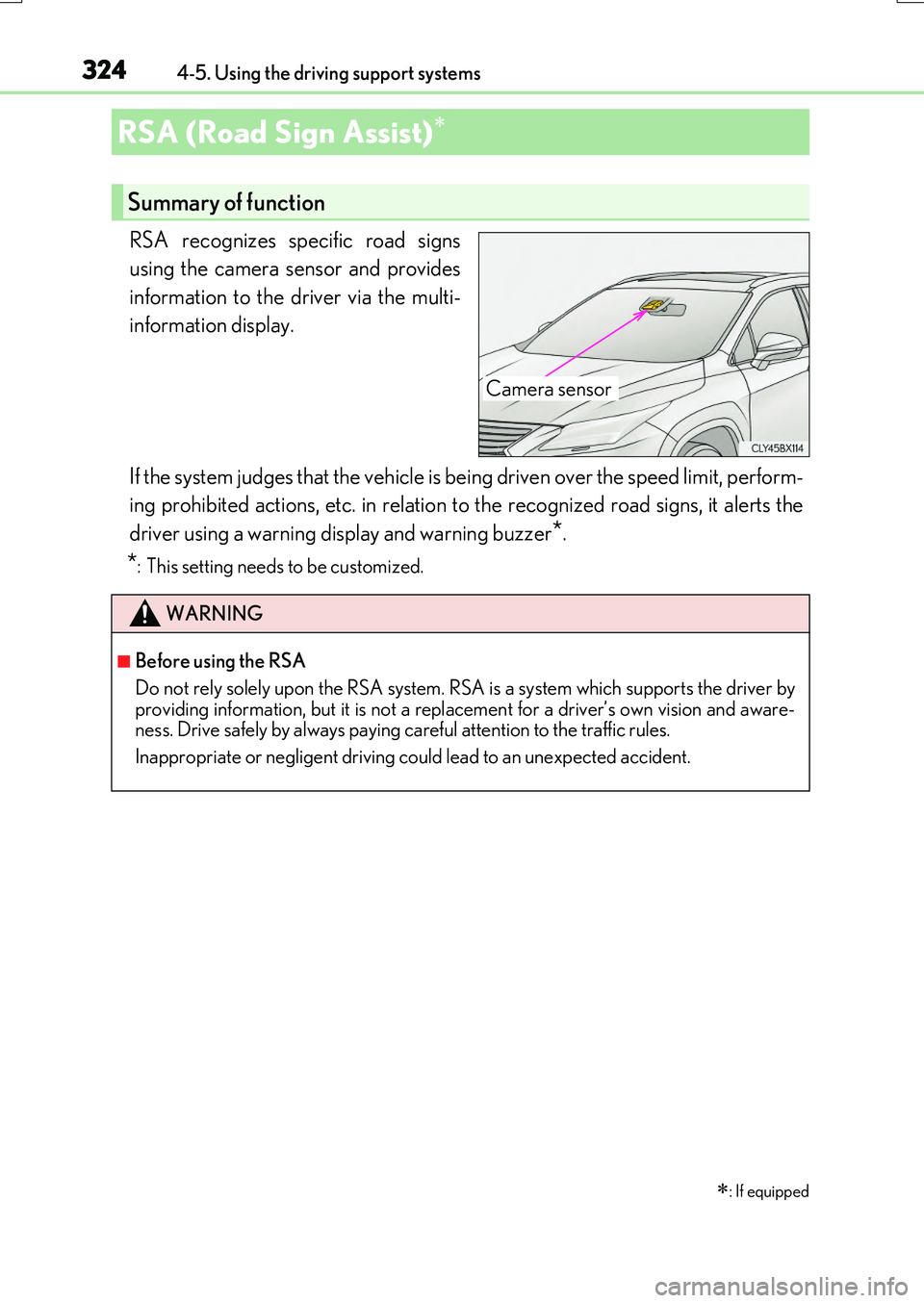
RSA recognizes specific road signs
using the camera sensor and provides
information to the driver via the multi-
information display.
If the system judges that the vehicle is being driven over the speed limit, perform-
ing prohibited actions, etc. in relation to the recognized road signs, it alerts the
driver using a warning display and warning buzzer*.
*: This setting needs to be customized.
RSA (Road Sign Assist)
: If equipped
Summary of function
Camera sensor
WARNING
■Before using the RSA
Do not rely solely upon the RSA system. RS A is a system which supports the driver by
providing information, but it is not a replacement for a driver’s own vision and aware- ness. Drive safely by always paying careful attention to the traffic rules.
Inappropriate or negligent driving could lead to an unexpected accident.