remote control LEXUS RX200T 2017 Owners Manual
[x] Cancel search | Manufacturer: LEXUS, Model Year: 2017, Model line: RX200T, Model: LEXUS RX200T 2017Pages: 776, PDF Size: 44.51 MB
Page 18 of 776
18Pictorial index
RX350/RX200t_EE_OM48F32E
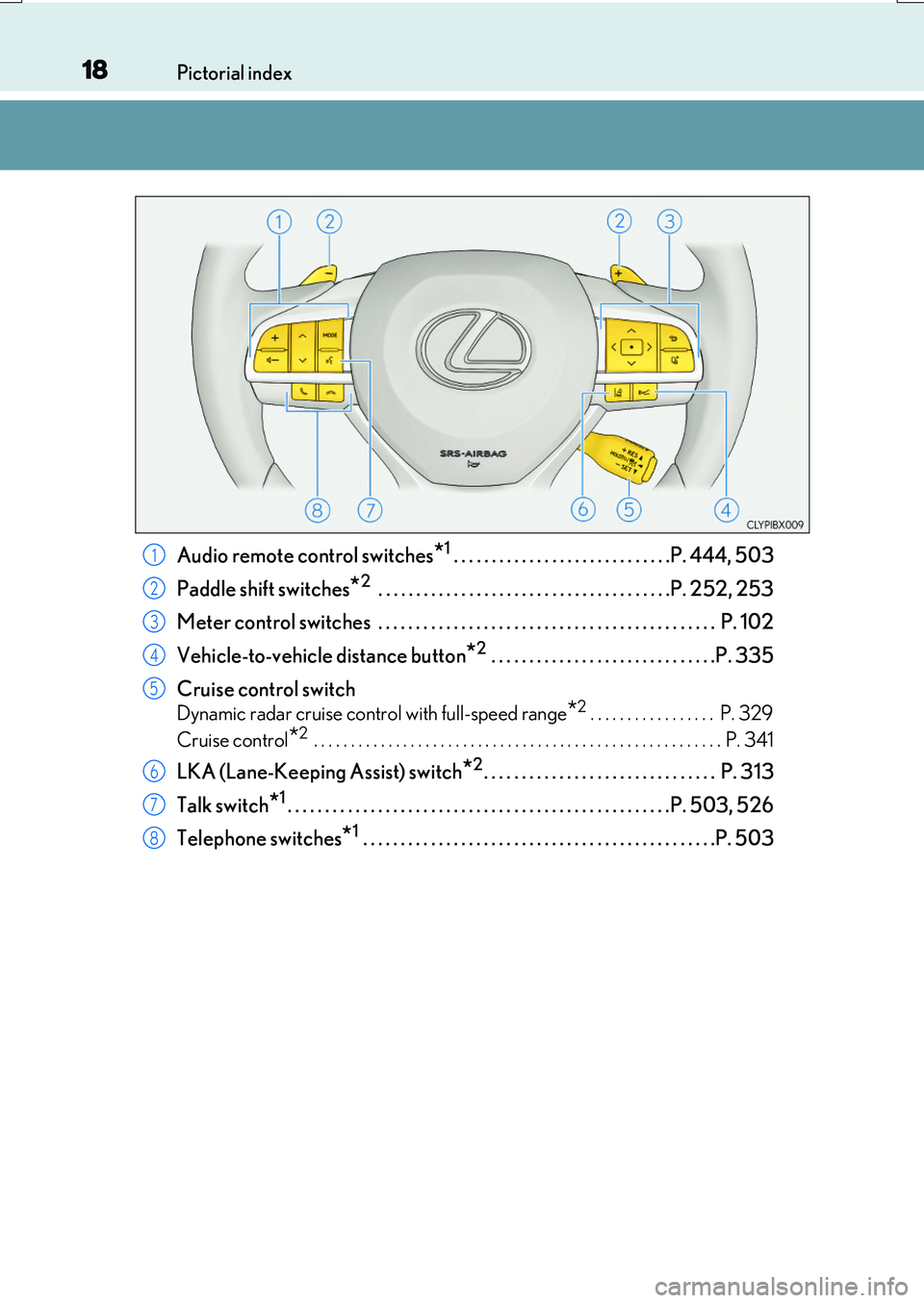
Audio remote control switches*1 . . . . . . . . . . . . . . . . . . . . . . . . . . . . .P. 444, 503
Paddle shift switches*2 . . . . . . . . . . . . . . . . . . . . . . . . . . . . . . . . . . . . . . .P. 252, 253
Meter control switches . . . . . . . . . . . . . . . . . . . . . . . . . . . . . . . . . . . . . . . . . . . . . P. 102
Vehicle-to-vehicle distance button*2 . . . . . . . . . . . . . . . . . . . . . . . . . . . . . .P. 335
Cruise control switch
Dynamic radar cruise cont rol with full-speed range*2. . . . . . . . . . . . . . . . . P. 329
Cruise control*2 . . . . . . . . . . . . . . . . . . . . . . . . . . . . . . . . . . . . . . . . . . . . . . . . . . . . . . . P. 341
LKA (Lane-Keeping Assist) switch*2. . . . . . . . . . . . . . . . . . . . . . . . . . . . . . . P. 313
Talk switch*1. . . . . . . . . . . . . . . . . . . . . . . . . . . . . . . . . . . . . . . . . . . . . . . . . . .P. 503, 526
Telephone switches*1 . . . . . . . . . . . . . . . . . . . . . . . . . . . . . . . . . . . . . . . . . . . . . . .P. 503
1
2
3
4
5
6
7
8
Page 19 of 776
19Pictorial index
RX350/RX200t_EE_OM48F32E
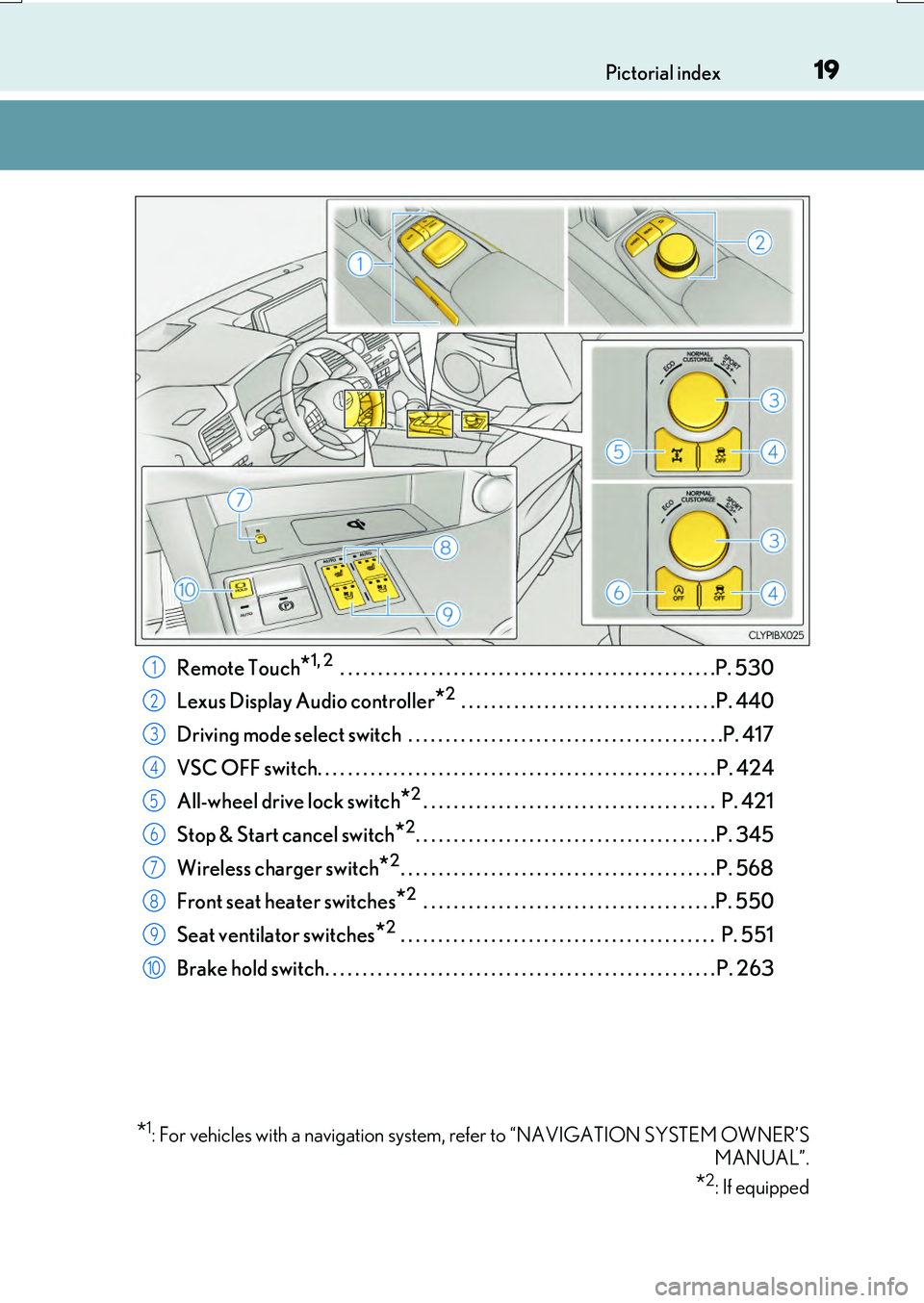
Remote Touch*1, 2 . . . . . . . . . . . . . . . . . . . . . . . . . . . . . . . . . . . . . . . . . . . . . . . . . .P. 530
Lexus Display Audio controller*2 . . . . . . . . . . . . . . . . . . . . . . . . . . . . . . . . . .P. 440
Driving mode select switch . . . . . . . . . . . . . . . . . . . . . . . . . . . . . . . . . . . . . . . . . .P. 417
VSC OFF switch. . . . . . . . . . . . . . . . . . . . . . . . . . . . . . . . . . . . . . . . . . . . . . . . . . . . . P. 424
All-wheel drive lock switch*2. . . . . . . . . . . . . . . . . . . . . . . . . . . . . . . . . . . . . . . P. 421
Stop & Start cancel switch*2. . . . . . . . . . . . . . . . . . . . . . . . . . . . . . . . . . . . . . . .P. 345
Wireless charger switch*2. . . . . . . . . . . . . . . . . . . . . . . . . . . . . . . . . . . . . . . . . .P. 568
Front seat heater switches*2 . . . . . . . . . . . . . . . . . . . . . . . . . . . . . . . . . . . . . . .P. 550
Seat ventilator switches*2 . . . . . . . . . . . . . . . . . . . . . . . . . . . . . . . . . . . . . . . . . . P. 551
Brake hold switch. . . . . . . . . . . . . . . . . . . . . . . . . . . . . . . . . . . . . . . . . . . . . . . . . . . . P. 263
*1: For vehicles with a navigation system, refer to “NAVIGATION SYSTEM OWNER’S
MANUAL”.
*2: If equipped
1
2
3
4
5
6
7
8
9
10
Page 26 of 776
26Pictorial index
RX350/RX200t_EE_OM48F32E
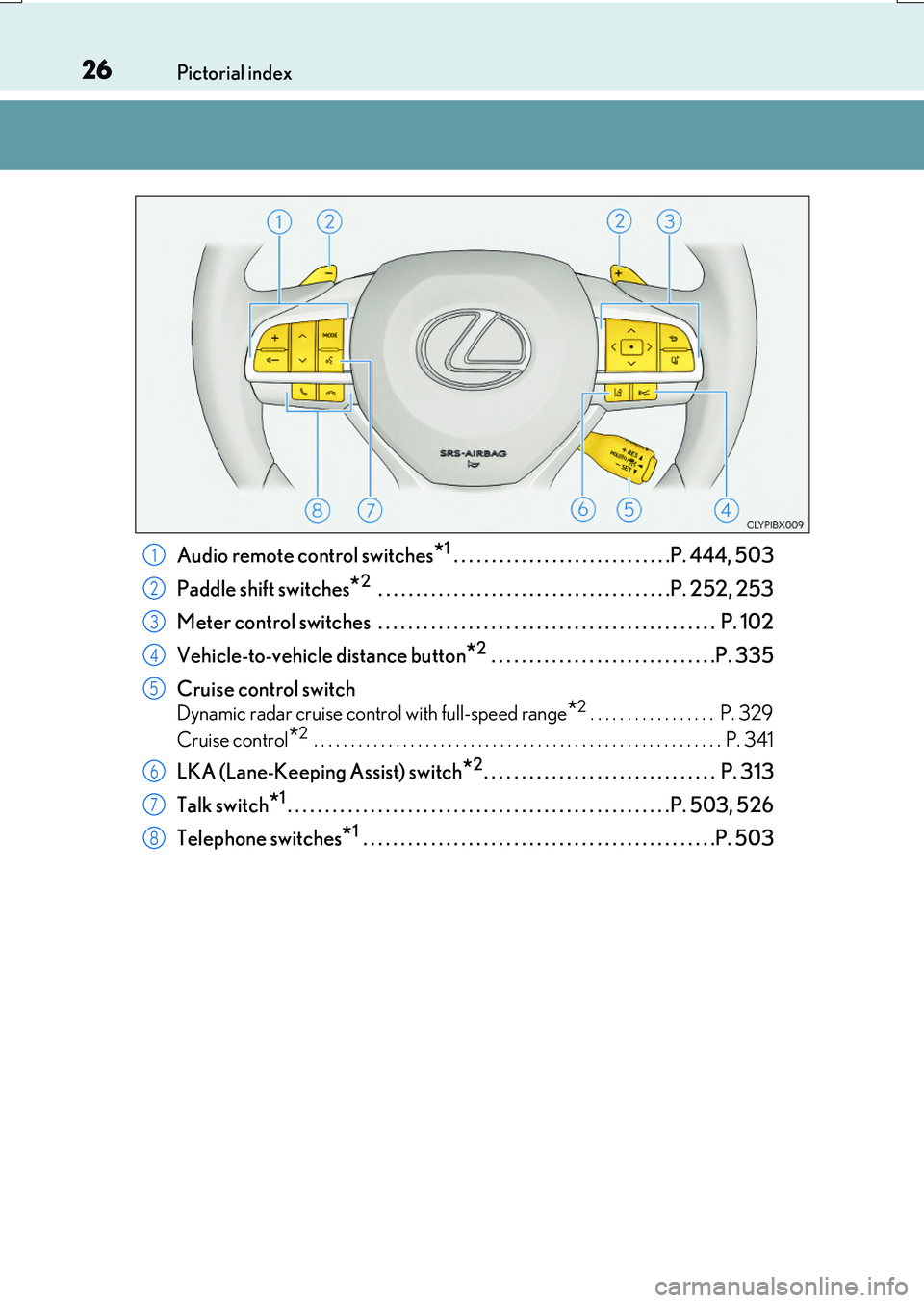
Audio remote control switches*1 . . . . . . . . . . . . . . . . . . . . . . . . . . . . .P. 444, 503
Paddle shift switches
*2 . . . . . . . . . . . . . . . . . . . . . . . . . . . . . . . . . . . . . . .P. 252, 253
Meter control switches . . . . . . . . . . . . . . . . . . . . . . . . . . . . . . . . . . . . . . . . . . . . . P. 102
Vehicle-to-vehicle distance button
*2 . . . . . . . . . . . . . . . . . . . . . . . . . . . . . .P. 335
Cruise control switch
Dynamic radar cruise cont rol with full-speed range*2. . . . . . . . . . . . . . . . . P. 329
Cruise control
*2 . . . . . . . . . . . . . . . . . . . . . . . . . . . . . . . . . . . . . . . . . . . . . . . . . . . . . . . P. 341
LKA (Lane-Keeping Assist) switch*2. . . . . . . . . . . . . . . . . . . . . . . . . . . . . . . P. 313
Talk switch
*1. . . . . . . . . . . . . . . . . . . . . . . . . . . . . . . . . . . . . . . . . . . . . . . . . . .P. 503, 526
Telephone switches
*1 . . . . . . . . . . . . . . . . . . . . . . . . . . . . . . . . . . . . . . . . . . . . . . .P. 503
1
2
3
4
5
6
7
8
Page 27 of 776
27Pictorial index
RX350/RX200t_EE_OM48F32E
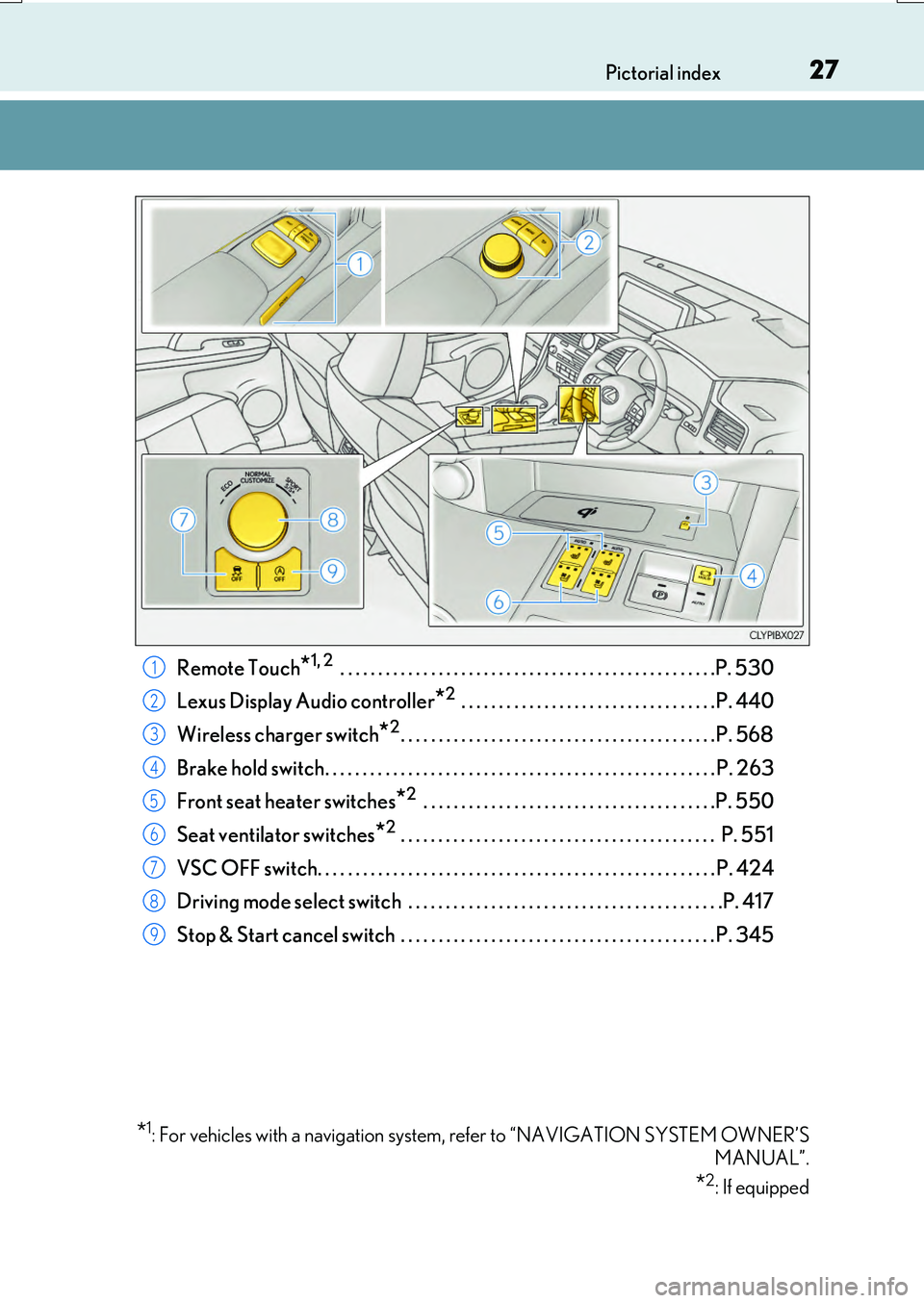
Remote Touch*1, 2 . . . . . . . . . . . . . . . . . . . . . . . . . . . . . . . . . . . . . . . . . . . . . . . . . .P. 530
Lexus Display Audio controller*2 . . . . . . . . . . . . . . . . . . . . . . . . . . . . . . . . . .P. 440
Wireless charger switch*2. . . . . . . . . . . . . . . . . . . . . . . . . . . . . . . . . . . . . . . . . .P. 568
Brake hold switch. . . . . . . . . . . . . . . . . . . . . . . . . . . . . . . . . . . . . . . . . . . . . . . . . . . . P. 263
Front seat heater switches*2 . . . . . . . . . . . . . . . . . . . . . . . . . . . . . . . . . . . . . . .P. 550
Seat ventilator switches*2 . . . . . . . . . . . . . . . . . . . . . . . . . . . . . . . . . . . . . . . . . . P. 551
VSC OFF switch. . . . . . . . . . . . . . . . . . . . . . . . . . . . . . . . . . . . . . . . . . . . . . . . . . . . . P. 424
Driving mode select switch . . . . . . . . . . . . . . . . . . . . . . . . . . . . . . . . . . . . . . . . . .P. 417
Stop & Start cancel switch . . . . . . . . . . . . . . . . . . . . . . . . . . . . . . . . . . . . . . . . . . P. 345
*1: For vehicles with a navigation system, refer to “NAVIGATION SYSTEM OWNER’S
MANUAL”.
*2: If equipped
1
2
3
4
5
6
7
8
9
Page 82 of 776

821-3. Theft deterrent system
RX350/RX200t_EE_OM48F32E
Vehicles employing this system have
labels on the side window of both front
doors.
Turn the engine switch off, have all the passengers exit the vehicle and ensure
that all the doors are closed.
Using the entry function:
Touch the sensor area on the outside door handle twice within 5 seconds.
Using the wireless remote control:
Press twice within 5 seconds.
Using the entry function: Hold the outs ide door handle, press the back door
opener button or hold your hand over th e rear emblem (vehicles with a touchless
power back door).
Using the wireless remote control: Press .
Double locking system
Unauthorized access to the vehicle is pr evented by disabling the door unlock-
ing function from both the interior and exterior of the vehicle.
Setting the double locking system
Canceling the double locking system
WARNING
■Double locking system precaution
Never activate the double locking system when there are people in the vehicle because all the doors cannot be opened from inside the vehicle.
Page 83 of 776

831-3. Theft deterrent system
1
For safety and security
RX350/RX200t_EE_OM48F32E
The alarm uses light and sound to give an alert when an intrusion is detected.
The alarm is triggered in the following situations when the alarm is set:
●A locked door is unlocked or opened in any way other than using the entry
function or wireless remote control. (The doors will lock again automatically.)
●The hood is opened.
●The intrusion sensor detects something moving inside the vehicle. (An
intruder gets in the vehicle.)
●The tilt sensor detects a change of vehicle inclination. (if equipped)
●Any of the windows are broken.
Close the doors and hood, and lock all
the doors using the entry function or
wireless remote control. The system will
be set automatically after 30 seconds.
The indicator light changes from being
on to flashing when the system is set.
Do one of the following to deactivate or stop the alarm.
●Unlock the doors using the entry function or wireless remote control.
●Start the engine. (The alarm will be deactivated or stopped after a few sec-
onds.)
Alarm
: If equipped
The alarm
Setting the alarm system
Deactivating or stopping the alarm
Page 86 of 776

861-3. Theft deterrent system
RX350/RX200t_EE_OM48F32E
■Canceling and automatic re-enabling of the intrusion sensor and tilt sensor
●The alarm will still be set even when the intrusion sensor and tilt sensor are canceled.
●After the intrusion sensor and tilt sensor are canceled, pressing the engine switch or unlocking the doors using the entry function or wireless remote control will re-enable
the intrusion sensor and tilt sensor.
●The intrusion sensor and tilt sensor will automatically be re-enabled when the alarm system is reactivated.
■Intrusion sensor dete ction considerations
The sensor may trigger the alarm in the following situations:
●People or pets are in the vehicle.
●A window or moon roof, panoramic moon roof is open.
In this case, the sensor may detect the follow-
ing:
• Wind or the movement of objects such as leaves and insects inside the vehicle
• Ultrasonic waves emitted from devices such as the intrusion sensors of other vehi-cles
• The movement of people outside the vehi- cle
●Unstable items, such as dangling accessories
or clothes hanging on the coat hooks, are in the vehicle.
Page 128 of 776
1282. Instrument cluster
RX350/RX200t_EE_OM48F32E
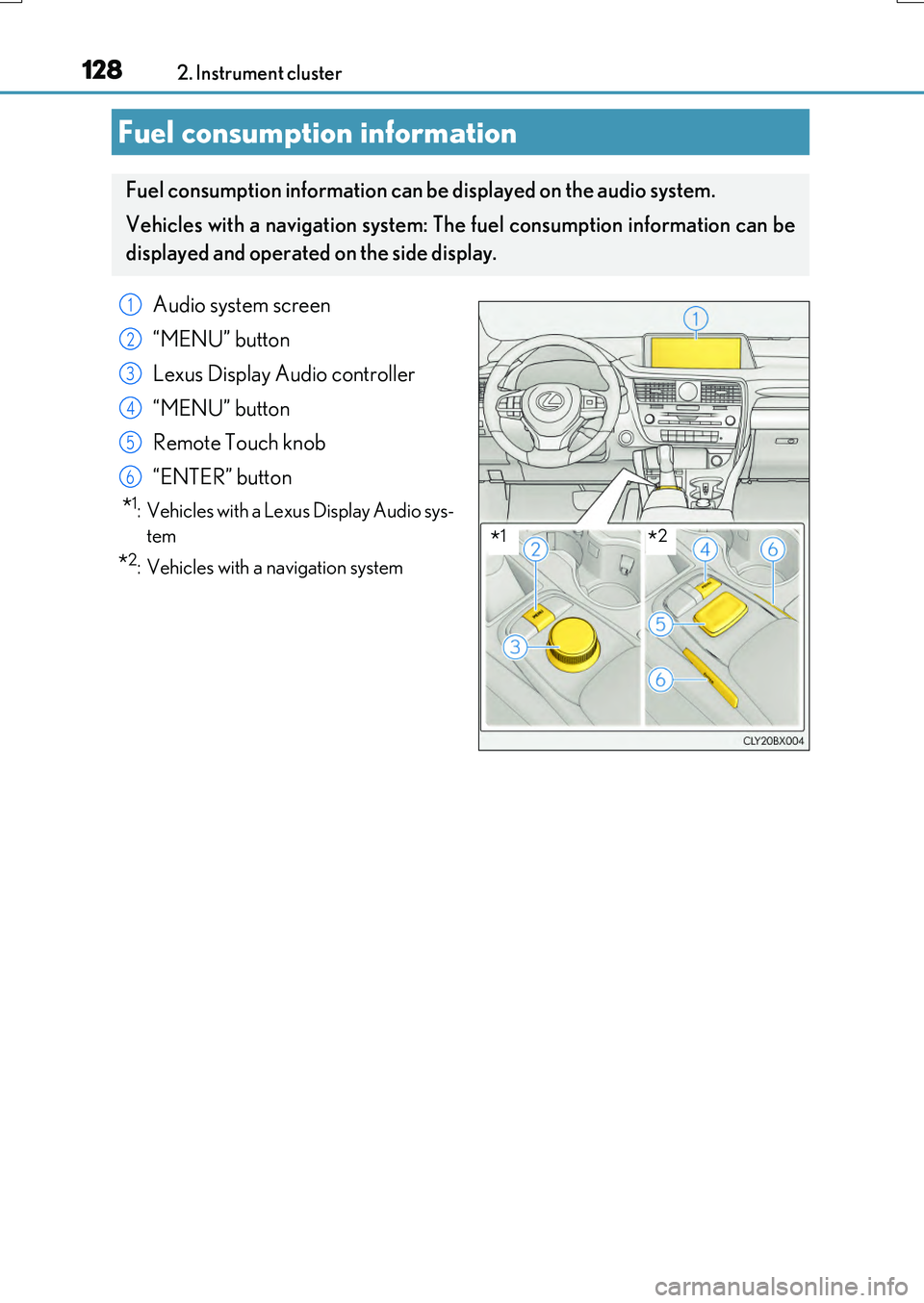
Fuel consumption information
Fuel consumption information can be displayed on the audio system.
Vehicles with a navigation system: The fuel consumption information can be
displayed and operated on the side display.
Audio system screen
“MENU” button
Lexus Display Audio controller
“MENU” button
Remote Touch knob
“ENTER” button
*1: Vehicles with a Lexus Display Audio sys-
tem
*2: Vehicles with a navigation system
1
2
3
4
5
6
*1*2
Page 129 of 776
1292. Instrument cluster
2
Instrument cluster
RX350/RX200t_EE_OM48F32E
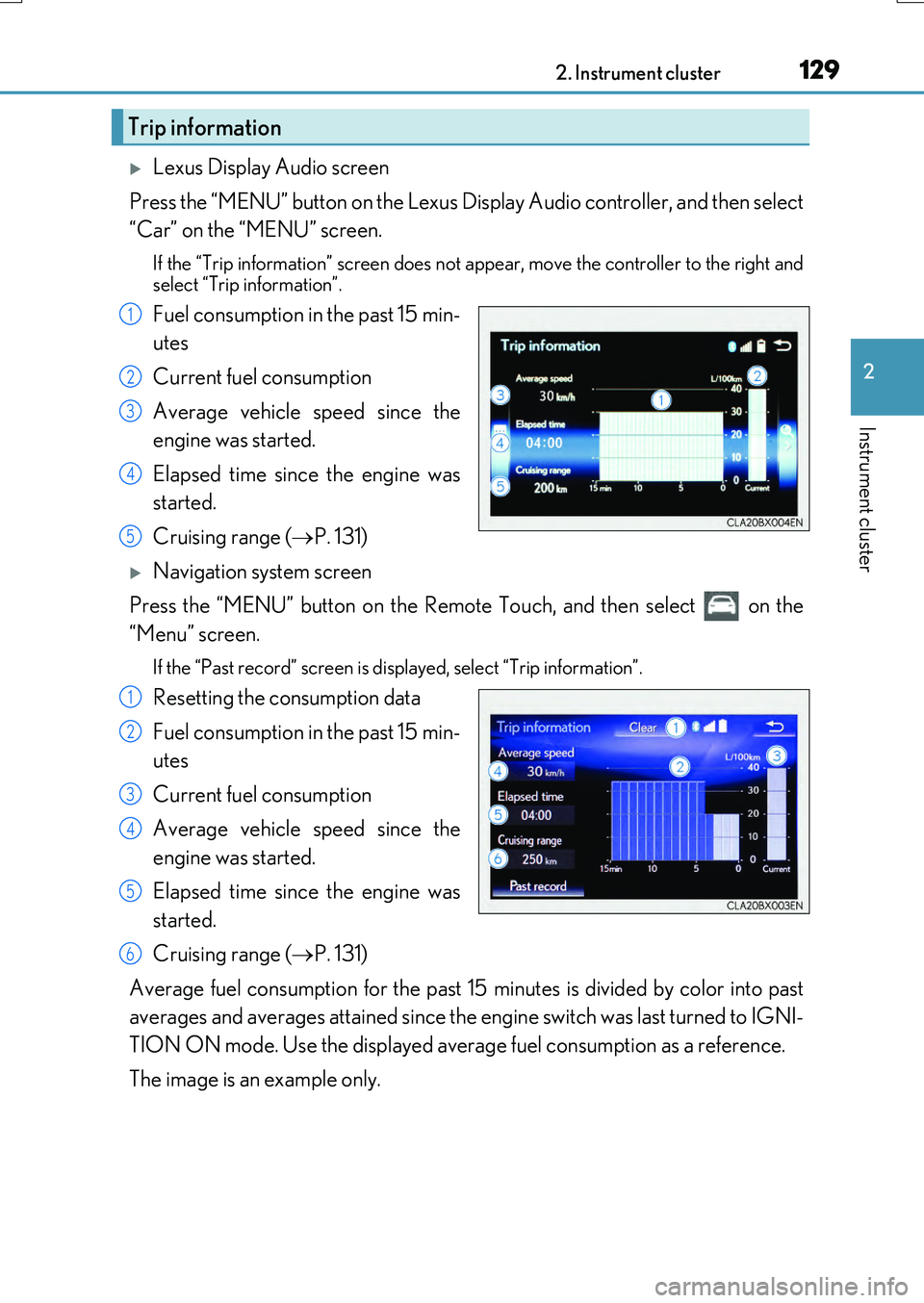
Lexus Display Audio screen
Press the “MENU” button on the Lexus Display Audio controller, and then select
“Car” on the “MENU” screen.
If the “Trip information” screen does not appear, move the controller to the right and
select “Trip information”.
Fuel consumption in the past 15 min-
utes
Current fuel consumption
Average vehicle speed since the
engine was started.
Elapsed time since the engine was
started.
Cruising range ( P. 131)
Navigation system screen
Press the “MENU” button on the Remote Touch, and then select on the
“Menu” screen.
If the “Past record” screen is displayed, select “Trip information”.
Resetting the consumption data
Fuel consumption in the past 15 min-
utes
Current fuel consumption
Average vehicle speed since the
engine was started.
Elapsed time since the engine was
started.
Cruising range ( P. 131)
Average fuel consumption for the past 15 minutes is divided by color into past
averages and averages attained since the engine switch was last turned to IGNI-
TION ON mode. Use the displayed average fuel consumption as a reference.
The image is an example only.
Trip information
1
2
3
4
5
1
2
3
4
5
6
Page 130 of 776
1302. Instrument cluster
RX350/RX200t_EE_OM48F32E
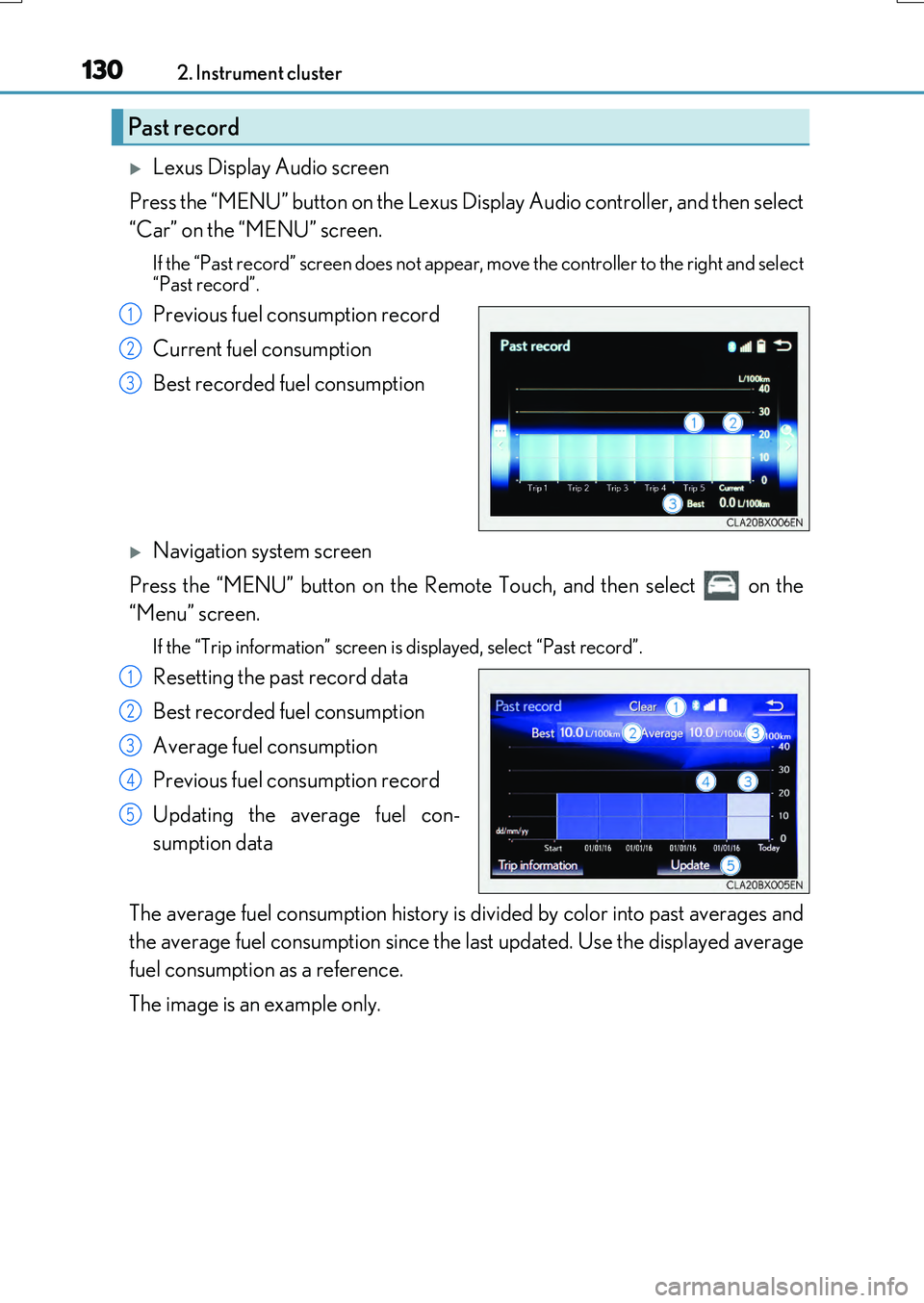
Lexus Display Audio screen
Press the “MENU” button on the Lexus Display Audio controller, and then select
“Car” on the “MENU” screen.
If the “Past record” screen does not appear , move the controller to the right and select
“Past record”.
Previous fuel consumption record
Current fuel consumption
Best recorded fuel consumption
Navigation system screen
Press the “MENU” button on the Remote Touch, and then select on the
“Menu” screen.
If the “Trip information” screen is displayed, select “Past record”.
Resetting the past record data
Best recorded fuel consumption
Average fuel consumption
Previous fuel consumption record
Updating the average fuel con-
sumption data
The average fuel consumption history is di vided by color into past averages and
the average fuel consumption since the last updated. Use the displayed average
fuel consumption as a reference.
The image is an example only.
Past record
1
2
3
1
2
3
4
5