engine LEXUS RX200T 2017 Owners Manual
[x] Cancel search | Manufacturer: LEXUS, Model Year: 2017, Model line: RX200T, Model: LEXUS RX200T 2017Pages: 776, PDF Size: 44.51 MB
Page 250 of 776
2504-2. Driving procedures
RX350/RX200t_EE_OM48F32E
NOTICE
■To prevent battery discharge
●Do not leave the engine switch in ACCESSORY or IGNITION ON mode for long periods of time without the engine running on.
●If “ACCESSORY” or “IGNITION ON” is displayed on the meters while the engine isnot running, the engine switch is not off. Exit the vehicle after turning the engineswitch off.
●Do not stop the engine when the shift lever is in a position other than P. If the engine isstopped in another shift lever position, the engine switch will not be turned off butinstead be turned to ACCESSORY mode. If the vehicle is left in ACCESSORY
mode, battery discharge may occur.
■When starting the engine
●Do not race a cold engine.
●If the engine becomes difficult to start or stalls frequently, have your vehicle checked by any authorized Lexus dealer or repair er, or another duly qualified and equipped professional immediately.
■Symptoms indicating a malfun ction with the engine switch
If the engine switch seems to be operating s omewhat differently than usual, such as the switch sticking slightly, th ere may be a malfunction. Contact any authorized Lexus
dealer or repairer, or another duly qualif ied and equipped professional immediately.
Page 251 of 776
2514-2. Driving procedures
4
Driving
RX350/RX200t_EE_OM48F32E
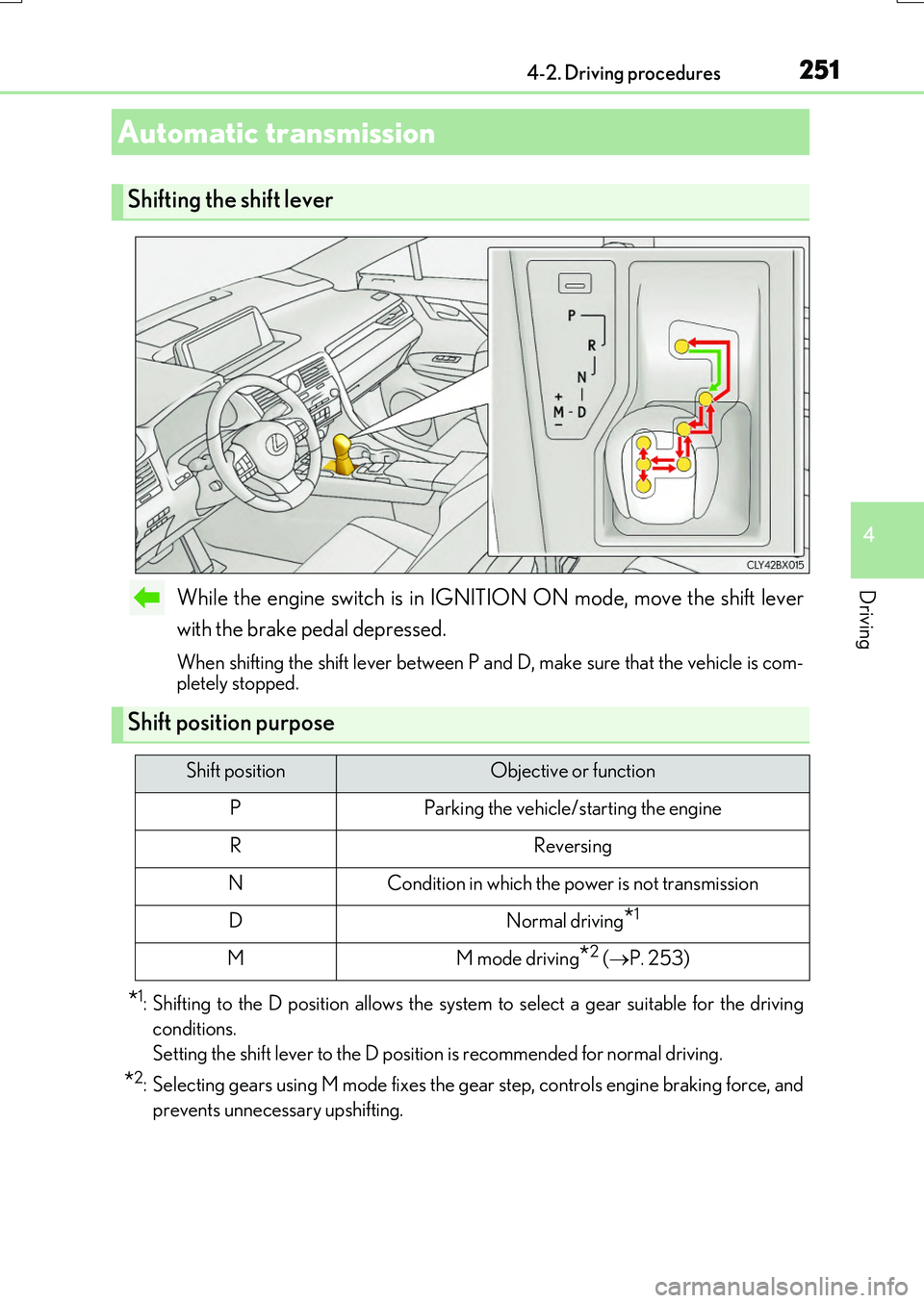
While the engine switch is in IGNITION ON mode, move the shift lever
with the brake pedal depressed.
When shifting the shift lever between P and D, make sure that the vehicle is com- pletely stopped.
*1: Shifting to the D position allows the system to select a gear suitable for the driving
conditions.
Setting the shift lever to the D position is recommended for normal driving.
*2: Selecting gears using M mode fixes the gear step, controls engine braking force, and
prevents unnecessary upshifting.
Automatic transmission
Shifting the shift lever
Shift position purpose
Shift positionObjective or function
PParking the vehicle/starting the engine
RReversing
NCondition in which the power is not transmission
DNormal driving*1
MM mode driving*2 ( P. 253)
Page 252 of 776
2524-2. Driving procedures
RX350/RX200t_EE_OM48F32E
P. 417
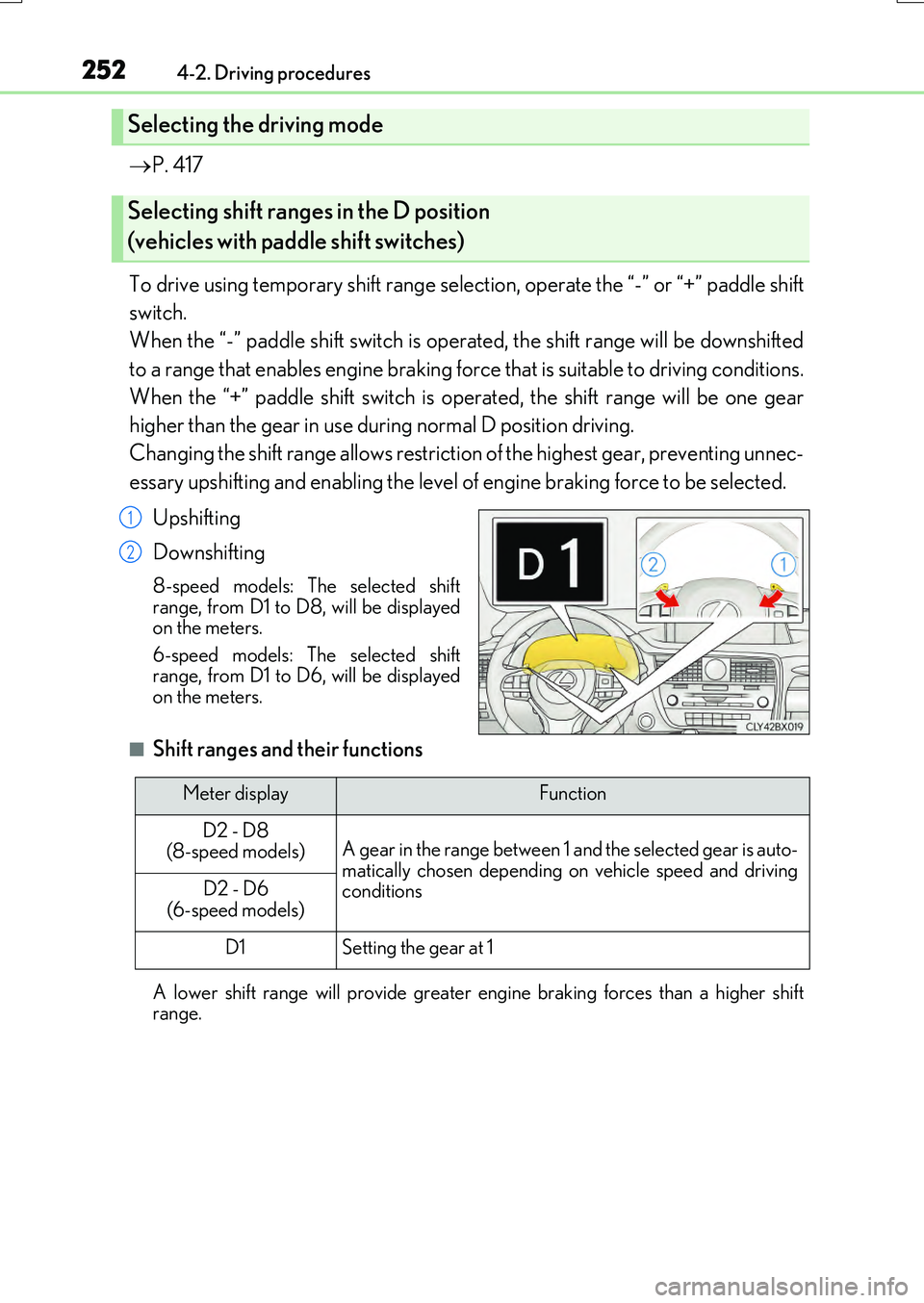
To drive using temporary shift range selection, operate the “-” or “+” paddle shift
switch.
When the “-” paddle shift switch is operated, the shift range will be downshifted
to a range that enables engine braking force that is suitable to driving conditions.
When the “+” paddle shift switch is operated, the shift range will be one gear
higher than the gear in use du ring normal D position driving.
Changing the shift range allows restrictio n of the highest gear, preventing unnec-
essary upshifting and enabling the level of engine braking force to be selected.
Upshifting
Downshifting
8-speed models: The selected shift range, from D1 to D8, will be displayedon the meters.
6-speed models: The selected shift range, from D1 to D6, will be displayedon the meters.
■Shift ranges and their functions
A lower shift range will provide greater engi ne braking forces than a higher shift range.
Selecting the driving mode
Selecting shift ranges in the D position
(vehicles with paddle shift switches)
1
2
Meter displayFunction
D2 - D8 (8-speed models)A gear in the range between 1 and the selected gear is auto-matically chosen depending on vehicle speed and drivingconditionsD2 - D6 (6-speed models)
D1Setting the gear at 1
Page 253 of 776
2534-2. Driving procedures
4
Driving
RX350/RX200t_EE_OM48F32E
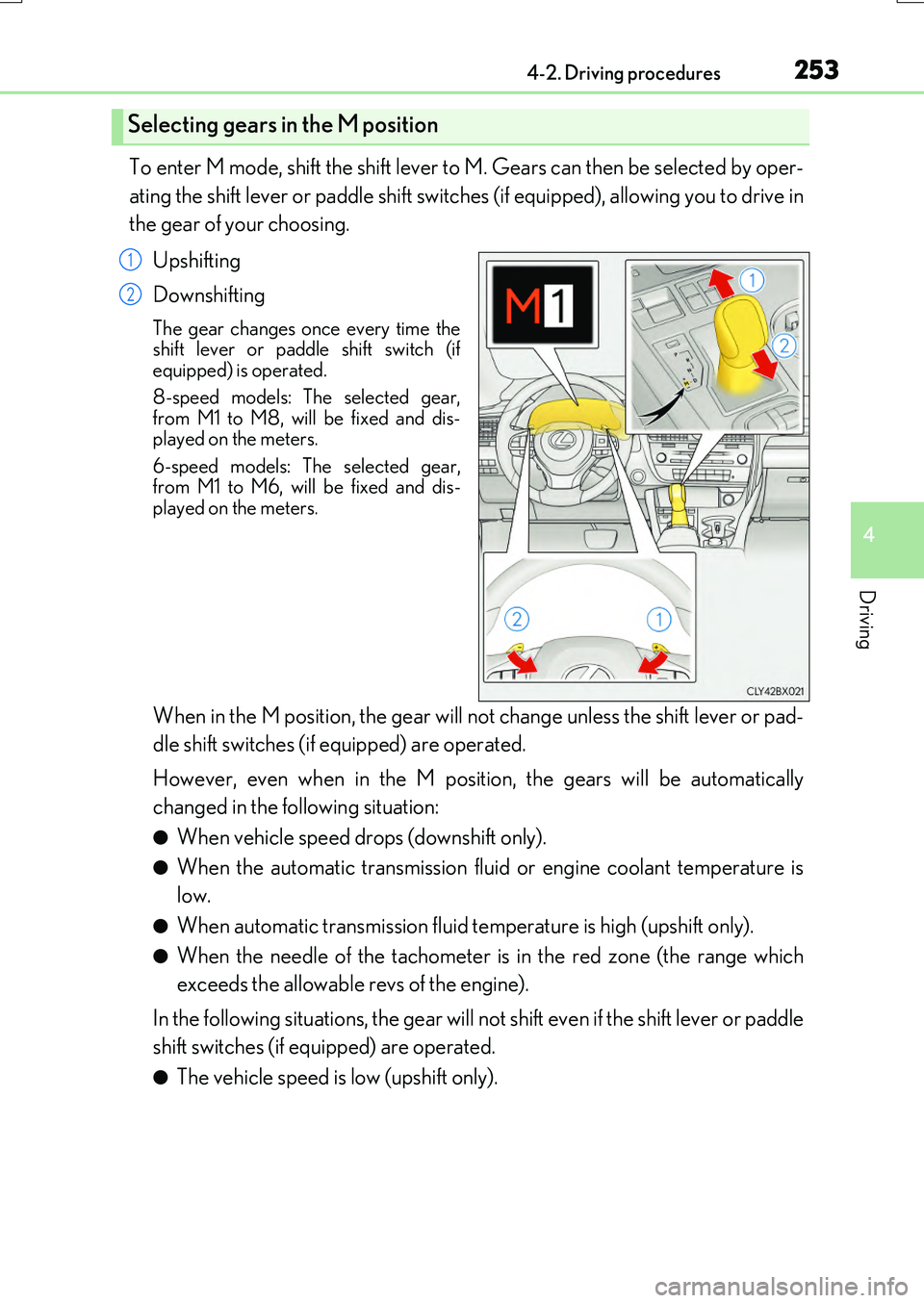
To enter M mode, shift the shift lever to M. Gears can then be selected by oper-
ating the shift lever or paddle shift switches (if equipped), allowing you to drive in
the gear of your choosing.
Upshifting
Downshifting
The gear changes once every time the shift lever or paddle shift switch (ifequipped) is operated.
8-speed models: The selected gear, from M1 to M8, will be fixed and dis-played on the meters.
6-speed models: The selected gear, from M1 to M6, will be fixed and dis-played on the meters.
When in the M position, the gear will not change unless the shift lever or pad-
dle shift switches (if equipped) are operated.
However, even when in the M position, the gears will be automatically
changed in the following situation:
●When vehicle speed drops (downshift only).
●When the automatic transmission flui d or engine coolant temperature is
low.
●When automatic transmission fluid temperature is high (upshift only).
●When the needle of the tachometer is in the red zone (the range which
exceeds the allowable revs of the engine).
In the following situations, the gear will not shift even if the shift lever or paddle
shift switches (if equipped) are operated.
●The vehicle speed is low (upshift only).
Selecting gears in the M position
1
2
Page 254 of 776
2544-2. Driving procedures
RX350/RX200t_EE_OM48F32E
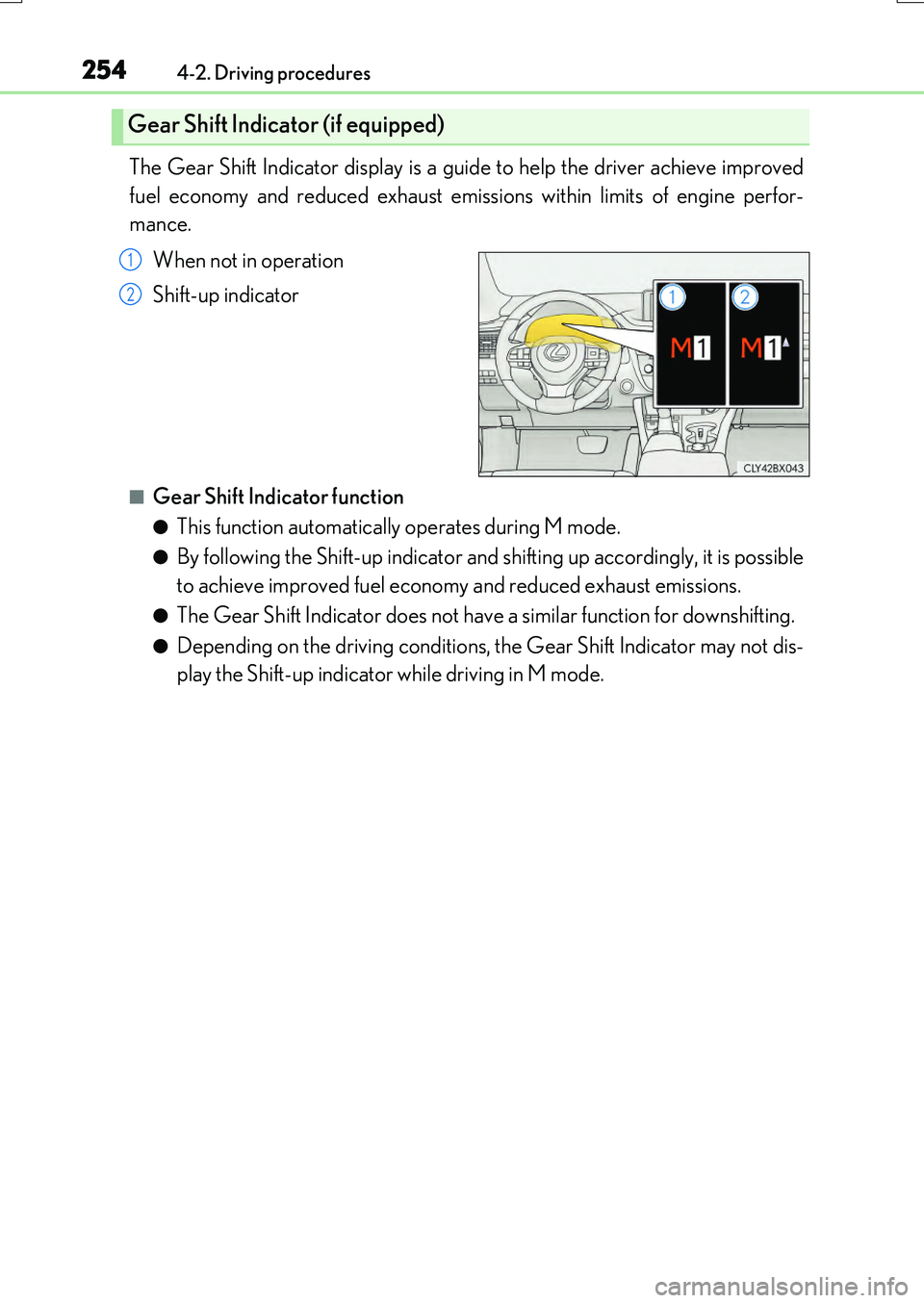
The Gear Shift Indicator display is a guide to help the driver achieve improved
fuel economy and reduced exhaust emissions within limits of engine perfor-
mance.
When not in operation
Shift-up indicator
■Gear Shift Indicator function
●This function automatically operates during M mode.
●By following the Shift-up indicator and shifting up accordingly, it is possible
to achieve improved fuel economy and reduced exhaust emissions.
●The Gear Shift Indicator does not have a similar function for downshifting.
●Depending on the driving conditions, the Gear Shift Indicator may not dis-
play the Shift-up indicator while driving in M mode.
Gear Shift Indicator (if equipped)
1
2
Page 255 of 776
2554-2. Driving procedures
4
Driving
RX350/RX200t_EE_OM48F32E
■Automatic deactivation of shift range selection in the D position (vehicles with paddle
shift switches)
Shift range selection in the D position will be deactivated in the following situations:
●The “+” paddle shift switch is held down for a period of time
●When the vehicle comes to a stop
●If the accelerator pedal is depressed for more than a certain period of time
●When the shift lever is shifted to a position other than D
■To protect the automatic transmission
If the automatic transmission fluid temperat ure is high, “Transmission Fluid Temp High See Owner’s Manual” will be displayed on the multi-information display and the vehicle
will go into transmission protection mode automatically. Have the vehicle inspected by any authorized Lexus dealer or repairer, or another duly qualified and equipped profes-sional.
■Downshifting restri ction warning buzzer
To help ensure safety and driving performa nce, downshifting operation may sometimes be restricted. In some circumstances, down shifting may not be possible even when the
shift lever or paddle shift switch (if equipp ed) is operated. (A buzzer will sound twice.)
■When driving with cruise control or dynamic radar cruise control with full-speed range activated
Even when performing the following actions with the intent of enabling engine braking, engine braking will not activate because crui se control or dynamic radar cruise control with full-speed range will not be canceled.
●Vehicles with paddle shift switches (8-sp eed models): While driving in D position, downshifting to 7, 6, 5 or 4. ( P. 329, 341)
●Vehicles with paddle shift switches (6-speed models): While driving in D position,
downshifting to 5 or 4. ( P. 329, 341)
●When switching the driving mode to sport mode while driving in D position. (P. 417)
■Restraining sudden start (Drive-Start Control)
When the following unusual operation is performed, the engine output may be restrained.
●When the shift lever is shifted from R to D, D to R, N to R, P to D, or P to R (D includes
M) with the accelerator pedal depressed, a warning message appears on the multi- information display. If a warning message is shown on the multi-information display, read the message and follow the instructions.
●When the accelerator pedal is depressed too while the vehicle is in reverse.
■Shift lock system
The shift lock system is a system to prevent accidental operation of the shift lever in start- ing.The shift lever can be shifte d from P only when the engine switch is in IGNITION ON
mode and the brake pedal is being depressed.
Page 256 of 776
2564-2. Driving procedures
RX350/RX200t_EE_OM48F32E
■If the shift lever cannot be shifted from P
First, check whether the brake pedal is being depressed.
If the shift lever cannot be shifted with your foot on the brake pedal, there may be a prob-
lem with the shift lock system. Have the vehicle inspected by any authorized Lexus dealer or repairer, or another duly qualifie d and equipped professional immediately. The following steps may be used as an emerge ncy measure to ensure that the shift lever
can be shifted.
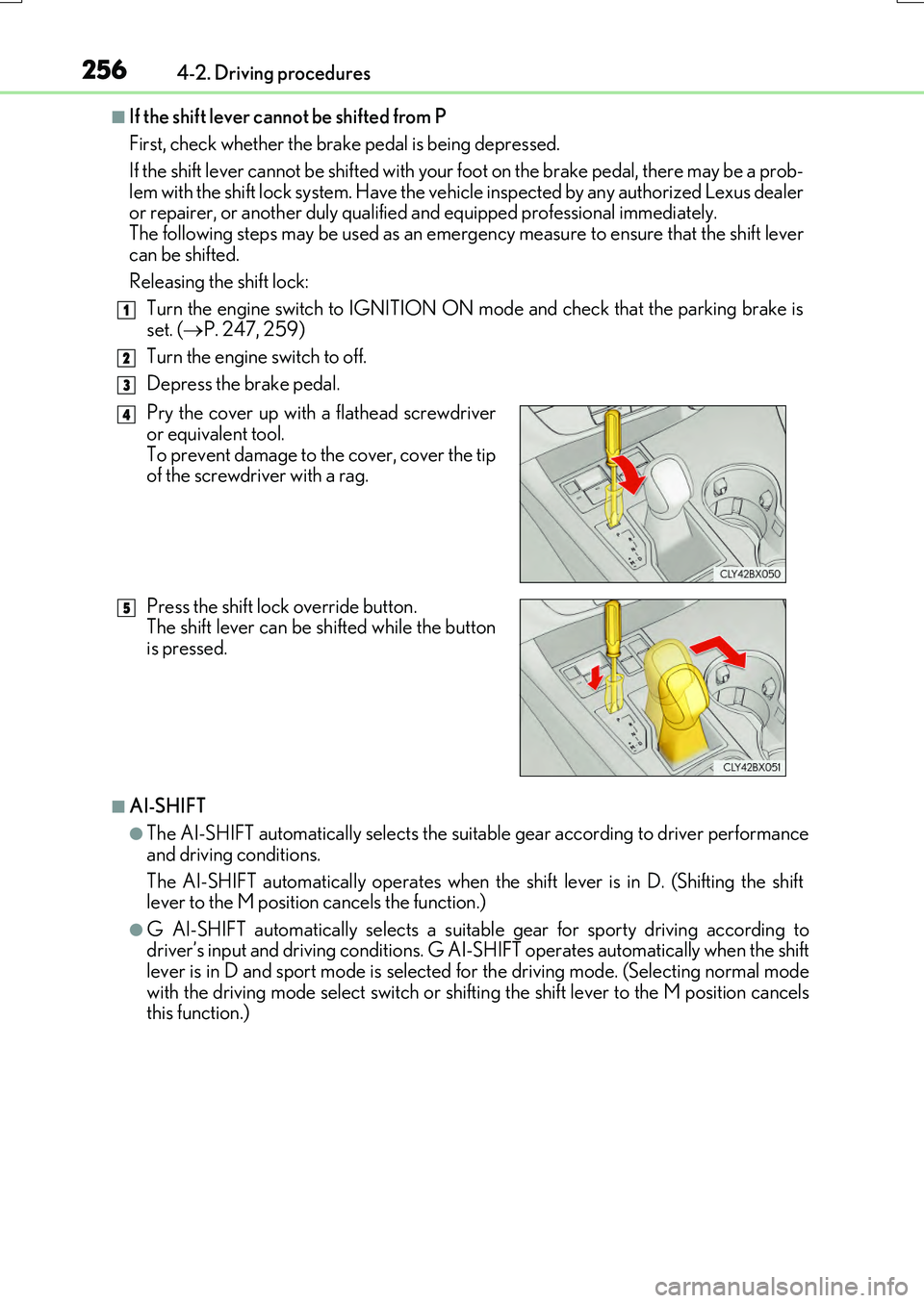
Releasing the shift lock:
Turn the engine switch to IGNITION ON mode and check that the parking brake is
set. ( P. 247, 259)
Turn the engine switch to off.
Depress the brake pedal.
■AI-SHIFT
●The AI-SHIFT automatically selects the suitable gear according to driver performance
and driving conditions.
The AI-SHIFT automatically operates when th e shift lever is in D. (Shifting the shift lever to the M position cancels the function.)
●G AI-SHIFT automatically selects a suitab le gear for sporty driving according to driver’s input and driving cond itions. G AI-SHIFT operates automatically when the shift lever is in D and sport mode is selected for the driving mode. (Selecting normal mode
with the driving mode select switch or shifti ng the shift lever to the M position cancels this function.)
1
2
3
Pry the cover up with a flathead screwdriveror equivalent tool.
To prevent damage to the cover, cover the tip of the screwdriver with a rag.
Press the shift lock override button. The shift lever can be shifted while the button
is pressed.
4
5
Page 258 of 776
2584-2. Driving procedures
RX350/RX200t_EE_OM48F32E
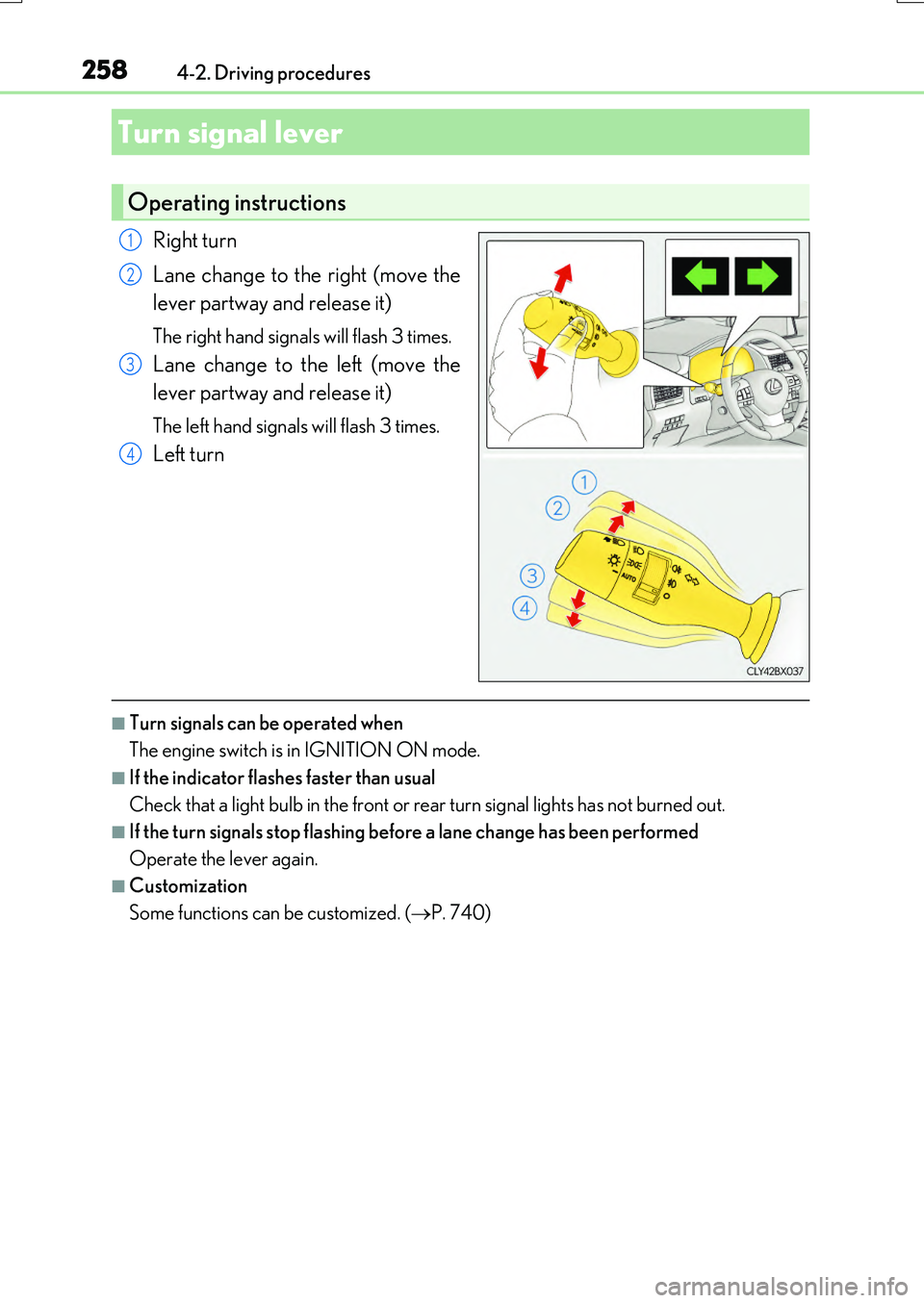
Right turn
Lane change to the right (move the
lever partway and release it)
The right hand signals will flash 3 times.
Lane change to the left (move the
lever partway and release it)
The left hand signals will flash 3 times.
Left turn
■Turn signals can be operated when
The engine switch is in IGNITION ON mode.
■If the indicator flashes faster than usual
Check that a light bulb in the front or rear turn signal lights has not burned out.
■If the turn signals stop flashing before a lane change has been performed
Operate the lever again.
■Customization
Some functions can be customized. ( P. 740)
Turn signal lever
Operating instructions
1
2
3
4
Page 260 of 776
2604-2. Driving procedures
RX350/RX200t_EE_OM48F32E
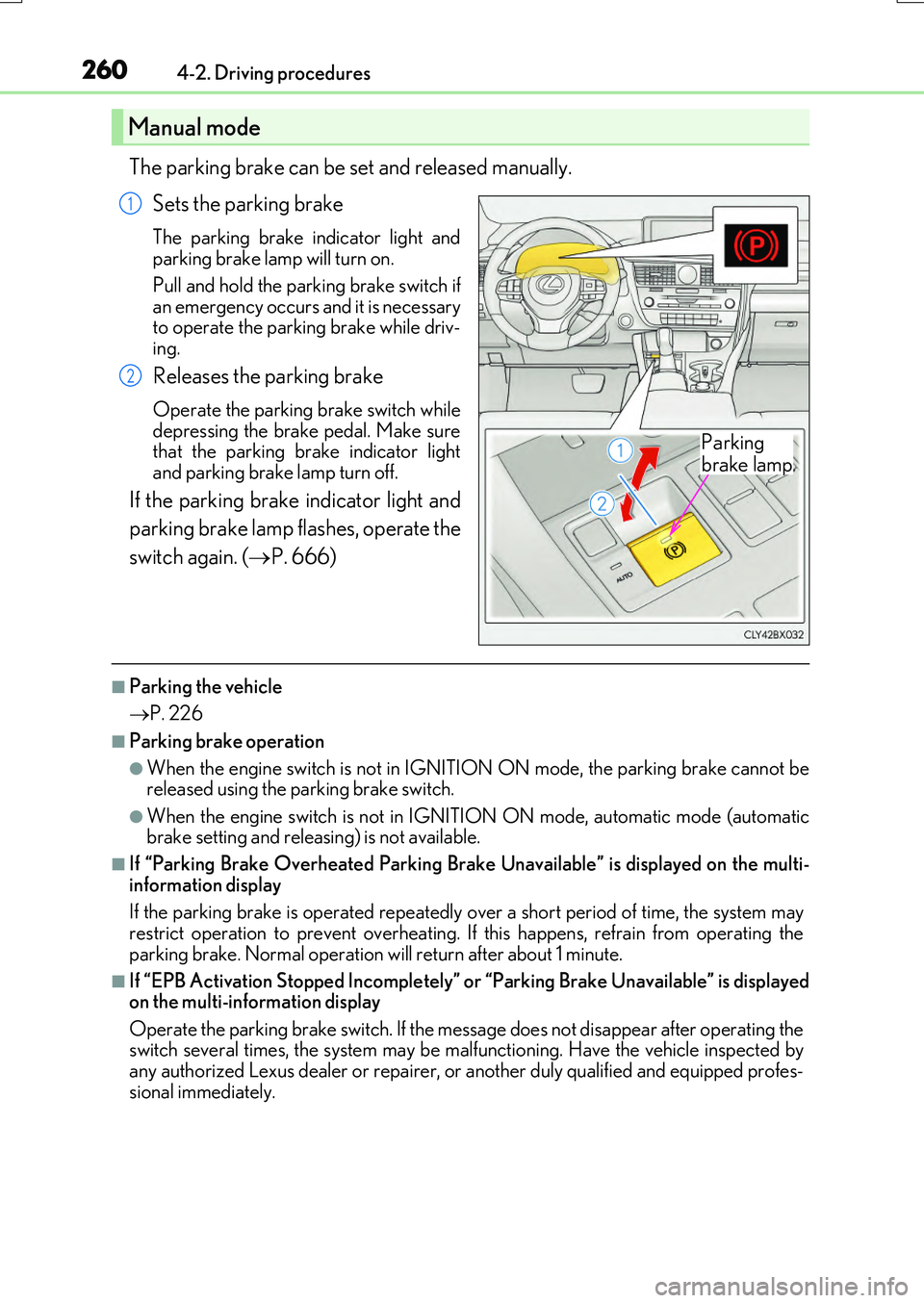
The parking brake can be set and released manually.
Sets the parking brake
The parking brake in dicator light and parking brake lamp will turn on.
Pull and hold the parking brake switch if an emergency occurs and it is necessaryto operate the parking brake while driv-
ing.
Releases the parking brake
Operate the parking brake switch while depressing the brake pedal. Make surethat the parking brake indicator light
and parking brake lamp turn off.
If the parking brake indicator light and
parking brake lamp flashes, operate the
switch again. ( P. 666)
■Parking the vehicle
P. 226
■Parking brake operation
●When the engine switch is not in IGNITION ON mode, the parking brake cannot be released using the parking brake switch.
●When the engine switch is not in IGNITION ON mode, automatic mode (automatic brake setting and releasing) is not available.
■If “Parking Brake Overheated Parking Brake Unavailable” is displayed on the multi-
information display
If the parking brake is operated repeatedly over a short period of time, the system may restrict operation to prevent overheating. If this happens, refrain from operating the
parking brake. Normal operation will return after about 1 minute.
■If “EPB Activation Stopped Incompletely” or “Parking Brake Unavailable” is displayed on the multi-information display
Operate the parking brake switch. If the message does not disappear after operating the switch several times, the system may be malfunctioning. Have the vehicle inspected byany authorized Lexus dealer or repairer, or another duly qualified and equipped profes-
sional immediately.
Manual mode
Parking
brake lamp
1
2
Page 261 of 776
2614-2. Driving procedures
4
Driving
RX350/RX200t_EE_OM48F32E
■Parking brake operation sound
When the parking brake operates, a motor so und (whirring sound) may be heard. This does not indicate a malfunction.
■Parking brake indicator light and parking brake lamp
●Depending on the engine switch mode, the parking brake indicator light and parking brake lamp will turn on and stay on as described below:
IGNITION ON mode: Comes on until the parking brake is released. Not in IGNITION ON mode: Stays on for approximately 15 seconds.
●When the engine switch is turned off with the parking brake set, the parking brake indi-
cator light and parking brake lamp will stay on for about 15 seconds. This does not indi- cate a malfunction.
■Changing the mode
When changing the automati c mode on/off, the message will be shown on the multi- information display and the buzzer sounds.
■Parking brake engaged warning buzzer
A buzzer will sound if the vehicle is driven with the parking brake engaged. “Release Parking Brake” is displayed on the multi-information display.
■Warning messages and buzzers
Warning messages and buzzers are used to indicate a system malfunction or to inform the driver of the need for caution. If a warn ing message is shown on the multi-information display, read the message and follow the instructions.
■If the brake system warning light comes on
P. 666
■Usage in winter time
P. 430