instrument cluster LEXUS RX200T 2017 User Guide
[x] Cancel search | Manufacturer: LEXUS, Model Year: 2017, Model line: RX200T, Model: LEXUS RX200T 2017Pages: 776, PDF Size: 44.51 MB
Page 96 of 776
962. Instrument cluster
RX350/RX200t_EE_OM48F32E
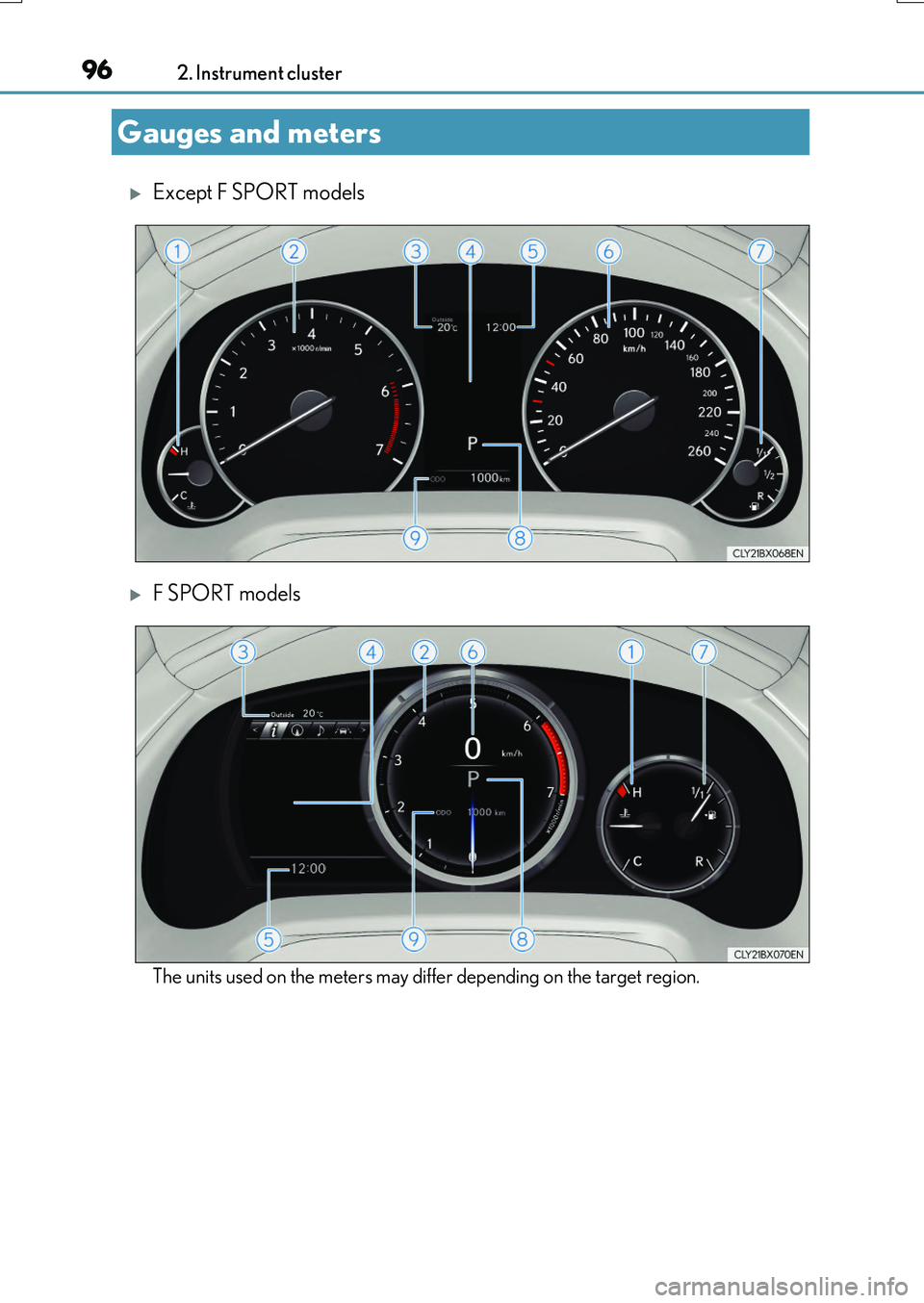
Except F SPORT models
F SPORT models
The units used on the meters may differ depending on the target region.
Gauges and meters
Page 97 of 776
972. Instrument cluster
2
Instrument cluster
RX350/RX200t_EE_OM48F32E
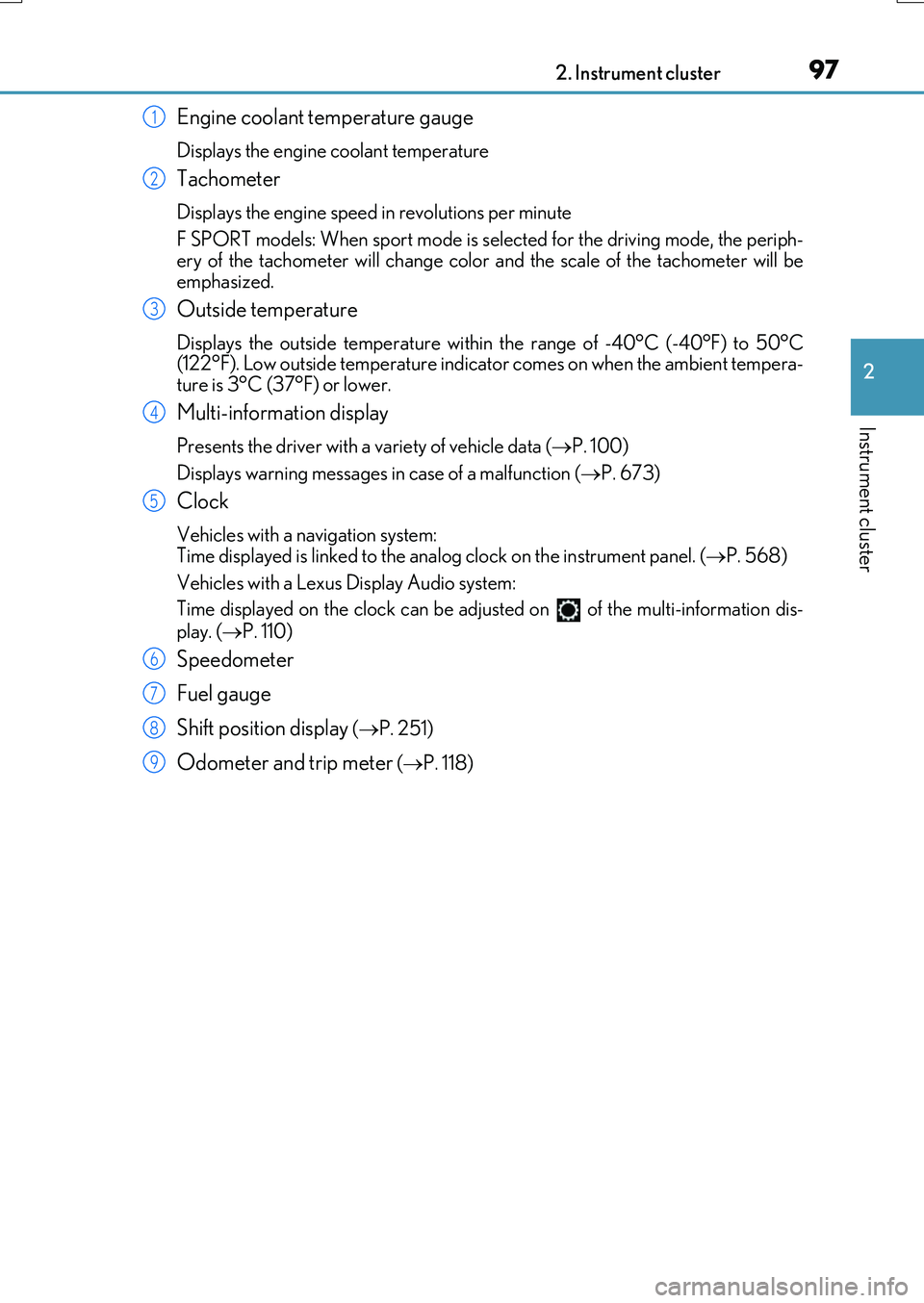
Engine coolant temperature gauge
Displays the engine coolant temperature
Tachometer
Displays the engine speed in revolutions per minute
F SPORT models: When sport mode is selected for the driving mode, the periph-
ery of the tachometer will change color and the scale of the tachometer will be emphasized.
Outside temperature
Displays the outside temperature within the range of -40°C (-40°F) to 50°C(122°F). Low outside temperature indicator comes on when the ambient tempera-
ture is 3°C (37°F) or lower.
Multi-information display
Presents the driver with a variety of vehicle data ( P. 100)
Displays warning messages in case of a malfunction ( P. 673)
Clock
Vehicles with a navigation system: Time displayed is linked to the analog clock on the instrument panel. (P. 568)
Vehicles with a Lexus Display Audio system:
Time displayed on the clock can be adju sted on of the multi-information dis-
play. ( P. 110)
Speedometer
Fuel gauge
Shift position display ( P. 251)
Odometer and trip meter (P. 118)
1
2
3
4
5
6
7
8
9
Page 98 of 776
982. Instrument cluster
RX350/RX200t_EE_OM48F32E
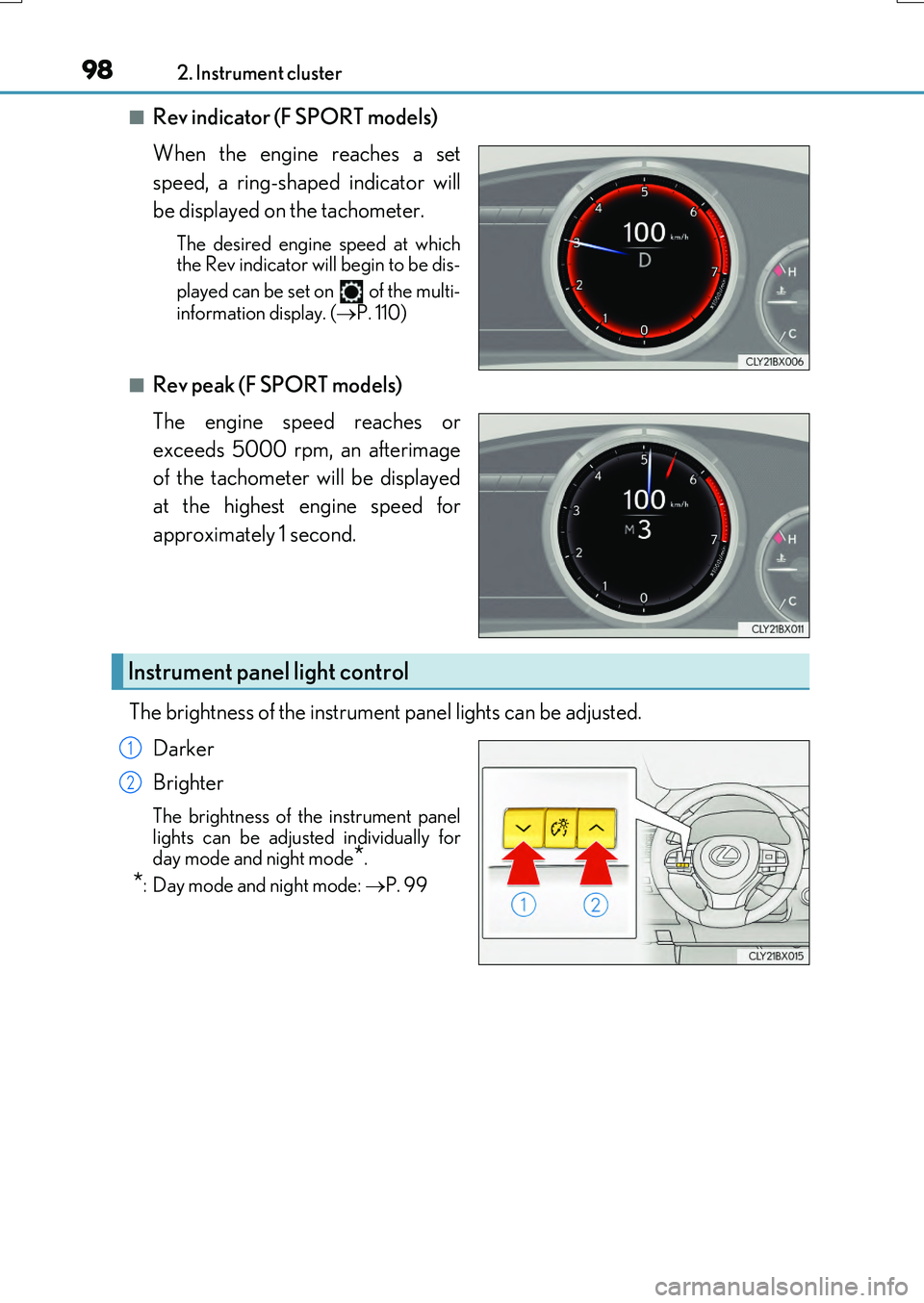
■Rev indicator (F SPORT models)
When the engine reaches a set
speed, a ring-shaped indicator will
be displayed on the tachometer.
The desired engine speed at which the Rev indicator will begin to be dis-
played can be set on of the multi-
information display. ( P. 110)
■Rev peak (F SPORT models)
The engine speed reaches or
exceeds 5000 rpm, an afterimage
of the tachometer will be displayed
at the highest engine speed for
approximately 1 second.
The brightness of the instrument panel lights can be adjusted.
Darker
Brighter
The brightness of the instrument panel lights can be adjusted individually for
day mode and night mode*.
*: Day mode and night mode: P. 99
Instrument panel light control
1
2
Page 99 of 776

992. Instrument cluster
2
Instrument cluster
RX350/RX200t_EE_OM48F32E
■The meters and display illuminate when
The engine switch is in IGNITION ON mode.
■Brightness of the meters (day mode and night mode)
The brightness of the meters is changed between day mode and night mode.
●Day mode: When the tail lights are off or wh en the tail lights are on but the surrounding area is bright
●Night mode: When the tail lights are on and the surrounding area is dark
■Outside temperature display
●In the following situations, the correct outside temperature may not be displayed, or thedisplay may take longer than normal to change.
• When stopped, or driving at low speeds (less than 20 km/h [12 mph]) • When the outside temperature has changed suddenly (at the entrance/exit of agarage, tunnel, etc.)
●When “ ” or “E” is displayed, the system may be malfunctioning. Take your vehicle to any authorized Lexus de aler or repairer, or another duly qualified
and equipped professional.
■Clock settings screen (vehicles with a navigation system only)
If the clock adjustment screen is displayed continuously when attempting to change the
clock settings, the system may be malfunctioning. Have the vehicle inspected by any authorized Lexus dealer or repairer, or another duly qualified and equipped professional.
■Customization
Some functions can be customized. ( P. 110)
NOTICE
■To prevent damage to the engine and its components
●Do not let the indicator needle of the tachometer enter the red zone, which indicates
the maximum engine speed.
●The engine may be overheating if the engine coolant temperature gauge is in the red zone (H). In this case, immediately stop the vehicle in a safe place, and check the
engine after it has cooled completely. ( P. 718)
Page 100 of 776

1002. Instrument cluster
RX350/RX200t_EE_OM48F32E
The multi-information display presents the driver with a variety of driving-related
data, such as the current outside temperature. The multi-information display can
also be used to change the display settings and other settings.
Except F SPORT models
Menu icon display area
Displays the following items.
When a menu icon is not selected, the outside temperature and clock are displayed. •Menu icons ( P. 104) • Outside temperature ( P. 96)
•Clock ( P. 96)
Content display area
A variety of information can be displayed by selecting a menu icon. Additionally, warning or suggestion/advice pop-up displa ys will be displayed in some situations. • Menu icon content ( P. 104)
• Suggestion function ( P. 119) • Warning message ( P. 673)
Indicator/shift position display area
Displays the following items: •Indicators ( P. 90)
• Shift position display ( P. 251) • RSA (Road Sign Assist) (if equipped) ( P. 324)
Multi-information display
Summary of functions
1
2
3
Page 101 of 776
1012. Instrument cluster
2
Instrument cluster
RX350/RX200t_EE_OM48F32E
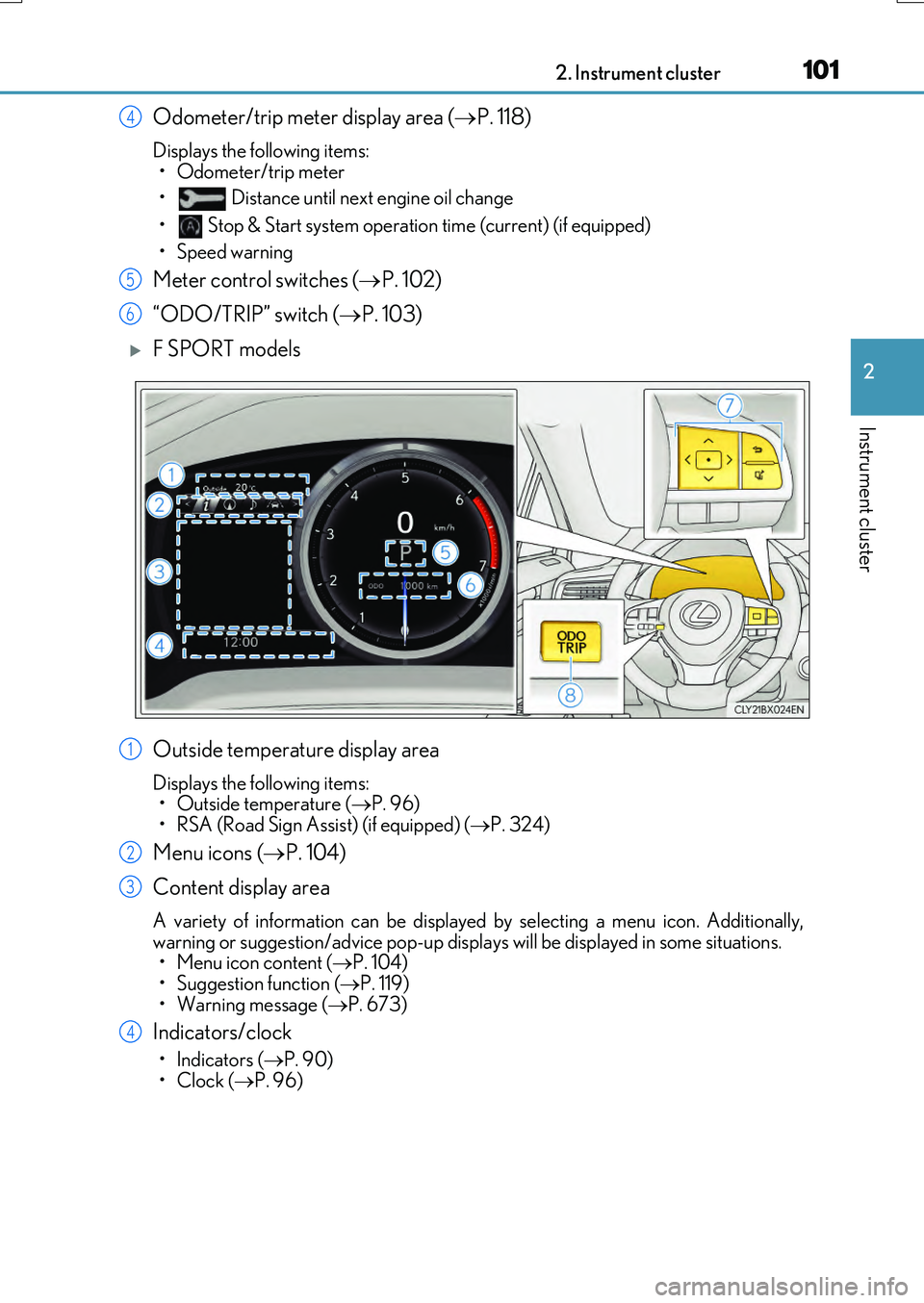
Odometer/trip meter display area (P. 118)
Displays the following items:
• Odometer/trip meter
• Distance until next engine oil change
• Stop & Start system operation time (current) (if equipped)
• Speed warning
Meter control switches ( P. 102)
“ODO/TRIP” switch ( P. 103)
F SPORT models
Outside temperature display area
Displays the following items: • Outside temperature ( P. 96)
• RSA (Road Sign Assist) (if equipped) ( P. 324)
Menu icons (P. 104)
Content display area
A variety of information can be displayed by selecting a menu icon. Additionally,
warning or suggestion/advice pop-up displa ys will be displayed in some situations. • Menu icon content ( P. 104) • Suggestion function ( P. 119)
• Warning message ( P. 673)
Indicators/clock
•Indicators (P. 90)
•Clock ( P. 96)
4
5
6
1
2
3
4
Page 102 of 776
1022. Instrument cluster
RX350/RX200t_EE_OM48F32E
Shift position display (P. 251)
Odometer/trip meter display area ( P. 118)
Displays the following items:
• Odometer/trip meter
• Distance until next engine oil change
• Stop & Start system operation time (current) (if equipped)
• Speed warning
Meter control switches ( P. 102)
“ODO/TRIP” switch ( P. 103)
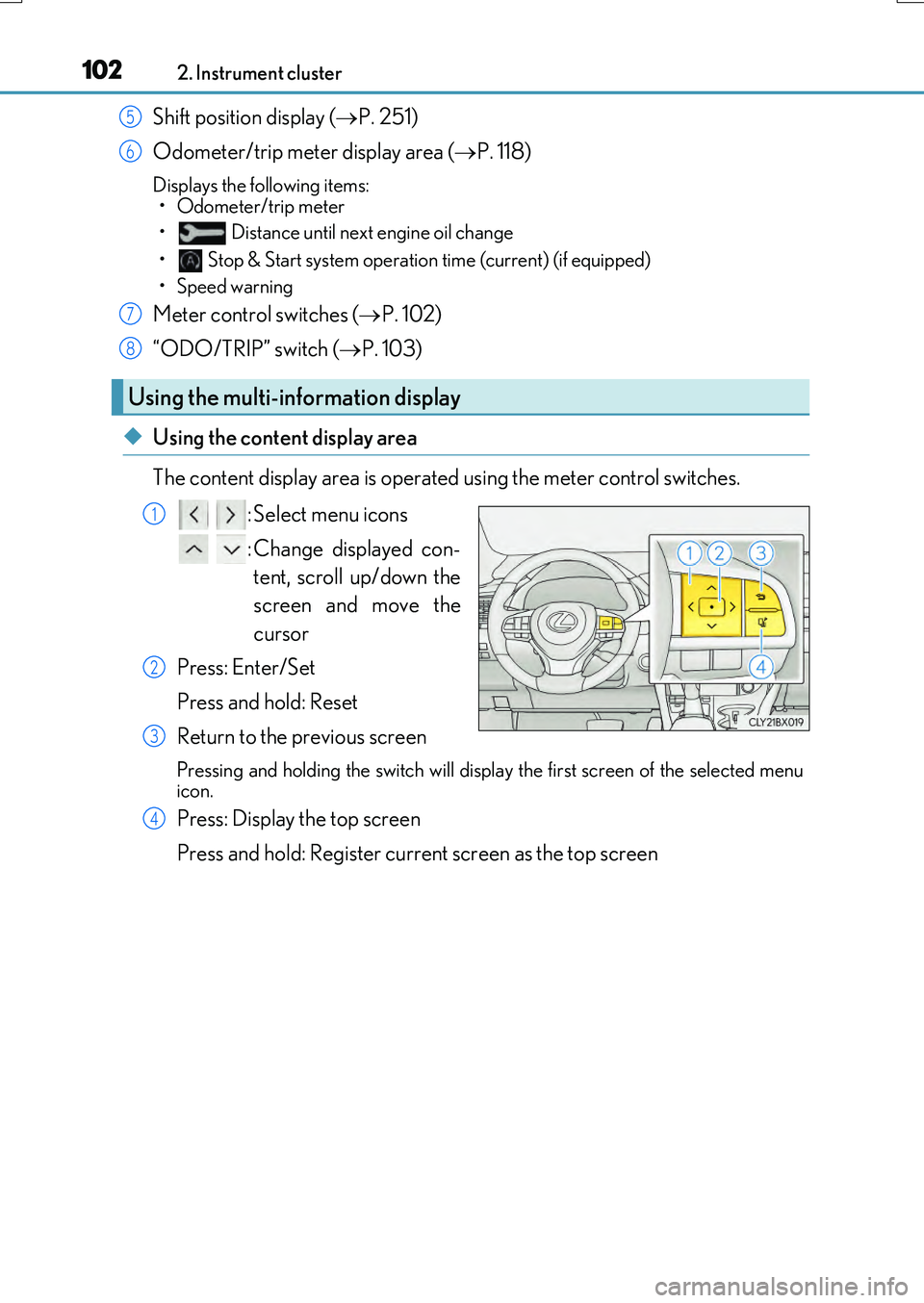
◆Using the content display area
The content display area is operated using the meter control switches. : Select menu icons
: Change displayed con- tent, scroll up/down the
screen and move the
cursor
Press: Enter/Set
Press and hold: Reset
Return to the previous screen
Pressing and holding the swit ch will display the first screen of the selected menu
icon.
Press: Display the top screen
Press and hold: Register current screen as the top screen
Using the multi-information display
5
6
7
8
1
2
3
4
Page 103 of 776
1032. Instrument cluster
2
Instrument cluster
RX350/RX200t_EE_OM48F32E
■Registering a top screen
The displayed top screen can be changed to a registered screen of your
choice.
To register a screen as the top screen, display the desired screen and press
and hold .
• A message asking to confirm if registrati on is desired will be displayed. If the
selected screen cannot be registered, a registration failure message will be dis- played.• When no screen has been registered, th e drive information screen will be dis-
played.
■Resetting drive information
To reset the average fuel economy (after reset)/average vehicle speed (after
reset)/elapsed time (after reset) that are displayed on , display the desired
item and press and hold .
If both of the displayed items are rese ttable, a message will be displayed asking which item(s) to reset.
◆Using the odometer/trip meter display area
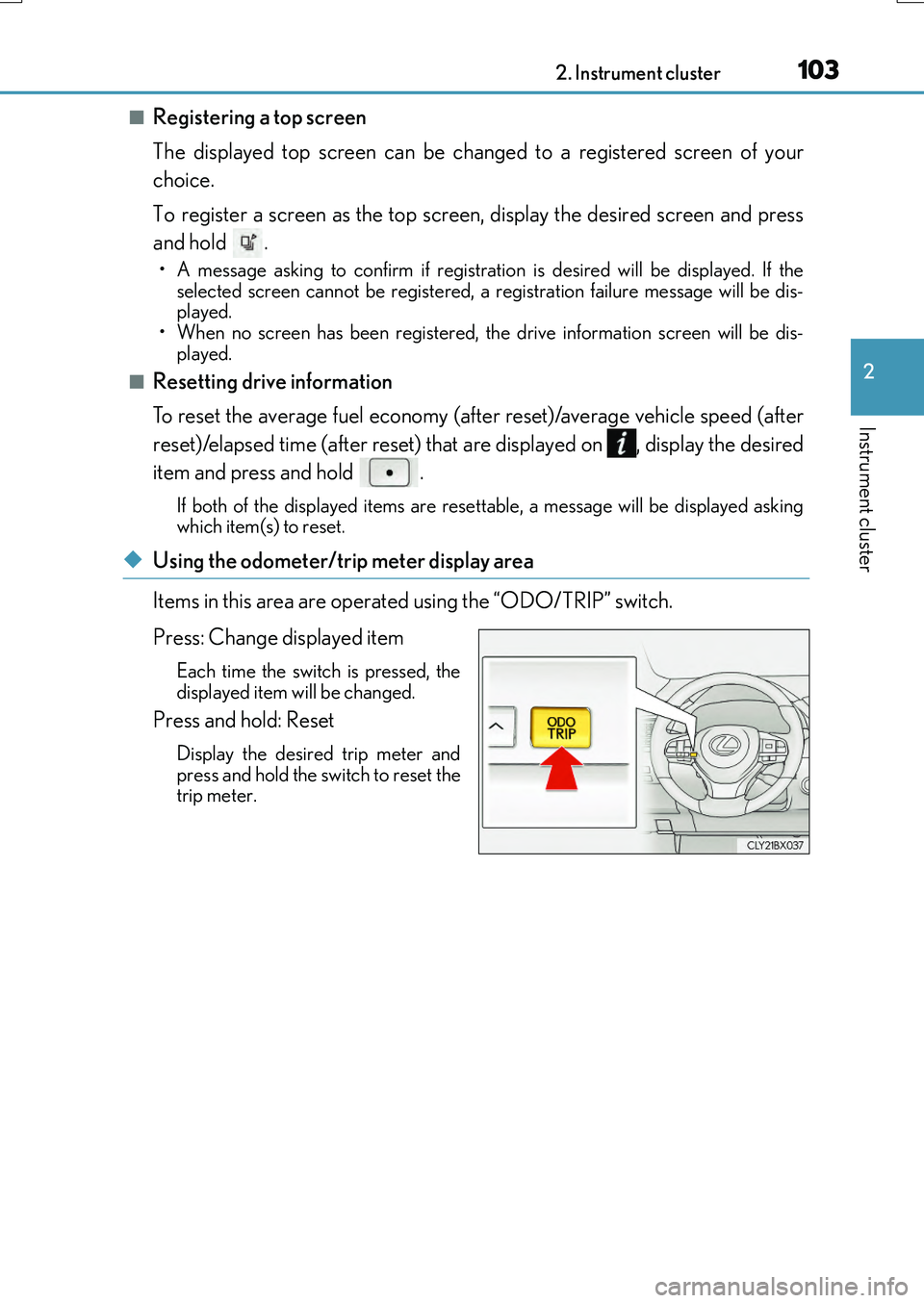
Items in this area are operated using the “ODO/TRIP” switch.
Press: Change displayed item
Each time the switch is pressed, the displayed item will be changed.
Press and hold: Reset
Display the desired trip meter and
press and hold the switch to reset the trip meter.
Page 104 of 776
1042. Instrument cluster
RX350/RX200t_EE_OM48F32E
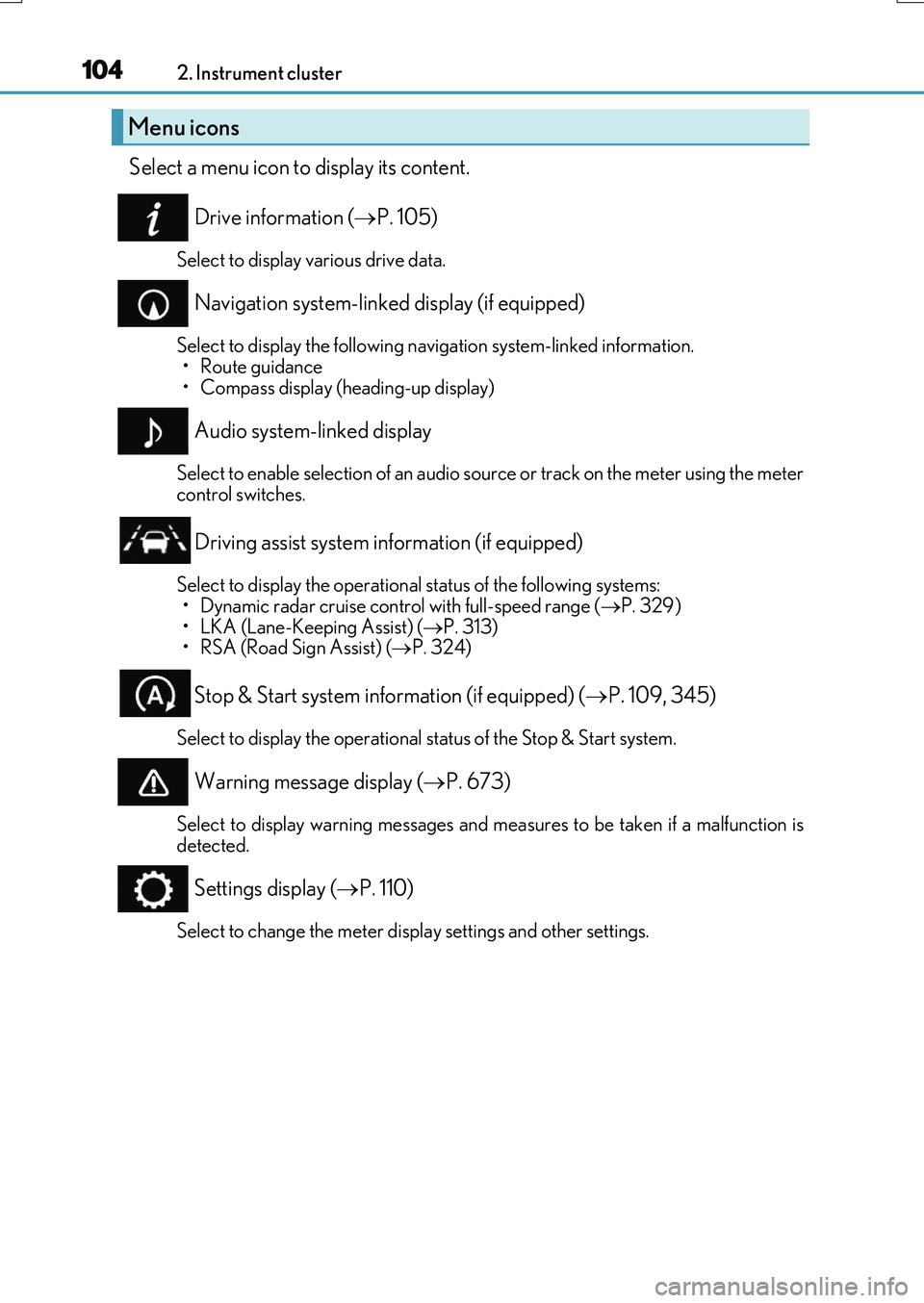
Select a menu icon to display its content.
Drive information ( P. 105)
Select to display various drive data.
Navigation system-linked display (if equipped)
Select to display the following navigation system-linked information.
•Route guidance • Compass display (heading-up display)
Audio system-linked display
Select to enable selection of an audio source or track on the meter using the metercontrol switches.
Driving assist system information (if equipped)
Select to display the operational status of the following systems: • Dynamic radar cruise control with full-speed range ( P. 329)
• LKA (Lane-Keeping Assist) ( P. 313) • RSA (Road Sign Assist) ( P. 324)
Stop & Start system information (if equipped) (P. 109, 345)
Select to display the operational status of the Stop & Start system.
Warning message display (P. 673)
Select to display warning messages and measures to be taken if a malfunction is detected.
Settings display ( P. 110)
Select to change the meter display settings and other settings.
Menu icons
Page 105 of 776
1052. Instrument cluster
2
Instrument cluster
RX350/RX200t_EE_OM48F32E
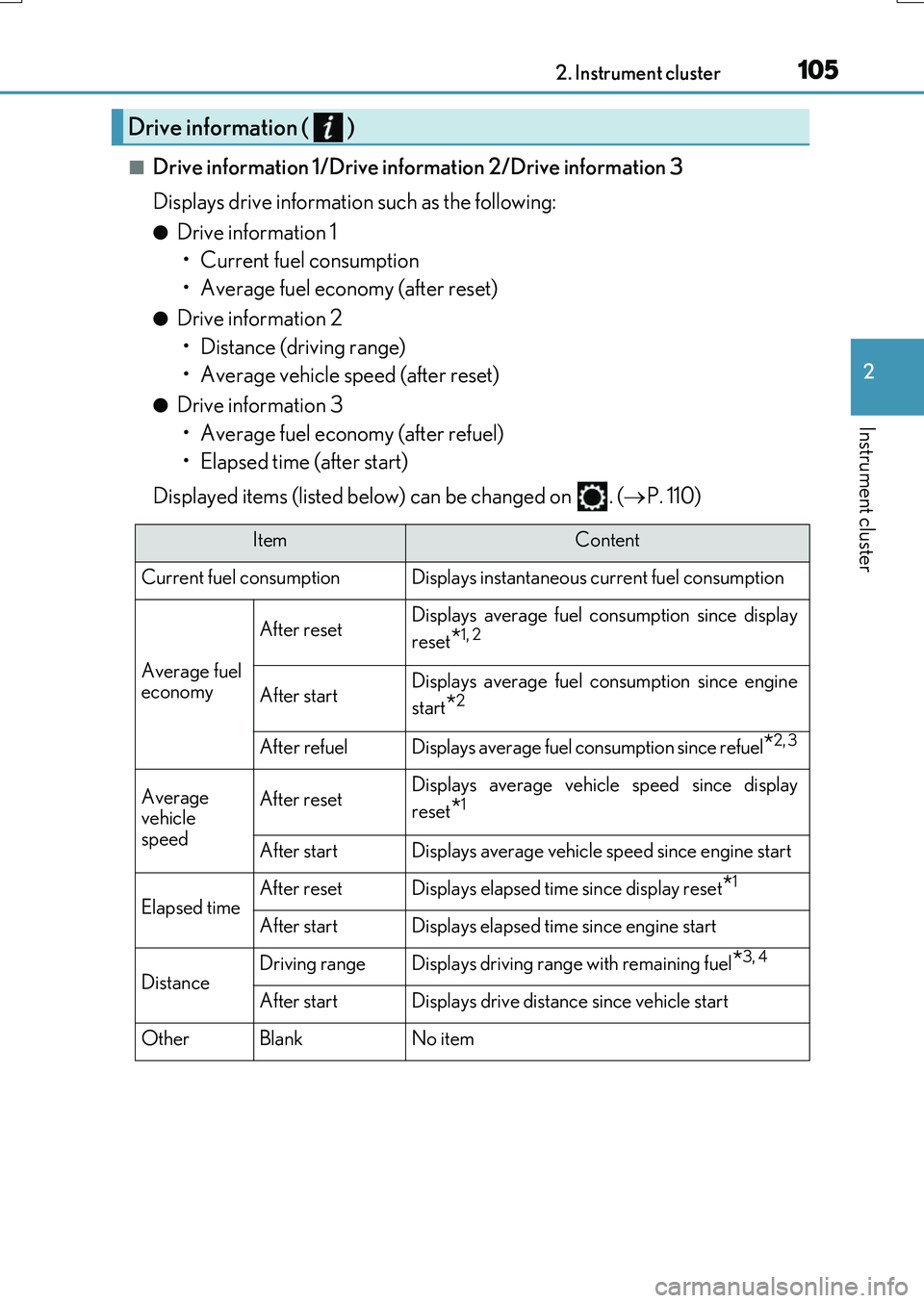
■Drive information 1/Drive information 2/Drive information 3
Displays drive information such as the following:
●Drive information 1 • Current fuel consumption
• Average fuel economy (after reset)
●Drive information 2 • Distance (driving range)
• Average vehicle speed (after reset)
●Drive information 3 • Average fuel economy (after refuel)
• Elapsed time (after start)
Displayed items (listed below) can be changed on . ( P. 110)
Drive information ( )
ItemContent
Current fuel consumption Displays instantaneous current fuel consumption
Average fuel
economy
After resetDisplays average fuel co nsumption since display
reset
*1, 2
After startDisplays average fuel consumption since engine
start
*2
After refuelDisplays average fuel consumption since refuel*2, 3
Average
vehicle
speedAfter resetDisplays average vehicle speed since display
reset
*1
After startDisplays average vehicle speed since engine start
Elapsed timeAfter resetDisplays elapsed time since display reset*1
After startDisplays elapsed time since engine start
DistanceDriving rangeDisplays driving range with remaining fuel*3, 4
After startDisplays drive distance since vehicle start
OtherBlankNo item