instrument panel LEXUS RX200T 2017 User Guide
[x] Cancel search | Manufacturer: LEXUS, Model Year: 2017, Model line: RX200T, Model: LEXUS RX200T 2017Pages: 776, PDF Size: 44.51 MB
Page 97 of 776
972. Instrument cluster
2
Instrument cluster
RX350/RX200t_EE_OM48F32E
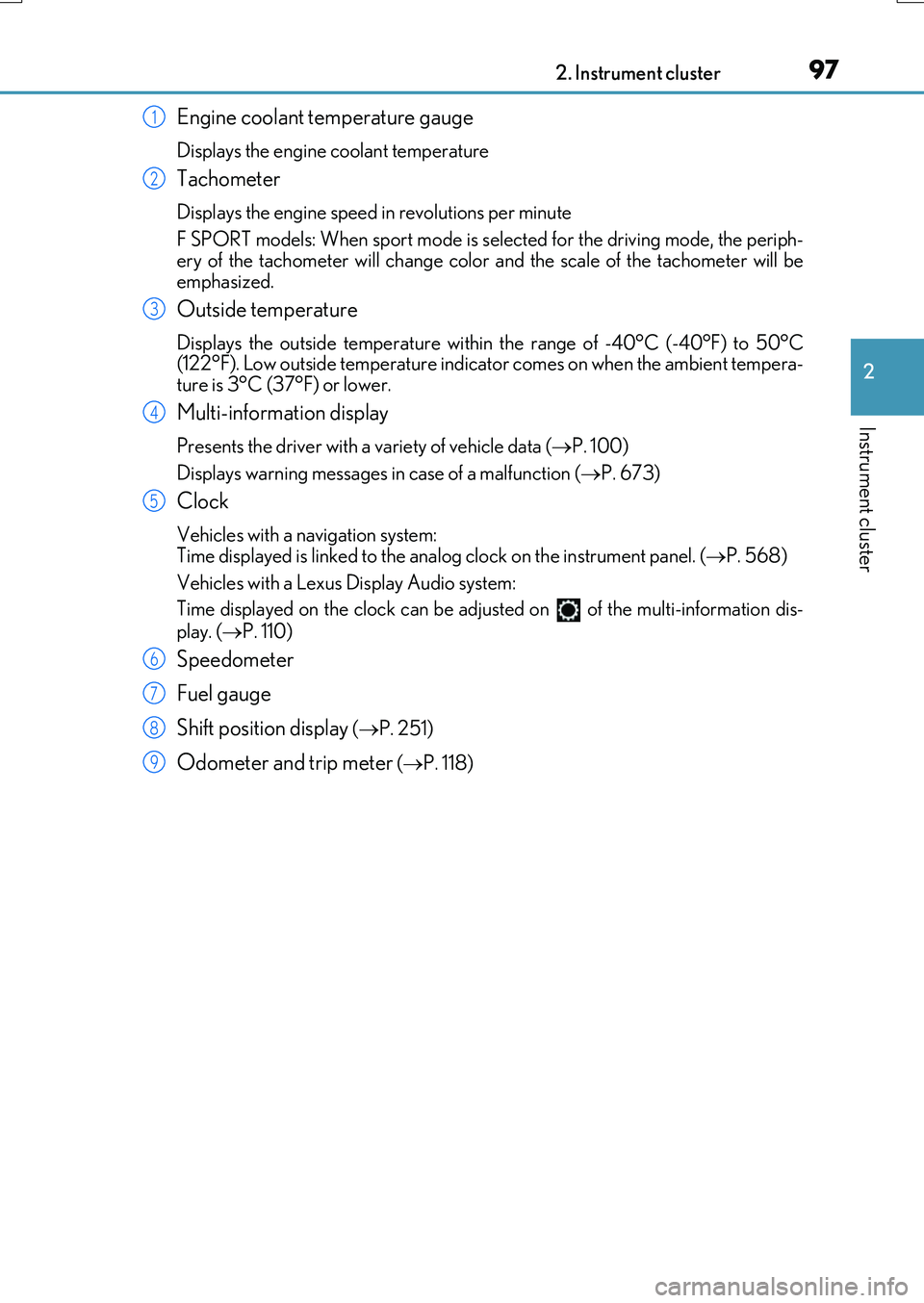
Engine coolant temperature gauge
Displays the engine coolant temperature
Tachometer
Displays the engine speed in revolutions per minute
F SPORT models: When sport mode is selected for the driving mode, the periph-
ery of the tachometer will change color and the scale of the tachometer will be emphasized.
Outside temperature
Displays the outside temperature within the range of -40°C (-40°F) to 50°C(122°F). Low outside temperature indicator comes on when the ambient tempera-
ture is 3°C (37°F) or lower.
Multi-information display
Presents the driver with a variety of vehicle data ( P. 100)
Displays warning messages in case of a malfunction ( P. 673)
Clock
Vehicles with a navigation system: Time displayed is linked to the analog clock on the instrument panel. (P. 568)
Vehicles with a Lexus Display Audio system:
Time displayed on the clock can be adju sted on of the multi-information dis-
play. ( P. 110)
Speedometer
Fuel gauge
Shift position display ( P. 251)
Odometer and trip meter (P. 118)
1
2
3
4
5
6
7
8
9
Page 98 of 776
982. Instrument cluster
RX350/RX200t_EE_OM48F32E
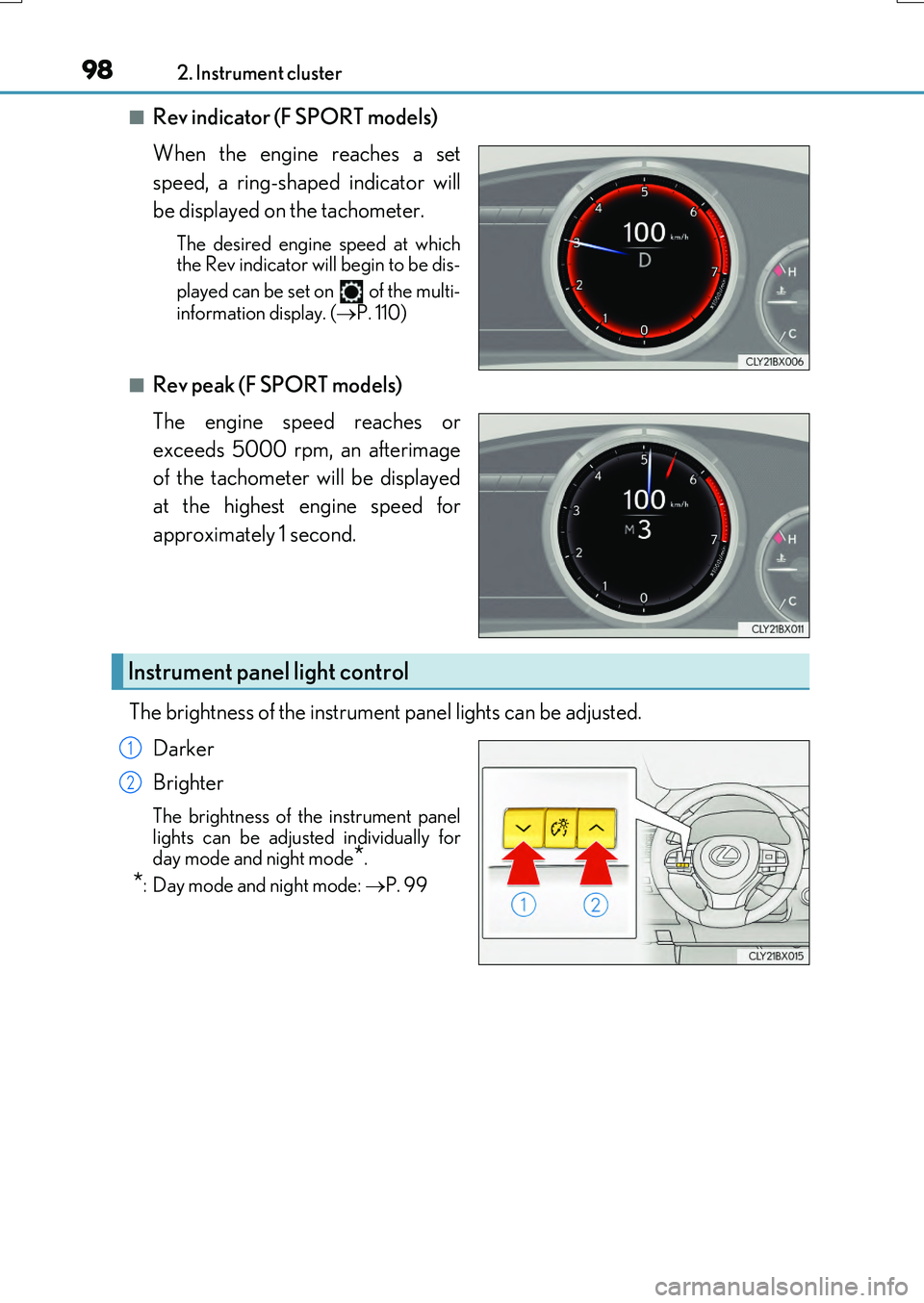
■Rev indicator (F SPORT models)
When the engine reaches a set
speed, a ring-shaped indicator will
be displayed on the tachometer.
The desired engine speed at which the Rev indicator will begin to be dis-
played can be set on of the multi-
information display. ( P. 110)
■Rev peak (F SPORT models)
The engine speed reaches or
exceeds 5000 rpm, an afterimage
of the tachometer will be displayed
at the highest engine speed for
approximately 1 second.
The brightness of the instrument panel lights can be adjusted.
Darker
Brighter
The brightness of the instrument panel lights can be adjusted individually for
day mode and night mode*.
*: Day mode and night mode: P. 99
Instrument panel light control
1
2
Page 119 of 776
1192. Instrument cluster
2
Instrument cluster
RX350/RX200t_EE_OM48F32E
Displays suggestions to the driver in the following situations. To select a response
to a displayed suggestion, use the meter control switches.
The suggestion function can be turned on/off. (Customizable features: P. 740)
■Suggestion to enable the po wer back door (if equipped)
If the power back door system is disabled (setting on set to off) and the
power back door switch on the instrument panel is operated, a suggestion
message will be displayed asking if you wish to enable the power back door
system. To enable the power back door system, select “Yes”.
After enabling the power back door system, press the power back door switch
again to open or close the power back door.
■Suggestion to close the power windows (linked to windshield wiper opera-
tion)
If the windshield wipers are operated with a power window open, a suggestion
message will be displayed asking if you wish to close the power windows. To
close all of the power windows, select “Yes”.
■Suggestion to close the po wer windows (linked to engine switch operation)
If the engine switch is turned off with a power window open, a suggestion
message will be displayed asking if you wish to close the power windows. To
close all of the power windows, select “Yes”.
Suggestion function
Page 171 of 776

1713-2. Opening, closing and locking the doors
3
Operation of each component
RX350/RX200t_EE_OM48F32E
■Note for the entry function
●Even when the electronic key is within the effective range (detection areas), the system may not operate properly in the following cases:
• The electronic key is too close to the window or outside door handle, near the ground, or in a high place when the doors are locked or unlocked.• The electronic key is near the ground or in a high place, or too close to the rear
bumper center when the back door is opened. • The electronic key is on the instrument panel, luggage compartment, floor, or in thedoor pockets or glove box when the engine is started or engine switch modes are
changed.
●Do not leave the electronic key on top of th e instrument panel or near the door pockets
when exiting the vehicle. Depending on the radio wave reception conditions, it may be detected by the antenna outside the cabin and the door will become lockable from theoutside, possibly trapping the electronic key inside the vehicle.
●As long as the electronic key is within the effective range, the doors may be locked orunlocked by anyone.
●Even if the electronic key is not inside the vehicle, it may be possible to start the engine
if the electronic key is near the window.
●The doors may unlock if a large amount of wa ter splashes on the door handle, such as in the rain or in a car wash when the electronic key is within the effective range. (The door
will automatically be locked after approx imately 30 seconds if the doors are not opened and closed.)
●If the wireless remote control is used to lock the doors when the electronic key is near
the vehicle, there is a possibility that the d oor may not be unlocked by the entry func- tion. (Use the wireless remote control to unlock the doors.)
●Touching the door lock sensor while wearin g gloves may delay or prevent lock opera-
tion. Remove the gloves and to uch the lock sensor again.
●If the door handle becomes wet while the electronic key is within the effective range,
the door may lock and unlock repeatedly. In that case, follow the following correction
procedures to wash the vehicle:
• Place the electronic key in a location 2 m (6 ft.) or more away from the vehicle. (Take
care to ensure that the key is not stolen.)
• Set the electronic key to battery-saving mode to disable the smart entry & start sys-
tem. ( P. 170)
●If the electronic key is inside the vehicle and a door handle becomes wet during a car wash, a message may be shown on the mult i-information display and a buzzer will
sound outside the vehicle. To turn off the alarm, lock all the doors.
●The lock sensor may not work properly if it comes into contact with ice, snow, mud, etc. Clean the lock sensor and attempt to operate it again.
●A sudden approach to the effective range or door handle may prevent the doors frombeing unlocked. In this case, return the door handle to the original position and check that the doors unlock before pulling the door handle again.
●If there is another electronic key in the de tection area, it may take slightly longer to unlock the doors after the door handle is gripped.
●Fingernails may scrape against the door duri ng operation of the door handle. Be care-
ful not to injure fingernails or damage the surface of the door.
Page 232 of 776
2324-1. Before driving
RX350/RX200t_EE_OM48F32E
WARNING
Observe the following precautions. Failure to do so may result in death or serious injury.
■When the vehicle is parked
●Do not leave glasses, cigarette lighters, spray cans, or soft drink cans in the vehiclewhen it is in the sun. Doing so may result in the following:
• Gas may leak from a cigarette lighter or spray can, and may lead to a fire. • The temperature inside the vehicle may cau se the plastic lenses and plastic mate- rial of glasses to deform or crack.
• Soft drink cans may fracture, causing the contents to spray over the interior of the vehicle, and may also cause a short circuit in the vehicle’s electrical components.
●Do not leave cigarette lighters in the vehicle. If a cigarette lighter is in a place such as the glove box or on the floor, it may be lit accidentally when luggage is loaded or the seat is adjusted, causing a fire.
●Do not attach adhesive discs to the windshield or windows. Do not place containerssuch as air fresheners on the instrument panel or dashboard. Adhesive discs or con- tainers may act as lenses, causing a fire in the vehicle.
●Do not leave a door or window open if the curved glass is coated with a metallizedfilm such as a silver-colored one. Reflected sunlight may cause the glass to act as alens, causing a fire.
●Always apply the parking brake, shift the shift lever to P, stop the engine and lock thevehicle.Do not leave the vehicle unattended while the engine is running.
If the vehicle is parked with the shift lever in P but the parking brake is not set, the vehicle may start to move, possibly leading to an accident.
●Do not touch the exhaust pipes while the engine is running or immediately after turn-
ing the engine off. Doing so may cause burns.
Page 235 of 776
2354-1. Before driving
4
Driving
RX350/RX200t_EE_OM48F32E
Cargo and luggage
Take notice of the following information about storage precautions, cargo
capacity and load.
WARNING
■Things that must not be carried in the luggage compartment
The following things may cause a fire if loaded in the luggage compartment:
●Receptacles containing gasoline
●Aerosol cans
■Storage precautions
Observe the following precautions. Failure to do so may prevent the pedals from being depressed properly, may block the driver’s vision, or may result in items hitting the driver or passengers, possibly causing
an accident.
●Stow cargo and luggage in the luggage compartment whenever possible.
●Do not stack cargo and luggage in the luggage compartment higher than the
seatbacks.
●When you fold down the rear seats, long items should not be placed directly behind the front seats.
●Never allow anyone to ride in the luggage compartment. It is not designed for pas- sengers. They should ride in their seats with their seat belts properly fastened.
●Do not place cargo or luggage in or on the following locations.
• At the feet of the driver • On the front passenger or rear seats (when stacking items)•On the luggage cover
• On the instrument panel • On the dashboard
●Secure all items in the occupant compartment.
■Load and distribution
●Do not overload your vehicle.
●Do not apply loads unevenly.
Improper loading may cause deterioration of steering or braking control which may cause death or serious injury.
Page 265 of 776
265
4
Driving
RX350/RX200t_EE_OM48F32E
4-3. Operating the lights and wipers
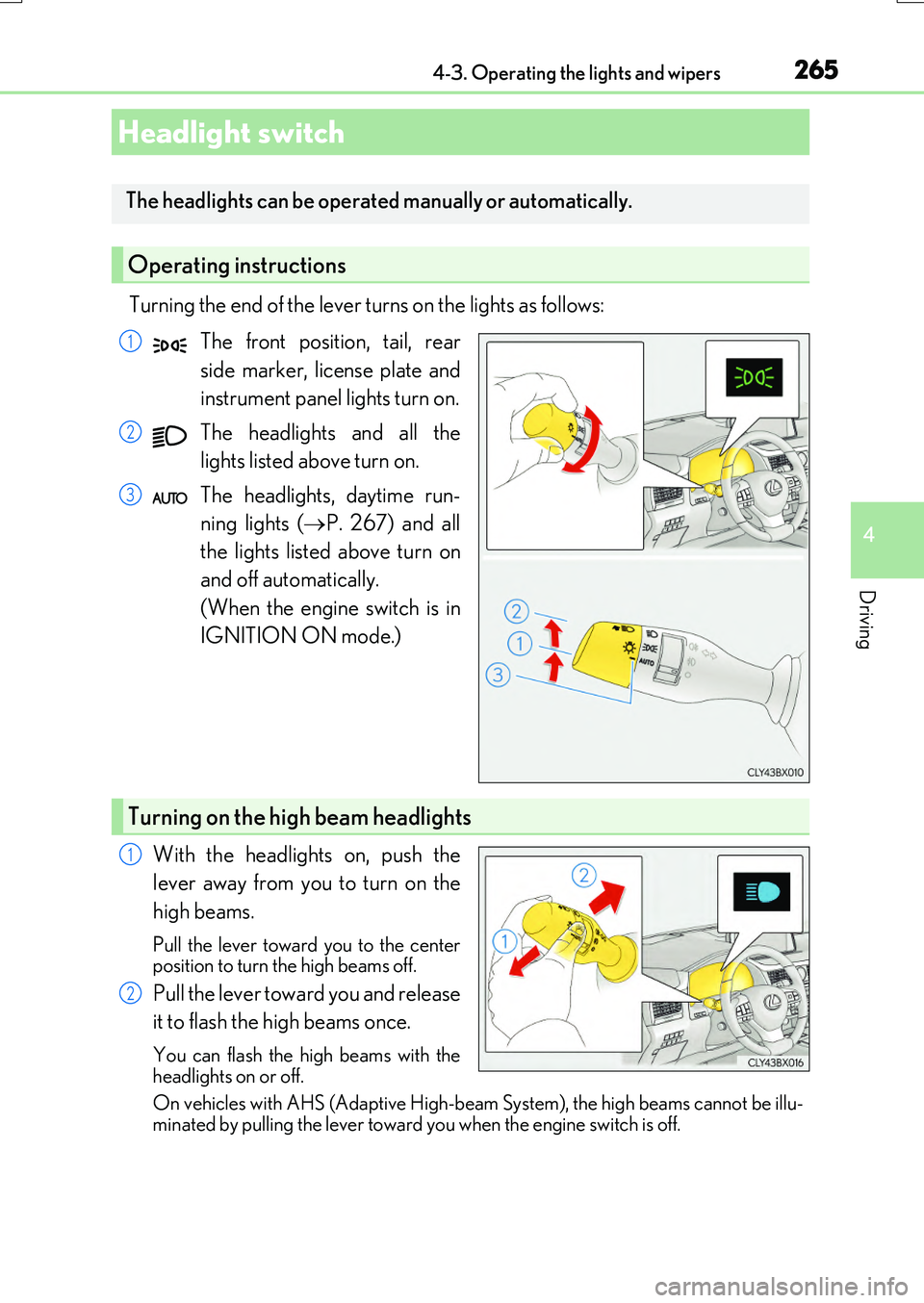
Turning the end of the lever turns on the lights as follows:
The front position, tail, rear
side marker, license plate and
instrument panel lights turn on.
The headlights and all the
lights listed above turn on.
The headlights, daytime run-
ning lights ( P. 267) and all
the lights listed above turn on
and off automatically.
(When the engine switch is in
IGNITION ON mode.)
With the headlights on, push the
lever away from you to turn on the
high beams.
Pull the lever toward you to the center position to turn the high beams off.
Pull the lever toward you and release
it to flash the high beams once.
You can flash the high beams with the
headlights on or off.
On vehicles with AHS (Adaptive High-bea m System), the high beams cannot be illu- minated by pulling the lever toward you when the engine switch is off.
Headlight switch
The headlights can be operated manually or automatically.
Operating instructions
1
2
3
Turning on the high beam headlights
1
2
Page 548 of 776
5486-2. Using the air conditioning system and defogger
RX350/RX200t_EE_OM48F32E
WARNING
■To prevent the windshield from fogging up
●Do not use during cool air operation in extremely humid weather. The differ-
ence between the temperature of the outside air and that of the windshield can cause the outer surface of the windshield to fog up, blocking your vision.
■To prevent burns
●Do not touch the rear view mirror surfaces when the outside rear view mirror defog-gers are on.
●Do not touch the glass at lower part of the windshield or to the side of the front pillarswhen the windshield wiper de-icer is on. (if equipped)
■nanoe (if equipped)
Do not disassemble or repair the generator because it contains high voltage parts.
Contact any authorized Lexus dealer or repairer, or another duly qualified and
equipped professional if the generator needs repair.
NOTICE
■To prevent battery discharge
Do not leave the air conditioning system on longer than necessary when the engine is
off.
■To prevent damage to the nanoe (if equipped)
Do not insert anything into the driver’s side vent, attach anything to it, or use sprays
around the driver’s side vent. These things may cause the generator not to work prop- erly.
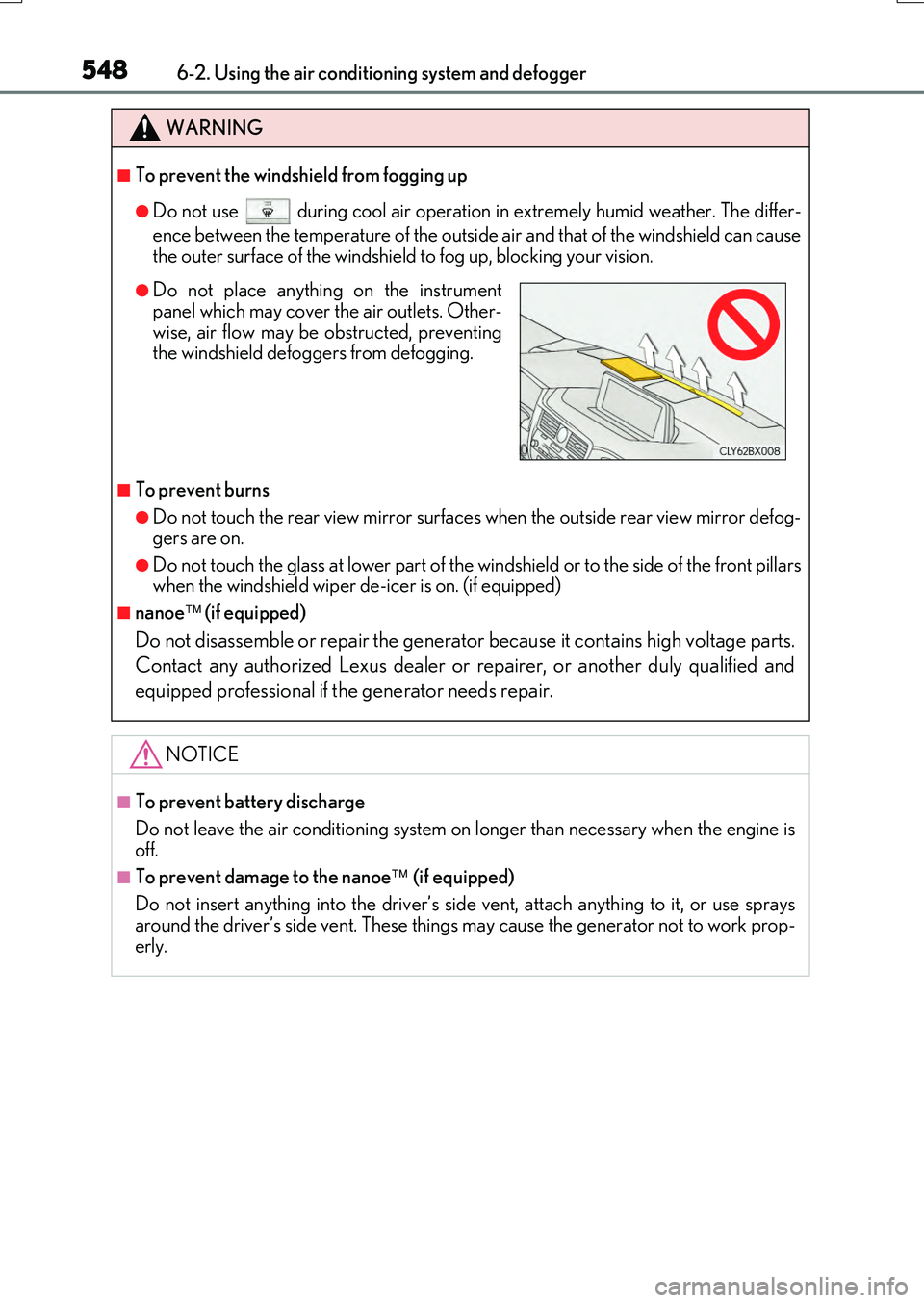
●Do not place anything on the instrumentpanel which may cover the air outlets. Other-
wise, air flow may be obstructed, preventing the windshield defoggers from defogging.
Page 552 of 776
552
RX350/RX200t_EE_OM48F32E
6-3. Using the interior lights
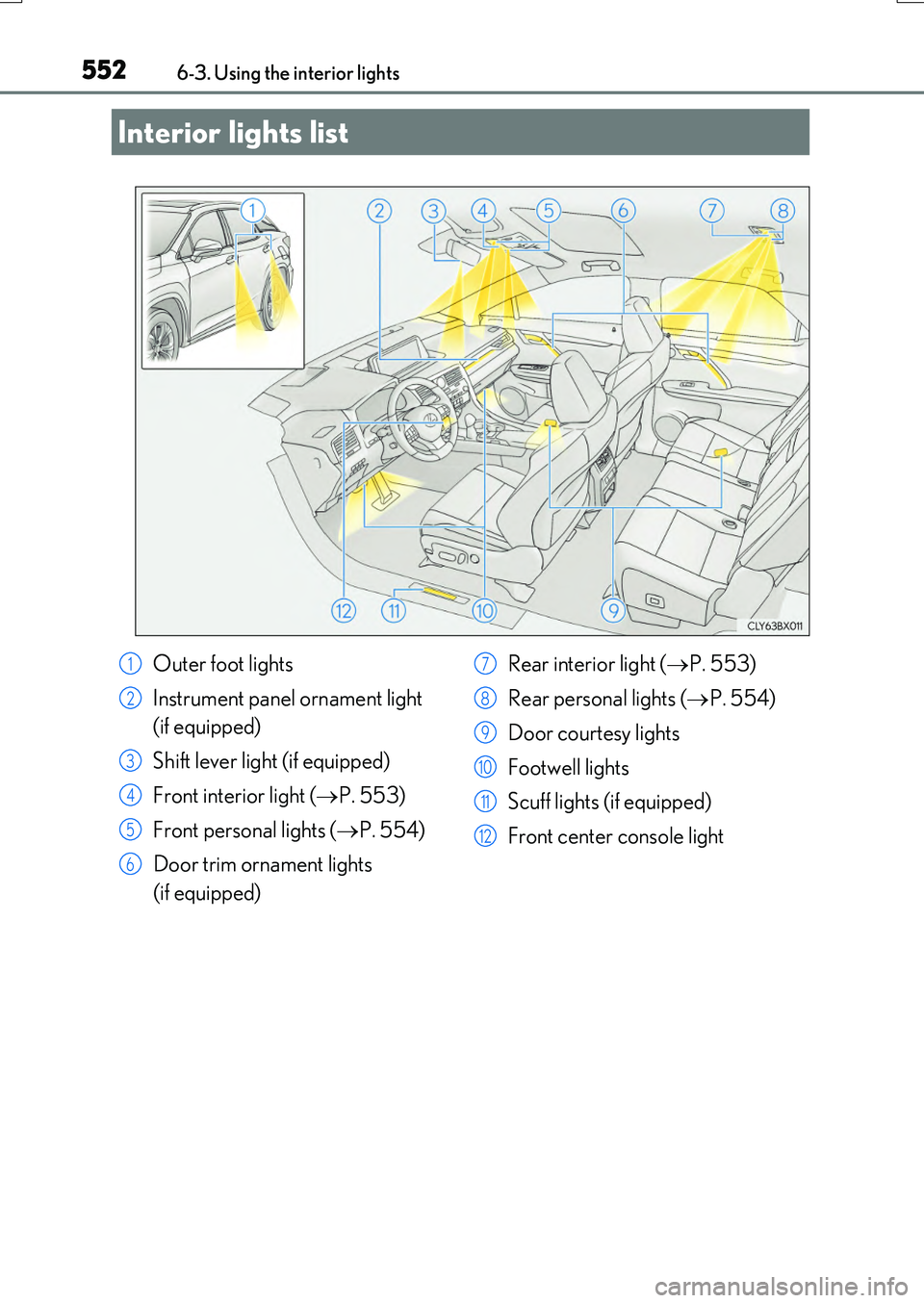
Interior lights list
Outer foot lights
Instrument panel ornament light
(if equipped)
Shift lever light (if equipped)
Front interior light ( P. 553)
Front personal lights ( P. 554)
Door trim ornament lights
(if equipped)
Rear interior light ( P. 553)
Rear personal lights ( P. 554)
Door courtesy lights
Footwell lights
Scuff lights (if equipped)
Front center console light
1
2
3
4
5
6
7
8
9
10
11
12
Page 574 of 776
5746-5. Using the other interior features
RX350/RX200t_EE_OM48F32E
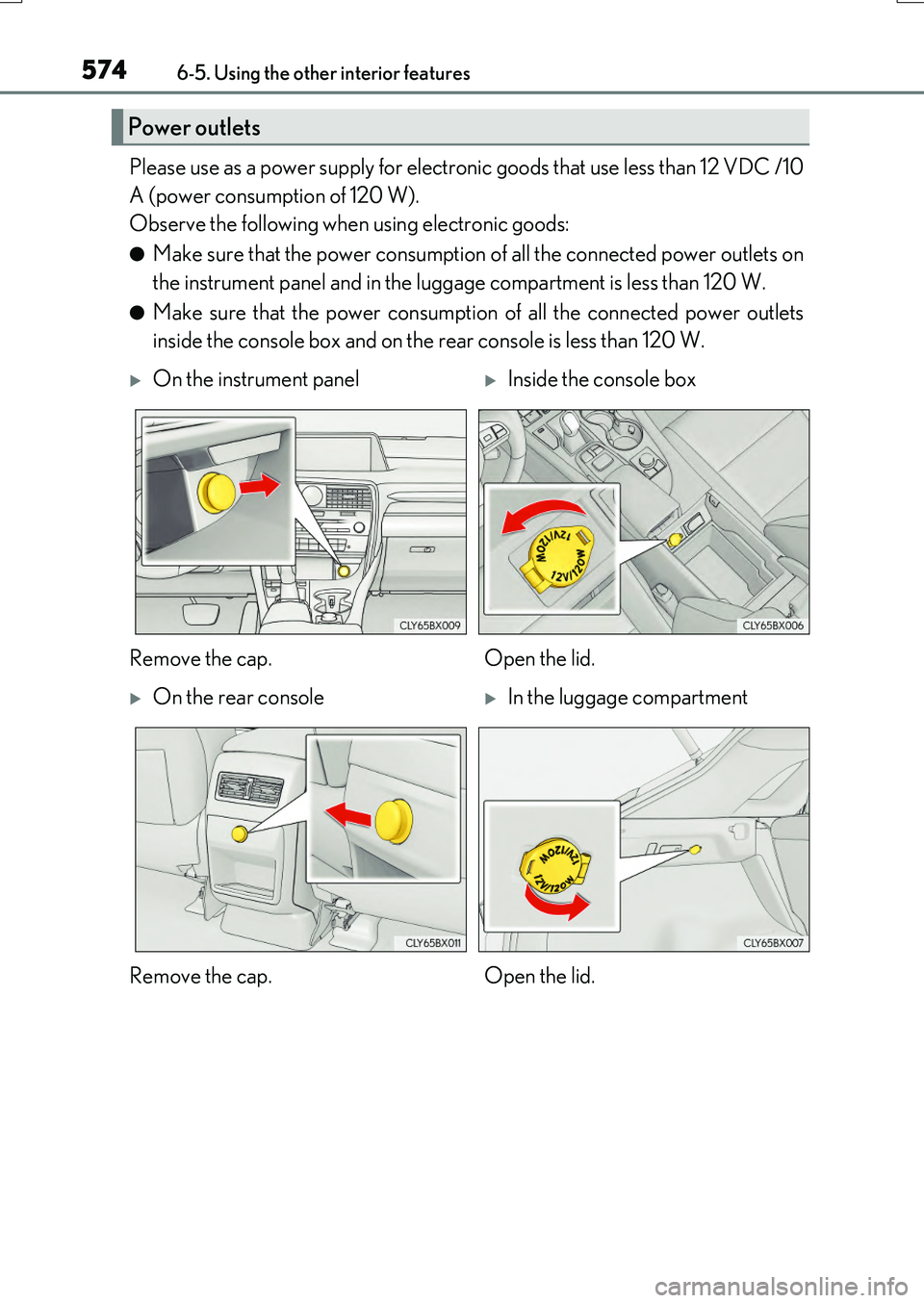
Please use as a power supply for electronic goods that use less than 12 VDC /10
A (power consumption of 120 W).
Observe the following when using electronic goods:
●Make sure that the power consumption of all the connected power outlets on
the instrument panel and in the luggage compartment is less than 120 W.
●Make sure that the power consumption of all the connected power outlets
inside the console box and on the rear console is less than 120 W.
Power outlets
On the instrument panelInside the console box
Remove the cap. Open the lid.
On the rear consoleIn the luggage compartment
Remove the cap. Open the lid.