sport mode LEXUS RX200T 2017 User Guide
[x] Cancel search | Manufacturer: LEXUS, Model Year: 2017, Model line: RX200T, Model: LEXUS RX200T 2017Pages: 776, PDF Size: 44.51 MB
Page 120 of 776
1202. Instrument cluster
RX350/RX200t_EE_OM48F32E
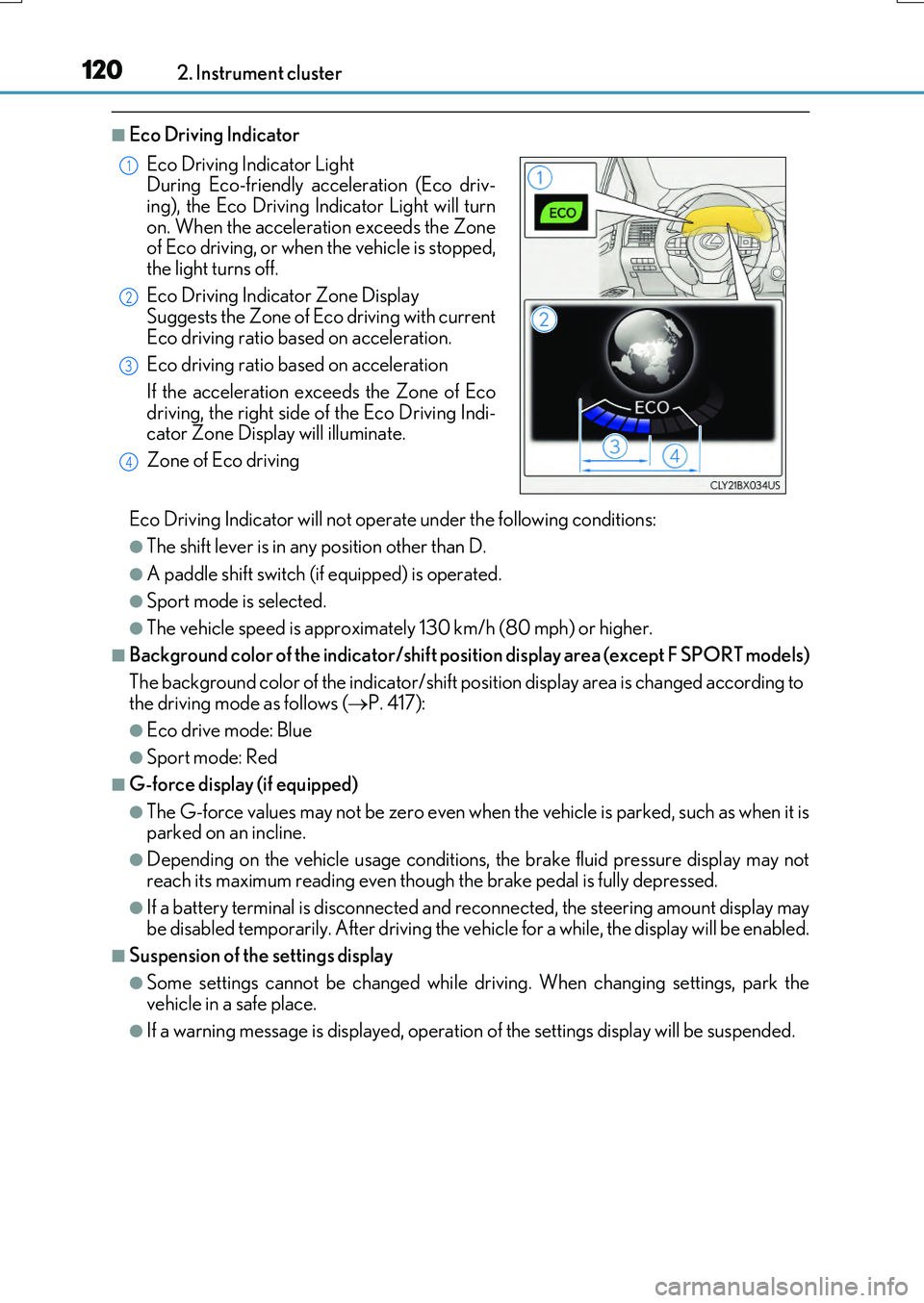
■Eco Driving Indicator
Eco Driving Indicator will not operate under the following conditions:
●The shift lever is in any position other than D.
●A paddle shift switch (if equipped) is operated.
●Sport mode is selected.
●The vehicle speed is approximately 130 km/h (80 mph) or higher.
■Background color of the indicator/shift position display area (except F SPORT models)
The background color of the indicator/shift position display area is changed according to the driving mode as follows ( P. 417):
●Eco drive mode: Blue
●Sport mode: Red
■G-force display (if equipped)
●The G-force values may not be zero even when the vehicle is parked, such as when it is parked on an incline.
●Depending on the vehicle usage conditions, the brake fluid pressure display may not
reach its maximum reading even though the brake pedal is fully depressed.
●If a battery terminal is disconnected and reconnected, the steering amount display may be disabled temporarily. After driving the ve hicle for a while, the display will be enabled.
■Suspension of the settings display
●Some settings cannot be changed while driving. When changing settings, park the vehicle in a safe place.
●If a warning message is displayed, operation of the settings display will be suspended.
Eco Driving Indicator Light During Eco-friendly acceleration (Eco driv-
ing), the Eco Driving In dicator Light will turn on. When the acceleration exceeds the Zoneof Eco driving, or when the vehicle is stopped,
the light turns off.
Eco Driving Indicator Zone Display Suggests the Zone of Eco driving with current
Eco driving ratio based on acceleration.
Eco driving ratio based on acceleration
If the acceleration exceeds the Zone of Eco
driving, the right side of the Eco Driving Indi- cator Zone Display will illuminate.
Zone of Eco driving
1
2
3
4
Page 227 of 776
2274-1. Before driving
4
Driving
RX350/RX200t_EE_OM48F32E
With the brake pedal depressed, shift the shift lever to D. (P. 251)
Pull the parking brake switch and parking brake is set manually. (P. 260)
Release the brake pedal and gently depr ess the accelerator pedal to acceler-
ate the vehicle.
Press the parking brake switch and pa rking brake is released manually.
( P. 260)
■When starting off on a uphill
The hill-start assist co ntrol will activate. (P. 422)
■Driving in the rain
●Drive carefully when it is raining, because visibility will be reduced, the windows may become fogged-up, and the road will be slippery.
●Drive carefully when it starts to rain, because the road surface will be especially slip- pery.
●Refrain from high speeds when driving on an expressway in the rain, because there may
be a layer of water between the tires and the road surface, preventing the steering and brakes from operating properly.
■Engine speed while driving
In the following conditions, the engine speed may become high while driving. This is due to automatic up-shifting control or down-shi fting implementation to meet driving condi- tions. It does not indicate sudden acceleration.
●The vehicle is judged to be driving uphill or downhill
●When the accelerator pedal is released
●When the brake pedal is depressed while sport mode is selected
■Restraining the engine output (Brake Override System)
●When the accelerator and brake pedals are depressed at the same time, the engine output may be restrained.
●A warning message is displayed on the mult i-information display while the system is operating. If a warning message is shown on the multi-information display, read the message and follow the instructions.
■Restraining sudden start (Drive-Start Control)
●When the following unusual operation is performed, the engine output may be
restrained.
• When the shift lever is shifted from R to D, D to R, N to R, P to D, or P to R (D includes M) with the accelerator pedal depressed, a warning message appears on
the multi-information display. If a warnin g message is shown on the multi-informa- tion display, read the messag e and follow the instructions. • When the accelerator pedal is depressed too while the vehicle is in reverse.
●While Drive-Start Control is being activated, your vehicle may have trouble escapingfrom the mud or fresh snow. In such case, deactivate TRC (P. 424) to cancel Drive-
Start Control so that the vehicle may become able to escape from the mud or fresh snow.
Starting off on a uphill
1
2
3
4
Page 255 of 776
2554-2. Driving procedures
4
Driving
RX350/RX200t_EE_OM48F32E
■Automatic deactivation of shift range selection in the D position (vehicles with paddle
shift switches)
Shift range selection in the D position will be deactivated in the following situations:
●The “+” paddle shift switch is held down for a period of time
●When the vehicle comes to a stop
●If the accelerator pedal is depressed for more than a certain period of time
●When the shift lever is shifted to a position other than D
■To protect the automatic transmission
If the automatic transmission fluid temperat ure is high, “Transmission Fluid Temp High See Owner’s Manual” will be displayed on the multi-information display and the vehicle
will go into transmission protection mode automatically. Have the vehicle inspected by any authorized Lexus dealer or repairer, or another duly qualified and equipped profes-sional.
■Downshifting restri ction warning buzzer
To help ensure safety and driving performa nce, downshifting operation may sometimes be restricted. In some circumstances, down shifting may not be possible even when the
shift lever or paddle shift switch (if equipp ed) is operated. (A buzzer will sound twice.)
■When driving with cruise control or dynamic radar cruise control with full-speed range activated
Even when performing the following actions with the intent of enabling engine braking, engine braking will not activate because crui se control or dynamic radar cruise control with full-speed range will not be canceled.
●Vehicles with paddle shift switches (8-sp eed models): While driving in D position, downshifting to 7, 6, 5 or 4. ( P. 329, 341)
●Vehicles with paddle shift switches (6-speed models): While driving in D position,
downshifting to 5 or 4. ( P. 329, 341)
●When switching the driving mode to sport mode while driving in D position. (P. 417)
■Restraining sudden start (Drive-Start Control)
When the following unusual operation is performed, the engine output may be restrained.
●When the shift lever is shifted from R to D, D to R, N to R, P to D, or P to R (D includes
M) with the accelerator pedal depressed, a warning message appears on the multi- information display. If a warning message is shown on the multi-information display, read the message and follow the instructions.
●When the accelerator pedal is depressed too while the vehicle is in reverse.
■Shift lock system
The shift lock system is a system to prevent accidental operation of the shift lever in start- ing.The shift lever can be shifte d from P only when the engine switch is in IGNITION ON
mode and the brake pedal is being depressed.
Page 256 of 776
2564-2. Driving procedures
RX350/RX200t_EE_OM48F32E
■If the shift lever cannot be shifted from P
First, check whether the brake pedal is being depressed.
If the shift lever cannot be shifted with your foot on the brake pedal, there may be a prob-
lem with the shift lock system. Have the vehicle inspected by any authorized Lexus dealer or repairer, or another duly qualifie d and equipped professional immediately. The following steps may be used as an emerge ncy measure to ensure that the shift lever
can be shifted.
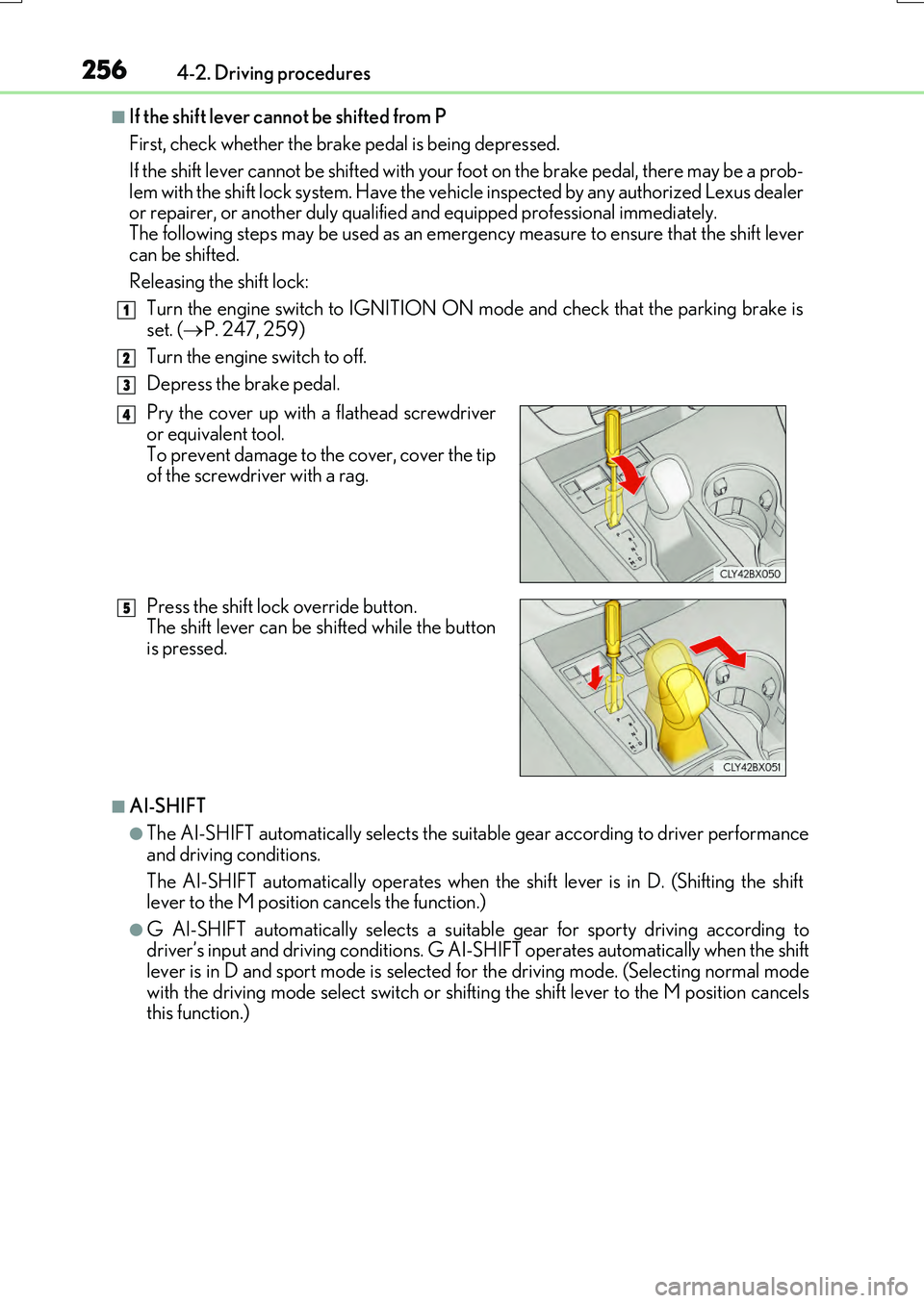
Releasing the shift lock:
Turn the engine switch to IGNITION ON mode and check that the parking brake is
set. ( P. 247, 259)
Turn the engine switch to off.
Depress the brake pedal.
■AI-SHIFT
●The AI-SHIFT automatically selects the suitable gear according to driver performance
and driving conditions.
The AI-SHIFT automatically operates when th e shift lever is in D. (Shifting the shift lever to the M position cancels the function.)
●G AI-SHIFT automatically selects a suitab le gear for sporty driving according to driver’s input and driving cond itions. G AI-SHIFT operates automatically when the shift lever is in D and sport mode is selected for the driving mode. (Selecting normal mode
with the driving mode select switch or shifti ng the shift lever to the M position cancels this function.)
1
2
3
Pry the cover up with a flathead screwdriveror equivalent tool.
To prevent damage to the cover, cover the tip of the screwdriver with a rag.
Press the shift lock override button. The shift lever can be shifted while the button
is pressed.
4
5
Page 371 of 776
3714-5. Using the driving support systems
4
Driving
RX350/RX200t_EE_OM48F32E
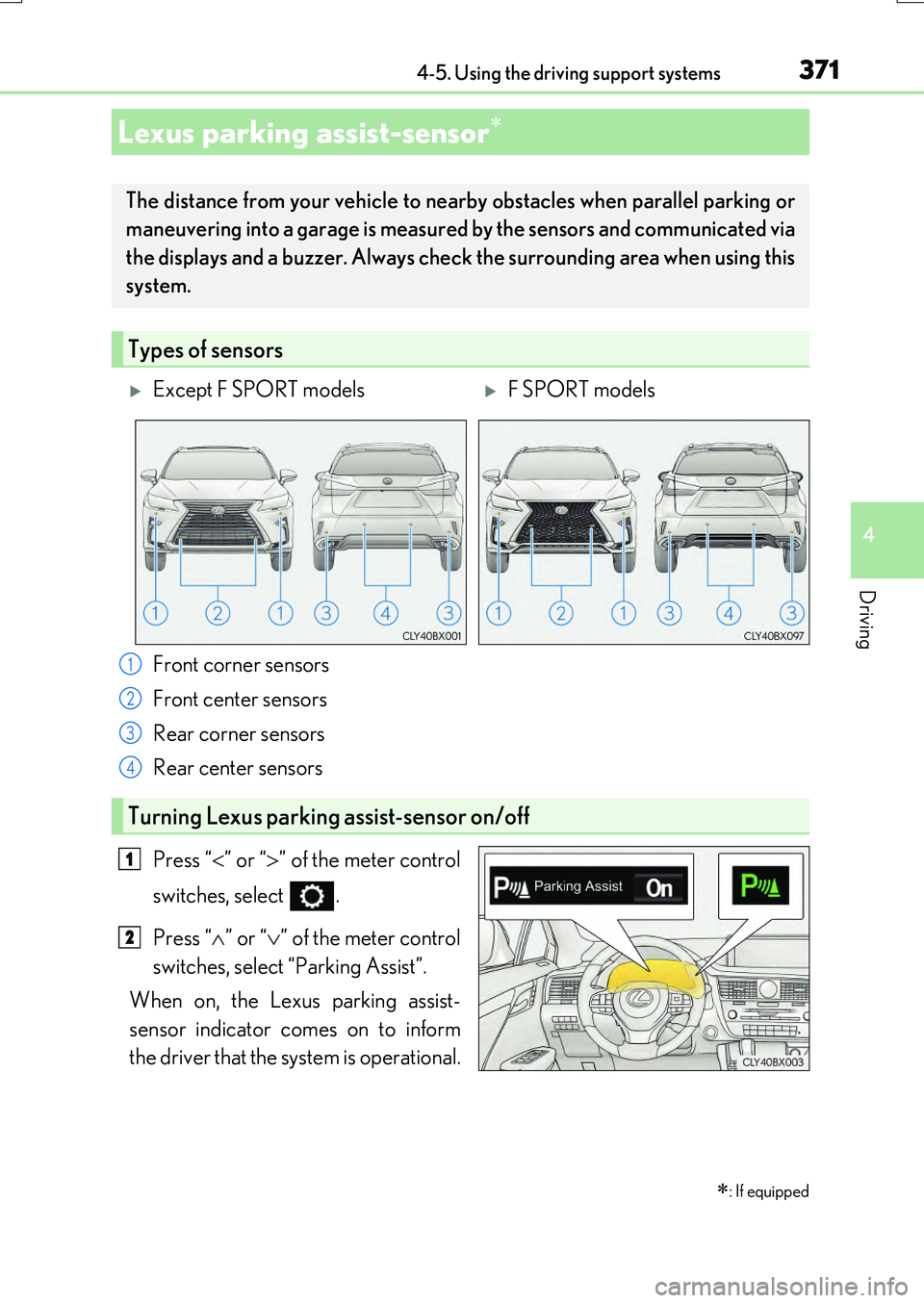
Front corner sensors
Front center sensors
Rear corner sensors
Rear center sensors
Press “ ” or “” of the meter control
switches, select .
Press “ ” or “” of the meter control
switches, select “Parking Assist”.
When on, the Lexus parking assist-
sensor indicator comes on to inform
the driver that the system is operational.
Lexus parking assist-sensor
: If equipped
The distance from your vehicle to ne arby obstacles when parallel parking or
maneuvering into a garage is measured by the sensors and communicated via
the displays and a buzzer. Always chec k the surrounding area when using this
system.
Types of sensors
Except F SPORT modelsF SPORT models
1
2
3
4
Turning Lexus parking assist-sensor on/off
1
2
Page 383 of 776
3834-5. Using the driving support systems
4
Driving
RX350/RX200t_EE_OM48F32E
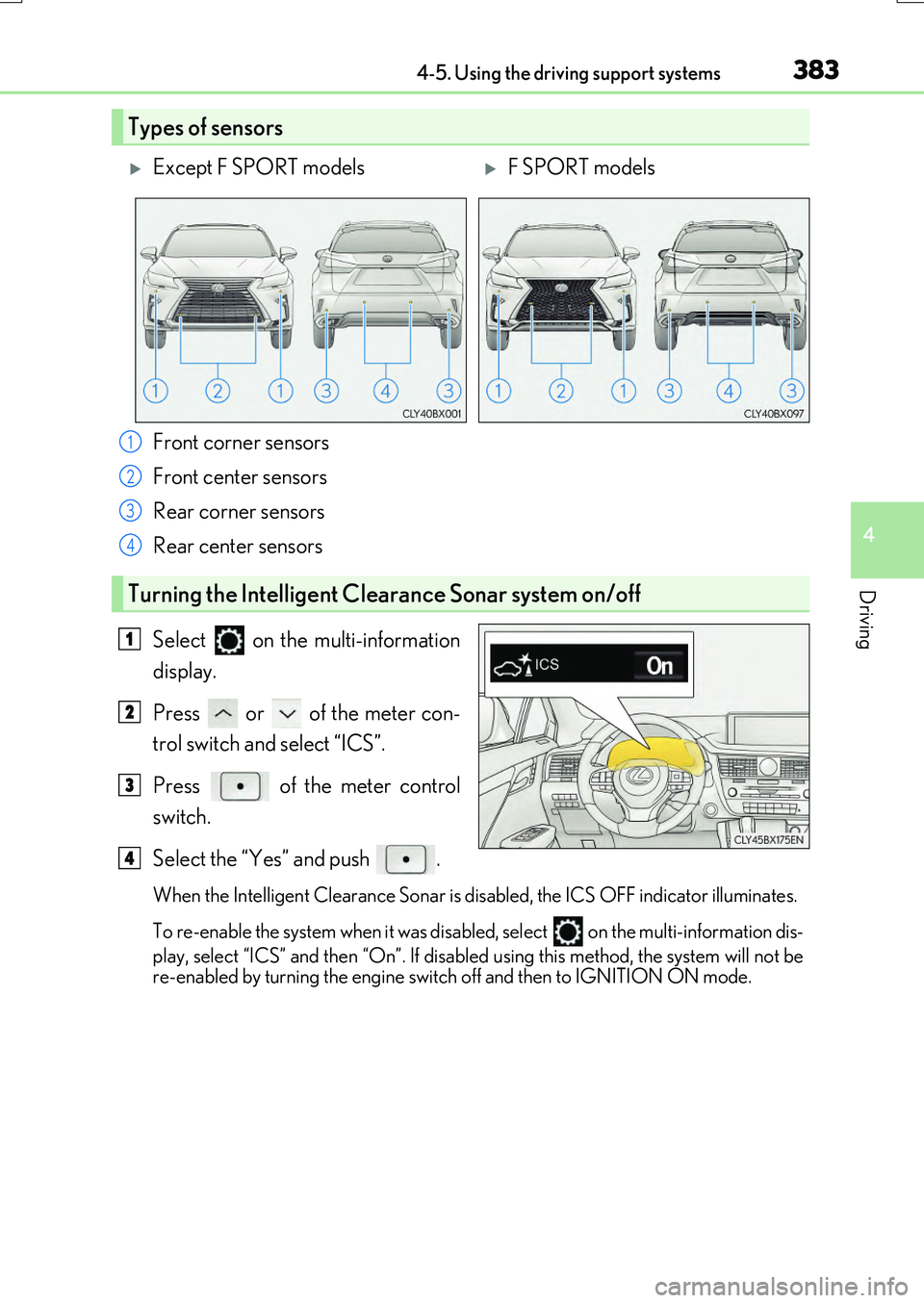
Front corner sensors
Front center sensors
Rear corner sensors
Rear center sensors
Select on the multi-information
display.
Press or of the meter con-
trol switch and select “ICS”.
Press of the meter control
switch.
Select the “Yes” and push .
When the Intelligent Clearance Sonar is di sabled, the ICS OFF indicator illuminates.
To re-enable the system when it was disabled, select
on the multi-information dis-
play, select “ICS” and then “On”. If disabled using this method, the system will not be
re-enabled by turning the engine swit ch off and then to IGNITION ON mode.
Types of sensors
Except F SPORT modelsF SPORT models
1
2
3
4
Turning the Intelligent Clearance Sonar system on/off
1
2
3
4
Page 417 of 776
4174-5. Using the driving support systems
4
Driving
RX350/RX200t_EE_OM48F32E
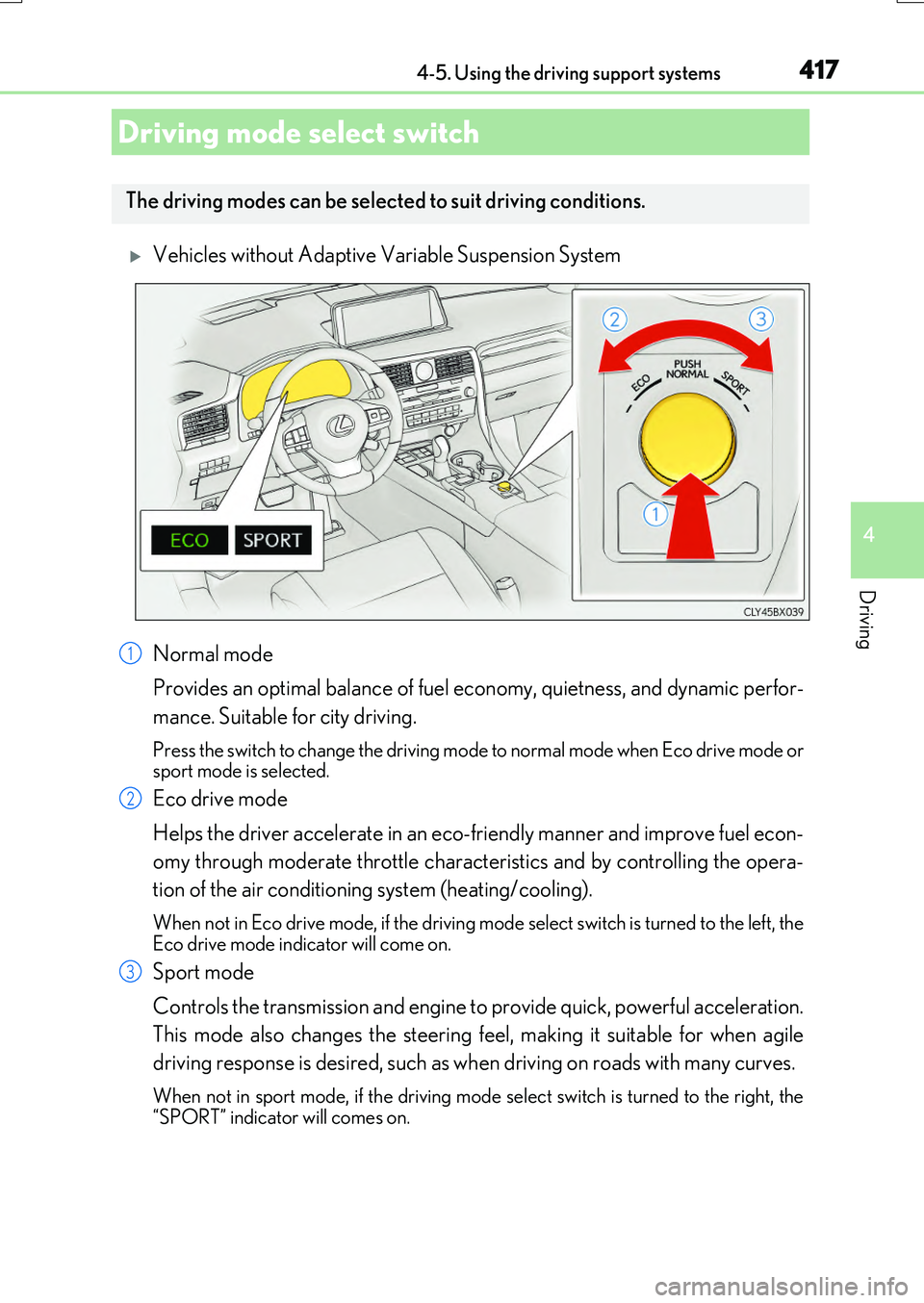
Vehicles without Adaptive Variable Suspension System
Normal mode
Provides an optimal balance of fuel ec onomy, quietness, and dynamic perfor-
mance. Suitable for city driving.
Press the switch to change the driving mode to normal mode when Eco drive mode or sport mode is selected.
Eco drive mode
Helps the driver accelerate in an eco-friendly manner and improve fuel econ-
omy through moderate throttle characteristics and by controlling the opera-
tion of the air conditioning system (heating/cooling).
When not in Eco drive mode, if the driving mode select switch is turned to the left, the
Eco drive mode indicator will come on.
Sport mode
Controls the transmission and engine to provide quick, powerful acceleration.
This mode also changes the steering feel, making it suitable for when agile
driving response is desired, such as when driving on roads with many curves.
When not in sport mode, if the driving mode se lect switch is turned to the right, the “SPORT” indicator will comes on.
Driving mode select switch
The driving modes can be selected to suit driving conditions.
1
2
3
Page 418 of 776
4184-5. Using the driving support systems
RX350/RX200t_EE_OM48F32E
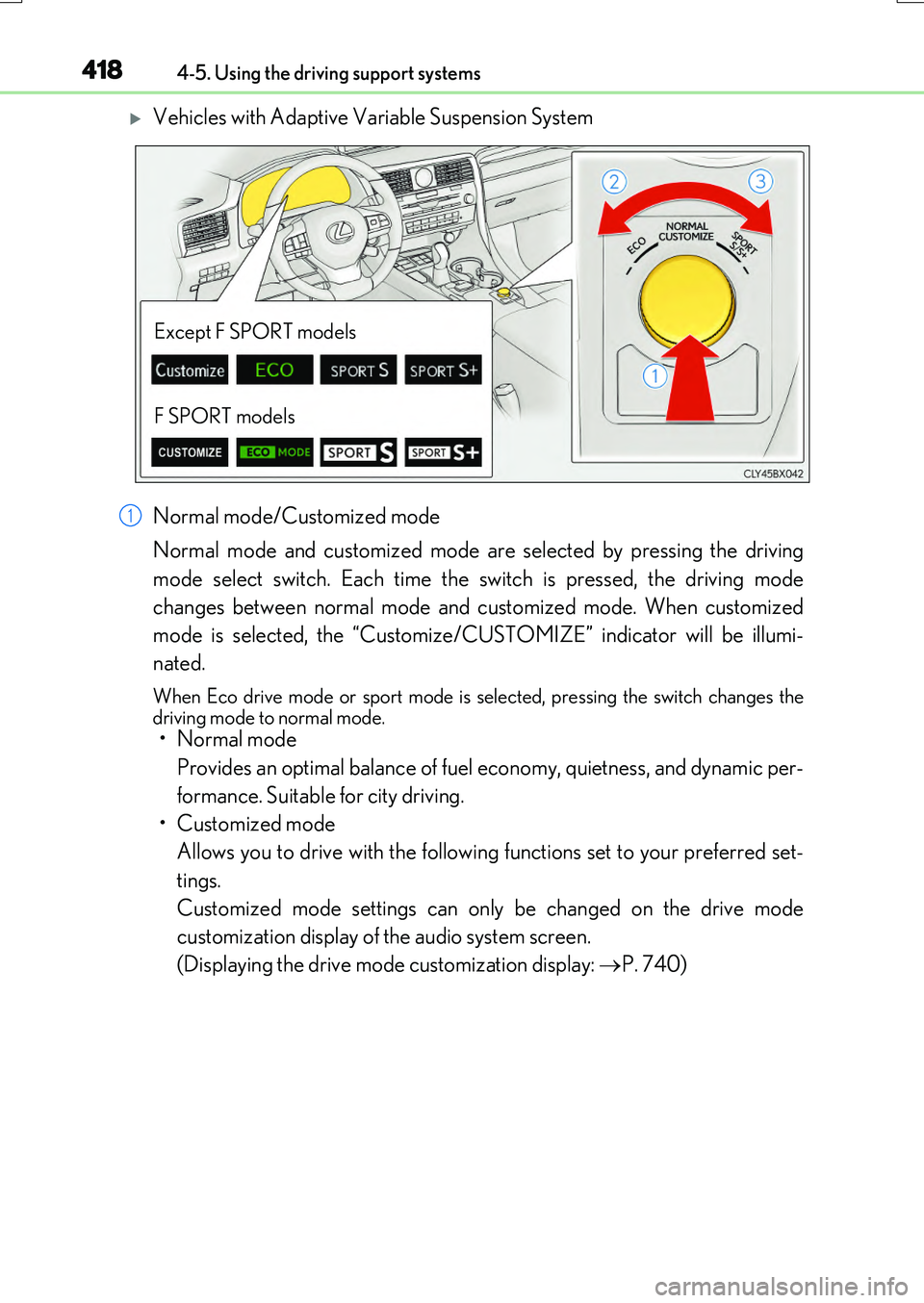
Vehicles with Adaptive Variable Suspension System
Normal mode/Customized mode
Normal mode and customized mode are selected by pressing the driving
mode select switch. Each time the switch is pressed, the driving mode
changes between normal mode and customized mode. When customized
mode is selected, the “Customize/CUSTOMIZE” indicator will be illumi-
nated.
When Eco drive mode or sport mode is sele cted, pressing the switch changes the driving mode to normal mode.
• Normal mode
Provides an optimal balance of fuel economy, quietness, and dynamic per-
formance. Suitable for city driving.
• Customized mode
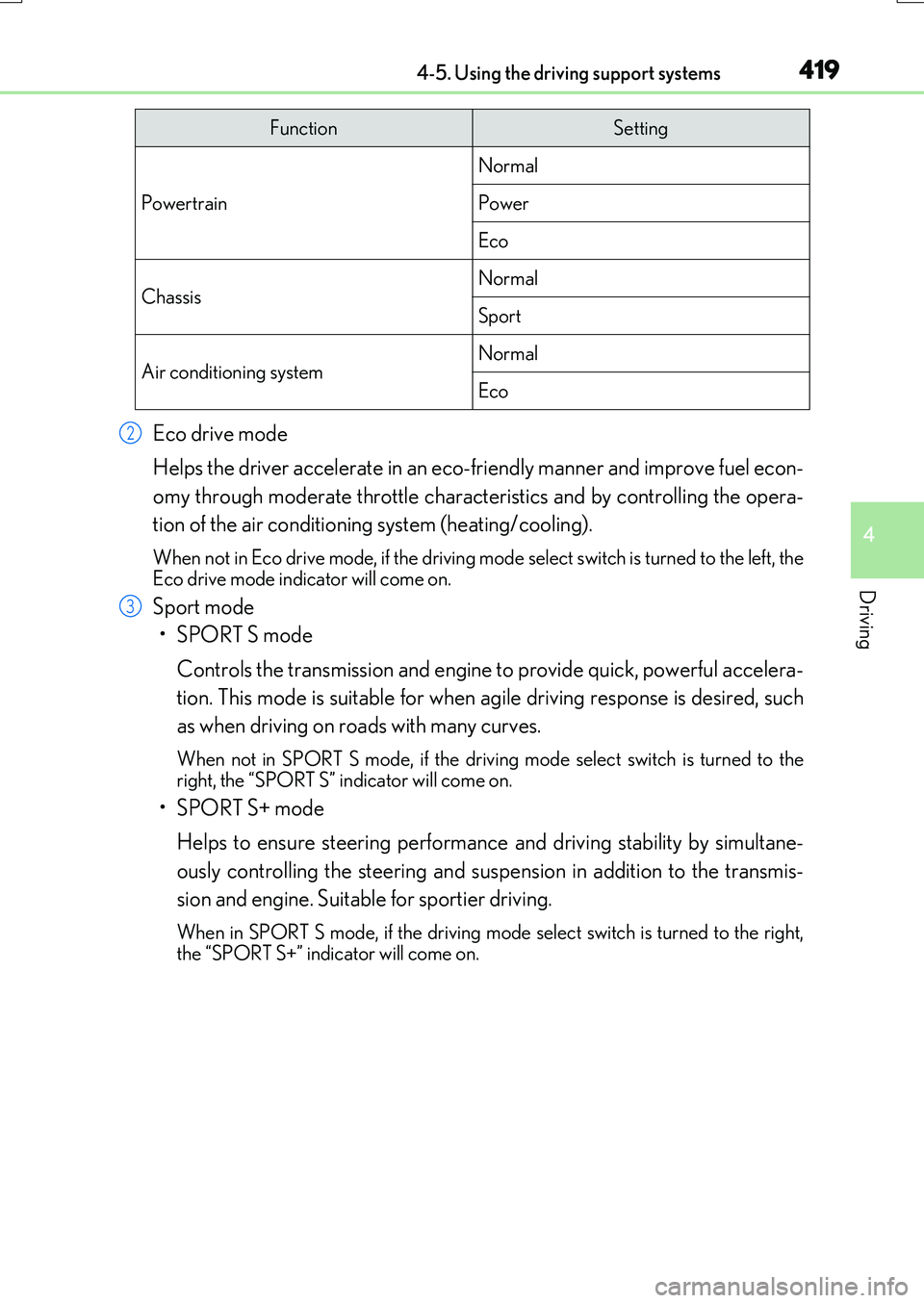
Allows you to drive with the following functions set to your preferred set-
tings.
Customized mode settings can only be changed on the drive mode
customization display of the audio system screen.
(Displaying the drive mode customization display: P. 740)
Except F SPORT models
F SPORT models
1
Page 419 of 776
4194-5. Using the driving support systems
4
Driving
RX350/RX200t_EE_OM48F32E
Eco drive mode
Helps the driver accelerate in an eco-friendly manner and improve fuel econ-
omy through moderate throttle characteristics and by controlling the opera-
tion of the air conditioning system (heating/cooling).
When not in Eco drive mode, if the driving mode select switch is turned to the left, the
Eco drive mode indicator will come on.
Sport mode
•SPORT S mode
Controls the transmission and engine to provide quick, powerful accelera-
tion. This mode is suitable for when agile driving response is desired, such
as when driving on roads with many curves.
When not in SPORT S mode, if the drivin g mode select switch is turned to the right, the “SPORT S” indicator will come on.
•SPORT S+ mode
Helps to ensure steering performanc e and driving stability by simultane-
ously controlling the steering and susp ension in addition to the transmis-
sion and engine. Suitable for sportier driving.
When in SPORT S mode, if th e driving mode select switch is turned to the right,
the “SPORT S+” indicator will come on.
FunctionSetting
Powertrain
Normal
Power
Eco
ChassisNormal
Sport
Air conditioning systemNormal
Eco
2
3
Page 420 of 776
4204-5. Using the driving support systems
RX350/RX200t_EE_OM48F32E
■Operation of the air conditioning system in Eco drive mode
Eco drive mode controls the heating/cooling operations and fan speed of the air condi- tioning system to enhance fuel efficiency . To improve air conditioning performance, adjust the fan speed or turn off Eco drive mode.
■Automatic deactivation of sport mode and customized mode
If the engine switch is turned off after dr iving in sport mode or customized mode, the drive mode will be changed to normal mode.
■Driving mode pop-up display (12.3-inch display only)
When the driving mode is changed, the selected driving mode will be temporarily dis- played on the side display. ( P. 533)