start LEXUS RX200T 2017 User Guide
[x] Cancel search | Manufacturer: LEXUS, Model Year: 2017, Model line: RX200T, Model: LEXUS RX200T 2017Pages: 776, PDF Size: 44.51 MB
Page 77 of 776
77
1
For safety and security
RX350/RX200t_EE_OM48F32E
1-3. Theft deterrent system
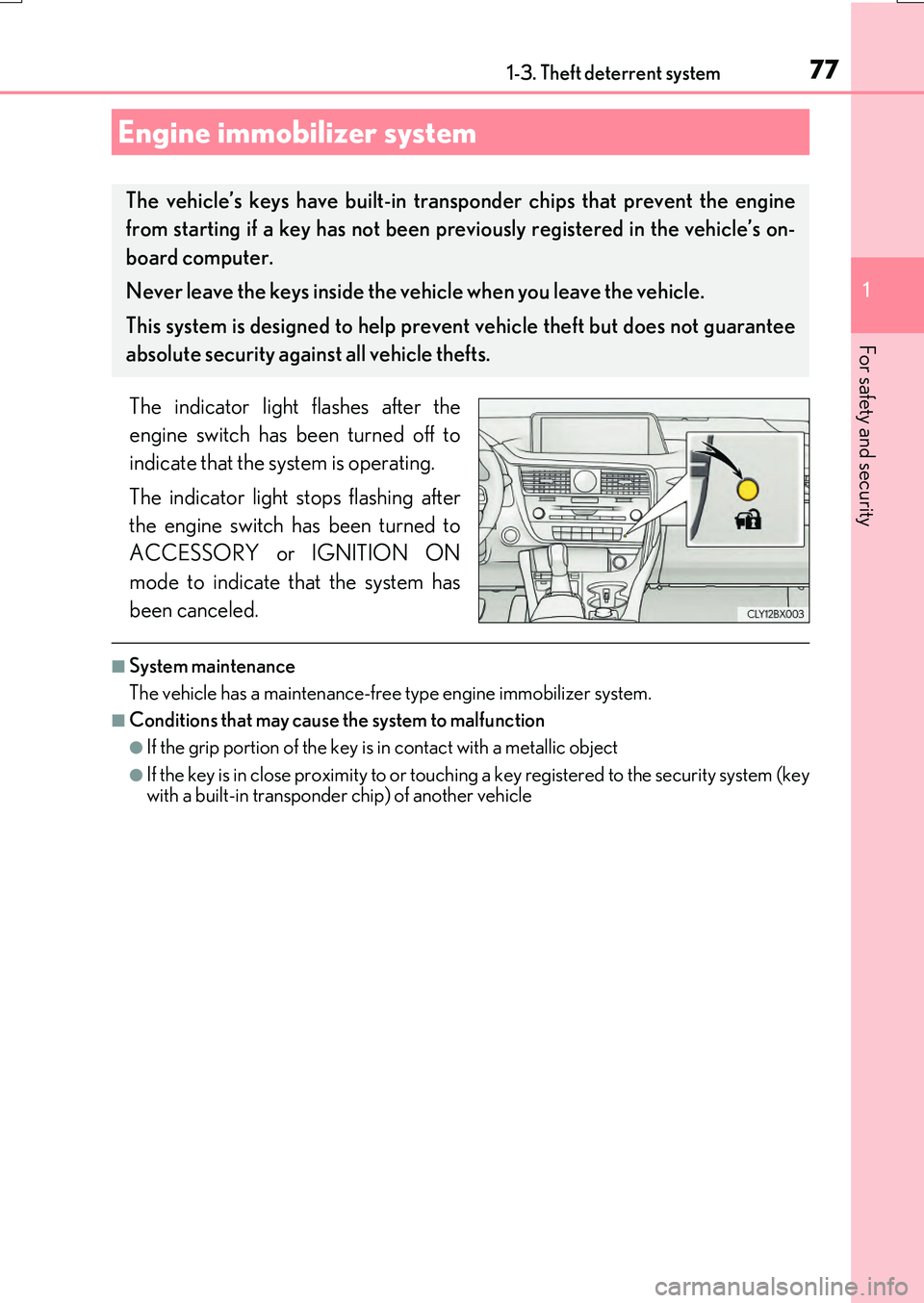
The indicator light flashes after the
engine switch has been turned off to
indicate that the system is operating.
The indicator light stops flashing after
the engine switch has been turned to
ACCESSORY or IGNITION ON
mode to indicate that the system has
been canceled.
■System maintenance
The vehicle has a maintenance-free type engine immobilizer system.
■Conditions that may cause the system to malfunction
●If the grip portion of the key is in contact with a metallic object
●If the key is in close proximity to or touching a key registered to the security system (key with a built-in transponder chip) of another vehicle
Engine immobilizer system
The vehicle’s keys have built-in tran sponder chips that prevent the engine
from starting if a key has not been previously registered in the vehicle’s on-
board computer.
Never leave the keys inside the vehicle when you leave the vehicle.
This system is designed to help prev ent vehicle theft but does not guarantee
absolute security agai nst all vehicle thefts.
Page 83 of 776

831-3. Theft deterrent system
1
For safety and security
RX350/RX200t_EE_OM48F32E
The alarm uses light and sound to give an alert when an intrusion is detected.
The alarm is triggered in the following situations when the alarm is set:
●A locked door is unlocked or opened in any way other than using the entry
function or wireless remote control. (The doors will lock again automatically.)
●The hood is opened.
●The intrusion sensor detects something moving inside the vehicle. (An
intruder gets in the vehicle.)
●The tilt sensor detects a change of vehicle inclination. (if equipped)
●Any of the windows are broken.
Close the doors and hood, and lock all
the doors using the entry function or
wireless remote control. The system will
be set automatically after 30 seconds.
The indicator light changes from being
on to flashing when the system is set.
Do one of the following to deactivate or stop the alarm.
●Unlock the doors using the entry function or wireless remote control.
●Start the engine. (The alarm will be deactivated or stopped after a few sec-
onds.)
Alarm
: If equipped
The alarm
Setting the alarm system
Deactivating or stopping the alarm
Page 91 of 776
912. Instrument cluster
2
Instrument cluster
RX350/RX200t_EE_OM48F32E
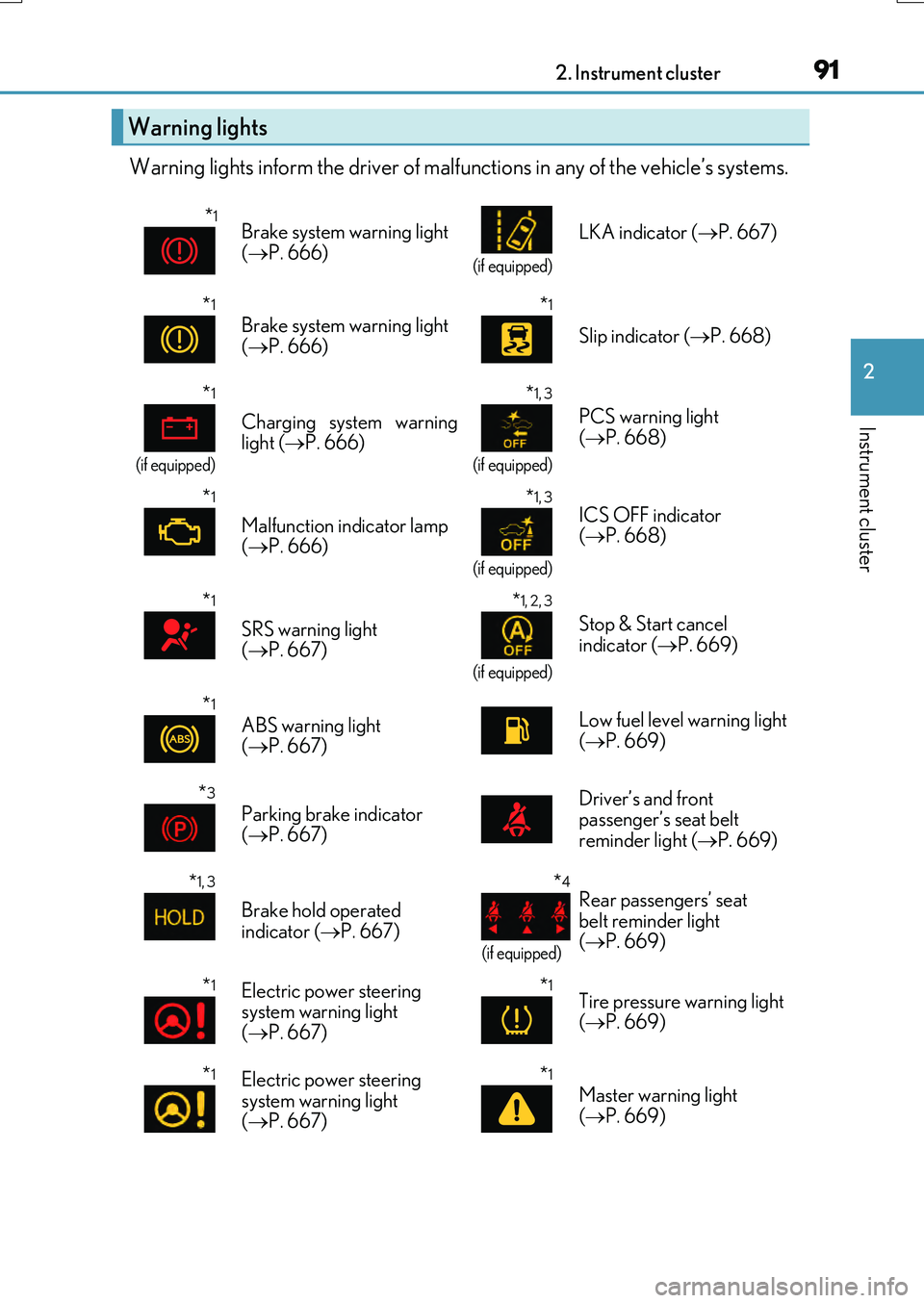
Warning lights inform the driver of malfunctions in any of the vehicle’s systems.
Warning lights
*1Brake system warning light
( P. 666)
(if equipped)
LKA indicator ( P. 667)
*1
Brake system warning light
( P. 666)*1
Slip indicator ( P. 668)
*1
(if equipped)
Charging system warning
light ( P. 666)
*1, 3
(if equipped)
PCS warning light
( P. 668)
*1
Malfunction indicator lamp
( P. 666)
*1, 3
(if equipped)
ICS OFF indicator
( P. 668)
*1
SRS warning light
( P. 667)
*1, 2, 3
(if equipped)
Stop & Start cancel
indicator ( P. 669)
*1
ABS warning light
( P. 667) Low fuel level warning light
(
P. 669)
*3
Parking brake indicator
( P. 667) Driver’s and front
passenger’s seat belt
reminder light (
P. 669)
*1, 3
Brake hold operated
indicator ( P. 667)
*4
(if equipped)
Rear passengers’ seat
belt reminder light
( P. 669)
*1Electric power steering
system warning light
( P. 667)*1Tire pressure warning light
( P. 669)
*1Electric power steering
system warning light
( P. 667)*1
Master warning light
( P. 669)
Page 92 of 776

922. Instrument cluster
RX350/RX200t_EE_OM48F32E
*1: These lights turn on when the engine switch is turned to IGNITION ON mode to
indicate that a system check is being performed. They will turn off after the engine is
started, or after a few seconds. There may be a malfunction in a system if a light does
not come on, or turn off. Have the vehicle inspected by any authorized Lexus dealer
or repairer, or another duly qualified and equipped professional.
*2: When the start-up display is displayed on the multi-information display, this light may
not turn on even though the engine swit ch has been turned to IGNITION ON mode.
*3: The light flashes to indicate a malfunction.
*4: This light illuminates on the center panel.
The indicators inform the driver of the operating state of the vehicle’s various sys-
tems.
Indicators
Turn signal indicator ( P. 258)
Cruise control “SET”
indicator ( P. 329, 341)
Tail light indicator
( P. 265)(if equipped)
LKA indicator (P. 313)
Headlight high beam indicator ( P. 265)(if equipped)
LKA indicator (P. 313)
*1
(if equipped)
Automatic High Beam
indicator ( P. 274) Adaptive High-beam System indicator ( P. 269)
*5
(if equipped)
LKA indicator (P. 313)
Front fog light indicator ( P. 278)
(if equipped)
Lexus parking
assist-sensor indicator ( P. 371)
Rear fog light indicator
( P. 278)
*1, 6
(if equipped)
ICS OFF indicator
( P. 383)
Cruise control indicator
( P. 329, 341)(if equipped)
“BSM” indicator (P. 355)
(if equipped)
Radar cruise control indicator ( P. 329) (if equipped)
“RCTA” indicator ( P. 355)
Page 93 of 776
932. Instrument cluster
2
Instrument cluster
RX350/RX200t_EE_OM48F32E
*3, 4
(if equipped)
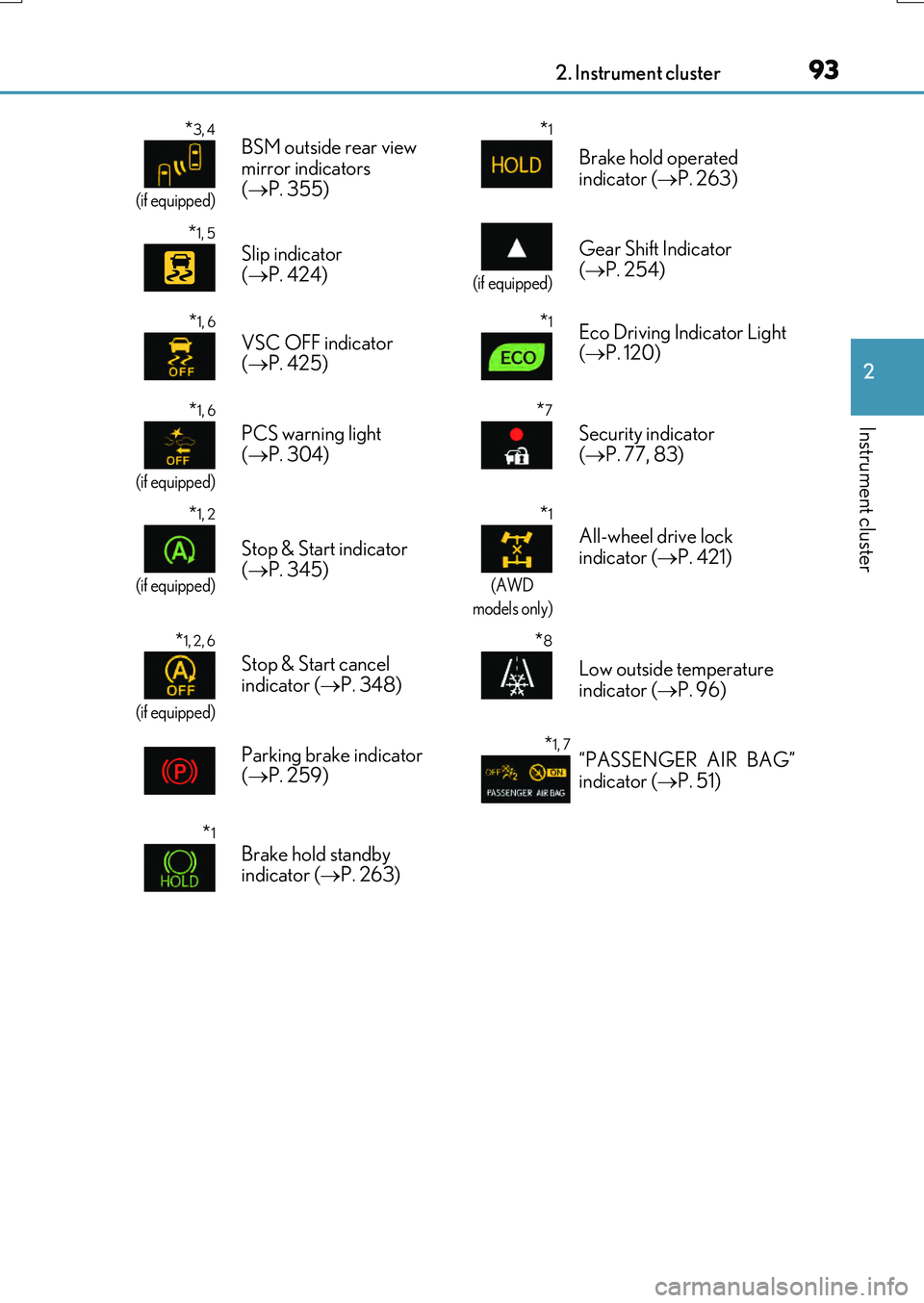
BSM outside rear view
mirror indicators
( P. 355)*1
Brake hold operated
indicator ( P. 263)
*1, 5
Slip indicator
( P. 424)
(if equipped)
Gear Shift Indicator
( P. 254)
*1, 6
VSC OFF indicator
( P. 425)*1Eco Driving Indicator Light
( P. 120)
*1, 6
(if equipped)
PCS warning light
( P. 304)
*7
Security indicator
( P. 77, 83)
*1, 2
(if equipped)
Stop & Start indicator
( P. 345)
*1
(AWD
models only)
All-wheel drive lock
indicator ( P. 421)
*1, 2, 6
(if equipped)
Stop & Start cancel
indicator ( P. 348)
*8
Low outside temperature
indicator ( P. 96)
Parking brake indicator
( P. 259)
*1, 7“PASSENGER AIR BAG”
indicator ( P. 51)
*1
Brake hold standby
indicator ( P. 263)
Page 94 of 776

942. Instrument cluster
RX350/RX200t_EE_OM48F32E
●Drive mode indicators
Except F SPORT models
F SPORT models
*1: These lights turn on when the engine switch is turned to IGNITION ON mode to indicate that a system check is being performed. They will turn off after the engine is
started, or after a few seconds. There may be a malfunction in a system if a light does
not come on, or turn off. Have the vehicle inspected by any authorized Lexus dealer
or repairer, or another duly qualified and equipped professional.
*2: When the start-up display is displayed on the multi-information display, this light may
not turn on even though the engine swit ch has been turned to IGNITION ON mode.
*3: In order to confirm operation, the BSM outside rear view mirror indicators illuminate
in the following situations:
• When the BSM function is enabled on of the multi-information display, the
engine switch is turned to IGNITION ON mode.
• When the engine switch is in IGNITION ON mode, the BSM function is enabled
on of the multi-information display.
If the system is functioning correctly, the BSM outside rear view mirror indicators will
turn off after a few seconds.
If the BSM outside rear view mirror indicators do not illuminate or do not turn off,
there may be a malfunction in the system.
If this occurs, have the vehicle inspected by any authorized Lexus dealer or repairer,
or another duly qualified and equipped professional. Eco drive mode indicator
( P. 417)
(if equipped)
“SPORT” indicator
( P. 417)
(if equipped)
“SPORT S” indicator
( P. 417)
(if equipped)
“SPORT S+” indicator
( P. 417)
(if equipped)
“Customize” indicator
( P. 417)
Eco drive mode indicator
( P. 417) “SPORT S” indicator
( P. 417)
“SPORT S+” indicator
( P. 417) “CUSTOMIZE” indicator
( P. 417)
Page 95 of 776
952. Instrument cluster
2
Instrument cluster
RX350/RX200t_EE_OM48F32E
*4: This light illuminates on the outside rear view mirrors.
*5: The light flashes to indicate that the system is operating.
*6: The light comes on when the system is turned off.
*7: This light illuminates on the center panel.
*8: When the outside temperature is approximately 3°C (37°F) or lower, the indicator
will flash for approximately 10 seconds, then stay on.
WARNING
■If a safety system warning light does not come on
Should a safety system light such as the ABS and SRS warning lights not come on when you start the engine, this could mean that these systems are not available to help pro-tect you in an accident, which could result in death or serious injury. Have the vehicle
inspected by any authorized Lexus dealer or repairer, or another duly qualified and equipped professional immediately if this occurs.
Page 101 of 776
1012. Instrument cluster
2
Instrument cluster
RX350/RX200t_EE_OM48F32E
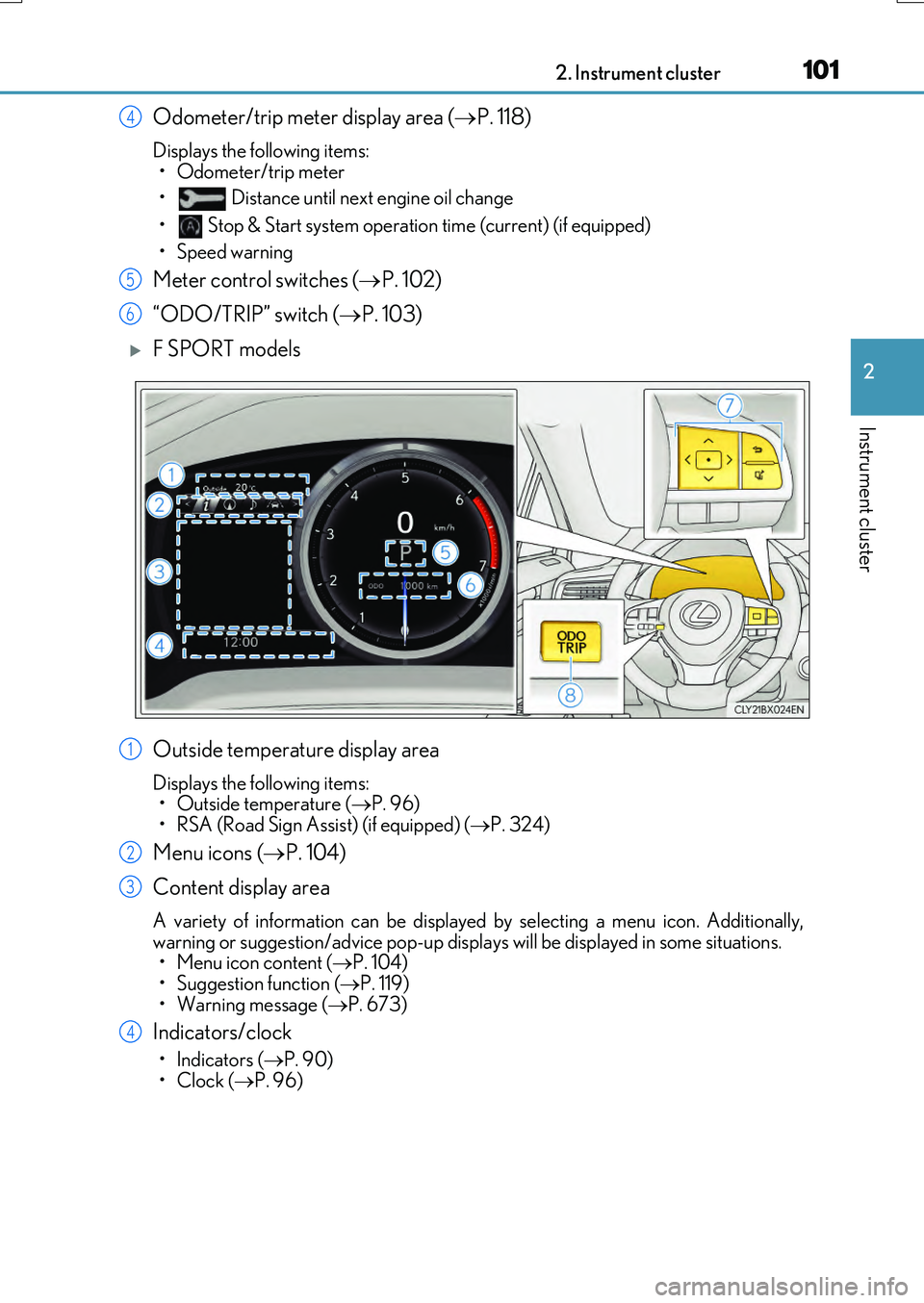
Odometer/trip meter display area (P. 118)
Displays the following items:
• Odometer/trip meter
• Distance until next engine oil change
• Stop & Start system operation time (current) (if equipped)
• Speed warning
Meter control switches ( P. 102)
“ODO/TRIP” switch ( P. 103)
F SPORT models
Outside temperature display area
Displays the following items: • Outside temperature ( P. 96)
• RSA (Road Sign Assist) (if equipped) ( P. 324)
Menu icons (P. 104)
Content display area
A variety of information can be displayed by selecting a menu icon. Additionally,
warning or suggestion/advice pop-up displa ys will be displayed in some situations. • Menu icon content ( P. 104) • Suggestion function ( P. 119)
• Warning message ( P. 673)
Indicators/clock
•Indicators (P. 90)
•Clock ( P. 96)
4
5
6
1
2
3
4
Page 102 of 776
1022. Instrument cluster
RX350/RX200t_EE_OM48F32E
Shift position display (P. 251)
Odometer/trip meter display area ( P. 118)
Displays the following items:
• Odometer/trip meter
• Distance until next engine oil change
• Stop & Start system operation time (current) (if equipped)
• Speed warning
Meter control switches ( P. 102)
“ODO/TRIP” switch ( P. 103)
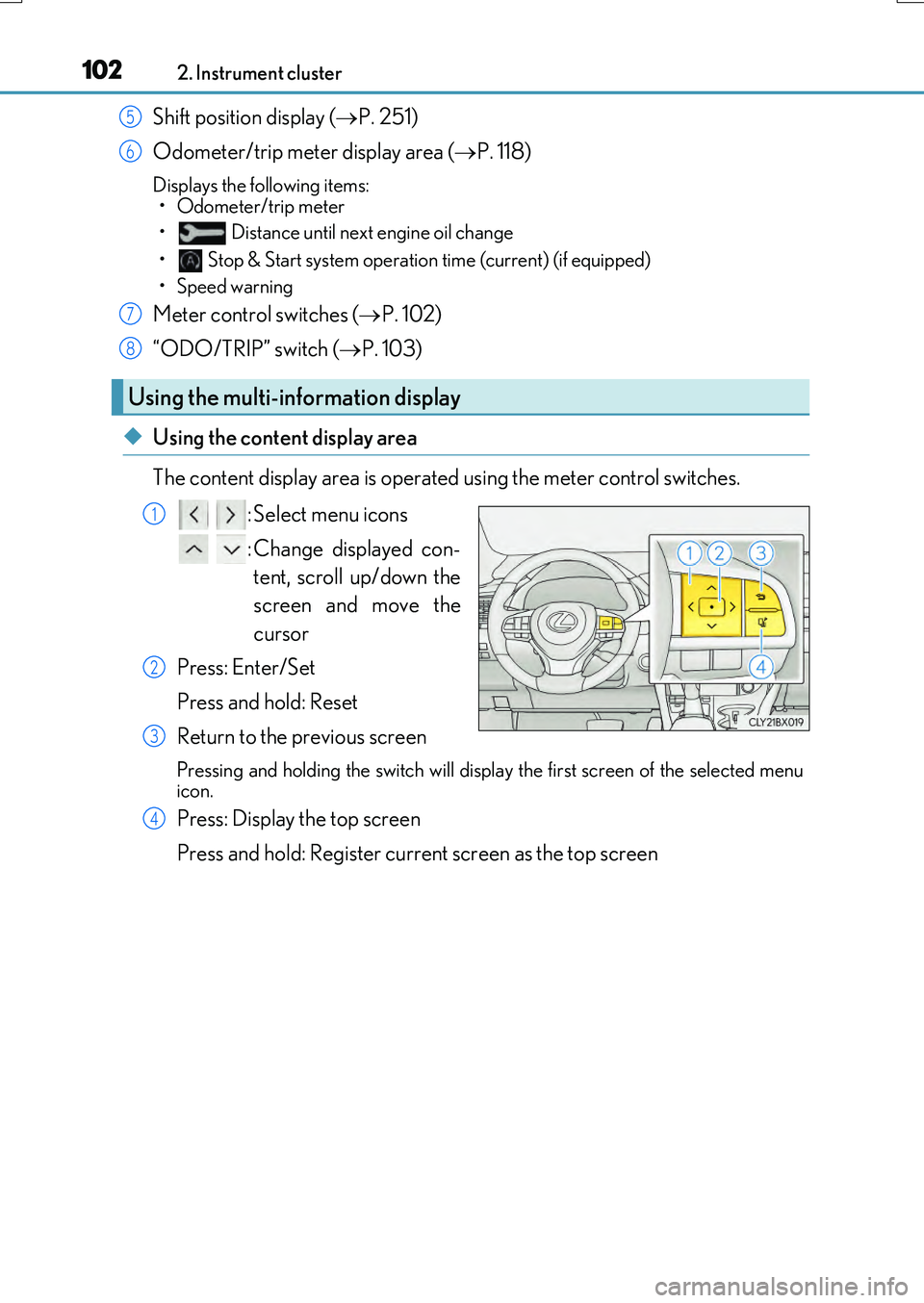
◆Using the content display area
The content display area is operated using the meter control switches. : Select menu icons
: Change displayed con- tent, scroll up/down the
screen and move the
cursor
Press: Enter/Set
Press and hold: Reset
Return to the previous screen
Pressing and holding the swit ch will display the first screen of the selected menu
icon.
Press: Display the top screen
Press and hold: Register current screen as the top screen
Using the multi-information display
5
6
7
8
1
2
3
4
Page 104 of 776
1042. Instrument cluster
RX350/RX200t_EE_OM48F32E
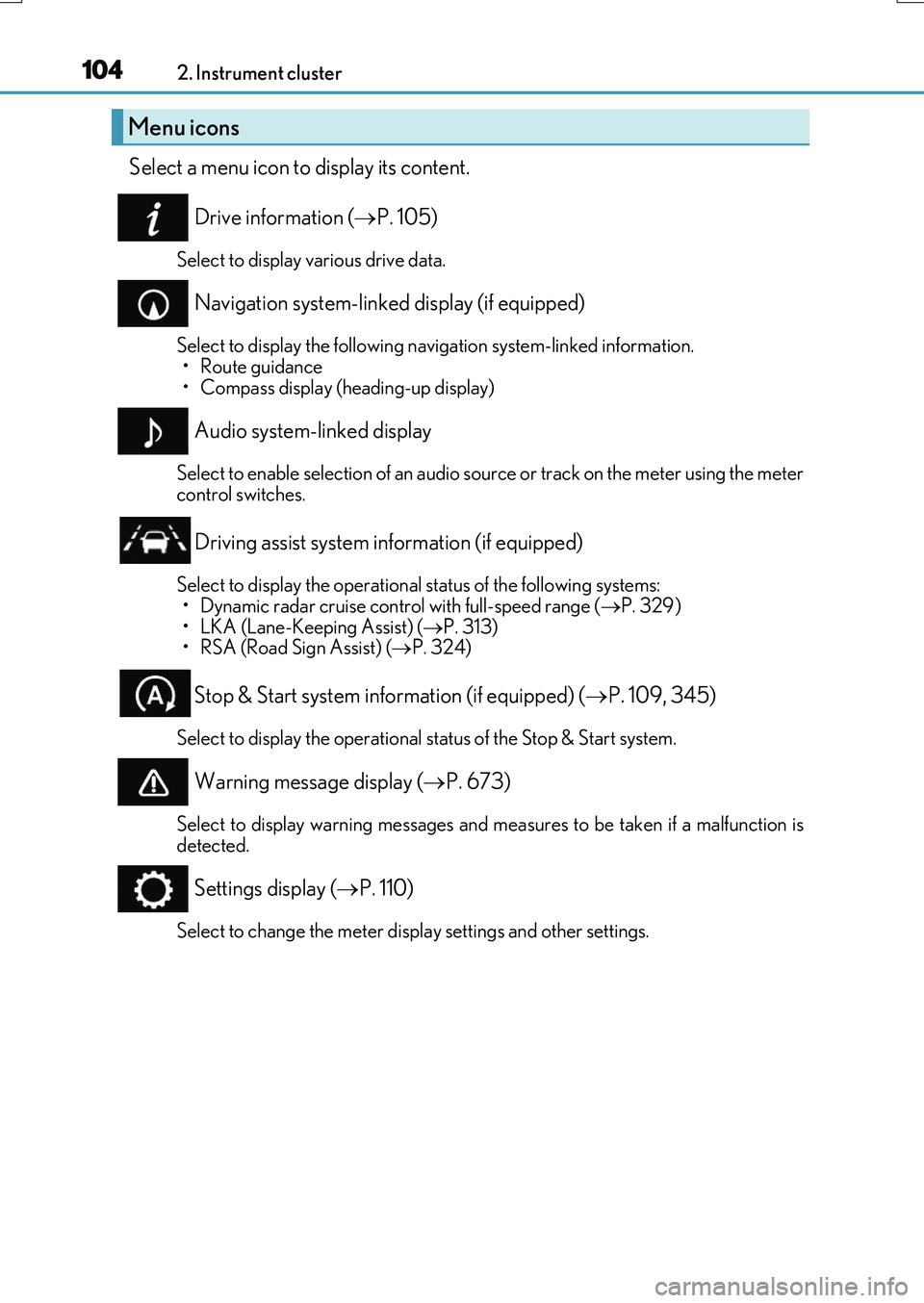
Select a menu icon to display its content.
Drive information ( P. 105)
Select to display various drive data.
Navigation system-linked display (if equipped)
Select to display the following navigation system-linked information.
•Route guidance • Compass display (heading-up display)
Audio system-linked display
Select to enable selection of an audio source or track on the meter using the metercontrol switches.
Driving assist system information (if equipped)
Select to display the operational status of the following systems: • Dynamic radar cruise control with full-speed range ( P. 329)
• LKA (Lane-Keeping Assist) ( P. 313) • RSA (Road Sign Assist) ( P. 324)
Stop & Start system information (if equipped) (P. 109, 345)
Select to display the operational status of the Stop & Start system.
Warning message display (P. 673)
Select to display warning messages and measures to be taken if a malfunction is detected.
Settings display ( P. 110)
Select to change the meter display settings and other settings.
Menu icons