start LEXUS RX200T 2017 Owner's Manual
[x] Cancel search | Manufacturer: LEXUS, Model Year: 2017, Model line: RX200T, Model: LEXUS RX200T 2017Pages: 776, PDF Size: 44.51 MB
Page 105 of 776
1052. Instrument cluster
2
Instrument cluster
RX350/RX200t_EE_OM48F32E
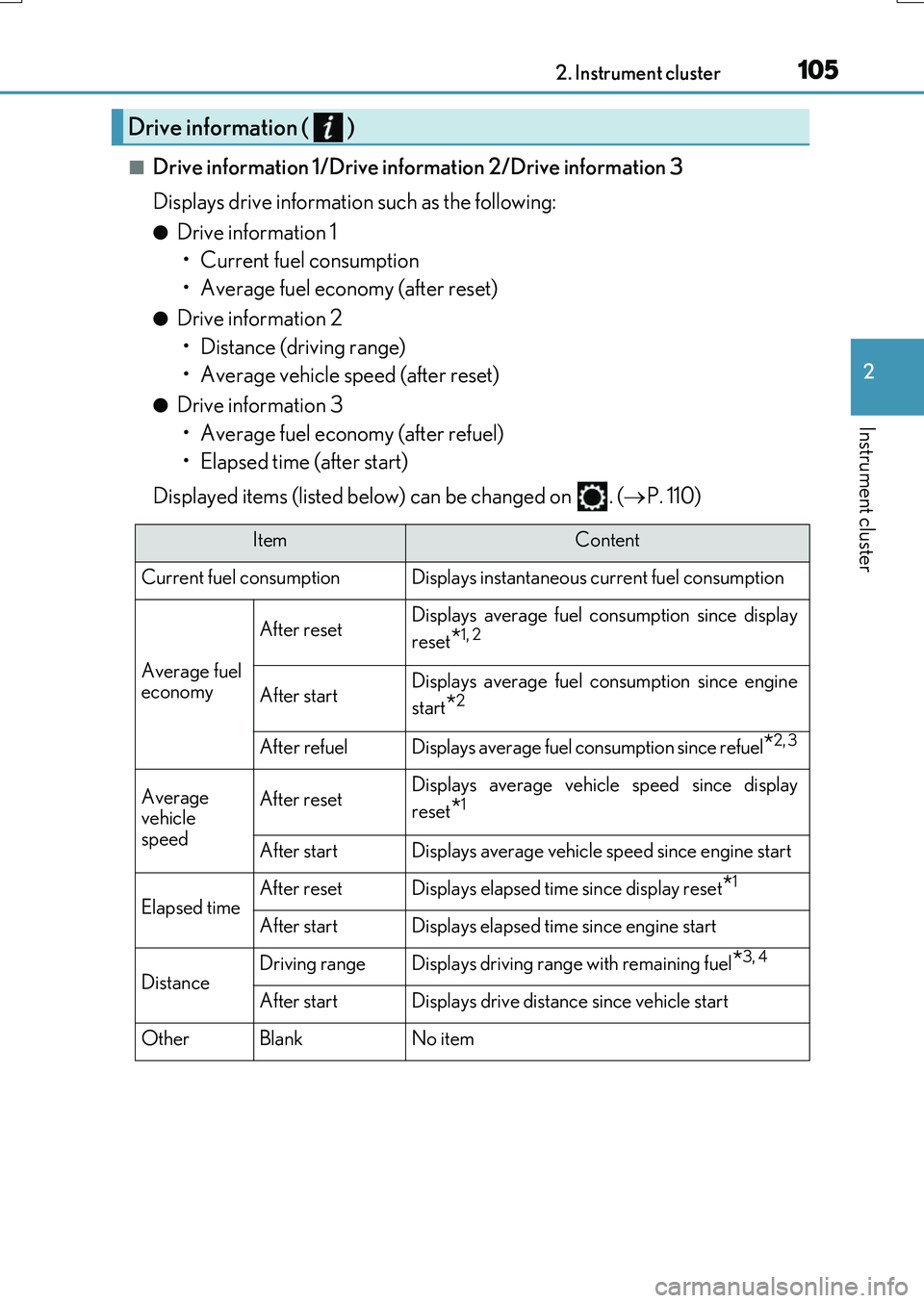
■Drive information 1/Drive information 2/Drive information 3
Displays drive information such as the following:
●Drive information 1 • Current fuel consumption
• Average fuel economy (after reset)
●Drive information 2 • Distance (driving range)
• Average vehicle speed (after reset)
●Drive information 3 • Average fuel economy (after refuel)
• Elapsed time (after start)
Displayed items (listed below) can be changed on . ( P. 110)
Drive information ( )
ItemContent
Current fuel consumption Displays instantaneous current fuel consumption
Average fuel
economy
After resetDisplays average fuel co nsumption since display
reset
*1, 2
After startDisplays average fuel consumption since engine
start
*2
After refuelDisplays average fuel consumption since refuel*2, 3
Average
vehicle
speedAfter resetDisplays average vehicle speed since display
reset
*1
After startDisplays average vehicle speed since engine start
Elapsed timeAfter resetDisplays elapsed time since display reset*1
After startDisplays elapsed time since engine start
DistanceDriving rangeDisplays driving range with remaining fuel*3, 4
After startDisplays drive distance since vehicle start
OtherBlankNo item
Page 109 of 776
1092. Instrument cluster
2
Instrument cluster
RX350/RX200t_EE_OM48F32E
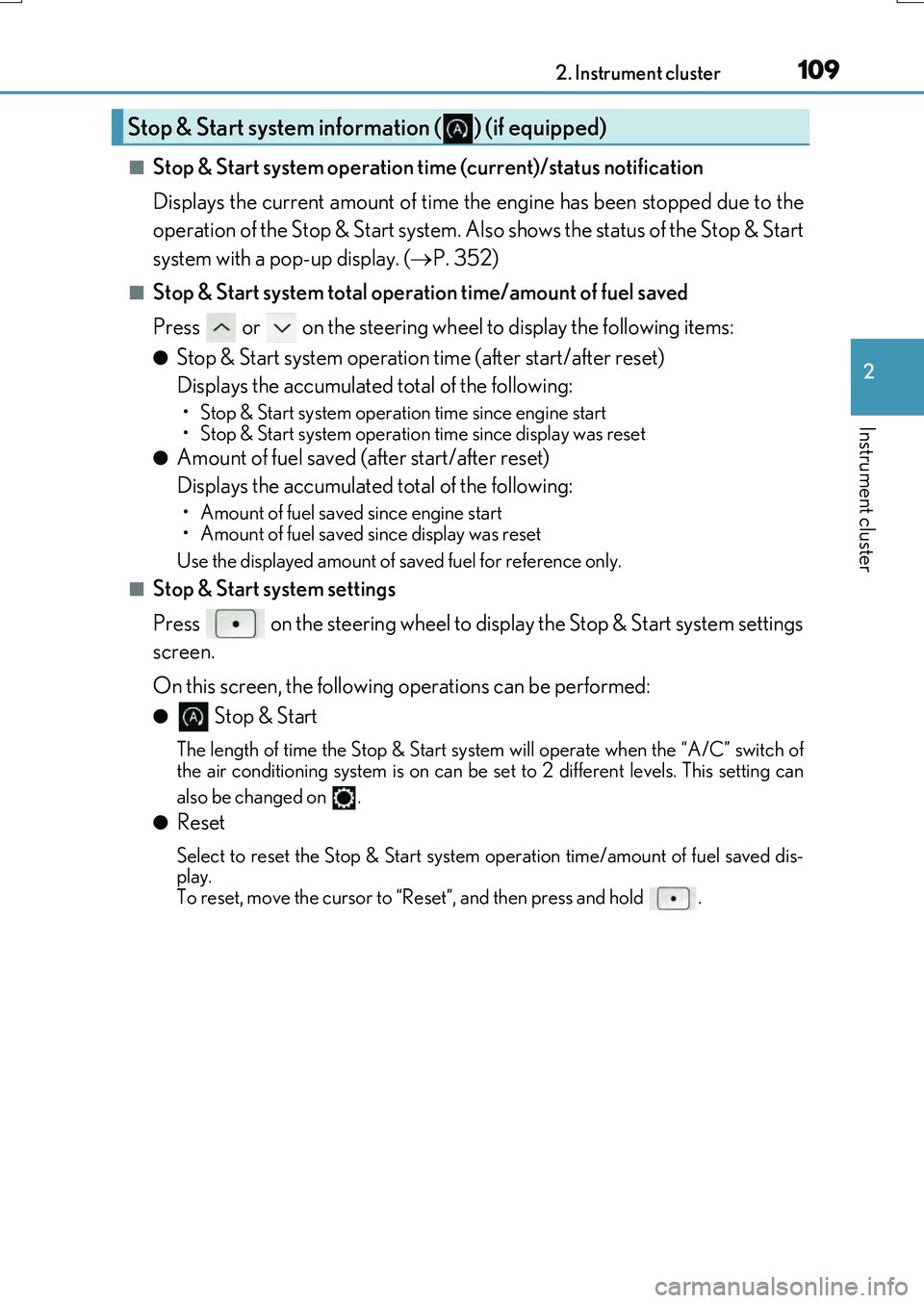
■Stop & Start system operation time (current)/status notification
Displays the current amount of time the engine has been stopped due to the
operation of the Stop & Start system. Also shows the status of the Stop & Start
system with a pop-up display. ( P. 352)
■Stop & Start system total operation time/amount of fuel saved
Press or on the steering wheel to display the following items:
●Stop & Start system operation time (after start/after reset)
Displays the accumulated total of the following:
• Stop & Start system operation time since engine start
• Stop & Start system operation time since display was reset
●Amount of fuel saved (a fter start/after reset)
Displays the accumulated total of the following:
• Amount of fuel saved since engine start
• Amount of fuel saved since display was reset
Use the displayed amount of saved fuel for reference only.
■Stop & Start system settings
Press on the steering wheel to display the Stop & Start system settings
screen.
On this screen, the following operations can be performed:
● Stop & Start
The length of time the Stop & Start syst em will operate when the “A/C” switch of
the air conditioning system is on can be set to 2 different levels. This setting can
also be changed on .
●Reset
Select to reset the Stop & Start system operation time/amount of fuel saved dis-
play.
To reset, move the cursor to “Reset”, and then press and hold .
Stop & Start system information ( ) (if equipped)
Page 112 of 776
1122. Instrument cluster
RX350/RX200t_EE_OM48F32E
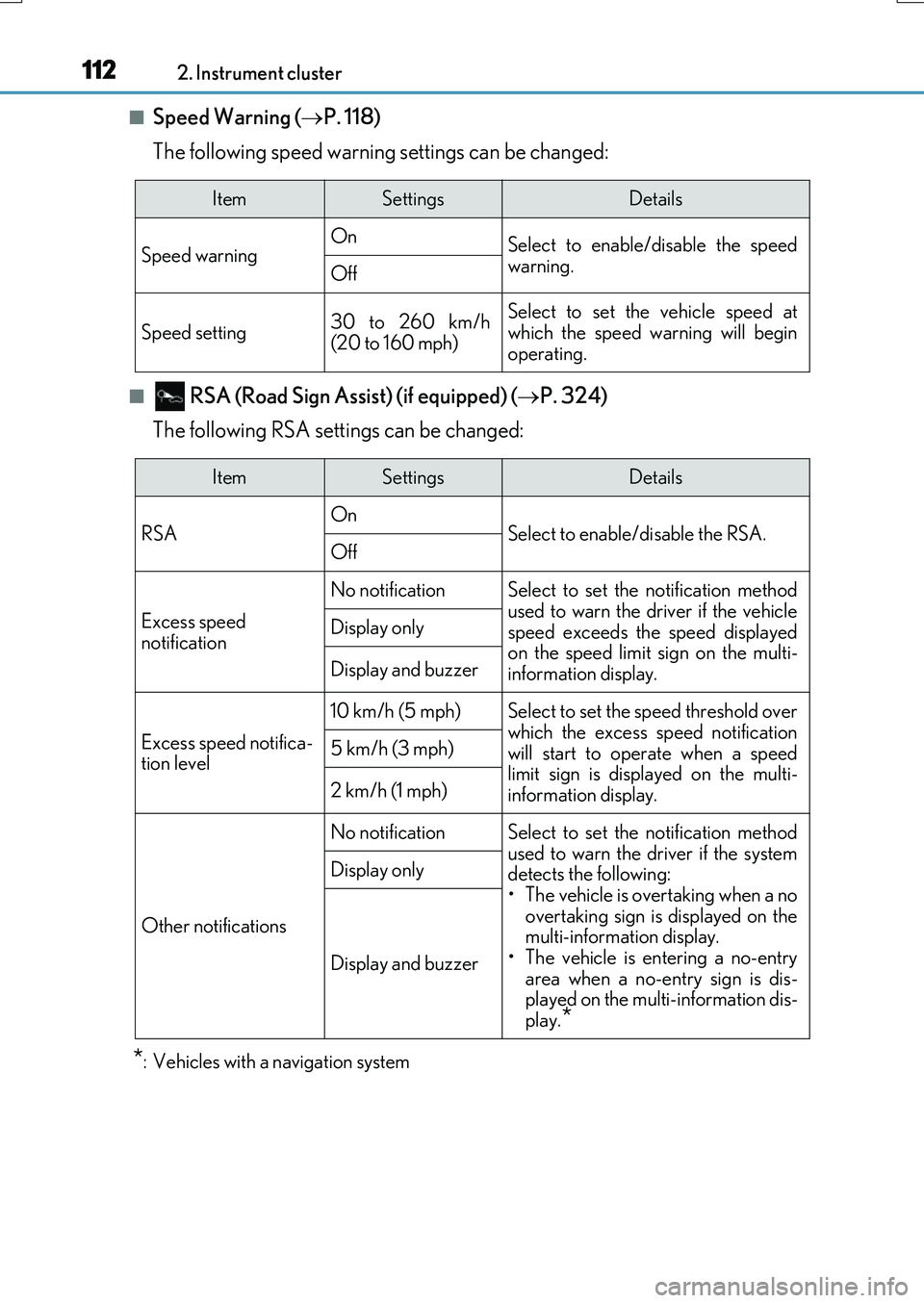
■Speed Warning (P. 118)
The following speed warning settings can be changed:
■ RSA (Road Sign Assi st) (if equipped) (P. 324)
The following RSA settings can be changed:
*: Vehicles with a navigation system
ItemSettingsDetails
Speed warning On Select to enable/disable the speed
warning.Off
Speed setting30 to 260 km/h (20 to 160 mph)
Select to set the vehicle speed atwhich the speed warning will begin
operating.
ItemSettingsDetails
RSA On Select to enable/disable the RSA.Off
Excess speed
notification
No notificationSelect to set the notification method
used to warn the driver if the vehicle speed exceeds the speed displayedon the speed limit sign on the multi-
information display.
Display only
Display and buzzer
Excess speed notifica- tion level
10 km/h (5 mph)Select to set the speed threshold overwhich the excess speed notification
will start to operate when a speed limit sign is disp layed on the multi- information display.
5 km/h (3 mph)
2 km/h (1 mph)
Other notifications
No notificationSelect to set the notification method
used to warn the driver if the system detects the following:• The vehicle is overtaking when a no
overtaking sign is displayed on the multi-information display.• The vehicle is entering a no-entry
area when a no-entry sign is dis- played on the multi-information dis-play.*
Display only
Display and buzzer
Page 115 of 776
1152. Instrument cluster
2
Instrument cluster
RX350/RX200t_EE_OM48F32E
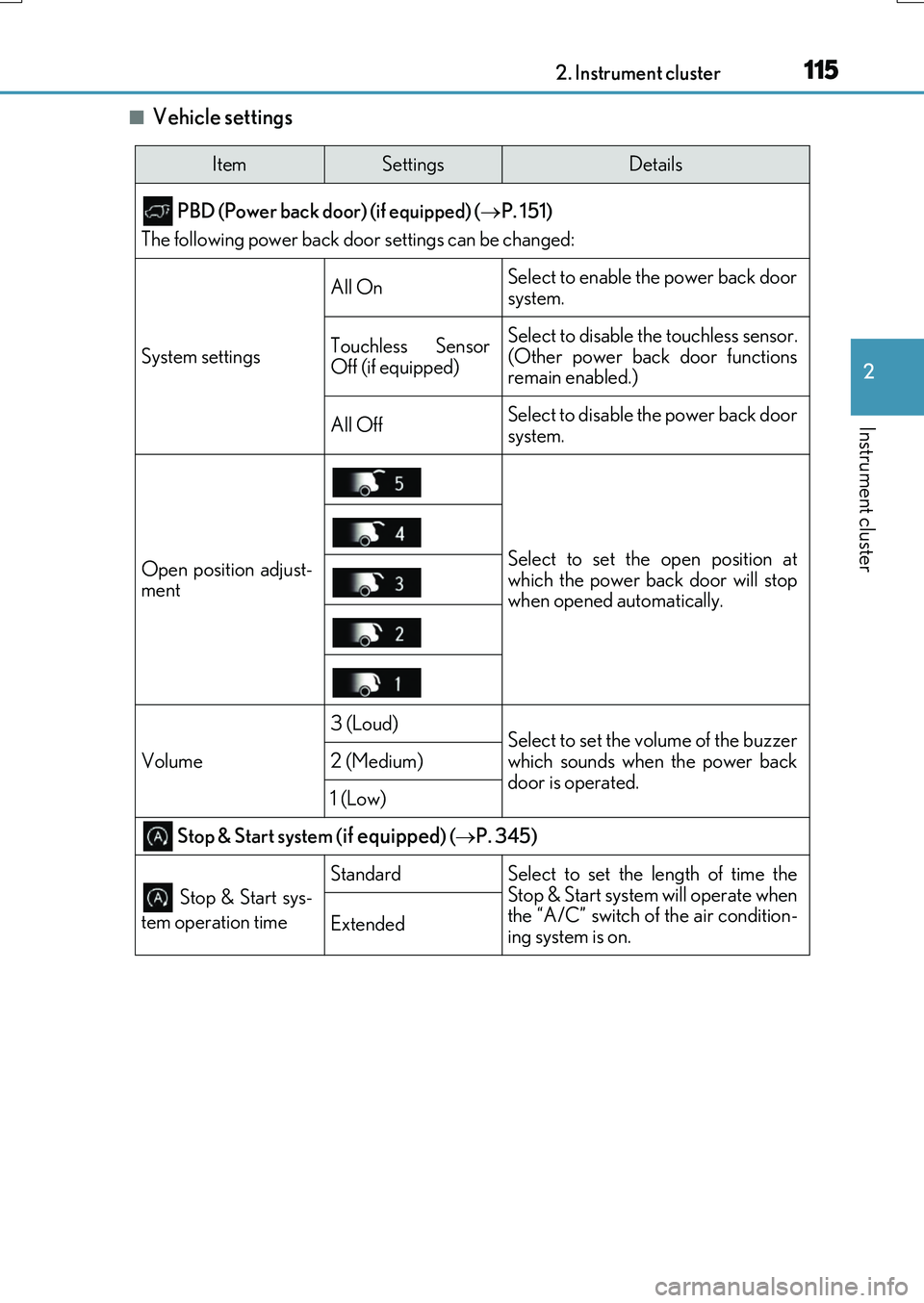
■Vehicle settings
ItemSettingsDetails
PBD (Power back door) (if equipped) ( P. 151)
The following power back door settings can be changed:
System settings
All OnSelect to enable the power back door
system.
Touchless Sensor
Off (if equipped)Select to disable the touchless sensor.
(Other power back door functions
remain enabled.)
All OffSelect to disable the power back door
system.
Open position adjust-
mentSelect to set the open position at
which the power back door will stop
when opened automatically.
Volume
3 (Loud)Select to set the volume of the buzzer
which sounds when the power back
door is operated.
2 (Medium)
1 (Low)
Stop & Start system (if equipped) ( P. 345)
Stop & Start sys-
tem operation time
StandardSelect to set the length of time the
Stop & Start system will operate when
the “A/C” switch of the air condition-
ing system is on.
Extended
Page 118 of 776
1182. Instrument cluster
RX350/RX200t_EE_OM48F32E
◆Display items
■Odometer
Displays the total distance the vehicle has been driven.
■Trip meter A/trip meter B
Displays the distance the vehicle has been driven since the meter was last
reset. Trip meters A and B can be used to record and display different dis-
tances independently.
To reset, display the desired trip meter and press and hold the “ODO/TRIP”
switch.
■ Distance until next engine oil change
Displays the distance the vehicle can be driven until an oil change is neces-
sary.
◆Pop-up display
In some situations the following will be temporarily displayed:
■ Stop & Start system operation time (current) (if equipped)
This display will be displayed when the engine is stopped due to the operation
of the Stop & Start system.
■ Distance until next engine oil change
Displays the distance until the next engine oil change. This display will be dis-
played in the following situations:
• When the engine switch is turned to IGNITION ON mode.
• When a warning message indicating that oil maintenance should be performed
soon or is required is displayed.
◆Speed warning
When set to on, the vehicle speed at which the speed warning will start oper-
ating will be displayed. If the vehicle exceeds the set speed, the speed display
will flash and a buzzer will sound.
• To display the odometer, etc. while the speed warning is set to on, press the “ODO/ TRIP” switch. (If the switch has not been operated for a certain amount of time, the
speed warning will be displayed.)
• The speed at which the speed warning w ill start operating can be changed on .
( P. 110)
Odometer/trip meter display area
Page 129 of 776
1292. Instrument cluster
2
Instrument cluster
RX350/RX200t_EE_OM48F32E
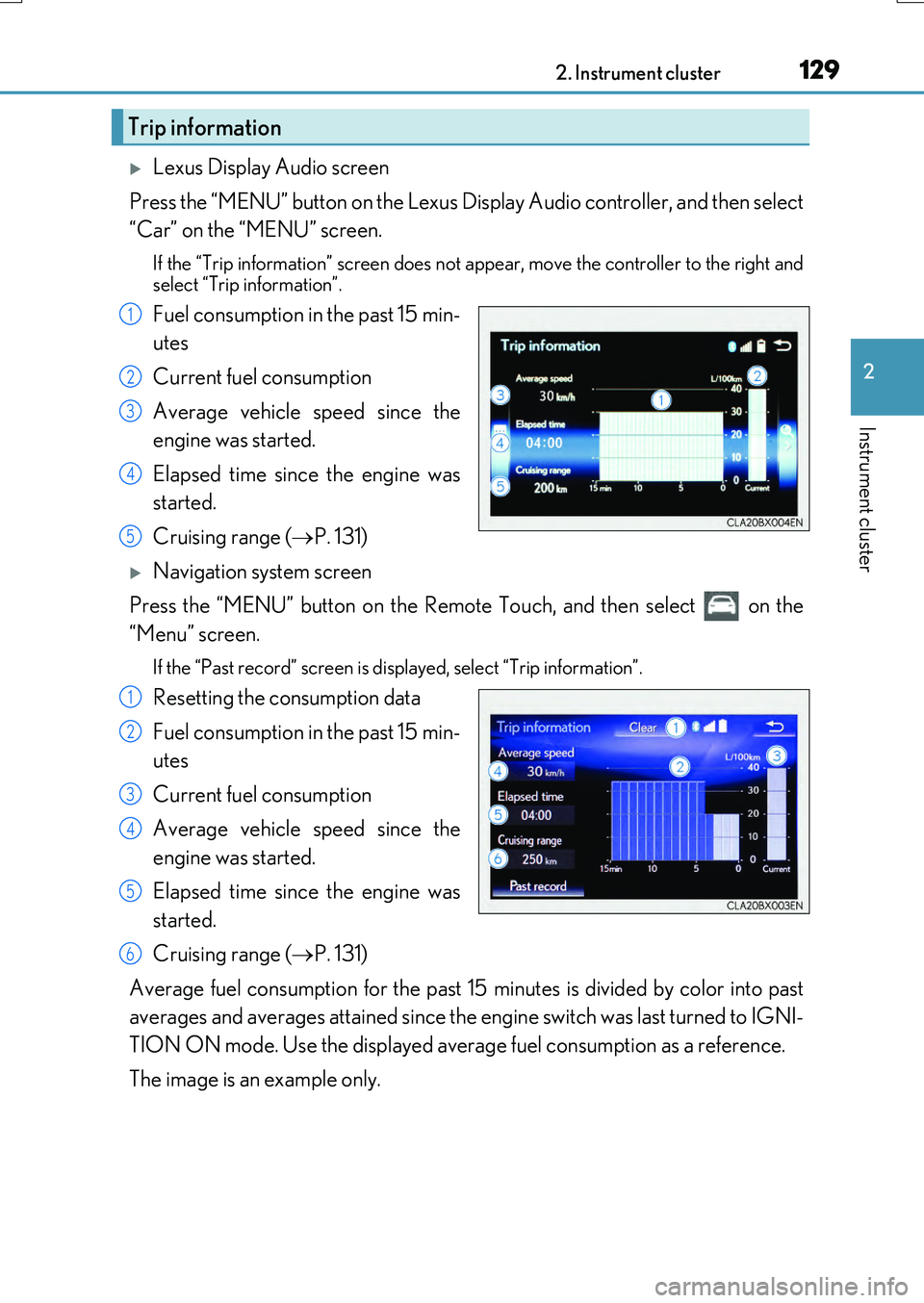
Lexus Display Audio screen
Press the “MENU” button on the Lexus Display Audio controller, and then select
“Car” on the “MENU” screen.
If the “Trip information” screen does not appear, move the controller to the right and
select “Trip information”.
Fuel consumption in the past 15 min-
utes
Current fuel consumption
Average vehicle speed since the
engine was started.
Elapsed time since the engine was
started.
Cruising range ( P. 131)
Navigation system screen
Press the “MENU” button on the Remote Touch, and then select on the
“Menu” screen.
If the “Past record” screen is displayed, select “Trip information”.
Resetting the consumption data
Fuel consumption in the past 15 min-
utes
Current fuel consumption
Average vehicle speed since the
engine was started.
Elapsed time since the engine was
started.
Cruising range ( P. 131)
Average fuel consumption for the past 15 minutes is divided by color into past
averages and averages attained since the engine switch was last turned to IGNI-
TION ON mode. Use the displayed average fuel consumption as a reference.
The image is an example only.
Trip information
1
2
3
4
5
1
2
3
4
5
6
Page 132 of 776
1322. Instrument cluster
RX350/RX200t_EE_OM48F32E
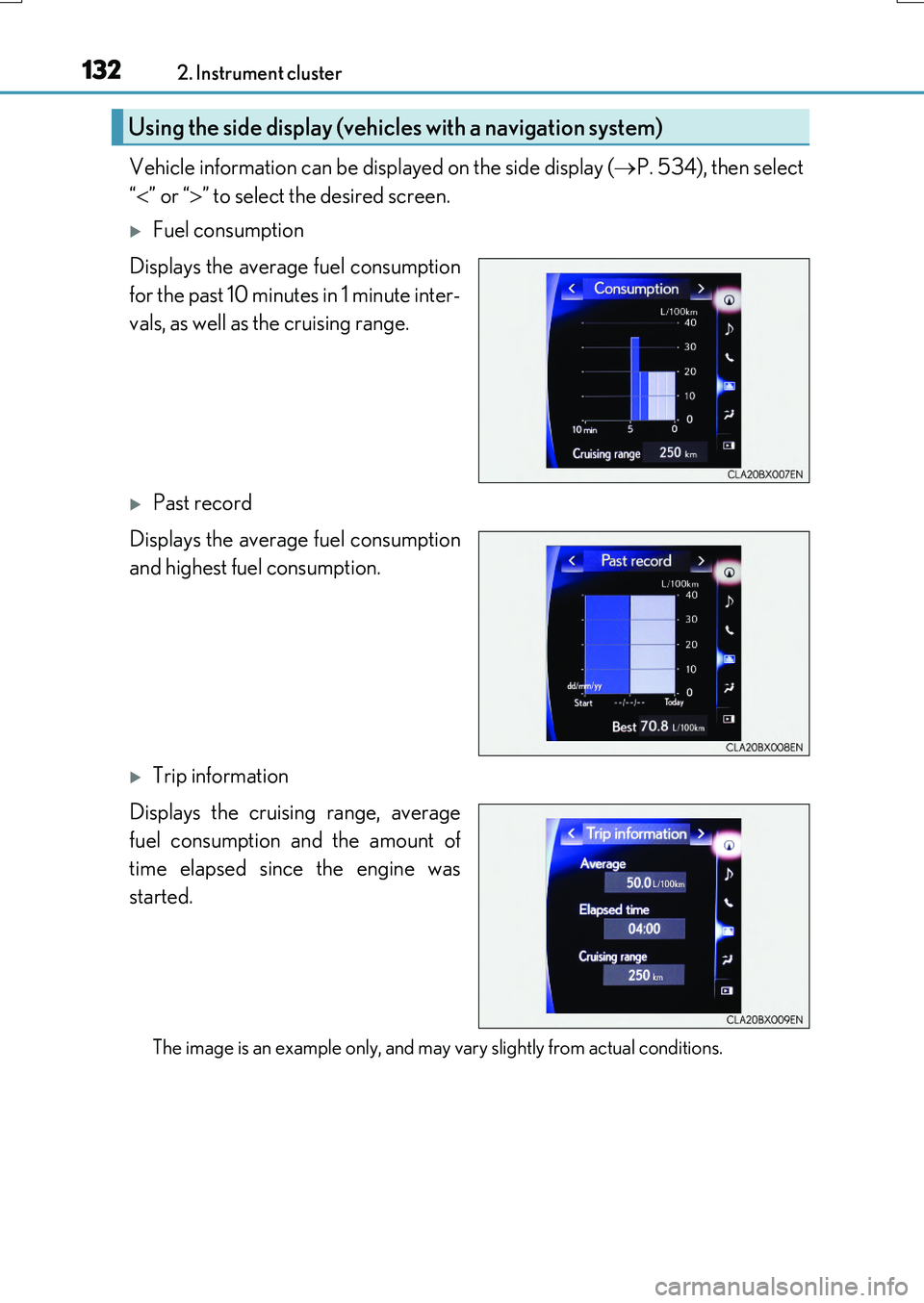
Vehicle information can be displayed on the side display (P. 534), then select
“ ” or “” to select the desired screen.
Fuel consumption
Displays the average fuel consumption
for the past 10 minutes in 1 minute inter-
vals, as well as the cruising range.
Past record
Displays the average fuel consumption
and highest fuel consumption.
Trip information
Displays the cruising range, average
fuel consumption and the amount of
time elapsed since the engine was
started.
The image is an example only, and may vary slightly from actual conditions.
Using the side display (vehicles with a navigation system)
Page 133 of 776
133
3
Operation of
each component
RX350/RX200t_EE_OM48F32E
3-1. Key information
Keys .................................................. 134
3-2. Opening, closing and
locking the doors
Side doors ...................................... 140
Back door........................................146
Power back door .......................... 151
Smart entry & start system ...... 168
3-3. Adjusting the seats
Front seats...................................... 185
Rear seats....................................... 186
Driving position memory ......... 195
Head restraints ...........................200
3-4. Adjusting the steering
wheel and mirrors
Steering wheel ............................ 202
Inside rear view mirror ............ 204
Outside rear view mirrors...... 206
3-5. Opening, closing the
windows and moon roof
Power windows ........................... 210
Moon roof .......................................214
Panoramic moon roof............... 218
Page 134 of 776
134
RX350/RX200t_EE_OM48F32E
3-1. Key information
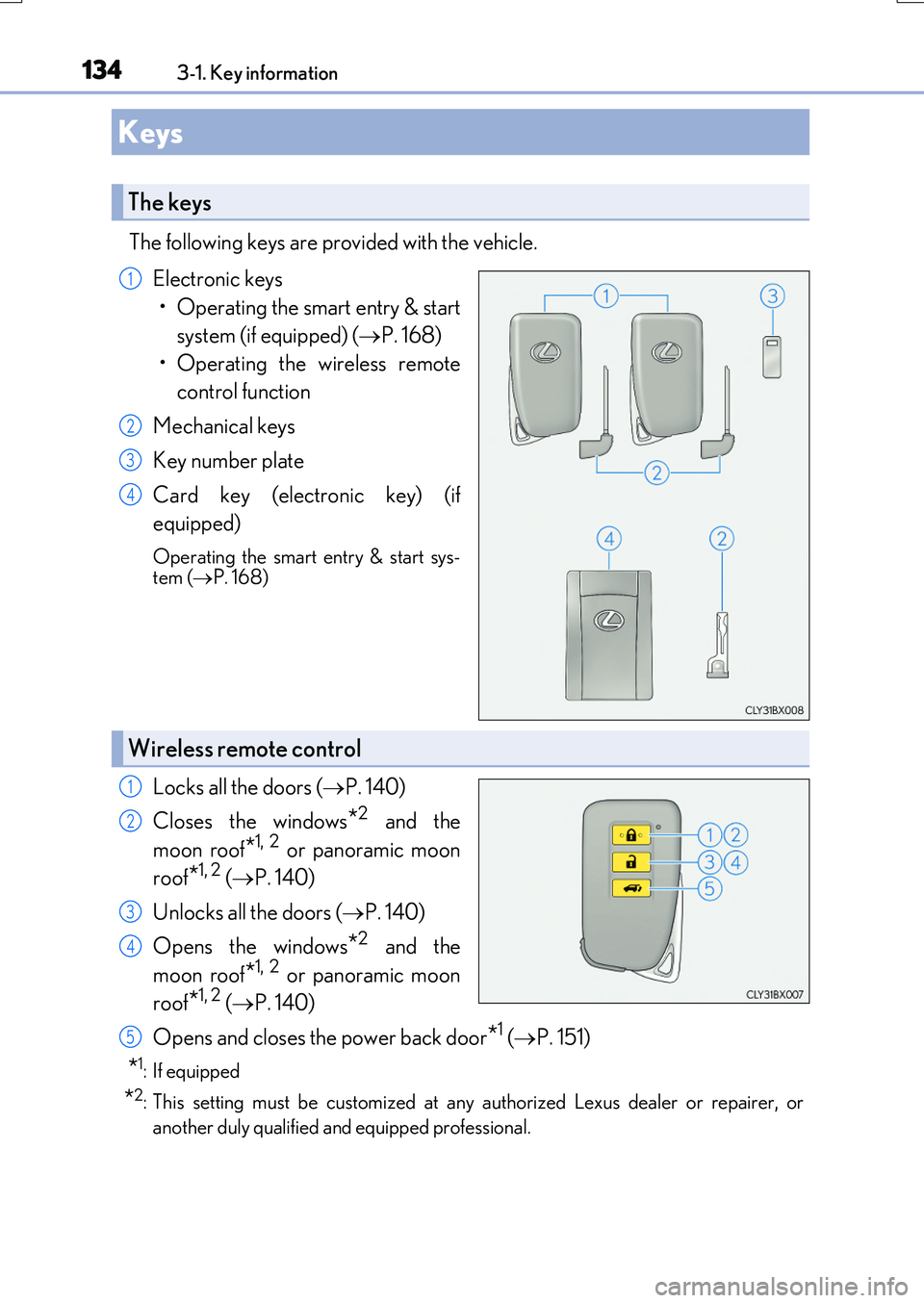
The following keys are provided with the vehicle.
Electronic keys
• Operating the smart entry & start
system (if equipped) ( P. 168)
• Operating the wireless remote
control function
Mechanical keys
Key number plate
Card key (electronic key) (if
equipped)
Operating the smart entry & start sys- tem ( P. 168)
Locks all the doors (P. 140)
Closes the windows*2 and the
moon roof*1, 2 or panoramic moon
roof*1, 2 ( P. 140)
Unlocks all the doors ( P. 140)
Opens the windows*2 and the
moon roof*1, 2 or panoramic moon
roof*1, 2 ( P. 140)
Opens and closes the power back door*1 ( P. 151)
*1: If equipped
*2: This setting must be customized at any authorized Lexus dealer or repairer, or
another duly qualified an d equipped professional.
Keys
The keys
1
2
3
4
Wireless remote control
1
2
3
4
5
Page 137 of 776
1373-1. Key information
3
Operation of each component
RX350/RX200t_EE_OM48F32E
■Electronic key battery depletion
●The standard battery life is 1 to 2 years. (The card key battery life is about a year and a half.)
●If the battery becomes low, an alarm will soun d in the cabin when the engine is stopped. ( P. 638)
●As the electronic key always receives radio waves, the battery will become depleted
even if the electronic key is not used. The following symptoms indicate that the elec- tronic key battery may be depleted. Replace the battery when necessary. ( P. 638)
• The smart entry & start system or the wireless remote control does not operate.
• The detection area becomes smaller. • The LED indicator on the key surface does not turn on.
●To avoid serious deterioration, do not leave the electronic key within 1 m (3 ft.) of thefollowing electrical appliances that produce a magnetic field:
•TVs
• Personal computers • Cellular phones, cordless phones and battery chargers• Recharging cellular phones or cordless phones
• Induction cookers • Table lamps
■Replacing the battery
P. 638
■Confirmation of the registered key number
The number of keys already registered to the vehicle can be confirmed. Ask any autho-
rized Lexus dealer or repairer, or another du ly qualified and equipped professional for details.
■If a wrong key is used
The key cylinder rotates freely, isolated from the internal mechanism.