Low LEXUS RX200T 2017 Owners Manual
[x] Cancel search | Manufacturer: LEXUS, Model Year: 2017, Model line: RX200T, Model: LEXUS RX200T 2017Pages: 776, PDF Size: 44.51 MB
Page 363 of 776
3634-5. Using the driving support systems
4
Driving
RX350/RX200t_EE_OM48F32E
■The BSM function is operational when
The BSM function is operational when a ll of the following conditions are met:
●The BSM function is on.
●The shift lever is in a position other than R.
●The vehicle speed is greater than approximately 16 km/h (10 mph).
■The BSM function will detect a vehicle when
The BSM function will detect a vehicle present in the detection area in the following situ-
ations:
●A vehicle in an adjacent lane overtakes your vehicle.
●Another vehicle enters the detection area when it changes lanes.
■Conditions under which the BSM function will not detect a vehicle
The BSM function is not designed to detect the following types of vehicles and/or objects:
●Small motorcycles, bicycles, pedestrians, etc.*
●Vehicles traveling in the opposite direction
●Guardrails, walls, signs, parked vehi cles and similar stationary objects*
●Following vehicles that are in the same lane*
●Vehicles traveling 2 lanes away from your vehicle*
*: Depending on the conditions, detection of a vehicle and/or object may occur.
Page 364 of 776
3644-5. Using the driving support systems
RX350/RX200t_EE_OM48F32E
■Conditions under which the BSM function may not function correctly
●The BSM function may not detect vehicles correctly in the following situations:
• When the sensor is misaligned due to a strong impact to the sensor or its surround-
ing area • When mud, snow, ice, a sticker, etc. is covering the sensor or surrounding area onthe rear bumper
• When driving on a road surface that is wet with standing water during bad weather, such as heavy rain, snow, or fog• When multiple vehicles are approaching wi th only a small gap between each vehicle
• When the distance between your vehicle and a following vehicle is short • When there is a significant difference in speed between your vehicle and the vehiclethat enters the detection area
• When the difference in speed between your vehicle and another vehicle is changing • When a vehicle enters a detection area traveling at about the same speed as yourvehicle
• As your vehicle starts from a stop, a vehicle remains in the detection area • When driving up and down consecutive steep inclines, such as hills, dips in the road, etc.
• When driving on roads with sharp bends, consecutive curves, or uneven surfaces • When vehicle lanes are wide, or when driving on the edge of a lane, and the vehiclein an adjacent lane is far away from your vehicle
• When towing a trailer (vehicles with towing package) • When items such as a bicycle carrier are installed on the rear of the vehicle• When there is a significant difference in height between your vehicle and the vehicle
that enters the detection area • Immediately after the BSM function is turned on
●Instances of the BSM function unnecessarily detecting a vehicle and/or object mayincrease in the following situations:
• When the sensor is misaligned due to a strong impact to the sensor or its surround- ing area• When the distance between your vehicle and a guardrail, wall, etc. that enters the
detection area is short • When driving up and down consecutive steep inclines, such as hills, dips in the road, etc.
• When vehicle lanes are narrow, or when driving on the edge of a lane, and a vehicle traveling in a lane other than the adjacent lanes enters the detection area• When driving on roads with sharp bends, consecutive curves, or uneven surfaces
• When the tires are slipping or spinning • When the distance between your vehicle and a following vehicle is short• When a bicycle carrier or other accessory is installed to the rear of the vehicle
• When towing a trailer (vehicles with towing package)
Page 366 of 776
3664-5. Using the driving support systems
RX350/RX200t_EE_OM48F32E
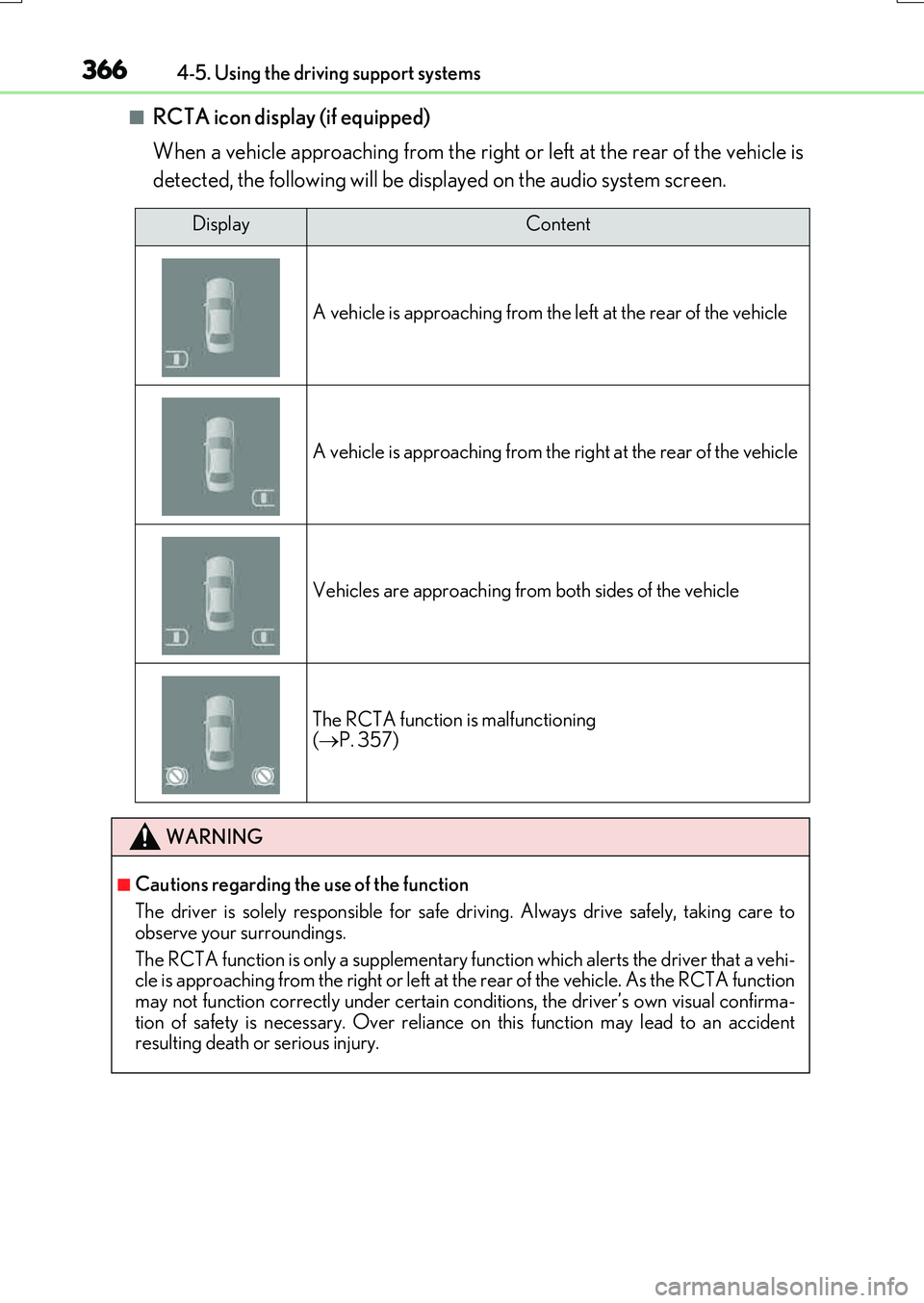
■RCTA icon display (if equipped)
When a vehicle approaching from the right or left at the rear of the vehicle is
detected, the following will be displayed on the audio system screen.
DisplayContent
A vehicle is approaching from the le ft at the rear of the vehicle
A vehicle is approaching from the right at the rear of the vehicle
Vehicles are approaching from both sides of the vehicle
The RCTA function is malfunctioning ( P. 357)
WARNING
■Cautions regarding the use of the function
The driver is solely responsible for safe driving. Always drive safely, taking care to
observe your surroundings.
The RCTA function is only a supplementary fu nction which alerts the driver that a vehi- cle is approaching from the right or left at th e rear of the vehicle. As the RCTA function
may not function correctly under certain conditions, the driver’s own visual confirma- tion of safety is necessary. Over reliance on this function may lead to an accidentresulting death or serious injury.
Page 367 of 776
3674-5. Using the driving support systems
4
Driving
RX350/RX200t_EE_OM48F32E
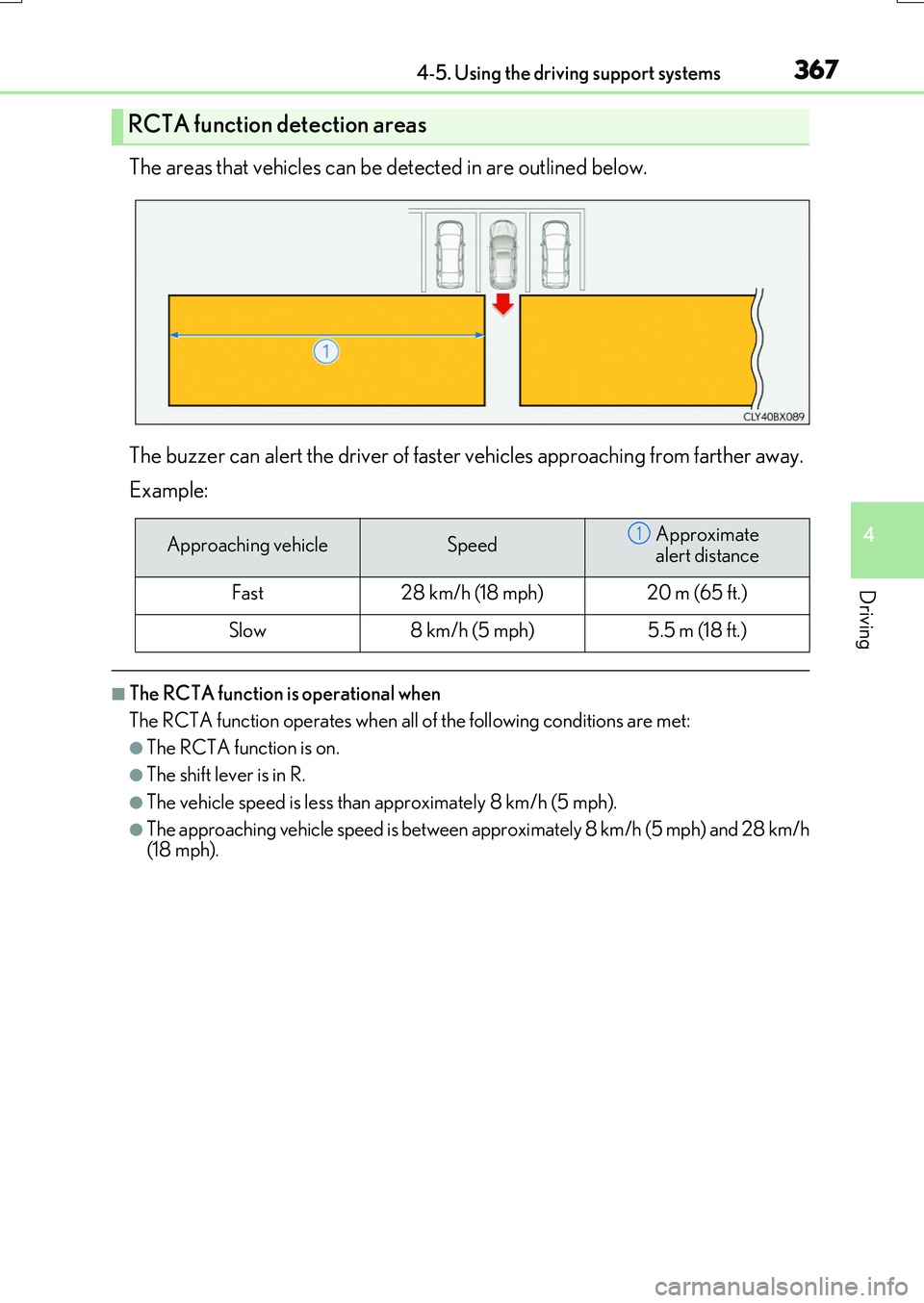
The areas that vehicles can be detected in are outlined below.
The buzzer can alert the driver of faster vehicles approaching from farther away.
Example:
■The RCTA function is operational when
The RCTA function operates when all of the following conditions are met:
●The RCTA function is on.
●The shift lever is in R.
●The vehicle speed is less than approximately 8 km/h (5 mph).
●The approaching vehicle speed is between approximately 8 km/h (5 mph) and 28 km/h (18 mph).
RCTA function detection areas
Approaching vehicleSpeedApproximate
alert distance
Fast28 km/h (18 mph)20 m (65 ft.)
Slow8 km/h (5 mph)5.5 m (18 ft.)
1
Page 368 of 776
3684-5. Using the driving support systems
RX350/RX200t_EE_OM48F32E
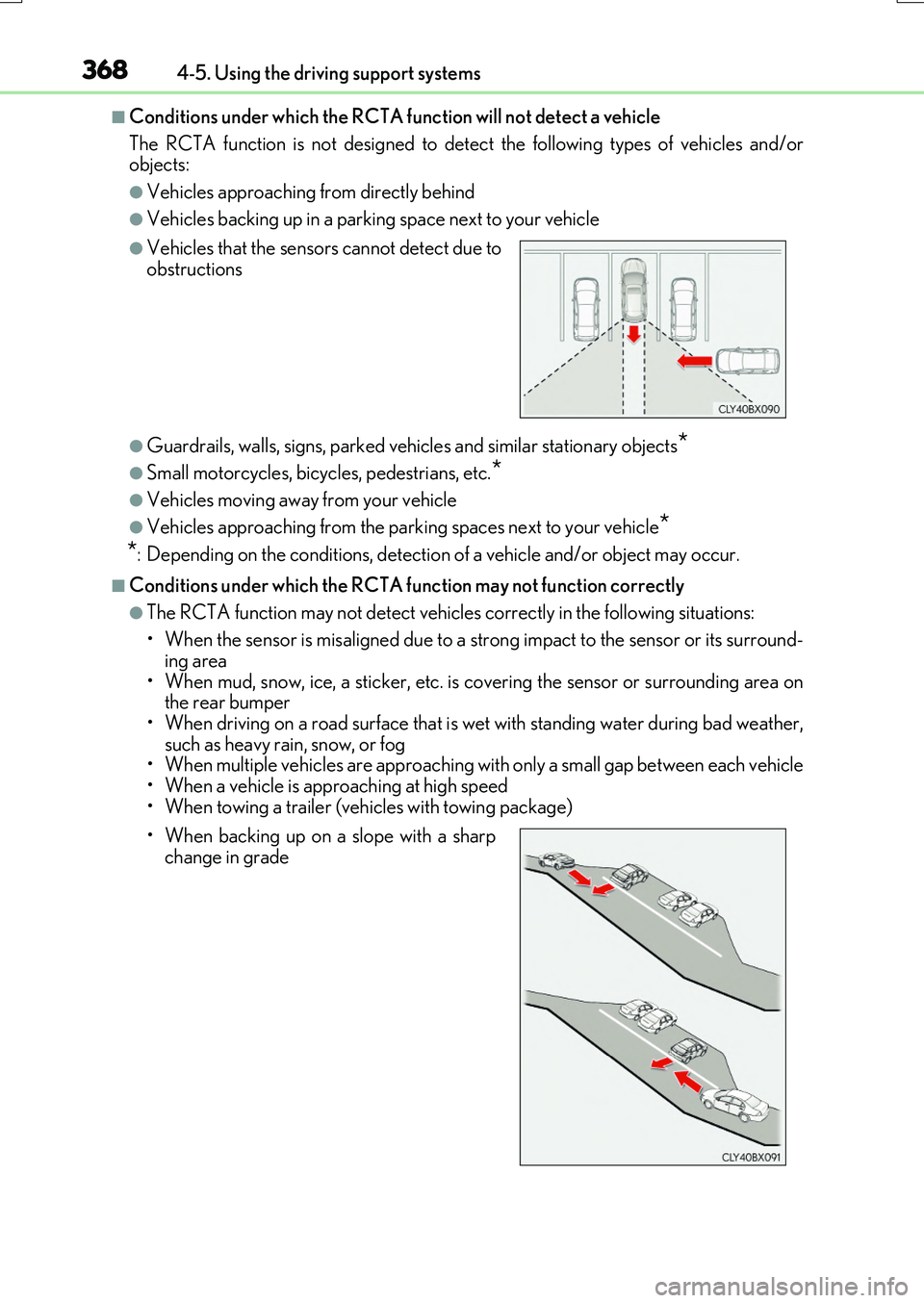
■Conditions under which the RCTA function will not detect a vehicle
The RCTA function is not designed to dete ct the following types of vehicles and/or objects:
●Vehicles approaching from directly behind
●Vehicles backing up in a parking space next to your vehicle
●Guardrails, walls, signs, parked vehi cles and similar stationary objects*
●Small motorcycles, bicycles, pedestrians, etc.*
●Vehicles moving away from your vehicle
●Vehicles approaching from the parking spaces next to your vehicle*
*: Depending on the conditions, detection of a vehicle and/or object may occur.
■Conditions under which the RCTA function may not function correctly
●The RCTA function may not detect vehicles correctly in the following situations:
• When the sensor is misaligned due to a strong impact to the sensor or its surround-
ing area • When mud, snow, ice, a sticker, etc. is covering the sensor or surrounding area onthe rear bumper
• When driving on a road surface that is wet with standing water during bad weather, such as heavy rain, snow, or fog• When multiple vehicles are approaching wi th only a small gap between each vehicle
• When a vehicle is approaching at high speed • When towing a trailer (vehicles with towing package)
●Vehicles that the sensors cannot detect due toobstructions
• When backing up on a slope with a sharp change in grade
Page 369 of 776
3694-5. Using the driving support systems
4
Driving
RX350/RX200t_EE_OM48F32E
• Immediately after the RCTA function is turned on • Immediately after the engine is started with the RCTA function on
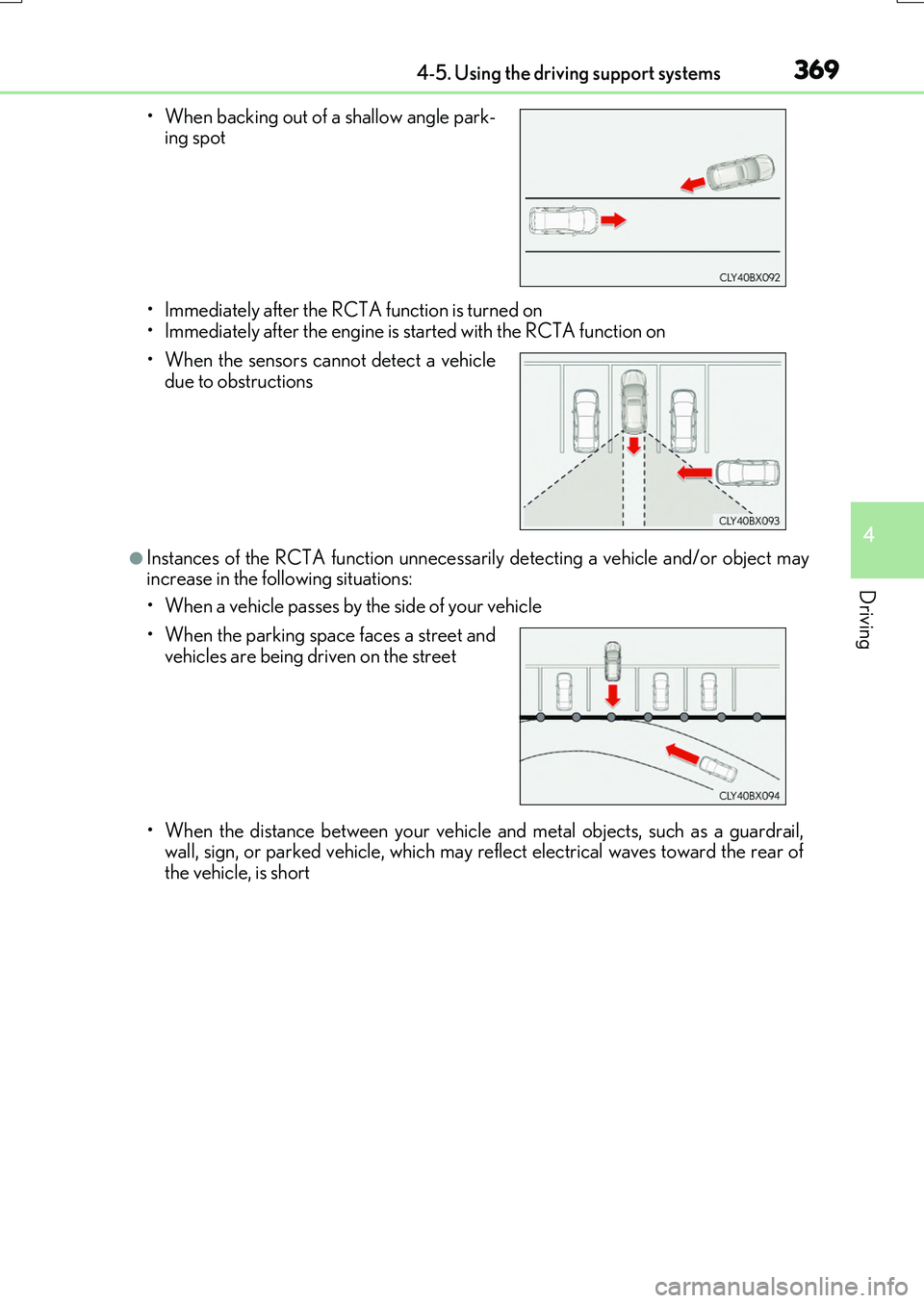
●Instances of the RCTA function unnecessarily detecting a vehicle and/or object mayincrease in the following situations:
• When a vehicle passes by the side of your vehicle
• When the distance between your vehicle and metal objects, such as a guardrail, wall, sign, or parked vehicle, which may reflect electrical waves toward the rear ofthe vehicle, is short
• When backing out of a shallow angle park- ing spot
• When the sensors cannot detect a vehicle due to obstructions
• When the parking space faces a street and
vehicles are being driven on the street
Page 372 of 776
3724-5. Using the driving support systems
RX350/RX200t_EE_OM48F32E
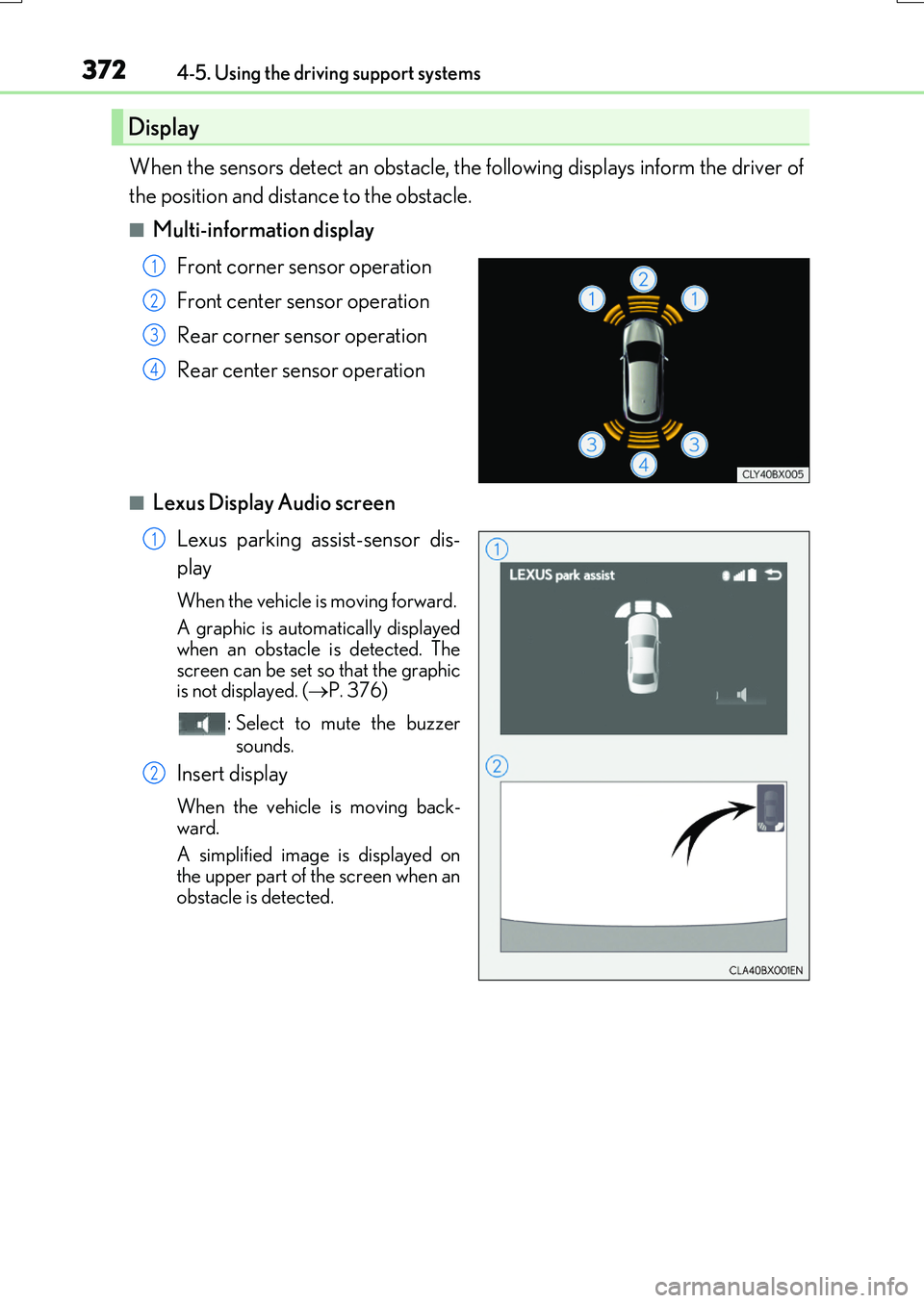
When the sensors detect an obstacle, the following displays inform the driver of
the position and distance to the obstacle.
■Multi-information display
Front corner sensor operation
Front center sensor operation
Rear corner sensor operation
Rear center sensor operation
■Lexus Display Audio screen
Lexus parking assist-sensor dis-
play
When the vehicle is moving forward.
A graphic is automatically displayed
when an obstacle is detected. The screen can be set so that the graphicis not displayed. ( P. 376)
: Select to mute the buzzer
sounds.
Insert display
When the vehicle is moving back-
ward.
A simplified image is displayed on
the upper part of the screen when an obstacle is detected.
Display
1
2
3
4
1
2
Page 374 of 776
3744-5. Using the driving support systems
RX350/RX200t_EE_OM48F32E
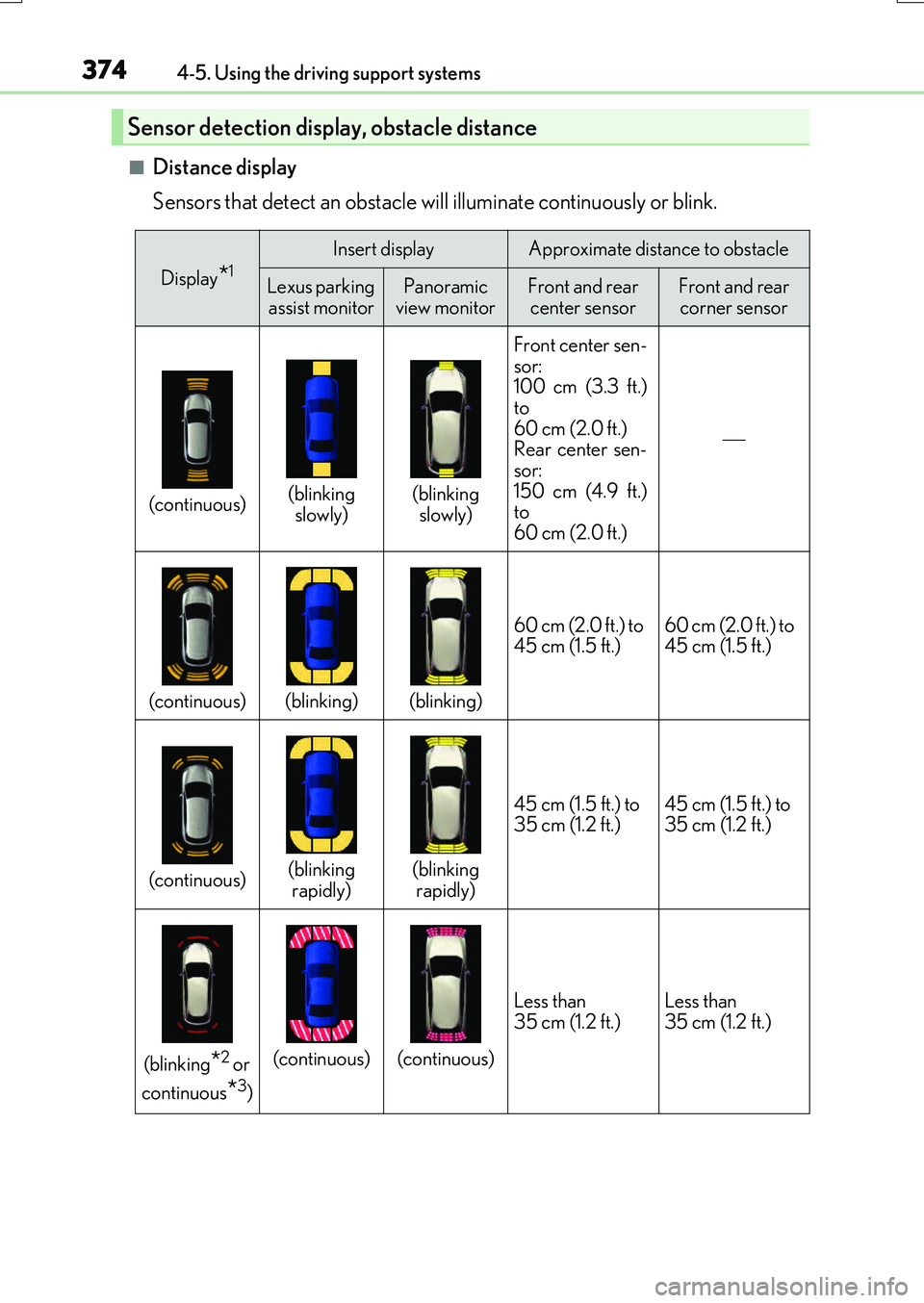
■Distance display
Sensors that detect an obstacle will illuminate continuously or blink.
Sensor detection display, obstacle distance
Display*1Insert displayApproximate distance to obstacle
Lexus parking assist monitorPanoramic
view monitorFront and rear center sensorFront and rear corner sensor
(continuous)(blinking slowly)(blinking slowly) Front center sen-
sor:
100 cm (3.3 ft.)
to
60 cm (2.0 ft.)
Rear center sen-
sor:
150 cm (4.9 ft.)
to
60 cm (2.0 ft.)
(continuous)(blinking)(blinking) 60 cm (2.0 ft.) to
45 cm (1.5 ft.)
60 cm (2.0 ft.) to
45 cm (1.5 ft.)
(continuous)(blinking
rapidly)(blinking rapidly) 45 cm (1.5 ft.) to
35 cm (1.2 ft.)
45 cm (1.5 ft.) to
35 cm (1.2 ft.)
(blinking*2 or
continuous
*3)
(continuous)(continuous) Less than
35 cm (1.2 ft.)
Less than
35 cm (1.2 ft.)
Page 375 of 776

3754-5. Using the driving support systems
4
Driving
RX350/RX200t_EE_OM48F32E
*1: The images may differ from that shown in the illustrations. (P. 372)
*2: Multi-information display
*3: Audio system screen
■Buzzer operation and distance to an obstacle
A buzzer sounds when the sensors are operating.
●The buzzer sounds faster as the vehicle approaches an obstacle.
When the vehicle comes within the following distance of the obstacle, the
buzzer sounds continuously: Appr oximately 35 cm (1.2 ft.).
●When 2 or more obstacles are detected simultaneously, the buzzer system
responds to the nearest obstacle. If on e or both come within the above dis-
tances, the beep will repeat a long tone, followed by fast beeps.
Approximately 100 cm (3.3 ft.)
Approximately 150 cm (4.9 ft.)
Approximately 60 cm (2.0 ft.)
The diagram shows the detection range
of the sensors. Note that the sensors cannot detect obstacles that areextremely close to the vehicle.
The range of the sensors may change depending on the shape of the objectetc.
Detection range of the sensors
1
2
3
Page 377 of 776
3774-5. Using the driving support systems
4
Driving
RX350/RX200t_EE_OM48F32E
■The Lexus parking assist-sensor can be operated when
●Front corner sensors:
• The engine switch is in IGNITION ON mode. • The shift lever is in other than P.
• The vehicle speed is less than about 10 km/h (6 mph). (At any speed when the shift lever is in R)
●Front center sensors:
• The engine switch is in IGNITION ON mode. • The shift lever is in other than P or R.
• The vehicle speed is less than about 10 km/h (6 mph).
●Rear corner and rear center sensors:
• The engine switch is in IGNITION ON mode. • The shift lever is in R.
■Lexus parking assist-sensor display
●Vehicles with a Lexus Display Audio system : When an obstacle is detected while the Lexus parking assist monitor is in use, the warning indicator will appear in the upperpart of the screen even if the display setting has been set to off.
●Vehicles with a navigation system: If the Lexu s parking assist-sensor display is set to on, detected objects will also be displayed on the panoramic view monitor. For details, refer to “NAVIGATION SYSTEM OWNER’S MANUAL”.
■Sensor detection information
●The sensor’s detection areas are limited to the areas around the vehicle’s bumper.
●Certain vehicle conditions and the surrounding environment may affect the ability of a
sensor to correctly detect an obstacle. Particular instances where this may occur are listed below.
• There is dirt, snow or ice on the sensor . (Wiping the sensors will resolve this prob-
lem.) • The sensor is frozen. (Thawing the area will resolve this problem.) In especially cold weather, if a sensor is frozen the screen may show an abnormal
display, or obstacles may not be detected. • The sensor is covered in any way.• The vehicle is leaning considerably to one side.
• On an extremely bumpy road, on an incline, on gravel, or on grass. • The vicinity of the vehicle is noisy due to vehicle horns, motorcycle engines, airbrakes of large vehicles, or other loud noises producing ultrasonic waves.
• There is another vehicle equipped with parking assist sensors in the vicinity. • The sensor is coated with a sheet of spray or heavy rain. • The vehicle is equipped with a fender pole or wireless antenna.
• Towing eyelets are installed. • The bumper or sensor receives a strong impact.
• The vehicle is approaching a tall or curved curb. • In harsh sunlight or intense cold weather.• The area directly under the bumpers is not detected.
• If obstacles draw too close to the sensor. • A non-genuine Lexus suspension (low ered suspension etc.) is installed. • People may not be detected if they are wearing certain types of clothing.
In addition to the examples above, there are instances in which, because of their shape, signs and other objects may be judged by a sensor to be closer than they are.