fog light LEXUS RX200T 2017 Owner's Manual
[x] Cancel search | Manufacturer: LEXUS, Model Year: 2017, Model line: RX200T, Model: LEXUS RX200T 2017Pages: 776, PDF Size: 44.51 MB
Page 389 of 776
3894-5. Using the driving support systems
4
Driving
RX350/RX200t_EE_OM48F32E
■Situations in which the Intelligent Clearance Sonar function may operate even if there is no possibility of a collision
In some situations such as the following, the Intelligent Clearance Sonar function may
operate even though there is no possibility of a collision.
●Vehicle surroundings
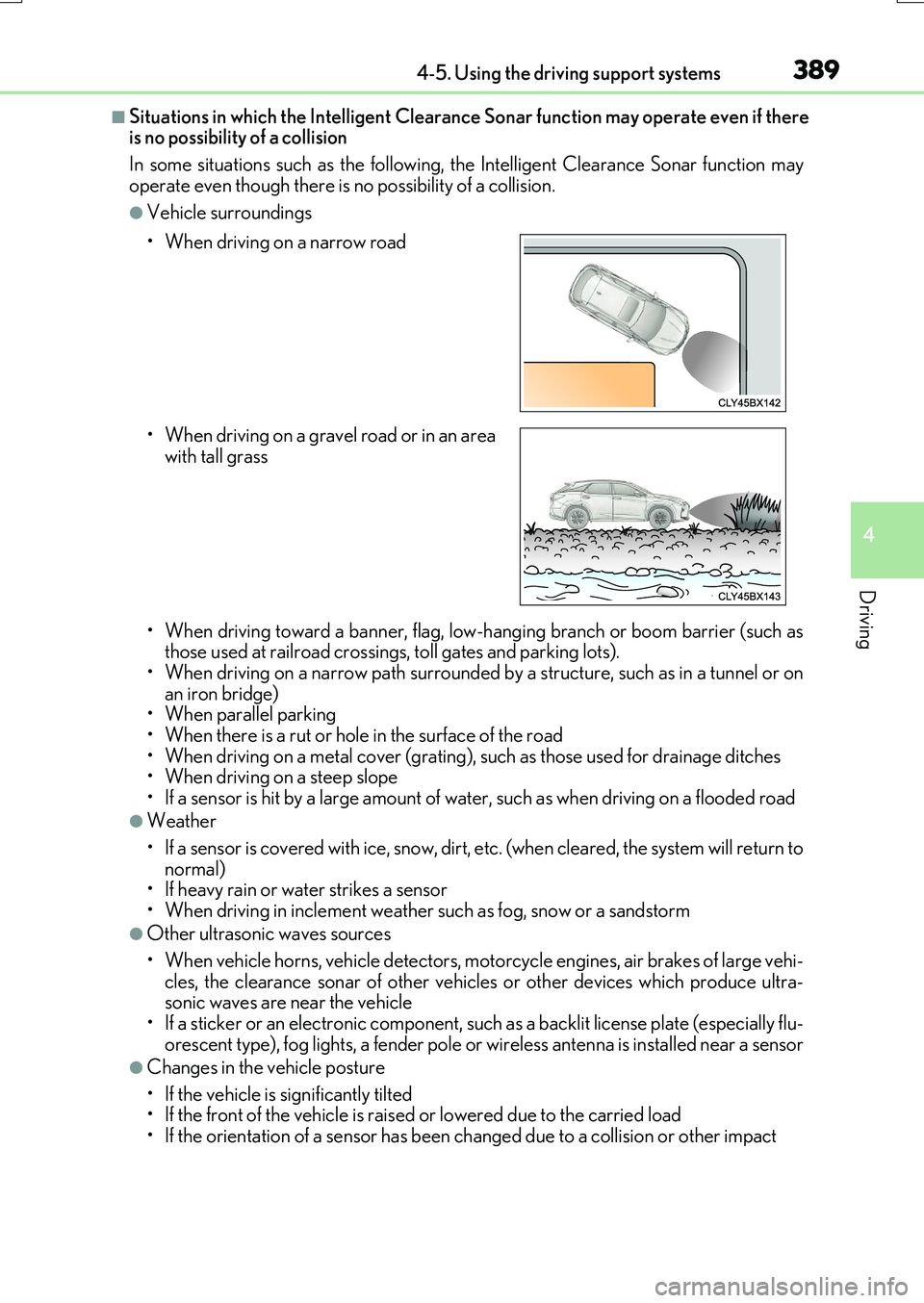
• When driving toward a banner, flag, low- hanging branch or boom barrier (such as those used at railroad crossings, toll gates and parking lots).• When driving on a narrow path surrounded by a structure, such as in a tunnel or on
an iron bridge) • When parallel parking• When there is a rut or hole in the surface of the road
• When driving on a metal cover (grating), such as those used for drainage ditches • When driving on a steep slope
• If a sensor is hit by a large amount of wa ter, such as when driving on a flooded road
●Weather
• If a sensor is covered with ice, snow, dirt, etc. (when cleared, the system will return to normal)• If heavy rain or water strikes a sensor
• When driving in inclement weather su ch as fog, snow or a sandstorm
●Other ultrasonic waves sources
• When vehicle horns, vehicle detectors, motorcycle engines, air brakes of large vehi- cles, the clearance sonar of other vehicles or other devices which produce ultra-sonic waves are near the vehicle
• If a sticker or an electronic component, such as a backlit license plate (especially flu- orescent type), fog lights, a fender pole or wireless antenna is installed near a sensor
●Changes in the vehicle posture
• If the vehicle is significantly tilted • If the front of the vehicle is raised or lowered due to the carried load
• If the orientation of a sensor has been changed due to a collision or other impact
• When driving on a narrow road
• When driving on a gravel road or in an area with tall grass
Page 390 of 776
3904-5. Using the driving support systems
RX350/RX200t_EE_OM48F32E
■If the Intelligent Clearance Sonar function operates unnecessarily such as at a railroad crossing
Even in the event that the Intelligent Cleara nce Sonar function operates unnecessarily,
such as at a railroad crossing, brake contro l will be canceled after approximately 2 sec- onds, allowing you to proceed forward and leave the area, Brake control can also be canceled by depressing the brake pedal. Depressing the accelerator pedal again will
allow you to proceed forward and leave the area.
■Situations in which the Intelligent Cleara nce Sonar Brake function may not operate properly
In some situations such as the following , this function may not operate properly.
●Weather
• If a sensor is covered with ice, snow, dirt, etc. (when cleared, the system will return to normal)
• If heavy rain or water strikes a sensor • When driving in inclement weather su ch as fog, snow or a sandstorm
●Vehicle surroundings
• When an object that cannot be detected is between the vehicle and a detected object
• If an object such as a vehicle, motorcycle, bicycle or pedestrian cuts in front of the vehicle or runs out from the side of the vehicle.
●Other ultrasonic waves sources
• When vehicle horns, vehicle detectors, motorcycle engines, air brakes of large vehi- cles, the clearance sonar of other vehicles or other devices which produce ultra-
sonic waves are near the vehicle • If a sticker or an electronic component, such as a backlit license plate (especially flu-orescent type), fog lights, a fender pole or wireless antenna is installed near a sensor
●Changes in the vehicle posture
• If the vehicle is significantly tilted
• If the front of the vehicle is raised or lowered due to the carried load • If the orientation of a sensor has been changed due to a collision or other impact
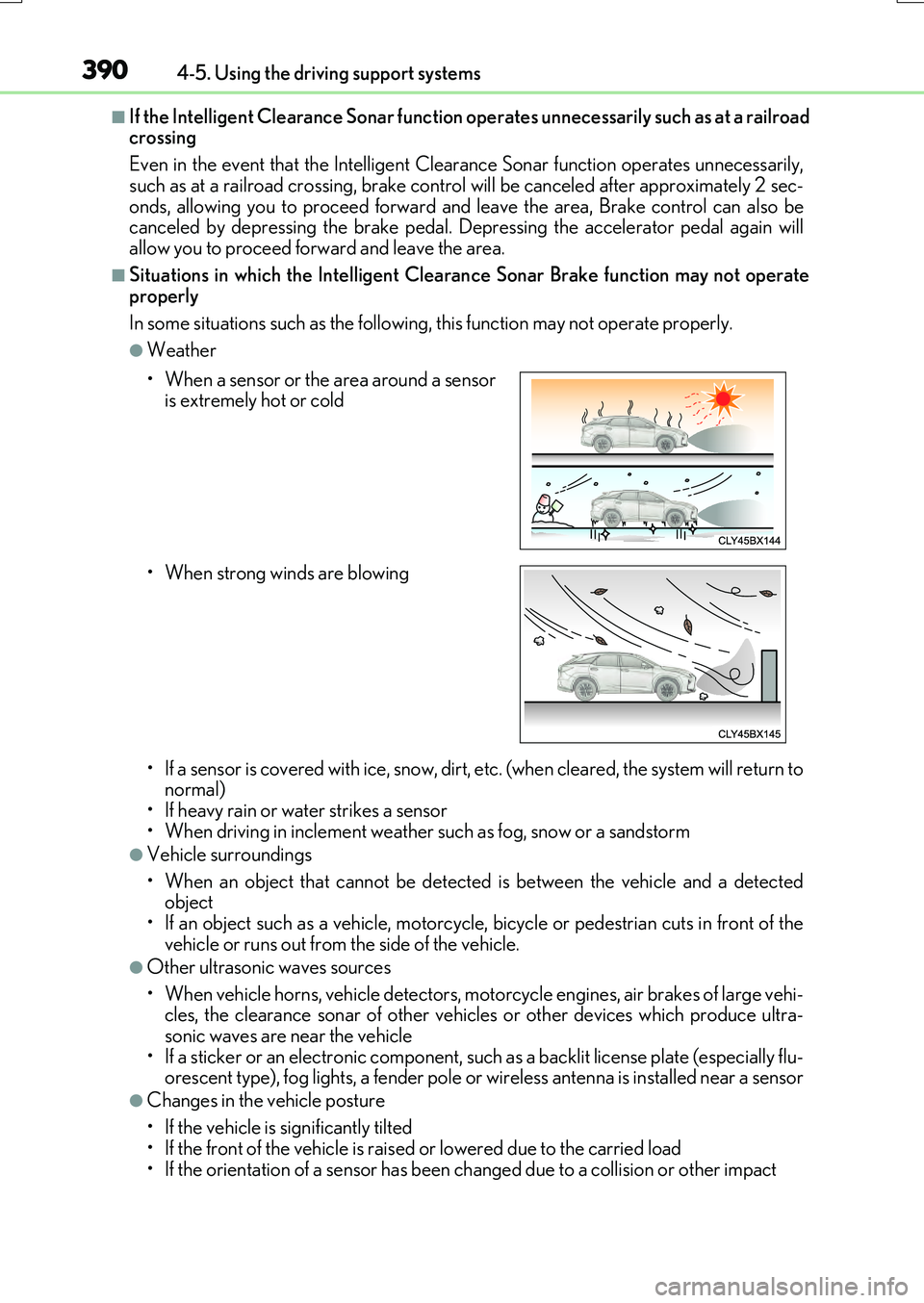
• When a sensor or the area around a sensor is extremely hot or cold
• When strong winds are blowing
Page 399 of 776
3994-5. Using the driving support systems
4
Driving
RX350/RX200t_EE_OM48F32E
■Situations in which the Rear Crossing Traffic Auto Brake function may not operate properly
In some situations such as the following , this function may not operate properly.
●Objects and vehicles which the radar sensors are not designed to detect
• Stationary objects • Vehicles which are moving away from your vehicle
• Pedestrians, motorcycles, bicycles, etc.*• Objects which are extremely close to a radar sensor • Vehicles which are approaching from the right or left at the rear of the vehicle at a
traveling speed of less than approximately 8 km/h (5 mph) • Vehicles which are approaching from the right or left at the rear of the vehicle at a traveling speed of more than a pproximately 24 km/h (15 mph)
*: Depending on conditions, detection of a vehicle and/or object may occur.
●Situations in which the radar sensors may not be able to detect an object
• When a sensor or the area around a sensor is extremely hot or cold • If the rear bumper is covered with ice, snow, dirt, etc.
• If heavy rain or water strikes the vehicle • When the detection area of a radar sensor is obstructed by an adjacent vehicle• If the vehicle is significantly tilted
• If towing eyelets are installed • If the suspension has been modified or ti res of a size other than specified are installed
• If the front of the vehicle is raised or lowered due to the carried load • If a sticker or an electronic component, such as a backlit license plate (especially flu-orescent type), fog lights, a fender pole or wireless antenna is installed near a radar
sensor • If the orientation of a radar sensor has been changed due to a collision or other
impact or removal and installation • When multiple vehicles are approaching wi th only a small gap between each vehicle • When a vehicle is approaching at high speed
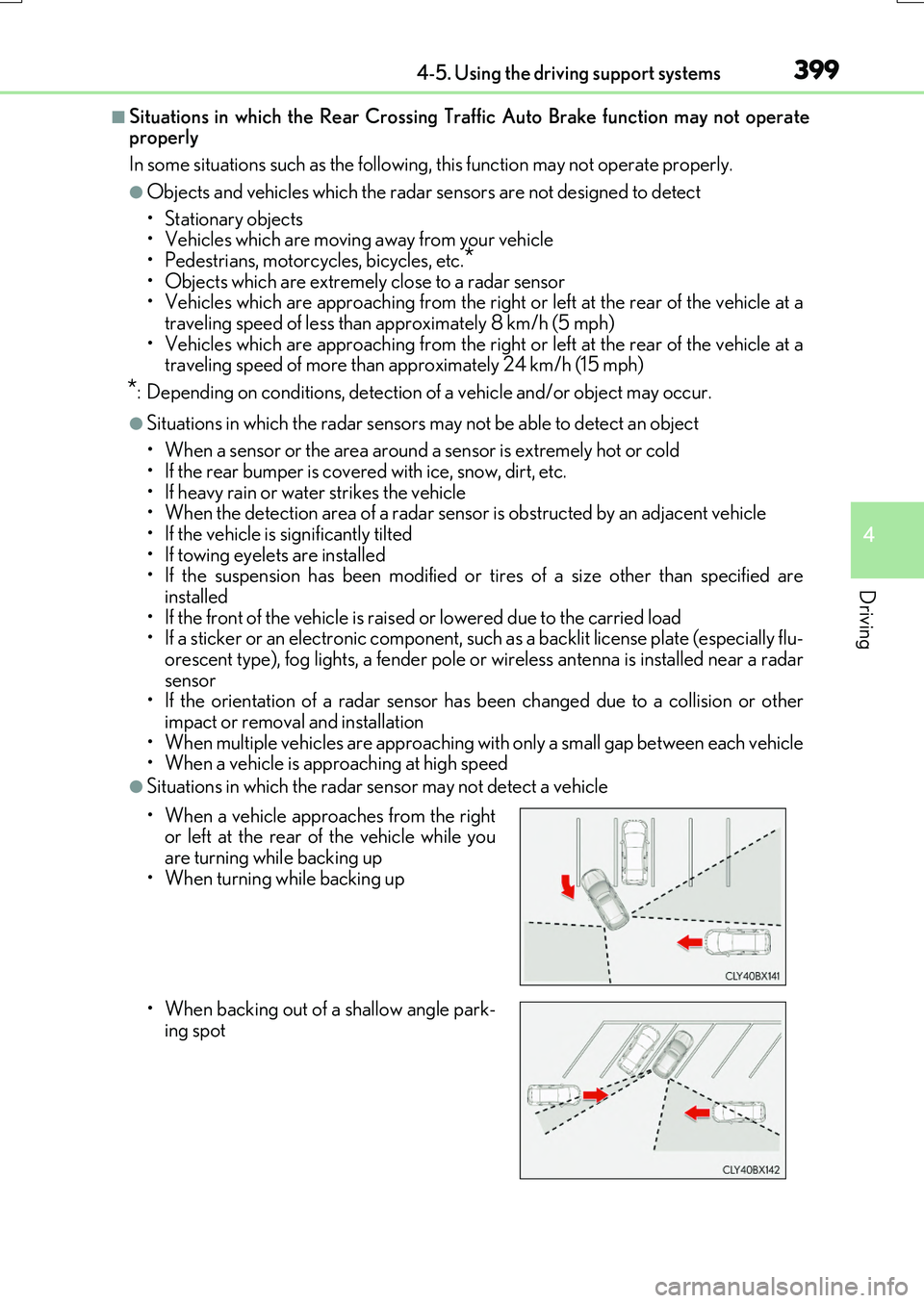
●Situations in which the radar sensor may not detect a vehicle
• When a vehicle approaches from the right or left at the rear of the vehicle while youare turning while backing up
• When turning while backing up
• When backing out of a shallow angle park-
ing spot
Page 529 of 776
529
6Interior features
RX350/RX200t_EE_OM48F32E
6-1. Basic operation of the
Remote Touch screen
Remote Touch ............................ 530
12.3-inch display.........................533
6-2. Using the air conditioning
system and defogger
Lexus Climate Concierge..... 535
Automatic air
conditioning system ...............536
Heated steering wheel/
seat heaters/
seat ventilators .........................549
6-3. Using the interior lights
Interior lights list..........................552
• Interior lights ......................... 553
• Personal lights .......................554
6-4. Using the storage
features
List of storage features ............556
• Glove box ...............................557
• Console box...........................557
• Cup holders .......................... 558
• Door pockets ........................ 559
• Bottle holders ....................... 560
• Coin box ................................. 560
• Auxiliary boxes ...................... 561
Luggage compartment
features........................................562
6-5. Using the other interior
features
Other interior features ............ 567
• Sun visors ................................ 567
• Vanity mirrors ....................... 567
• Clock ........................................568
• Wireless charger .................568
• Power outlets......................... 574
• Front passenger
footwell hooks ....................... 575
• Rear door sunshades ......... 576
• Armrest.................................... 576
• Assist grips ............................. 577
• Coat hooks ............................. 577
ERA-GLONASS ...................... 578
Page 547 of 776
5476-2. Using the air conditioning system and defogger
6
Interior features
RX350/RX200t_EE_OM48F32E
■nanoe (if equipped)
Your vehicle incorporates a nanoe device, which is considered a biocidal product.
The nanoe device generates charged water particles from the ambient air. These parti-
cles purify the air in the cabin by suppressing bacteria.
The nanoe device is considered a biocidal product in the EU according to the interpre- tation of Regulation (EU) No 528/2012.
Active substances: Charged water particles (nano) containing hydroxyl radicals, gener- ated from ambient air
nanoe helps to provide purified air by emitting electrically charged water particles
through the window side air outlet of the driver's seat*.
●When the fan is turned on and “nanoe” on the option control screen is selected, the nanoe is activated.
●When the fan is operated in the following conditions, system performance will be maxi- mized. If the following conditions are not met, the nanoe may not operate at full capacity.
• The upper body, the upper body and feet or the feet air outlets are being used. ( P. 538) • The window side air outlet of the driver’s seat is open.
●When nanoe is generated, a small amount of ozone is emitted and may be faintly smelled in some situations. However, this is approximately the same as the amount that
already exists in nature, such as in forests, and it has no affect on the human body.
●A slight noise may be heard during operation. This is not a malfunction.
*: According to temperature and humidity conditions, fan speed and direction of the air
flow, the nanoe may not operate at full capacity.
■Air conditioning filter
P. 633
■Customization
Some functions can be customized. ( P. 740)
Page 549 of 776
5496-2. Using the air conditioning system and defogger
6
Interior features
RX350/RX200t_EE_OM48F32E
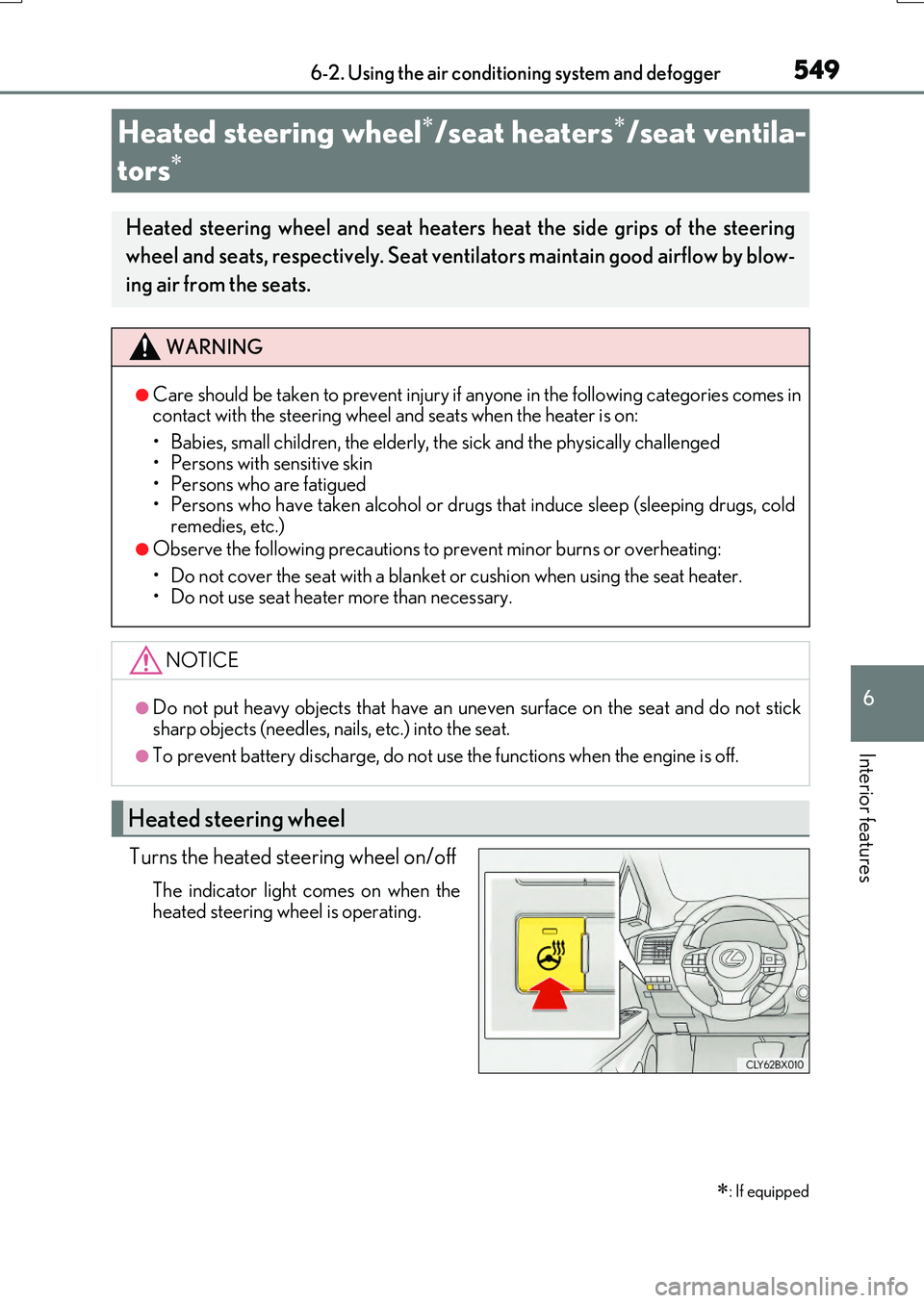
Turns the heated steering wheel on/off
The indicator light comes on when the
heated steering wheel is operating.
Heated steering wheel/seat heaters/seat ventila-
tors
: If equipped
Heated steering wheel and seat heaters heat the side grips of the steering
wheel and seats, respectively. Seat ventilators maintain good airflow by blow-
ing air from the seats.
WARNING
●Care should be taken to prevent injury if anyone in the following categories comes in contact with the steering wheel and seats when the heater is on:
• Babies, small children, the elderly, the sick and the physically challenged
• Persons with sensitive skin • Persons who are fatigued• Persons who have taken alcohol or drugs that induce sleep (sleeping drugs, cold
remedies, etc.)
●Observe the following precautions to prevent minor burns or overheating:
• Do not cover the seat with a blanket or cushion when using the seat heater. • Do not use seat heater more than necessary.
NOTICE
●Do not put heavy objects that have an uneven surface on the seat and do not sticksharp objects (needles, na ils, etc.) into the seat.
●To prevent battery discharge, do not use the functions when the engine is off.
Heated steering wheel
Page 550 of 776
5506-2. Using the air conditioning system and defogger
RX350/RX200t_EE_OM48F32E
■Operation condition
The heated steering wheel can be used when the engine switch is in IGNITION ON mode.
■Timer
The heated steering wheel will automatically turn off after about 30 minutes.
■When the heated steering wheel is operating
If the Heated Windshield Defroster is operated, operation of the heated steering wheel
will be suspended. Turn off the Heated Windsh ield Defroster to enable the heated steer- ing wheel. ( P. 543)
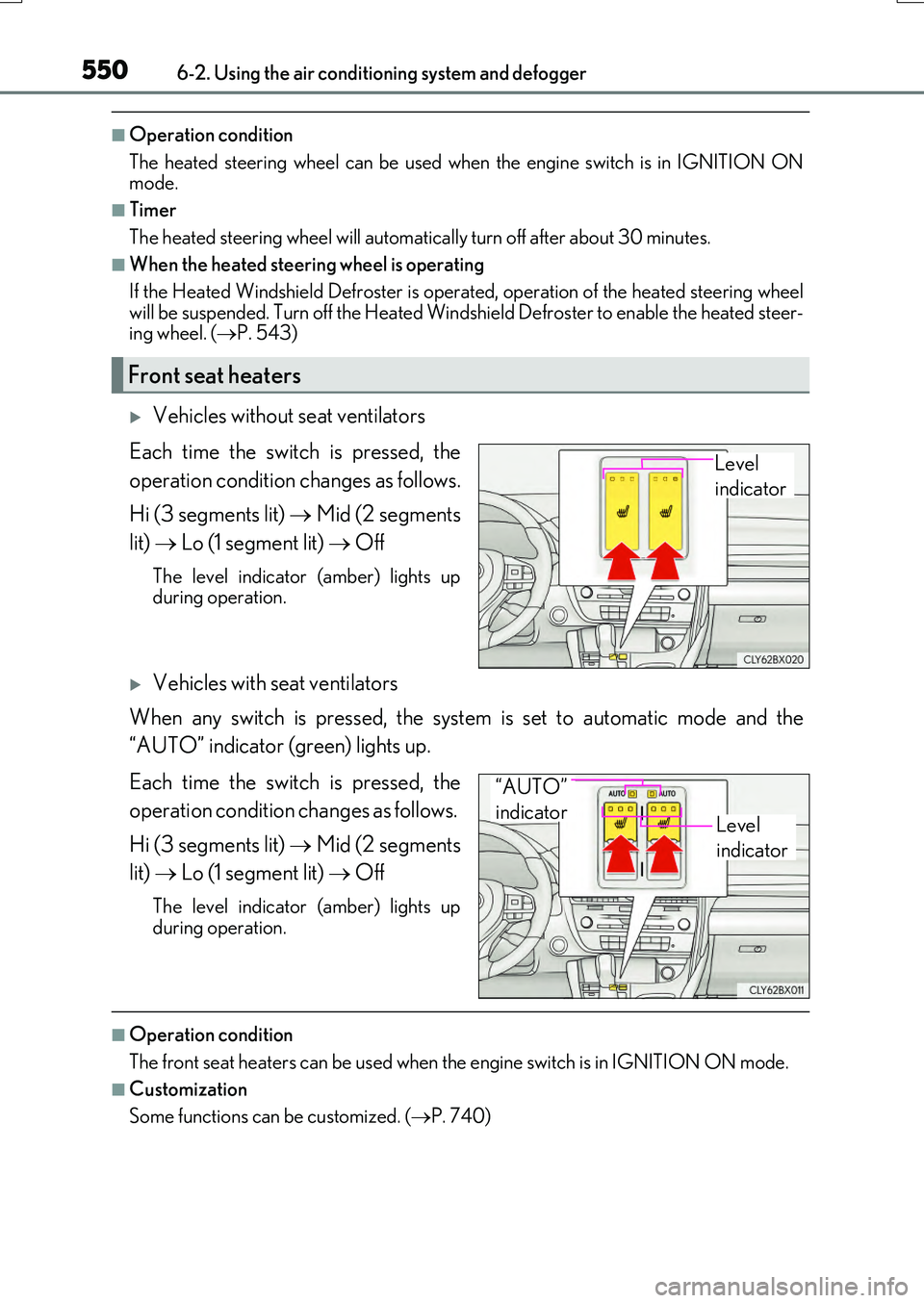
Vehicles without seat ventilators
Each time the switch is pressed, the
operation condition changes as follows.
Hi (3 segments lit) Mid (2 segments
lit) Lo (1 segment lit) Off
The level indicator (amber) lights up during operation.
Vehicles with seat ventilators
When any switch is pressed, the system is set to automatic mode and the
“AUTO” indicator (green) lights up.
Each time the switch is pressed, the
operation condition changes as follows.
Hi (3 segments lit) Mid (2 segments
lit) Lo (1 segment lit) Off
The level indicator (amber) lights up
during operation.
■Operation condition
The front seat heaters can be used when th e engine switch is in IGNITION ON mode.
■Customization
Some functions can be customized. ( P. 740)
Front seat heaters
Level
indicator
Level
indicator
“AUTO”
indicator
Page 551 of 776
5516-2. Using the air conditioning system and defogger
6
Interior features
RX350/RX200t_EE_OM48F32E
■When the front passenger seat heater is operating
If the Heated Windshield Defroster is operated, operation of the front passenger seat heater will be suspended. Turn off the Heated Windshield Defroster enable the front pas-
senger seat heater. ( P. 543)
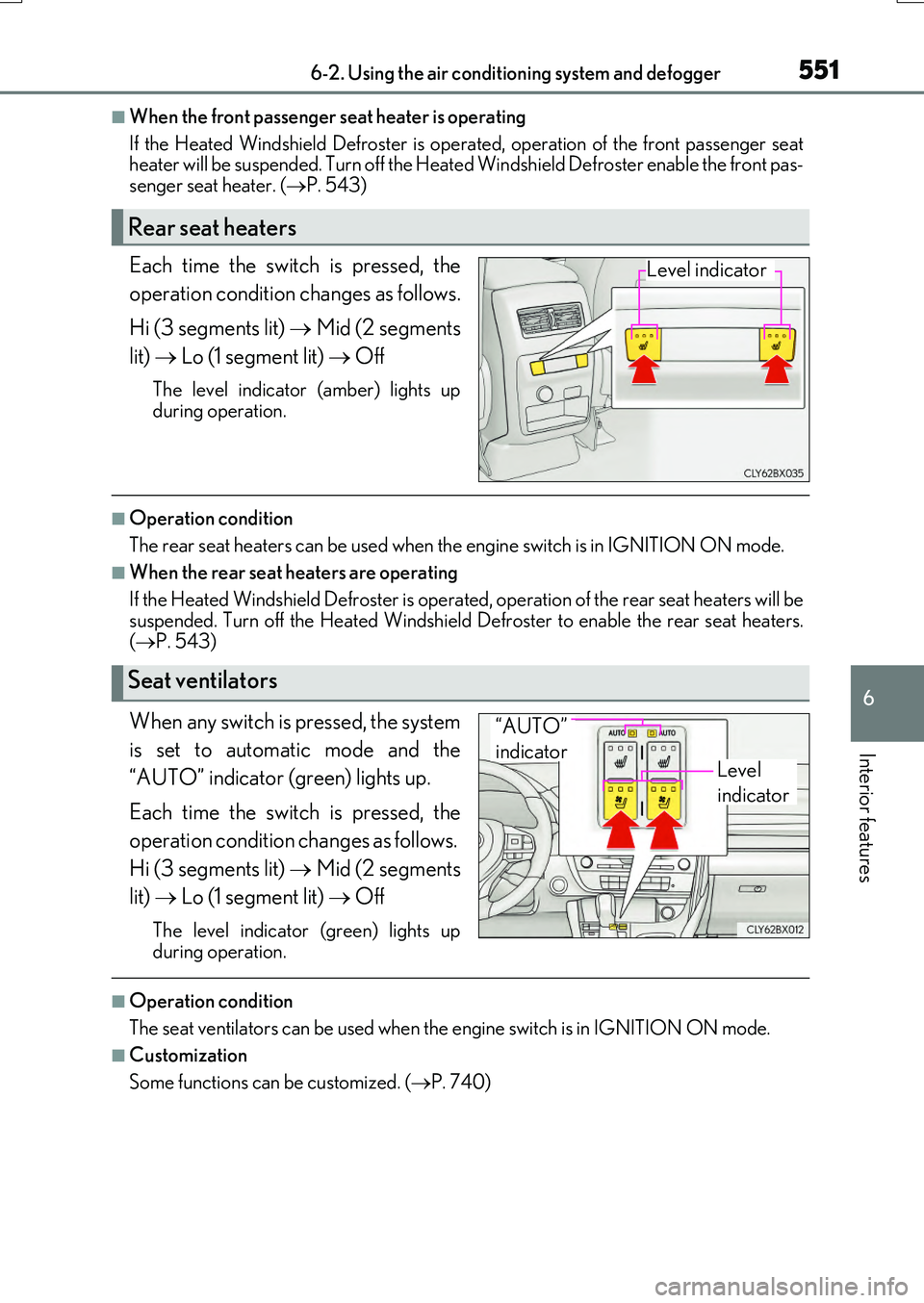
Each time the switch is pressed, the
operation condition changes as follows.
Hi (3 segments lit) Mid (2 segments
lit) Lo (1 segment lit) Off
The level indicator (amber) lights up
during operation.
■Operation condition
The rear seat heaters can be used when th e engine switch is in IGNITION ON mode.
■When the rear seat heaters are operating
If the Heated Windshield Defroster is operat ed, operation of the rear seat heaters will be
suspended. Turn off the Heated Windshield Defroster to enable the rear seat heaters. ( P. 543)
When any switch is pressed, the system
is set to automatic mode and the
“AUTO” indicator (green) lights up.
Each time the switch is pressed, the
operation condition changes as follows.
Hi (3 segments lit) Mid (2 segments
lit) Lo (1 segment lit) Off
The level indicator (green) lights up
during operation.
■Operation condition
The seat ventilators can be used when th e engine switch is in IGNITION ON mode.
■Customization
Some functions can be customized. ( P. 740)
Rear seat heaters
Level indicator
Seat ventilators
Level
indicator
“AUTO”
indicator
Page 591 of 776
5917-1. Maintenance and care
7
Maintenance and care
RX350/RX200t_EE_OM48F32E
NOTICE
■Cleaning detergents
●Do not use the following types of detergent, as they may discolor the vehicle interior or cause streaks or damage to painted surfaces:
• Non-seat portions: Organic substances su ch as benzene or gasoline, alkaline or acidic solutions, dye, and bleach• Seats: Alkaline or acidic solutions, such as thinner, benzene, and alcohol
●Do not use polish wax or polish cleaner. The instrument panel’s or other interior part’s painted surface may be damaged.
■Preventing damage to leather surfaces
Observe the following precautions to avoid damage to and deterioration of leather surfaces:
●Remove any dust or dirt from leather surfaces immediately.
●Do not expose the vehicle to direct sunlight for extended periods of time. Park the vehicle in the shade, especially during summer.
●Do not place items made of vinyl, plastic, or containing wax on the upholstery, as theymay stick to the leather surface if the vehicle interior heats up significantly.
■Water on the floor
Do not wash the vehicle floor with water. Vehicle systems such as the audio system may be damaged if water comes into contactwith electrical components such as the au dio system above or under the floor of the
vehicle. Water may also cause the body to rust.
■When cleaning the inside of the windshield (vehicles with Lexus Safety System+)
Do not allow glass cleaner to contact the lens. Also, do not touch the lens.
( P. 293)
■Cleaning the inside of the rear window
●Do not use a glass cleaner to clean the rear window, as this may cause damage to the
rear window defogger heater wires or antenna. Use a cloth dampened with luke- warm water to gently wipe the window clean. Wipe the window in strokes runningparallel to the heater wires or antenna.
●Be careful not to scratch or damage the heater wires or antenna.
Page 652 of 776
6527-3. Do-it-yourself maintenance
RX350/RX200t_EE_OM48F32E
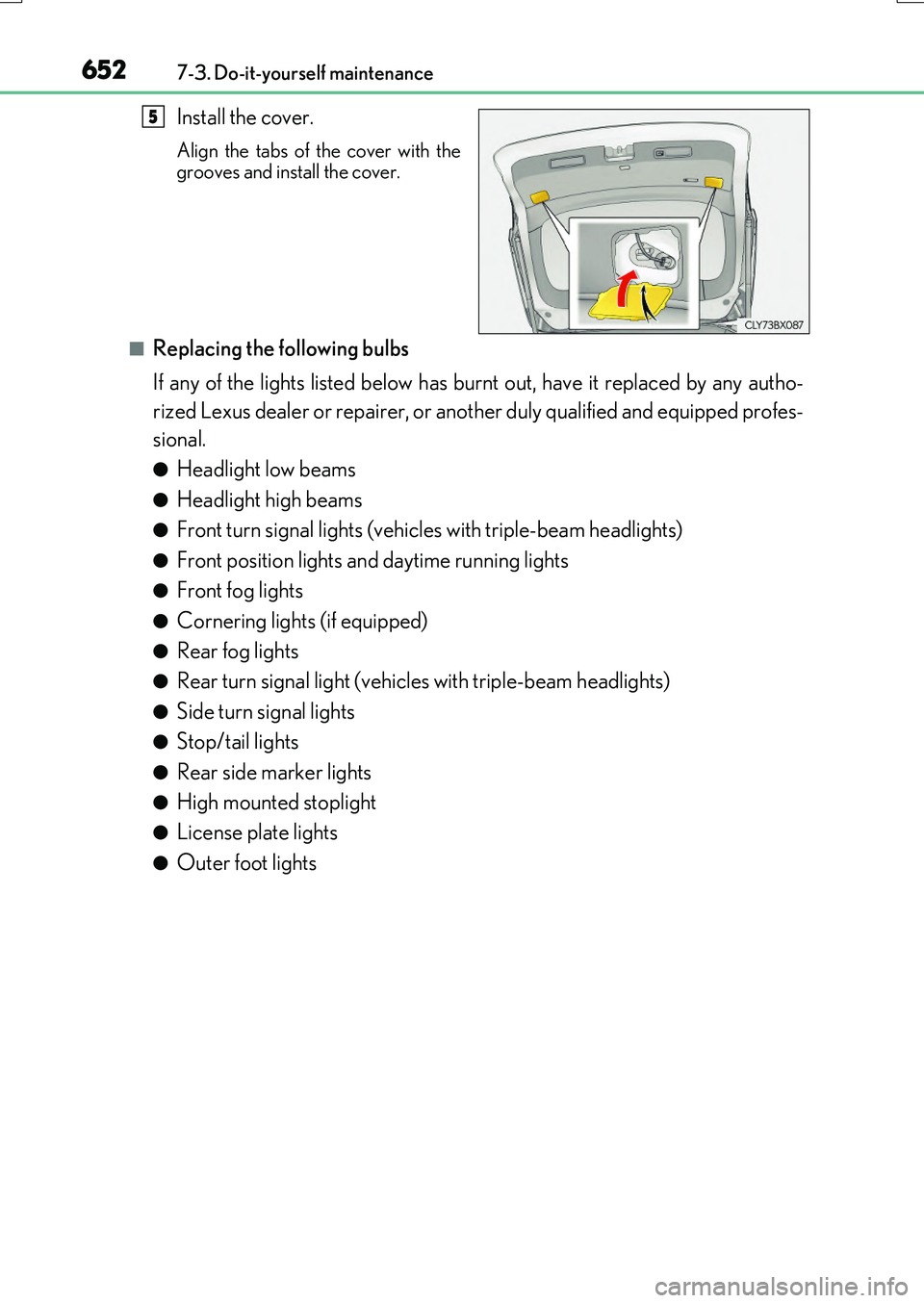
Install the cover.
Align the tabs of the cover with the
grooves and install the cover.
■Replacing the following bulbs
If any of the lights listed below has burnt out, have it replaced by any autho-
rized Lexus dealer or repairer, or another duly qualified and equipped profes-
sional.
●Headlight low beams
●Headlight high beams
●Front turn signal lights (vehicles with triple-beam headlights)
●Front position lights and daytime running lights
●Front fog lights
●Cornering lights (if equipped)
●Rear fog lights
●Rear turn signal light (vehicles with triple-beam headlights)
●Side turn signal lights
●Stop/tail lights
●Rear side marker lights
●High mounted stoplight
●License plate lights
●Outer foot lights
5