light LEXUS RX200T 2017 Service Manual
[x] Cancel search | Manufacturer: LEXUS, Model Year: 2017, Model line: RX200T, Model: LEXUS RX200T 2017Pages: 776, PDF Size: 44.51 MB
Page 121 of 776
1212. Instrument cluster
2
Instrument cluster
RX350/RX200t_EE_OM48F32E
■Tire pressure
●It may take a few minutes to display the tire inflation pressure after the engine switch is turned to IGNITION ON mode. It may also take a few minutes to display the tire infla-
tion pressure after inflation pressure has been adjusted.
●“---” may be displayed if the tire position information cannot be determined due to unfavorable radio wave conditions.
●Tire inflation pressure changes with temperature. The displayed values may also be dif-ferent from the values measured using a tire pressure gauge.
■Liquid crystal display
Small spots or light spots may appear on th e display. This phenomenon is characteristic of liquid crystal displays, and there is no problem continuing to use the display.
■Customization
Some functions can be customized. ( P. 110, 740)
WARNING
■Caution for use while driving
●When operating the multi-information display while driving, pay extra attention to the safety of the area around the vehicle.
●Do not look continuously at the multi-info rmation display while driving as you may fail to see pedestrians, objects on the road, etc. ahead of the vehicle.
■The information display at low temperatures
Allow the interior of the vehicle to warm up before using the liquid crystal information display. At extremely low temperatures, th e information display monitor may respond slowly, and display changes may be delayed.
For example, there is a lag between the dr iver’s shifting and the new gear number appearing on the display. This lag could cau se the driver to downshift again, causing rapid and excessive engine braking and po ssibly an accident resulting in death or
injury.
■Cautions during setting up the display
As the engine needs to be running during setting up the display, ensure that the vehicle
is parked in a place with adequate ventilation. In a closed area such as a garage, exhaust gases including harmful carbon monoxide (CO) may collect and enter thevehicle. This may lead to death or a serious health hazard.
NOTICE
■While setting up the display
To prevent battery discharge, ensure that the engine is running while setting up the dis- play features.
Page 132 of 776
1322. Instrument cluster
RX350/RX200t_EE_OM48F32E
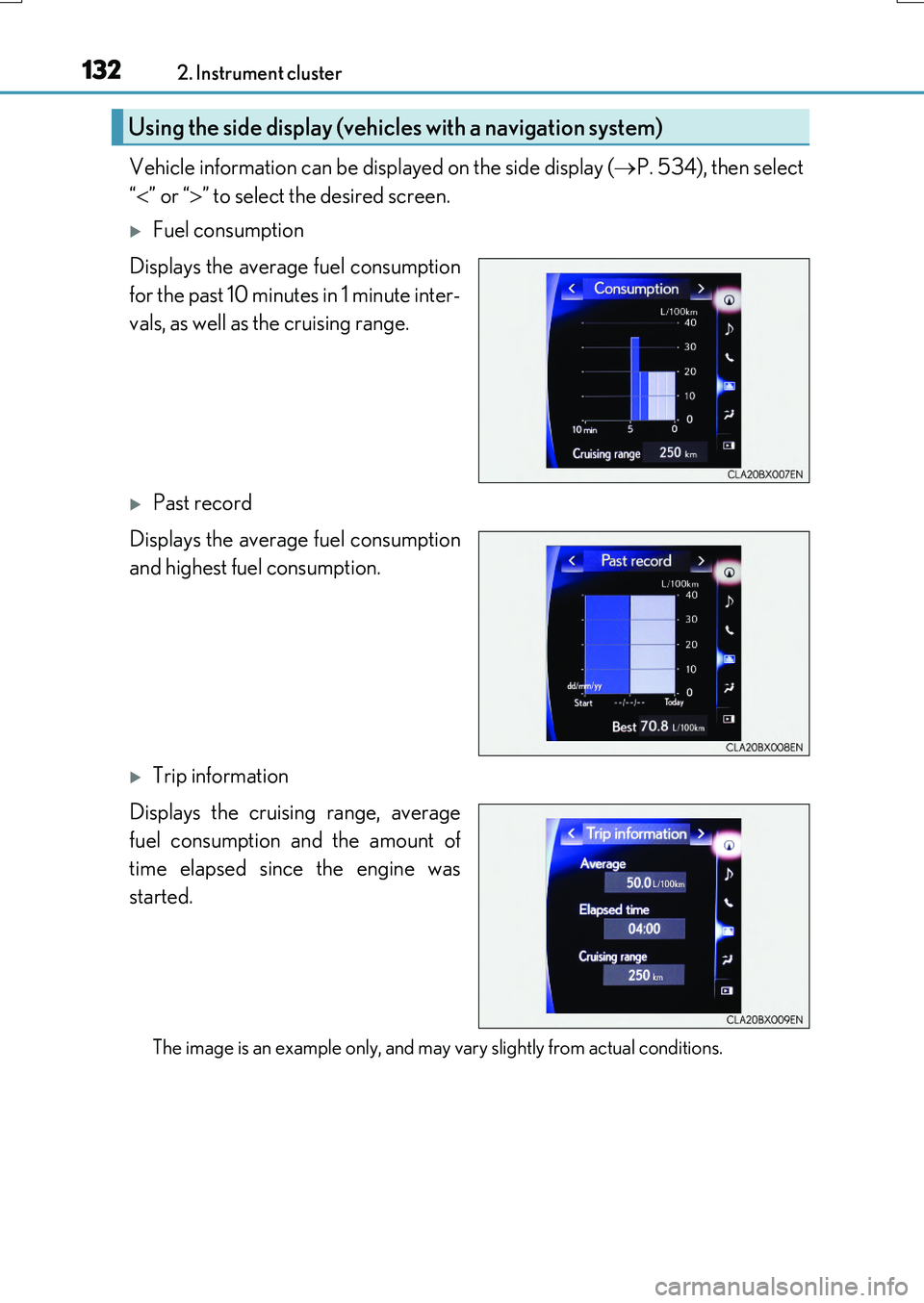
Vehicle information can be displayed on the side display (P. 534), then select
“ ” or “” to select the desired screen.
Fuel consumption
Displays the average fuel consumption
for the past 10 minutes in 1 minute inter-
vals, as well as the cruising range.
Past record
Displays the average fuel consumption
and highest fuel consumption.
Trip information
Displays the cruising range, average
fuel consumption and the amount of
time elapsed since the engine was
started.
The image is an example only, and may vary slightly from actual conditions.
Using the side display (vehicles with a navigation system)
Page 139 of 776

1393-1. Key information
3
Operation of each component
RX350/RX200t_EE_OM48F32E
NOTICE
■Handling the card key (if equipped)
●Do not apply excess force when inserting the mechanical key into the card key. Doing so may damage the card key.
●If the battery or card key terminals get wet, the battery may corrode and the card keymay stop working.If the key is dropped into water, or if drinki ng water, etc. is spilled on the key, immedi-
ately remove the battery cover and wipe the battery and terminals. (To remove the battery cover, lightly grasp and pull it.) If the battery is corroded, have any authorized Lexus dealer or repairer, or another duly qualified and equipped professional replace
the battery.
●Do not crush the battery cover or use a screwdriver to remove the battery cover. Forcibly removing the battery co ver may bend or damage the key.
●If the battery cover is frequently removed, the battery cover may become loose.
●When installing the battery, make sure to check the direction of the battery. Installing the battery in the wrong direction may cause the battery to deplete rapidly.
●The surface of the card key may be damaged, or its coating may peel off in the follow- ing situations:
• The card key is carried together with hard objects, such as coins and keys.
• The card key is scraped with a sharp object, such as the tip of a mechanical pencil. • The surface of the card key is wiped with thinner or benzene.
Page 144 of 776
1443-2. Opening, closing and locking the doors
RX350/RX200t_EE_OM48F32E
■Switching the door unlock function
It is possible to set which doors the entry function unlocks using the wireless remote con- trol.
Turn the engine switch off.
Cancel the intrusion sensor and tilt sensor of the alarm system to prevent unintended triggering of the alarm while changing the settings. (if equipped) ( P. 85)
When the indicator light on the key surface is not on, press and hold , for
approximately 5 seconds while pressing and holding .
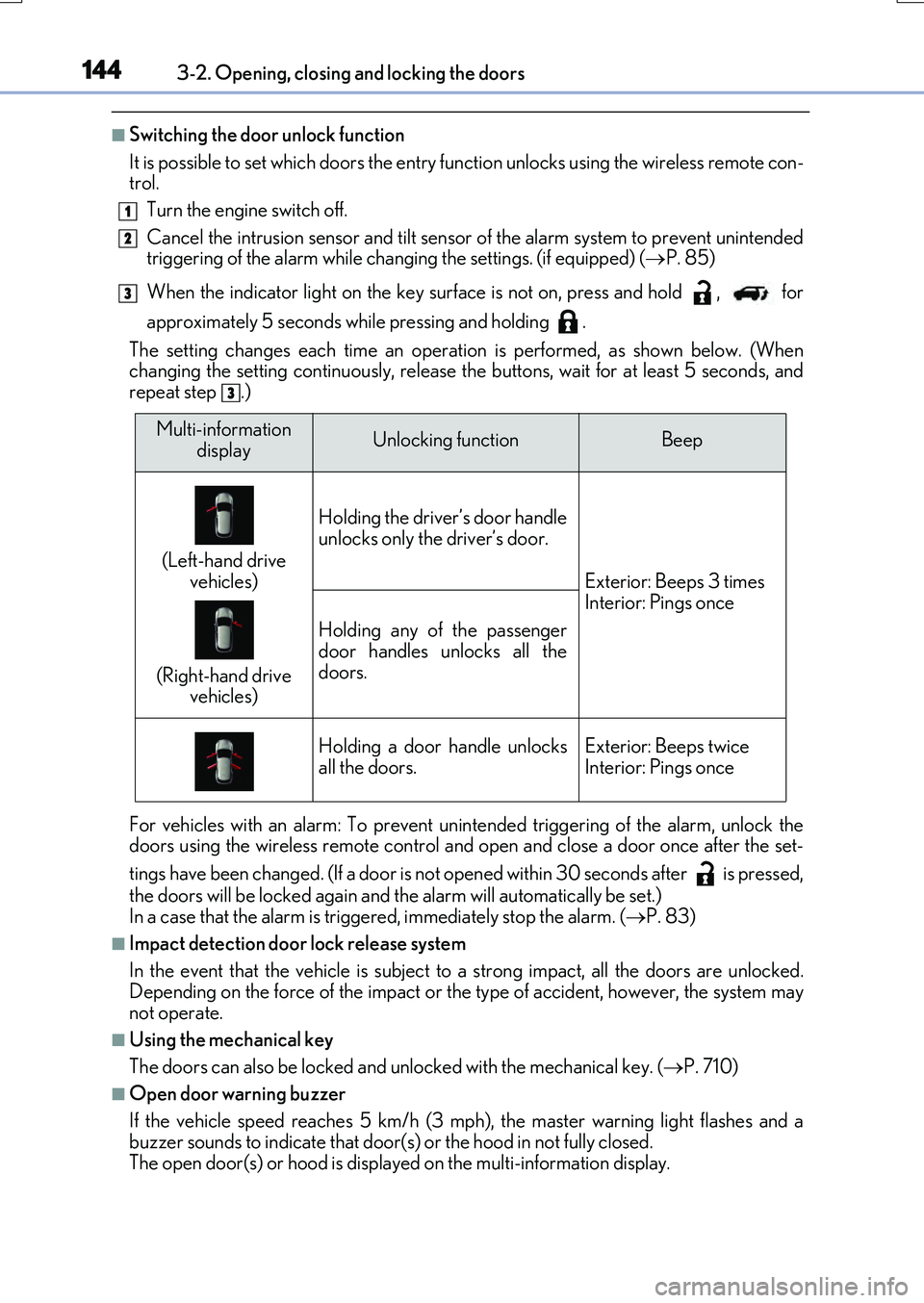
The setting changes each time an operatio n is performed, as shown below. (When changing the setting continuously, release the buttons, wait for at least 5 seconds, andrepeat step .)
For vehicles with an alarm: To prevent unin tended triggering of the alarm, unlock the doors using the wireless remote control and op en and close a door once after the set-
tings have been changed. (If a door is not opened within 30 seconds after is pressed,
the doors will be locked again and the alarm will automatically be set.) In a case that the alarm is triggered, immediately stop the alarm. ( P. 83)
■Impact detection door lock release system
In the event that the vehicle is subject to a strong impact, all the doors are unlocked. Depending on the force of the impact or the type of accident, however, the system may
not operate.
■Using the mechanical key
The doors can also be locked and unlocked with the mechanical key. ( P. 710)
■Open door warning buzzer
If the vehicle speed reaches 5 km/h (3 mph), the master warning light flashes and a buzzer sounds to indicate that door (s) or the hood in not fully closed.
The open door(s) or hood is displa yed on the multi-information display.
1
2
3
3
Multi-information
displayUnlocking functionBeep
(Left-hand drive
vehicles)
(Right-hand drive vehicles)
Holding the driver’s door handle
unlocks only the driver’s door.
Exterior: Beeps 3 times Interior: Pings once
Holding any of the passenger
door handles unlocks all the doors.
Holding a door handle unlocksall the doors.Exterior: Beeps twiceInterior: Pings once
Page 147 of 776
1473-2. Opening, closing and locking the doors
3
Operation of each component
RX350/RX200t_EE_OM48F32E
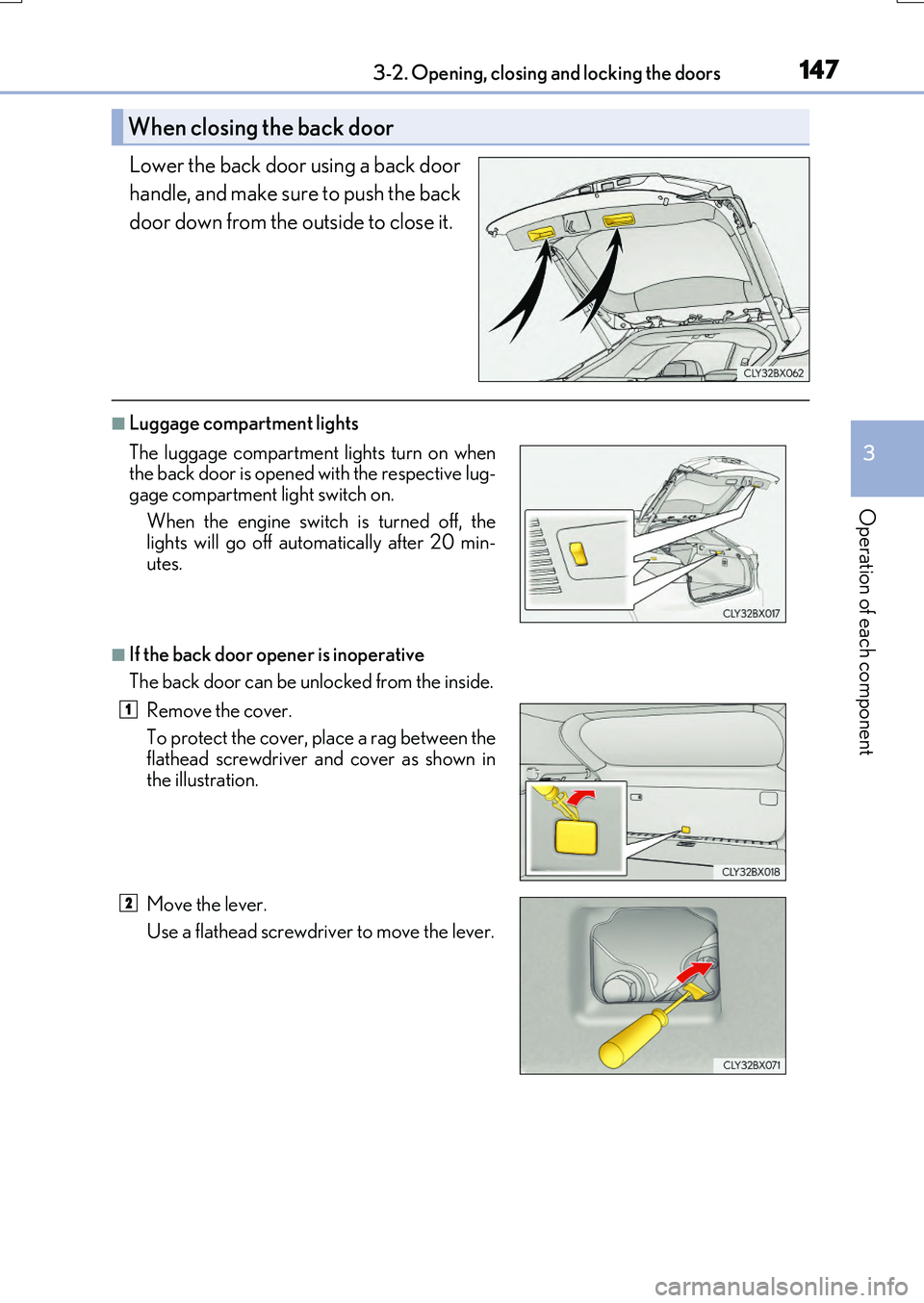
Lower the back door using a back door
handle, and make sure to push the back
door down from the outside to close it.
■Luggage compartment lights
■If the back door opener is inoperative
The back door can be unlocked from the inside.
When closing the back door
The luggage compartment lights turn on when the back door is opened with the respective lug-
gage compartment light switch on.
When the engine switch is turned off, the lights will go off automatically after 20 min-
utes.
Remove the cover.
To protect the cover, place a rag between the
flathead screwdriver and cover as shown in the illustration.
Move the lever.
Use a flathead screwdriver to move the lever.
1
2
Page 149 of 776

1493-2. Opening, closing and locking the doors
3
Operation of each component
RX350/RX200t_EE_OM48F32E
WARNING
■Operating the back door
Observe the following precautions. Failure to do so may cause parts of the body to be caught, resulting in death or serious
injury.
●Remove any heavy loads, such as snow and ic e, from the back door before opening it. Failure to do so may cause the back door to suddenly shut again after it is opened.
●When opening or closing th e back door, thoroughly check to make sure the sur- rounding area is safe.
●If anyone is in the vicinity, make sure they are safe and let them know that the back
door is about to open or close.
●Use caution when opening or closing the b ack door in windy weather as it may move abruptly in strong wind.
●Do not pull on the back door damper stay ( P. 150) to close the back door, and do not hang on the back door damper stay. Doing so may cause hands to be caught or the back door damper stay to break,
causing an accident.
●If a bicycle carrier or similar heavy object is attached to the back door, it may sud- denly shut again after being opened, causing someone’s hands, arms, head or neck to
be caught and injured. When installing an accessory part to the back door, using a genuine Lexus part is recommended.
●The back door may suddenly shut if it is notopened fully. It is more difficult to open or
close the back door on an incline than on a level surface, so beware of the back doorunexpectedly opening or closing by itself.
Make sure that the back door is fully open and secure before using the luggage compart-ment.
●When closing the back door, take extra care
to prevent your fingers, etc., from being caught.
●When closing the back door, make sure to
press it lightly on its outer surface. If the back door handle is used to fully close the backdoor, it may result in hands or arms being
caught.
Page 157 of 776
1573-2. Opening, closing and locking the doors
3
Operation of each component
RX350/RX200t_EE_OM48F32E
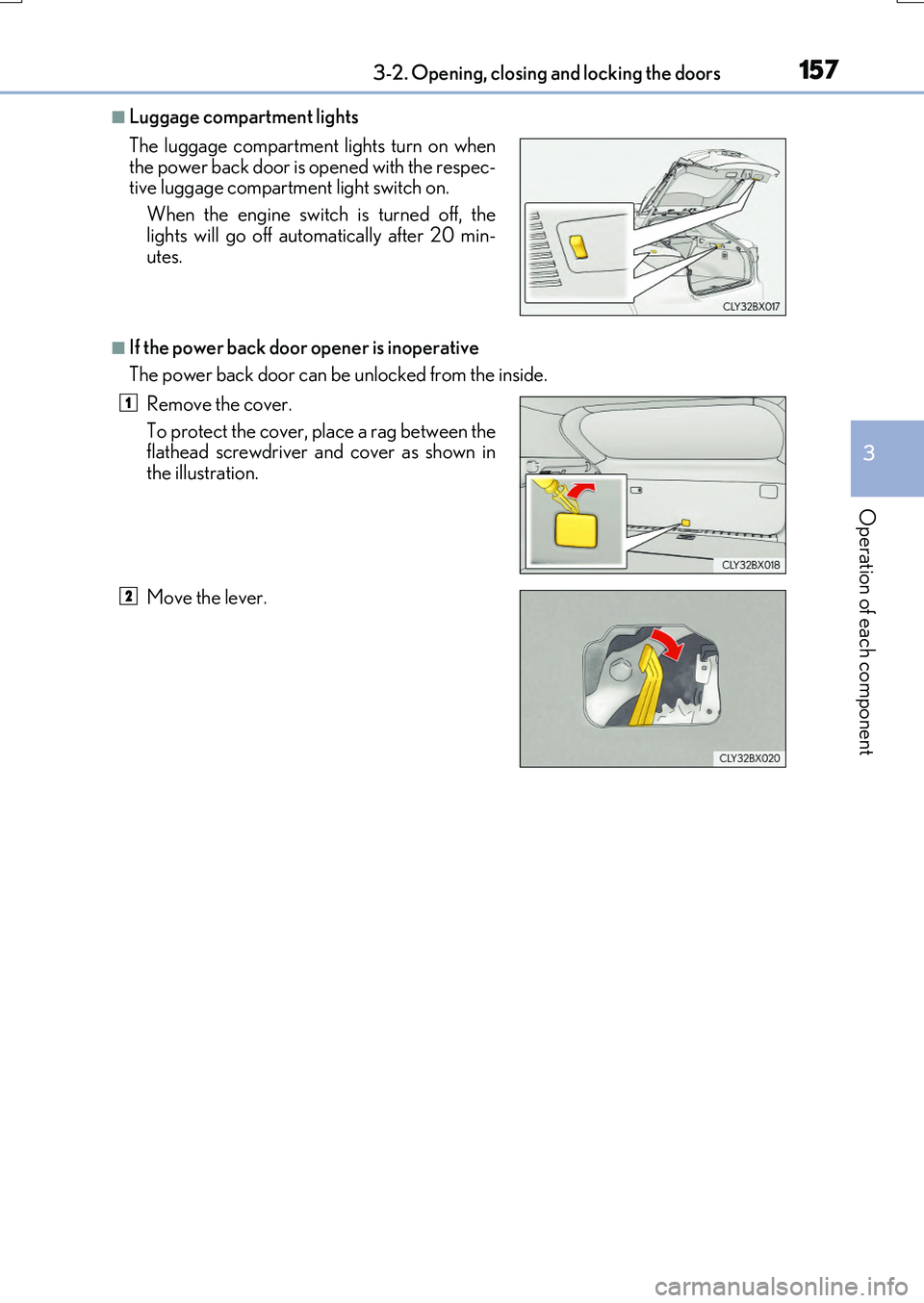
■Luggage compartment lights
■If the power back door opener is inoperative
The power back door can be unlocked from the inside.
The luggage compartment lights turn on when
the power back door is opened with the respec-
tive luggage compartment light switch on.
When the engine switch is turned off, the
lights will go off automatically after 20 min-
utes.
Remove the cover.
To protect the cover, place a rag between the
flathead screwdriver and cover as shown in
the illustration.
Move the lever.
1
2
Page 158 of 776
1583-2. Opening, closing and locking the doors
RX350/RX200t_EE_OM48F32E
■Back door closer
In the event that the power back door is left slightly open, the back door closer will auto- matically close it to the fully closed position.
●The back door closer can function when the engine switch is in any mode.
●The power back door can be opened using the back door opener switch even if theback door closer is operating.
■Operation of the power back door
●When the power back door begins to operat e, the emergency flashers will flash twice and a buzzer will sound.
●When the power back door is disabled ( P. 115), the power back door will not operate but can be opened and closed manually.
●The power back door turns to manual operat ion when the back door opener switch is
pressed while the power back door is in an automatic opening/closing operation.
●If anything obstructs the power back door while opening, a buzzer will sound and the power back door will stop immediately. If anything obstructs the power back door while
closing, a buzzer will sound and the power back door will automatically move slightly in the opposite direction and then stop.
■Back door reserve lock function
This function reserves the locking of the po wer back door when the power back door is open. If the following operations are perfor med, all of the doors except the power back door will lock and then the power back door will lock when it is completely closed.
Close all of the doors, except the power back door.
Perform an automatic closing operation of the power back door and lock the doors using the wireless remote control ( P. 140) or smart entry & start system (P. 140,
151) while the power back door is closing.
1
2
Page 162 of 776
1623-2. Opening, closing and locking the doors
RX350/RX200t_EE_OM48F32E
WARNING
■Operating the power back door
Observe the following precautions.
Failure to do so may cause parts of the body to be caught, resulting in death or serious
injury.
●Remove any heavy loads, such as snow and ice, from the power back door before
opening it. Failure to do so may cause the power back door to suddenly shut again
after it is opened.
●When opening or closing the power back do or, thoroughly check to make sure the
surrounding area is safe.
●If anyone is in the vicinity, make sure they are safe and let them know that the power
back door is about to open or close.
●Use caution when opening or closing the power back door in windy weather as it may
move abruptly in strong wind.
●Do not pull on the back door spindle ( P. 165) to close the power back door, and
do not hang on the back door spindle.
Doing so may cause hands to be caught or the back door spindle to break, causing
an accident.
●If a bicycle carrier or similar heavy object is attached to the power back door, it may
suddenly shut again after being opened, causing someone’s hands, arms, head or
neck to be caught and injured. When installing an accessory part to the power back
door, using a genuine Lexus part is recommended.
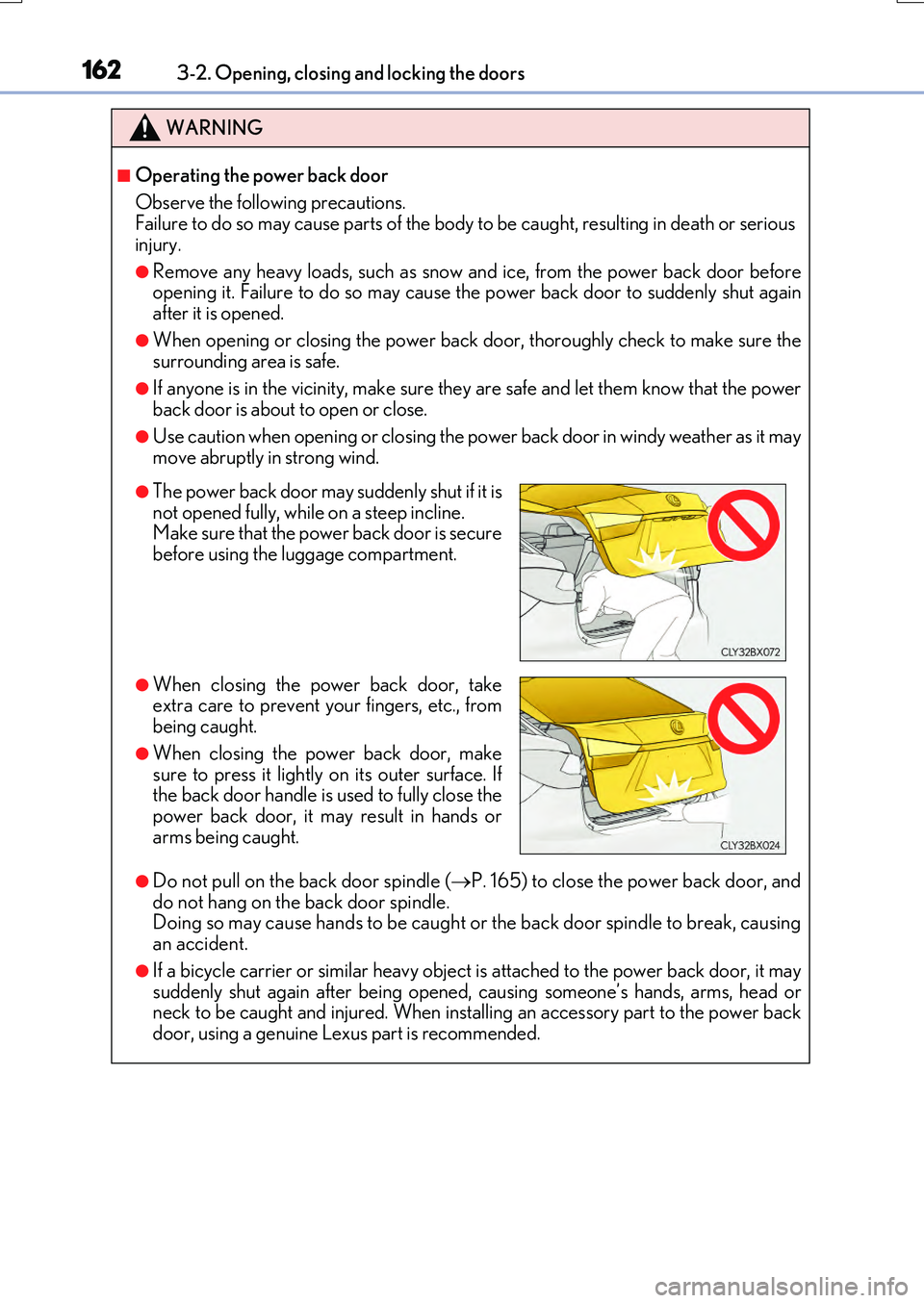
●The power back door may suddenly shut if it is
not opened fully, while on a steep incline.
Make sure that the power back door is secure
before using the luggage compartment.
●When closing the power back door, take
extra care to prevent your fingers, etc., from
being caught.
●When closing the power back door, make
sure to press it lightly on its outer surface. If
the back door handle is used to fully close the
power back door, it may result in hands or
arms being caught.
Page 163 of 776

1633-2. Opening, closing and locking the doors
3
Operation of each component
RX350/RX200t_EE_OM48F32E
WARNING
■Back door closer
●Use caution when using the back door closer as it still operates when the power back door system is disabled.
■Power back door
Observe the following precautions when operating the power back door. Failure to do so may cause death or serious injury.
●Check the safety of the surrounding area to make sure there are no obstacles or any-thing that could cause any of your belongings to get caught.
●If anyone is in the vicinity, make sure they are safe and let them know that the power
back door is about to open or close.
●If the power back door system is disabled ( P. 115) while the power back door is operating, the power back door will stop operating. The power back door must then
be operated manually. Take extra care in th is situation, as the power back door may open or close suddenly.
●If the operating conditions of the power back door (P. 156) are no longer met, a
buzzer may sound and the power back door may stop opening or closing. The power back door must then be operated manually. Take extra care on an incline in this situa-tion, as the power back door may move suddenly.
●On an incline, the power back door may suddenly shut after it opens. Make sure thepower back door is fully open and secure.
●In the following situations, the power back door may detect an abnormality and auto-
matic operation may be stopped. In this case, the power back door must then be operated manually. Take extra care in this situation, as the stopped power back door may suddenly open or close, causing an accident.
• When the power back door contacts an obstacle • When the battery voltage suddenly drops, such as when the engine switch isturned to IGNITION ON mode or the engine is started during automatic opera-
tion
●In the event that the power back door is left
slightly open, the back door closer will auto- matically close it to the fully closed position. Ittakes several seconds before the back door
closer begins to operate. Be careful not to get fingers caught or anything else in the powerback door, as this may cause bone fractures
or other serious injuries.