window LEXUS RX200T 2017 Service Manual
[x] Cancel search | Manufacturer: LEXUS, Model Year: 2017, Model line: RX200T, Model: LEXUS RX200T 2017Pages: 776, PDF Size: 44.51 MB
Page 227 of 776
2274-1. Before driving
4
Driving
RX350/RX200t_EE_OM48F32E
With the brake pedal depressed, shift the shift lever to D. (P. 251)
Pull the parking brake switch and parking brake is set manually. (P. 260)
Release the brake pedal and gently depr ess the accelerator pedal to acceler-
ate the vehicle.
Press the parking brake switch and pa rking brake is released manually.
( P. 260)
■When starting off on a uphill
The hill-start assist co ntrol will activate. (P. 422)
■Driving in the rain
●Drive carefully when it is raining, because visibility will be reduced, the windows may become fogged-up, and the road will be slippery.
●Drive carefully when it starts to rain, because the road surface will be especially slip- pery.
●Refrain from high speeds when driving on an expressway in the rain, because there may
be a layer of water between the tires and the road surface, preventing the steering and brakes from operating properly.
■Engine speed while driving
In the following conditions, the engine speed may become high while driving. This is due to automatic up-shifting control or down-shi fting implementation to meet driving condi- tions. It does not indicate sudden acceleration.
●The vehicle is judged to be driving uphill or downhill
●When the accelerator pedal is released
●When the brake pedal is depressed while sport mode is selected
■Restraining the engine output (Brake Override System)
●When the accelerator and brake pedals are depressed at the same time, the engine output may be restrained.
●A warning message is displayed on the mult i-information display while the system is operating. If a warning message is shown on the multi-information display, read the message and follow the instructions.
■Restraining sudden start (Drive-Start Control)
●When the following unusual operation is performed, the engine output may be
restrained.
• When the shift lever is shifted from R to D, D to R, N to R, P to D, or P to R (D includes M) with the accelerator pedal depressed, a warning message appears on
the multi-information display. If a warnin g message is shown on the multi-informa- tion display, read the messag e and follow the instructions. • When the accelerator pedal is depressed too while the vehicle is in reverse.
●While Drive-Start Control is being activated, your vehicle may have trouble escapingfrom the mud or fresh snow. In such case, deactivate TRC (P. 424) to cancel Drive-
Start Control so that the vehicle may become able to escape from the mud or fresh snow.
Starting off on a uphill
1
2
3
4
Page 232 of 776
2324-1. Before driving
RX350/RX200t_EE_OM48F32E
WARNING
Observe the following precautions. Failure to do so may result in death or serious injury.
■When the vehicle is parked
●Do not leave glasses, cigarette lighters, spray cans, or soft drink cans in the vehiclewhen it is in the sun. Doing so may result in the following:
• Gas may leak from a cigarette lighter or spray can, and may lead to a fire. • The temperature inside the vehicle may cau se the plastic lenses and plastic mate- rial of glasses to deform or crack.
• Soft drink cans may fracture, causing the contents to spray over the interior of the vehicle, and may also cause a short circuit in the vehicle’s electrical components.
●Do not leave cigarette lighters in the vehicle. If a cigarette lighter is in a place such as the glove box or on the floor, it may be lit accidentally when luggage is loaded or the seat is adjusted, causing a fire.
●Do not attach adhesive discs to the windshield or windows. Do not place containerssuch as air fresheners on the instrument panel or dashboard. Adhesive discs or con- tainers may act as lenses, causing a fire in the vehicle.
●Do not leave a door or window open if the curved glass is coated with a metallizedfilm such as a silver-colored one. Reflected sunlight may cause the glass to act as alens, causing a fire.
●Always apply the parking brake, shift the shift lever to P, stop the engine and lock thevehicle.Do not leave the vehicle unattended while the engine is running.
If the vehicle is parked with the shift lever in P but the parking brake is not set, the vehicle may start to move, possibly leading to an accident.
●Do not touch the exhaust pipes while the engine is running or immediately after turn-
ing the engine off. Doing so may cause burns.
Page 285 of 776
2854-3. Operating the lights and wipers
4
Driving
RX350/RX200t_EE_OM48F32E
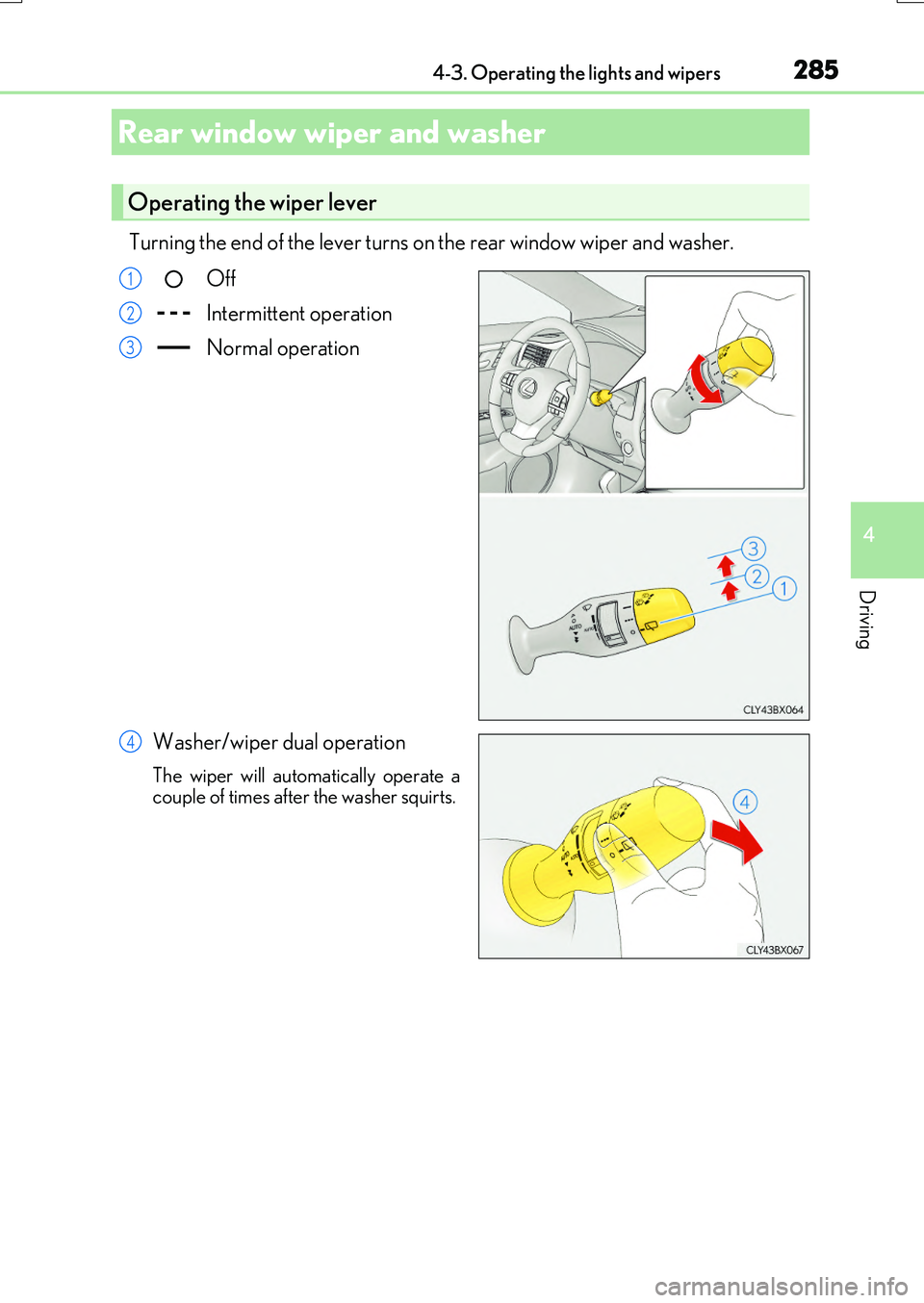
Turning the end of the lever turns on the rear window wiper and washer.
Off
Intermittent operation
Normal operation
Washer/wiper dual operation
The wiper will automatically operate a couple of times after the washer squirts.
Rear window wiper and washer
Operating the wiper lever
1
2
3
4
Page 286 of 776
2864-3. Operating the lights and wipers
RX350/RX200t_EE_OM48F32E
■The rear window wiper and washer can be operated when
The engine switch is in IGNITION ON mode.
■If no washer fluid sprays
Check that the washer nozzle is not blocked if there is washer fluid in the washer fluid
tank.
NOTICE
■When the rear window is dry
Do not use the wiper, as it may damage the rear window.
■When the washer fluid tank is empty
Do not operate the switch continually as the washer fluid pump may overheat.
■When a nozzle becomes blocked
In this case, contact any authorized Lexus de aler or repairer, or another duly qualified
and equipped professional. Do not try to clear it with a pin or other object. The nozzle will be damaged.
Page 287 of 776
287
4
Driving
RX350/RX200t_EE_OM48F32E
4-4. Refueling
●Close all the doors and windows, and turn the engine switch off.
●Confirm the type of fuel.
■Fuel types
P. 739
■Fuel tank opening for unleaded gasoline
To help prevent incorrect fueling, your vehicle has a fuel tank opening that only accom-
modates the special nozzle on unleaded fuel pumps.
Opening the fuel tank cap
Perform the following steps to open the fuel tank cap:
Before refueling the vehicle
Page 295 of 776
2954-5. Using the driving support systems
4
Driving
RX350/RX200t_EE_OM48F32E
WARNING
■To avoid malfunction of the camera sensor
Observe the following precautions.
Otherwise, the camera sensor may not oper ate properly, possibly leading to an acci-
dent resulting in death or serious injury.
●Keep the windshield clean at all times.
• If the windshield is dirty or covered with an oily film, water droplets, snow, etc.,
clear the windshield. • If a glass coating agent is applied to the windshield, it will still be necessary to use the windshield wipers to remove water dr oplets, etc. from the area of the wind-
shield in front of the camera sensor. • If the inner side of the windshield where th e camera sensor is installed is dirty, con- tact any authorized Lexus dealer or repairer, or another duly qualified and
equipped professional.
●If the part of the windshield in front of the camera sensor is fogged up or covered with condensation or ice, use the windshield de fogger to remove the fog, condensation or ice. ( P. 542)
●If water droplets cannot be properly removed from the area of the windshield in front of the camera sensor by the windshield wi pers, replace the wiper insert or wiper blade.
• To replace the wiper insert: P. 636 • If the wiper blades need to be replaced, contact any authorized Lexus dealer orrepairer, or another duly qualif ied and equipped professional.
●Do not attach window tinting to the windshield.
●Replace the windshield if it is damaged or cracked.
If the windshield needs to be replaced, contact any authorized Lexus dealer or repairer, or another duly qualified and equipped professional.
●Do not get the camera sensor wet.
●Do not allow bright lights to shine into the camera sensor.
●Do not dirty or damage the camera sensor. When cleaning the inside of the windshield, do not allow glass cleaner to contact the
lens. Also, do not touch the lens. If the lens is dirty or damaged, contact any authorized Lexus dealer or repairer, oranother duly qualified an d equipped professional.
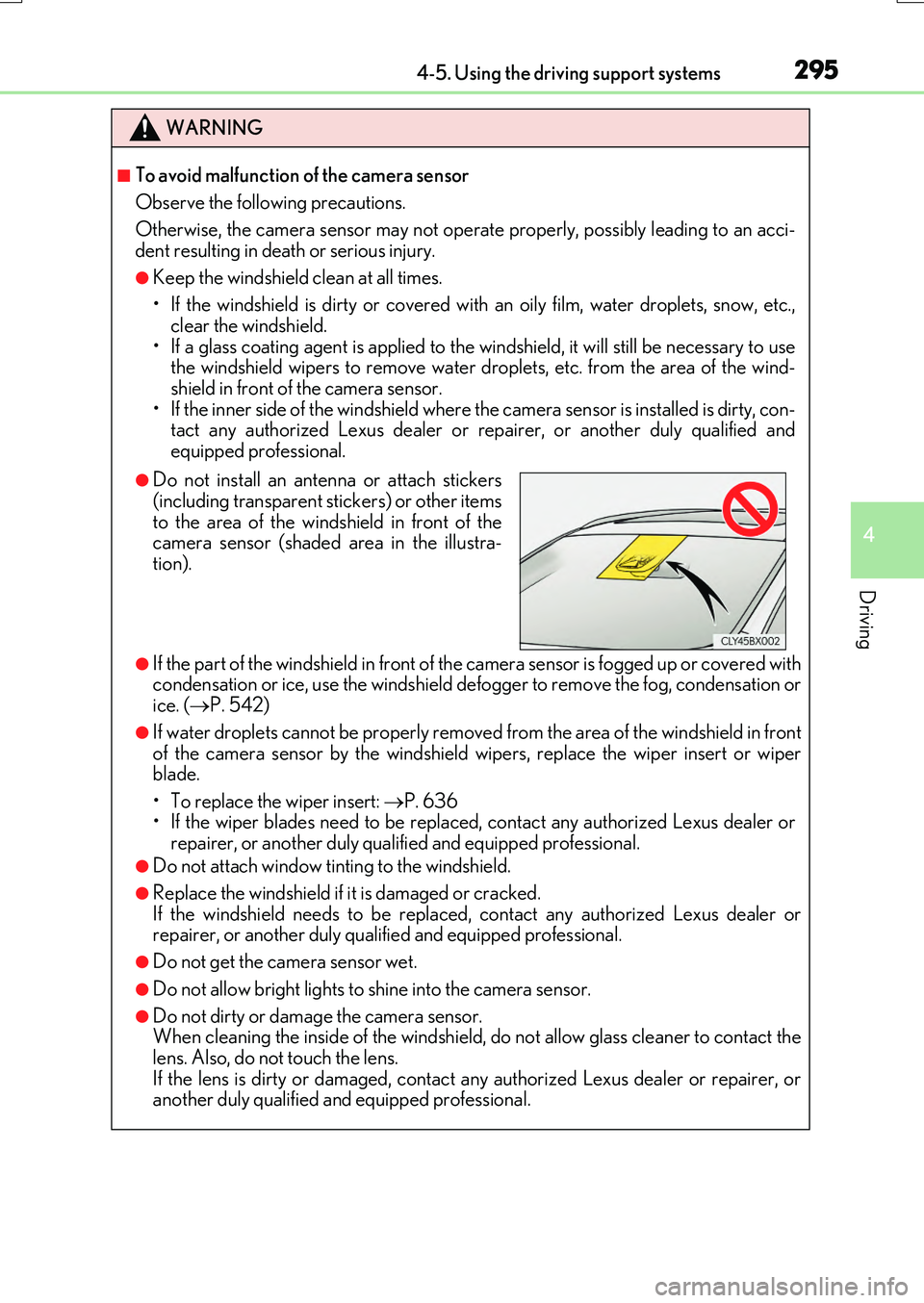
●Do not install an antenna or attach stickers
(including transparent stickers) or other items to the area of the windshield in front of thecamera sensor (shaded area in the illustra-
tion).
Page 416 of 776
4164-5. Using the driving support systems
RX350/RX200t_EE_OM48F32E
NOTICE
■How to use the camera
●The parking assist monitor may not operate properly in the following cases.
• If the back of the vehicle is hit, the position and mounting angle of the camera may
change. • As the camera has a water proof construction, do not detach, disassemble ormodify it. This may cause incorrect operation.
• When cleaning the camera lens, flush the camera with a large quantity of water and wipe it with a soft and wet cloth. Strongly rubbing the camera lens may causethe camera lens to be scratched and unable to transmit a clear image.
• Do not allow organic solvent, car wax, window cleaner or glass coat to adhere to the camera. If this happens, wipe it off as soon as possible.• If the temperature changes rapidly, such as when hot water is poured on the vehi-
cle in cold weather, the system may not operate normally. • When washing the vehicle, do not apply intensive bursts of water to the camera orcamera area. Doing so may result in the camera malfunctioning.
• When the camera is used under fluorescent lights, sodium light or mercury light etc., the lights and the illuminate d areas may appear to flicker.
●Do not expose the camera to strong impact as this could cause a malfunction. If this happens, have the vehicle inspected by any authorized Lexus dealer or repairer,or another duly qualified and equipped professional as soon as possible.
Page 429 of 776
429
4
Driving
RX350/RX200t_EE_OM48F32E
4-6. Driving tips
●Use fluids that are appropriate to the prevailing outside temperatures.
•Engine oil
• Engine coolant
• Washer fluid
●Have a service technician inspect the condition of the battery.
●Have the vehicle fitted with four snow tires or purchase a set of tire chains for
the front tires.
Ensure that all tires are of the specified size and the same brand, and that chains match the size of the tires.
Perform the following according to the driving conditions:
●Do not try to forcibly open a window or move a wiper that is frozen. Pour
warm water over the frozen area to melt the ice. Wipe away the water imme-
diately to prevent it from freezing.
●To ensure proper operation of the climate control system fan, remove any
snow that has accumulated on the air inlet vents in front of the windshield.
●Check for and remove any excess ice or snow that may have accumulated on
the exterior lights, vehicle’s roof, chassi s, around the tires or on the brakes.
●Remove any snow or mud from the bottom of your shoes before getting in the
vehicle.
Winter driving tips
Carry out the necessary preparations and inspections before driving the vehi-
cle in winter. Always drive the vehicle in a manner appropriate to the prevail-
ing weather conditions.
Pre-winter preparations
Before driving the vehicle
Page 451 of 776
4515-2. Setup
5
Lexus Display Audio system
RX350/RX200t_EE_OM48F32E
■USB memory
When saving the images to a USB memory device, name the folder that the images are saved to “Image”.
●Compatible device formats
The following device format can be used:
• The image’s file format must be JPEG • USB communication format: USB2.0 FS (480 Mbps)
• File system format: FAT16/32 (Windows) • Correspondence class: Mass storage class
●JPEG file compatibility
Compatible image size: Maximum 10 MB
Go to “Delete personal data”: “MENU” button “Setup” “General”
“Delete personal data”
Select “Delete”.
Check carefully beforehand, as data cannot be retrieved once deleted.
The following personal data will be deleted or changed to its default settings.
• Phonebook data •Voice tag
• Call history data •Favorite data
• Bluetooth® devices data
• Phone sound settings
• Detailed Bluetooth® settings • Audio/video setting
• Customized image data •FM info setting• Software update history
• Software update detail information • Phone display setting• Contact/call history setting
• Messaging setting
NOTICE
■To prevent damage to the USB memory device or its terminals
P. 480
Deleting personal data
1
2
Page 465 of 776
4655-4. Using the radio
5
Lexus Display Audio system
RX350/RX200t_EE_OM48F32E
■Manual tuning (manual screen)
Turn the “TUNE•SCROLL” knob or turn the controller.
■Station list (preset or station list screen)
Select the desired station by pressi ng the “<” or “>” button, turn the
“TUNE•SCROLL” knob, or turning and pressing the controller.
Radio stations can be preset.
Search for desired stations.
Turn the controller to select one of the stations and then press the controller
until you hear a beep while on the preset selection screen.
The broadcast you are currently listening to can be re-listened to at any time.
Move the controller to the right and then select “Time shift”.
Turn the “TUNE•SCROLL” knob to set the desired offset.
An offset playback time can also be set on the menu screen. ( P. 461)
To cancel the time shift operation while in time shift mode, move the controller to the
left and select “Time shift off”. If the time shift display is left showing “-0’ 00”” for 6 seconds without any operation, the time shift operation will be canceled.
■Reception sensitivity
●Maintaining perfect radio recept ion at all times is difficult due to the continually chang- ing position of the antenna, differences in signal strength and surrounding objects, such
as trains, transmitters, etc.
●The radio antenna is mounted inside the rear window. To maintain clear radio reception, do not attach metallic window tinting or other metallic objects to the antenna wire
mounted inside the rear window.
■Traffic announcement operation
When traffic announcement is set to on, “TP” will appear on the screen and the radio will
begin seeking a TP station. If the radio seeks out a TP station, a pop-up massage is dis- played. To listen the program, select “Continue”. When the program ends, the initial
operation will resume.
Setting station presets (preset screen)
Time shift operation (DAB) (if equipped)
1
2
1
2