window LEXUS RX200T 2017 Workshop Manual
[x] Cancel search | Manufacturer: LEXUS, Model Year: 2017, Model line: RX200T, Model: LEXUS RX200T 2017Pages: 776, PDF Size: 44.51 MB
Page 467 of 776

4675-5. Playing an audio CD and MP3/WMA/AAC discs
5
Lexus Display Audio system
RX350/RX200t_EE_OM48F32E
■Error messages
If the following error messages appear on the screen, refer to the table and take the appropriate measures. If the problem is not rectified, take the vehicle to any authorizedLexus dealer or repairer, or another duly qualified and equipped professional.
■Discs that can be used
Discs with the marks shown below can be used. Playback may not be possible depending on re cording format or disc features, or due to scratches, dirt or deterioration.
CDs with copy-protection features may not play correctly.
■Music disc player protection feature
To protect the internal components, playback is automatically stopped when a problem is detected.
■If a disc is left inside the Music disc player or in the ejected position for extended peri-ods
Disc may be damaged and may not play properly.
■Lens cleaners
Do not use lens cleaners. Doing so may damage the Music disc player.
■MP3, WMA and AAC files
MP3 (MPEG Audio LAYER3) is a standard audio compression format.
Files can be compressed to approximately 1/10 of their original size by using MP3 com- pression.
WMA (Windows Media Audio) is a Mi crosoft audio compression format.
This format compresses audio data to a size smaller than that of the MP3 format.
AAC is short for Advanced Audio Coding an d refers to an audio compression technol-
ogy standard used with MPEG2 and MPEG4.
MP3, WMA and AAC file and media/ formats compatibility are limited.
MessageCauseCorrection procedures
“Check disc”
• The disc is dirty or dam- aged.
• The disc is inserted upside down.• The disc is not playable
with the player.
•Clean the disc.
• Insert the disc correctly. • Confirm the disc is play-able with the player.
“DISC error”There is a malfunctionwithin the system.Eject the disc.
“No music files found.”No playable data isincluded on the disc.Eject the disc.
Page 468 of 776
4685-5. Playing an audio CD and MP3/WMA/AAC discs
RX350/RX200t_EE_OM48F32E
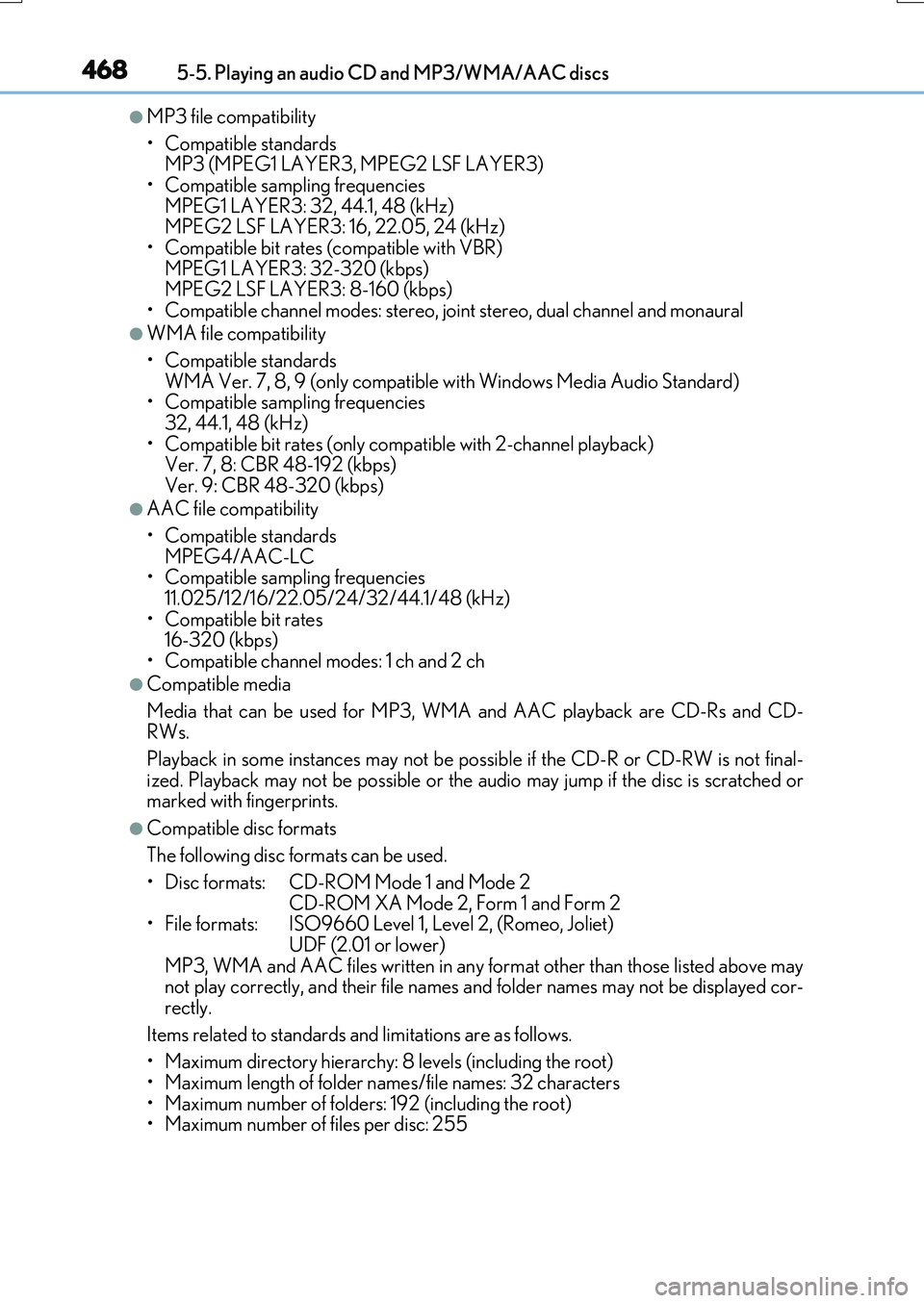
●MP3 file compatibility
• Compatible standards MP3 (MPEG1 LAYER3, MPEG2 LSF LAYER3)
• Compatible sampling frequencies MPEG1 LAYER3: 32, 44.1, 48 (kHz) MPEG2 LSF LAYER3: 16, 22.05, 24 (kHz)
• Compatible bit rates (c ompatible with VBR) MPEG1 LAYER3: 32-320 (kbps) MPEG2 LSF LAYER3: 8-160 (kbps)
• Compatible channel modes: stereo, joint stereo, dual channel and monaural
●WMA file compatibility
• Compatible standards WMA Ver. 7, 8, 9 (only compatible with Windows Media Audio Standard)• Compatible sampling frequencies
32, 44.1, 48 (kHz) • Compatible bit rates (only compatible with 2-channel playback) Ver. 7, 8: CBR 48-192 (kbps)
Ver. 9: CBR 48-320 (kbps)
●AAC file compatibility
• Compatible standards MPEG4/AAC-LC• Compatible sampling frequencies
11.025/12/16/22.05/24/32/44.1/48 (kHz) • Compatible bit rates 16-320 (kbps)
• Compatible channel modes: 1 ch and 2 ch
●Compatible media
Media that can be used for MP3, WMA and AAC playback are CD-Rs and CD- RWs.
Playback in some instances may not be poss ible if the CD-R or CD-RW is not final- ized. Playback may not be possible or the au dio may jump if the disc is scratched or marked with fingerprints.
●Compatible disc formats
The following disc formats can be used.
• Disc formats: CD-ROM Mode 1 and Mode 2
CD-ROM XA Mode 2, Form 1 and Form 2 • File formats: ISO9660 Level 1, Level 2, (Romeo, Joliet) UDF (2.01 or lower)
MP3, WMA and AAC files written in any format other than those listed above may not play correctly, and their file names and folder names may not be displayed cor-rectly.
Items related to standards and limitations are as follows.
• Maximum directory hierarchy: 8 levels (including the root) • Maximum length of folder names/file names: 32 characters
• Maximum number of folders: 192 (including the root) • Maximum number of files per disc: 255
Page 469 of 776
4695-5. Playing an audio CD and MP3/WMA/AAC discs
5
Lexus Display Audio system
RX350/RX200t_EE_OM48F32E
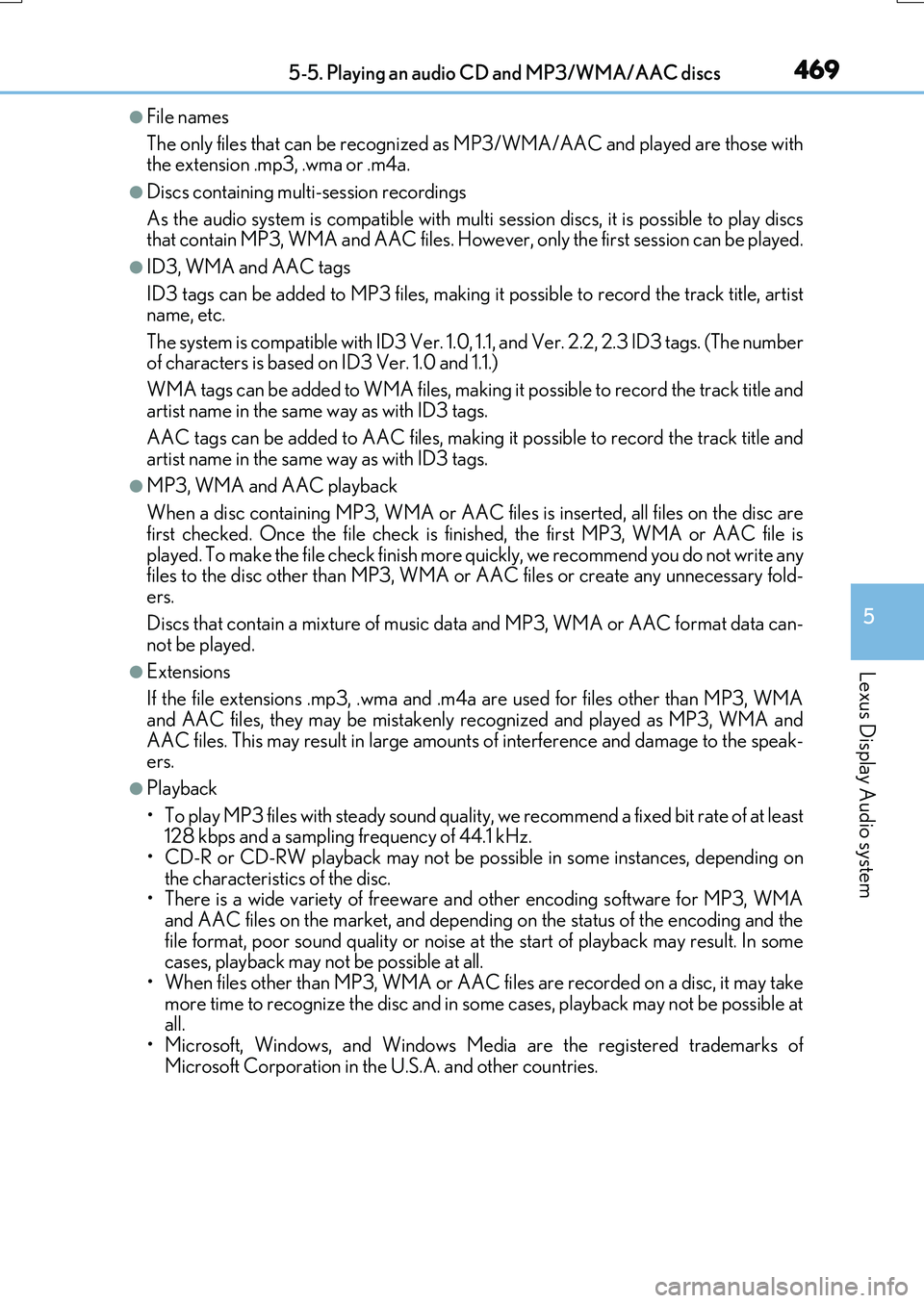
●File names
The only files that can be recognized as MP3/WMA/AAC and played are those with the extension .mp3, .wma or .m4a.
●Discs containing multi-session recordings
As the audio system is compatible with multi session discs, it is possible to play discs that contain MP3, WMA and AAC files. However, only the first session can be played.
●ID3, WMA and AAC tags
ID3 tags can be added to MP3 files, making it possible to record the track title, artist name, etc.
The system is compatible with ID3 Ver. 1.0, 1.1, and Ver. 2.2, 2.3 ID3 tags. (The number of characters is based on ID3 Ver. 1.0 and 1.1.)
WMA tags can be added to WMA files, making it possible to record the track title and
artist name in the same way as with ID3 tags.
AAC tags can be added to AAC files, making it possible to record the track title and artist name in the same way as with ID3 tags.
●MP3, WMA and AAC playback
When a disc containing MP3, WMA or AAC f iles is inserted, all files on the disc are first checked. Once the file check is fi nished, the first MP3, WMA or AAC file is
played. To make the file check finish more quickly, we recommend you do not write any files to the disc other than MP3, WMA or AAC files or create any unnecessary fold- ers.
Discs that contain a mixture of music data and MP3, WMA or AAC format data can- not be played.
●Extensions
If the file extensions .mp3, .wma and .m4a are used for files other than MP3, WMA and AAC files, they may be mistakenly recognized and played as MP3, WMA and
AAC files. This may result in large amount s of interference and damage to the speak- ers.
●Playback
• To play MP3 files with steady sound quality, we recommend a fixed bit rate of at least 128 kbps and a sampling frequency of 44.1 kHz.• CD-R or CD-RW playback may not be possible in some instances, depending on
the characteristics of the disc. • There is a wide variety of freeware and other encoding software for MP3, WMAand AAC files on the market, and depending on the status of the encoding and the
file format, poor sound quality or noise at the start of playback may result. In some cases, playback may not be possible at all.• When files other than MP3, WMA or AAC f iles are recorded on a disc, it may take
more time to recognize the disc and in some cases, playback may not be possible at all.• Microsoft, Windows, and Windows Medi a are the registered trademarks of
Microsoft Corporation in the U.S.A. and other countries.
Page 478 of 776
4785-6. Using an external device
RX350/RX200t_EE_OM48F32E
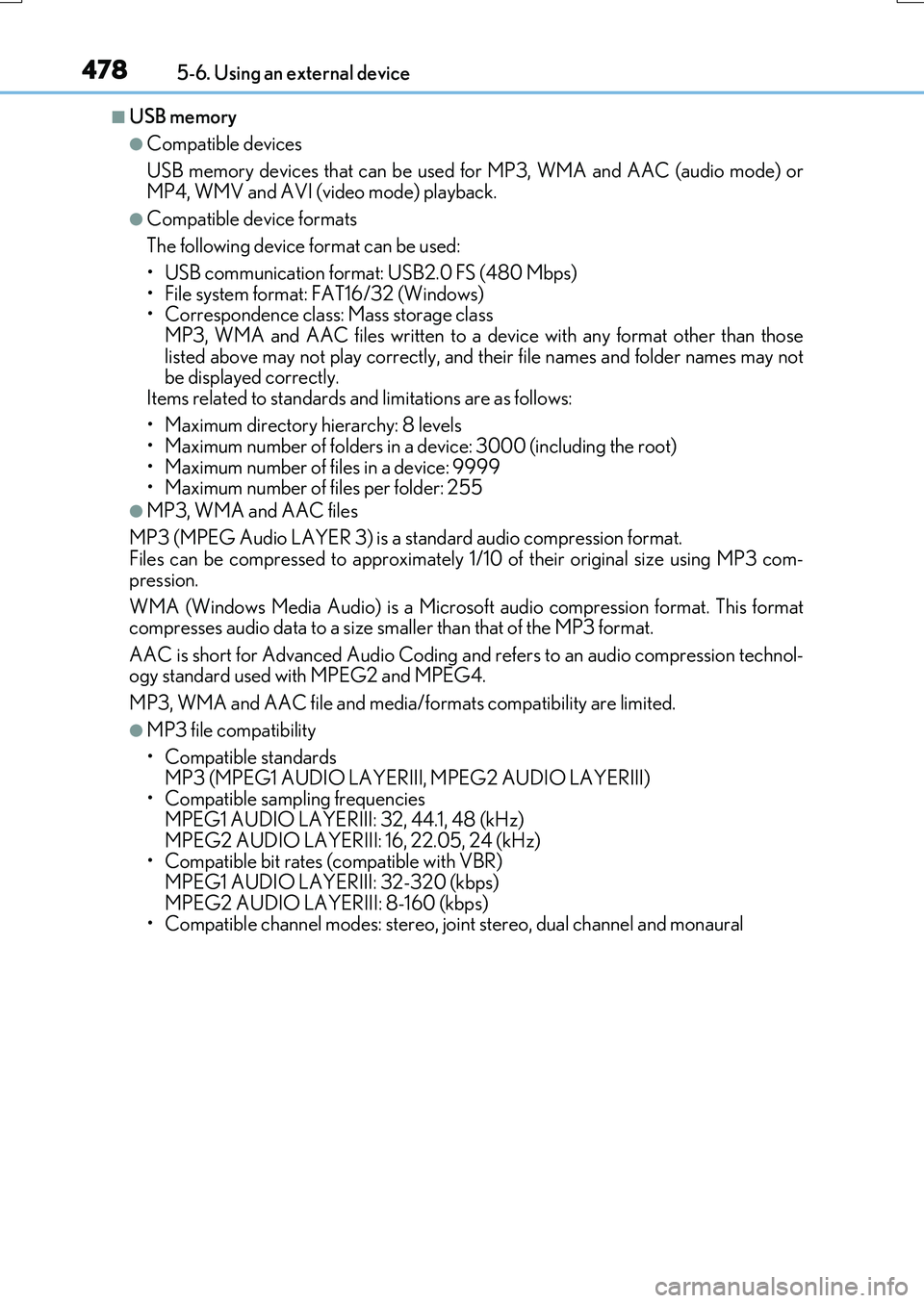
■USB memory
●Compatible devices
USB memory devices that can be used for MP3, WMA and AAC (audio mode) or
MP4, WMV and AVI (video mode) playback.
●Compatible device formats
The following device format can be used:
• USB communication format: USB2.0 FS (480 Mbps) • File system format: FAT16/32 (Windows)• Correspondence class: Mass storage class
MP3, WMA and AAC files written to a device with any format other than those listed above may not play correctly, and their file names and folder names may notbe displayed correctly.
Items related to standards and limitations are as follows:
• Maximum directory hierarchy: 8 levels • Maximum number of folders in a device: 3000 (including the root)
• Maximum number of files in a device: 9999 • Maximum number of files per folder: 255
●MP3, WMA and AAC files
MP3 (MPEG Audio LAYER 3) is a standard audio compression format. Files can be compressed to approximately 1/ 10 of their original size using MP3 com-
pression.
WMA (Windows Media Audio) is a Microsoft audio compression format. This format compresses audio data to a size smaller than that of the MP3 format.
AAC is short for Advanced Audio Coding an d refers to an audio compression technol- ogy standard used with MPEG2 and MPEG4.
MP3, WMA and AAC file and media/ formats compatibility are limited.
●MP3 file compatibility
• Compatible standards
MP3 (MPEG1 AUDIO LAYERIII, MPEG2 AUDIO LAYERIII) • Compatible sampling frequencies MPEG1 AUDIO LAYERIII: 32, 44.1, 48 (kHz)
MPEG2 AUDIO LAYERIII: 16, 22.05, 24 (kHz) • Compatible bit rates (c ompatible with VBR) MPEG1 AUDIO LAYERIII: 32-320 (kbps)
MPEG2 AUDIO LAYERIII: 8-160 (kbps) • Compatible channel modes: stereo, joint stereo, dual channel and monaural
Page 479 of 776
4795-6. Using an external device
5
Lexus Display Audio system
RX350/RX200t_EE_OM48F32E
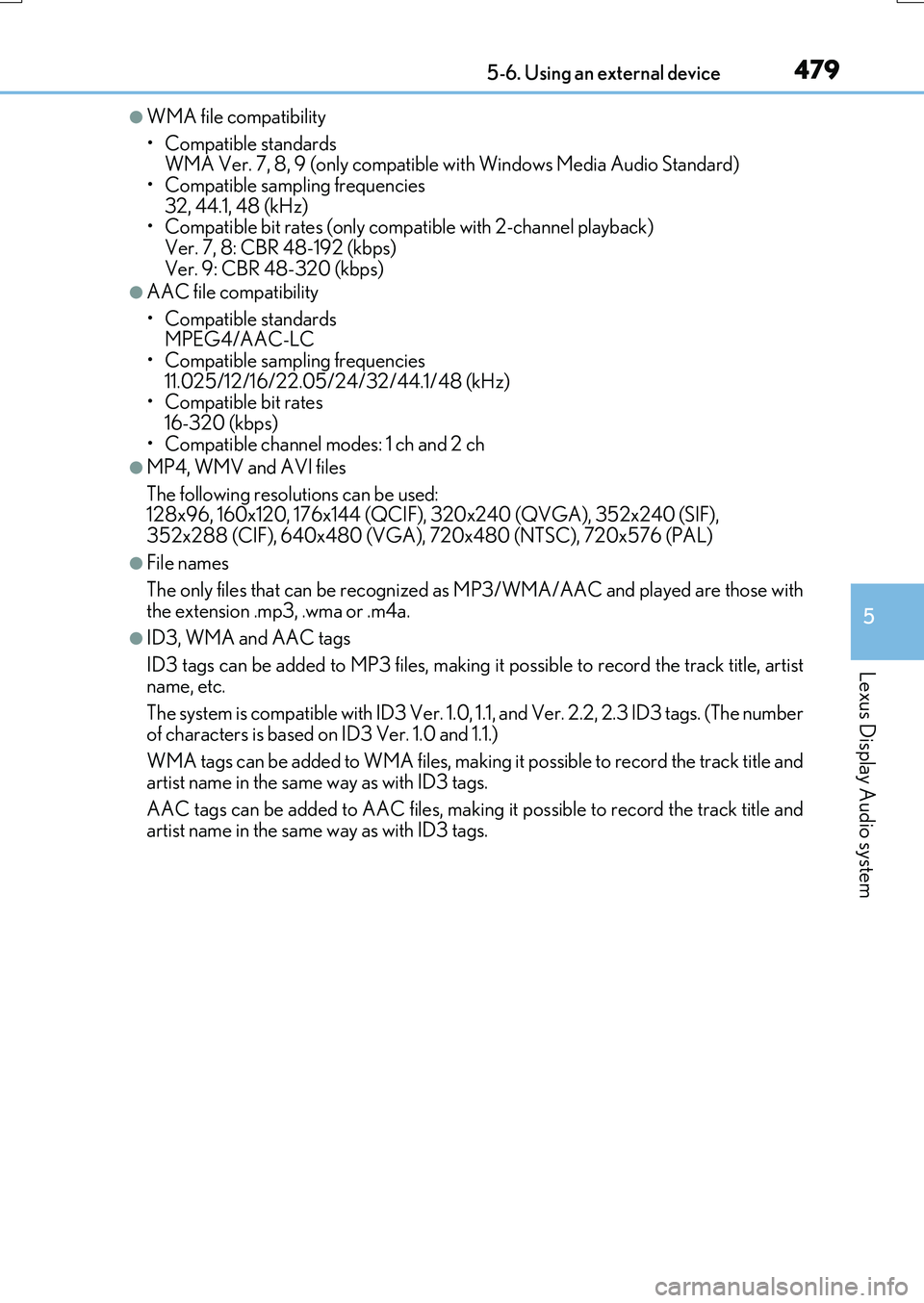
●WMA file compatibility
• Compatible standards WMA Ver. 7, 8, 9 (only compatible with Windows Media Audio Standard)
• Compatible sampling frequencies 32, 44.1, 48 (kHz)• Compatible bit rates (only compatible with 2-channel playback)
Ver. 7, 8: CBR 48-192 (kbps) Ver. 9: CBR 48-320 (kbps)
●AAC file compatibility
• Compatible standards MPEG4/AAC-LC
• Compatible sampling frequencies 11.025/12/16/22.05/24/32/44.1/48 (kHz)• Compatible bit rates
16-320 (kbps) • Compatible channel modes: 1 ch and 2 ch
●MP4, WMV and AVI files
The following resolutions can be used: 128x96, 160x120, 176x144 (QCIF), 320x240 (QVGA), 352x240 (SIF),
352x288 (CIF), 640x480 (VGA), 720x480 (NTSC), 720x576 (PAL)
●File names
The only files that can be recognized as MP3/WMA/AAC and played are those with
the extension .mp3, .wma or .m4a.
●ID3, WMA and AAC tags
ID3 tags can be added to MP3 files, making it possible to record the track title, artist
name, etc.
The system is compatible with ID3 Ver. 1.0, 1.1, and Ver. 2.2, 2.3 ID3 tags. (The number
of characters is based on ID3 Ver. 1.0 and 1.1.)
WMA tags can be added to WMA files, making it possible to record the track title and artist name in the same way as with ID3 tags.
AAC tags can be added to AAC files, making it possible to record the track title and artist name in the same way as with ID3 tags.
Page 480 of 776
4805-6. Using an external device
RX350/RX200t_EE_OM48F32E
●MP3, WMA and AAC playback
• When a device containing MP3, WMA or AA C files is connected, all files in the USB memory device are checked. Once the file check is finished, the first MP3,
WMA or AAC file is played. To make the file check finish more quickly, we recom- mend that you do not include any files other than MP3, WMA or AAC files or cre-ate any unnecessary folders.
• When a USB memory device is connected and the audio source is changed to USB memory mode, the USB memory device will start playing the first file in the firstfolder. If the same device is removed and reconnected (and the contents have not
been changed), the USB memory device will resume play from the same point in which it was last used.
●Extensions
If the file extensions .mp3, .wma and .m4a are used for files other than MP3, WMA and AAC files, they will be skipped (not played).
●Playback
• To play MP3 files with steady sound quality, we recommend a fixed bit rate of at least 128 kbps and a sampling frequency of 44.1 kHz.
• There is a wide variety of freeware and other encoding software for MP3, WMA and AAC files on the market, and depending on the status of the encoding and thefile format, poor sound quality or noise at the start of playback may result. In some
cases, playback may not be possible at all. • Microsoft, Windows, and Windows Medi a are the registered trademarks of Microsoft Corporation in the U.S.A. and other countries.
NOTICE
■To prevent damage to the USB memory device or its terminals
●Depending on the size and shape of the USB memory that is connected to the sys-tem, the console box may not close fully. In this case, do not forcibly close the consolebox as this may damage the USB memory or the terminal, etc.
●Do not leave the USB memory device in the vehicle. The temperature inside the vehi-cle may become high.
●Do not push down on or apply unnecessary pressure to the USB memory device
while it is connected.
●Do not insert foreign objects into the port.
Page 513 of 776
5135-11. Bluetooth®
5
Lexus Display Audio system
RX350/RX200t_EE_OM48F32E
■When using the Bluetooth® audio system
●In the following situations, the system may not function.
• If the portable audio player is turned off • If the portable audio player is not connected
• If the portable audio player’s battery is low
●There may be a delay if a cellular phone connection is made during Bluetooth® audio
play.
●Depending on the type of portable audio player that is connected to the system, opera- tion may differ slightly and certain functions may not be available.
■When using the hands-free system
●The audio system is muted when making a call.
●If both parties speak at the same time, it may be difficult to hear.
●If the received call volume is over ly loud, an echo may be heard. If the Bluetooth® phone is too close to the system, quality of the sound may deteriorate and connection status may deteriorate.
●In the following situations, it may be difficult to hear the other party:
• When driving on unpaved roads • When driving at high speeds
•If a window is open • If the air conditioning is blowing directly on the microphone• If there is interference from the network of the cellular phone
●Depending on the type phone, cert ain functions may not be available.
■Conditions under which the system will not operate
●If using a cellular phone that does not support Bluetooth®
●If the cellular phone is turned off
●If you are outside of cellular phone service coverage
●If the cellular phone is not connected
●If the cellular phone’s battery is low
●When outgoing calls are controlled, due to heavy traffic on phone lines, etc.
●When the cellular phone itself cannot be used
●When transferring phonebook data from the cellular phone
Bluetooth®
Page 525 of 776
5255-12. Other function
5
Lexus Display Audio system
RX350/RX200t_EE_OM48F32E
■USB memory functions
P. 477
■USB memory
●Compatible devices
USB memory device that can be used for JPEG display.
●Compatible device formats
The following device format can be used:
• USB communication format: USB2.0 FS (480 Mbps) • File system format: FAT16/32 (Windows)• Correspondence class: Mass storage class
●JPEG file compatibility
• Compatible image size: Maximum 10MB
• Compatible pixel size: Maximum 10,000,000 pixels
NOTICE
■To prevent damage to the USB memory device or its terminals
P. 480
Page 538 of 776
5386-2. Using the air conditioning system and defogger
RX350/RX200t_EE_OM48F32E
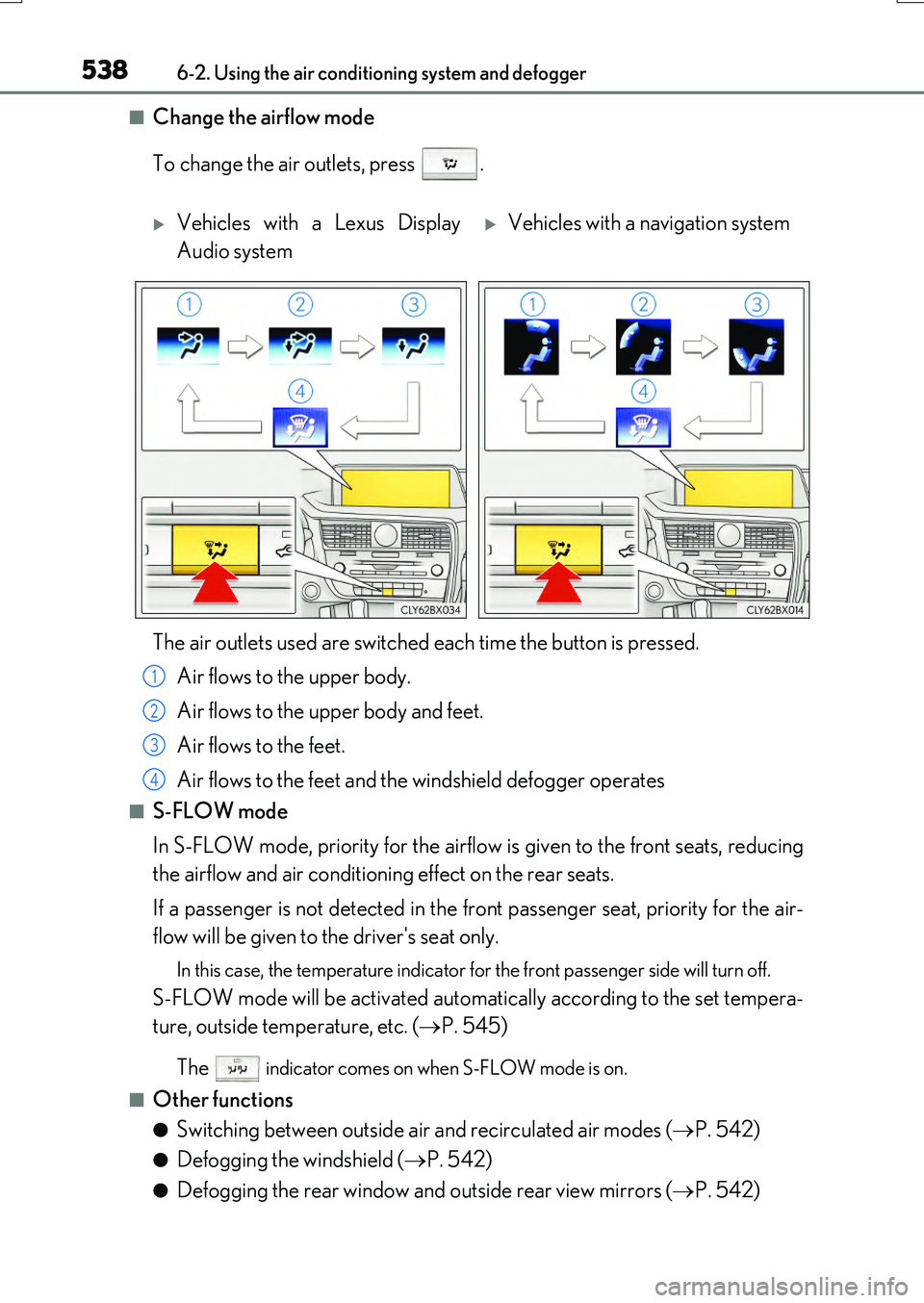
■Change the airflow mode
To change the air outlets, press .
■S-FLOW mode
In S-FLOW mode, priority for the airflow is given to the front seats, reducing
the airflow and air conditioning effect on the rear seats.
If a passenger is not detected in the front passenger seat, priority for the air-
flow will be given to the driver's seat only.
In this case, the temperature indicator for the front passenger side will turn off.
S-FLOW mode will be activated automatically according to the set tempera-
ture, outside temperature, etc. ( P. 545)
The indicator comes on when S-FLOW mode is on.
■Other functions
●Switching between outside air and recirculated air modes ( P. 542)
●Defogging the windshield (P. 542)
●Defogging the rear window and outside rear view mirrors (P. 542)
Vehicles with a Lexus Display
Audio system
Vehicles with a navigation system
The air outlets used are switched each time the button is pressed.
Air flows to the upper body.
Air flows to the upper body and feet.
Air flows to the feet.
Air flows to the feet and the windshield defogger operates
1
2
3
4
Page 542 of 776
5426-2. Using the air conditioning system and defogger
RX350/RX200t_EE_OM48F32E
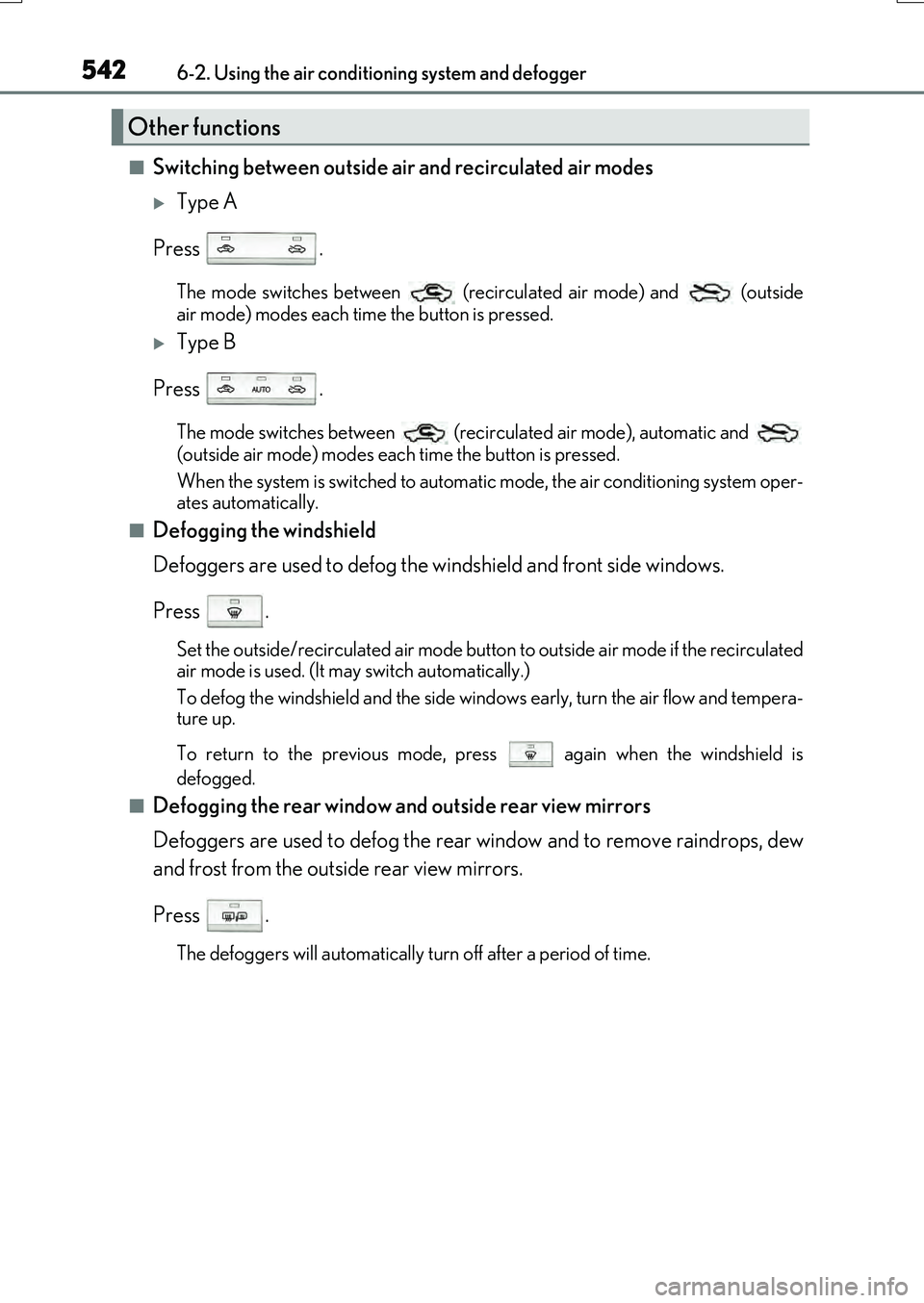
■Switching between outside air and recirculated air modes
Type A
Press .
The mode switches between (recirculated air mode) and (outside
air mode) modes each time the button is pressed.
Type B
Press .
The mode switches between (recirculated air mode), automatic and
(outside air mode) modes each time the button is pressed.
When the system is switched to automatic mode, the air conditioning system oper-
ates automatically.
■Defogging the windshield
Defoggers are used to defog the windshield and front side windows.
Press .
Set the outside/recirculated air mode button to outside air mode if the recirculated
air mode is used. (It may switch automatically.)
To defog the windshield and the side windows early, turn the air flow and tempera-
ture up.
To return to the previous mode, press again when the windshield is
defogged.
■Defogging the rear window and outside rear view mirrors
Defoggers are used to defog the rear window and to remove raindrops, dew
and frost from the outside rear view mirrors.
Press .
The defoggers will automatically turn off after a period of time.
Other functions