ignition LEXUS RX200T 2017 Workshop Manual
[x] Cancel search | Manufacturer: LEXUS, Model Year: 2017, Model line: RX200T, Model: LEXUS RX200T 2017Pages: 776, PDF Size: 44.51 MB
Page 383 of 776
3834-5. Using the driving support systems
4
Driving
RX350/RX200t_EE_OM48F32E
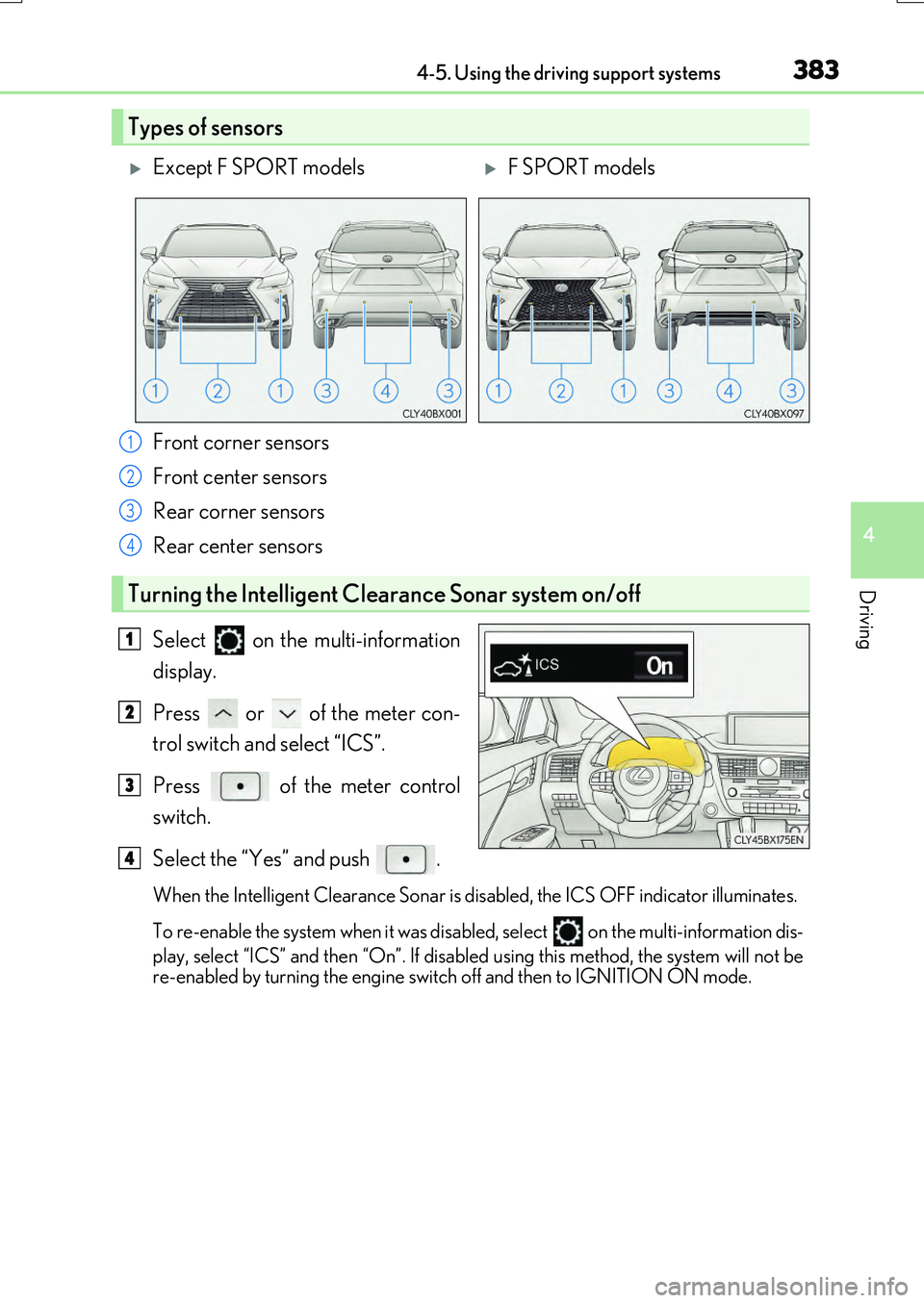
Front corner sensors
Front center sensors
Rear corner sensors
Rear center sensors
Select on the multi-information
display.
Press or of the meter con-
trol switch and select “ICS”.
Press of the meter control
switch.
Select the “Yes” and push .
When the Intelligent Clearance Sonar is di sabled, the ICS OFF indicator illuminates.
To re-enable the system when it was disabled, select
on the multi-information dis-
play, select “ICS” and then “On”. If disabled using this method, the system will not be
re-enabled by turning the engine swit ch off and then to IGNITION ON mode.
Types of sensors
Except F SPORT modelsF SPORT models
1
2
3
4
Turning the Intelligent Clearance Sonar system on/off
1
2
3
4
Page 388 of 776
3884-5. Using the driving support systems
RX350/RX200t_EE_OM48F32E
■Re-enabling the Intelligent Clearance Sonar system
To re-enable the Intelligent Clearance Sonar system when it is disabled due to operation of the Intelligent Clearance Sonar function, either enable the system again (P. 383),
or turn the engine switch off and then back to IGNITION ON mode.
Additionally, if the object becomes no longer in the traveling direction of the vehicle or if the traveling direction of the vehicle chan ges (such as changing from moving forward to
backing up, or from backing up to moving fo rward), the system will be re-enabled auto- matically.
■Objects that the Intelligent Clearance Sonar function may not detect
The sensors may not be able to detect certain objects, such as the following.
●Cotton cloth, snow, and other materials that are poor reflectors of ultrasonic waves.
(People may also not be detected depending on the type of clothing they are wearing.)
●Objects which are not perpendicular to the ground, are not perpendicular to the traveling direction of the vehicle, are uneven or are waving.
●Low objects
●Thin objects such as wires, fences, ropes and signposts
●Objects that are extremely close to the bumper
■Lexus parking assist-sensor buzzer
Regardless of whether the Lexus parking as sist-sensor system is enabled or not (P. 375), if the Intelligent Clearance Sonar system is enabled ( P. 383), the front or rear sensors detect an object and brake control is performed, the Lexus parking assist-sensor
buzzer will sound to notify the driver of the approximate distance to the object.
Page 397 of 776
3974-5. Using the driving support systems
4
Driving
RX350/RX200t_EE_OM48F32E
■Re-enabling the Rear Crossing Traffic Auto Brake function
To re-enable the Rear Crossing Traffic Auto Brake function when it is disabled during
operation of the Rear Crossing Traffic Auto Brake function, either enable the system
again ( P. 383), or turn the engine switch o ff and then back to IGNITION ON mode.
Additionally, if there is no longer a vehicle ap proaching from the right or left at the rear of
the vehicle, or if the traveling direction of the vehicle changes (such as changing from
moving forward to backing up or from backing up to moving forward), the system will be
re-enabled automatically.
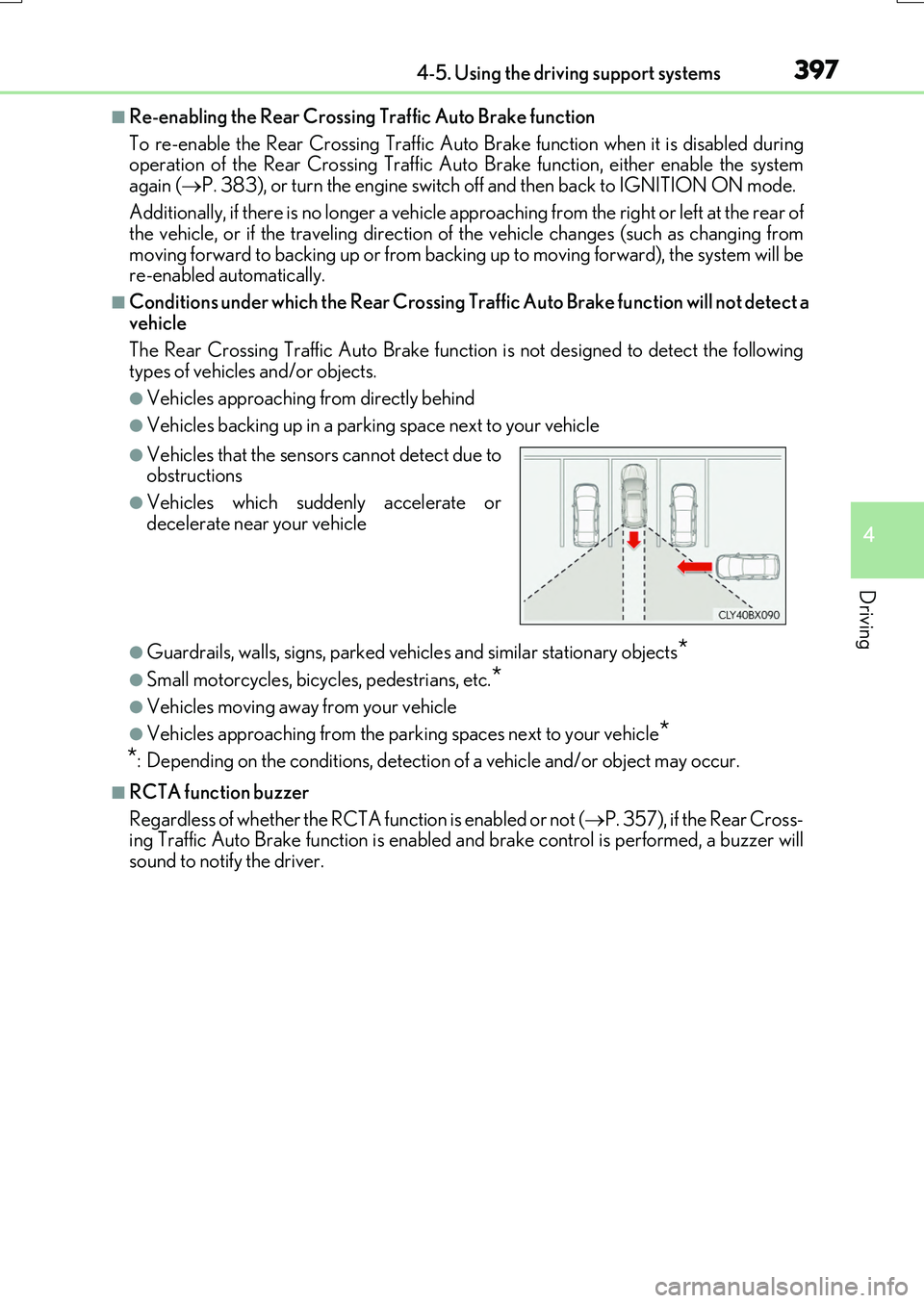
■Conditions under which the Rear Crossing Traffic Auto Brake function will not detect a
vehicle
The Rear Crossing Traffic Auto Brake function is not designed to detect the following
types of vehicles and/or objects.
●Vehicles approaching from directly behind
●Vehicles backing up in a parking space next to your vehicle
●Guardrails, walls, signs, parked vehi cles and similar stationary objects*
●Small motorcycles, bicycles, pedestrians, etc.*
●Vehicles moving away from your vehicle
●Vehicles approaching from the parking spaces next to your vehicle*
*
: Depending on the conditions, detection of a vehicle and/or object may occur.
■RCTA function buzzer
Regardless of whether the RCTA function is enabled or not ( P. 357), if the Rear Cross-
ing Traffic Auto Brake function is enabled an d brake control is performed, a buzzer will
sound to notify the driver.
●Vehicles that the sensors cannot detect due to
obstructions
●Vehicles which suddenly accelerate or
decelerate near your vehicle
Page 401 of 776
4014-5. Using the driving support systems
4
Driving
RX350/RX200t_EE_OM48F32E
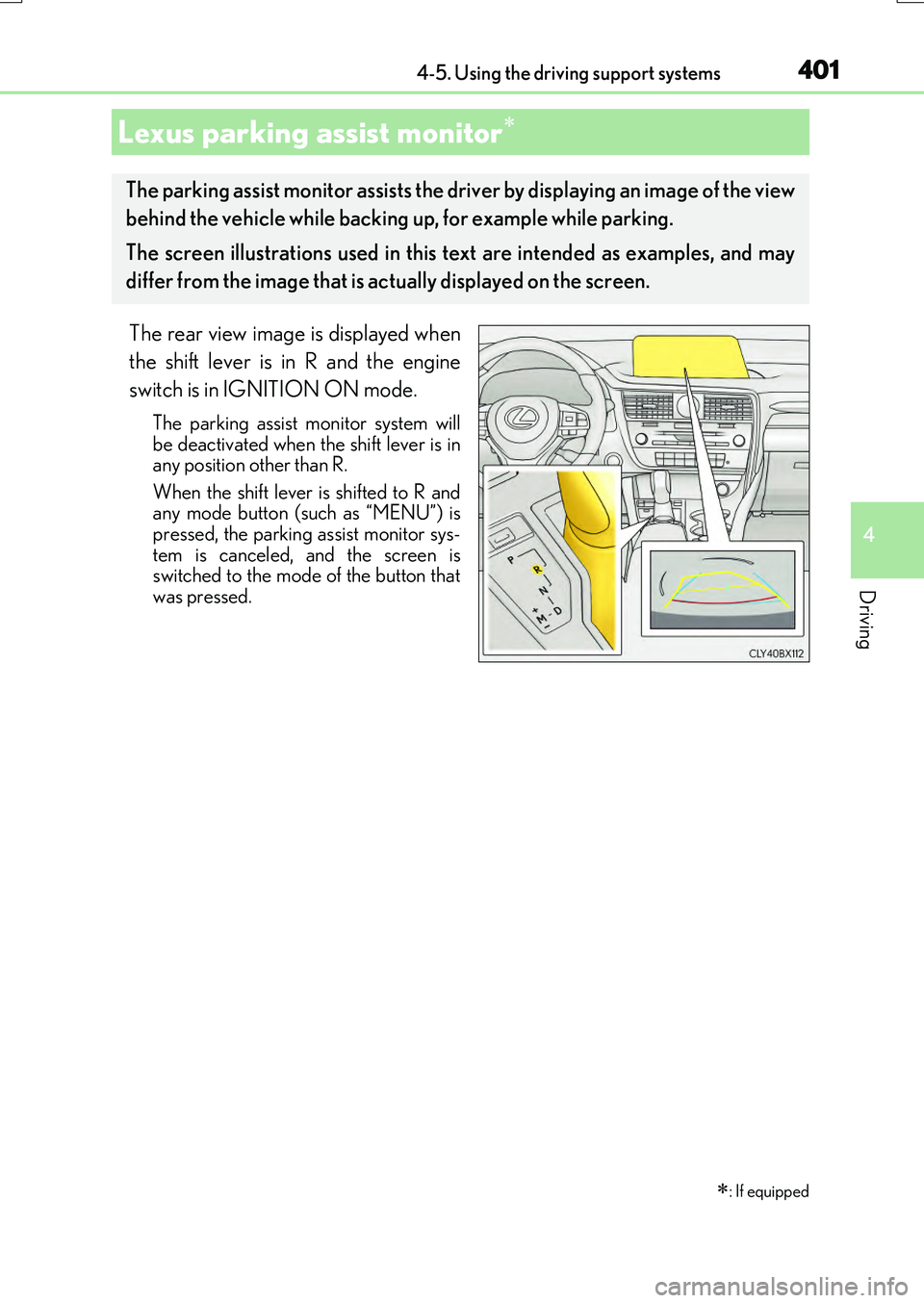
The rear view image is displayed when
the shift lever is in R and the engine
switch is in IGNITION ON mode.
The parking assist monitor system will be deactivated when the shift lever is inany position other than R.
When the shift lever is shifted to R and any mode button (such as “MENU”) ispressed, the parking assist monitor sys-
tem is canceled, and the screen is switched to the mode of the button thatwas pressed.
Lexus parking assist monitor
: If equipped
The parking assist monitor assists the driver by displaying an image of the view
behind the vehicle while backing up, for example while parking.
The screen illustrations used in this text are intended as examples, and may
differ from the image that is ac tually displayed on the screen.
Page 402 of 776
4024-5. Using the driving support systems
RX350/RX200t_EE_OM48F32E
■Screen display
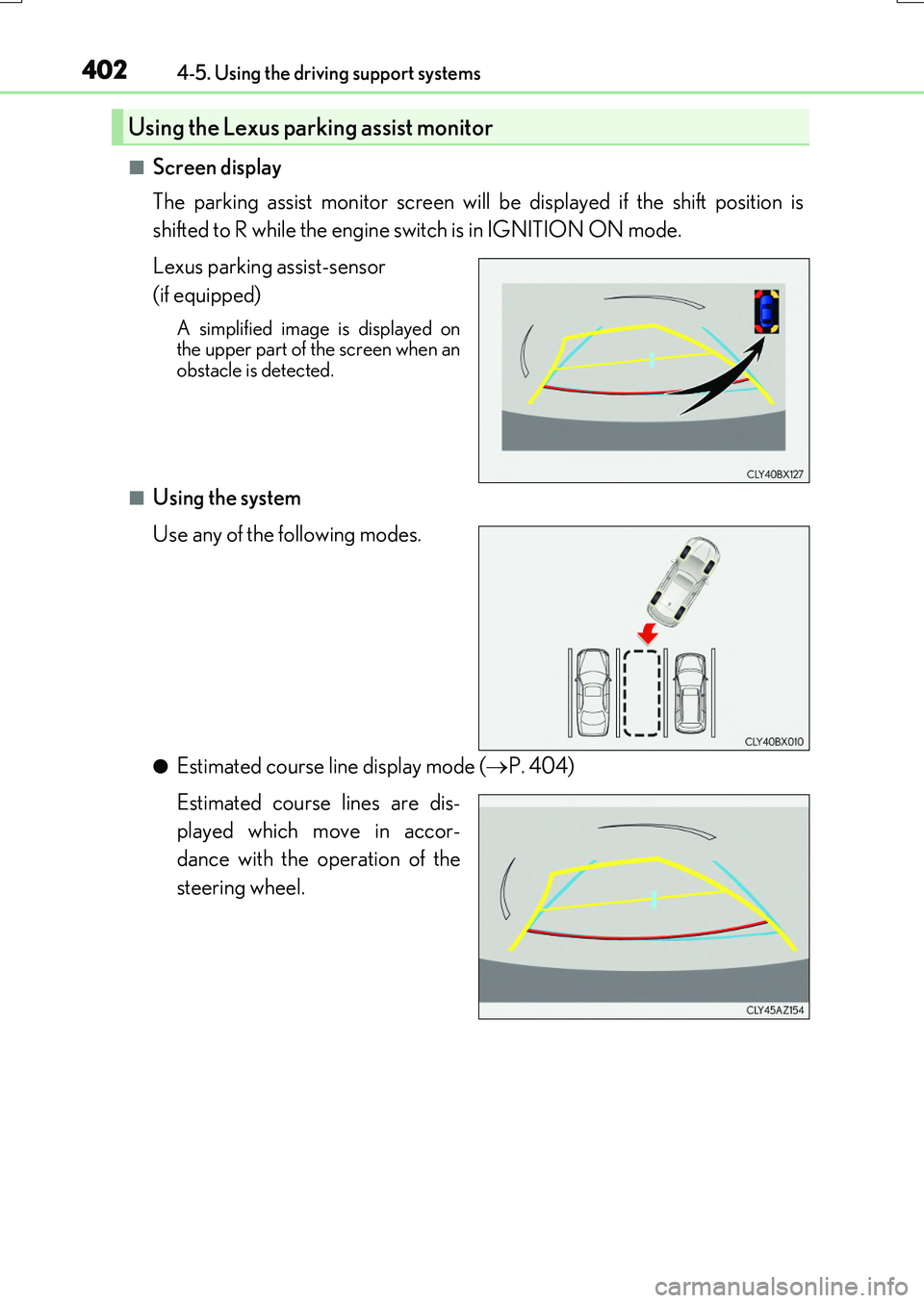
The parking assist monitor screen will be displayed if the shift position is
shifted to R while the engine switch is in IGNITION ON mode.
Lexus parking assist-sensor
(if equipped)
A simplified image is displayed on the upper part of the screen when anobstacle is detected.
■Using the system
Use any of the following modes.
●Estimated course line display mode ( P. 404)
Estimated course lines are dis-
played which move in accor-
dance with the operation of the
steering wheel.
Using the Lexus parking assist monitor
Page 421 of 776
4214-5. Using the driving support systems
4
Driving
RX350/RX200t_EE_OM48F32E
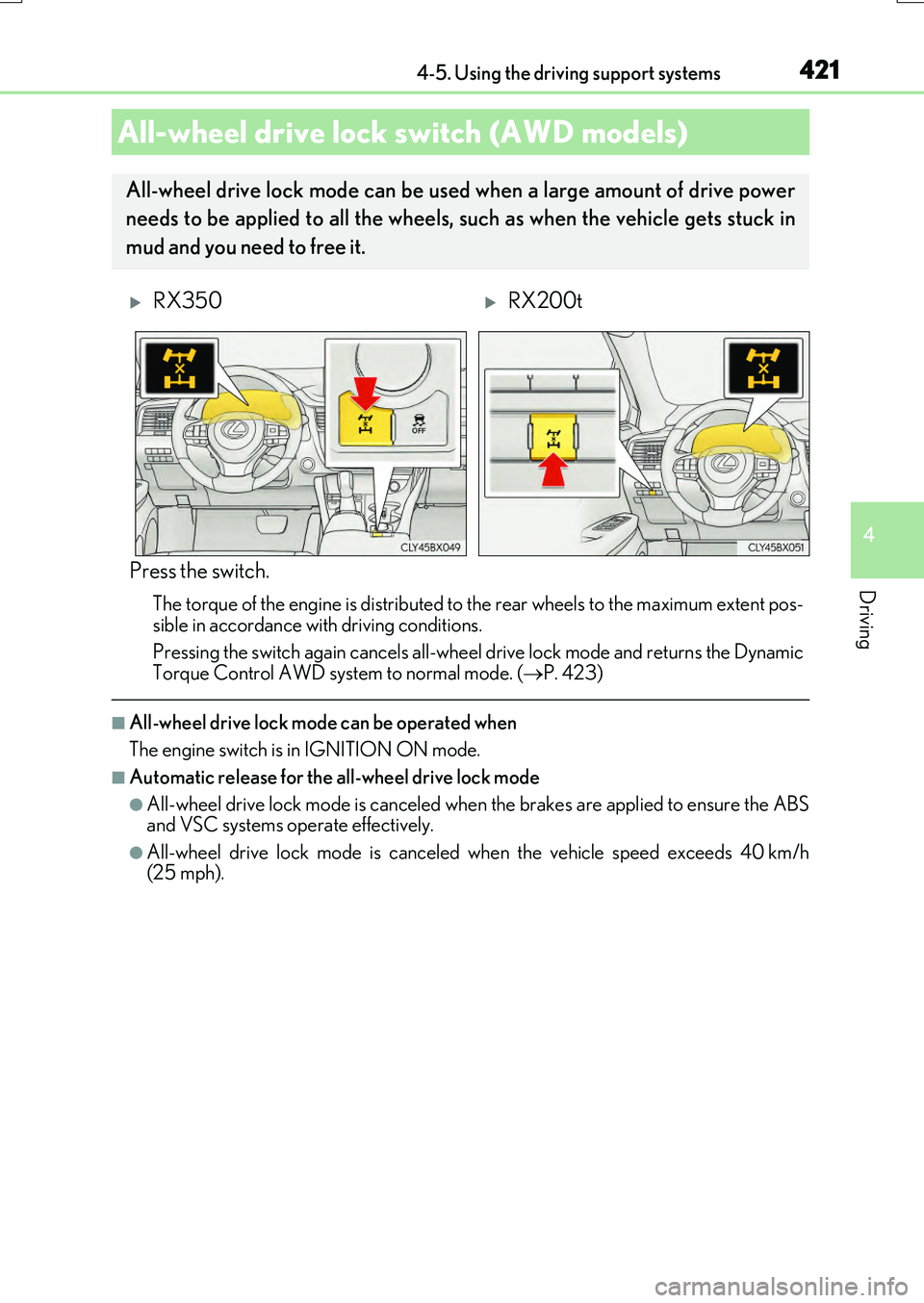
Press the switch.
The torque of the engine is distributed to the rear wheels to the maximum extent pos-
sible in accordance with driving conditions.
Pressing the switch again cancels all-wheel drive lock mode and returns the Dynamic Torque Control AWD system to normal mode. ( P. 423)
■All-wheel drive lock mode can be operated when
The engine switch is in IGNITION ON mode.
■Automatic release for the all-wheel drive lock mode
●All-wheel drive lock mode is canceled when the brakes are applied to ensure the ABS and VSC systems operate effectively.
●All-wheel drive lock mode is canceled when the vehicle speed exceeds 40 km/h(25 mph).
All-wheel drive lock switch (AWD models)
All-wheel drive lock mode can be used when a large amount of drive power
needs to be applied to all the wheels, such as when the vehicle gets stuck in
mud and you need to free it.
RX350RX200t
Page 487 of 776
4875-7. Connecting Bluetooth®
5
Lexus Display Audio system
RX350/RX200t_EE_OM48F32E
When you register a phone, auto connection will be activated. It is recom-
mended to have the system set to this mode and leave the Bluetooth® phone in a
place where a good connection can be established.
When the engine switch is turned to ACCESSORY or IGNITION ON mode,
the system will search for a nearby cellular phone you have registered.
The system automatically connects with the most recent phone that was con-
nected. The connected result is displayed.
When auto connection has failed or “Bluetooth* power” is turned off, you must
connect the Bluetooth® device manually.
Go to “Bluetooth* setup”: “MENU” button “Setup” “Bluetooth*”
Select the device to connect.
Select “Connect all”, “Connect as a telephone” or “Connect as audio player”.
If the desired Bluetooth® device is not displayed, register the device.
( P. 484)
*: Bluetooth is a registered trademark of Bluetooth SIG, Inc.
■Reconnecting a Bluetooth® phone
If the system cannot connect due to poor signal strength with the engine switch in ACCESSORY or IGNITION ON mode, the syst em will automatically attempt to recon-
nect.
■Connecting a phone while Bluetooth® audio is playing
●Bluetooth® audio will stop temporarily.
●It may take time to connect.
Connecting a Bluetooth® phone
There are two connecting methods available: automatic and manual.
Auto connection
Manual connection
1
2
3
Page 515 of 776
5155-11. Bluetooth®
5
Lexus Display Audio system
RX350/RX200t_EE_OM48F32E
■Compatible models
The Bluetooth® audio system supports portable audio players with the following specifi- cations
●Bluetooth® specifications: Ver. 2.0, or higher (Recommend ed: Ver. 3.0 +EDR or higher)
●Profiles:
• A2DP (Advanced Audio Distribution Profile) Ver. 1.0, or higher (Recommended: Ver. 1.2 or higher) This is a profile to transmit stereo audio or high quality sound to the audio system.
• AVRCP (Audio/Video Remote Control Profile) Ver. 1.0 or higher (Recommended: Ver. 1.4 or higher) This is a profile to allow remote control the A/V equipment.
However, please note that some functions may be limited depending on the type of por- table audio player connected.
The hands-free system supports cellular ph ones with the following specifications.
●Bluetooth® specification: Ver. 2.0 or higher (Recommended : Ver. 3.0 +EDR or higher)
●Profiles:
• HFP (Hands Free Profile) Ver. 1.0 or higher (Recommended: Ver. 1.6 or higher) This is a profile to allow hands-free phone calls using a cellular phone or head set. It has outgoing and incoming call functions.
• OPP (Object Push Profile) Ver. 1.1 or higher (Recommended: Ver. 1.2) This is a profile to transfer phonebook data. When a Bluetooth® compatible cellular phone has both PBAP and OPP, OPP cannot be used.
• PBAP (Phone Book Access Profile) Ver. 1.0 or higher (Recommended: Ver. 1.1) This is a profile to tr ansfer phonebook data.
• MAP (Message Access Profile) Ver.1.0 or higher This is a profile to using phone message.If the cellular phone does not support HFP, you cannot register it with the hands-free sys-
tem. OPP, PBAP or MAP services must be selected individually.
■Reconnecting the portable audio player
If the portable audio player is disconnect ed due to poor reception when the engine
switch is turned to ACCESSORY or IGNITION ON mode, the system automatically reconnects the portable audio player.
If you have switched off the portable audio player yourself, follow the instructions below
to reconnect:
●Select the portable audio player again
●Enter the portable audio player
■When you sell your car
Be sure to delete your personal data. ( P. 451)
Page 550 of 776
5506-2. Using the air conditioning system and defogger
RX350/RX200t_EE_OM48F32E
■Operation condition
The heated steering wheel can be used when the engine switch is in IGNITION ON mode.
■Timer
The heated steering wheel will automatically turn off after about 30 minutes.
■When the heated steering wheel is operating
If the Heated Windshield Defroster is operated, operation of the heated steering wheel
will be suspended. Turn off the Heated Windsh ield Defroster to enable the heated steer- ing wheel. ( P. 543)
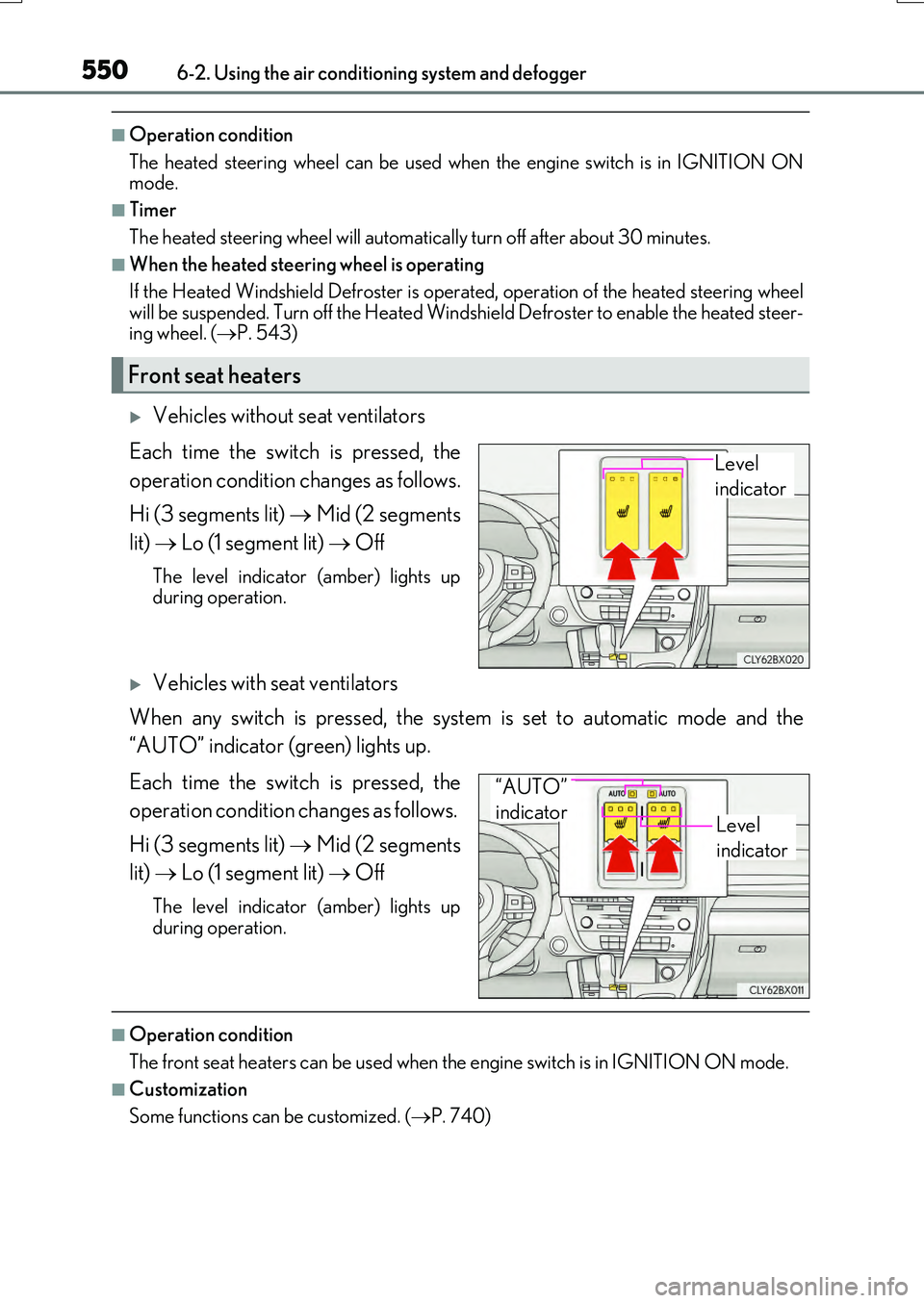
Vehicles without seat ventilators
Each time the switch is pressed, the
operation condition changes as follows.
Hi (3 segments lit) Mid (2 segments
lit) Lo (1 segment lit) Off
The level indicator (amber) lights up during operation.
Vehicles with seat ventilators
When any switch is pressed, the system is set to automatic mode and the
“AUTO” indicator (green) lights up.
Each time the switch is pressed, the
operation condition changes as follows.
Hi (3 segments lit) Mid (2 segments
lit) Lo (1 segment lit) Off
The level indicator (amber) lights up
during operation.
■Operation condition
The front seat heaters can be used when th e engine switch is in IGNITION ON mode.
■Customization
Some functions can be customized. ( P. 740)
Front seat heaters
Level
indicator
Level
indicator
“AUTO”
indicator
Page 551 of 776
5516-2. Using the air conditioning system and defogger
6
Interior features
RX350/RX200t_EE_OM48F32E
■When the front passenger seat heater is operating
If the Heated Windshield Defroster is operated, operation of the front passenger seat heater will be suspended. Turn off the Heated Windshield Defroster enable the front pas-
senger seat heater. ( P. 543)
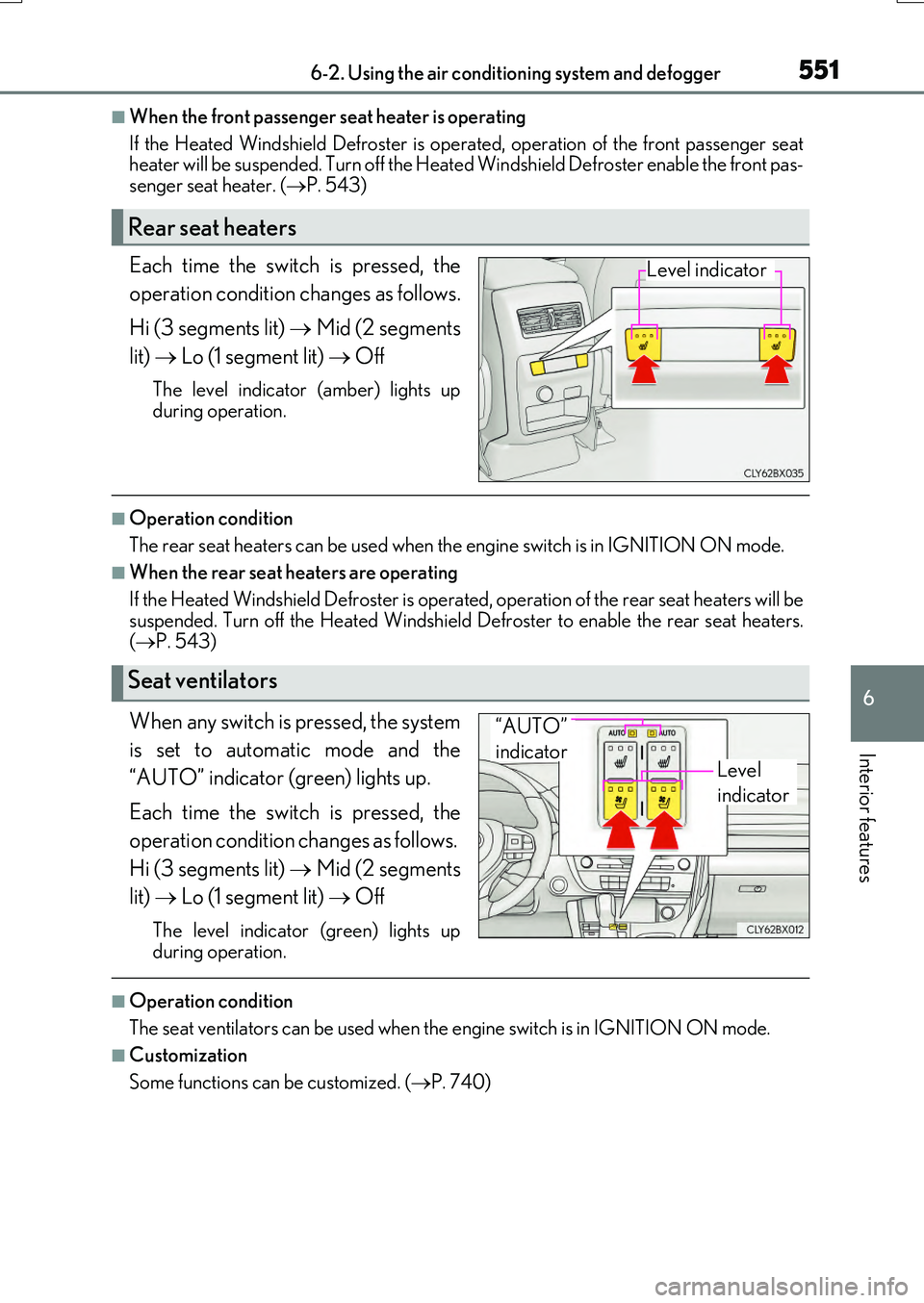
Each time the switch is pressed, the
operation condition changes as follows.
Hi (3 segments lit) Mid (2 segments
lit) Lo (1 segment lit) Off
The level indicator (amber) lights up
during operation.
■Operation condition
The rear seat heaters can be used when th e engine switch is in IGNITION ON mode.
■When the rear seat heaters are operating
If the Heated Windshield Defroster is operat ed, operation of the rear seat heaters will be
suspended. Turn off the Heated Windshield Defroster to enable the rear seat heaters. ( P. 543)
When any switch is pressed, the system
is set to automatic mode and the
“AUTO” indicator (green) lights up.
Each time the switch is pressed, the
operation condition changes as follows.
Hi (3 segments lit) Mid (2 segments
lit) Lo (1 segment lit) Off
The level indicator (green) lights up
during operation.
■Operation condition
The seat ventilators can be used when th e engine switch is in IGNITION ON mode.
■Customization
Some functions can be customized. ( P. 740)
Rear seat heaters
Level indicator
Seat ventilators
Level
indicator
“AUTO”
indicator