parking LEXUS RX200T 2017 Workshop Manual
[x] Cancel search | Manufacturer: LEXUS, Model Year: 2017, Model line: RX200T, Model: LEXUS RX200T 2017Pages: 776, PDF Size: 44.51 MB
Page 376 of 776
3764-5. Using the driving support systems
RX350/RX200t_EE_OM48F32E
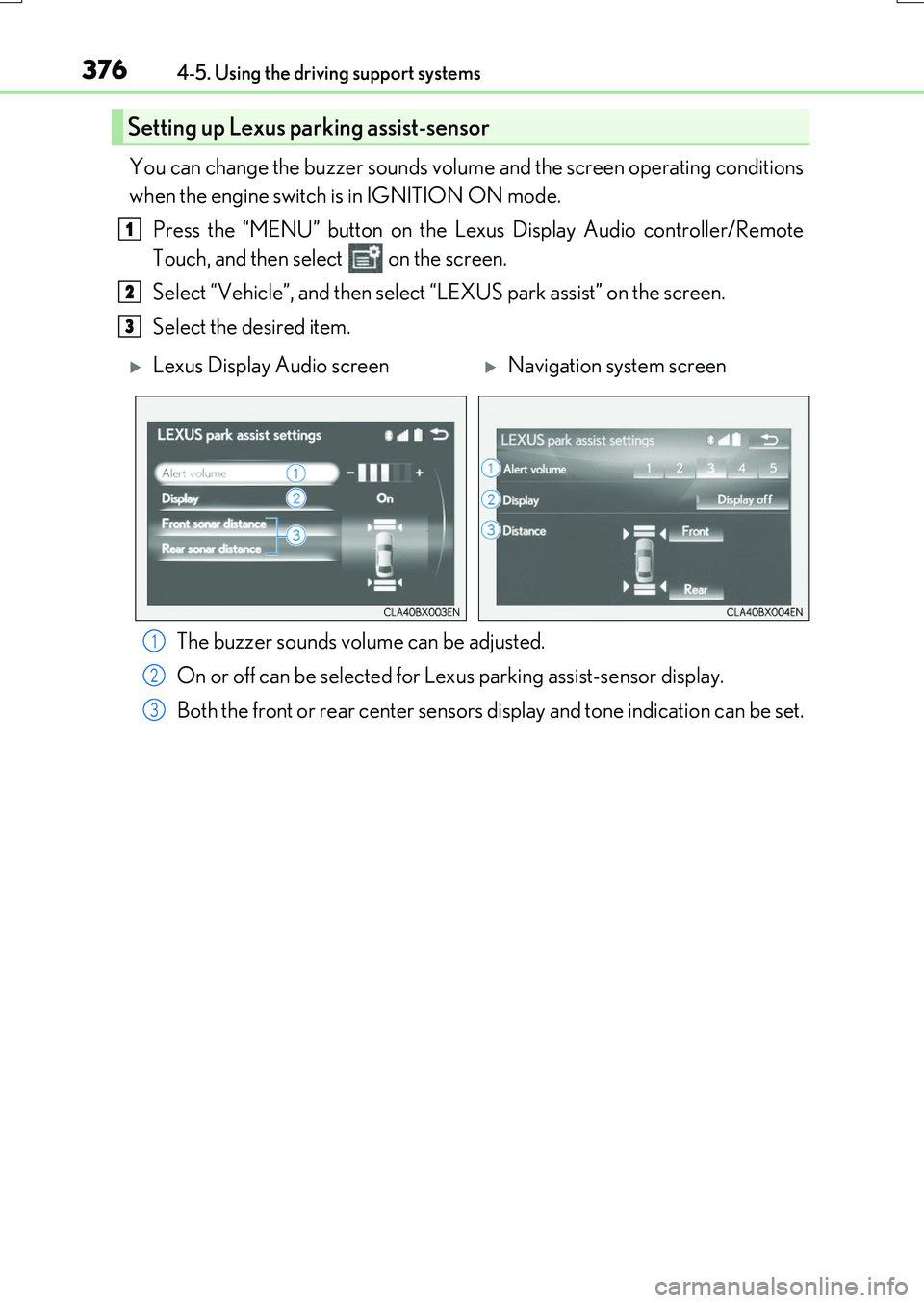
You can change the buzzer sounds volume and the screen operating conditions
when the engine switch is in IGNITION ON mode.
Press the “MENU” button on the Le xus Display Audio controller/Remote
Touch, and then select on the screen.
Select “Vehicle”, and then select “LEXUS park assist” on the screen.
Select the desired item.
The buzzer sounds volume can be adjusted.
On or off can be selected for Le xus parking assist-sensor display.
Both the front or rear ce nter sensors display and tone indication can be set.
Setting up Lexus parking assist-sensor
1
2
3
Lexus Display Audio screenNavigation system screen
1
2
3
Page 377 of 776
3774-5. Using the driving support systems
4
Driving
RX350/RX200t_EE_OM48F32E
■The Lexus parking assist-sensor can be operated when
●Front corner sensors:
• The engine switch is in IGNITION ON mode. • The shift lever is in other than P.
• The vehicle speed is less than about 10 km/h (6 mph). (At any speed when the shift lever is in R)
●Front center sensors:
• The engine switch is in IGNITION ON mode. • The shift lever is in other than P or R.
• The vehicle speed is less than about 10 km/h (6 mph).
●Rear corner and rear center sensors:
• The engine switch is in IGNITION ON mode. • The shift lever is in R.
■Lexus parking assist-sensor display
●Vehicles with a Lexus Display Audio system : When an obstacle is detected while the Lexus parking assist monitor is in use, the warning indicator will appear in the upperpart of the screen even if the display setting has been set to off.
●Vehicles with a navigation system: If the Lexu s parking assist-sensor display is set to on, detected objects will also be displayed on the panoramic view monitor. For details, refer to “NAVIGATION SYSTEM OWNER’S MANUAL”.
■Sensor detection information
●The sensor’s detection areas are limited to the areas around the vehicle’s bumper.
●Certain vehicle conditions and the surrounding environment may affect the ability of a
sensor to correctly detect an obstacle. Particular instances where this may occur are listed below.
• There is dirt, snow or ice on the sensor . (Wiping the sensors will resolve this prob-
lem.) • The sensor is frozen. (Thawing the area will resolve this problem.) In especially cold weather, if a sensor is frozen the screen may show an abnormal
display, or obstacles may not be detected. • The sensor is covered in any way.• The vehicle is leaning considerably to one side.
• On an extremely bumpy road, on an incline, on gravel, or on grass. • The vicinity of the vehicle is noisy due to vehicle horns, motorcycle engines, airbrakes of large vehicles, or other loud noises producing ultrasonic waves.
• There is another vehicle equipped with parking assist sensors in the vicinity. • The sensor is coated with a sheet of spray or heavy rain. • The vehicle is equipped with a fender pole or wireless antenna.
• Towing eyelets are installed. • The bumper or sensor receives a strong impact.
• The vehicle is approaching a tall or curved curb. • In harsh sunlight or intense cold weather.• The area directly under the bumpers is not detected.
• If obstacles draw too close to the sensor. • A non-genuine Lexus suspension (low ered suspension etc.) is installed. • People may not be detected if they are wearing certain types of clothing.
In addition to the examples above, there are instances in which, because of their shape, signs and other objects may be judged by a sensor to be closer than they are.
Page 378 of 776
3784-5. Using the driving support systems
RX350/RX200t_EE_OM48F32E
●The shape of the obstacle may prevent a sensor from detecting it. Pay particular atten- tion to the following obstacles:
• Wires, fences, ropes, etc.
• Cotton, snow and other materials that absorb sound waves • Sharply-angled objects• Low obstacles
• Tall obstacles with upper sections projecting outwards in the direction of your vehi- cle
●The following situations may occur during use.
• Depending on the shape of the obstacle and other factors, the detection distance may shorten, or detection may be impossible.
• Obstacles may not be detected if they are too close to the sensor. • There will be a short delay between obst acle detection and display. Even at slow speeds, there is a possibility that the obstacl e will come within the sensor’s detection
areas before the display is shown and the buzzer sounds. • Thin posts or objects lower than the sens or may not be detected when approached, even if they have been detected once.
• It might be difficult to hear beeps due to the volume of audio system or air flow noise of the air conditioning system.
■If “Clean Parking Assist Sensor” is di splayed on the multi-information display
A sensor may be dirty or covered with snow or ice. In such cases, if it is removed from the sensor, the system should return to normal. Also, due to the sensor being frozen at low temperatures, a malfunction display may
appear or an obstacle may not be detected. If the sensor thaws out, the system should return to normal.
■If “Parking Assist Malfun ction” is displayed on the multi-information display
Depending on the malfunction of the sensor , the device may not be working normally. Have the vehicle inspected by any authorized Lexus dealer or repairer, or another duly
qualified and equipped professional.
■Customization
Some functions can be customized. ( P. 376,740)
WARNING
■When using the Lexus parking assist-sensor
Observe the following precautions.
Failing to do so may result in the vehicle be ing unable to be driven safely and possibly cause an accident.
●Do not use the sensor at speeds in excess of 10 km/h (6 mph).
●The sensors’ detection areas and reaction times are limited. When moving forward or reversing, check the areas surrounding the vehicle (especially the sides of the vehi-cle) for safety, and drive slowly, using the brake to control the vehicle’s speed.
●Do not install accessories within the sensors’ detection areas.
Page 379 of 776
3794-5. Using the driving support systems
4
Driving
RX350/RX200t_EE_OM48F32E
NOTICE
■When using Lexus parking assist-sensor
In the following situations, the system may not function correctly due to a sensor mal- function, etc. Have the vehicle checked by any authorized Lexus dealer or repairer, or
another duly qualified and equipped professional.
●The Lexus parking assist-sensor operation display flashes, and a buzzer sounds when no obstacles are detected.
●If the area around a sensor collides with something, or is subjected to strong impact.
●If the bumper collides with something.
●If the display shows continuously without beeping, except when the buzzer mute
switch has been turned on.
●If a display error occurs, first check the sensor. If the error occurs even if there is no ice, snow or mud on the sensor, it is likely that the
sensor is malfunctioning.
■Notes when washing the vehicle
Do not apply intensive bursts of water or steam to the sensor area.
Doing so may result in the sensor malfunctioning.
Page 380 of 776
3804-5. Using the driving support systems
RX350/RX200t_EE_OM48F32E
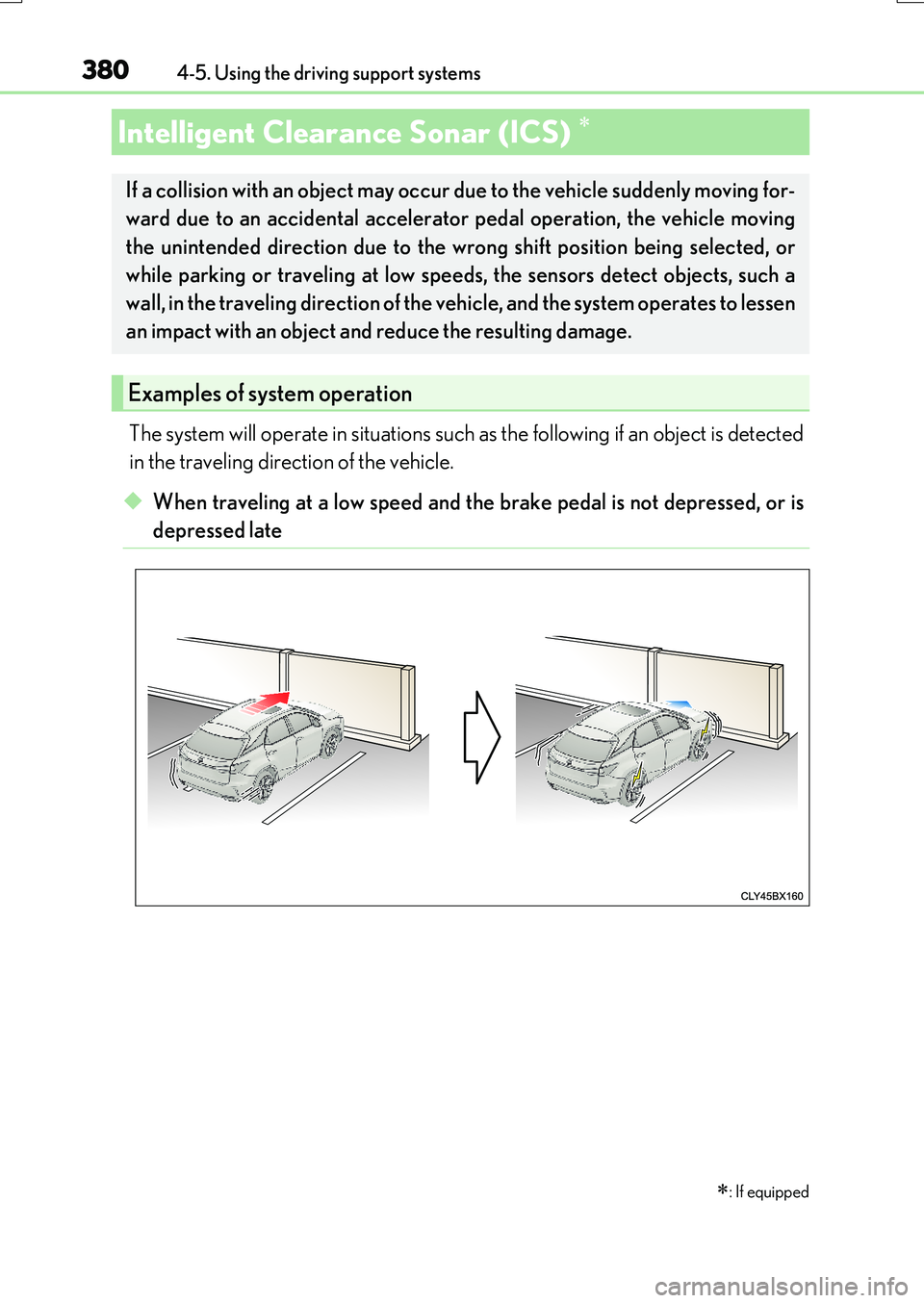
The system will operate in situations such as the following if an object is detected
in the traveling direction of the vehicle.
◆When traveling at a low speed and the brake pedal is not depressed, or is
depressed late
: If equipped
Intelligent Clearance Sonar (ICS)
If a collision with an object may occur due to the vehicle suddenly moving for-
ward due to an accidental accelerato r pedal operation, the vehicle moving
the unintended direction due to the wrong shift position being selected, or
while parking or traveling at low speeds, the sensors detect objects, such a
wall, in the traveling direction of the ve hicle, and the system operates to lessen
an impact with an object and reduce the resulting damage.
Examples of system operation
Page 387 of 776
3874-5. Using the driving support systems
4
Driving
RX350/RX200t_EE_OM48F32E
■The Intelligent Clearance Sonar function will operate when
The function will operate when the ICS OFF indicator is not illuminated or flashing ( P. 383, 391) and all of the following conditions are met:
●Engine output restriction control
• The Intelligent Clearance Sonar system is enabled. • The vehicle speed is 15 km/h (10 mph) or less.• There is an object in the traveling directio n of the vehicle and 2 to 4 m (6 to 13 ft.)
away. • The system determines that a stronger-than-normal brake operation is necessary toavoid a collision.
●Brake control
• Engine output restriction control is operating.
• The system determines that an emergency brake operation is necessary to avoid a collision.
■The Intelligent Clearance Sonar function will stop operating when
The function will stop operating if an y of the following conditions are met:
●Engine output restriction control
• The Intelligent Clearance Sonar system is disabled.
• The collision becomes avoidable with normal brake operation. • The object is no longer 2 to 4 m (6 to 13 ft.) away in the traveling direction of thevehicle.
●Brake control
• The Intelligent Clearance Sonar system is disabled.
• Approximately 2 seconds elapse after the vehicle is stopped by brake control. • The brake pedal is depressed after the vehicle is stopped by brake control.• The object is no longer 2 to 4 m (6 to 13 ft.) away in the traveling direction of the
vehicle.
■Detection range of the Intelligent Clearance Sonar function
The detection range of the Intelligent Clearance Sonar function differs from the detec-
tion range of the Lexus parking assist-sensor ( P. 375).
Therefore, even if the Lexus parking assist-s ensor detects an object and provides a warn- ing, the Intelligent Clearance Sonar function may not start operating.
■If the Intelligent Clearance Sonar function has operated
If the vehicle is stopped due to operation of the Intelligent Clearance Sonar function, the Intelligent Clearance Sonar system will be disa bled and the ICS OFF indicator will illumi-
nate.
Page 388 of 776
3884-5. Using the driving support systems
RX350/RX200t_EE_OM48F32E
■Re-enabling the Intelligent Clearance Sonar system
To re-enable the Intelligent Clearance Sonar system when it is disabled due to operation of the Intelligent Clearance Sonar function, either enable the system again (P. 383),
or turn the engine switch off and then back to IGNITION ON mode.
Additionally, if the object becomes no longer in the traveling direction of the vehicle or if the traveling direction of the vehicle chan ges (such as changing from moving forward to
backing up, or from backing up to moving fo rward), the system will be re-enabled auto- matically.
■Objects that the Intelligent Clearance Sonar function may not detect
The sensors may not be able to detect certain objects, such as the following.
●Cotton cloth, snow, and other materials that are poor reflectors of ultrasonic waves.
(People may also not be detected depending on the type of clothing they are wearing.)
●Objects which are not perpendicular to the ground, are not perpendicular to the traveling direction of the vehicle, are uneven or are waving.
●Low objects
●Thin objects such as wires, fences, ropes and signposts
●Objects that are extremely close to the bumper
■Lexus parking assist-sensor buzzer
Regardless of whether the Lexus parking as sist-sensor system is enabled or not (P. 375), if the Intelligent Clearance Sonar system is enabled ( P. 383), the front or rear sensors detect an object and brake control is performed, the Lexus parking assist-sensor
buzzer will sound to notify the driver of the approximate distance to the object.
Page 389 of 776
3894-5. Using the driving support systems
4
Driving
RX350/RX200t_EE_OM48F32E
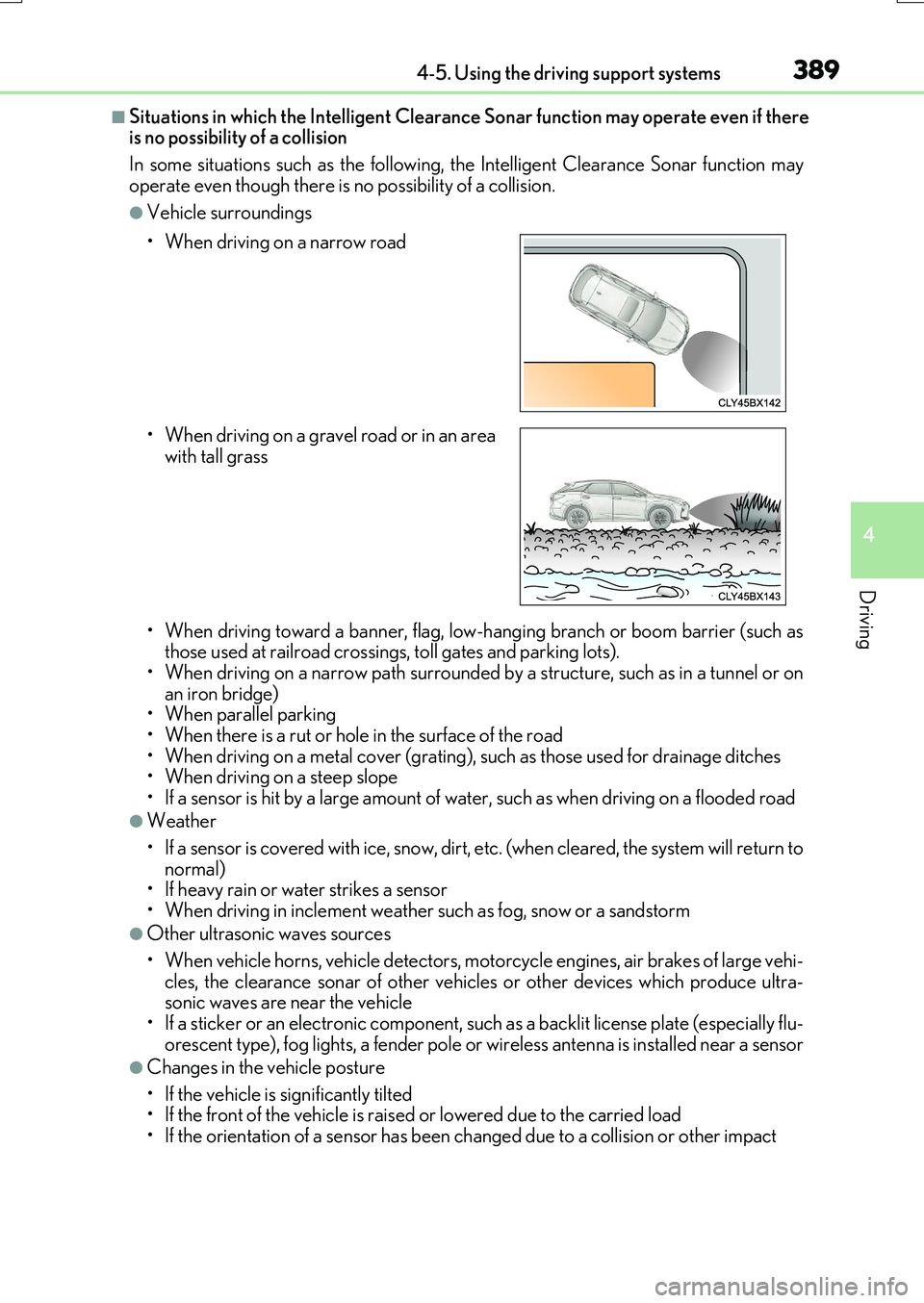
■Situations in which the Intelligent Clearance Sonar function may operate even if there is no possibility of a collision
In some situations such as the following, the Intelligent Clearance Sonar function may
operate even though there is no possibility of a collision.
●Vehicle surroundings
• When driving toward a banner, flag, low- hanging branch or boom barrier (such as those used at railroad crossings, toll gates and parking lots).• When driving on a narrow path surrounded by a structure, such as in a tunnel or on
an iron bridge) • When parallel parking• When there is a rut or hole in the surface of the road
• When driving on a metal cover (grating), such as those used for drainage ditches • When driving on a steep slope
• If a sensor is hit by a large amount of wa ter, such as when driving on a flooded road
●Weather
• If a sensor is covered with ice, snow, dirt, etc. (when cleared, the system will return to normal)• If heavy rain or water strikes a sensor
• When driving in inclement weather su ch as fog, snow or a sandstorm
●Other ultrasonic waves sources
• When vehicle horns, vehicle detectors, motorcycle engines, air brakes of large vehi- cles, the clearance sonar of other vehicles or other devices which produce ultra-sonic waves are near the vehicle
• If a sticker or an electronic component, such as a backlit license plate (especially flu- orescent type), fog lights, a fender pole or wireless antenna is installed near a sensor
●Changes in the vehicle posture
• If the vehicle is significantly tilted • If the front of the vehicle is raised or lowered due to the carried load
• If the orientation of a sensor has been changed due to a collision or other impact
• When driving on a narrow road
• When driving on a gravel road or in an area with tall grass
Page 397 of 776
3974-5. Using the driving support systems
4
Driving
RX350/RX200t_EE_OM48F32E
■Re-enabling the Rear Crossing Traffic Auto Brake function
To re-enable the Rear Crossing Traffic Auto Brake function when it is disabled during
operation of the Rear Crossing Traffic Auto Brake function, either enable the system
again ( P. 383), or turn the engine switch o ff and then back to IGNITION ON mode.
Additionally, if there is no longer a vehicle ap proaching from the right or left at the rear of
the vehicle, or if the traveling direction of the vehicle changes (such as changing from
moving forward to backing up or from backing up to moving forward), the system will be
re-enabled automatically.
■Conditions under which the Rear Crossing Traffic Auto Brake function will not detect a
vehicle
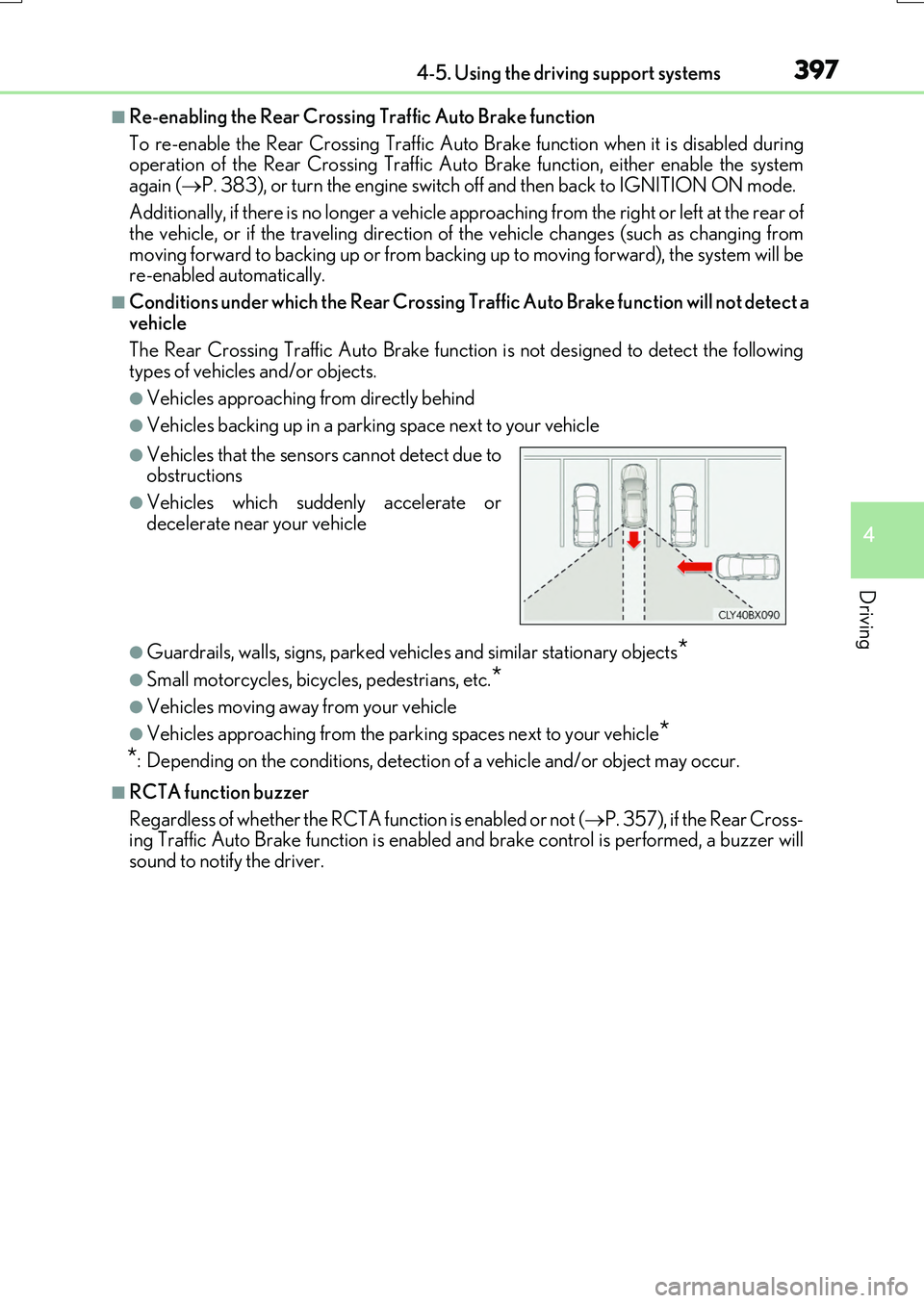
The Rear Crossing Traffic Auto Brake function is not designed to detect the following
types of vehicles and/or objects.
●Vehicles approaching from directly behind
●Vehicles backing up in a parking space next to your vehicle
●Guardrails, walls, signs, parked vehi cles and similar stationary objects*
●Small motorcycles, bicycles, pedestrians, etc.*
●Vehicles moving away from your vehicle
●Vehicles approaching from the parking spaces next to your vehicle*
*
: Depending on the conditions, detection of a vehicle and/or object may occur.
■RCTA function buzzer
Regardless of whether the RCTA function is enabled or not ( P. 357), if the Rear Cross-
ing Traffic Auto Brake function is enabled an d brake control is performed, a buzzer will
sound to notify the driver.
●Vehicles that the sensors cannot detect due to
obstructions
●Vehicles which suddenly accelerate or
decelerate near your vehicle
Page 398 of 776
3984-5. Using the driving support systems
RX350/RX200t_EE_OM48F32E
■Situations in which the system may operate even though there is no possibility of a colli-
sion
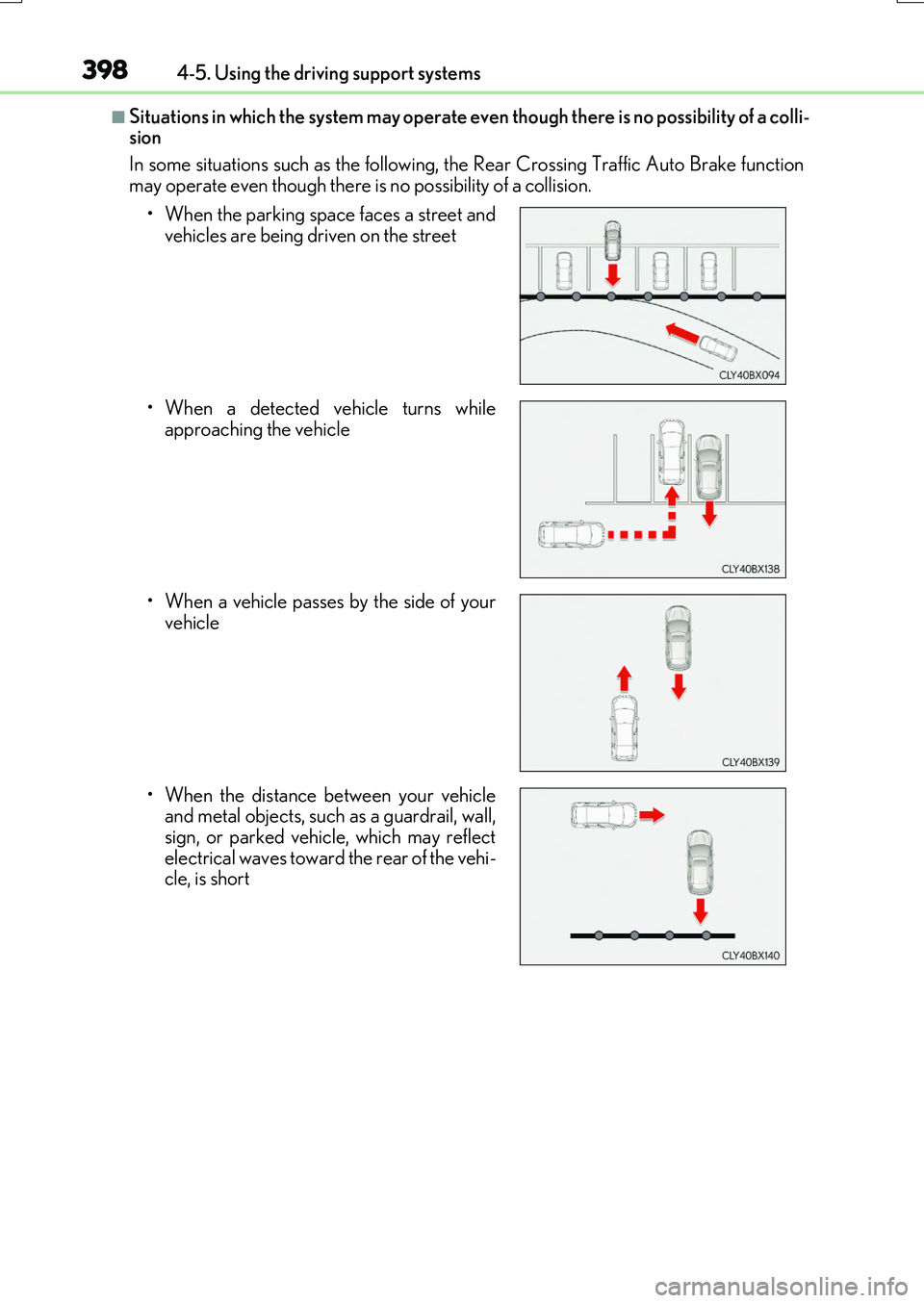
In some situations such as the following, th e Rear Crossing Traffic Auto Brake function
may operate even though there is no possibility of a collision.
• When the parking space faces a street and vehicles are being driven on the street
• When a detected vehicle turns while approaching the vehicle
• When a vehicle passes by the side of your vehicle
• When the distance between your vehicle and metal objects, such as a guardrail, wall,
sign, or parked vehicle, which may reflect
electrical waves toward the rear of the vehi-
cle, is short