parking LEXUS RX200T 2017 Service Manual
[x] Cancel search | Manufacturer: LEXUS, Model Year: 2017, Model line: RX200T, Model: LEXUS RX200T 2017Pages: 776, PDF Size: 44.51 MB
Page 309 of 776
3094-5. Using the driving support systems
4
Driving
RX350/RX200t_EE_OM48F32E
• When rapidly closing on an electric toll gate barrier, parking area barrier, or other barrier that opens and closes• When using an automatic car wash
• When the vehicle is hit by water, snow, dust, etc. from a vehicle ahead • When driving through steam or smoke
• When there are patterns or paint on the road or a wall that may be mistaken for a
vehicle or pedestrian*4
• When driving near an object that reflects radio waves, such as a large truck or guardrail
• When driving near a TV tower, broadcasting station, electric power plant, or other location where strong radio waves or electrical noise may be present
*4: Depending on the region in which the vehicle was sold, the pedestrian detection
function may not be available.
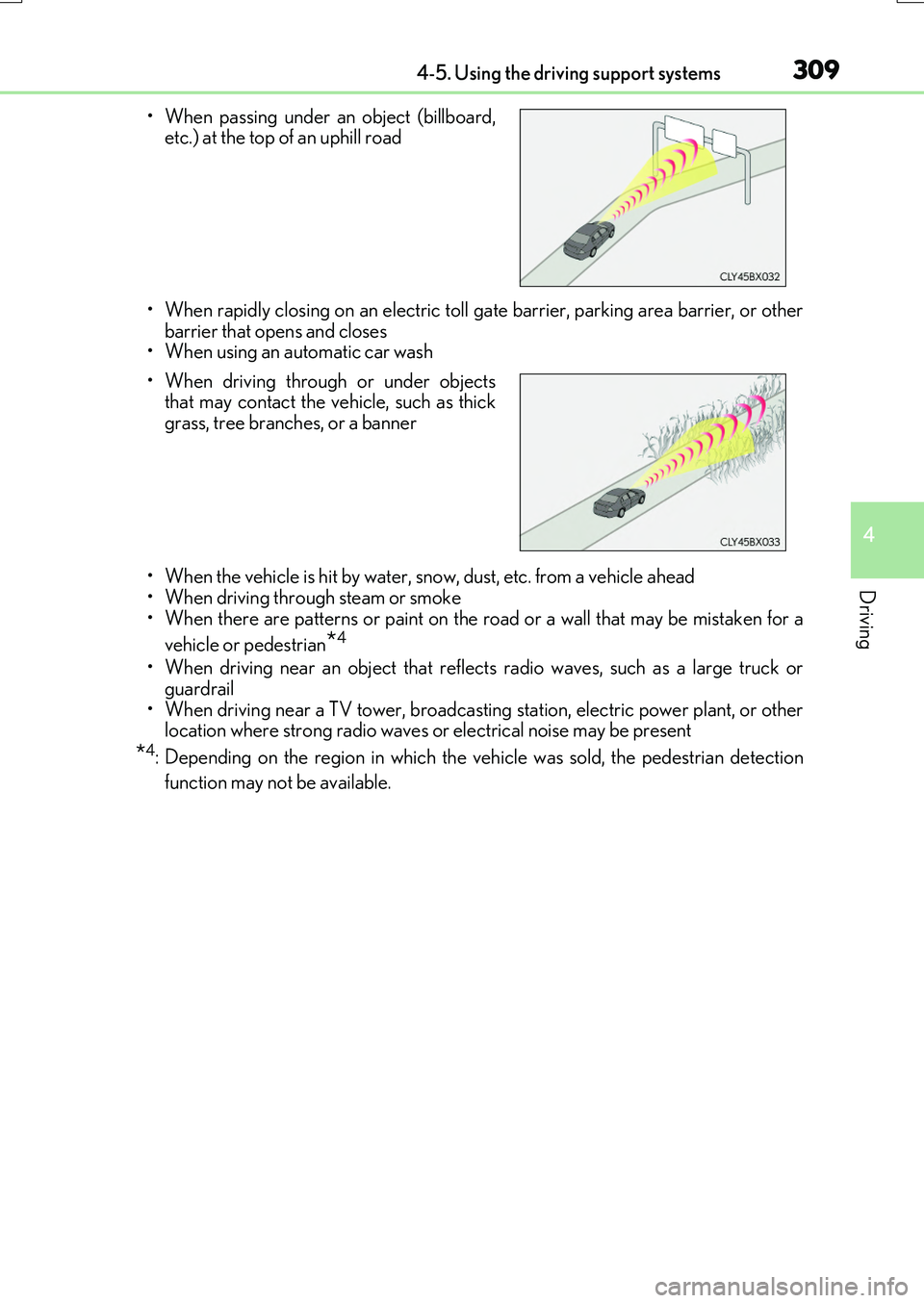
• When passing under an object (billboard, etc.) at the top of an uphill road
• When driving through or under objects that may contact the vehicle, such as thick
grass, tree branches, or a banner
Page 338 of 776
3384-5. Using the driving support systems
RX350/RX200t_EE_OM48F32E
■Dynamic radar cruise control with full-speed range can be set when
●The shift lever is in D.
●Range 4 or higher of D has been selected by using the paddle shift switch. (vehicles with paddle shift switches)
●Vehicle speed is above approximately 50 km/h (30 mph). However, when a precedingvehicle is detected, the dynamic radar cruise control with full-speed range can be seteven if the vehicle speed is at or below approximately 50 km/h (30 mph).
■Accelerating after setting the vehicle speed
The vehicle can accelerate by operating the accelerator pedal. After accelerating, the set speed resumes. However, during vehicle-to-vehicle distance control mode, the vehi-
cle speed may decrease below the set speed in order to maintain the distance to the pre- ceding vehicle.
■Automatic cancelation of vehicle- to-vehicle distance control mode
Vehicle-to-vehicle distance control mode is automatically canceled in the following situ- ations.
●Actual vehicle speed falls below approximat ely 40 km/h (25 mph) when there are no
vehicles ahead.
●The preceding vehicle leaves the lane when your vehicle is following at a vehicle speed below approximately 40 km/h (25 mph). Otherwise, the sensor cannot properly
detect the vehicle.
●VSC is activated.
●TRC is activated for a period of time.
●When the VSC or TRC system is turned off by pressing the VSC OFF switch.
●The sensor cannot detect correctly because it is covered in some way.
●Pre-crash braking is activated.
●The parking brake is operated.
●The vehicle is stopped by syst em control on a steep incline.
●The following are detected when the vehicle has been stopped by system control:
• The driver is not wearing a seat belt. • The driver’s door is opened.• The vehicle has been stopped for about 3 minutes
If vehicle-to-vehicle distance control mode is automatically canceled for any other rea- son, there may be a malfunction in the syst em. Contact any authorized Lexus dealer or repairer, or another duly qua lified and equipped professional.
Page 346 of 776
3464-5. Using the driving support systems
RX350/RX200t_EE_OM48F32E
◆When the brake hold system is enabled
The Stop & Start system is operational when the brake hold system is operat-
ing. (P. 263)
■Stopping the engine
While driving with the shift lever in D
or M, depress the brake pedal, and
stop the vehicle.
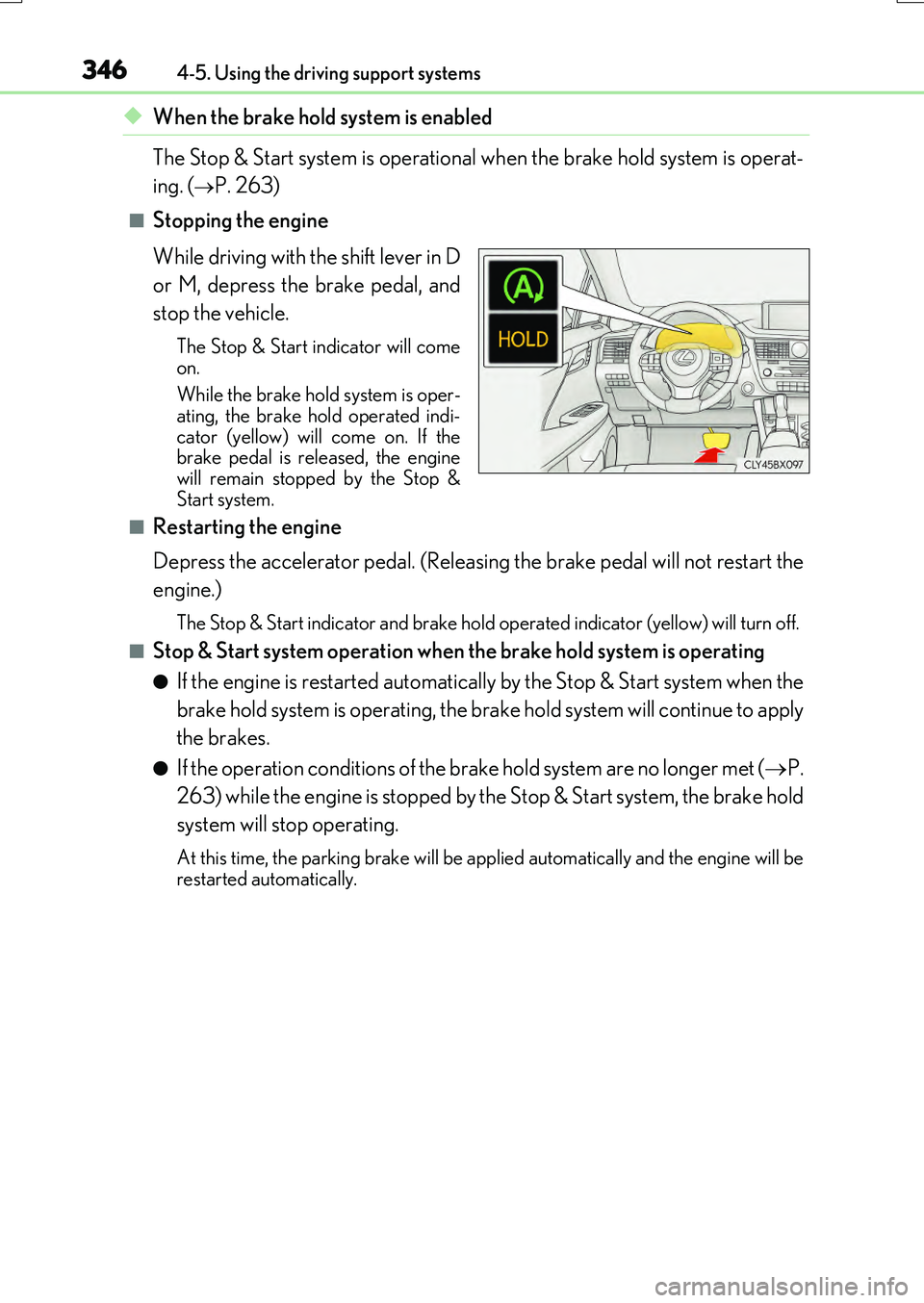
The Stop & Start indicator will come
on.
While the brake hold system is oper- ating, the brake hold operated indi-
cator (yellow) will come on. If the brake pedal is released, the enginewill remain stopped by the Stop &
Start system.
■Restarting the engine
Depress the accelerator pedal. (Releasing the brake pedal will not restart the
engine.)
The Stop & Start indicator and brake hold op erated indicator (yellow) will turn off.
■Stop & Start system operation when the brake hold system is operating
●If the engine is restarted automatically by the Stop & Start system when the
brake hold system is operating, the brake hold system will continue to apply
the brakes.
●If the operation conditions of the brake hold system are no longer met ( P.
263) while the engine is stopped by the Stop & Start system, the brake hold
system will stop operating.
At this time, the parking brake will be a pplied automatically and the engine will be restarted automatically.
Page 354 of 776
3544-5. Using the driving support systems
RX350/RX200t_EE_OM48F32E
WARNING
■When the Stop & Start system is operating
●Depress the brake pedal and apply the parking brake when necessary while the engine is stopped by the Stop & Start system (while the Stop & Start indicator is on).
(Except when the brake hold system is operating or when the vehicle comes to a con- trolled stop while driving with the dynamic radar cruise control with full-speed range in vehicle-to-vehicle distan ce control mode [if equipped])
●Do not allow anyone to leave the vehicle while the engine is stopped by the Stop & Start system (while the Stop & Start indicator is on).An accident may occur due to the automatic engine start function.
●Ensure that the engine is not stopped by the Stop & Start system while the vehicle is ina poorly ventilated area. The engine may restart due to the automatic engine startfunction, causing exhaust gases to collect and enter the vehicle, possibly resulting in
death or a serious health hazard.
NOTICE
■To ensure the system operates correctly
If any of the following situations occur, the Stop & Start system may not operate cor- rectly. Have your vehicle inspected by any authorized Lexus dealer or repairer, or
another duly qualified and equipped professional.
●While the driver's seat belt is fastened, the driver's and front passenger's seat belt reminder light flashes.
●Even though the driver's seat belt is not fastened, the driver's and front passenger'sseat belt reminder light does not illuminate.
●Even though the driver's door is closed, the open door warning is displayed on the
multi-information display or the interior lig ht is illuminated when door linked illumina- tion is enabled ( P. 553).
●Even though the driver's door is open, the open door warning is not displayed on the
multi-information display or the interior light does not illuminate when door linked illumination is enabled ( P. 553).
Page 368 of 776
3684-5. Using the driving support systems
RX350/RX200t_EE_OM48F32E
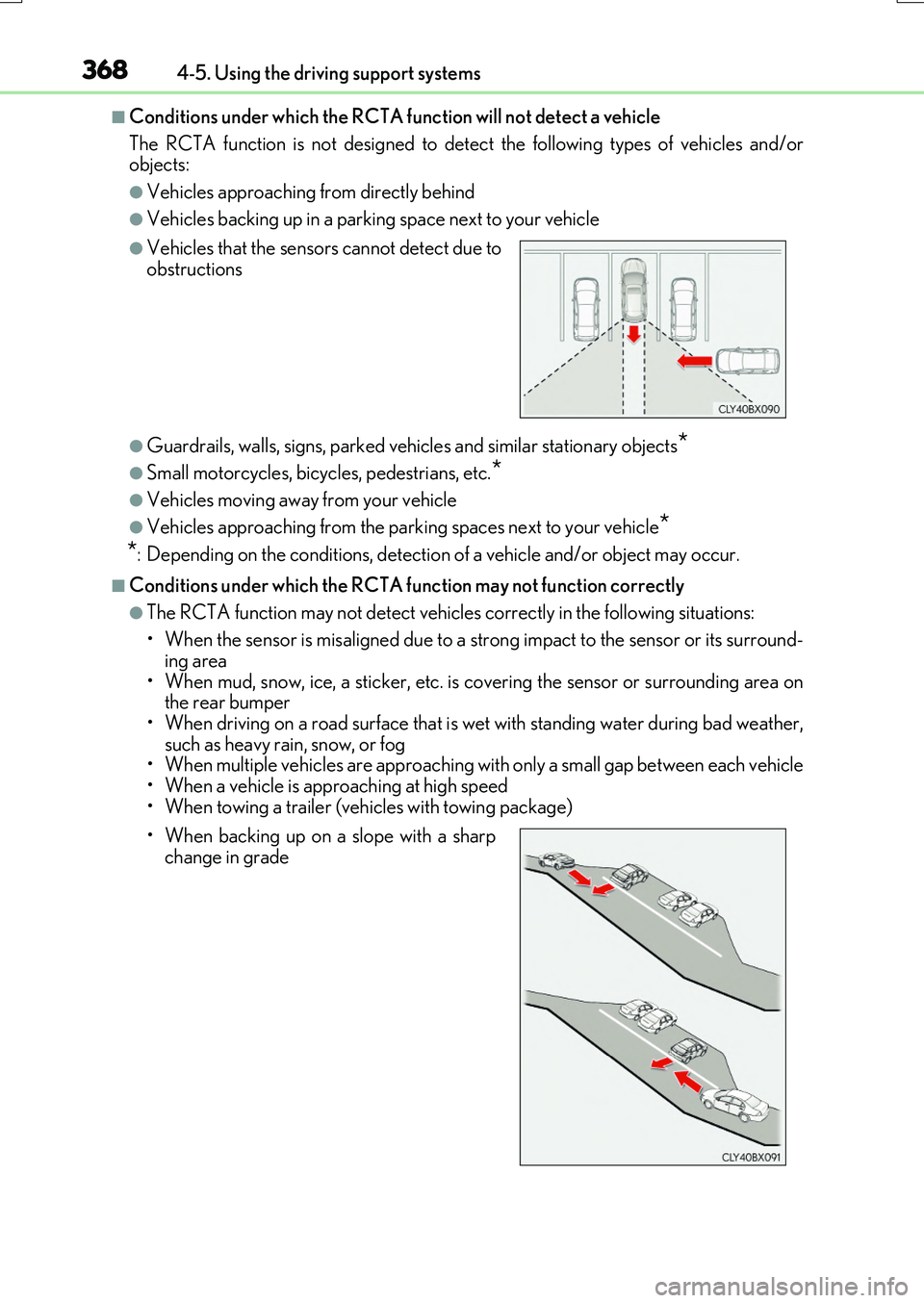
■Conditions under which the RCTA function will not detect a vehicle
The RCTA function is not designed to dete ct the following types of vehicles and/or objects:
●Vehicles approaching from directly behind
●Vehicles backing up in a parking space next to your vehicle
●Guardrails, walls, signs, parked vehi cles and similar stationary objects*
●Small motorcycles, bicycles, pedestrians, etc.*
●Vehicles moving away from your vehicle
●Vehicles approaching from the parking spaces next to your vehicle*
*: Depending on the conditions, detection of a vehicle and/or object may occur.
■Conditions under which the RCTA function may not function correctly
●The RCTA function may not detect vehicles correctly in the following situations:
• When the sensor is misaligned due to a strong impact to the sensor or its surround-
ing area • When mud, snow, ice, a sticker, etc. is covering the sensor or surrounding area onthe rear bumper
• When driving on a road surface that is wet with standing water during bad weather, such as heavy rain, snow, or fog• When multiple vehicles are approaching wi th only a small gap between each vehicle
• When a vehicle is approaching at high speed • When towing a trailer (vehicles with towing package)
●Vehicles that the sensors cannot detect due toobstructions
• When backing up on a slope with a sharp change in grade
Page 369 of 776
3694-5. Using the driving support systems
4
Driving
RX350/RX200t_EE_OM48F32E
• Immediately after the RCTA function is turned on • Immediately after the engine is started with the RCTA function on
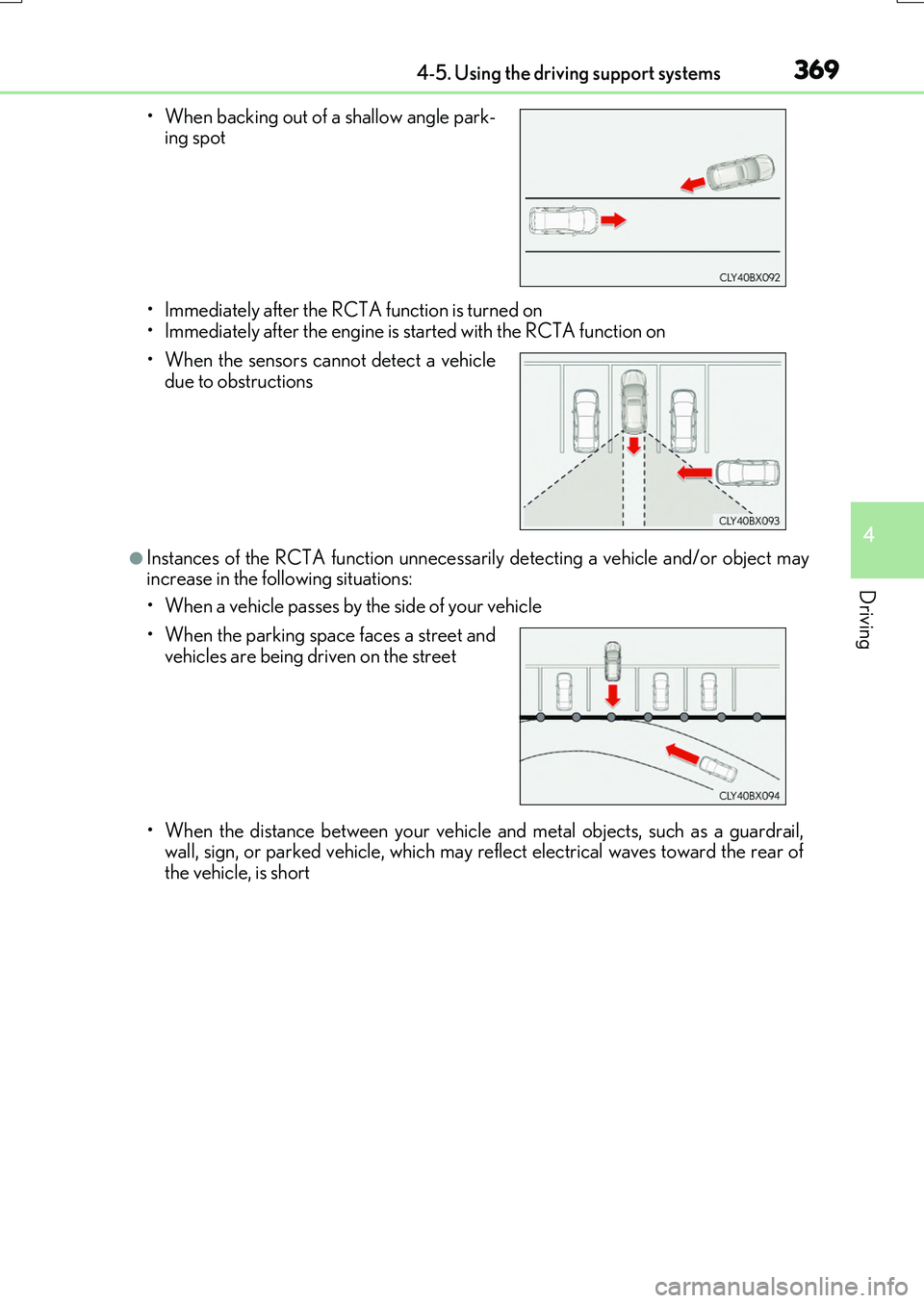
●Instances of the RCTA function unnecessarily detecting a vehicle and/or object mayincrease in the following situations:
• When a vehicle passes by the side of your vehicle
• When the distance between your vehicle and metal objects, such as a guardrail, wall, sign, or parked vehicle, which may reflect electrical waves toward the rear ofthe vehicle, is short
• When backing out of a shallow angle park- ing spot
• When the sensors cannot detect a vehicle due to obstructions
• When the parking space faces a street and
vehicles are being driven on the street
Page 371 of 776
3714-5. Using the driving support systems
4
Driving
RX350/RX200t_EE_OM48F32E
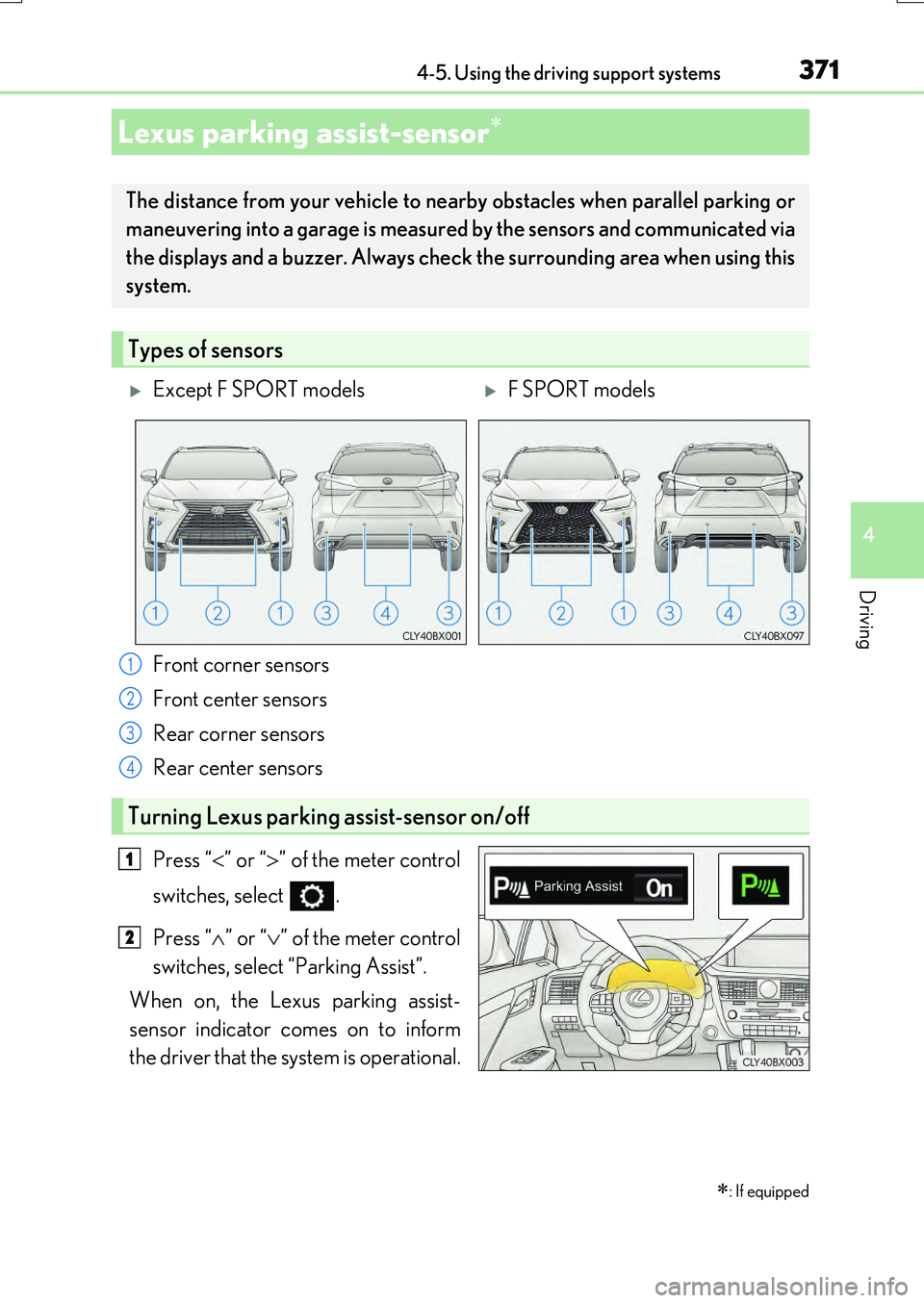
Front corner sensors
Front center sensors
Rear corner sensors
Rear center sensors
Press “ ” or “” of the meter control
switches, select .
Press “ ” or “” of the meter control
switches, select “Parking Assist”.
When on, the Lexus parking assist-
sensor indicator comes on to inform
the driver that the system is operational.
Lexus parking assist-sensor
: If equipped
The distance from your vehicle to ne arby obstacles when parallel parking or
maneuvering into a garage is measured by the sensors and communicated via
the displays and a buzzer. Always chec k the surrounding area when using this
system.
Types of sensors
Except F SPORT modelsF SPORT models
1
2
3
4
Turning Lexus parking assist-sensor on/off
1
2
Page 372 of 776
3724-5. Using the driving support systems
RX350/RX200t_EE_OM48F32E
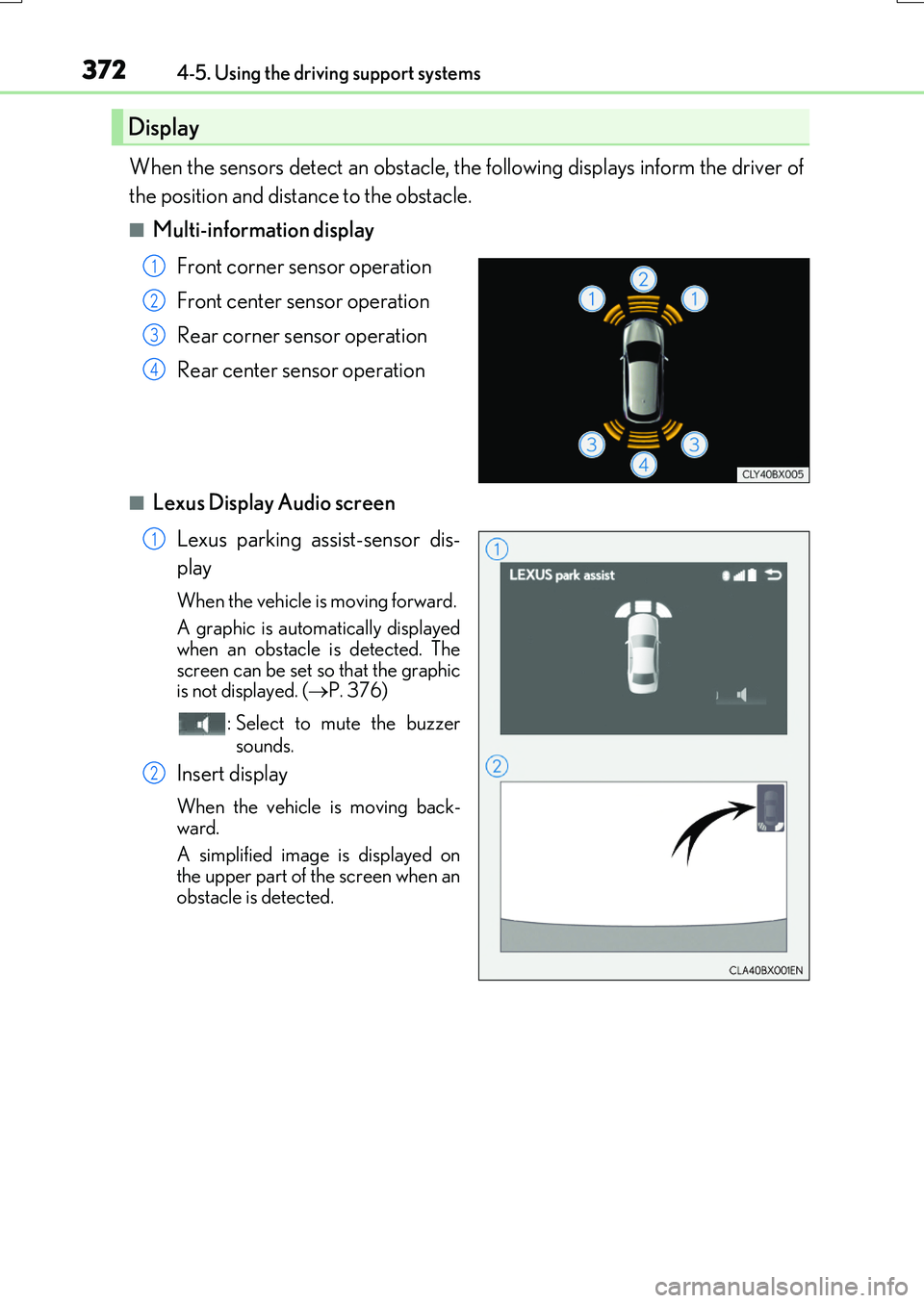
When the sensors detect an obstacle, the following displays inform the driver of
the position and distance to the obstacle.
■Multi-information display
Front corner sensor operation
Front center sensor operation
Rear corner sensor operation
Rear center sensor operation
■Lexus Display Audio screen
Lexus parking assist-sensor dis-
play
When the vehicle is moving forward.
A graphic is automatically displayed
when an obstacle is detected. The screen can be set so that the graphicis not displayed. ( P. 376)
: Select to mute the buzzer
sounds.
Insert display
When the vehicle is moving back-
ward.
A simplified image is displayed on
the upper part of the screen when an obstacle is detected.
Display
1
2
3
4
1
2
Page 373 of 776
3734-5. Using the driving support systems
4
Driving
RX350/RX200t_EE_OM48F32E
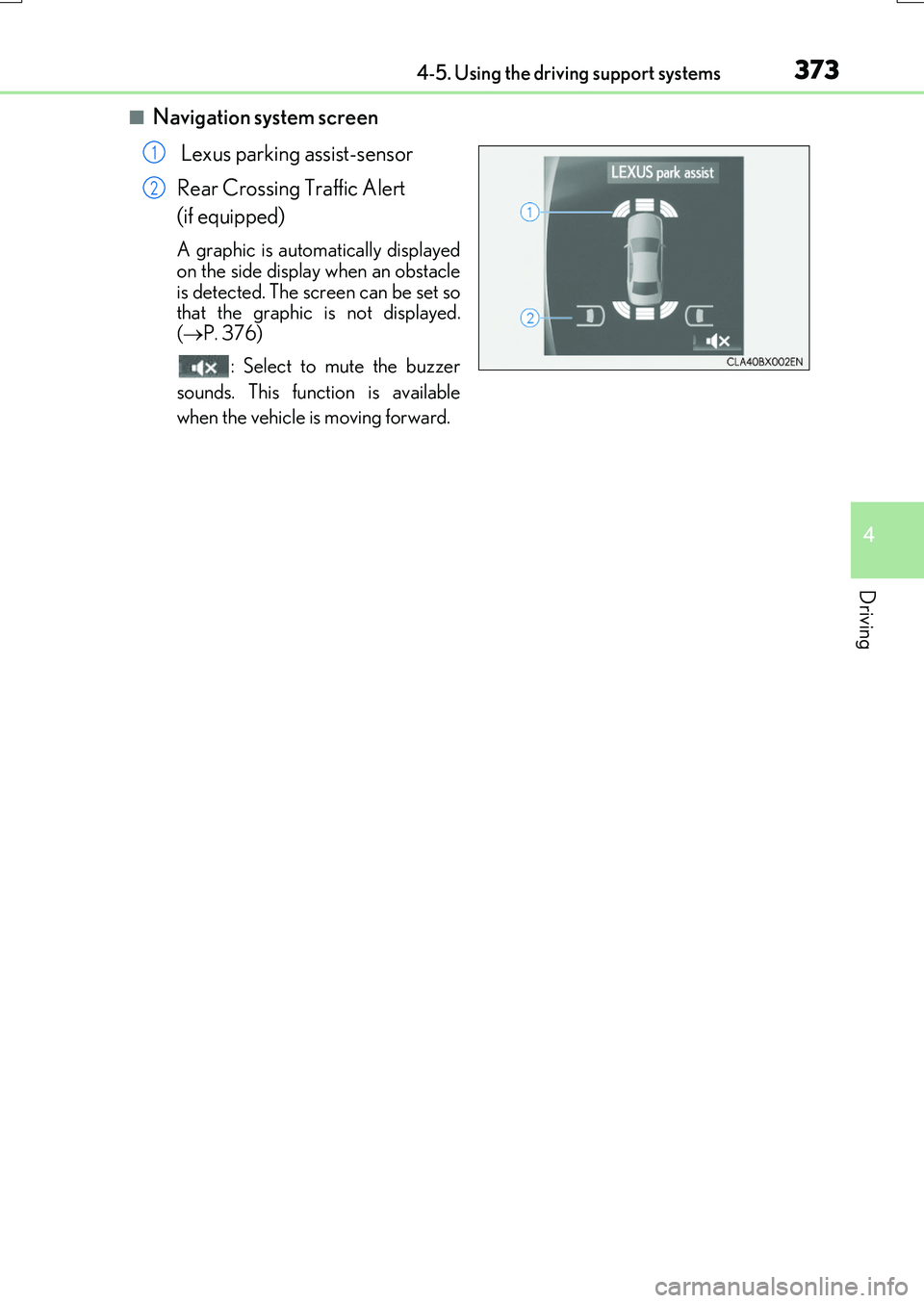
■Navigation system screen
Lexus parking assist-sensor
Rear Crossing Traffic Alert
(if equipped)
A graphic is automatically displayed on the side display when an obstacle
is detected. The screen can be set so that the graphic is not displayed.( P. 376)
: Select to mute the buzzer
sounds. This function is available
when the vehicle is moving forward.
1
2
Page 374 of 776
3744-5. Using the driving support systems
RX350/RX200t_EE_OM48F32E
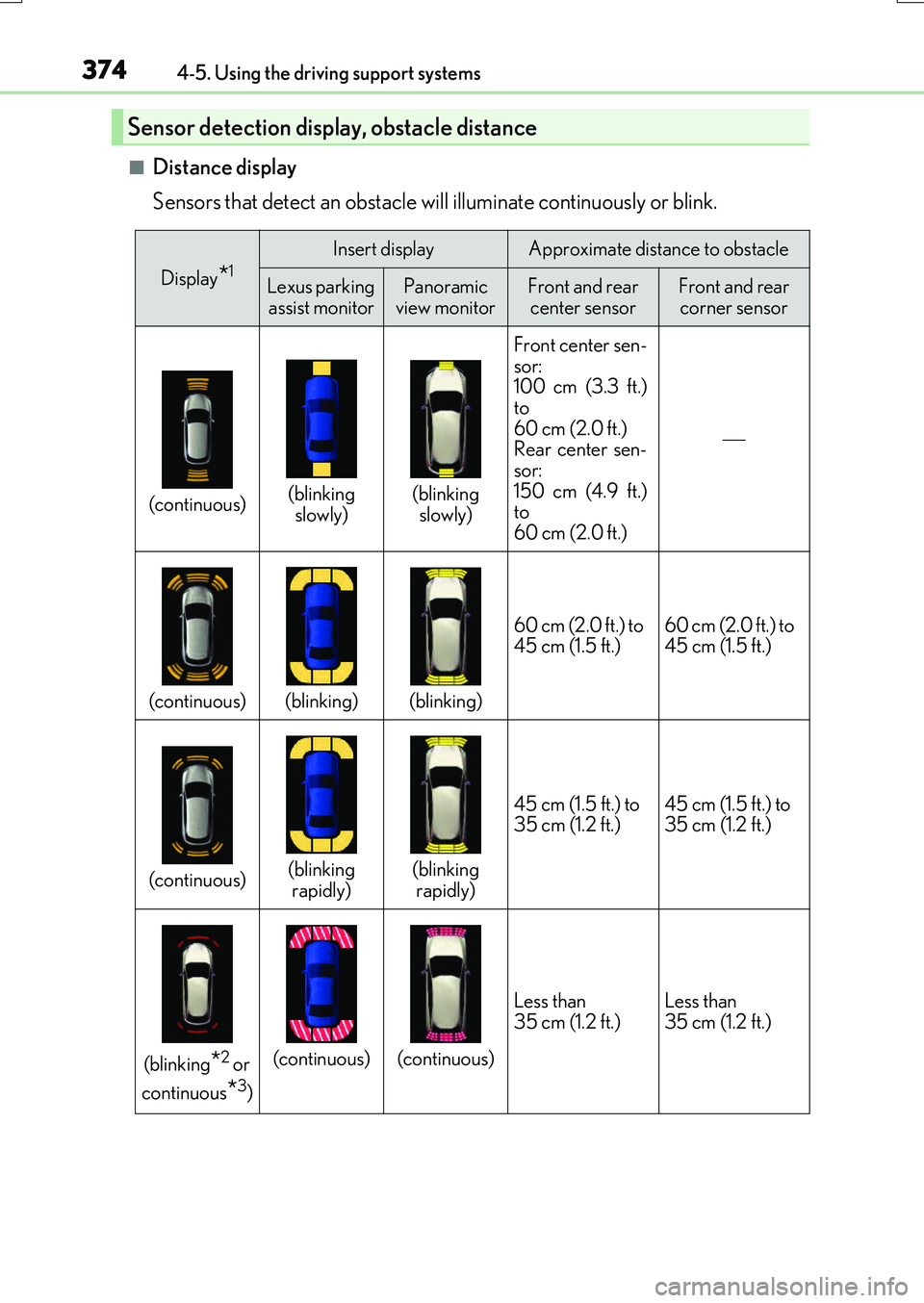
■Distance display
Sensors that detect an obstacle will illuminate continuously or blink.
Sensor detection display, obstacle distance
Display*1Insert displayApproximate distance to obstacle
Lexus parking assist monitorPanoramic
view monitorFront and rear center sensorFront and rear corner sensor
(continuous)(blinking slowly)(blinking slowly) Front center sen-
sor:
100 cm (3.3 ft.)
to
60 cm (2.0 ft.)
Rear center sen-
sor:
150 cm (4.9 ft.)
to
60 cm (2.0 ft.)
(continuous)(blinking)(blinking) 60 cm (2.0 ft.) to
45 cm (1.5 ft.)
60 cm (2.0 ft.) to
45 cm (1.5 ft.)
(continuous)(blinking
rapidly)(blinking rapidly) 45 cm (1.5 ft.) to
35 cm (1.2 ft.)
45 cm (1.5 ft.) to
35 cm (1.2 ft.)
(blinking*2 or
continuous
*3)
(continuous)(continuous) Less than
35 cm (1.2 ft.)
Less than
35 cm (1.2 ft.)