parking LEXUS RX200T 2017 Owner's Guide
[x] Cancel search | Manufacturer: LEXUS, Model Year: 2017, Model line: RX200T, Model: LEXUS RX200T 2017Pages: 776, PDF Size: 44.51 MB
Page 259 of 776
2594-2. Driving procedures
4
Driving
RX350/RX200t_EE_OM48F32E
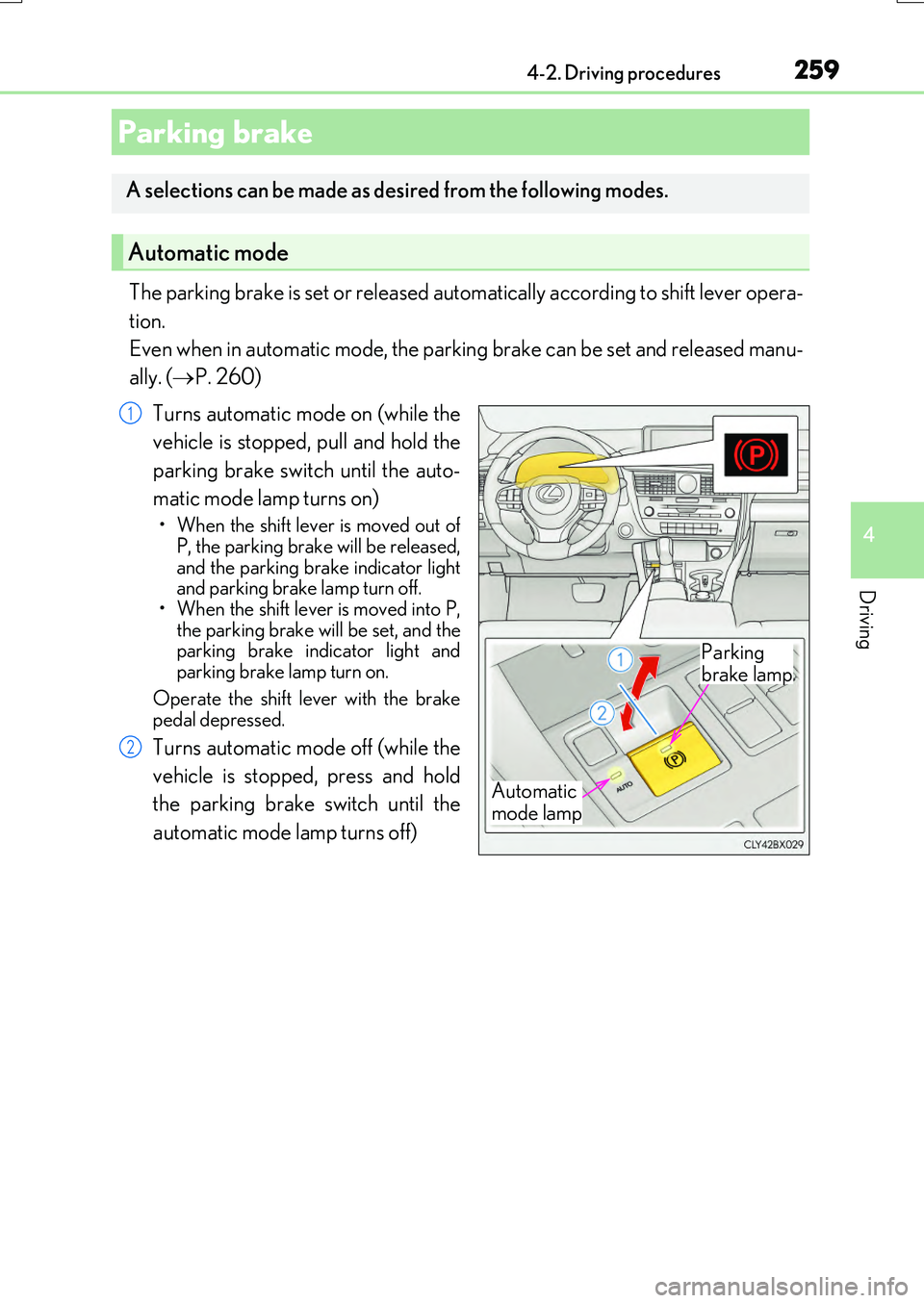
The parking brake is set or released automatically according to shift lever opera-
tion.
Even when in automatic mode, the parking brake can be set and released manu-
ally. ( P. 260)
Turns automatic mode on (while the
vehicle is stopped, pull and hold the
parking brake switch until the auto-
matic mode lamp turns on)
• When the shift lever is moved out of P, the parking brake will be released,
and the parking brake indicator light and parking brake lamp turn off.• When the shift lever is moved into P,
the parking brake will be set, and the parking brake indicator light andparking brake lamp turn on.
Operate the shift lever with the brake pedal depressed.
Turns automatic mode off (while the
vehicle is stopped, press and hold
the parking brake switch until the
automatic mode lamp turns off)
Parking brake
A selections can be made as desired from the following modes.
Automatic mode
Automatic
mode lamp
Parking
brake lamp
1
2
Page 260 of 776
2604-2. Driving procedures
RX350/RX200t_EE_OM48F32E
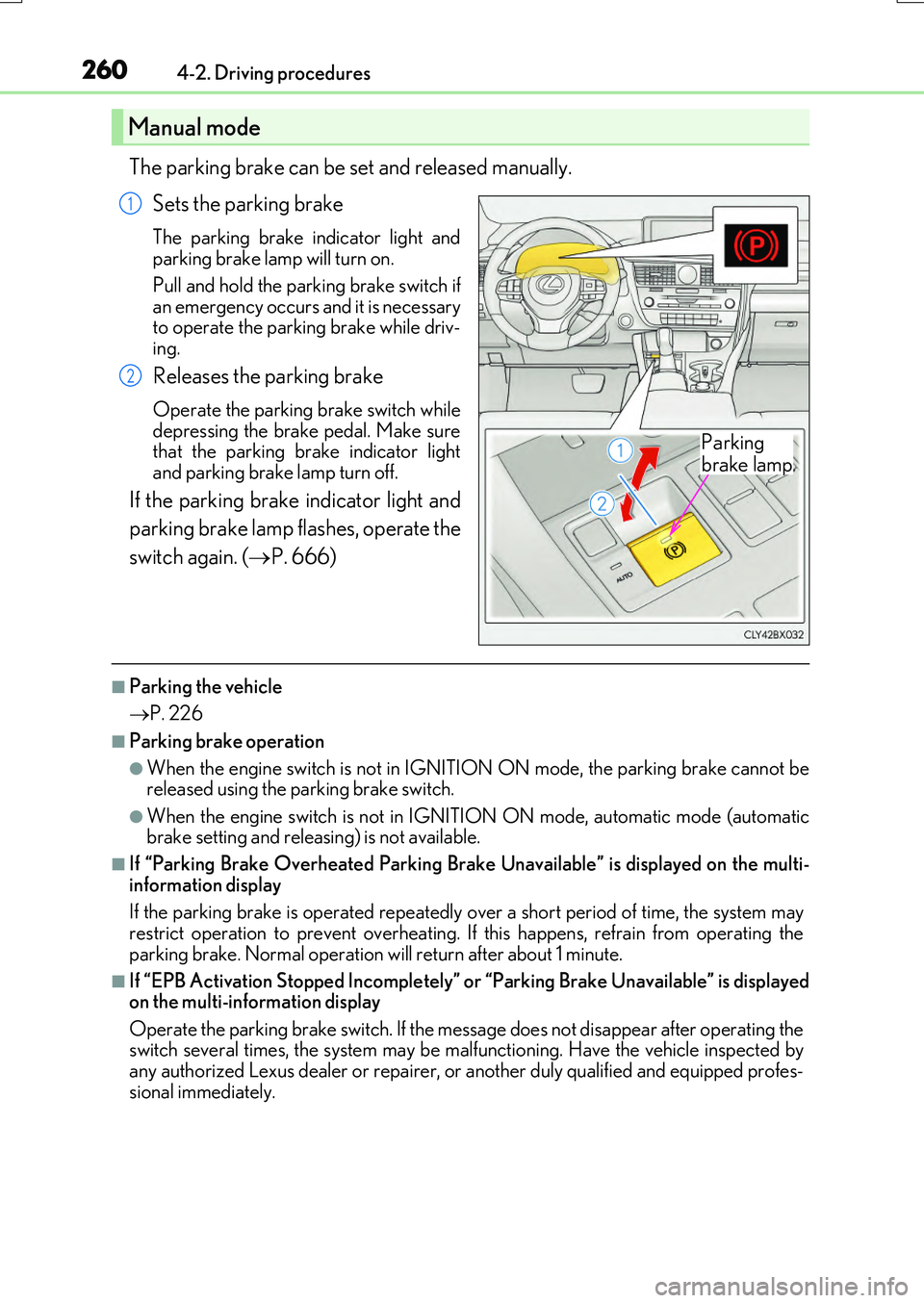
The parking brake can be set and released manually.
Sets the parking brake
The parking brake in dicator light and parking brake lamp will turn on.
Pull and hold the parking brake switch if an emergency occurs and it is necessaryto operate the parking brake while driv-
ing.
Releases the parking brake
Operate the parking brake switch while depressing the brake pedal. Make surethat the parking brake indicator light
and parking brake lamp turn off.
If the parking brake indicator light and
parking brake lamp flashes, operate the
switch again. ( P. 666)
■Parking the vehicle
P. 226
■Parking brake operation
●When the engine switch is not in IGNITION ON mode, the parking brake cannot be released using the parking brake switch.
●When the engine switch is not in IGNITION ON mode, automatic mode (automatic brake setting and releasing) is not available.
■If “Parking Brake Overheated Parking Brake Unavailable” is displayed on the multi-
information display
If the parking brake is operated repeatedly over a short period of time, the system may restrict operation to prevent overheating. If this happens, refrain from operating the
parking brake. Normal operation will return after about 1 minute.
■If “EPB Activation Stopped Incompletely” or “Parking Brake Unavailable” is displayed on the multi-information display
Operate the parking brake switch. If the message does not disappear after operating the switch several times, the system may be malfunctioning. Have the vehicle inspected byany authorized Lexus dealer or repairer, or another duly qualified and equipped profes-
sional immediately.
Manual mode
Parking
brake lamp
1
2
Page 261 of 776
2614-2. Driving procedures
4
Driving
RX350/RX200t_EE_OM48F32E
■Parking brake operation sound
When the parking brake operates, a motor so und (whirring sound) may be heard. This does not indicate a malfunction.
■Parking brake indicator light and parking brake lamp
●Depending on the engine switch mode, the parking brake indicator light and parking brake lamp will turn on and stay on as described below:
IGNITION ON mode: Comes on until the parking brake is released. Not in IGNITION ON mode: Stays on for approximately 15 seconds.
●When the engine switch is turned off with the parking brake set, the parking brake indi-
cator light and parking brake lamp will stay on for about 15 seconds. This does not indi- cate a malfunction.
■Changing the mode
When changing the automati c mode on/off, the message will be shown on the multi- information display and the buzzer sounds.
■Parking brake engaged warning buzzer
A buzzer will sound if the vehicle is driven with the parking brake engaged. “Release Parking Brake” is displayed on the multi-information display.
■Warning messages and buzzers
Warning messages and buzzers are used to indicate a system malfunction or to inform the driver of the need for caution. If a warn ing message is shown on the multi-information display, read the message and follow the instructions.
■If the brake system warning light comes on
P. 666
■Usage in winter time
P. 430
Page 262 of 776
2624-2. Driving procedures
RX350/RX200t_EE_OM48F32E
WARNING
■When parking the vehicle
Do not leave a child in the vehicle alone. The parking brake may be released uninten- tionally and there is the danger of the vehicle moving that may lead to an accident
resulting in death or serious injury.
NOTICE
■When parking the vehicle
Before you leave the vehicle, shift the shift lever to P, set the parking brake and make sure that the vehicle does not move.
■When the system malfunctions
Stop the vehicle in a safe place and check the warning messages.
■When the parking brake cannot be released due to a malfunction
Driving the vehicle with the parking brake se t will lead to brake components overheat- ing, which may affect braking performance and increase brake wear. Contact anyauthorized Lexus dealer or repairer, or another duly qualified and equipped profes-
sional immediately if this occurs.
Page 263 of 776
2634-2. Driving procedures
4
Driving
RX350/RX200t_EE_OM48F32E
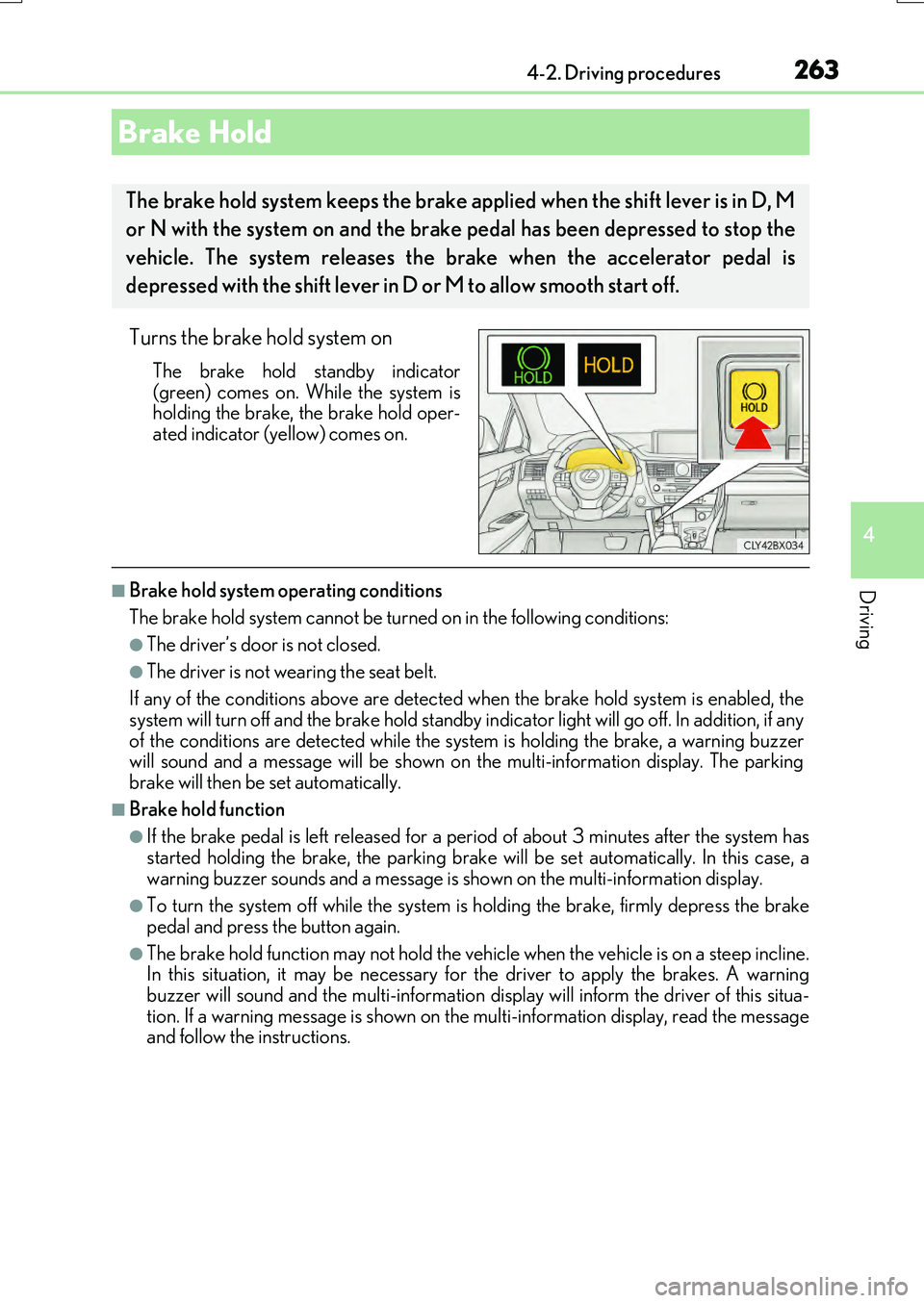
Turns the brake hold system on
The brake hold standby indicator
(green) comes on. While the system is holding the brake, the brake hold oper-ated indicator (yellow) comes on.
■Brake hold system operating conditions
The brake hold system cannot be turn ed on in the following conditions:
●The driver’s door is not closed.
●The driver is not wearing the seat belt.
If any of the conditions above are detected when the brake hold system is enabled, the
system will turn off and the brake hold standby indicator light will go off. In addition, if any of the conditions are detected while the sy stem is holding the brake, a warning buzzer will sound and a message will be shown on th e multi-information display. The parking
brake will then be set automatically.
■Brake hold function
●If the brake pedal is left released for a pe riod of about 3 minutes after the system has
started holding the brake, th e parking brake will be set automatically. In this case, a warning buzzer sounds and a message is shown on the multi-information display.
●To turn the system off while the system is holding the brake, firmly depress the brake
pedal and press the button again.
●The brake hold function may not hold the vehicle when the vehicle is on a steep incline. In this situation, it may be necessary for the driver to apply the brakes. A warning
buzzer will sound and the multi-information disp lay will inform the driver of this situa- tion. If a warning message is shown on the multi-information display, read the message and follow the instructions.
Brake Hold
The brake hold system keeps the brake a pplied when the shift lever is in D, M
or N with the system on and the brake pedal has been depressed to stop the
vehicle. The system releases the brake when the accelerator pedal is
depressed with the shift lever in D or M to allow smooth start off.
Page 264 of 776
2644-2. Driving procedures
RX350/RX200t_EE_OM48F32E
■When the parking brake is set automatically while the system is holding the brakes
The parking brake will not be released aut omatically. With the brake pedal depressed, release the parking brake by operating the pa rking brake switch, making sure that the
parking brake indicator light goes off. ( P. 259)
■If “Brake Hold Fault Depress Brake to Deactivate Visit Your Dealer” is displayed on the multi-information display
The system may be malfunctioning. Have the vehicle inspected by any authorized Lexus dealer or repairer, or another duly qua lified and equipped professional immediately.
■Warning messages and buzzers
Warning messages and buzzers are used to indicate a system malfunction or to inform the driver of the need for caution. If a warn ing message is shown on the multi-information display, read the message and follow the instructions.
■If the brake hold operated indicator flashes
P. 666
WARNING
■When the vehicle is on a steep incline
When using the brake hold system on a steep incline exercise caution. The brake hold
function may not hold the vehicle in such a situation.
■When stopped on a slippery road
The system cannot stop the vehicle when the gripping ability of the tires has been
exceeded. Do not use the system when stopped on a slippery road.
NOTICE
■When parking the vehicle
The brake hold system is not designed fo r use when parking the vehicle for a long period of time. Turning the en gine switch off while the system is holding the brake may
release the brake, which would cause the ve hicle to move. When operating the engine switch, depress the brake peda l, shift the shift lever to P and set the parking brake.
Page 266 of 776
2664-3. Operating the lights and wipers
RX350/RX200t_EE_OM48F32E
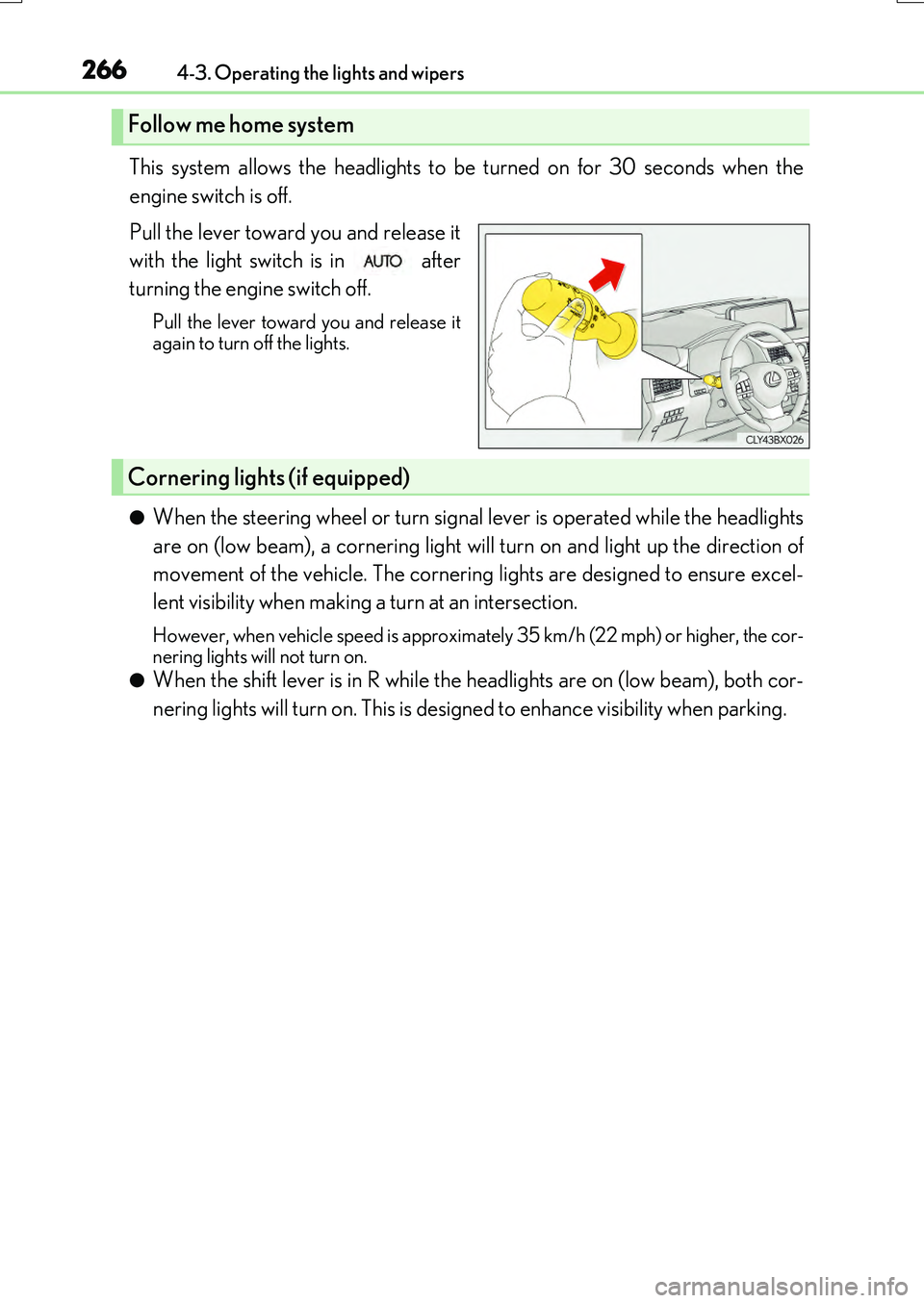
This system allows the headlights to be turned on for 30 seconds when the
engine switch is off.
Pull the lever toward you and release it
with the light switch is in after
turning the engine switch off.
Pull the lever toward you and release it again to turn off the lights.
●When the steering wheel or turn signal lever is operated while the headlights
are on (low beam), a cornering light will turn on and light up the direction of
movement of the vehicle. The cornering lights are designed to ensure excel-
lent visibility when making a turn at an intersection.
However, when vehicle speed is approximately 35 km/h (22 mph) or higher, the cor-
nering lights will not turn on.
●When the shift lever is in R while the headlights are on (low beam), both cor-
nering lights will turn on. This is designed to enhance visibility when parking.
Follow me home system
Cornering lights (if equipped)
Page 267 of 776
2674-3. Operating the lights and wipers
4
Driving
RX350/RX200t_EE_OM48F32E
■Daytime running light system
To make your vehicle more visible to other drivers during daytime driving, the daytime
running lights turn on automatically whenev er the engine is started and the parking
brake is released with the headlight switch in position. (Illuminate brighter than
the front position lights.) Daytime running lights are not designed for use at night.
■Cornering lights (if equipped)
When the cornering lights are on for more than 30 minutes, they will turn off automati-
cally.
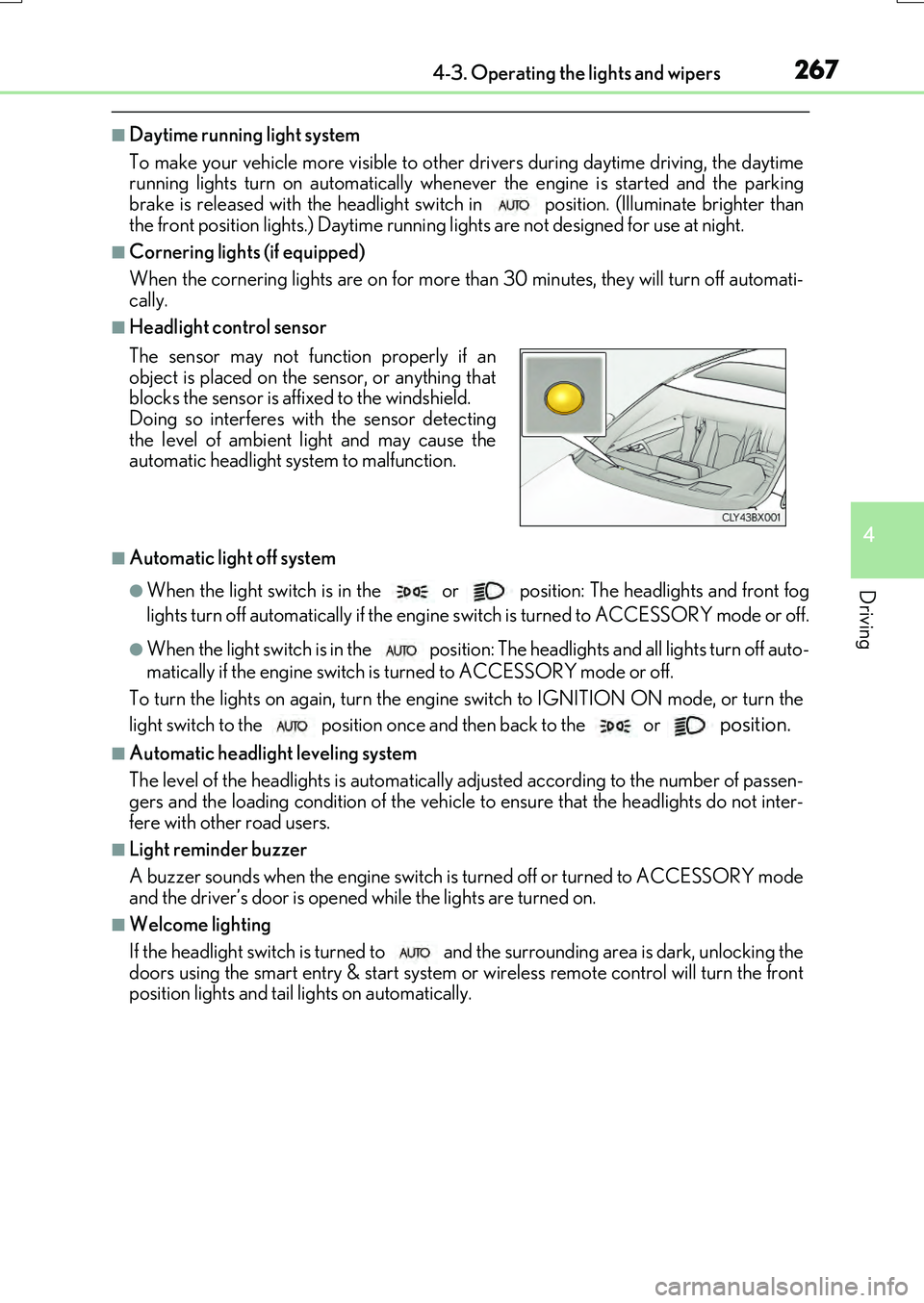
■Headlight control sensor
■Automatic light off system
●When the light switch is in the or position: The headlights and front fog
lights turn off automatically if the engine switch is turned to ACCESSORY mode or off.
●When the light switch is in the position: The headlights and all lights turn off auto-
matically if the engine switch is turned to ACCESSORY mode or off.
To turn the lights on again, turn the engine switch to IGNITION ON mode, or turn the
light switch to the
position once and then back to the or position.
■Automatic headlight leveling system
The level of the headlights is automatically ad justed according to the number of passen-
gers and the loading condition of the vehicle to ensure that the headlights do not inter-
fere with other road users.
■Light reminder buzzer
A buzzer sounds when the engine switch is turned off or turned to ACCESSORY mode
and the driver’s door is opened while the lights are turned on.
■Welcome lighting
If the headlight switch is turned to and the surrounding area is dark, unlocking the
doors using the smart entry & start system or wireless remote control will turn the front
position lights and tail lights on automatically.
The sensor may not function properly if an
object is placed on the sensor, or anything that
blocks the sensor is affixed to the windshield.
Doing so interferes with the sensor detecting
the level of ambient light and may cause the
automatic headlight system to malfunction.
Page 282 of 776
2824-3. Operating the lights and wipers
RX350/RX200t_EE_OM48F32E
■Front door opening linked windshield wiper stop function (vehicles with rain-sensing windshield wipers)
When “AUTO” is selected and the windshield wipers are operating, if a front door is
opened, the operation of the windshield wipers will be stopped to prevent anyone near the vehicle from being sprayed by water from the wipers, provided the vehicle is stoppedwith the parking brake applied or the shift leve r in P. When the front door is closed, wiper
operation will resume.
■Customization
Some functions can be customized. ( P. 740)
WARNING
■Caution regarding the use of windshield wipers in AUTO mode (vehicles with rain-
sensing windshield wipers)
The windshield wipers may operate unexpectedly if the sensor is touched or the wind- shield is subject to vibration in AUTO mode. Take care that your fingers, etc. do not
become caught in th e windshield wipers.
■Caution regarding the use of washer fluid
When it is cold, do not use the washer fluid until the windshield becomes warm. The
fluid may freeze on the windshield and cause low visibility. This may lead to an accident, resulting in death or serious injury.
■When the washer nozzle heaters are operating (if equipped)
Do not touch the area around the washer no zzle heaters, as they can become very hot and burn you.
NOTICE
■When the windshield is dry
Do not use the wipers, as they may damage the windshield.
■When the washer fluid tank is empty
Do not operate the switch continually as the washer fluid pump may overheat.
■When a nozzle becomes blocked
In this case, contact any authorized Lexus de aler or repairer, or another duly qualified and equipped professional.Do not try to clear it with a pin or other object. The nozzle will be damaged.
Page 283 of 776
2834-3. Operating the lights and wipers
4
Driving
RX350/RX200t_EE_OM48F32E
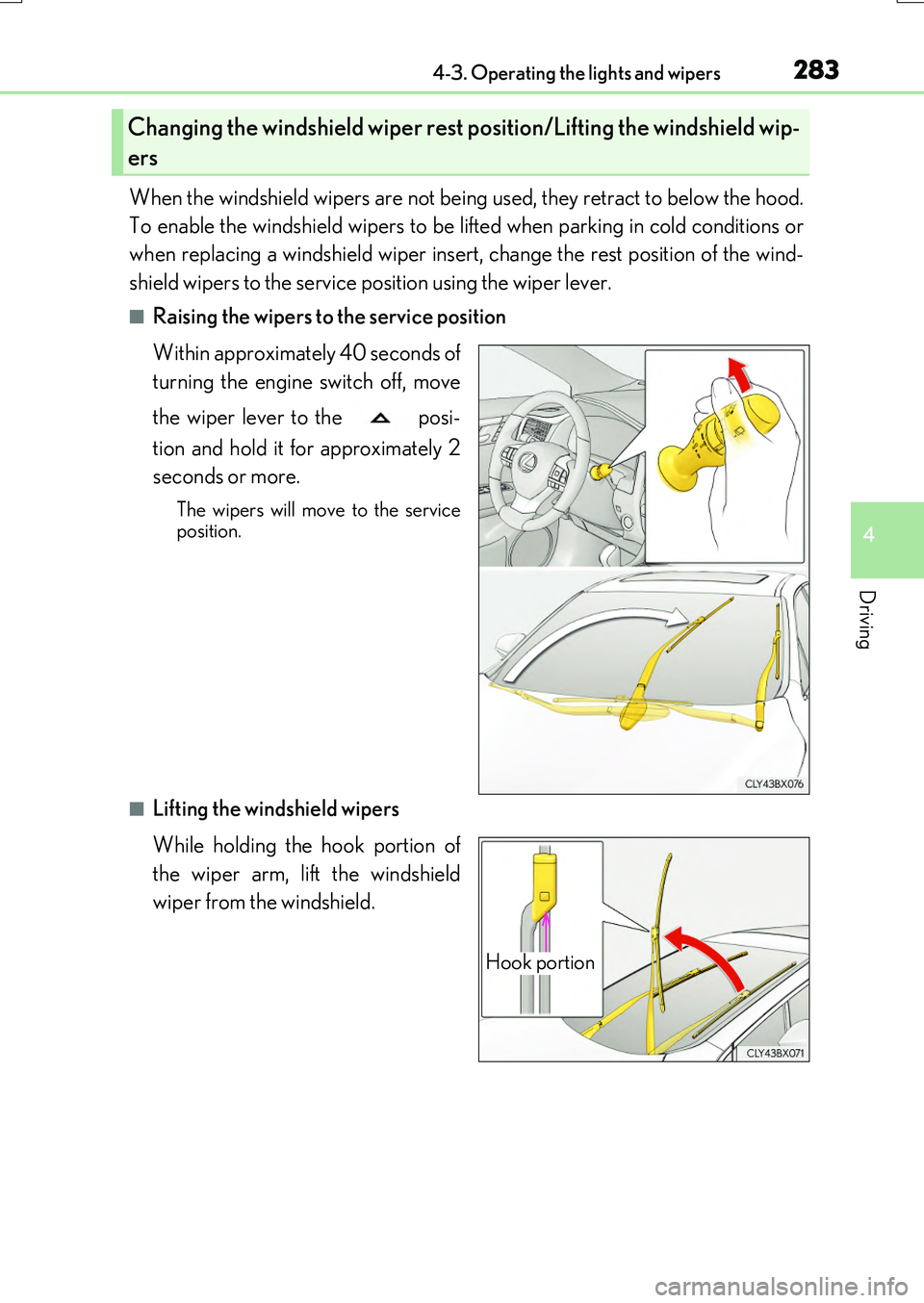
When the windshield wipers are not being used, they retract to below the hood.
To enable the windshield wipers to be li fted when parking in cold conditions or
when replacing a windshield wiper insert, change the rest position of the wind-
shield wipers to the service position using the wiper lever.
■Raising the wipers to the service position
Within approximately 40 seconds of
turning the engine switch off, move
the wiper lever to the posi-
tion and hold it for approximately 2
seconds or more.
The wipers will move to the service position.
■Lifting the windshield wipers
While holding the hook portion of
the wiper arm, lift the windshield
wiper from the windshield.
Changing the windshield wiper rest position/Lifting the windshield wip-
ers
Hook portion