change LEXUS RX270 2014 Owners Manual
[x] Cancel search | Manufacturer: LEXUS, Model Year: 2014, Model line: RX270, Model: LEXUS RX270 2014Pages: 652, PDF Size: 48.98 MB
Page 548 of 652
548
5-2. Steps to take in an emergency
RX350/270_EE
■If the malfunction indicator lamp comes on while driving
For some models, the malfunction indicator lamp will come on if the fuel tank
becomes completely empty. If the fuel tank is empty, refuel the vehicle immediately.
The malfunction indicator lamp will go off after several trips.
If the malfunction indicator lamp does not go off, contact any authorized Lexus
dealer or repairer, or another duly qualified and equipped professional as soon as
possible.
■Front passenger detection sensor, passenger seat belt reminder and warning
buzzer
●If luggage is placed on the front passenger seat, the front passenger detection
sensor may cause the warning light to flash and the warning buzzer to sound
even if a passenger is not sitting in the seat.
●If a cushion is placed on the seat, the sensor may not detect a passenger, and the
warning light may not operate properly.
■Electric power steering system warning light (warning buzzer)
When the battery charge becomes insufficient or the voltage temporarily drops,
the electric power steering system warning light may come on and the warning
buzzer may sound.
■When the tire pressure warning light comes on
Check the tire inflation pressure and adjust to the appropriate level. Pushing the tire
pressure warning reset switch will not turn off the tire pressure warning light.
■The tire pressure warning light may come on due to natural causes
The tire pressure warning light may come on due to natural causes such as natural
air leaks and tire inflation pressure changes caused by temperature. In this case,
adjusting the tire inflation pressure will turn off the warning light (after a few min-
utes).
RX350_270_EE_48D77E.book 548 ページ 2014年1月24日 金曜日 午前10時4分
Page 550 of 652
550
5-2. Steps to take in an emergency
RX350/270_EE
●If tire chains are used
●Vehicles with a full-size spare tire: If the spare tire is in a location subject to poor
radio wave signal reception
●Vehicles with a full-size spare tire: If a large metallic object which can interfere
with signal reception is put in the luggage compartment
■If the tire pressure warning light frequently comes on after blinking for 1 minute
If the tire pressure warning light frequently comes on after blinking for 1 minute
when the “ENGINE START STOP” switch is turned to IGNITION ON mode, have
it checked by any authorized Lexus dealer or repairer, or another duly qualified and
equipped professional.
■Customization
The vehicle speed linked seat belt reminder buzzer can be disabled.
(Customizable features →P. 6 2 2 )
CAUTION
■When the electric power steering system warning light comes on
The steering wheel may become extremely heavy.
If the steering wheel becomes heavier than usual when operating, hold firmly and
operate using more force than usual.
■If the tire pressure warning light comes on
Be sure to observe the following precautions. Failure to do so could cause loss of
vehicle control and result in death or serious injury.
●Stop your vehicle in a safe place as soon as possible. Adjust the tire inflation pres-
sure immediately.
●If the tire pressure warning light comes on even after tire inflation pressure adjust-
ment, it is probable that you have a flat tire. Check the tires. If a tire is flat, change
it with the spare tire and have the flat tire repaired by the nearest authorized
Lexus dealer or repairer, or another duly qualified and equipped professional.
●Avoid abrupt maneuvering and braking. If the vehicle tires deteriorate, you could
lose control of the steering wheel or the brakes.
■If a blowout or sudden air leakage should occur
The tire pressure warning system may not activate immediately.
RX350_270_EE_48D77E.book 550 ページ 2014年1月24日 金曜日 午前10時4分
Page 581 of 652
5
581
5-2. Steps to take in an emergency
When trouble arises
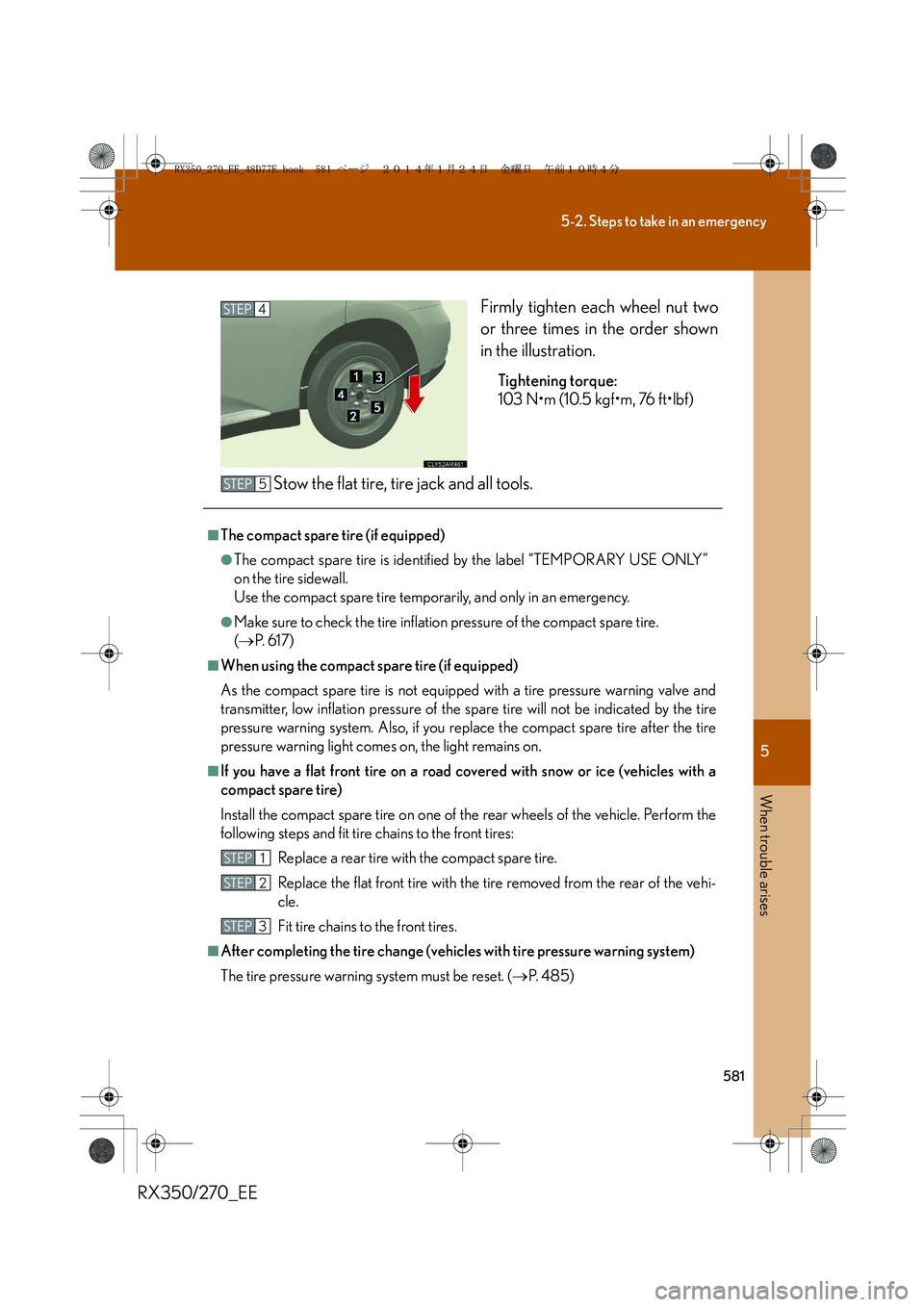
RX350/270_EEFirmly tighten each wheel nut two
or three times in the order shown
in the illustration.
Tightening torque:
103 N•m (10.5 kgf•m, 76 ft•lbf)
Stow the flat tire, tire jack and all tools.
STEP4
■The compact spare tire (if equipped)
●The compact spare tire is identified by the label “TEMPORARY USE ONLY”
on the tire sidewall.
Use the compact spare tire temporarily, and only in an emergency.
●Make sure to check the tire inflation pressure of the compact spare tire.
(→P. 6 1 7 )
■When using the compact spare tire (if equipped)
As the compact spare tire is not equipped with a tire pressure warning valve and
transmitter, low inflation pressure of the spare tire will not be indicated by the tire
pressure warning system. Also, if you replace the compact spare tire after the tire
pressure warning light comes on, the light remains on.
■If you have a flat front tire on a road covered with snow or ice (vehicles with a
compact spare tire)
Install the compact spare tire on one of the rear wheels of the vehicle. Perform the
following steps and fit tire chains to the front tires:
Replace a rear tire with the compact spare tire.
Replace the flat front tire with the tire removed from the rear of the vehi-
cle.
Fit tire chains to the front tires.
■After completing the tire change (vehicles with tire pressure warning system)
The tire pressure warning system must be reset. (→P. 4 8 5 )
STEP5
STEP1
STEP2
STEP3
RX350_270_EE_48D77E.book 581 ページ 2014年1月24日 金曜日 午前10時4分
Page 593 of 652
5
593
5-2. Steps to take in an emergency
When trouble arises
RX350/270_EE
■Stopping the engine
Shift the shift lever to P and press the “ENGINE START STOP” switch as you nor-
mally do when stopping the engine.
■Replacing the key battery
As the above procedure is a temporary measure, it is recommended that the elec-
tronic key battery be replaced immediately when the battery is depleted.
(→P. 5 0 1 )
■Alarm
Using the mechanical key to lock the doors will not set the alarm system.
If a door is unlocked using the mechanical key when the alarm system is set, the
alarm may be triggered. (→P. 1 2 2 )
■Changing “ENGINE START STOP” switch modes
Within 10 seconds of the buzzer sounding, release the brake pedal and press the
“ENGINE START STOP” switch.
The engine does not start and modes will be changed each time the switch is
pressed. (→P. 1 8 1 )
RX350_270_EE_48D77E.book 593 ページ 2014年1月24日 金曜日 午前10時4分
Page 611 of 652
611
6-1. Specifications
6
Vehicle specifications
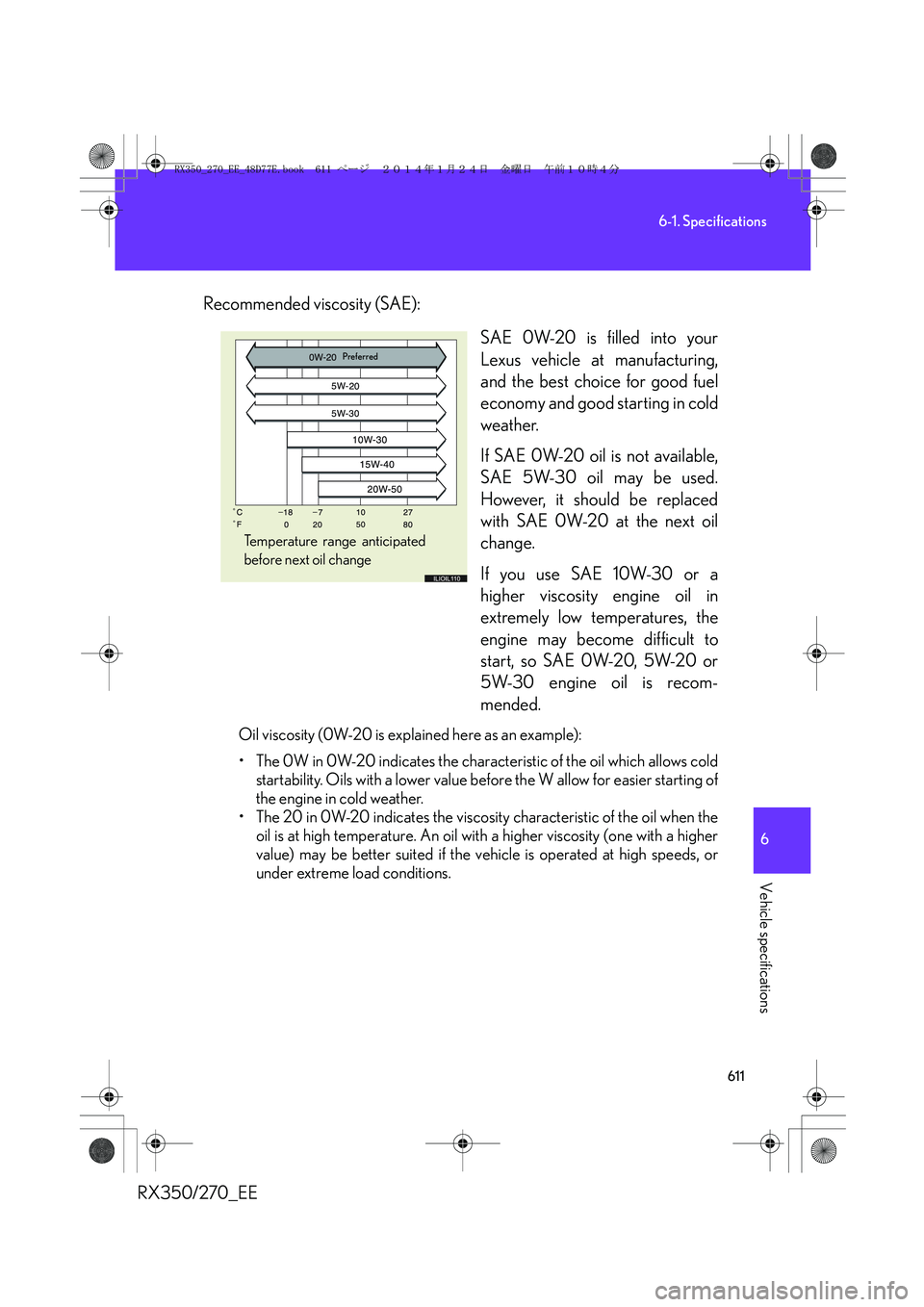
RX350/270_EERecommended viscosity (SAE):
SAE 0W-20 is filled into your
Lexus vehicle at manufacturing,
and the best choice for good fuel
economy and good starting in cold
weather.
If SAE 0W-20 oil is not available,
SAE 5W-30 oil may be used.
However, it should be replaced
with SAE 0W-20 at the next oil
change.
If you use SAE 10W-30 or a
higher viscosity engine oil in
extremely low temperatures, the
engine may become difficult to
start, so SAE 0W-20, 5W-20 or
5W-30 engine oil is recom-
mended.
Oil viscosity (0W-20 is explained here as an example):
• The 0W in 0W-20 indicates the characteristic of the oil which allows cold
startability. Oils with a lower value before the W allow for easier starting of
the engine in cold weather.
• The 20 in 0W-20 indicates the viscosity characteristic of the oil when the
oil is at high temperature. An oil with a higher viscosity (one with a higher
value) may be better suited if the vehicle is operated at high speeds, or
under extreme load conditions.
Temperature range anticipated
before next oil change
Preferred
RX350_270_EE_48D77E.book 611 ページ 2014年1月24日 金曜日 午前10時4分
Page 622 of 652
622
RX350/270_EE
6-2. Customization
Customizable features
Customizing vehicle features
It is possible to customize certain vehicle features using the multi-infor-
mation switches.*
*: For instructions on customizing vehicle features using the navigation
system screen, refer to the “Navigation System Owner’s Manual”.
When customizing vehicle features, ensure that the vehicle is parked in a
safe place with the shift lever in P and the parking brake set.
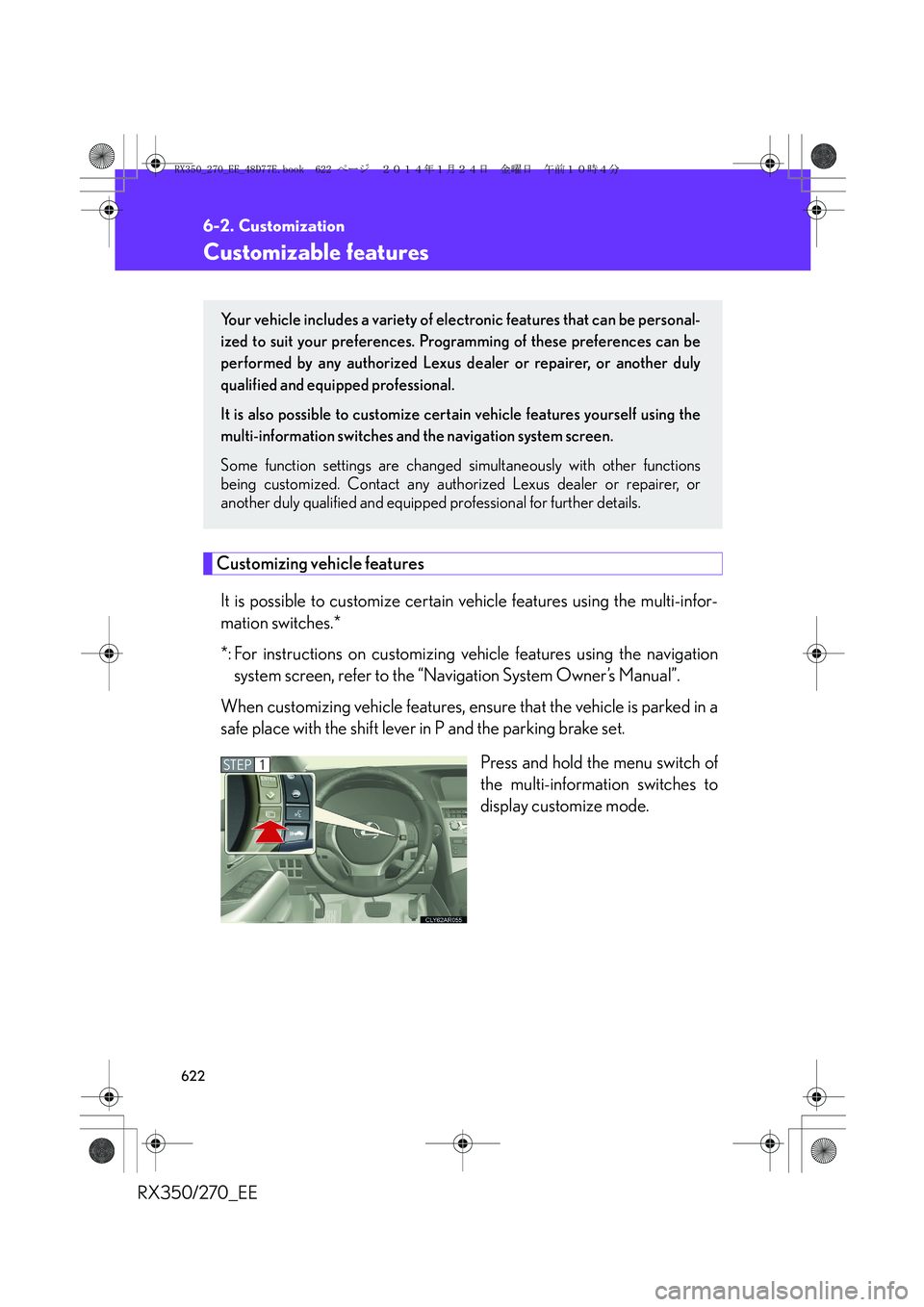
Press and hold the menu switch of
the multi-information switches to
display customize mode.
Your vehicle includes a variety of electronic features that can be personal-
ized to suit your preferences. Programming of these preferences can be
performed by any authorized Lexus dealer or repairer, or another duly
qualified and equipped professional.
It is also possible to customize certain vehicle features yourself using the
multi-information switches and the navigation system screen.
Some function settings are changed simultaneously with other functions
being customized. Contact any authorized Lexus dealer or repairer, or
another duly qualified and equipped professional for further details.
STEP1
RX350_270_EE_48D77E.book 622 ページ 2014年1月24日 金曜日 午前10時4分
Page 624 of 652
624
6-2. Customization
RX350/270_EE
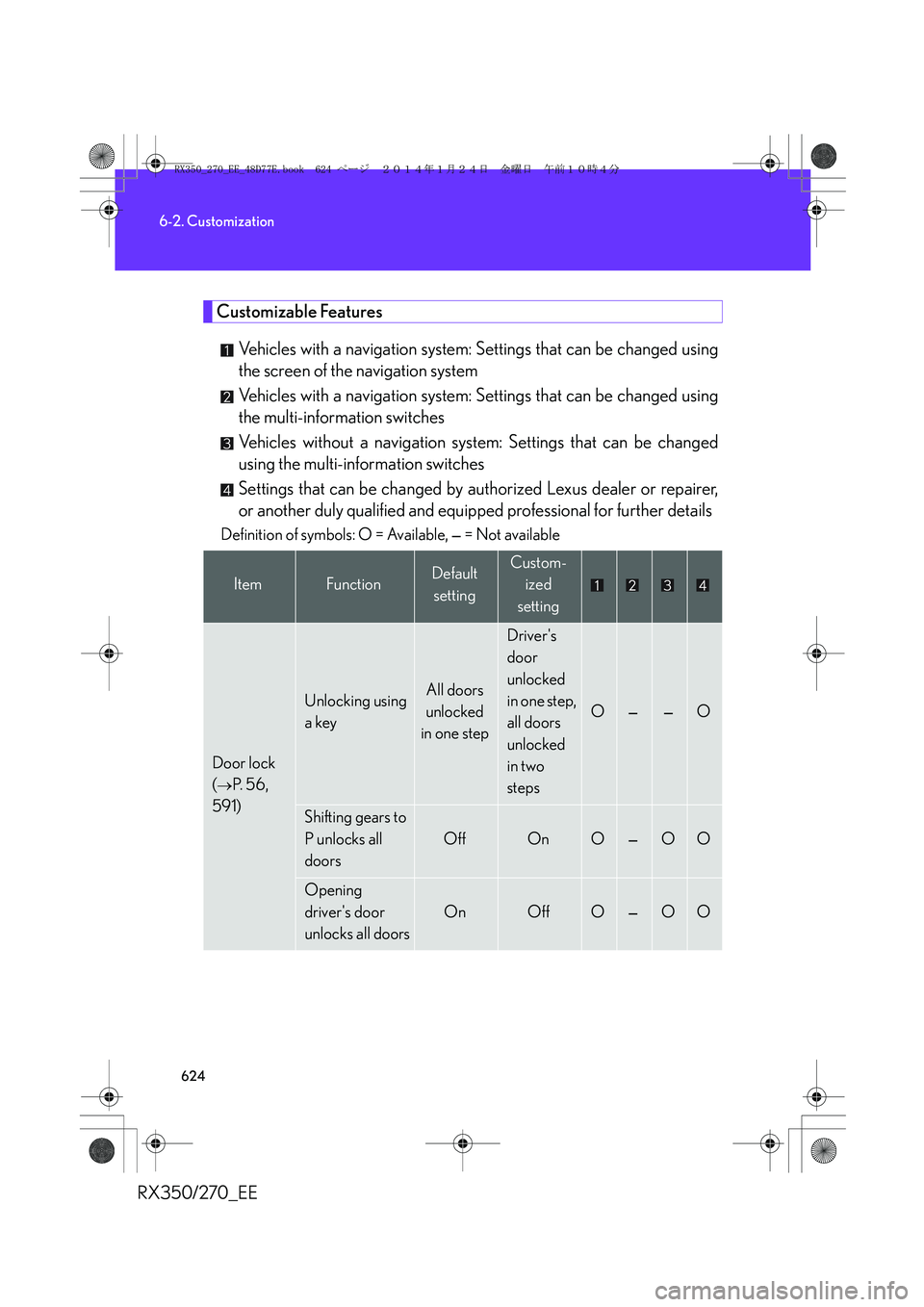
Customizable Features
Vehicles with a navigation system: Settings that can be changed using
the screen of the navigation system
Vehicles with a navigation system: Settings that can be changed using
the multi-information switches
Vehicles without a navigation system: Settings that can be changed
using the multi-information switches
Settings that can be changed by authorized Lexus dealer or repairer,
or another duly qualified and equipped professional for further details
Definition of symbols: O = Available, — = Not available
ItemFunctionDefault
settingCustom-
ized
setting
Door lock
(
→P. 5 6 ,
591)
Unlocking using
a keyAll doors
unlocked
in one step
Driver's
door
unlocked
in one step,
all doors
unlocked
in two
steps
O——O
Shifting gears to
P unlocks all
doors
OffOnO—OO
Opening
driver's door
unlocks all doors
OnOffO—OO
RX350_270_EE_48D77E.book 624 ページ 2014年1月24日 金曜日 午前10時4分
Page 631 of 652
631
6-2. Customization
6
Vehicle specifications
RX350/270_EE
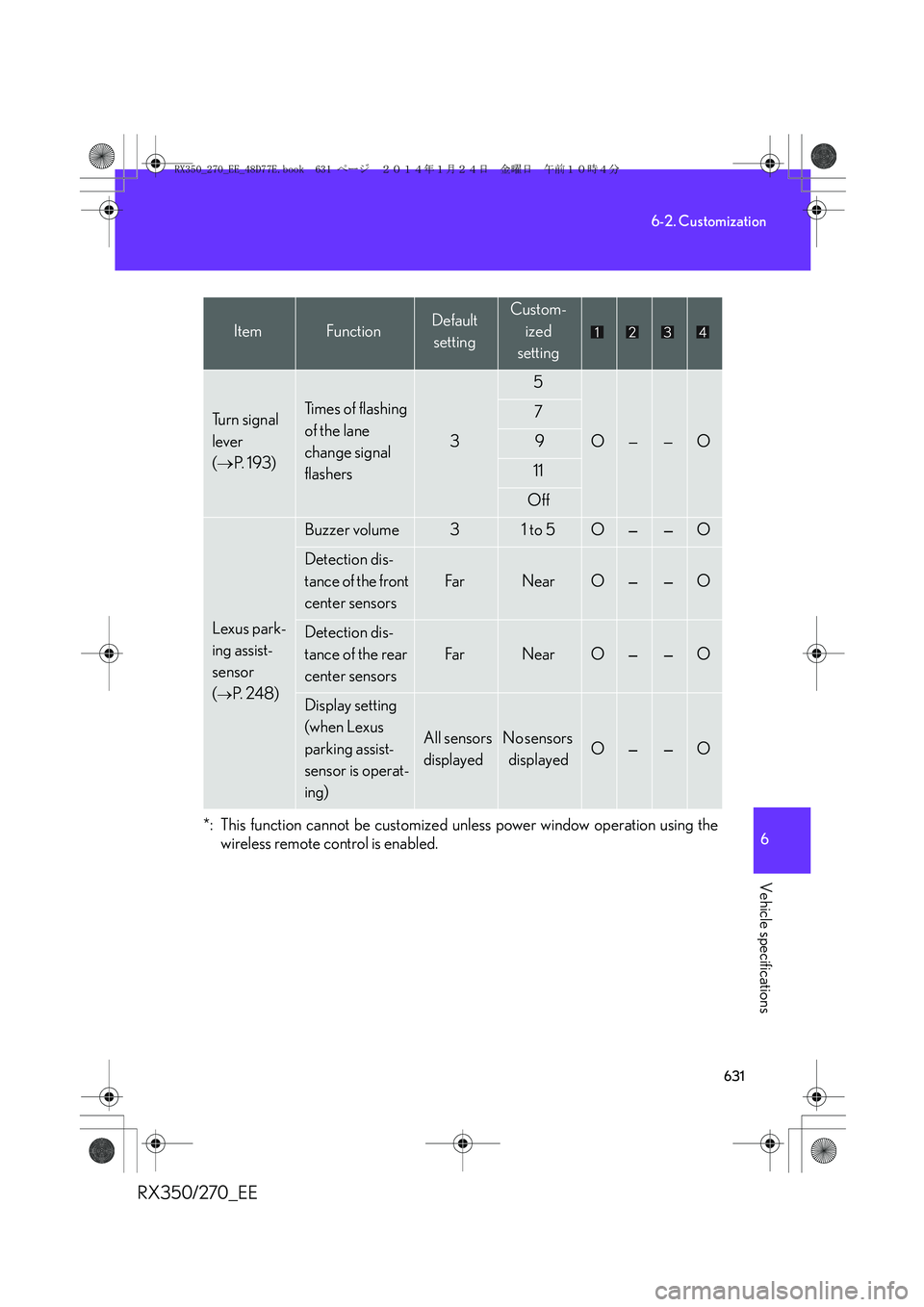
*: This function cannot be customized unless power window operation using the
wireless remote control is enabled.
Tu r n s i g n a l
lever
(→P. 1 9 3 )Ti m e s o f f l a s h i n g
of the lane
change signal
flashers
3
5
O——O
7
9
11
Off
Lexus park-
ing assist-
sensor
(
→P. 2 4 8 )
Buzzer volume31 to 5O——O
Detection dis-
tance of the front
center sensors
Fa rNearO——O
Detection dis-
tance of the rear
center sensors
Fa rNearO——O
Display setting
(when Lexus
parking assist-
sensor is operat-
ing)
All sensors
displayedNo sensors
displayedO——O
ItemFunctionDefault
settingCustom-
ized
setting
RX350_270_EE_48D77E.book 631 ページ 2014年1月24日 金曜日 午前10時4分
Page 632 of 652
632
6-2. Customization
RX350/270_EE
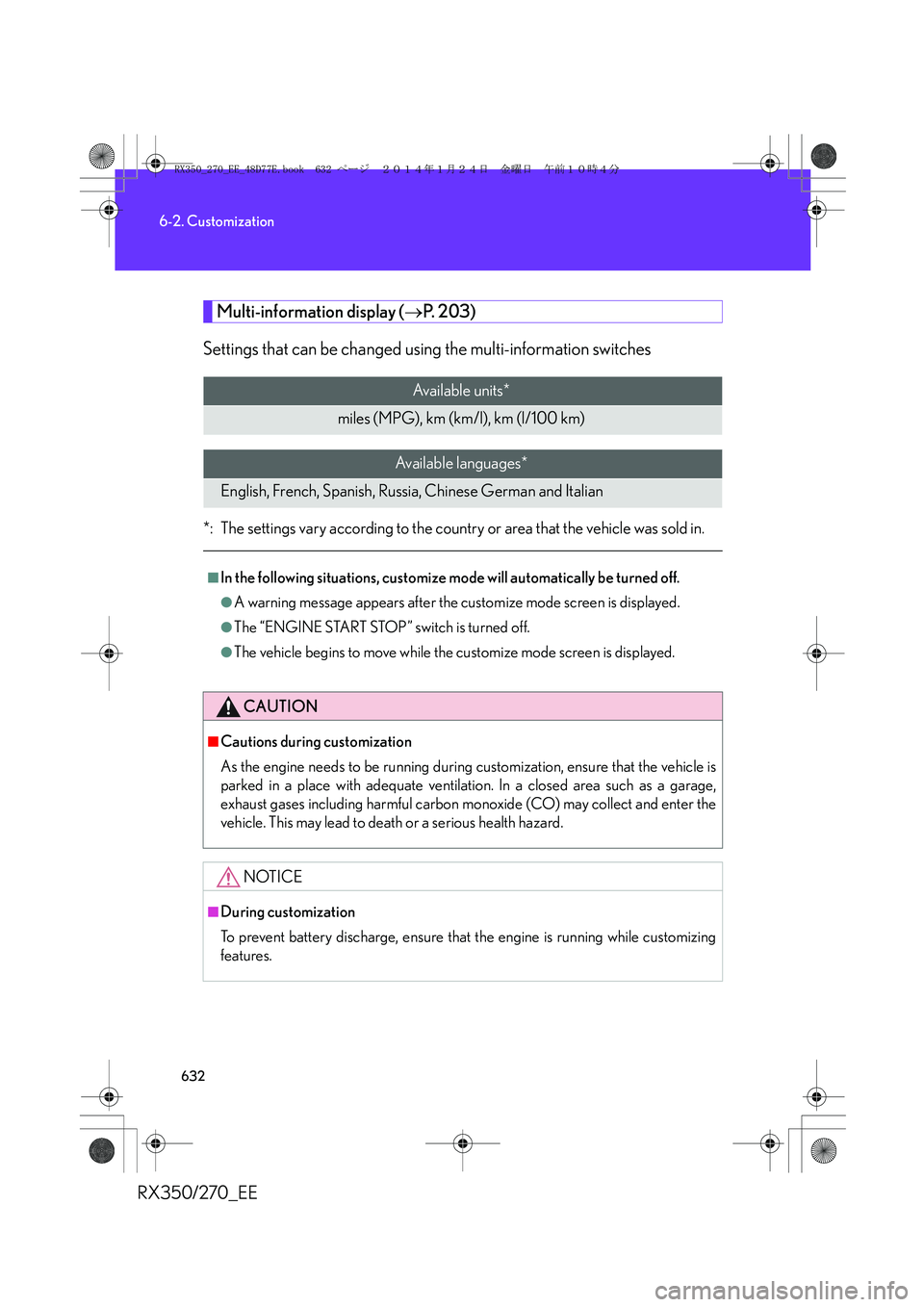
Multi-information display (→P. 2 0 3 )
Settings that can be changed using the multi-information switches
*: The settings vary according to the country or area that the vehicle was sold in.
Available units*
miles (MPG), km (km/l), km (l/100 km)
Available languages*
English, French, Spanish, Russia, Chinese German and Italian
■In the following situations, customize mode will automatically be turned off.
●A warning message appears after the customize mode screen is displayed.
●The “ENGINE START STOP” switch is turned off.
●The vehicle begins to move while the customize mode screen is displayed.
CAUTION
■Cautions during customization
As the engine needs to be running during customization, ensure that the vehicle is
parked in a place with adequate ventilation. In a closed area such as a garage,
exhaust gases including harmful carbon monoxide (CO) may collect and enter the
vehicle. This may lead to death or a serious health hazard.
NOTICE
■During customization
To prevent battery discharge, ensure that the engine is running while customizing
features.
RX350_270_EE_48D77E.book 632 ページ 2014年1月24日 金曜日 午前10時4分
Page 637 of 652
637
RX350/270_EE
Alphabetical index
Alphabetical index
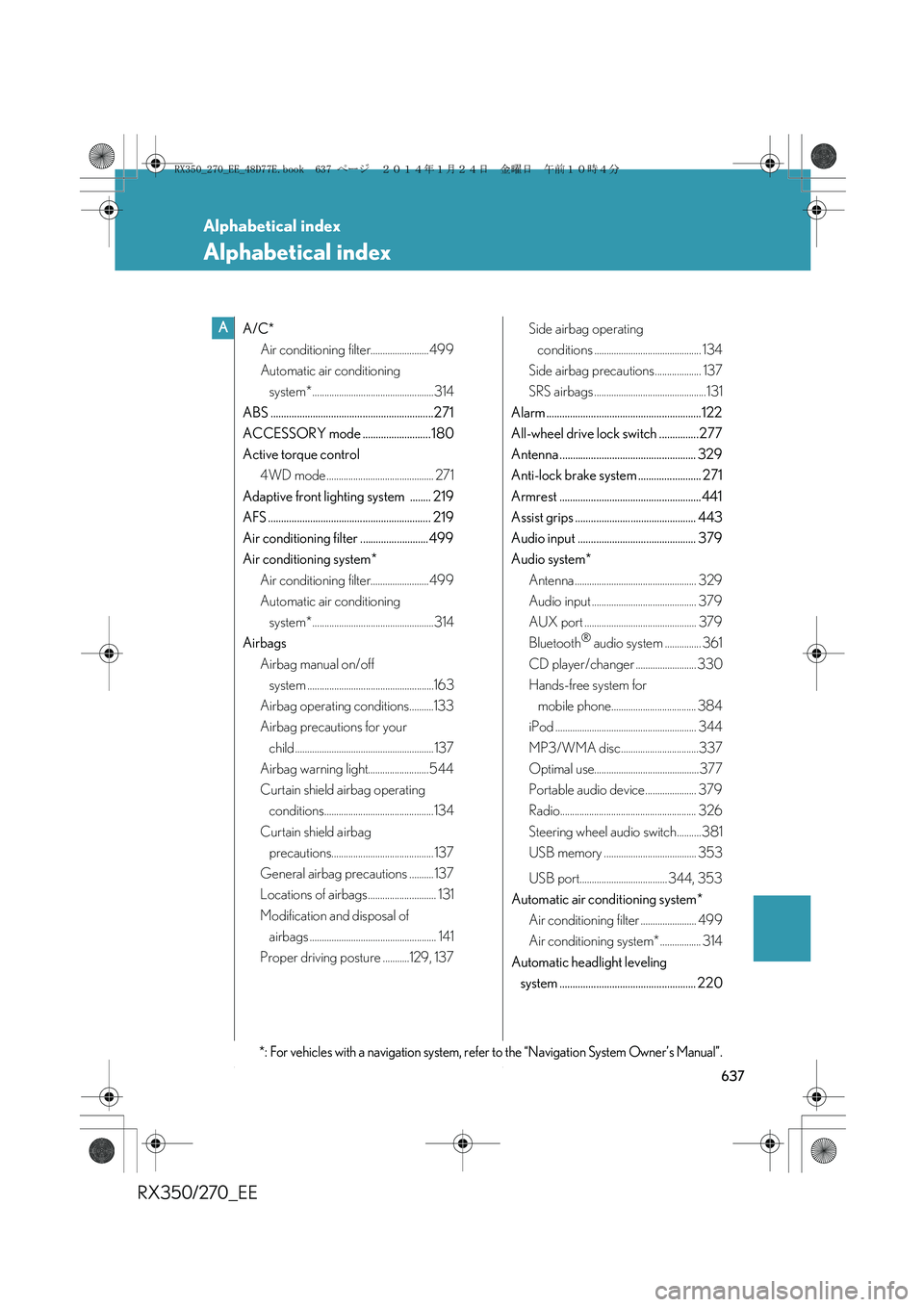
A/C*
Air conditioning filter........................499
Automatic air conditioning
system*..................................................314
ABS ..............................................................271
ACCESSORY mode .......................... 180
Active torque control
4WD mode ............................................ 271
Adaptive front lighting system ........ 219
AFS .............................................................. 219
Air conditioning filter .......................... 499
Air conditioning system*
Air conditioning filter........................499
Automatic air conditioning
system*..................................................314
Airbags
Airbag manual on/off
system ....................................................163
Airbag operating conditions..........133
Airbag precautions for your
child ......................................................... 137
Airbag warning light......................... 544
Curtain shield airbag operating
conditions.............................................134
Curtain shield airbag
precautions.......................................... 137
General airbag precautions .......... 137
Locations of airbags............................ 131
Modification and disposal of
airbags .................................................... 141
Proper driving posture ...........129, 137Side airbag operating
conditions ............................................ 134
Side airbag precautions................... 137
SRS airbags ..............................................131
Alarm ........................................................... 122
All-wheel drive lock switch ...............277
Antenna .................................................... 329
Anti-lock brake system ........................ 271
Armrest ......................................................441
Assist grips .............................................. 443
Audio input ............................................. 379
Audio system*
Antenna .................................................. 329
Audio input ........................................... 379
AUX port .............................................. 379
Bluetooth
® audio system ............... 361
CD player/changer ......................... 330
Hands-free system for
mobile phone................................... 384
iPod .......................................................... 344
MP3/WMA disc................................337
Optimal use........................................... 377
Portable audio device..................... 379
Radio........................................................ 326
Steering wheel audio switch..........381
USB memory ...................................... 353
USB port.................................... 344, 353
Automatic air conditioning system*
Air conditioning filter ....................... 499
Air conditioning system* ................. 314
Automatic headlight leveling
system .................................................... 220
A
*: For vehicles with a navigation system, refer to the “Navigation System Owner’s Manual”.
RX350_270_EE_48D77E.book 637 ページ 2014年1月24日 金曜日 午前10時4分