display LEXUS RX270 2014 Owners Manual
[x] Cancel search | Manufacturer: LEXUS, Model Year: 2014, Model line: RX270, Model: LEXUS RX270 2014Pages: 652, PDF Size: 48.98 MB
Page 557 of 652
5
557
5-2. Steps to take in an emergency
When trouble arises
RX350/270_EE
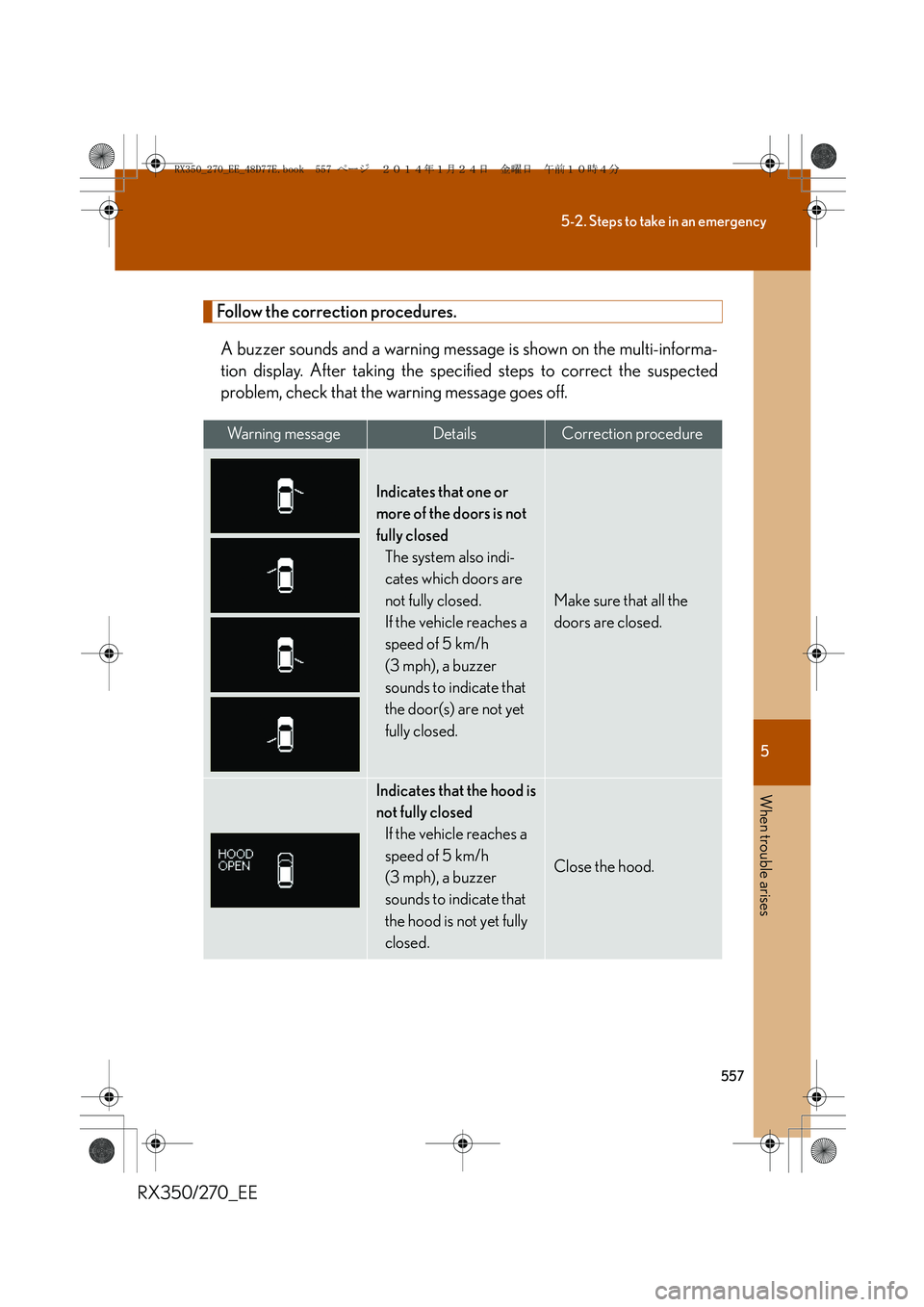
Follow the correction procedures.
A buzzer sounds and a warning message is shown on the multi-informa-
tion display. After taking the specified steps to correct the suspected
problem, check that the warning message goes off.
Wa r n i n g m e s s a g eDetailsCorrection procedure
Indicates that one or
more of the doors is not
fully closed
The system also indi-
cates which doors are
not fully closed.
If the vehicle reaches a
speed of 5 km/h
(3 mph), a buzzer
sounds to indicate that
the door(s) are not yet
fully closed.
Make sure that all the
doors are closed.
Indicates that the hood is
not fully closed
If the vehicle reaches a
speed of 5 km/h
(3 mph), a buzzer
sounds to indicate that
the hood is not yet fully
closed.
Close the hood.
RX350_270_EE_48D77E.book 557 ページ 2014年1月24日 金曜日 午前10時4分
Page 560 of 652
560
5-2. Steps to take in an emergency
RX350/270_EE
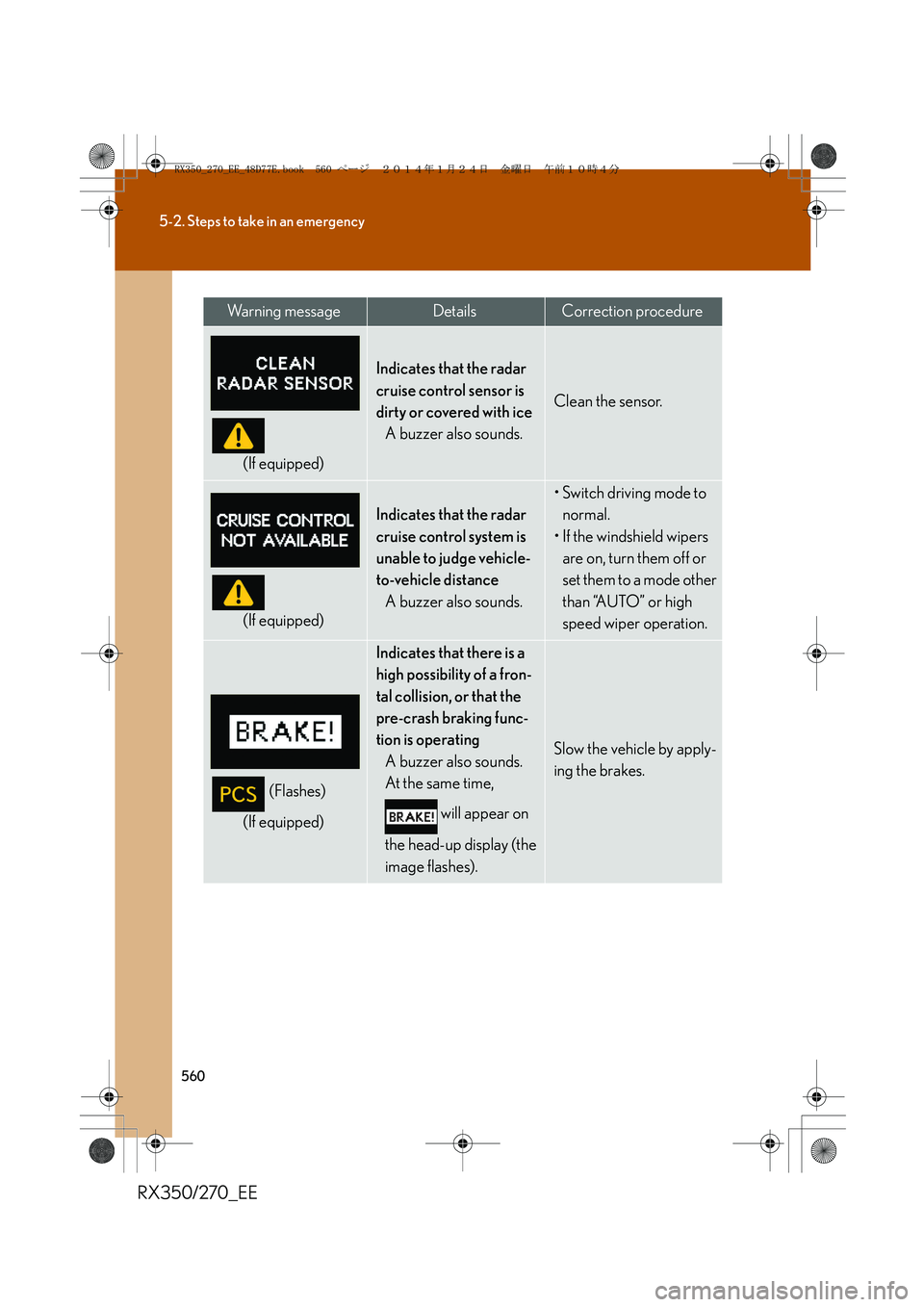
(If equipped)
Indicates that the radar
cruise control sensor is
dirty or covered with ice
A buzzer also sounds.
Clean the sensor.
(If equipped)
Indicates that the radar
cruise control system is
unable to judge vehicle-
to-vehicle distance
A buzzer also sounds.
• Switch driving mode to
normal.
• If the windshield wipers
are on, turn them off or
set them to a mode other
than “AUTO” or high
speed wiper operation.
(Flashes)
(If equipped)
Indicates that there is a
high possibility of a fron-
tal collision, or that the
pre-crash braking func-
tion is operating
A buzzer also sounds.
At the same time,
will appear on
the head-up display (the
image flashes).
Slow the vehicle by apply-
ing the brakes.
Wa r n i n g m e s s a g eDetailsCorrection procedure
RX350_270_EE_48D77E.book 560 ページ 2014年1月24日 金曜日 午前10時4分
Page 561 of 652
5
561
5-2. Steps to take in an emergency
When trouble arises
RX350/270_EE
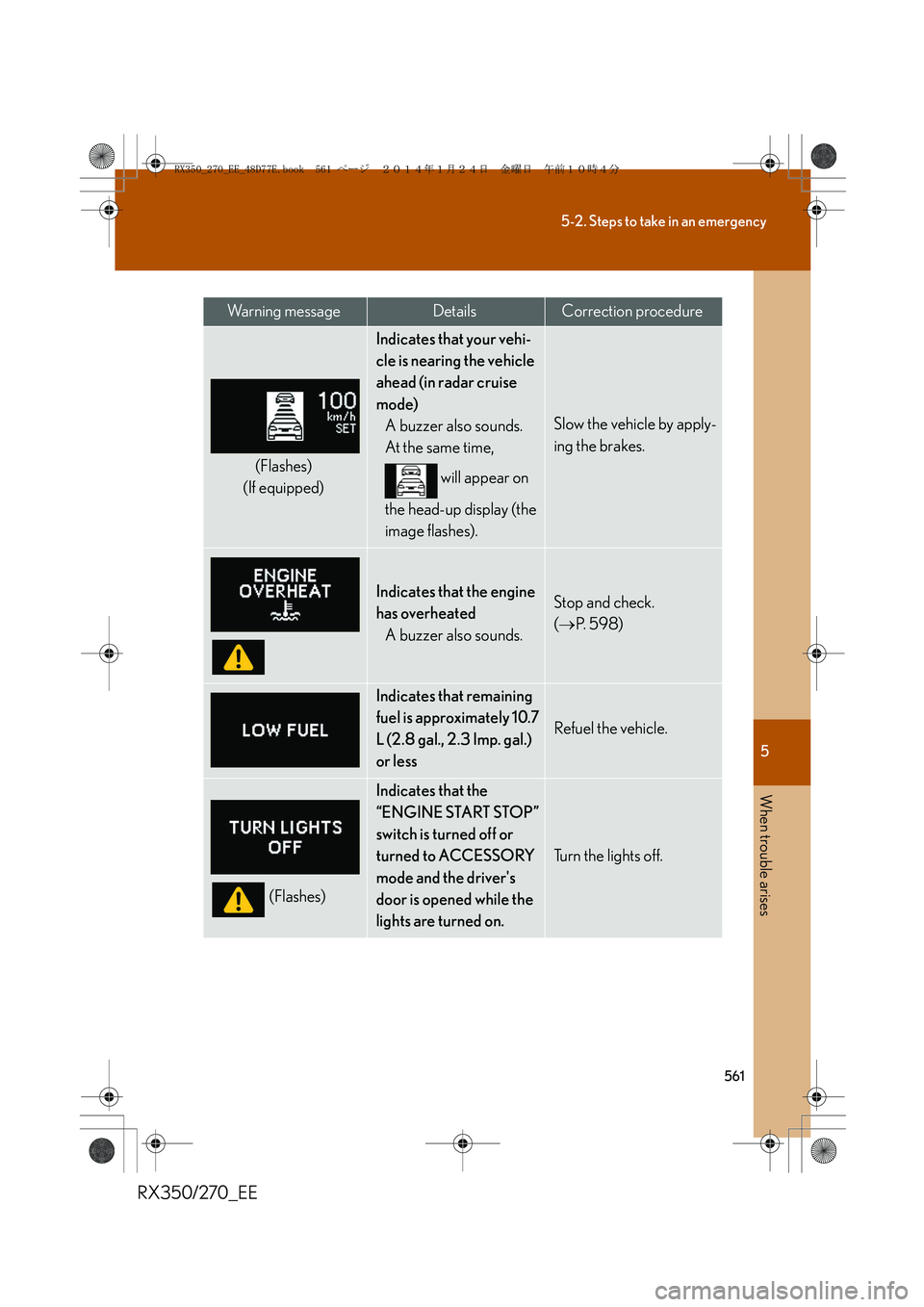
(Flashes)
(If equipped)
Indicates that your vehi-
cle is nearing the vehicle
ahead (in radar cruise
mode)
A buzzer also sounds.
At the same time,
will appear on
the head-up display (the
image flashes).
Slow the vehicle by apply-
ing the brakes.
Indicates that the engine
has overheated
A buzzer also sounds.Stop and check.
(→P. 5 9 8 )
Indicates that remaining
fuel is approximately 10.7
L (2.8 gal., 2.3 Imp. gal.)
or less
Refuel the vehicle.
(Flashes)
Indicates that the
“ENGINE START STOP”
switch is turned off or
turned to ACCESSORY
mode and the driver's
door is opened while the
lights are turned on.
Tu r n t h e l i g h t s o f f .
Wa r n i n g m e s s a g eDetailsCorrection procedure
RX350_270_EE_48D77E.book 561 ページ 2014年1月24日 金曜日 午前10時4分
Page 565 of 652
5
565
5-2. Steps to take in an emergency
When trouble arises
RX350/270_EE
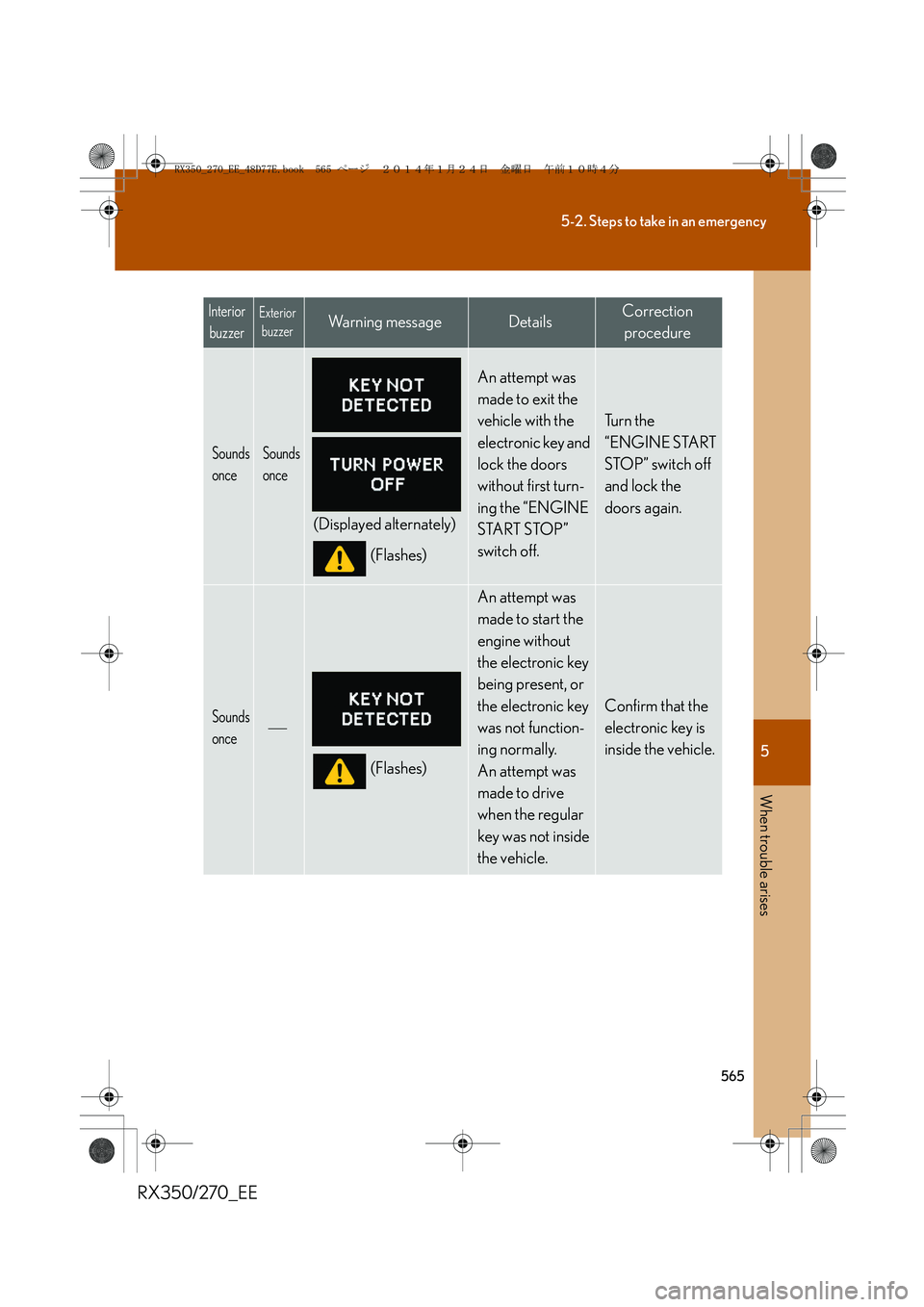
Sounds
onceSounds
once
(Displayed alternately)
(Flashes)
An attempt was
made to exit the
vehicle with the
electronic key and
lock the doors
without first turn-
ing the “ENGINE
START STOP”
switch off.
Tu r n t h e
“ENGINE START
STOP” switch off
and lock the
doors again.
Sounds
once
(Flashes)
An attempt was
made to start the
engine without
the electronic key
being present, or
the electronic key
was not function-
ing normally.
An attempt was
made to drive
when the regular
key was not inside
the vehicle.
Confirm that the
electronic key is
inside the vehicle.
Interior
buzzerExterior
buzzerWa r n i n g m e s s a g eDetailsCorrection
procedure
RX350_270_EE_48D77E.book 565 ページ 2014年1月24日 金曜日 午前10時4分
Page 566 of 652
566
5-2. Steps to take in an emergency
RX350/270_EE
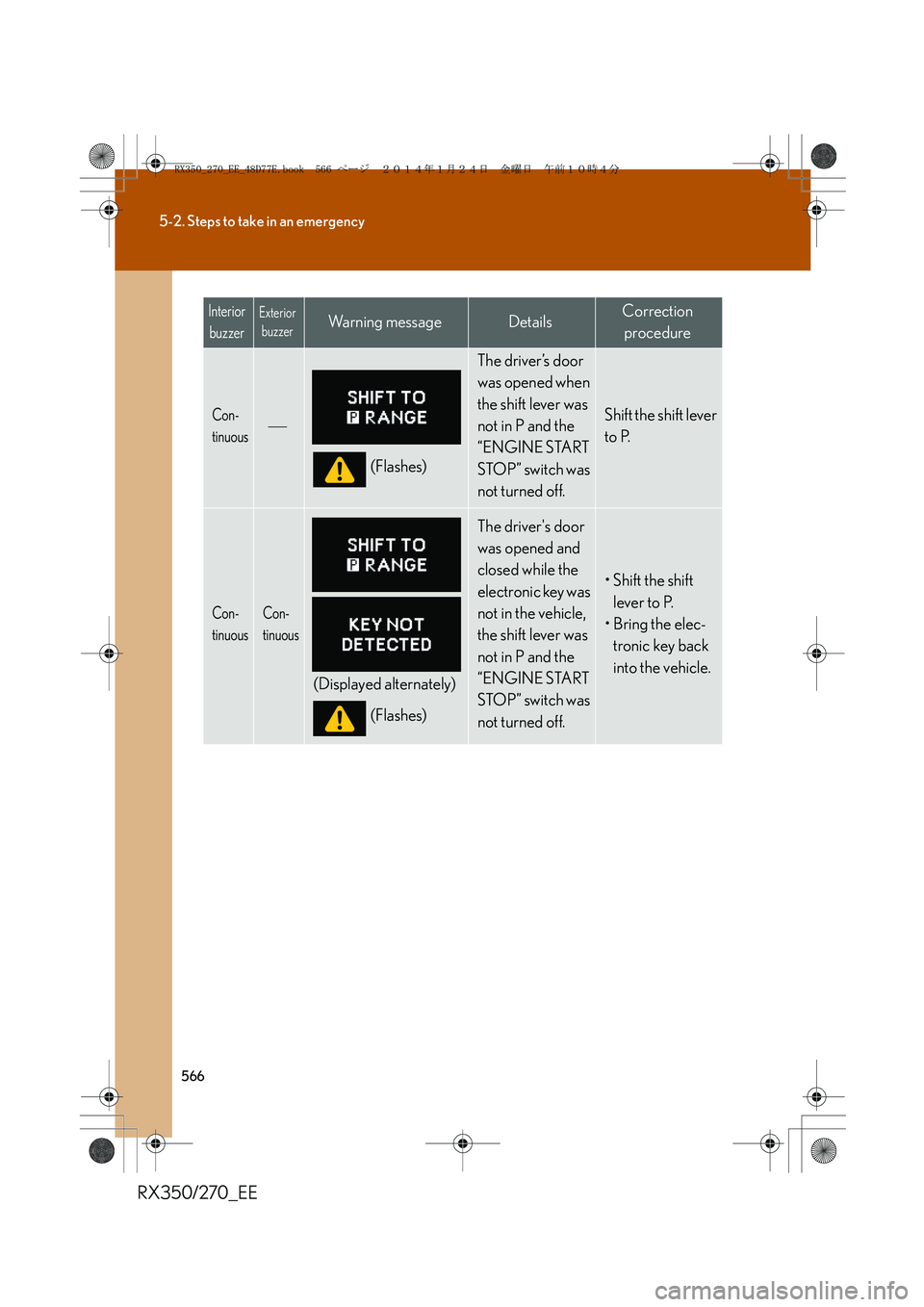
Con-
tinuous
(Flashes)
The driver’s door
was opened when
the shift lever was
not in P and the
“ENGINE START
STOP” switch was
not turned off.
Shift the shift lever
to P.
Con-
tinuousCon-
tinuous
(Displayed alternately)
(Flashes)
The driver's door
was opened and
closed while the
electronic key was
not in the vehicle,
the shift lever was
not in P and the
“ENGINE START
STOP” switch was
not turned off.
• Shift the shift
lever to P.
• Bring the elec-
tronic key back
into the vehicle.
Interior
buzzerExterior
buzzerWa r n i n g m e s s a g eDetailsCorrection
procedure
RX350_270_EE_48D77E.book 566 ページ 2014年1月24日 金曜日 午前10時4分
Page 571 of 652
5
571
5-2. Steps to take in an emergency
When trouble arises
RX350/270_EE
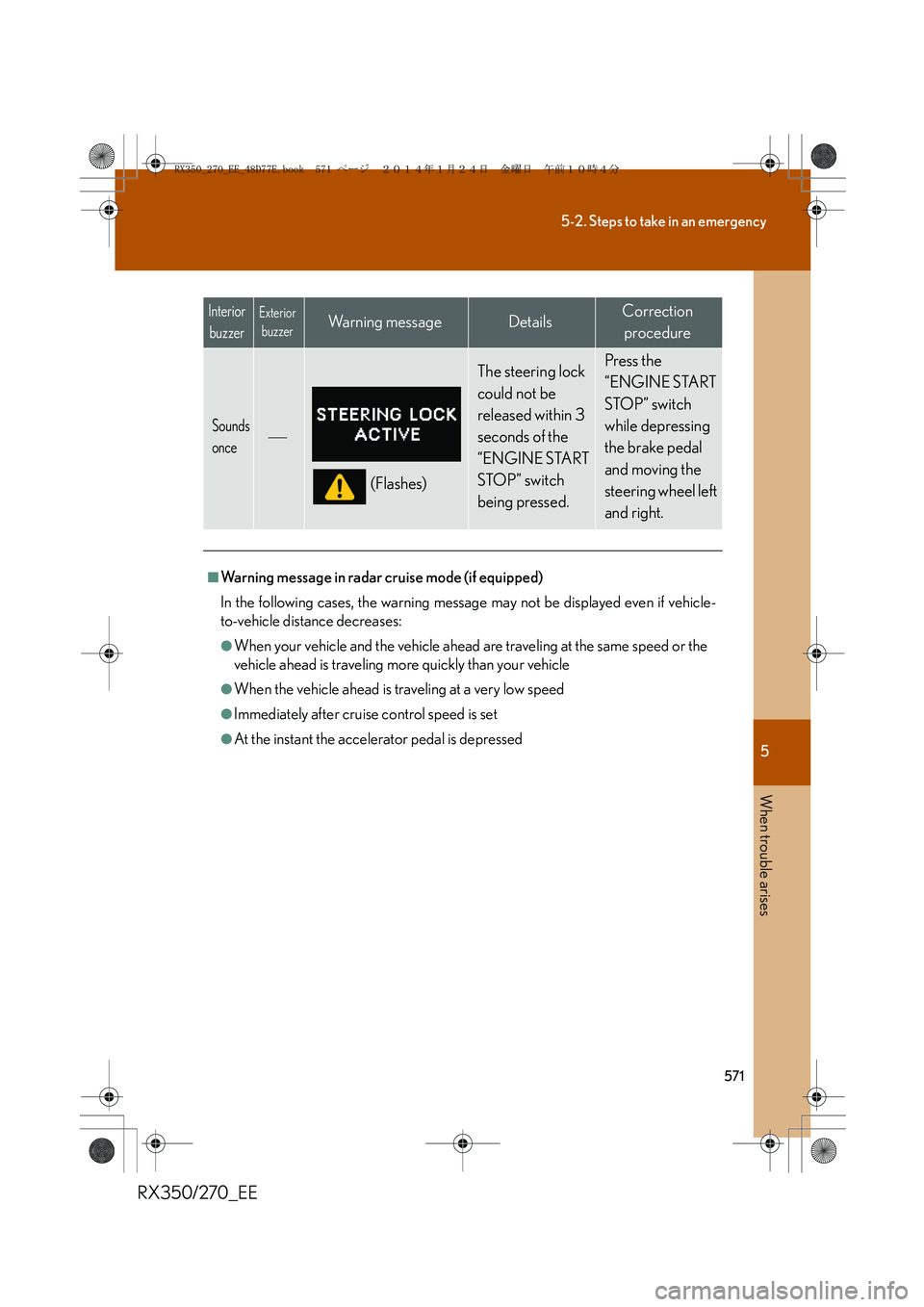
Sounds
once
(Flashes)
The steering lock
could not be
released within 3
seconds of the
“ENGINE START
STOP” switch
being pressed. Press the
“ENGINE START
STOP” switch
while depressing
the brake pedal
and moving the
steering wheel left
and right.
■Warning message in radar cruise mode (if equipped)
In the following cases, the warning message may not be displayed even if vehicle-
to-vehicle distance decreases:
●When your vehicle and the vehicle ahead are traveling at the same speed or the
vehicle ahead is traveling more quickly than your vehicle
●When the vehicle ahead is traveling at a very low speed
●Immediately after cruise control speed is set
●At the instant the accelerator pedal is depressed
Interior
buzzerExterior
buzzerWa r n i n g m e s s a g eDetailsCorrection
procedure
RX350_270_EE_48D77E.book 571 ページ 2014年1月24日 金曜日 午前10時4分
Page 598 of 652
598
5-2. Steps to take in an emergency
RX350/270_EE
If your vehicle overheats
Correction procedures
Stop the vehicle in a safe place and turn off the air conditioning
system, and then stop the engine.
If you see steam:
Carefully lift the hood after the steam subsides.
If you do not see steam:
Carefully lift the hood.
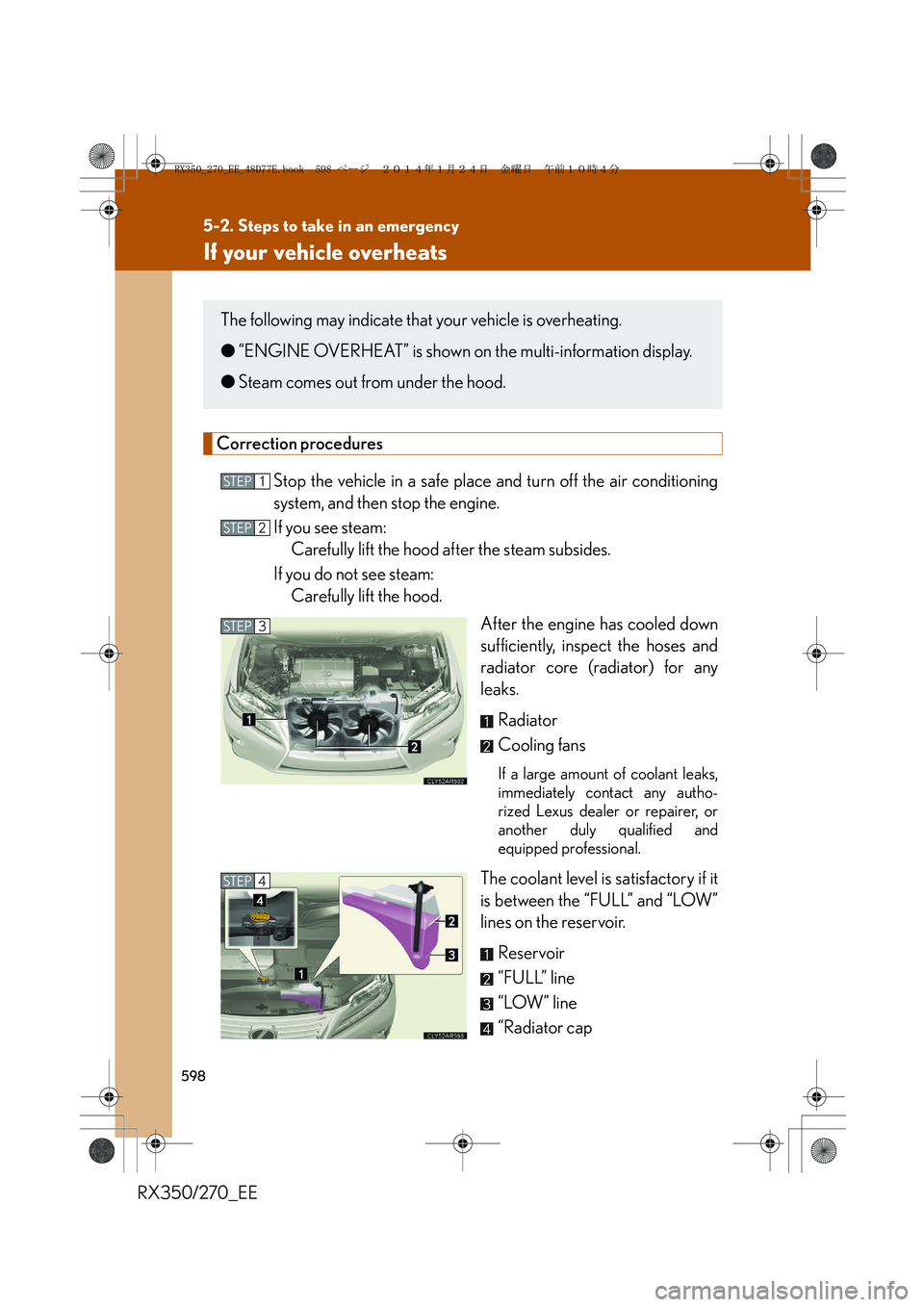
After the engine has cooled down
sufficiently, inspect the hoses and
radiator core (radiator) for any
leaks.
Radiator
Cooling fans
If a large amount of coolant leaks,
immediately contact any autho-
rized Lexus dealer or repairer, or
another duly qualified and
equipped professional.
The coolant level is satisfactory if it
is between the “FULL” and “LOW”
lines on the reservoir.
Reservoir
“FULL” line
“LOW” line
“Radiator cap
The following may indicate that your vehicle is overheating.
●“ENGINE OVERHEAT” is shown on the multi-information display.
●Steam comes out from under the hood.
STEP1
STEP2
STEP3
STEP4
RX350_270_EE_48D77E.book 598 ページ 2014年1月24日 金曜日 午前10時4分
Page 622 of 652
622
RX350/270_EE
6-2. Customization
Customizable features
Customizing vehicle features
It is possible to customize certain vehicle features using the multi-infor-
mation switches.*
*: For instructions on customizing vehicle features using the navigation
system screen, refer to the “Navigation System Owner’s Manual”.
When customizing vehicle features, ensure that the vehicle is parked in a
safe place with the shift lever in P and the parking brake set.
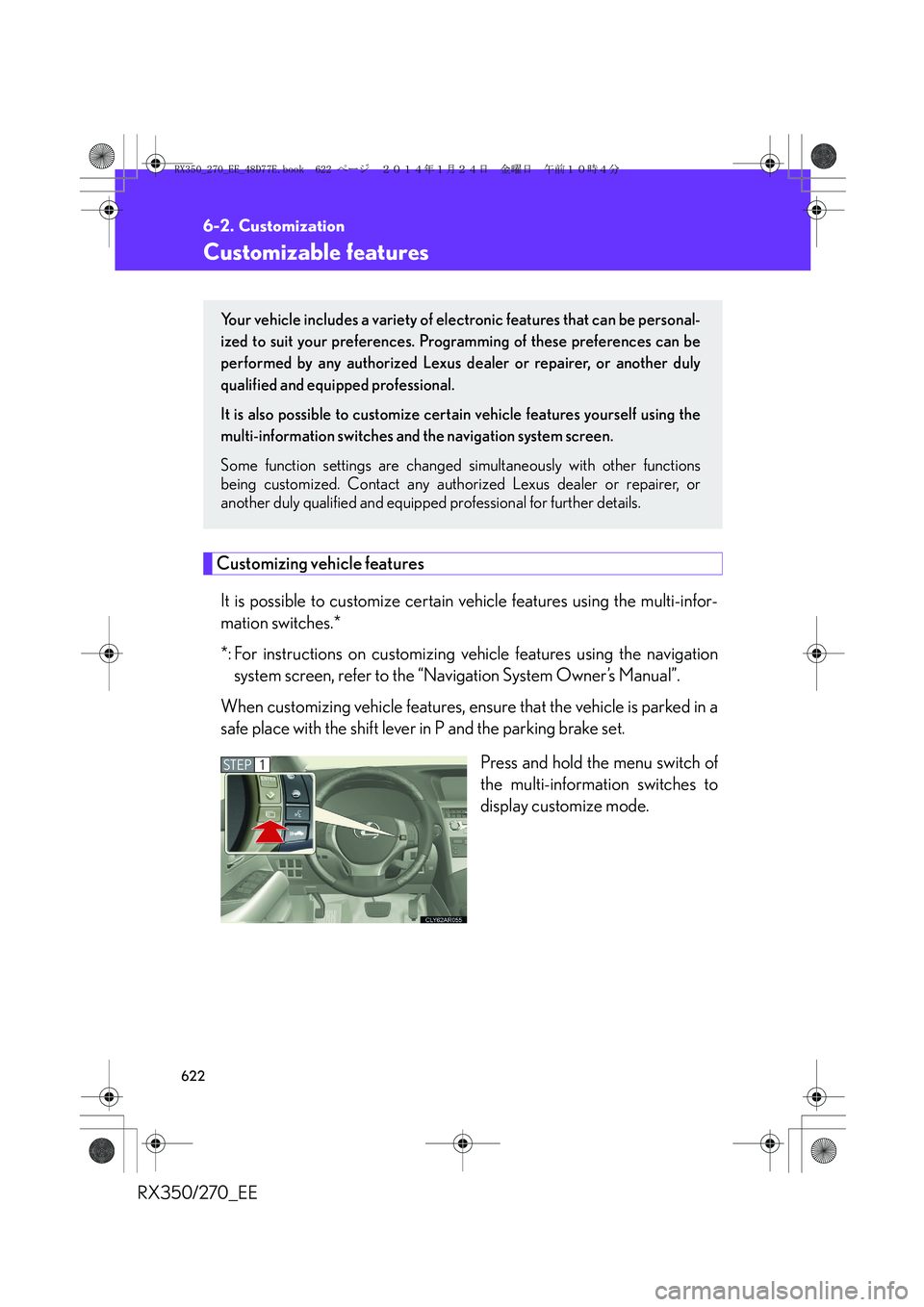
Press and hold the menu switch of
the multi-information switches to
display customize mode.
Your vehicle includes a variety of electronic features that can be personal-
ized to suit your preferences. Programming of these preferences can be
performed by any authorized Lexus dealer or repairer, or another duly
qualified and equipped professional.
It is also possible to customize certain vehicle features yourself using the
multi-information switches and the navigation system screen.
Some function settings are changed simultaneously with other functions
being customized. Contact any authorized Lexus dealer or repairer, or
another duly qualified and equipped professional for further details.
STEP1
RX350_270_EE_48D77E.book 622 ページ 2014年1月24日 金曜日 午前10時4分
Page 631 of 652
631
6-2. Customization
6
Vehicle specifications
RX350/270_EE
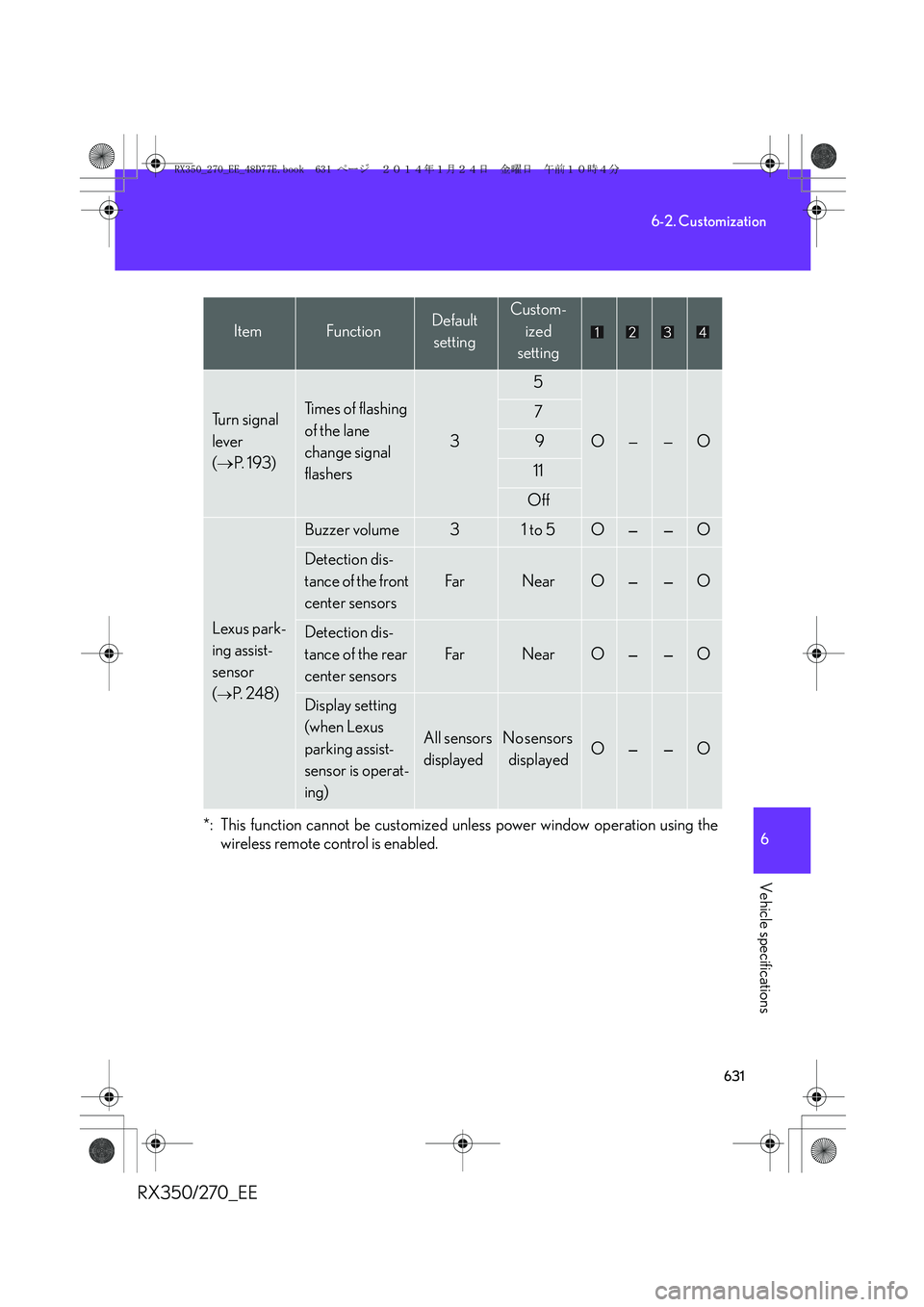
*: This function cannot be customized unless power window operation using the
wireless remote control is enabled.
Tu r n s i g n a l
lever
(→P. 1 9 3 )Ti m e s o f f l a s h i n g
of the lane
change signal
flashers
3
5
O——O
7
9
11
Off
Lexus park-
ing assist-
sensor
(
→P. 2 4 8 )
Buzzer volume31 to 5O——O
Detection dis-
tance of the front
center sensors
Fa rNearO——O
Detection dis-
tance of the rear
center sensors
Fa rNearO——O
Display setting
(when Lexus
parking assist-
sensor is operat-
ing)
All sensors
displayedNo sensors
displayedO——O
ItemFunctionDefault
settingCustom-
ized
setting
RX350_270_EE_48D77E.book 631 ページ 2014年1月24日 金曜日 午前10時4分
Page 632 of 652
632
6-2. Customization
RX350/270_EE
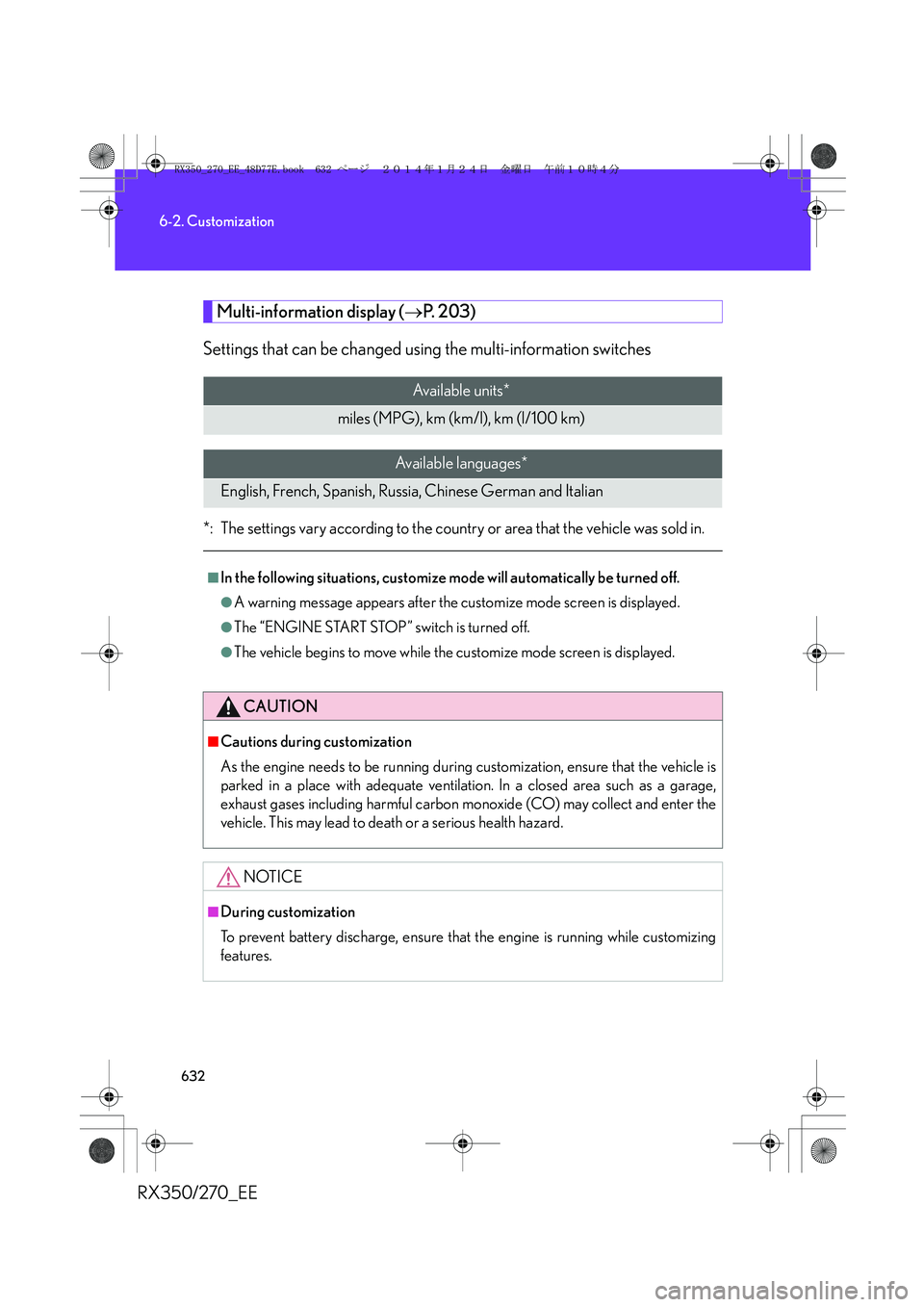
Multi-information display (→P. 2 0 3 )
Settings that can be changed using the multi-information switches
*: The settings vary according to the country or area that the vehicle was sold in.
Available units*
miles (MPG), km (km/l), km (l/100 km)
Available languages*
English, French, Spanish, Russia, Chinese German and Italian
■In the following situations, customize mode will automatically be turned off.
●A warning message appears after the customize mode screen is displayed.
●The “ENGINE START STOP” switch is turned off.
●The vehicle begins to move while the customize mode screen is displayed.
CAUTION
■Cautions during customization
As the engine needs to be running during customization, ensure that the vehicle is
parked in a place with adequate ventilation. In a closed area such as a garage,
exhaust gases including harmful carbon monoxide (CO) may collect and enter the
vehicle. This may lead to death or a serious health hazard.
NOTICE
■During customization
To prevent battery discharge, ensure that the engine is running while customizing
features.
RX350_270_EE_48D77E.book 632 ページ 2014年1月24日 金曜日 午前10時4分