display LEXUS RX270 2014 Repair Manual
[x] Cancel search | Manufacturer: LEXUS, Model Year: 2014, Model line: RX270, Model: LEXUS RX270 2014Pages: 652, PDF Size: 48.98 MB
Page 316 of 652
316
3-1. Using the air conditioning system and defogger
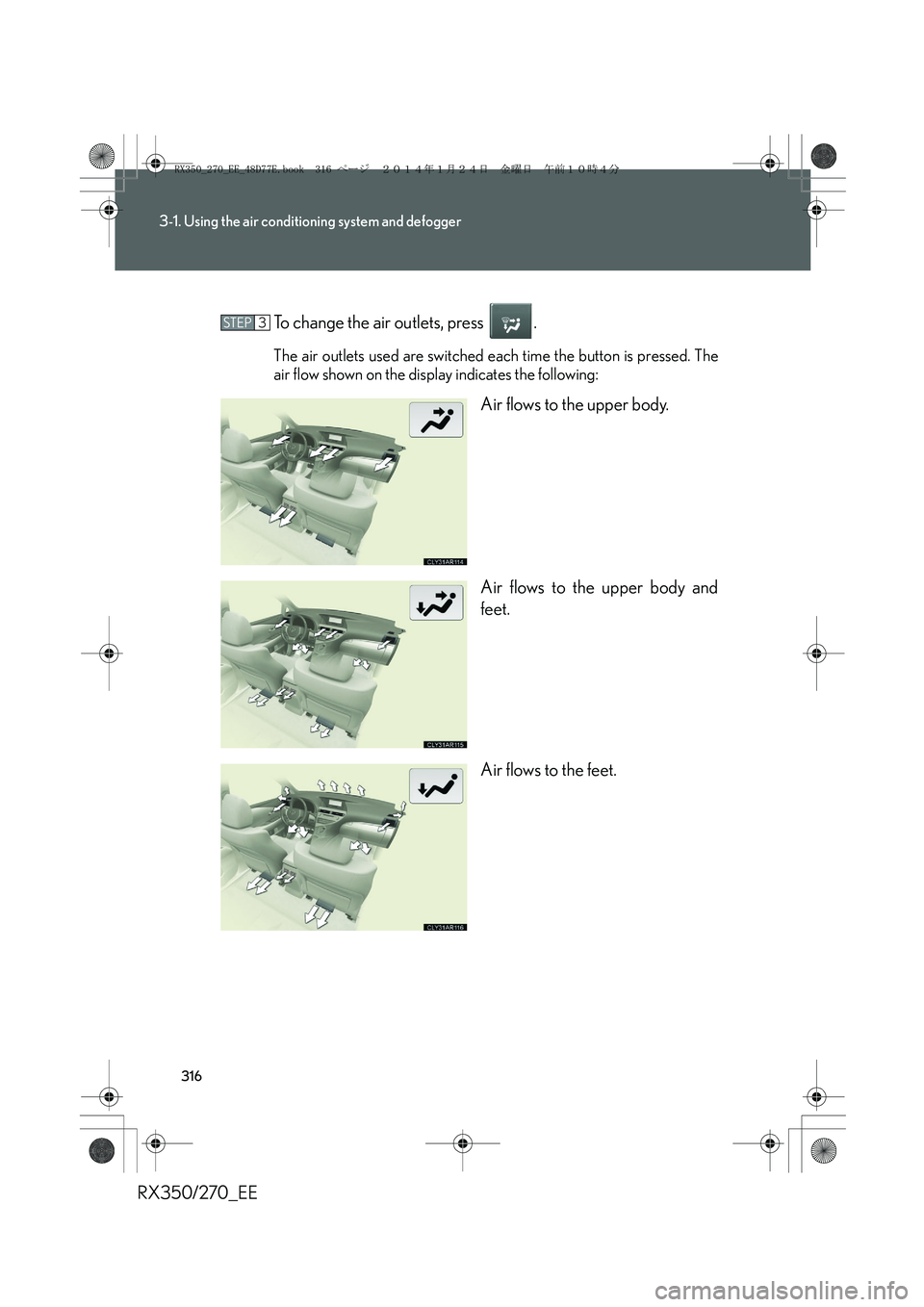
RX350/270_EETo change the air outlets, press .
The air outlets used are switched each time the button is pressed. The
air flow shown on the display indicates the following:
Air flows to the upper body.
Air flows to the upper body and
feet.
Air flows to the feet.
STEP3
RX350_270_EE_48D77E.book 316 ページ 2014年1月24日 金曜日 午前10時4分
Page 328 of 652
328
3-2. Using the audio system
RX350/270_EE■Selecting a program type
Press .
Each time is pressed, the program type changes in the following order:
“NEWS”→“SPORTS”→“TALK”→“POP”→“CLASSICS”
■Traffic information
Press .
TP mode: The system automatically switches to traffic information
when a broadcast with a traffic information signal is
received.
The station returns to the previous one when the traffic informa-
tion ends.
TA mode: Traffic information can be heard only when a signal is
received. The system switches to mute mode when a signal
is not received. In CD or MP3/WMA mode, the system
automatically switches to traffic information when a signal is
received.
The audio system returns to mute, CD or MP3/WMA mode
when the traffic information ends.
Audio system mode changes as follows each time is pressed:
FM modes: “TP”→“TA”→off
Modes other than radio modes: “TA”→off
■Emergency broadcast reception mode
“ALARM” appears in the display in the event that an emergency
broadcast is received, and the emergency broadcast is aired.
RX350_270_EE_48D77E.book 328 ページ 2014年1月24日 金曜日 午前10時4分
Page 331 of 652
331
3-2. Using the audio system
3
Interior features
RX350/270_EE
Loading a CD
■Loading a CD
Press .
“WAIT” is shown on the display.
When the indicator on the slot turns from amber to green, insert a
CD.
The display changes from “WAIT” to “LOAD”.
■Loading multiple CDs
Press and hold until you hear a beep.
“WAIT” is shown on the display.
When the indicator on the slot turns from amber to green, insert a
CD.
The display changes from “WAIT” to “LOAD”.
The indicator on the slot turns to amber when the CD is being inserted.
When the indicator on the slot turns from amber to green, insert
the next CD.
Repeat the procedure for the remaining CDs.
To cancel the operation, press . If you do not insert a disc within 15
seconds, loading will be canceled automatically.
STEP1
STEP2
STEP1
STEP2
STEP3
RX350_270_EE_48D77E.book 331 ページ 2014年1月24日 金曜日 午前10時4分
Page 332 of 652
332
3-2. Using the audio system
RX350/270_EE
Ejecting CDs
■Ejecting a CD
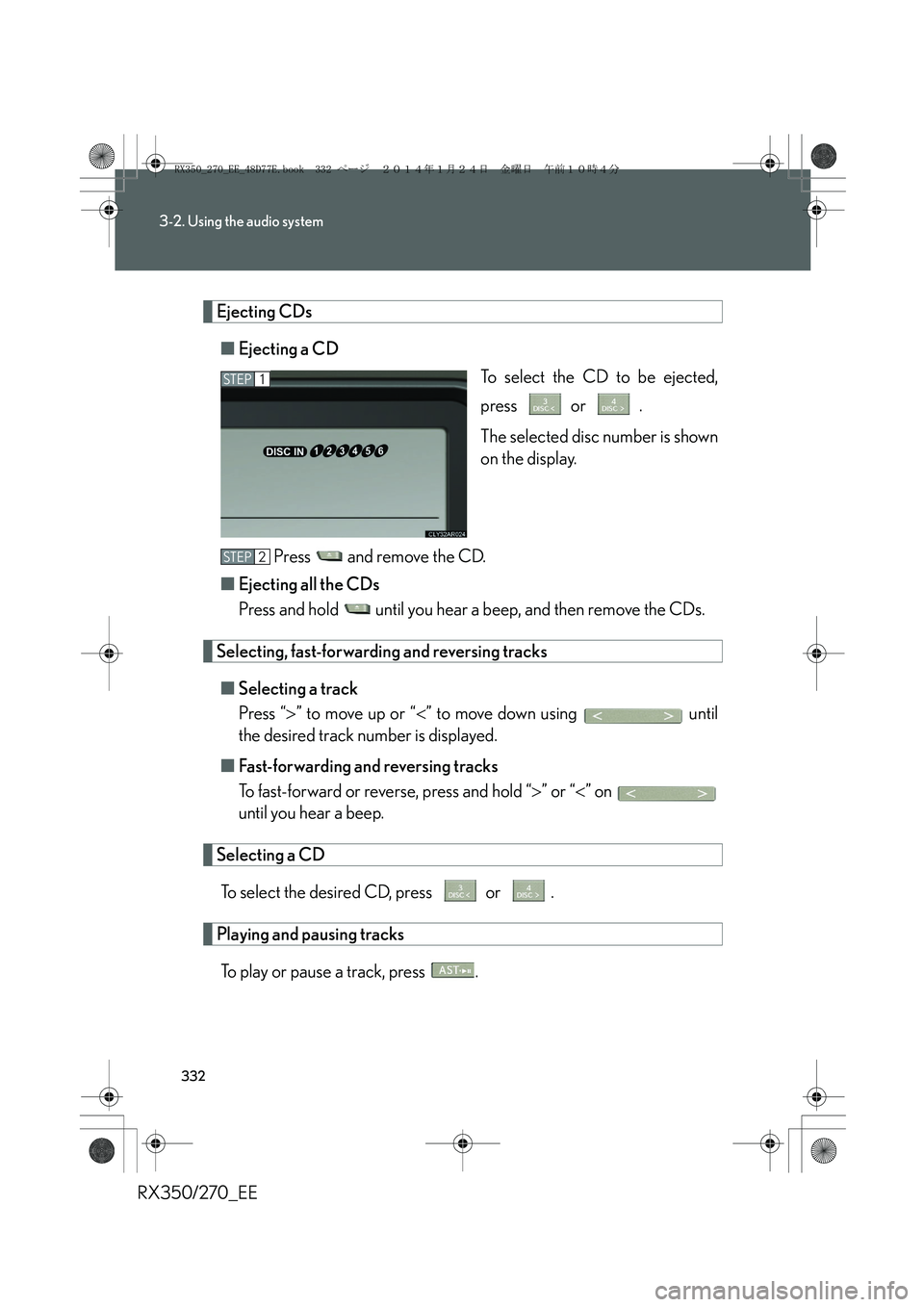
To select the CD to be ejected,
press or .
The selected disc number is shown
on the display.
Press and remove the CD.
■Ejecting all the CDs
Press and hold until you hear a beep, and then remove the CDs.
Selecting, fast-forwarding and reversing tracks
■Selecting a track
Press “>” to move up or “<” to move down using until
the desired track number is displayed.
■Fast-forwarding and reversing tracks
To fast-forward or reverse, press and hold “>” or “<” on
until you hear a beep.
Selecting a CD
To select the desired CD, press or .
Playing and pausing tracks
To play or pause a track, press .
STEP1
STEP2
RX350_270_EE_48D77E.book 332 ページ 2014年1月24日 金曜日 午前10時4分
Page 333 of 652
333
3-2. Using the audio system
3
Interior features
RX350/270_EE
Random playback
■Current CD
Press .
Songs are played in random order.
To cancel, press again.
■All CDs
Press and hold until you hear a beep.
Tracks on all loaded CDs are played in random order.
To cancel, press again.
Repeat play
■Repeating a track
Press .
To cancel, press again.
■Repeating all of the tracks on a CD
Press and hold until you hear a beep.
To cancel, press again.
Switching the display
Press .
Each time the button is pressed, the display changes in the following order:
Elapsed time → CD title → Tr a c k t i t l e
RX350_270_EE_48D77E.book 333 ページ 2014年1月24日 金曜日 午前10時4分
Page 334 of 652
334
3-2. Using the audio system
RX350/270_EE
■CD player protection feature
To protect the internal components, playback is automatically stopped when a
problem is detected.
■Display
Up to 12 characters can be displayed at a time.
If there are 13 or more characters, pressing and holding until you hear a beep
enables to display the remaining characters.
A maximum of 24 characters can be displayed.
If is pressed until you hear a beep again or has not been operated for more
than 6 seconds, the display will return to the first 12 characters.
Depending on the contents recorded, the characters may not be displayed prop-
erly or may not be displayed at all.
■When “ERROR” or “WAIT” is shown on the display
“ERROR”: This indicates a problem either in the CD or inside the player. The CD
may be dirty, damaged, or inserted up-side down.
“WAIT”: This indicates that operation is stopped due to a high temperature inside
the player. Wait for a while and then press . If the CD still cannot
be played back, contact any authorized Lexus dealer or repairer, or
another duly qualified and equipped professional.
■Discs that can be used
Discs with the marks shown below can be used.
Playback may not be possible depending on recording format or disc features, or
due to scratches, dirt or deterioration.
CDs with copy-protection features may not be used.
■Lens cleaners
Do not use lens cleaners. Doing so may damage the CD player.
■If discs are left inside the CD player or in the ejected position for extended peri-
ods of time
The discs may be damaged and may not play properly.
RX350_270_EE_48D77E.book 334 ページ 2014年1月24日 金曜日 午前10時4分
Page 339 of 652
339
3-2. Using the audio system
3
Interior features
RX350/270_EE
Random playback
■Playing files from a folder in random order
Press .
To cancel, press again.
■Playing all the files from a disc in random order
Press and hold until you hear a beep.
To cancel, press again.
Repeat play
■Repeating a file
Press .
To cancel, press again.
■Repeating all the files in a folder
Press and hold until you hear a beep.
To cancel, press again.
Switching the display
Press .
Each time the button is pressed, the display changes in the following order:
Folder no./File no./Elapsed time → Folder name → File name → Album title
(MP3 only) → Track title → Artist name
RX350_270_EE_48D77E.book 339 ページ 2014年1月24日 金曜日 午前10時4分
Page 340 of 652
340
3-2. Using the audio system
RX350/270_EE
■CD player protection feature
→P. 3 3 4
■Display
→P. 3 3 4
■When “ERROR”, “WAIT” or “NO MUSIC” is shown on the display
“ERROR”: This indicates a problem either in the CD or inside the player. The CD
may be dirty, damaged, or inserted up-side down.
“WAIT”: This indicates that operation is stopped due to a high temperature inside
the player. Wait for a while and then press . If the CD still cannot
be played back, contact any authorized Lexus dealer or repairer, or
another duly qualified and equipped professional.
“NO MUSIC”: This indicates that an MP3/WMA file is not included in the CD.
■Discs that can be used
→P. 3 3 4
■Lens cleaners
→P. 3 3 4
■If discs are left inside the CD player or in the ejected position for extended peri-
ods of time
→P. 3 3 4
RX350_270_EE_48D77E.book 340 ページ 2014年1月24日 金曜日 午前10時4分
Page 347 of 652
347
3-2. Using the audio system
3
Interior features
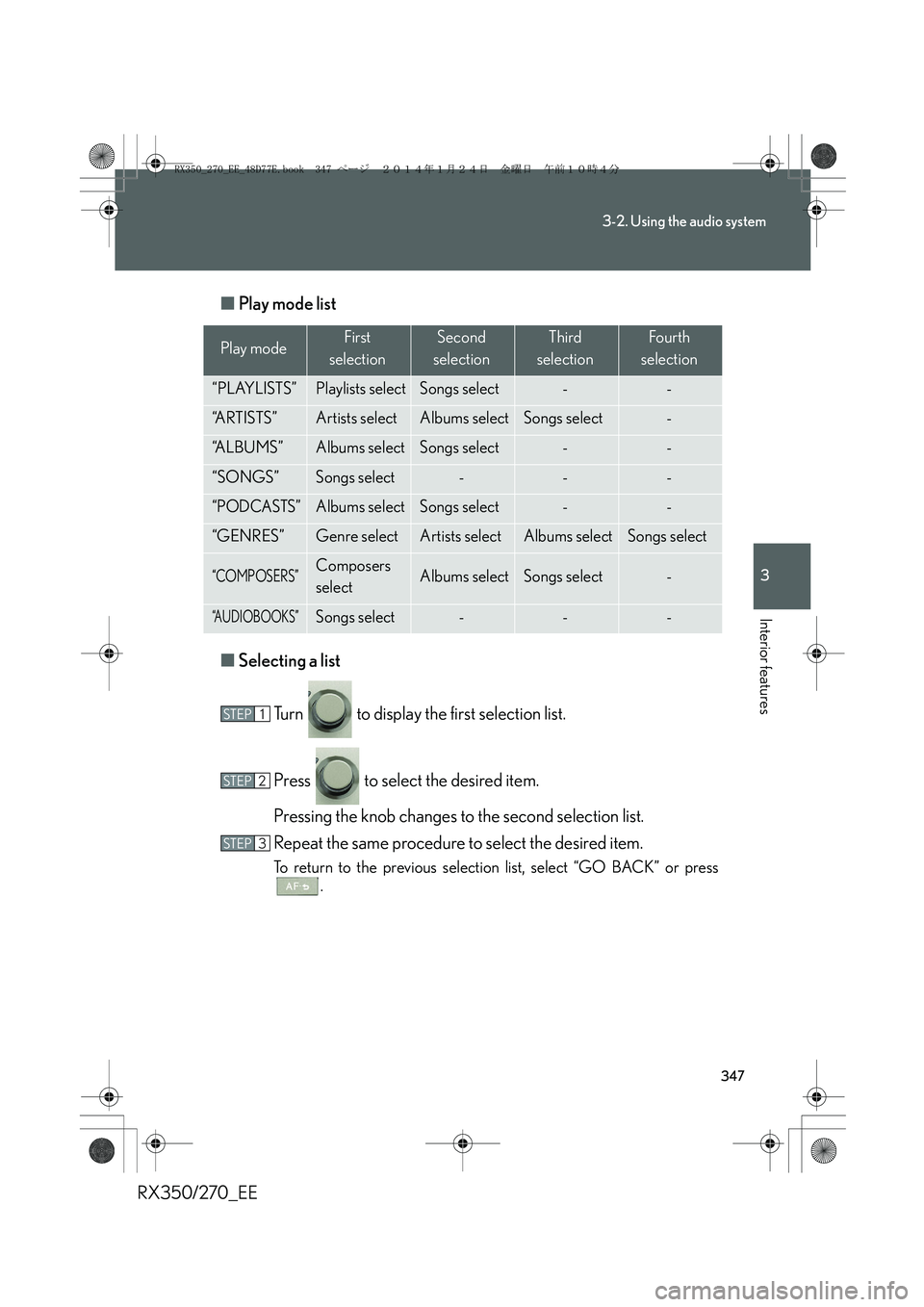
RX350/270_EE■Play mode list
■Selecting a list
Turn to display the first selection list.
Press to select the desired item.
Pressing the knob changes to the second selection list.
Repeat the same procedure to select the desired item.
To return to the previous selection list, select “GO BACK” or press
.
Play modeFirst
selectionSecond
selectionThird
selectionFour th
selection
“PLAYLISTS”Playlists selectSongs select--
“A R T I S T S ”Artists selectAlbums selectSongs select-
“A L B U M S ”Albums selectSongs select--
“SONGS”Songs select---
“PODCASTS”Albums selectSongs select--
“GENRES”Genre selectArtists selectAlbums selectSongs select
“COMPOSERS”Composers
selectAlbums selectSongs select-
“A U D I O B O O K S ”Songs select---
STEP1
STEP2
STEP3
RX350_270_EE_48D77E.book 347 ページ 2014年1月24日 金曜日 午前10時4分
Page 348 of 652
348
3-2. Using the audio system
RX350/270_EE
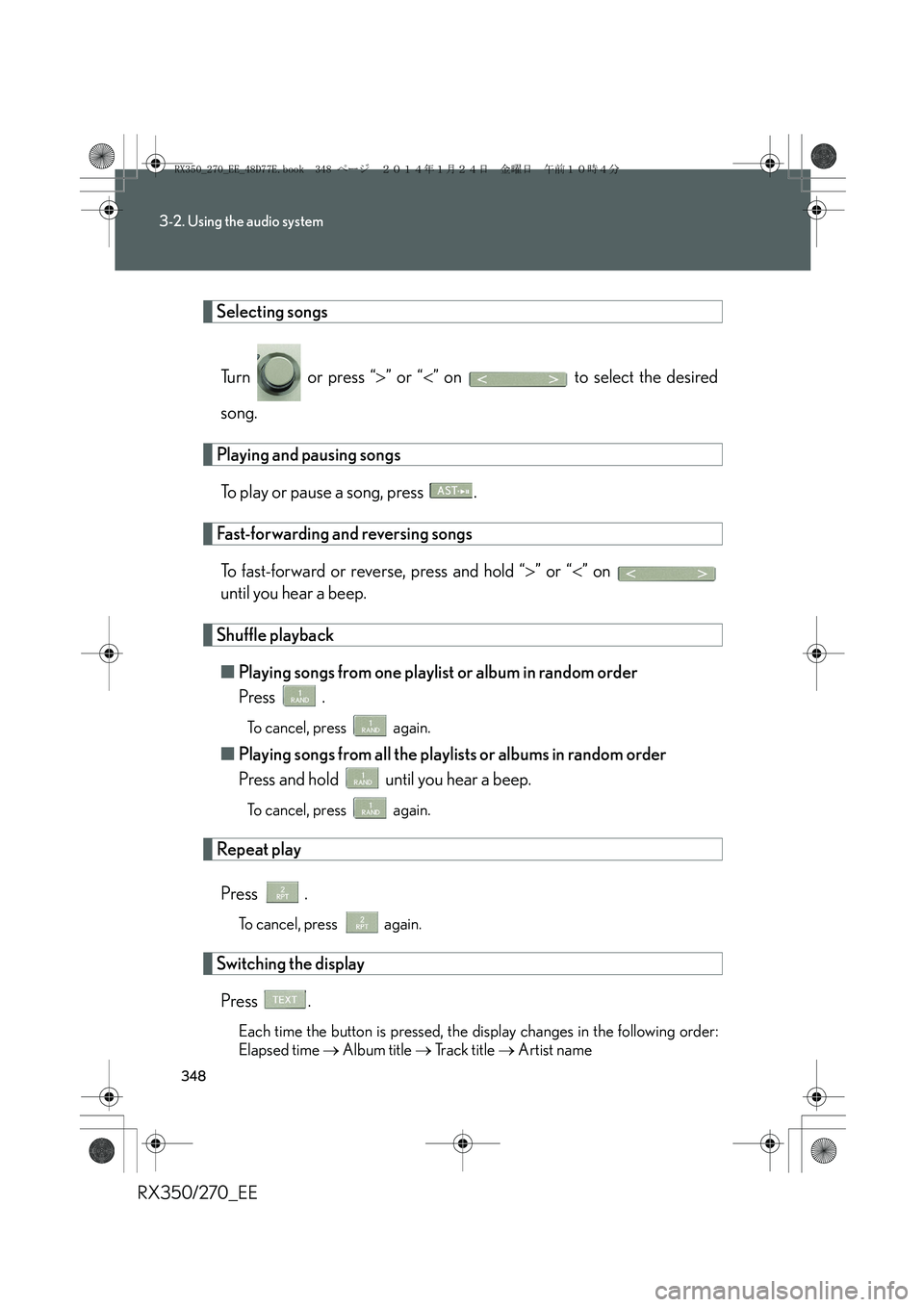
Selecting songs
Tu r n o r p r e s s “>” or “<” on to select the desired
song.
Playing and pausing songs
To play or pause a song, press .
Fast-forwarding and reversing songs
To fast-forward or reverse, press and hold “>” or “<” on
until you hear a beep.
Shuffle playback
■Playing songs from one playlist or album in random order
Press .
To cancel, press again.
■Playing songs from all the playlists or albums in random order
Press and hold until you hear a beep.
To cancel, press again.
Repeat play
Press .
To cancel, press again.
Switching the display
Press .
Each time the button is pressed, the display changes in the following order:
Elapsed time → Album title → Track title → Artist name
RX350_270_EE_48D77E.book 348 ページ 2014年1月24日 金曜日 午前10時4分