warning LEXUS RX270 2014 User Guide
[x] Cancel search | Manufacturer: LEXUS, Model Year: 2014, Model line: RX270, Model: LEXUS RX270 2014Pages: 652, PDF Size: 48.98 MB
Page 201 of 652
201
2-2. Instrument cluster
2
When driving
RX350/270_EE
*1: These lights turn on when the “ENGINE START STOP” switch is
turned to IGNITION ON mode to indicate that a system check is
being performed. They will turn off after the engine is started, or after a
few seconds. There may be a malfunction in a system if a light does not
come on, or if the lights do not turn off. Have the vehicle inspected by
any authorized Lexus dealer or repairer, or another duly qualified and
equipped professional for details.
*2: The light flashes to indicate that the system is operating.
*3: The light comes on when the system is turned off. The light flashes
faster than usual to indicate that the system is operating.
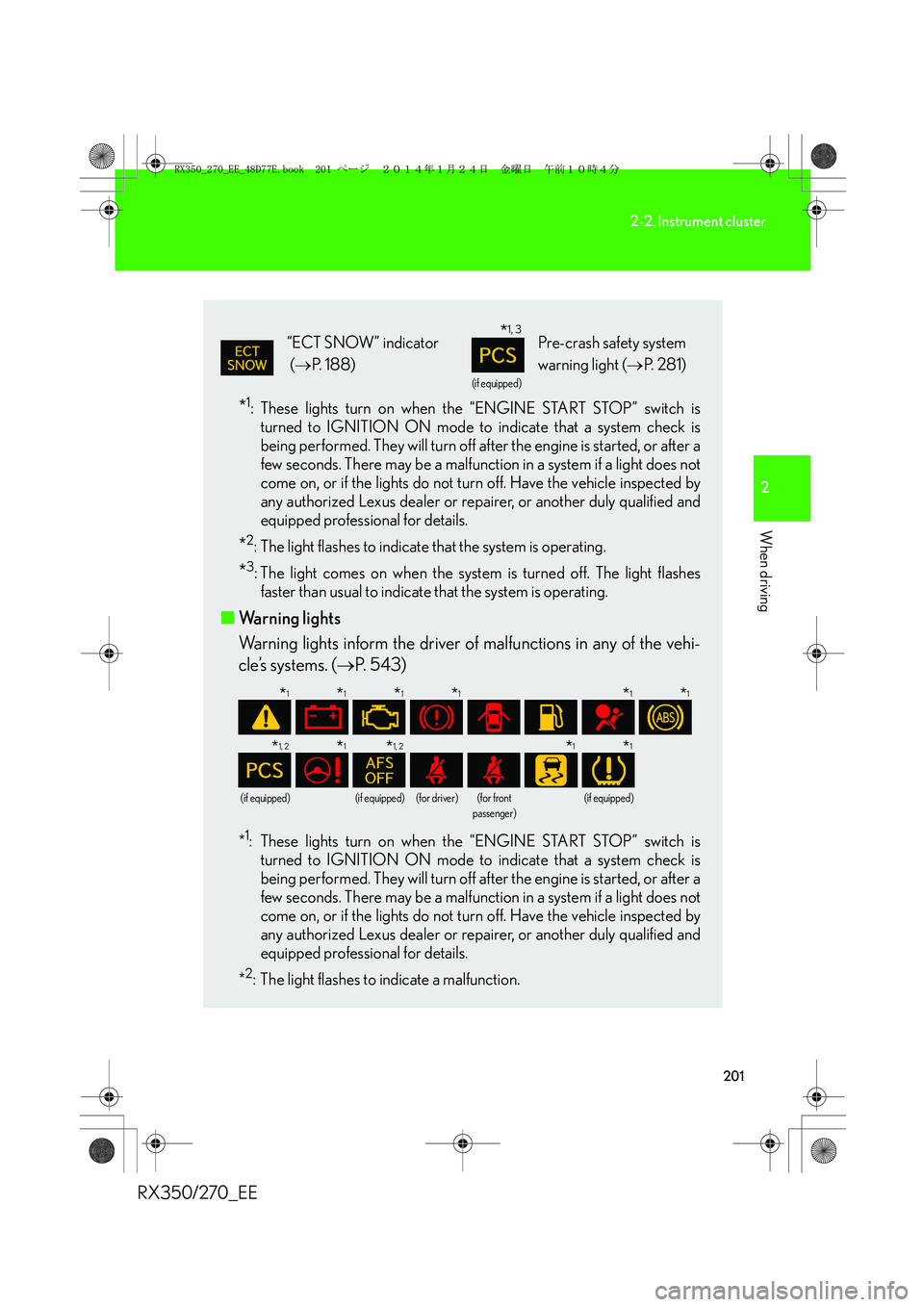
■Warning lights
Warning lights inform the driver of malfunctions in any of the vehi-
cle’s systems. (→P. 543)
*1: These lights turn on when the “ENGINE START STOP” switch is
turned to IGNITION ON mode to indicate that a system check is
being performed. They will turn off after the engine is started, or after a
few seconds. There may be a malfunction in a system if a light does not
come on, or if the lights do not turn off. Have the vehicle inspected by
any authorized Lexus dealer or repairer, or another duly qualified and
equipped professional for details.
*
2: The light flashes to indicate a malfunction.
“ECT SNOW” indicator
(→P. 188)
(if equipped)
Pre-crash safety system
warning light (→P. 2 8 1 )
(if equipped)(if equipped)(for driver)(for front
passenger)(if equipped)
*1, 3
*1*1*1*1*1*1
*1, 2*1*1, 2*1*1
RX350_270_EE_48D77E.book 201 ページ 2014年1月24日 金曜日 午前10時4分
Page 202 of 652
202
2-2. Instrument cluster
RX350/270_EE
CAUTION
■If a safety system warning light does not come on
Should a safety system light such as the ABS and SRS airbag warning light not
come on when you start the engine, this could mean that these systems are not
available to help protect you in an accident, which could result in death or serious
injury. Have the vehicle inspected by any authorized Lexus dealer or repairer, or
another duly qualified and equipped professional immediately if this occurs.
RX350_270_EE_48D77E.book 202 ページ 2014年1月24日 金曜日 午前10時4分
Page 209 of 652
209
2-2. Instrument cluster
2
When driving
RX350/270_EE
■Electronic features control can be turned on/off when
The “ENGINE START STOP” switch is in IGNITION ON mode.
■Conditions for ending electronic features control
In the following situations, the electronic features control will end:
●The menu switch is pressed.
●The dynamic radar cruise control is operated (if equipped).
●Lexus parking assist-sensor starts operating (if equipped).
●No action is performed for some time after the electronic features control
screen is displayed.
●A warning message appears after the electronic features control screen is dis-
played.
■Window close suggestion mode
●In the following situations, the window close suggestion mode will not operate:
• A warning message appears on the multi-information display.
• The window lock switch is on.
• All the windows are closed.
• The window close suggestion mode has been disabled in the customized set-
tings.
• The driver's or front passenger's door is open.
●In the following situations, the window close suggestion mode will end:
• The “ENGINE START STOP” switch is turned to IGNITION ON mode.
• About 20 seconds have passed since the “ENGINE START STOP” switch
was turned off.
• A warning message appears on the multi-information display.
• All the windows are closed.
• The window lock switch is turned on.
• The menu switch is pressed.
• The driver's or front passenger's door is opened.
• The windows were opened or closed by the wireless remote control.
RX350_270_EE_48D77E.book 209 ページ 2014年1月24日 金曜日 午前10時4分
Page 213 of 652
213
2-2. Instrument cluster
2
When driving
RX350/270_EE
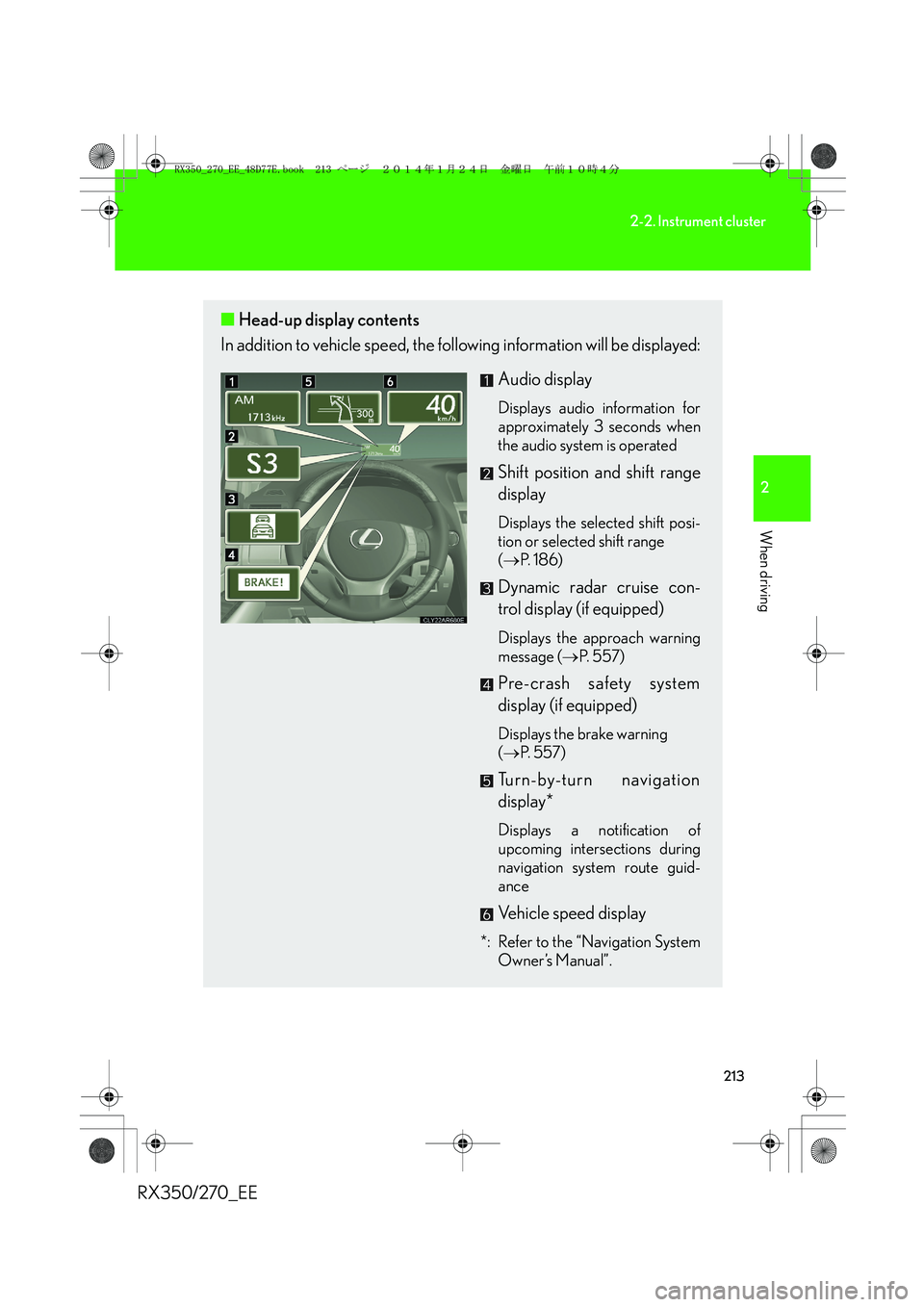
■Head-up display contents
In addition to vehicle speed, the following information will be displayed:
Audio display
Displays audio information for
approximately 3 seconds when
the audio system is operated
Shift position and shift range
display
Displays the selected shift posi-
tion or selected shift range
(→P. 1 8 6 )
Dynamic radar cruise con-
trol display (if equipped)
Displays the approach warning
message (→P. 5 5 7 )
Pre-crash safety system
display (if equipped)
Displays the brake warning
(→P. 5 5 7 )
Turn-by-turn navigation
display*
Displays a notification of
upcoming intersections during
navigation system route guid-
ance
Vehicle speed display
*: Refer to the “Navigation System
Owner’s Manual”.
RX350_270_EE_48D77E.book 213 ページ 2014年1月24日 金曜日 午前10時4分
Page 233 of 652
233
2-4. Using other driving systems
2
When driving
RX350/270_EE
■Automatic cruise control cancelation
Cruise control will stop maintaining the vehicle speed in any of the following situa-
tions:
●Actual vehicle speed falls more than approximately 16 km/h (10 mph) below the
preset vehicle speed.
At this time, the memorized set speed is not retained.
●Actual vehicle speed is below approximately 40 km/h (25 mph).
●VSC is activated.
●VSC+ is activated (if equipped).
■If a warning message is shown on the multi-information display
Press the “ON-OFF” button once to deactivate the system, and then press the but-
ton again to reactivate the system.
If the cruise control speed cannot be set or if the cruise control cancels immediately
after being activated, there may be a malfunction in the cruise control system. Have
the vehicle inspected by any authorized Lexus dealer or repairer, or another duly
qualified and equipped professional.
CAUTION
■To avoid operating the cruise control by mistake
Switch the cruise control off using the “ON-OFF” button when not in use.
■Situations unsuitable for cruise control
Do not use cruise control in any of the following situations.
Doing so may result in loss of control and could cause an accident resulting in death
or serious injury.
●In heavy traffic
●On roads with sharp bends
●On winding roads
●On slippery roads, such as those covered with rain, ice or snow
●On steep hills
Vehicle speed may exceed the set speed when driving down a steep hill.
●When your vehicle is towing a trailer or during emergency towing
RX350_270_EE_48D77E.book 233 ページ 2014年1月24日 金曜日 午前10時4分
Page 238 of 652
238
2-4. Using other driving systems
RX350/270_EE
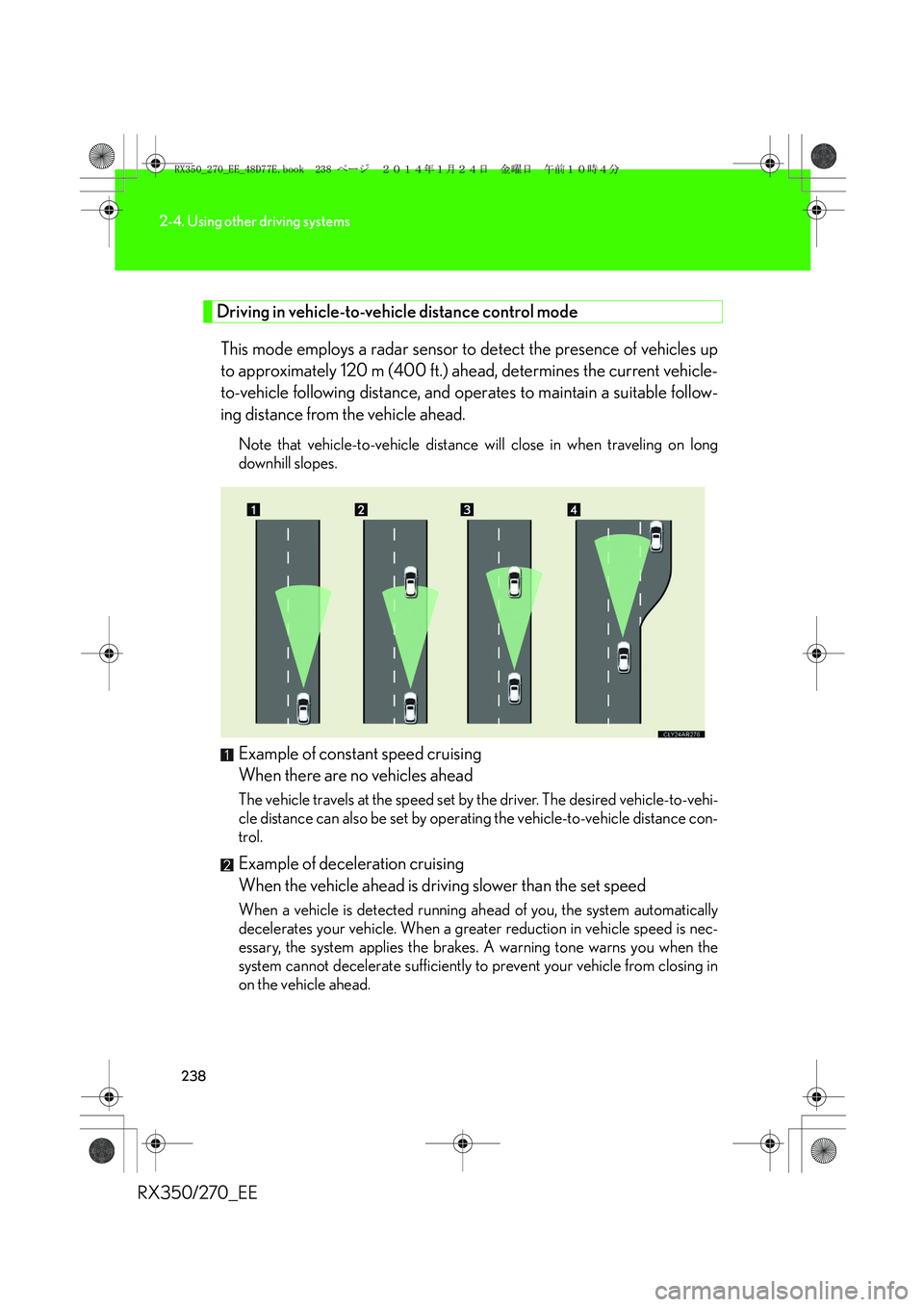
Driving in vehicle-to-vehicle distance control mode
This mode employs a radar sensor to detect the presence of vehicles up
to approximately 120 m (400 ft.) ahead, determines the current vehicle-
to-vehicle following distance, and operates to maintain a suitable follow-
ing distance from the vehicle ahead.
Note that vehicle-to-vehicle distance will close in when traveling on long
downhill slopes.
Example of constant speed cruising
When there are no vehicles ahead
The vehicle travels at the speed set by the driver. The desired vehicle-to-vehi-
cle distance can also be set by operating the vehicle-to-vehicle distance con-
trol.
Example of deceleration cruising
When the vehicle ahead is driving slower than the set speed
When a vehicle is detected running ahead of you, the system automatically
decelerates your vehicle. When a greater reduction in vehicle speed is nec-
essary, the system applies the brakes. A warning tone warns you when the
system cannot decelerate sufficiently to prevent your vehicle from closing in
on the vehicle ahead.
RX350_270_EE_48D77E.book 238 ページ 2014年1月24日 金曜日 午前10時4分
Page 239 of 652
239
2-4. Using other driving systems
2
When driving
RX350/270_EEExample of follow-up cruising
When following a vehicle driving slower than the set speed
The system continues follow-up cruising while adjusting for changes in the
speed of the vehicle ahead in order to maintain the vehicle-to-vehicle dis-
tance set by the driver.
Example of acceleration
When there are no longer any vehicles ahead driving slower than the
set speed
The system accelerates until the set speed is reached. The system then
returns to constant speed cruising.
Approach warning
When your vehicle is too close to a vehicle ahead, and sufficient auto-
matic deceleration via the cruise control is not possible, the display will
flash and the buzzer will sound to alert the driver. An example of this
would be if another driver cuts in front of you while you are following a
vehicle. Apply the brakes to ensure an appropriate vehicle-to-vehicle dis-
tance.
■Warnings may not occur when
In the following instances, there is a possibility that the warnings will not
occur:
●When the speed of the vehicle ahead matches or exceeds your
vehicle speed
●When the vehicle ahead is traveling at an extremely slow speed
●Immediately after the cruise control speed was set
●At the instant the accelerator is applied
RX350_270_EE_48D77E.book 239 ページ 2014年1月24日 金曜日 午前10時4分
Page 242 of 652
242
2-4. Using other driving systems
RX350/270_EE
■Automatic cancelation of constant speed control
The cruise control will stop maintaining the vehicle speed in the following situations:
●Actual vehicle speed is more than approximately 16 km/h (10 mph) below the
set vehicle speed.
At this time, the memorized set speed is not retained.
●Actual vehicle speed falls below approximately 40 km/h (25 mph).
●VSC is activated.
●VSC+ is activated (if equipped).
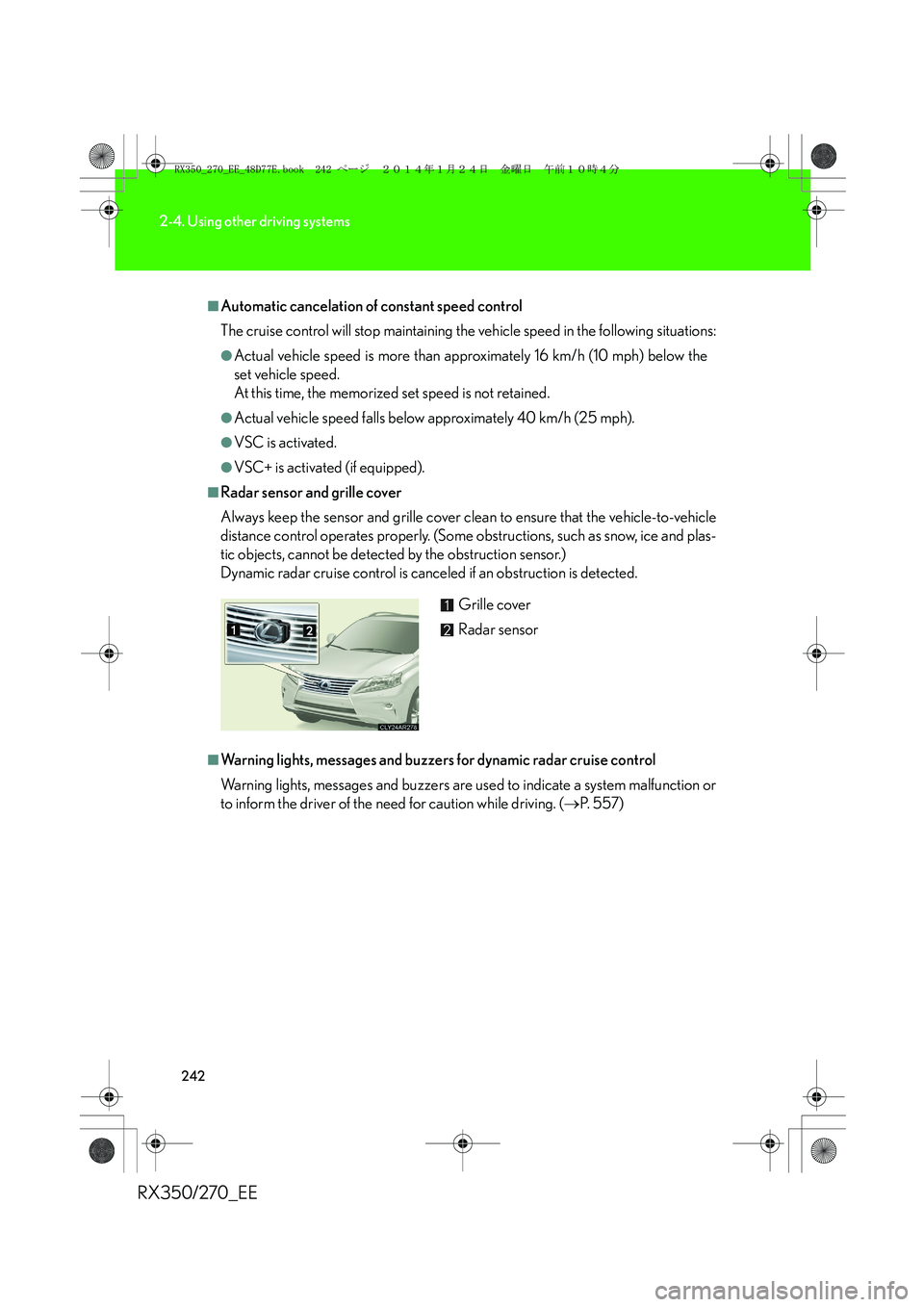
■Radar sensor and grille cover
Always keep the sensor and grille cover clean to ensure that the vehicle-to-vehicle
distance control operates properly. (Some obstructions, such as snow, ice and plas-
tic objects, cannot be detected by the obstruction sensor.)
Dynamic radar cruise control is canceled if an obstruction is detected.
■Warning lights, messages and buzzers for dynamic radar cruise control
Warning lights, messages and buzzers are used to indicate a system malfunction or
to inform the driver of the need for caution while driving. (→P. 5 5 7 ) Grille cover
Radar sensor
RX350_270_EE_48D77E.book 242 ページ 2014年1月24日 金曜日 午前10時4分
Page 246 of 652
246
2-4. Using other driving systems
RX350/270_EE
CAUTION
■Situations unsuitable for dynamic radar cruise control
Do not use dynamic radar cruise control in any of the following situations.
Doing so may result in inappropriate speed control and could cause an accident
resulting in death or serious injury.
●In heavy traffic
●On roads with sharp bends
●On winding roads
●On slippery roads, such as those covered with rain, ice or snow
●On steep downhills, or where there are sudden changes between sharp up and
down gradients
Vehicle speed may exceed the set speed when driving down a steep hill.
●At entrances to expressways
●When weather conditions are bad enough that they may prevent the sensors
from functioning correctly (fog, snow, sandstorm, heavy rain, etc.)
●When an approach warning buzzer is heard often
●When your vehicle is towing a trailer or during emergency towing
■When the sensor may not be correctly detecting the vehicle ahead
Apply the brakes as necessary when any of the following types of vehicles are in
front of you.
As the sensor may not be able to correctly detect these types of vehicles, the
approach warning (→P. 239) will not be activated, and a fatal or serious accident
may result.
●Vehicles that cut in suddenly
●Vehicles traveling at low speeds
●Vehicles that are not moving
●Vehicles with small rear ends (trailers with no load on board etc.)
●Motorcycles traveling in the same lane
RX350_270_EE_48D77E.book 246 ページ 2014年1月24日 金曜日 午前10時4分
Page 280 of 652
280
2-4. Using other driving systems
RX350/270_EE
Pre-Crash Safety system∗
When the radar sensor detects the possibility of a frontal collision, the pre-
crash safety system such as the brakes and seat belts are automatically
engaged to lessen impact as well as vehicle damage.
■Pre-crash seat belts (front seat belts only)
If the pre-crash sensor detects that a collision is unavoidable, the pre-
crash safety system will retract the seat belt before the collision occurs.
The same will happen if the driver makes an emergency braking or loses
control of the vehicle. (→P. 9 0 )
However, the system will not operate in the event of skidding when the
VSC system is disabled.
■Pre-crash brake assist
When there is a high possibility of a frontal collision, the system applies
greater braking force in relation to how strongly the brake pedal is
depressed. The system may not warn the driver using a warning light,
warning display and buzzer when the system detects and judges braking
operations.
■Pre-crash braking
When there is a high possibility of a frontal collision, the system warns the
driver using a warning light, warning display and buzzer. If the system
determines that a collision is unavoidable, the brakes are automatically
applied to reduce the collision speed. Pre-crash braking can be disabled
using the pre-crash braking off switch.
∗: If equipped
RX350_270_EE_48D77E.book 280 ページ 2014年1月24日 金曜日 午前10時4分